You may want a Capital One spending limit because it is easy to spend more than planned, share a card with a teen, or worry about debt growing fast. The hard part is that a card’s credit limit is not the same as a budget cap.
Capital One does not offer a simple, hard dollar cap that stops a primary cardholder’s spending at a set amount.
You can still build strong guardrails with alerts, card locks, spending reviews, and a lower credit limit. This guide explains what each tool can and cannot do.
Key Takeaways
This guide explains how to control spending on a Capital One credit card, including why no hard spending cap exists, plus practical tools like alerts, Card Lock, credit limit changes, and authorized user controls.
Core Facts:
- Capital One does not offer a self-service tool for primary cardholders to set a fixed dollar spending cap that automatically declines charges once reached.
- Purchase alerts and credit-limit alerts notify cardholders after a charge posts or when the balance nears the limit, but they cannot block or decline purchases.
- Card Lock blocks most new and pending purchases and cash advances, but recurring payments and previously approved charges may still process while locked.
- Requesting a lower credit limit can reduce the maximum chargeable amount, but it can also raise the credit utilization ratio and does not erase existing balances or stop interest.
- Authorized users can be managed through instant purchase notifications, category sorting, card locking, and removal, though the primary cardholder remains responsible for all charges.
- Some competing issuers offer true per-user spending caps, including Amex additional-card members (as low as $200) and Barclays merchant-category blocking through its app.
Best for:
- Cardholders who want to prevent overspending but assume Capital One has a built-in spending cap feature.
- Parents or primary cardholders managing an authorized user, such as a teen, who need practical guardrails.
- Anyone deciding between using Capital One’s alert and lock tools versus switching to an issuer with a true spending limit feature.
Does Capital One Let You Set a Spending Limit on a Credit Card?
Capital One doesn’t offer a self-service option for personal cardholders. You can’t set a fixed amount, like $500 a month, to automatically decline new charges once you reach that limit.
A credit card already has a credit limit. That is the most the account can borrow at one time. But it is usually much higher than a safe monthly budget. A person with a $10,000 line may want to spend only $1,000 this month. The card will not stop at that $1,000 mark on its own.
Capital One does offer tools that can help create control:
- Purchase alerts can tell you when a charge posts.
- Credit-limit alerts can warn you when the balance gets close to the card’s limit.
- Card Lock can stop most new purchases.
- Eno can flag free trials, repeat charges, and other account activity.
- A lower credit limit can reduce the total amount available to spend.
Capital One lets primary users manage added users easily. They can track spending, limit it, and turn on instant purchase notices. Also, they can sort charges by type and lock or unlock user cards. The primary cardholder remains responsible for every charge on the account, including charges made by an authorized user.
💡 Pro Tip: Treat alerts as an early-warning tool, not a stop sign. A fast alert gives you a chance to act before small charges become a large balance.
Credit Limit vs. Spending Limit: Why They’re Not the Same Thing
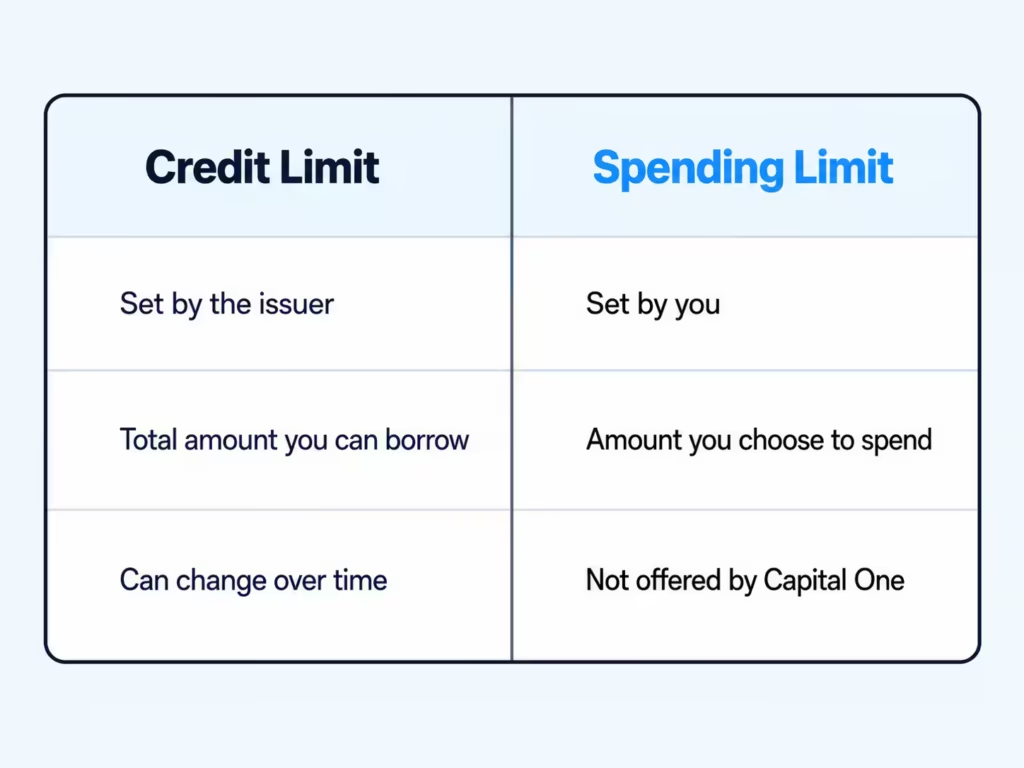
A credit limit is the total amount the card issuer allows the account to borrow. It is set by the issuer and can change over time.
A spending limit is a budget rule. It is the amount a person chooses to spend during a week, month, or billing cycle. A true spending cap declines purchases after the set amount is used.
These two limits can be very different. For example:
| Term | Example | What it does |
|---|---|---|
| Credit limit | $8,000 | Sets the most that can be borrowed on the account |
| Monthly budget | $1,200 | Sets a personal goal for total spending |
| Per-user cap | $300 | Sets the most an added card user may spend, when an issuer supports that feature |
A lower credit limit can act like a rough spending barrier. But it has a cost. It may raise your credit utilization ratio, which is the share of available credit that you are using.
For example, a $1,000 balance on an $8,000 limit is 12.5% utilization. That same $1,000 balance on a $2,000 limit is 50% utilization. A high ratio can hurt a credit score, even if every payment is on time.
This does not mean a lower limit is always wrong. It means the choice should match your goal. A lower limit can help if overspending is a serious risk. It may not be the best fit if you often carry a balance or need more available credit for emergencies.
Tools That Help You Control Your Own Spending
No single tool replaces a hard spending cap. But a few small tools can work well together. The best plan gives you a quick warning, a clear review point, and a way to pause new charges.
Setting Up Real-Time Purchase Alerts
Purchase alerts help you see charges soon after they happen. They are useful when you want to catch impulse buys, unknown charges, or a fast rise in spending.
Sign in to your Capital One account online or in the app. Open your profile settings, then choose Alerts & Notifications. Turn on the alerts that matter most to you, such as purchase notices, due-date reminders, and notices that your balance is close to the credit limit.
Capital One also lets cardholders choose alerts by text or email for events such as a ready statement, a due date, or nearing the credit limit.
Keep the alert setting simple. Too many notices can make it easy to ignore all of them. For many people, a purchase alert and a near-limit alert are enough.
Alerts do not stop a charge. They only tell you that it happened.
Using Card Lock to Pause Spending
Card Lock is the closest tool to a pause button. It can help after an impulse-buying day, while a card is missing, or when an added user should not make more purchases for now.
In the Capital One Mobile app:
- Choose the card you want to manage.
- Find Protect and replace your card.
- Select the option to lock the card.
- Unlock it when you need to use it again.
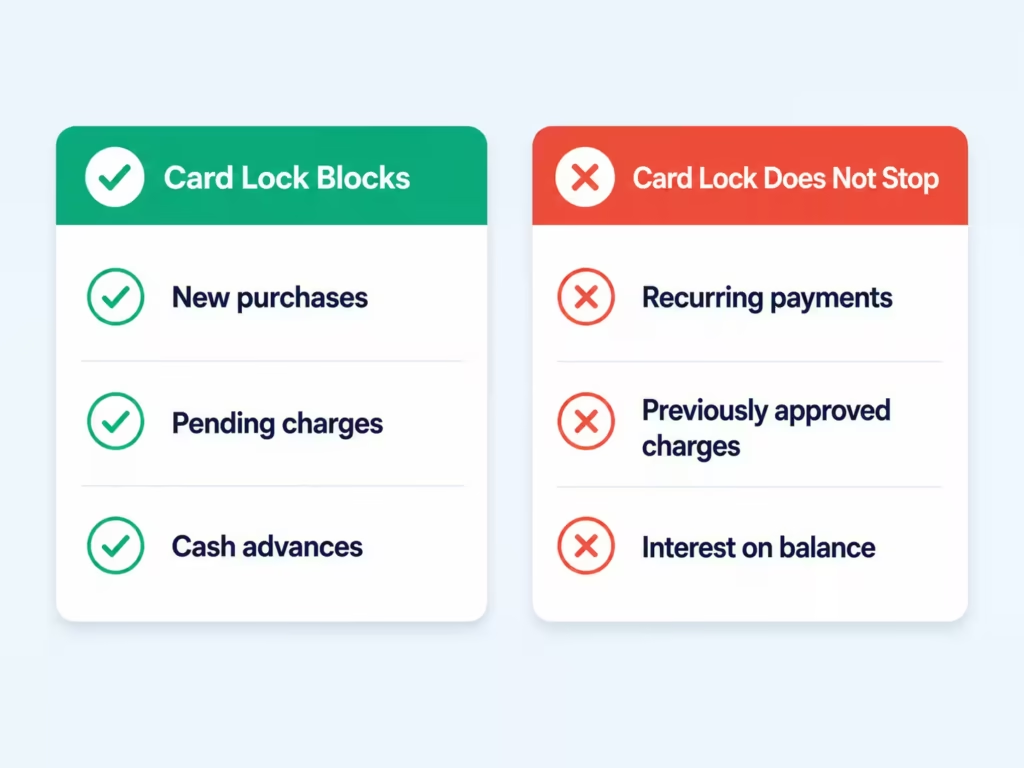
A locked Capital One card blocks most new or pending purchases. It can also block cash advances. Yet a lock is not a full account shutdown.
Recurring payments and charges that you already approved may still go through. The balance can still earn interest, and the minimum payment is still due.
Tracking Spending Patterns with CreditWise
CreditWise is mainly a credit-monitoring tool. It can help you view your credit report, track score changes, and watch for signs of identity theft. It is not designed as a full card-spending budget tool.
Use CreditWise to check the credit side of the picture. For example, it can help you notice whether rising balances are pushing up your utilization ratio.
For daily spending habits, use the Capital One app, account activity, or Eno instead. Review charges by date and type at least once a week. Look for repeat costs, such as food delivery, games, rides, or subscription fees.
This split is useful:
- Use the card account to review where money went.
- Use CreditWise to watch how borrowing may affect credit health.
- Use a separate written or app-based budget to set the amount you want to spend.
Using Virtual Cards for Specific Purchases
A virtual card number is a number tied to your credit-card account that can be used for online shopping. It can add a layer of safety because you do not need to give every merchant the number printed on your physical card.
Virtual cards do not create a dollar spending cap. Still, they can help you keep online purchases more organized.
For example, use one virtual card number for a streaming service or a trial offer. If the service is no longer needed, you may be able to lock that virtual card number without affecting the physical card or other spending.
This approach can make it easier to manage repeat online charges. It is especially helpful when a free trial changes to a paid plan.
Before using a virtual card for a key bill, make sure you know how the merchant handles card updates and failed payments.
How Eno Flags Unusual Spending
Eno is Capital One’s digital assistant. It can send account notices and spending insights. It may point out free trials, repeat charges, and other activity that could be easy to miss.
These notices are helpful because small repeat charges can add up. A $12 monthly fee may not seem important at first. Over 12 months, it becomes $144.
Use Eno as a review tool. When it flags a trial or recurring charge, decide right away:
- Keep it because it still has value.
- Cancel it because you no longer use it.
- Replace it with a lower-cost option.
- Lock the related virtual card number if that is the right fix.
Eno can help you notice a problem. It cannot set a personal spending budget or decline charges once a chosen dollar amount is reached.
Requesting a Lower Credit Limit to Curb Spending
A lower credit limit is one way to reduce the maximum amount that can be charged. It is not the same as a monthly spending limit, but it can create a firmer boundary than alerts alone.
Start by choosing a limit that fits your real needs. Include normal bills, a small emergency cushion, and any charges that must stay on the card. Do not choose a number based only on a perfect month.
Then contact Capital One through the app, website, or the number on the back of the card. Ask whether a voluntary credit-limit reduction is available for your account. The available steps may vary by card and account status.
Think through the trade-off before you make the request:
- A lower limit can make large impulse purchases harder.
- A lower limit can increase your credit utilization ratio.
- A high utilization ratio may affect your credit score.
- A lower limit does not erase an existing balance.
- A lower limit does not stop interest on money already owed.
If debt is the main concern, pair this step with a payment plan. Set AutoPay for at least the minimum due. If possible, schedule an extra payment after each payday. That reduces the balance before the statement closes.
Setting Spending Controls for an Authorized User
Adding an authorized user can help a child or family member learn how to use credit. It can also create risk because the main cardholder is responsible for the full bill.
Start with a clear agreement before the card is used. Set a dollar budget, name the types of purchases that are allowed, and decide how often the user must review transactions with you.
Then use Capital One’s account tools:
- Turn on instant purchase notifications.
- Review the user’s purchases often.
- Sort purchases by category in the mobile app.
- Lock the user’s card when spending needs to pause.
- Remove the user if the arrangement no longer works.
A locked user card can help prevent most new purchases without closing the whole account. But it should not replace clear rules. The user needs to know that recurring charges and previously approved payments may still post.
If you need a published, fixed dollar cap for each added user, compare issuers before opening a new card. Some issuers provide that kind of control. For example, American Express states that eligible additional-card members can have a spending limit as low as $200. Barclays also says its mobile app lets users set spend limits and block merchant types.
Practical Habits for Staying Within Your Own Budget
The strongest budget plan is one that works on normal days, not just after a spending problem starts. Keep it simple enough to follow when you are busy.
Building a Simple Alert + Lock Routine
Pick one spending number for the month. Then divide it by four to get a weekly guide.
For example, if your card budget is $800 per month, aim to stay near $200 each week. That makes it easier to spot trouble early.
Use this routine:
- Turn on purchase alerts.
- Check card activity every Sunday.
- Add up the week’s charges.
- Compare the total with your weekly guide.
- Lock the card for the rest of the week if you have reached your planned amount.
- Unlock it only for a planned purchase or a real need.
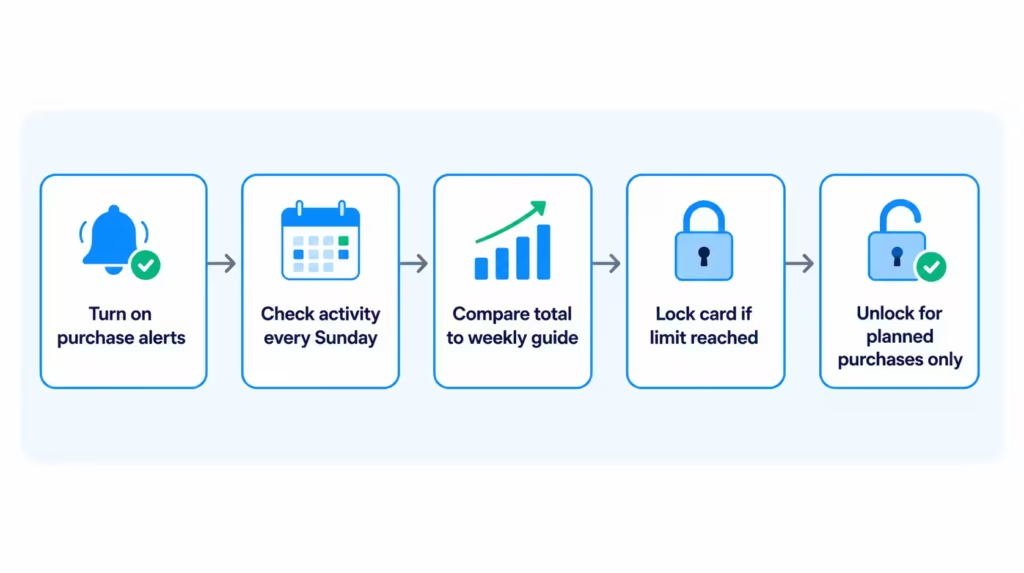
This method is not a true automated limit. It does give you a clear pause point. It also builds a habit of looking at spending before the statement arrives.
Use a note on your phone, a simple budget app, or a paper list. The tool matters less than the weekly check.
Mistakes to Avoid When Trying to Limit Spending
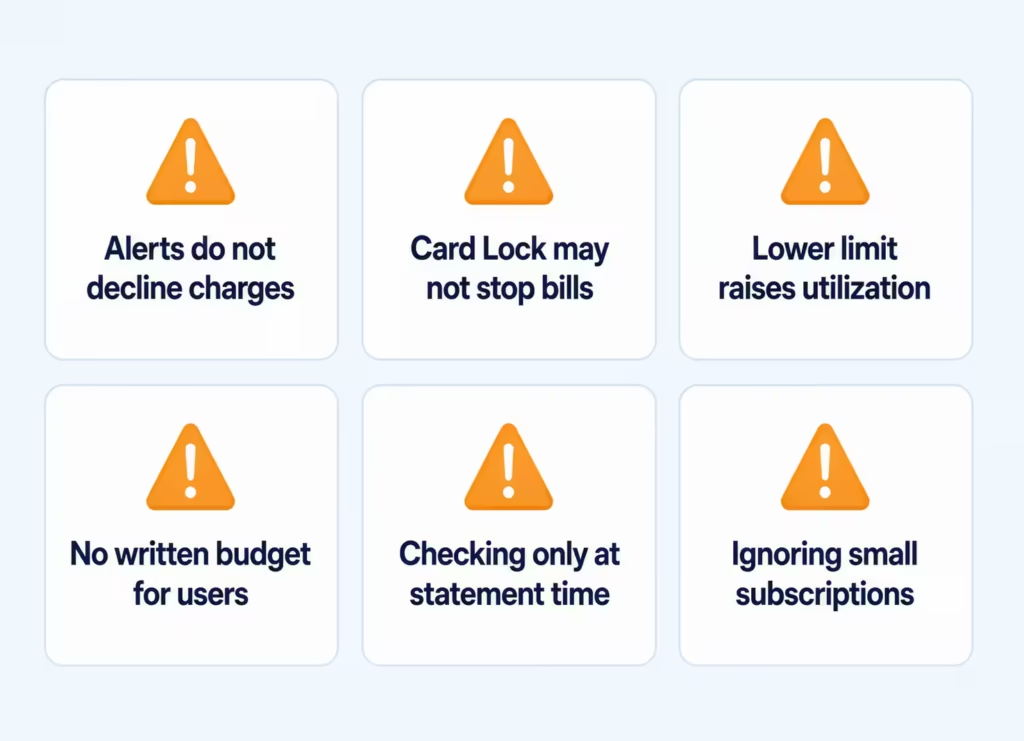
A spending plan can fail when the tools are used in the wrong way. Avoid these common mistakes:
- Thinking alerts decline purchases: Alerts tell you about a charge. They do not block it.
- Using Card Lock as a full bill stop: Repeat charges may still process.
- Lowering a credit limit without checking utilization: A smaller limit can make the same balance look much larger to credit scoring models.
- Giving an authorized user a card without a written budget: A verbal plan can be forgotten. Use a clear amount and a review date.
- Checking only when the statement arrives: A monthly review may come too late. A weekly check gives you more time to change course.
- Ignoring small subscriptions: Small recurring fees can quietly use up room in your budget.
Where to Find a True Spending Limit Feature If Capital One Doesn’t Meet Your Need
If a hard per-user limit is essential, compare features before you apply for another card. Do not assume that every issuer offers the same controls.
Look for clear language such as:
- Per-card spending limit
- Additional-card-member limit
- Authorized-user cap
- Employee-card limit
- Merchant-category blocks
- Monthly or billing-cycle limit
American Express offers spending-limit tools for some additional card members. Barclays says its app can set spend limits and block merchant types. Features can vary by card, account, and location, so read the current terms before applying.
A third-party budgeting app may also help if the main goal is to control your own spending across more than one card or bank account. These apps can track total spending, show category totals, and warn you when you are near a budget amount. They usually cannot decline a credit-card charge in real time.
For most people, the best answer is not a new card right away. Start with alerts, weekly reviews, and Card Lock. If those steps still do not provide enough control, a card with a true per-user spending cap may be a better fit.
Frequently Asked Questions (FAQs)
Can you put a spending limit on a Capital One card?
No, Capital One doesn’t offer a self-service option for personal cardholders to set a fixed dollar cap. You can use purchase alerts, Card Lock, and a lower credit limit instead to create similar guardrails.
How do I change my spending limit on a Capital One card?
Capital One doesn’t let you set a true spending limit, but you can request a lower credit limit through the app, website, or the number on the back of your card. This narrows the maximum you can charge, though it may raise your credit utilization ratio.
How much of my credit limit should I use?
Keep your balance below 30% of your available credit limit. For example, on an $8,000 limit, that means staying under $2,400 to avoid the high-utilization penalty that can hurt your credit score even with on-time payments.
Does Card Lock stop all charges on a Capital One card?
No, Card Lock blocks most new and pending purchases along with cash advances, but recurring payments and previously approved charges may still go through. Interest can still accrue on the existing balance while the card is locked.
Does an authorized user get their own credit limit?
No, an authorized user shares the primary cardholder’s credit limit rather than getting a separate one. The primary cardholder remains responsible for every charge the authorized user makes.
How to set spending limits on Capital One for an authorized user?
Capital One doesn’t offer a fixed dollar cap for authorized users. Instead, turn on instant purchase notifications, review their transactions often, and lock their card when spending needs to pause.
Which card issuers offer a true per-user spending limit?
American Express states that eligible additional-card members can have a spending limit as low as $200. Barclays also allows users to set spend limits and block merchant types through its mobile app.
What can Eno do to help control spending?
Eno is Capital One’s digital assistant that flags free trials, repeat charges, and unusual account activity. It can’t set a personal budget or decline charges, but it helps you catch small recurring fees before they add up.
Do purchase alerts block charges on a Capital One card?
No, purchase alerts only notify you after a charge has already posted. They give you a chance to react quickly, but they can’t prevent or decline a purchase.
Will requesting a lower credit limit hurt my credit score?
It can, because a lower limit raises your credit utilization ratio even if your balance stays the same. For example, a $1,000 balance goes from 12.5% utilization on an $8,000 limit to 50% utilization on a $2,000 limit.
The Bottom Line
Capital One does not offer a standard hard cap for a primary cardholder, but its alerts, Card Lock, account reviews, and authorized-user tools can still reduce risk. The key is knowing that a credit limit is not a budget, alerts do not block charges, and locked cards may still allow repeat payments.
To stay within your limits, combine a weekly budget with purchase alerts. Also, use Card Lock when your spending hits that limit.
If you know someone sharing a card with a teen or trying to curb impulse buys, share this guide to help them set safer card rules.