I know how frustrating it feels to open the Chase app, search every menu, and still not find a simple spending limit toggle. Many cardholders worry about a partner, teen, or their own habits pushing the balance too high before payday. The confusion between a credit limit and a self-set cap only makes things harder.
Chase does not offer a built-in personal spending limit, but you can use card locks, custom alerts, and business card controls to get the same result.
Below, we’ll walk through each option, step by step, so you can pick the one that fits your goals.
Key Takeaways
This guide explains how to set a spending limit on a Chase credit card using card lock and custom alerts, since Chase does not offer a true built-in spending limit for personal cards.
Core Facts:
- Chase personal credit cards have no built-in feature that lets you set a self-chosen spending limit that blocks charges above a dollar amount.
- Card lock stops most new charges in one tap through the Chase Mobile app or website, but recurring charges already authorized still process.
- Custom balance alerts notify you by text, email, or push notification once your balance crosses a dollar threshold you choose, such as $500.
- Chase for Business cards include a true spending limit feature that lets you cap how much each employee or authorized user spends, but this option is not available on personal cards.
- Under the Credit CARD Act, Chase cannot charge an over-limit fee unless you opt in, though going over your limit can still get a charge declined or lower your credit score.
- A prepaid or secondary card gives authorized users a hard spending stop, since the card stops working once its balance runs out, unlike a Chase personal card.
Best for:
- Chase personal cardholders who want to stop overspending without a formal spending limit toggle.
- Chase for Business owners who need to cap how much each employee or authorized user can spend.
- Anyone deciding whether to add a family member as an authorized user versus giving them a prepaid card with a hard spending cap.
Can You Set a Spending Limit on a Chase Credit Card?
The short answer is no, at least not in the way most people expect. Chase personal credit cards do not include a formal, self-set spending limit feature. You cannot open the app, type in “$500 per week,” and have the card decline anything above that. That setting simply does not exist for personal accounts.
What Chase does give you is a group of tools that work together like a spending cap. You can lock your card in one tap. You can set custom alerts that ping your phone the second you cross a dollar amount you choose. You can watch your balance with Chase Credit Journey. Business cardholders get a stronger tool, real employee spending caps, but those rules do not apply to personal cards.
This matters because searching for a setting that does not exist wastes your time. Once you know the real tools available, you can build a system that stops overspending before it happens.
Credit Limit vs. Spending Limit: What’s the Difference
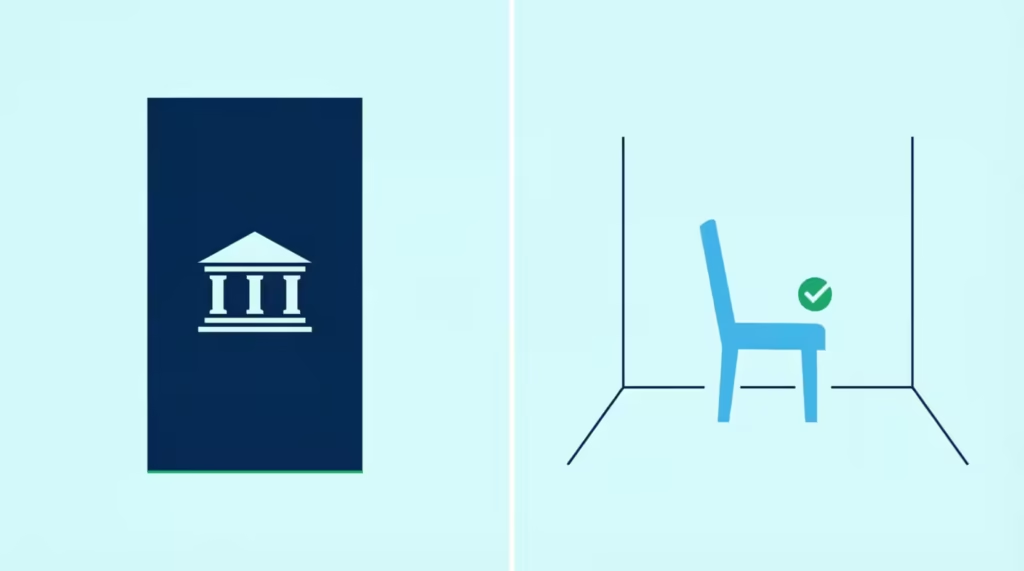
A credit limit is the total dollar amount Chase lets you borrow on the card. Chase decides this number based on your income, credit score, and account history. You cannot raise it or lower it just by tapping a button. You can request a change, but Chase has to approve it.
A spending limit is different. It is a personal budget cap you set for yourself. For example, you might decide you will not spend more than $800 on the card this month. That number is yours, not Chase’s. The card itself will not stop you at $800. That is why many people feel stuck; they mix up these two ideas and expect the bank to enforce a rule that only they can enforce.
Once you see the split clearly, the fix gets easier. You use Chase’s alert and lock tools to help you stick to the personal cap you picked.
💡 Pro Tip: Think of your credit limit as the ceiling of a room and your spending cap as a chair you place inside it. The ceiling never moves, but the chair sits wherever you want.
Why Chase Doesn’t Offer a Personal Spending Limit Feature
Chase built its personal cards around the credit limit model, not a soft spending cap. The reason is simple. Personal cards are meant for flexible, everyday use. A hard dollar cutoff at, say, $500 would block emergency purchases, travel bookings, and normal bills that vary month to month.
That does not mean you are stuck. The real answer is a mix of tools that act like a spending cap without being called one. Card lock stops all new charges in seconds. Custom alerts warn you as you approach your personal budget.
For business owners, the Chase for Business platform does offer true per-employee spending controls. So while the label “spending limit” is missing, the function is not. You just have to build it yourself.
How to Set a Spending Limit for Authorized Users on a Chase Business Card
If you own a Chase for Business credit card, you get a real spending limit tool. This feature is only for business accounts, not personal Chase cards. It lets you cap how much each employee or authorized user can spend on their card. You can set a monthly cap, adjust it, or turn it off at any time.
Personal cardholders do not have this option. Even if your spouse or child is an authorized user on your personal Chase card, you cannot set a hard dollar limit for them. The best personal workaround is card lock plus alerts, which we’ll cover below.
Steps to Set or Adjust an Authorized User’s Limit
Follow these steps to set a spending cap for an employee on a Chase for Business card:
- Sign in to your account at chase.com or open the Chase Mobile app.
- Select your business credit card account from the main dashboard.
- Tap or click “Account services” or “Manage employees.”
- Find the authorized user or employee whose card you want to control.
- Choose “Set spending limit” or “Edit spending limit.”
- Enter the dollar amount you want to cap them at for the cycle.
- Save the change. The new cap takes effect right away.
If you do not see this option, check that you are logged in under the business account, not a personal Chase login. The two portals look similar, but only the business side shows this feature.
How to Lock Your Chase Card to Stop New Spending
Card lock is the closest thing to an instant spending cap on a personal Chase card. When you turn on the lock, the card stops accepting new charges. This is useful if you gave the card to a family member and want to pause their spending. It also helps if you want to break a late-night online shopping habit.
The lock works fast, and you can turn it off just as quickly when you want to use the card again. You do not lose your account, your rewards, or your credit history. It is a soft pause, not a cancel.
Steps to Lock and Unlock Your Card
Here is how to lock your Chase card using the Chase Mobile app, which you can download from the Apple App Store or Google Play:
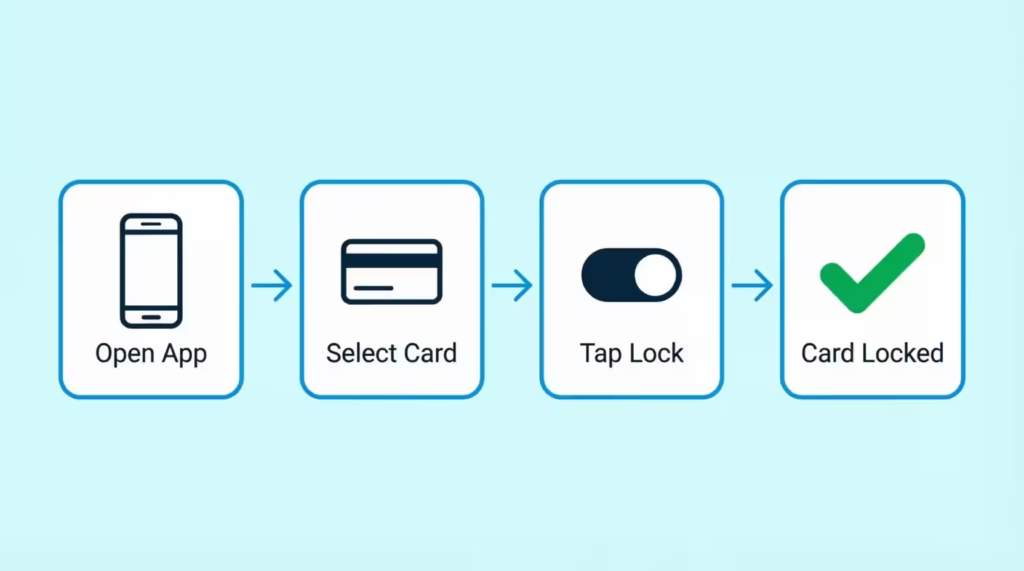
- Open the Chase Mobile app and sign in.
- Tap the credit card you want to lock from your account list.
- Swipe over to “Account services” on the card’s menu bar.
- Tap “Lock & unlock card.”
- Toggle the switch to “Locked.”
- To unlock later, come back to the same screen and toggle it off.
You can also do this on the Chase website. Sign in, click your card, and look for the same “Lock & unlock card” option under account services.
What Locking Does and Doesn’t Block
Locking your card stops most new activity, but not everything. Here is a clear breakdown:
| What Card Lock Blocks | What Card Lock Still Allows |
|---|---|
| New in-store purchases | Recurring bills already set up (streaming, utilities) |
| New online purchases | Automatic subscription renewals |
| ATM cash advances | Refunds and credits to your account |
| Balance transfers | Fees and interest charges |
| Authorized user new charges | Payments you make toward the balance |
This split matters. If you lock the card hoping to stop a recurring Netflix or gym charge, it will not work. You need to cancel those directly with the merchant. The lock is best for stopping new, one-time purchases.
⚠️ Mistake to Avoid: Don’t rely on card lock to stop a recurring charge you already agreed to. Cancel the subscription with the merchant instead, or the payment will still process.
How to Set Custom Spending Alerts on a Chase Card
Alerts are the most flexible tool for building your own spending cap. You pick a dollar amount, and Chase sends you a text or email the moment your balance crosses it. This gives you a heads-up before you overspend, without blocking the card entirely.
For example, if your personal monthly budget is $600, you can set an alert at $500. When you hit that point, you get a message and know to slow down. Some people set several alerts at different levels, like $300, $500, and $700, so they get a running update all month.
Steps to Set a Spending or Balance Threshold Alert
Follow these steps in the Chase Mobile app or on chase.com:
- Sign in to your Chase account.
- Tap or click your credit card from the account list.
- Go to “Account services” or the “Profile & settings” menu.
- Select “Alerts” or “Manage alerts.”
- Look for “Balance alert” or “Spending alert.”
- Choose your delivery method: text, email, or push notification.
- Enter the dollar threshold you want, such as $500.
- Save your settings.
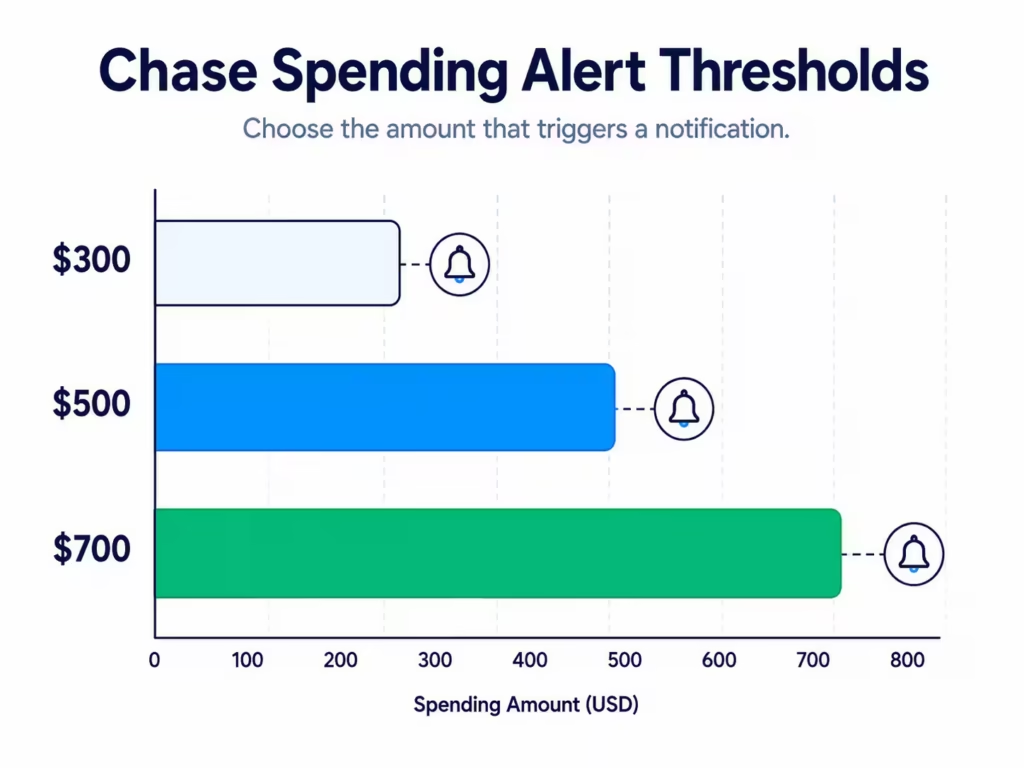
You can add more than one alert. Many people set a warning alert and a hard-stop alert so they get two chances to pause before their budget runs out.
Other Useful Alert Types to Combine With a Spending Cap
Pairing a balance alert with other alerts builds a stronger safety net. Useful ones to add include:
- Transaction alerts: Get a ping for every charge, no matter the size. This is great for spotting fraud fast and staying aware of an authorized user’s habits.
- Large purchase alerts: Get a message for any charge over a set amount, like $200. This helps you catch big surprises.
- Payment due alerts: Get a reminder a few days before your bill is due so you avoid late fees.
- Available credit alerts: Get notified when your available credit drops below a set level, which helps protect your credit utilization ratio.
Together, these alerts act like a self-built spending cap. You will not get a hard block, but you will always know where you stand.
What Happens If You Go Over Your Chase Credit Limit
Going over your credit limit used to mean an automatic fee, but the rules changed. Under the Credit CARD Act, Chase cannot charge you an over-limit fee unless you opt in to over-limit protection. Most Chase personal cards do not charge this fee by default, according to guidance from the Consumer Financial Protection Bureau.
That does not mean going over is free. Here is what actually happens:
- The charge may get declined. Chase often blocks purchases that would push you past your credit limit.
- Your credit score can drop. Your credit utilization ratio, which is how much of your limit you use, is a big part of your score. Using more than 30% of your limit can hurt your score, and going over 100% hurts it more.
- Chase may lower your limit. If you keep pushing against the ceiling, Chase can decide to drop your credit line, which makes utilization worse.
- Interest keeps piling up. Any balance you carry past the due date still earns interest at your card’s APR.
The takeaway is simple. Even without a fee, going over your credit limit costs you in ways that show up later, mostly through your credit score.
Handling a Large Purchase Without Triggering a Decline
If you plan a big purchase, like a $4,000 flight or a $6,000 appliance, your card might get declined even when you have the credit for it. This is not a spending cap. It is Chase’s fraud system protecting you from what looks like unusual activity.
The fix is a quick call before you shop. Chase’s security team can flag your account so the charge goes through smoothly. Here is what to do:
- Call the number on the back of your card or Chase customer service at 1-800-432-3117.
- Tell the agent you plan to make a large purchase soon.
- Share the dollar amount, the merchant name if you know it, and the rough date.
- Ask them to note the account so the charge does not trigger a security block.
This is not a spending limit at work. It is a security tool. Chase is trying to protect you from fraud, not stop you from spending your own money. A five-minute call can save you the awkward moment of a declined card at the register.
📌 Did You Know: Chase’s fraud system watches for changes in your spending pattern, not just dollar amounts. A $200 charge in a new country can flag your card faster than a $2,000 charge at your usual grocery store.
Other Ways to Manage or Monitor Spending on a Chase Card
Beyond locks and alerts, you can layer in outside tools to keep your spending in check. A few practical options include:
- Prepaid or secondary card for the authorized user. Instead of adding a family member to your Chase card, give them a prepaid card with a set balance. When the money runs out, the card stops. This gives you a real hard cap, which Chase personal cards cannot.
- Budgeting apps. Apps like YNAB, Monarch, or Rocket Money link to your Chase account and show your spending in real time. Many let you set category caps, which act like soft limits.
- A weekly spending check-in. Sign in to Chase every Sunday and look at your week’s charges. This five-minute habit catches drift before it becomes a problem.
- Auto-pay on the statement balance. This does not cap spending, but it stops interest from piling up when you do overspend.
Each tool fills a gap. Chase gives you alerts and locks. Outside apps give you category breakdowns. Prepaid cards give you the hard stop that Chase personal cards do not offer.
Using Chase Credit Journey to Monitor Spending Habits
Chase Credit Journey is a free tool from Chase that shows your credit score, credit report, and account activity in one place. You do not need to be a Chase customer to use it, but if you are, it links right to your accounts.
Credit Journey helps in a few ways:
- Score tracking. Watch how your spending affects your credit score over time.
- Credit report alerts. Get pinged when something new shows up on your report, like a new account or a hard pull.
- Utilization view. See how close you are to your credit limit across all your cards, not just Chase ones.
- Simulator tool. Test what would happen to your score if you paid down a card or opened a new one.
Pair Credit Journey with your Chase Mobile alerts and you get both sides of the picture. Alerts tell you what is happening right now. Credit Journey shows you the long-term effect of your habits.
Frequently Asked Questions (FAQs)
Can you set a spending limit on a Chase credit card?
Chase personal credit cards have no built-in spending limit toggle. You can get the same effect using card lock, custom balance alerts, and Chase for Business employee spending caps for business accounts.
How do I put a spending limit on my credit card?
Chase doesn’t offer a true spending limit for personal cards, but you can lock the card to stop new charges instantly or set custom balance alerts at a dollar amount you choose, like $500. Combining a lock with two alerts gives you the closest thing to a real cap.
How to change daily spending limit in Chase app?
Chase personal cards don’t have a daily spending limit setting in the app. Instead, open Account Services and use Lock & Unlock Card to block new charges, or set a balance alert to warn you at a chosen threshold.
Can you set up a limit on the size of credit card transactions?
Chase doesn’t cap individual transaction sizes for personal cardholders. You can set a large-purchase alert, such as $200, so you get notified whenever a charge exceeds that amount.
How do I change the credit card limit on Chase?
Your credit limit is set by Chase based on income, credit score, and account history, so you can’t change it yourself with a toggle. You can request an increase, but Chase must review and approve it before your limit changes.
Can you ask Chase for a credit limit increase?
Yes, you can request a credit limit increase, though Chase decides whether to approve it based on your income, credit score, and account history. This is separate from a spending limit, which is a personal budget cap you set and track yourself.
What happens if you go over your Chase credit limit?
Going over your limit can get the charge declined, and it can lower your credit score by pushing your utilization ratio too high. Chase may also reduce your credit line, and any carried balance still accrues interest at your card’s APR.
How to set spending limits on authorized users for a Chase card?
Chase for Business cards let you set a real monthly spending cap for each employee or authorized user through Account Services under “Manage employees.” Personal Chase cards don’t offer this feature, even for a spouse or child listed as an authorized user.
What’s the best way for a family member to have a hard spending cap on Chase?
Chase personal cards can’t enforce a true hard-dollar stop for an authorized user. A prepaid or secondary card with a fixed balance works better, since the card simply stops working once the funds run out.
Why does my Chase card get declined on a large purchase even with available credit?
Chase’s fraud system can flag large or unusual purchases, like a $4,000 flight, even when you have enough credit. Calling 1-800-432-3117 before the purchase to note the amount and merchant helps prevent the block.
The Bottom Line
Chase personal credit cards do not have a built-in spending limit toggle, but that does not mean you have no control. Card lock stops new charges in one tap. Custom alerts warn you before your budget breaks. Chase for Business owners get true per-employee caps. For a hard dollar stop, a prepaid card works better than any Chase personal feature.
The best approach for most cardholders is to use a card lock along with two alerts. One alert should be a warning, and the other should notify when reaching the spending limit.
If you know a parent, partner, or friend struggling to control card spending, share this guide with them; it could save them from a costly overspend.