I get it. You’ve decided your Chase card just isn’t pulling its weight anymore. Maybe the annual fee feels too steep, your wallet is too full, or you’re cleaning up your finances. The tricky part is figuring out how to cancel a Chase credit card the right way, without losing your points, hurting your credit score, or missing a payment hiding in the background.
Here’s the short answer: call Chase at 1-800-432-3117, redeem your points first, pay your balance, and move your auto-pays before you close the account.
In this guide, we’ll walk through every step, share insider tips on the retention call, and show you how to confirm your account is truly closed.
Key Takeaways
This guide explains how to cancel a Chase credit card the right way, covering when to downgrade instead of cancel, how to protect Ultimate Rewards points, steps to clear recurring charges, the phone cancellation process (1-800-432-3117), and how closure affects your credit score.
Core Facts:
- Call Chase at 1-800-432-3117 to cancel; Chase has no online close-account button, though Secure Message requests are accepted and may still route to a phone call.
- Chase Ultimate Rewards points are permanently forfeited when an account closes; redeem or transfer them to another Chase card before calling.
- Canceling a Chase card raises your credit utilization ratio by removing that card’s limit from your total available credit, which can lower your FICO score.
- Closed Chase accounts in good standing remain on your credit report for up to 10 years and continue counting toward average account age during that window.
- Chase will process a cancellation request even if a balance remains; interest and minimum payments continue on the outstanding balance until it is paid in full.
- Cardholders who cancel within 30 days of an annual fee posting can request a prorated refund from Chase customer service.
Best for:
- Chase cardholders whose annual fee no longer justifies the rewards earned and want a step-by-step process to close without losing points or damaging their credit score.
- People switching to a different bank or card issuer who need to cleanly remove Chase from their wallet and update all linked auto-pay accounts.
- Anyone weighing a full cancellation against a product change to a no-fee Chase card who wants a clear framework for deciding which option protects their credit history better.
Should You Cancel or Downgrade Your Chase Card?
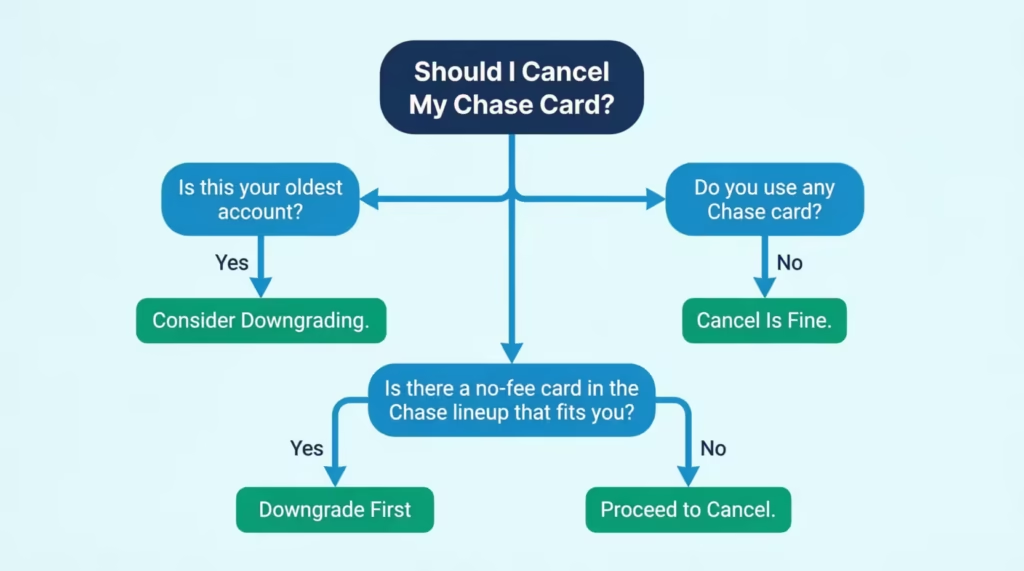
Before you close anything, pause for a moment. Cancelling isn’t always the best move. Chase lets you switch your card to a different one in the same family. This is called a product change, or a downgrade. You keep the same account, the same account age, and often your Chase Ultimate Rewards points.
A downgrade makes sense in these situations:
- Your Chase card is your oldest credit account. Closing it can shrink your average account age and chip away at your score.
- You want to keep your points alive. Moving a Sapphire Preferred to a Chase Freedom Unlimited, for example, keeps your rewards safe inside the Chase ecosystem.
- You just want to escape the annual fee. A no-fee card in the same family does the job without closing the account.
- You still spend with Chase, just differently. A different card might match your habits better.
Full cancellation is the better choice when:
- You have no use for any Chase card. You’re moving to a different bank or simplifying your finances.
- Your credit profile is strong. You have several old accounts, low utilization, and a high score. A small dip won’t sting much.
- No product in the Chase lineup fits you. None of the no-fee or lower-fee options match your spending.
- You’re trying to limit access to credit. Some people close cards as part of a debt reset plan.
A simple way to decide: ask yourself if you’d keep the card if it had no annual fee. If yes, downgrade. If not, cancel.
💡 Pro Tip: Always ask Chase for a downgrade option before you say the word “cancel.” Once you ask to close, the retention department may steer the call differently and the downgrade conversation gets harder.
How to Downgrade a Chase Card
If you’ve decided a product change is the right move, here’s the practical path. Call the number on the back of your card, not the general cancellation line. Tell the agent you’d like to “product change” to a specific card by name, like the Chase Freedom Unlimited or Freedom Flex.
A few rules to remember:
- You can only switch within the same card family. A Sapphire card downgrades to a Freedom card, but you can’t move from a personal card to a business card.
- Your account number, credit limit, and account opening date usually stay the same. That’s exactly why this protects your credit history.
- If your card had an annual fee that has already been posted, ask for a prorated refund. Chase typically refunds the fee within 30 days of payment, so timing matters.
After the change, watch your account online to confirm the new card name appears. A new physical card will arrive in the mail within 7 to 10 business days.
What to Do with Your Chase Ultimate Rewards Points Before You Cancel
This is the step most people skip, and it’s the one that hurts the most. Chase Ultimate Rewards points are tied to your account. When the account closes, the points are gone. Chase’s own rewards education page confirms that points can be forfeited once an account is closed.
You have three options to protect them before you call.
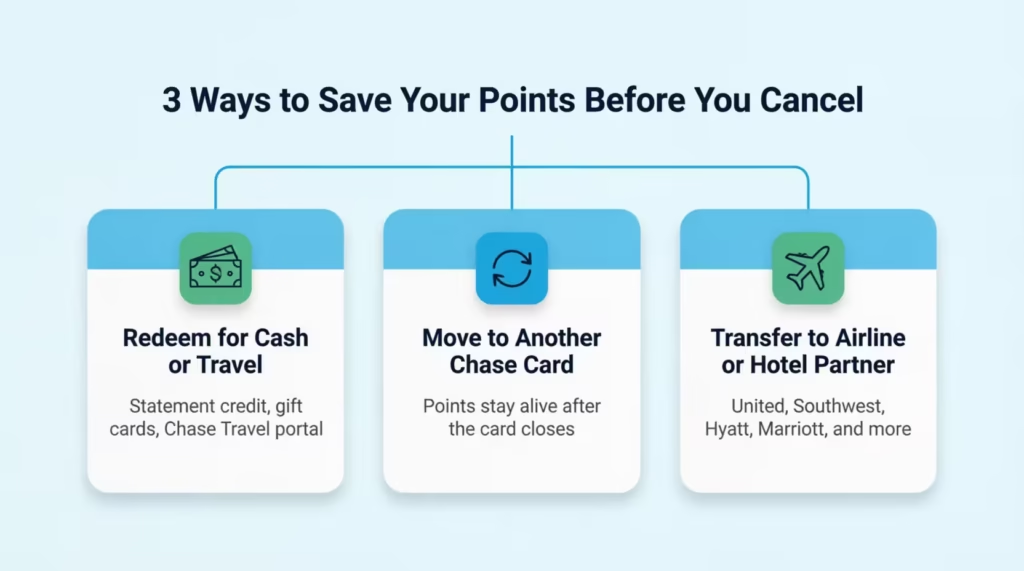
Option 1: Redeem them.
You can cash them out as a statement credit, swap them for gift cards, or book travel through the Chase Travel portal. If you have 50,000 points, that’s $500 in cash back at a 1 cent per point rate.
Option 2: Transfer them to another Chase card you own.
If you also have a Chase Freedom Flex or Freedom Unlimited, your points can move there and live on, even after the premium card closes. You usually need to do this through your online account before the cancellation goes through.
Option 3: Transfer to a travel partner.
Sapphire Preferred, Sapphire Reserve, and Ink Business Preferred cards can move points to airlines and hotels like United, Southwest, Hyatt, and Marriott. Once transferred, those miles or points belong to the partner program and survive your Chase account closure.
⚠️ Mistake to Avoid: Sapphire cardholders, take note. If your Sapphire card is the only premium Chase card you own, closing it removes your ability to transfer points to airline and hotel partners. Move or use your points before the call, not after.
Quick warning: if you only have one Chase card and it’s the one you’re closing, options 2 and 3 may not be possible without first transferring points or opening another Chase card. Plan. The safest play is to redeem before you cancel.
How to Handle an Outstanding Balance Before You Cancel
A common myth is that you must have a zero balance to close a Chase card. That’s not true. Chase will let you close an account that still has a balance. You don’t owe the full amount on the spot either.
Here’s what actually happens when you close a card with debt on it:
- You still owe the balance. Closing the account doesn’t erase what you spent.
- Minimum payments continue. You must keep paying at least the minimum each month until the balance is gone.
- APR keeps running. Interest still adds up on the remaining balance, often at the same rate.
- Your statements still arrive. Chase will send a monthly statement until the balance hits zero.
Even though you can close with a balance, paying it off first is usually the cleaner move. Here’s why. Carrying a balance on a closed card can hurt your credit utilization ratio, since the card’s credit limit is no longer counted in your total available credit. You’ll also avoid months of interest charges piling up.
If the balance feels too big to clear in one shot, consider a 0% APR balance transfer to another card before you cancel. This buys you time to pay down the debt without interest. Just don’t transfer the balance to another Chase card right before closing the original, because that can complicate the process.
Pay off what you can, set up auto-pay on the minimum, and only call to cancel once you have a clear plan for the remaining debt.
Find and Update All Recurring Charges Linked to Your Card
This step protects your daily life. The moment your Chase card closes, every subscription, bill, and auto-pay tied to it stops working. That means declined charges, late fees from service providers, and even canceled services if a payment fails repeatedly.
Start with a 3 to 6-month review of your statements. Look through every charge and flag the ones that repeat. Most people are surprised by how many they find.
Common categories to check:
- Streaming and entertainment: Netflix, Hulu, Disney+, Spotify, YouTube Premium, Apple TV+, gaming subscriptions.
- Utilities and household: electric, gas, water, internet, mobile phone, home security.
- Memberships: gym, Costco, Amazon Prime, news sites, cloud storage like iCloud or Google One.
- Insurance: auto, renters, life, pet insurance.
- Software and work tools: Microsoft 365, Adobe Creative Cloud, Dropbox, web hosting.
- Charitable giving: monthly donations to nonprofits.
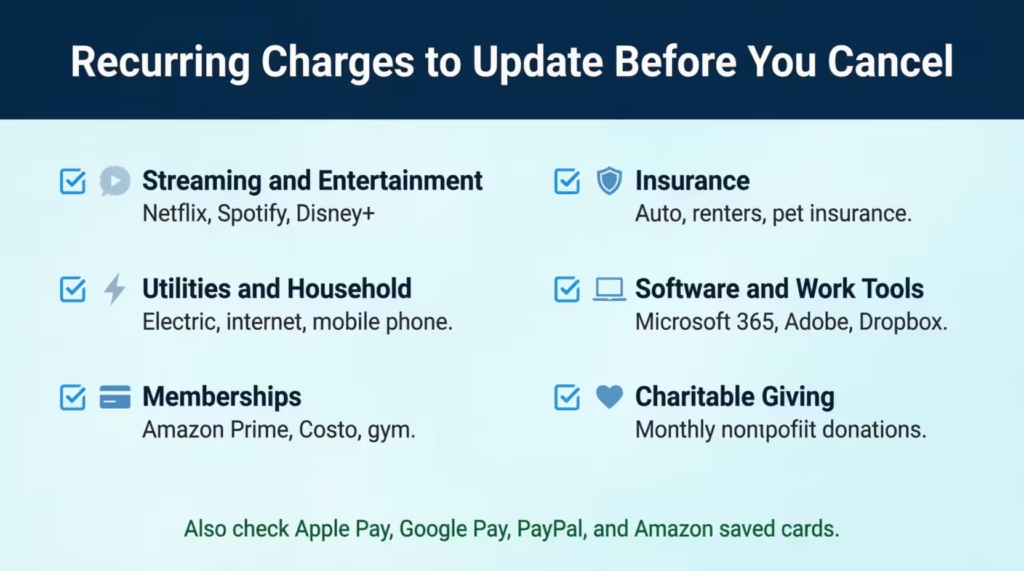
Once you have the list, log in to each service and update the payment method. Use a different active card or your bank account. Do this at least 7 days before you cancel the Chase card, so any pending charges are processed on the new method.
Don’t forget the silent ones. If you’ve added your Chase card to Apple Pay, Google Pay, Samsung Pay, or PayPal, that wallet may also be running auto-charges. Update those wallets, too. Check Amazon’s “Saved Payment Methods” and any “1-Click” settings.
A practical trick: keep a running list as you go. Write down each service, the date you updated it, and the new payment method. That paper trail saves you if a charge slips through.
How to Cancel Your Chase Credit Card by Phone
Phone is the main way to close a Chase credit card. It’s the fastest, gives you a real-time confirmation, and lets you ask questions on the spot. Plan for a 10 to 20-minute call.
Here’s the step-by-step:
- Have your info ready. You’ll need your card number, the last 4 digits of your Social Security number, your full name, address, and date of birth. Keep a pen and paper nearby to note the rep’s name and a confirmation number.
- Call 1-800-432-3117. This is the main Chase credit card customer service line. It’s available 24/7, but live agents for cancellation requests are easiest to reach during business hours.
- Get through the menu. When the automated system asks why you’re calling, say “close my account” or press the option for account services. You may need to enter your card number first.
- Speak clearly and directly. When the agent picks up, say: “I’d like to close my Chase credit card account.” Short and firm works best. Don’t ramble or list reasons unless asked.
- Verify your identity. The agent will ask security questions. Answer them calmly.
- Ask for written confirmation. Before hanging up, request that Chase send you a confirmation in writing or through Secure Messages. Get the rep’s name and a reference or case number.
- Note the timing. Most phone cancellations are processed within 1 to 3 business days. The account status on your online portal should change to “Closed” within that window.
What to Do When Chase Tries to Keep You
Chase trains its retention team to slow you down. This is normal. They may offer a statement credit, bonus points, a fee waiver, or a downgrade. None of this means you’re stuck. You’re in control.
Here’s how to handle the conversation:
- Expect the offer. It’s standard procedure, not a sign that closing is hard. Almost every cardholder gets some kind of save attempt.
- Take the 24-hour window if it helps. If an offer sounds appealing, you can ask to think it over and call back within 24 hours. There’s no pressure to decide on the call.
- Use a firm restatement. If you’re sure, say: “I understand, but I’d still like to close the account today.” Repeat it once if they push. Politeness and steady wins.
- Declining doesn’t block closure. Saying no to the offer doesn’t stop them from closing the account. They must honor your request.
Some readers find a retention offer that actually works for them, like a fee waiver. Others use the call to confirm cancellation is the right choice. Either outcome is fine.
How to Cancel Your Chase Credit Card Online
A lot of people search for an online cancel button on the Chase site. The honest truth: there isn’t one. Chase doesn’t give you a “Close Account” link inside the online banking dashboard. But you can still start the process digitally through Chase Secure Messages.
Here’s how the secure message route works:
- Log in to your account at chase.com.
- Open the Secure Messages center, usually under the customer service or “Messages” menu.
- Click “New Message” and choose a topic like “Account Maintenance” or “Other.”
- Write a short, clear note: “Please close my Chase credit card account ending in [last 4 digits]. My full name is [Your Name], and my account is in good standing. Please confirm the closure in writing.”
- Send the message and check back in 24 to 48 hours for a reply.
Chase will usually respond by either confirming the closure or asking you to call to verify your identity. Many cancellation requests still end up routing back to a phone call, especially if the account has a balance, points, or recent activity.
The Chase Mobile App offers the same Secure Messages tool. It’s a fine option if you’re more comfortable typing than talking. Just don’t expect it to be faster than the phone. The phone usually closes the account the same day. Secure Messages can take a couple of days.
📌 Did You Know: Chase only offers true online closure through Secure Messages, not a button. That’s because they want a chance to verify identity and offer retention options, the same process you’d get on a phone call.
Other Ways to Cancel — By Mail or In Person
Not everyone wants to call or message online. If you prefer a paper trail or a face-to-face conversation, Chase supports two more options. They’re slower than phones, but they each have real benefits.
Cancel by Mail
A written request is the slowest option, but it gives you the strongest paper trail. This is the route many people use when they want a documented record for legal or financial reasons.
Send your written request to:
Cardmember Services P.O. Box 6294 Carol Stream, IL 60197-6294
Inside the letter, include:
- Your full name as it appears on the card.
- Your mailing address.
- The last 4 digits of the card number (never write the full card number).
- A clear sentence: “Please close my Chase credit card account ending in [last 4 digits], effective immediately, and send written confirmation to my address on file.”
- Your signature and the date.
Do not include your full Social Security number or your full credit card number in the letter. Chase doesn’t need them, and it’s a privacy risk if the letter is lost.
Send it by certified mail with a return receipt. The post office tracking proves Chase received it. Allow several weeks for the request to process and a confirmation letter to arrive. If you haven’t heard back in 3 weeks, call to follow up.
Cancel in Person at a Chase Branch
If you bank with Chase already or just prefer talking to someone face-to-face, walking into a branch works too.
Here’s what to bring:
- A government-issued photo ID (driver’s license, passport, or state ID).
- Your physical Chase credit card, if you still have it.
- The account number, if your card is missing.
Use the Chase branch locator to find the nearest location. Branch staff can submit the closure request on the spot. They may not finalize it in real time, since some closures still route to the central team, but you’ll leave with a clear timeline.
Before you walk out, ask for written confirmation. A printed slip, an email confirmation, or a follow-up Secure Message all work. The in-person route is especially smooth if you also bank with Chase, because the staff already has your info on file.
How Cancelling Your Chase Card Affects Your Credit Score
Now, to the question that holds most people back. Will closing your Chase card hurt your credit score? The honest answer is yes, often a little, but usually not for long. The size of the dip depends on your overall credit profile.
If you have several open cards, low balances, and a long credit history, you might see your FICO score drop by a few points or not at all. If your Chase card is your oldest account or makes up most of your available credit, the dip can be larger. The two main forces at work are credit utilization and average age of accounts.
Credit Utilization Impact
Credit utilization is the percentage of your total credit limit that you’re actively using. Lenders like to see it under 30%, and under 10% is even better for your score.
Here’s a concrete example. Say you carry a $2,000 balance across your cards. You have $25,000 in total credit limits across all your cards combined. Your utilization is 8%, which is healthy.
Now you close a Chase card with a $5,000 limit. Your total limit drops to $20,000, but your $2,000 balance stays the same. Your new utilization is 10%. That’s a small jump, but it’s enough to nudge your score down a few points.
The bigger the closed card’s limit relative to your total, the bigger the utilization swing. If you close a card with a very high limit, like $15,000 or $20,000, the change can be steep.
You can soften the blow before you cancel. Pay down your balances on other cards first. If you bring that $2,000 balance down to $500 before closing, your post-closure utilization stays under 3%, which actually keeps your score stable.
Average Age of Accounts Impact
The second factor is the age of your accounts. The length of your credit history makes up roughly 15% of your FICO score, according to myFICO’s official credit education breakdown. That includes your oldest account, your newest account, and the average age of all accounts.
Here’s an important detail many readers miss. Closed accounts in good standing don’t disappear from your credit report right away. Experian confirms that closed accounts in good standing stay on your credit report for up to 10 years, and they keep counting toward your average age during that window.
So the real risk isn’t immediate. It’s the cliff that hits in year 10, when the closed account finally drops off. If your Chase card is your oldest, that drop can shorten your credit history overnight and lower your score.
If your Chase card is your oldest open account, this is exactly where a downgrade beats a cancellation. Keeping the account open, even on a no-fee card, preserves the age for as long as you keep it active.
How to Confirm Your Chase Card Is Actually Closed
Cancellation isn’t over until you’ve confirmed it. Plenty of people assume the account is closed and never check, only to find a surprise charge or an annual fee posting months later. Here’s a tight verification routine.
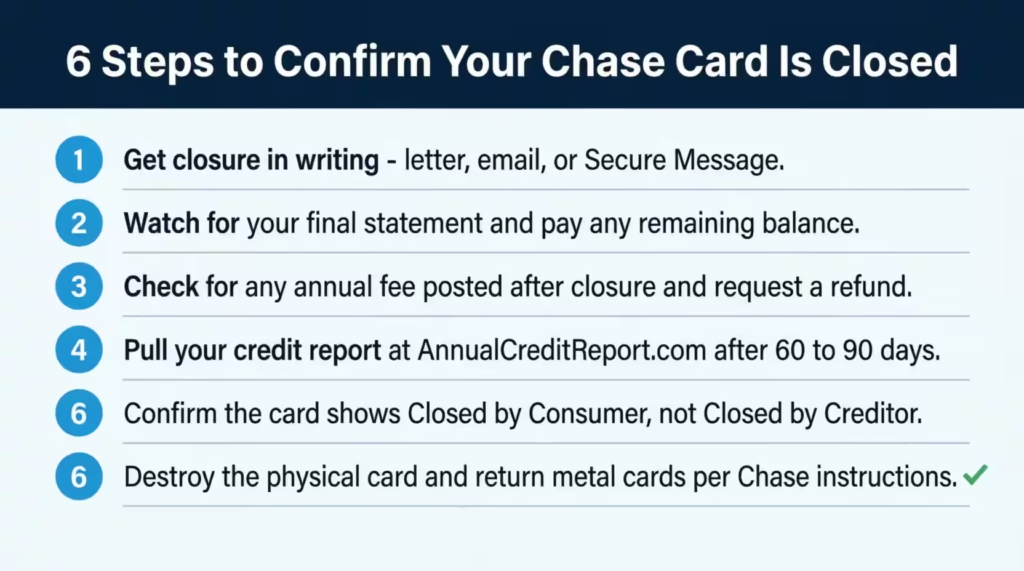
Step 1: Get the closure in writing.
During the call, ask for written confirmation. It might arrive as a letter in the mail, an email, or a Secure Message in your Chase account. Save it as a PDF or screenshot for your records.
Step 2: Watch for your final statement.
Chase will send one more statement showing your closing balance, any final fees, and the closed status. Pay any remaining balance in full to avoid late fees on a closed account.
Step 3: Look for any annual fee that posts after closure.
If the annual fee was charged within 30 days before you cancelled, you can usually request a prorated refund. Call back and ask politely. Most agents will process it.
Step 4: Check your credit report.
Wait 60 to 90 days after the closure, then pull your free credit report at AnnualCreditReport.com, the official government-authorized site. You can also use Chase Credit Journey, the free tool inside your Chase account. The card should show as “Closed by consumer” or “Account closed at consumer’s request.” That note matters because “Closed by creditor” looks worse to future lenders.
Step 5: Destroy the physical card.
Cut it into small pieces, separating the chip and the magnetic stripe. If it’s a metal card, Chase will mail you a prepaid envelope to return it, or you can request one through Secure Messages.
Step 6: Note the timeline.
Standard phone cancellations process in 1 to 3 business days. If your account still shows as “Open” after a week, call back and reference the original confirmation number.
Once you’ve checked all six boxes, you can put this behind you. Your Chase card is officially closed.
Frequently Asked Questions (FAQs)
How do I call Chase to cancel my card?
Call Chase customer service at 1-800-432-3117, available 24/7. When prompted, say “close my account” to reach the right team, then ask the agent for a written confirmation and a reference number before hanging up.
Can I cancel my Chase credit card online?
Chase does not offer a close-account button inside its online dashboard. You can submit a closure request through Chase Secure Messages, but many requests still route back to a phone call for identity verification.
Is there a fee to close a Chase account?
Chase does not charge a fee to close a credit card account. You remain responsible for any outstanding balance and any annual fee already posted before the closure date.
Do you lose Chase points if you cancel a card?
Yes, unredeemed Chase Ultimate Rewards points are forfeited when the account closes. Redeem them for cash back or travel, or transfer them to another Chase card you own, before you make the cancellation call.
Can I cancel my credit card without paying the annual fee?
You can cancel without paying an annual fee if you close the account before the fee posts to your statement. Once the fee has posted, you still owe it unless you request a prorated refund within 30 days.
How long after an annual fee posts should I cancel a Chase card?
Cancel within 30 days of the annual fee posting to qualify for a prorated refund from Chase. After that window closes, you typically forfeit the fee even if you cancel shortly after.
Can I get my Chase annual fee waived?
Chase retention agents sometimes offer a fee waiver or statement credit during a cancellation call as an incentive to keep the account open. You can accept the offer, take 24 hours to decide, or decline and proceed with closing.
Can I get my annual fee back if I cancel my Chase credit card?
Chase typically refunds a prorated portion of the annual fee if you cancel within 30 days of the fee posting to your account. Call customer service and ask specifically for the prorated refund before the window closes.
Can I cancel my Chase credit card by mail?
Yes. Send a written request including your full name, mailing address, last four digits of your card number, and your signature to: Cardmember Services, P.O. Box 6294, Carol Stream, IL 60197-6294. Use certified mail and allow several weeks for processing.
How long does a closed Chase card stay on my credit report?
A Chase card closed in good standing remains on your credit report for up to 10 years and continues counting toward your average account age during that time. The real credit impact hits when the account finally drops off the report.
Bottom Line
Closing a Chase card the right way comes down to one thing: order of operations. Based on how Chase’s process actually works, the most effective approach is to weigh a downgrade first, redeem your Ultimate Rewards points, square away your balance and auto-pays, then call 1-800-432-3117 and confirm the closure in writing.
The credit score dip from utilization and account age tends to be small and short-term, especially if you prep your other balances first. Follow the checklist, verify it on your credit report, and you’re done.
If you know someone clearing out an old Chase card or chasing a sign-up bonus elsewhere, share this guide. It could save them hundreds in lost points and protect their score in the process.