You found a Chase referral prompt in your app, or your sister just opened a Sapphire card, and you’re wondering if you can still get credit for sending her the link. Either way, you’ve decided referring is worth it. What you still need is what really counts: the specific steps, the eligibility rules, and the little errors that can quietly wipe out your bonus.
We’ve watched friends lose thousands of points because they typed the link by hand or hit a cap they didn’t know existed. The Chase refer-a-friend process pays well, but only when you follow it precisely.
This guide walks you through every step, every limit, and every reason a payout fails, so your bonus lands the first time.
Key Takeaways
This guide explains how Chase Refer-A-Friend works, including how to generate and share a referral link, current bonus amounts by product, annual and monthly caps, payout timing, and tax treatment.
Core Facts:
- Chase referral bonuses are approval-contingent, meaning no reward is earned until the referred friend’s application is approved, not when they apply or click the link.
- Bonus amounts vary by product: Sapphire cards pay 15,000 Ultimate Rewards points per approved friend, Freedom Unlimited and Flex pay $50, Freedom Rise pays $25, and checking pays $50.
- Annual caps are product-specific: 100,000 points for Sapphire, $500 for Freedom Unlimited and Flex combined, $250 for Freedom Rise, and $500 (10 referrals) for checking.
- Chase can disqualify referrals beyond roughly 10 approved friends in a single month, even if the annual cap has not been reached.
- Referral bonuses typically post within 8 weeks of the friend’s approval date, though many post within 2 to 4 weeks.
- Referral bonuses are taxable income, and Chase issues a Form 1099-MISC if total referral earnings reach $2,000 in a calendar year for 2026.
Best for:
- Chase cardholders who want to earn extra points or cash back by referring friends or family to a Chase credit card or checking account.
- People troubleshooting a missing referral bonus and trying to identify why it hasn’t posted.
- Readers deciding which Chase product to refer someone to based on bonus size and annual caps.
How Chase Refer-A-Friend Works
The program is simple in concept but strict in execution. If you have a Chase card or checking account, you can create a personalized referral link just for you. You share that link with someone who’s interested in opening a Chase product.
If they click it, complete the application, and get approved, both of you receive a reward. You earn referral points or cash back. Your friend earns the standard new-cardmember welcome bonus listed on the offer they applied through.
Two things make this work:
First, the link is tracked. It carries a unique identifier that ties any approved application back to your account. If your friend applies without that link, even if they pick the same card, you get nothing.
Second, the payout is approval-contingent. You don’t earn anything for sending the link. You don’t earn anything when your friend submits an application. You only earn once Chase approves them.
The program runs across two channels. You can access it inside the Chase mobile app, and you can access it through the desktop site at chase.com. Both work, but the menus and button names are slightly different on each, which we’ll walk through in the next section.
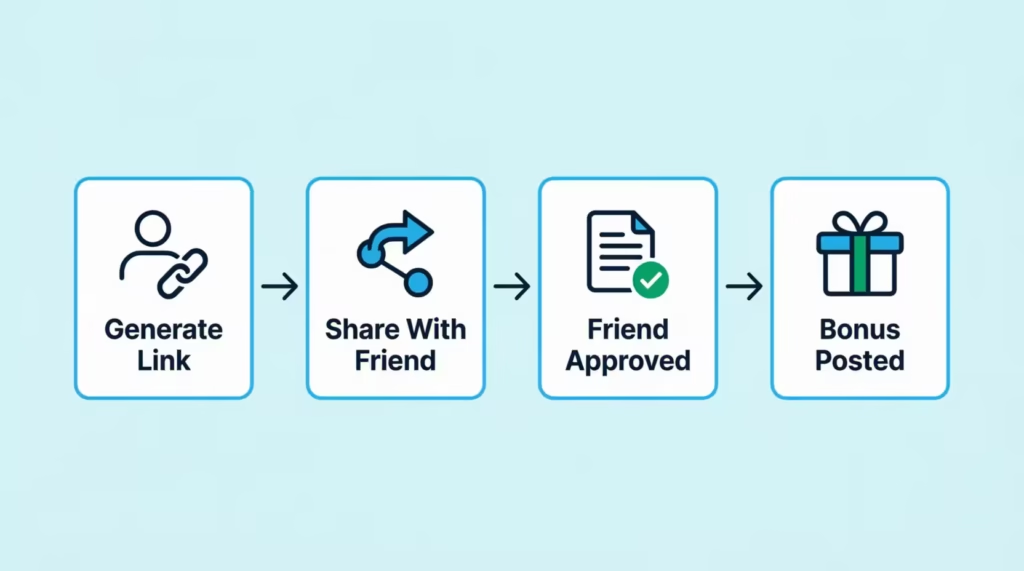
One detail worth noting: Chase doesn’t tell your friend that you referred them, and they don’t tell you when your friend is approved. The system is private on both sides. Your friend sees a normal application.
You see the bonus appear in your account weeks later. Chase confirms this directly on its program page, noting that bonus points or cash back are simply posted to your account and listed as a “Refer A Friend” bonus on your Chase account.
💡 Pro Tip: Save a copy of your referral link in a notes app the moment you generate it. The link doesn’t change, and you can reuse it for multiple people throughout the year without going back into the referral menu each time.
Can You Refer Someone for a Card You Don’t Have?
Yes, and this surprises most people. You can generate a referral link for any participating Chase card, even if you don’t personally carry that card. If you have a Chase Freedom Unlimited, you can still refer your friend to a Chase Sapphire Preferred and earn the Sapphire referral bonus when they’re approved. The only requirement is that you hold at least one eligible Chase product to access the referral portal.
Two things you can’t do. You can’t refer yourself, meaning you can’t use your own link to apply for another Chase card. The system blocks this, and even if it didn’t, the bonus wouldn’t post. You also can’t refer someone for a card they already have. The bonus only pays out for a brand-new account.
It works in reverse too. If a friend or family member already holds a Chase card, ask them for their referral link before you apply. You get the same welcome bonus you would have gotten anyway, and they get a referral reward for sending you. There’s no downside to using their link, which we’ll cover in detail later.
How to Refer a Friend on Chase (Step-by-Step)
The steps differ slightly depending on whether you use the mobile app or the desktop site. Both produce the same referral link, so use whichever is faster for you.
Steps in the Chase mobile app
- Open the Chase Mobile app (iOS / Android) and sign in.
- Tap the card or checking account you want to refer for. If you want to refer for a card you don’t hold, tap any account first to get into the menu.
- Scroll down to find the “Refer a friend” or “Refer friends, earn rewards” tile. On some account screens, it’s listed under the “Things you can do” section.
- Tap “Refer now” or “Get started.” This loads your personalized referral page.
- Choose how to send the link. Chase gives you options for email, text message, social share, or copying the link directly to your clipboard.
Steps on the Chase desktop site
- Go to chase.com and sign in to your account.
- From the top navigation, hover over “Explore Products” and select the credit card or checking section, or go straight to the Chase Refer-a-Friend page.
- Pick the card or account type you want to refer someone to. Each product has its own referral page.
- Click “Refer friends now.” Chase will display your personalized URL.
- Copy the link or use one of the share buttons.
Confirm your friend wants the referral first
Before you send, ask. Some people don’t want unsolicited financial product links, and some prefer to compare offers across multiple cards first. A quick “Hey, are you thinking about a new Chase card? I can send you a referral link” avoids awkwardness and increases the odds they’ll actually apply through your link instead of clicking a random ad later.
Copy the link exactly, never retype it
This is the single biggest reason referral bonuses fail to pay. Your personalized URL contains a tracking code at the end. If your friend types the link manually and misses a character, the tracking fails. Then, the application shows up as a direct application instead of a referral. You get nothing.
Always use copy-paste. Send the link by text, email, or messaging app. Tell your friend to click directly, not retype. If they’re applying on a different device than where they received the link, have them email or text the link to themselves first, then tap it.
⚠️ Mistake to Avoid: Don’t shorten your referral link with bit.ly or any URL shortener. Some shorteners strip tracking parameters, which kills your bonus. Send the raw, full-length Chase URL even if it looks long and ugly.
Current Chase Referral Bonuses by Card and Account
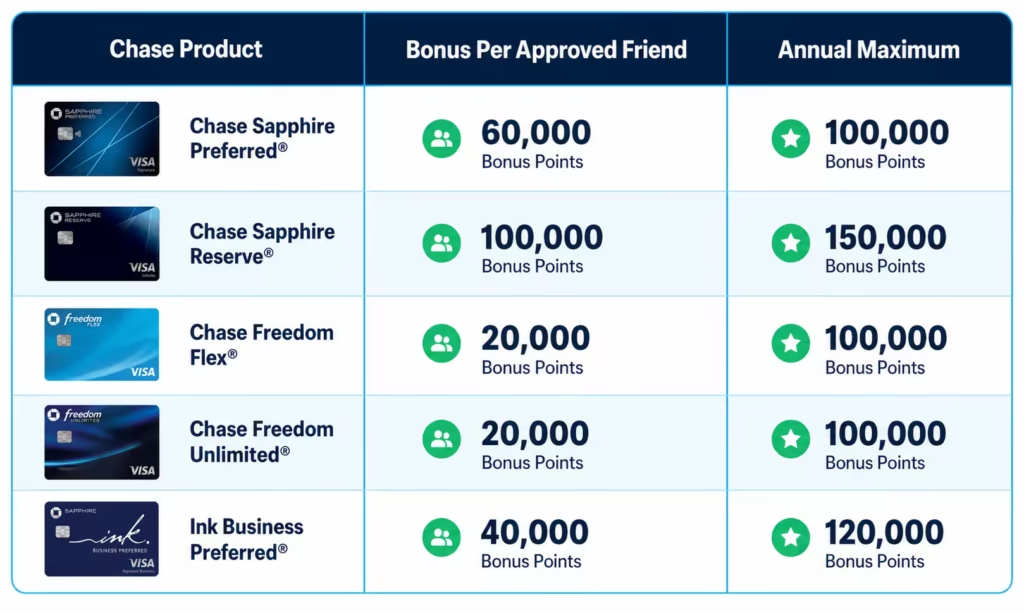
Bonus amounts vary by product, and the currency you earn depends on what you’re referring someone to. Sapphire cards pay in Ultimate Rewards points.
Freedom cards pay in cash back. Co-branded cards like Southwest and Marriott pay in their own airline or hotel currency. Checking accounts pay in cash deposited directly to your account.
| Chase Product | Bonus Per Approved Friend | Annual Maximum |
|---|---|---|
| Chase Sapphire Preferred / Sapphire Reserve | 15,000 Ultimate Rewards points | 100,000 points |
| Chase Freedom Unlimited / Freedom Flex | $50 cash back | $500 cash back |
| Chase Freedom Rise | $25 cash back | $250 cash back |
| Southwest Rapid Rewards Cards | 10,000 Rapid Rewards points | 50,000 points |
| United MileagePlus Cards | 5,000 miles | 25,000 miles |
| Marriott Bonvoy Cards | 7,500 Bonvoy points | Varies by card |
| Chase Total / Premier Plus / Sapphire Checking | $50 cash | $500 (10 referrals) |
Bonus structures published by Chase: Chase Credit Card Referrals and Chase Checking Refer-A-Friend.
Not every Chase card is in the program. Business cards, the Ink family, and some older legacy products either don’t offer referrals or have paused them. As Chase notes in its program updates, referrals of people who already hold Chase business card accounts stopped qualifying for the referral bonus as of October 7, 2025. If you don’t see a “Refer a friend” option on a specific card, that card isn’t currently participating.
How to Refer a Friend for Chase Checking
The checking referral program works the same way as credit cards but with different rules. You’re eligible to refer if you have a Chase Total Checking, Premier Plus Checking, Sapphire Checking, or Private Client Checking account. Each approved friend earns you $50, deposited directly into your account. You can earn up to 10 referrals per calendar year, capping at $500.
One detail catches people off guard: your account must be at least 30 days old before the referral option becomes available. New customers who just opened a Chase Total Checking can’t immediately start referring.
Your friend needs to finish qualifying activities. This often means setting up direct deposit or making a few debit card purchases in a certain time frame. The exact requirements appear on the offer page when they apply.
How to Refer a Friend for Chase Sapphire Preferred or Sapphire Reserve
Both Sapphire cards share the same referral pool. You earn 15,000 Ultimate Rewards points for each approved friend who opens either the Sapphire Preferred or the Sapphire Reserve.
The annual cap is 100,000 points, which means you can refer up to about six or seven friends per year before maxing out. The exact number depends on whether all referrals pay the full 15,000 or whether Chase runs a temporary higher offer.
At a standard valuation of about 2 cents per point through the Chase Travel portal or transfer partners, 100,000 points is worth roughly $2,000 in travel. To generate your link, follow the step-by-step steps above and pick either Sapphire card on the referral page.
How to Refer a Friend for Chase Freedom Unlimited
Freedom Unlimited referrals pay $50 cash back per approved friend, capped at $500 per year. The cap is shared among the Freedom family. So, if you refer one person for Freedom Unlimited and another for Freedom Flex, both referrals count toward the same $500 annual limit. That’s different from Sapphire. In Sapphire, Preferred and Reserve each have their own pool, separate from Freedom.
The Chase Freedom Rise card sits in its own tier. It pays only $25 per approved friend, capped at $250 per year. Rise is designed for credit-builders, so the referral payout is lower. If your friend can choose between Freedom Unlimited and Freedom Rise, pick Freedom Unlimited. If they qualify for both, you’ll earn double.
Annual and Monthly Referral Limits
Caps exist at two levels, and only one of them is published clearly. Missing either one zeros out your bonuses for that period.
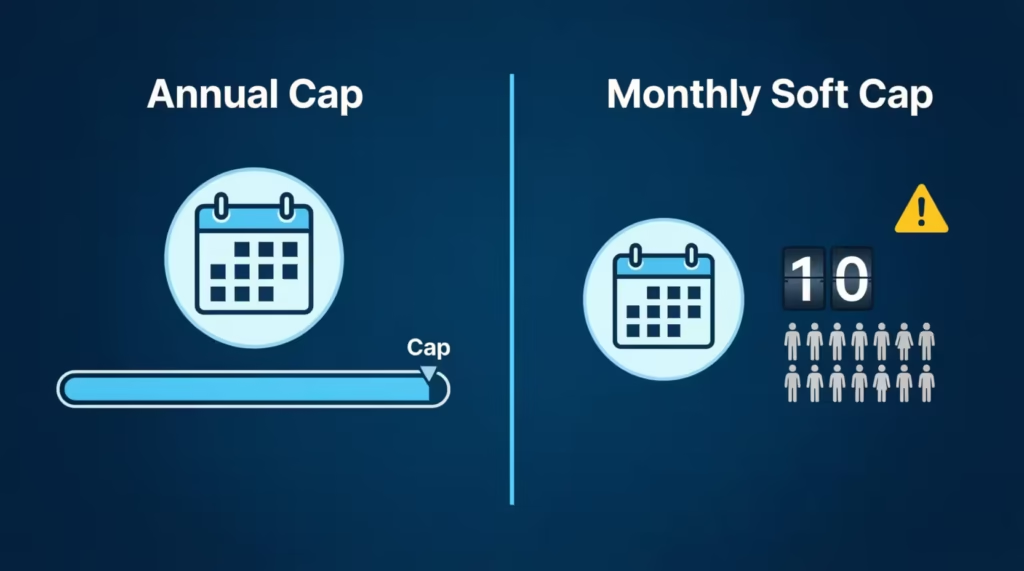
The annual cap is product-specific and listed on each card’s referral page. Sapphire family: 100,000 points per year. Freedom Unlimited and Flex combined: $500 per year. Freedom Rise: $250 per year. Checking: $500 per year. The year is a calendar year, January 1 through December 31, not a rolling 12-month window. Your caps reset on January 1.
Caps are also per card, not per person. If you hold both a Sapphire Preferred and a Freedom Unlimited, you have two separate referral allowances. You could earn the full 100,000 Sapphire points and the full $500 Freedom cash back in the same year, completely independently.
People who hold multiple Chase cards can multiply their earning potential significantly. A household with a Sapphire Reserve, a Freedom Unlimited, a Southwest card, and a checking account can stack four separate referral pools at once.
The Monthly 10-Referral Limit Explained
The lesser-known rule is the monthly soft cap. Chase can disqualify your referrals if you refer more than about 10 people in one month, even if you haven’t reached your yearly limit. This rule exists to prevent abuse, like someone running referral schemes on social media or to large mailing lists.
The frustrating part: Chase doesn’t always tell you when this happens. You might refer 12 people in March, see 8 bonuses post normally, and never see the other 4 even though those friends were approved. Chase considers those last referrals outside the spirit of the program and silently excludes them.
Here’s how this plays out in practice. Imagine Jennifer, a finance director at a mid-sized accounting firm, who posted her Sapphire referral link in a company Slack channel. Fifteen colleagues opened cards within three weeks.
Jennifer expected 225,000 points. She received about 120,000 and never got an answer from Chase support about the rest. The fix is to spread referrals out across months. If you have a large group interested, send links in waves of 6 or 7 per month rather than all at once. Your bonuses post cleanly, and you never bump against the soft cap.
How Long It Takes to Get a Chase Referral Bonus
Plan for approximately 8 weeks between your friend’s approval and your bonus appearing in your account. That’s the window Chase officially publishes. In practice, many referrals post faster, sometimes within 2 to 4 weeks, but the 8-week ceiling is what you should expect.
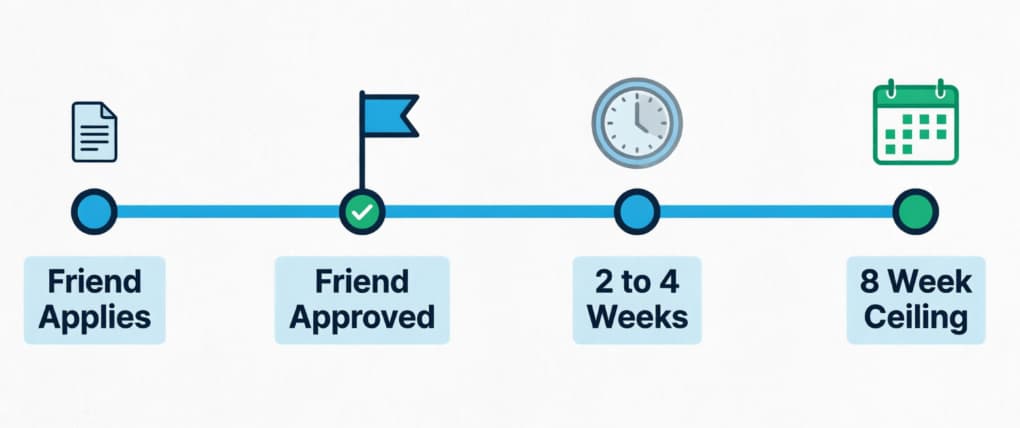
The clock doesn’t start when your friend applies. It starts when Chase approves their application. If your friend applies on March 1 and gets approved on March 10, your 8-week window runs from March 10, not March 1. Approval can take from instant to two weeks. It depends on how Chase processes the application and if they need more information.
Once it posts, the bonus appears in your account based on the product. For credit cards, the points or cash back show up on your statement labeled as a “Refer A Friend” bonus.
For Ultimate Rewards earners, you’ll also see the points added to your points balance under Chase Travel. For checking, the $50 is deposited directly into the same account that generated the referral, listed as a referral bonus credit. Chase confirms this posting language and timeline on its refer-a-friend education page.
Why Your Chase Referral Bonus Hasn’t Shown Up
If your bonus is missing, work through these checks in order before contacting support. Most missing bonuses fall into one of five buckets.
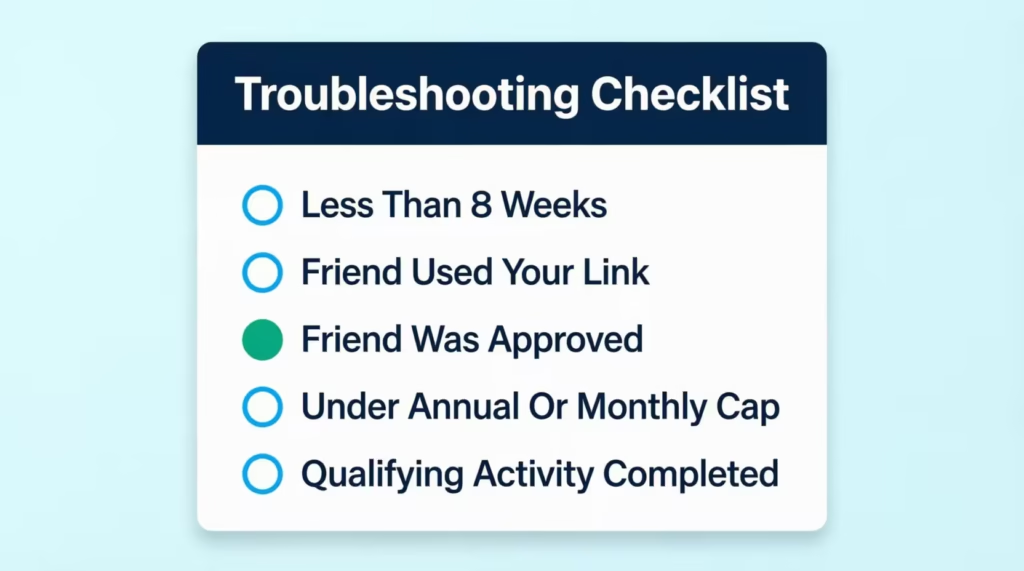
Has it been less than 8 weeks? If yes, wait. Chase support cannot speed up the posting timeline. Calling at week 6 wastes your time and theirs. Mark week 9 on your calendar from your friend’s approval date. If the bonus still hasn’t posted by then, move to the next step.
Did your friend actually use your link? This is the most common failure point. Ask them directly: did you click the link I sent, or did you go to Chase’s website on your own? If they went directly to chase.com and applied, the application isn’t tagged to your referral. There’s no way to fix this after the fact. Chase cannot retroactively attach a referral code to an already-approved application. Painful, but final.
Was your friend actually approved? Some people apply and forget to mention they got denied. Ask. If Chase denied the application or your friend withdrew it, no bonus is owed because the program is approval-contingent.
Have you hit your annual or monthly cap? Check the referral page for the card. It usually shows your year-to-date earnings against the cap. If you’ve maxed out, the bonus simply won’t post, and Chase won’t notify you.
Did your friend complete qualifying activities? For checking referrals, this is critical. Your friend has to set up direct deposit or make qualifying debit transactions within their offer window. If they opened the account and never used it, no bonus.
If all five checks pass and it’s past 8 weeks, contact Chase. Use the secure message center inside your account rather than the phone line. Reference your friend’s approval date and your referral link, and ask them to investigate the missing posting. Keep a screenshot of your referral link and the dates you shared it, just in case.
How to Check If Your Referral Was Approved
Chase does not send you a notification when your friend is approved. This catches people off guard, especially those used to other referral programs that send “Your friend just signed up!” emails. With Chase, the bonus posting is the confirmation. When the points or cash back land in your account, you know the referral worked.
If you want a status update before then, the only option is to ask your friend directly. They know whether they got approved, and they can share that information with you. There’s no portal where you can log in and see “Referral pending: 3, Referral approved: 7.” That dashboard doesn’t exist.
Past the 8-week mark with nothing in your account? At that point, you have enough evidence to contact Chase support. They can look up whether a referral was logged against your account at all, which tells you immediately whether the link tracking worked.
Is the Chase Refer-A-Friend Bonus Taxable?
Yes. Chase treats referral bonuses as taxable income, not as a rebate on your own spending. This is the same treatment most banks use, and it’s a key reason referral rewards differ from regular credit card rewards. Sign-up bonuses and cash back on purchases are generally considered rebates and aren’t taxable. Referral bonuses are payments to you for bringing in a new customer, which the IRS treats as miscellaneous income.
Chase issues a Form 1099-MISC at year-end if your total referral earnings from Chase hit the reporting threshold.
Important update for 2026: under the One Big Beautiful Bill Act, the 1099-MISC reporting threshold rose from $600 to $2,000, effective for tax year 2026. That means Chase only sends you (and the IRS) a 1099-MISC if your total referral income from Chase reaches $2,000 in the calendar year.
Points are valued for tax purposes at roughly 1 cent per point, which is the standard cash-redemption value, not the inflated travel value. If you earn 100,000 Ultimate Rewards points through referrals, Chase reports that as $1,000 of income on your 1099-MISC. Under the new $2,000 threshold, that wouldn’t trigger a form, but a full Sapphire annual cap plus a Freedom annual cap would put you over.
Here’s the part many people miss:
Even if you don’t receive a 1099-MISC, the income is still reportable. The IRS rule is that all income is taxable unless specifically excluded, regardless of whether you receive a form. If you earn $1,500 in Chase referral cash back, you won’t get a form. But you still need to report it on your return. Most people don’t, and enforcement at small dollar amounts is minimal, but the rule stands.
📌 Did You Know: The IRS requires you to report all income, even amounts that don’t generate a 1099. The $2,000 threshold is just when Chase has to issue the form, not when the income becomes taxable.
This is general information, not tax advice. Chase referrals in large amounts can affect your tax situation. This impact depends on your filing status, deductions, and other income. If you’re earning thousands of dollars in referral bonuses, talk to a CPA about how to report them properly.
What Happens When Your Friend Uses Your Referral Link
Your friend’s experience using your link is almost identical to applying directly. They click your URL, land on the Chase application page for the specific card or account, and fill out the standard application.
The welcome bonus they see is the standard public new-cardmember offer for that product. Using your link doesn’t reduce their welcome bonus or change the terms they qualify for. In most cases, it’s the same offer they’d see if they walked in cold from a Google search.
There’s no negative effect on your friend’s approval odds. Chase runs the same underwriting on a referred application as on a direct application. Same credit pull, same income verification, same internal scoring.
Your friend isn’t penalized for using a referral, and they don’t get a worse rate, lower credit limit, or stricter terms. This is worth saying clearly because some people assume “going through a referral” means being routed to a different application path with different standards. It doesn’t.
Your friend also doesn’t see anything about you in their application. Chase keeps the referrer’s identity confidential. The only thing your friend might notice is the “Refer-a-Friend” language on the offer page they land on, which is generic. They won’t see your name, account number, or any identifying information. The privacy works in both directions.
One question people ask is this: Does using a referral link change welcome bonus eligibility? Does it affect Chase’s 5/24 rule or other internal rules? No. The referral link doesn’t bypass those rules, but it also doesn’t add new ones.
If your friend would have been approved applying directly, they’ll be approved applying through your link. If they’re over 5/24 or otherwise restricted, the referral link doesn’t help. The link only handles the tracking, not the underwriting.
Frequently Asked Questions (FAQs)
How do I refer a friend on Chase?
Open your Chase app or sign into chase.com, find the “Refer a friend” option on any account, and generate your personalized link. Share it by text, email, or copy-paste, but never retype it manually, or the tracking fails.
How do I refer a friend in the Chase app?
Sign into the app, tap any card or checking account, then scroll to the “Refer a friend” tile under “Things you can do.” Tap “Refer now” to load your personalized page and choose how to send the link.
Where is Refer a Friend on the Chase app?
It’s located on the account details screen for any card or checking account you hold, usually under a “Things you can do” section. Tap into any account first if you want to refer someone for a product you don’t personally have.
How much does Chase give you for referring a friend?
Payouts vary by product: Sapphire cards pay 15,000 Ultimate Rewards points, Freedom Unlimited and Flex pay $50 cash back, Freedom Rise pays $25, and checking accounts pay $50 cash. Each product has its own annual cap.
What is the $50 referral bonus for Chase?
The $50 bonus applies to Chase Freedom Unlimited, Freedom Flex, and checking account referrals. It’s capped at $500 per year for Freedom cards and $500 per year (10 referrals) for checking.
Does Chase Bank pay for referrals?
Yes, Chase pays referral rewards for both credit cards and checking accounts once your referred friend is approved. The currency depends on the product, ranging from cash back to Ultimate Rewards points to airline or hotel miles.
How long does it take to get the Chase referral bonus?
Plan for about 8 weeks from your friend’s approval date, though many bonuses post within 2 to 4 weeks. The clock starts when Chase approves the application, not when your friend applies.
How do I check if I got my Chase referral bonus?
Chase doesn’t send a notification when your friend is approved, so check your account statement for a bonus labeled “Refer A Friend.” If nothing has posted after 8 weeks, contact Chase through the secure message center.
Is the Chase Refer-A-Friend bonus taxable?
Yes, Chase treats referral bonuses as taxable income and reports them on Form 1099-MISC if your total referral earnings reach $2,000 in 2026. Even without a 1099, the income is still reportable to the IRS.
Can you refer someone for a Chase card you don’t have?
Yes, you can generate a referral link for any participating Chase card as long as you hold at least one eligible Chase product. You just can’t refer yourself or refer someone for a card they already own.
Wrapping Up
The Chase referral program offers great earning potential for those in the Chase ecosystem. But you need to manage the details correctly. Create your link in the app or on your desktop. Share it with consent. Don’t retype it by hand. Also, keep an eye on the dual cap structure. It limits both annual and monthly earnings.
The 8-week payout window is important. Missing bonuses often come from link errors or unapproved applications. Also, any earnings around or over $2,000 in 2026 will probably trigger a 1099-MISC.
For most readers, the best way is to refer two or three friends each month. Use multiple Chase products instead of grouping everyone together. This keeps you under the soft cap and ensures each bonus posts on time.
If you know someone who’s been eyeing a new Chase card or checking account, send them this guide before they apply. It could be worth hundreds of dollars to both of you.