I’ve spent years helping Chase cardholders climb the ladder inside their existing accounts, and the same question keeps coming up: how do I move to a better Chase card without opening a fresh one? You’ve paid on time, your spending has grown, and now your starter card feels too small. The worry is real. A new application means a hard pull, a reset clock, and possible rejection.
The fix is simple. You can request a Chase credit card upgrade, also called a product change, and keep your account history intact.
Below, I’ll walk you through the rules, the steps, and the exact paths for each card family.
Key Takeaways
This guide explains how to upgrade a Chase credit card through a product change, covering eligibility rules, card family restrictions, credit score impact, fee proration, and the exact phone and online request steps.
Core Facts:
- A product change requires at least 12 months of account age, on-time payments in the last 12 months, good account standing, and a credit limit meeting the new card’s minimum.
- Visa Infinite cards such as the Sapphire Reserve and United Club Infinite require at least a $10,000 credit limit for eligibility.
- A product change does not trigger a hard inquiry; Chase may run only a soft pull, which does not lower a credit score.
- Upgrading within the same card family keeps the account number, opening date, credit limit, APR, and accumulated points intact.
- Upgraded cardholders do not receive the new card’s welcome bonus, though targeted offers sometimes provide 10,000 to 20,000 bonus points.
- Annual fees are prorated: moving to a higher-fee card bills the new fee while refunding part of the old one, and downgrading refunds the unused portion.
Best for:
- Cardholders with at least 12 months of account history who want a higher-tier Chase card without a hard inquiry.
- People over Chase’s 5/24 rule who cannot open new cards but still want access to better card features.
- Cardholders whose credit limit and profile meet a target card’s requirements and who want to preserve their existing points and account age.
Chase Credit Card Upgrade Eligibility Requirements
Before you call Chase, you need to know if you even qualify. A product change is not automatic. Chase sets clear rules for who can move up, and missing any of them will result in a quick denial. The good news is that the checklist is short and easy to check on your own.
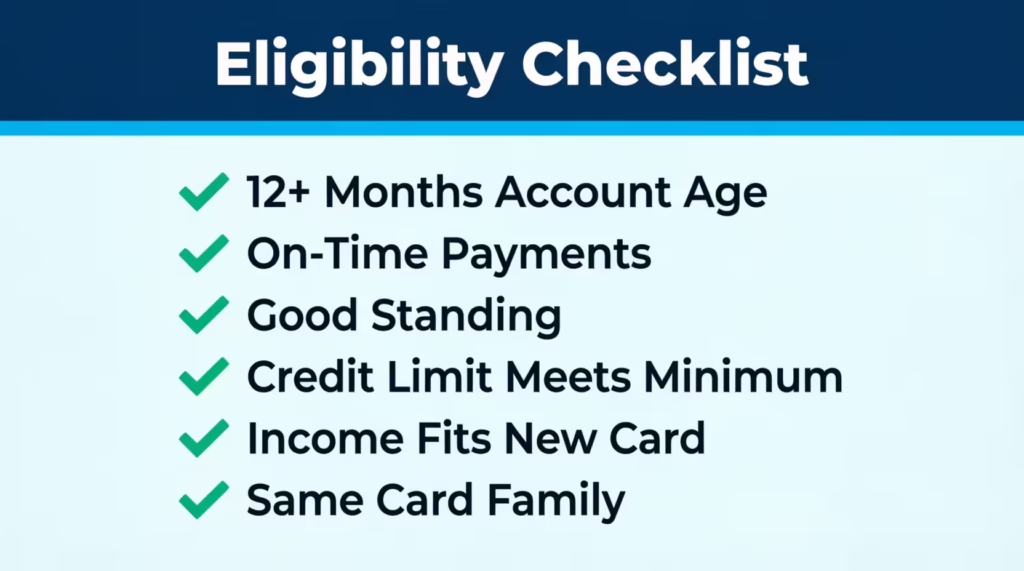
Here is the eligibility checklist you can run through in two minutes:
- Account age of at least 12 months. Your current card must be open for a full year. Chase counts from the account opening date, not from the day you got the card in the mail.
- On-time payments. Late payments in the last 12 months can block your request. A clean record is key.
- Good standing. Your account must not be closed, restricted, or under fraud review.
- Credit limit that meets the new card’s floor. Some higher-tier cards have a minimum credit line. For Visa Infinite cards like the Chase Sapphire Reserve or United Club Infinite, you need at least a $10,000 credit limit.
- Income and credit profile that fit the new card. Chase may do a soft pull to check your file.
- Same card family. You can only switch within the same product family. More on that below.
If you meet all six points, your odds are strong. If you miss one, fix it first, then try again.
Same-Family Restriction (Personal, Business, and Co-Branded Cards)
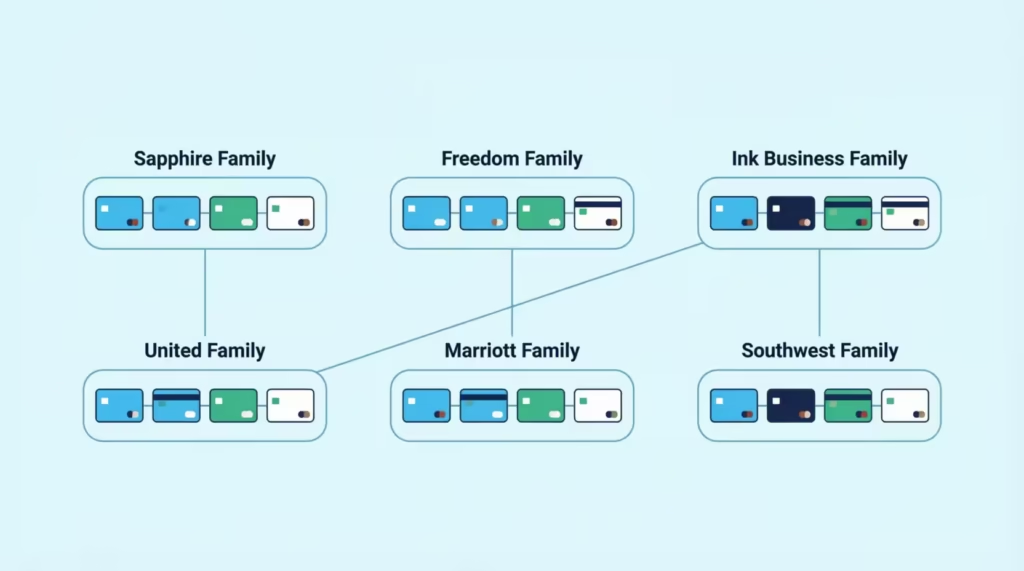
Chase groups its cards into families, and a product change must stay inside one family. This rule trips up many people. You cannot switch a Freedom Unlimited into a Sapphire Preferred through a product change, for example. They sit in different families.
The main Chase card families work like this:
- Sapphire family: Sapphire Preferred and Sapphire Reserve sit together.
- Freedom family: Freedom Unlimited, Freedom Flex, and Freedom Rise sit together.
- Ink Business family: Ink Business Cash, Ink Business Unlimited, and Ink Business Preferred sit together.
- United co-branded family: United Gateway, United Explorer, United Quest, and United Club Infinite sit together.
- Marriott Bonvoy co-branded family: Bold, Boundless, and Bountiful sit together.
- Southwest co-branded family: Plus, Premier, and Priority sit together.
Personal cards cannot swap into business cards. Co-branded cards cannot swap into Chase-only cards. If you want to jump families, you must apply for a new card, which brings a hard inquiry and starts a fresh account.
💡 Pro Tip: If your target card sits in a different family, ask Chase to keep your current card open and apply for the new one as a second card. You keep your history and still get the new welcome bonus.
Does Upgrading a Chase Card Hurt Your Credit Score?
This is the fear that stops most people from asking. The short answer is NO. A product change does not hurt your credit score in any real way. Chase does not run a hard inquiry when you switch cards within the same family. The account number, opening date, and payment history all stay the same. Your credit report will still show the same tradeline, just with a new card name.
There is one small point to watch. Chase may run a soft pull to confirm your income or profile fits the new card. A soft pull does not show up on your report to lenders and does not lower your score. Compare this to a new application, which brings a hard inquiry that can drop your score by 5 to 10 points and stays on your report for two years.
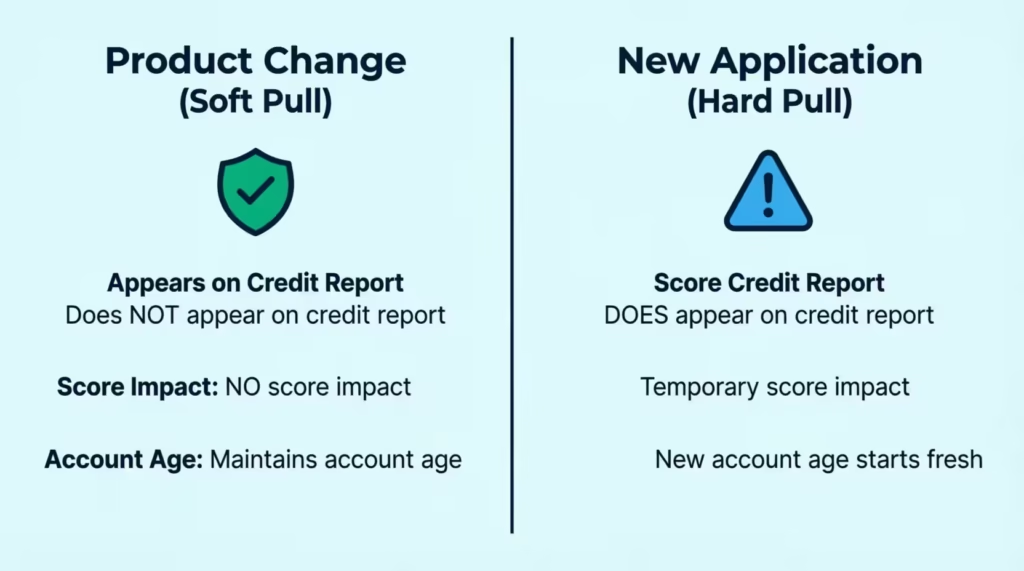
Data from Experian confirms that hard inquiries can affect scores for up to 12 months, while soft inquiries have no effect. So the product change route is the safer path if you want to protect your file. Your account age also stays the same, which matters a lot.
What Happens to Your Credit Limit, APR, and Rewards Points
Once your product change goes through, the mechanics of your account shift a bit. But most of the numbers stay the same. Knowing what carries over and what changes will help you plan.
Here is what to expect for each item:
- Credit limit: Your current credit limit moves with you. If you had a $12,000 limit on your old card, your new card starts at $12,000. Chase will not lower it just because you switched.
- APR: Your existing APR usually stays the same. Some cards have a set APR range, and Chase may adjust it to fit the new card’s terms. Check your new cardmember agreement to be sure.
- Rewards points: All your unused points move to the new card. If you switch from a Freedom Flex with cash-back points to a Sapphire Preferred, your points shift into the Chase Ultimate Rewards travel portal at the higher redemption value. This is one of the top reasons people upgrade.
- Balance transfers and pending charges: Any balance on your old card moves to the new card. Autopay, statement date, and account number stay the same.
📌 Did You Know: Points earned on a Freedom card gain more value when moved to a Sapphire Preferred or Reserve. The same 50,000 points worth $500 in cash back can become $625 or $750 in travel value through the Ultimate Rewards portal.
What Happens to Your Annual Fee
The annual fee is the trickiest part of a product change. If you move to a card with a higher fee, Chase will bill the new fee on your next statement. If you move to a lower-fee or no-fee card, Chase may refund a prorated share of your old fee.
Here is how the fee math works in real life:
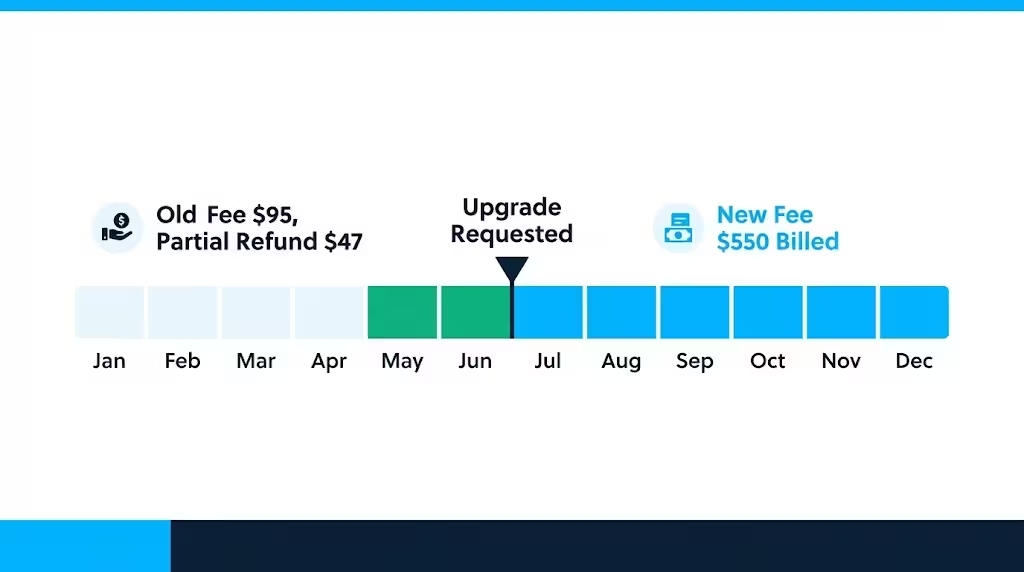
- Upgrading to a higher-fee card mid-year: Chase often prorates the old fee refund and charges the new fee in full. For example, Sarah moved from a Sapphire Preferred ($95 fee) to a Sapphire Reserve ($550 fee) six months into her year. She got about $47 back on the old fee and was billed the full $550 for the new card.
- Downgrading to a no-fee card: Chase refunds the unused part of your old annual fee. If you paid $95 four months ago and downgrade now, you get about $63 back.
- Timing tip: Some cardholders wait until right after their new annual fee posts, then downgrade for a full refund. Chase policy allows a refund within 30 to 60 days of the fee posting.
Will You Get the New Card’s Sign-Up Bonus?
This is the biggest trade-off of a product change. When you upgrade through Chase, you do not get the new card’s welcome bonus. Chase treats the switch as a change to your existing account, not a new one. So the 60,000-point offer on the Sapphire Preferred or the 75,000-point offer on the Reserve stays out of reach.
There are a few exceptions to know:
- Targeted upgrade offers. Chase sometimes emails or mails targeted offers to select cardholders. These can include a smaller bonus, like 10,000 to 20,000 points, if you upgrade within a set window. Log in to your Chase account and check the “Just for You” tab often.
- Retention offers. If you call to downgrade or cancel, Chase may offer bonus points or a statement credit to keep you as a customer. This is not a sign-up bonus, but it can add real value.
- 5/24 rule impact. If you are over the 5/24 rule (five or more new cards from any bank in the last 24 months), you cannot get approved for a new Chase card anyway. A product change is your only way up.
The choice comes down to math. If you can get approved for the new card as a fresh application and you want the full welcome bonus, apply for a new card. If you want to protect your history, skip the hard pull, or you are stuck at 5/24, product change is the smart move.
How to Request a Chase Card Upgrade
Once you know your target card and confirm eligibility, the request itself is quick. Chase gives you two ways to ask: by phone or online. Both work, but each has its own strengths. Pick the one that fits your comfort level.
Requesting an Upgrade by Phone
Calling Chase is the most reliable way to request an upgrade. A live agent can check for targeted offers, confirm your fit, and process the switch in one call. Most upgrades finish in under 15 minutes.
Follow these steps for a smooth call:
- Dial the number on the back of your card. Or call Chase customer service at 1-800-432-3117.
- Verify your identity. Have your card number, last four of your Social Security number, and account details ready.
- Ask for a product change. Use this script: “Hi, I’d like to request a product change on my current card. I’d like to move to the [target card name]. Can you check if I’m eligible and if there are any offers on my account?”
- Ask about targeted offers. Say: “Before we process the change, can you check for any upgrade offers or bonus points on my account?”
- Confirm the fee, credit limit, and effective date. Get the details in clear terms before you agree.
- Ask for a confirmation number. Write it down and save the call date.
The agent will process the change while you wait. You will hear “approved” or “let me check” within a few minutes.
Requesting an Upgrade Online
The online path works well if you spot a targeted upgrade offer in your account. Not every card has an online upgrade option, so this method is limited.
Follow these steps:
- Log in to your account at Chase.com or the Chase mobile app on the Apple App Store or Google Play.
- Open your credit card account.
- Look for the “Upgrade Your Card” or “Just for You” section. If Chase has a targeted offer, it shows here.
- Review the offer terms. Check the fee, bonus, and effective date.
- Click “Accept” or “Upgrade Now.” Confirm your choice.
If no offer shows online, call instead. The phone agent can pull offers not shown on the site.
⚠️ Mistake to Avoid: Do not close your old card before the product change is confirmed in writing. If you close it first, you lose the account history and Chase will treat any new card as a fresh application.
How Long Approval and Card Delivery Take
Chase moves fast on product changes. Most requests get instant approval on the phone. Your new card ships in 7 to 12 business days through standard mail. You can ask for expedited shipping, which takes 2 to 3 business days, sometimes at no cost.
Your account will update the same day. You can start using your existing card number for online purchases in some cases, or wait for the new plastic to arrive. Points, credit limit, and history all shift over on the change date.
Chase Card Upgrade Paths by Card Family
Every Chase card family has its own set of upgrade steps. The rules stay the same, but the target cards, fees, and reasons to move up will differ. Below are the most common paths, with clear guidance for each.
How to Upgrade Chase Sapphire Preferred to Reserve (and Related Sapphire Moves)
This is the most popular upgrade path in the Chase lineup. The Sapphire Preferred ($95 annual fee) moves up to the Sapphire Reserve ($550 annual fee), which brings more travel perks, higher point value, and Priority Pass lounge access.
To make the switch:
- Check your credit limit. Sapphire Reserve is a Visa Infinite card, so you need at least a $10,000 credit line.
- Call Chase and ask for a product change to the Reserve.
- Confirm the fee timing. The full $550 will bill on your next statement.
- Update your Priority Pass and travel credits. These kick in as soon as the change goes through.
You can also move down. If the Reserve fee feels too high, you can downgrade to the Preferred or even to a no-fee Freedom card after the first year.
How to Upgrade Chase Freedom Unlimited or Freedom Flex
The Freedom Unlimited and Freedom Flex are both no-annual-fee cash-back cards. Since they sit in the same family, you can switch between them freely. You can also downgrade a Sapphire card into a Freedom card if you want to drop the annual fee but keep your history.
Steps:
- Call Chase and ask to switch between Freedom Unlimited and Freedom Flex, or to downgrade a Sapphire card into a Freedom card.
- Confirm the change is fee-free.
- Move any Ultimate Rewards points before the switch if you want to keep travel portal value. Points on a Freedom card only earn 1 cent per point unless paired with a Sapphire or Ink card.
How to Upgrade Chase Business Credit Card
The Ink Business family covers three cards: Ink Business Cash (no fee), Ink Business Unlimited (no fee), and Ink Business Preferred ($95 fee). Product changes between them are simple.
Steps:
- Call the Chase business card line.
- Ask for a product change to the target Ink card.
- Confirm your points move to the higher-value Ink Business Preferred if you plan to switch to the Preferred. Points on the Preferred earn 1.25 cents through travel.
Business cards do not report to your personal credit report, so the impact on your personal FICO score is even smaller.
How to Upgrade Chase United Credit Card
The United co-branded family runs from the no-fee United Gateway up to the top-tier United Club Infinite ($525 fee). You can move up or down within this line.
Common paths:
- United Gateway to United Explorer ($95 fee) for free checked bags and priority boarding.
- Explorer to United Quest ($250 fee) for more miles and travel credits.
- Quest to United Club Infinite for full lounge access. Requires a $10,000 credit limit.
Call Chase or United’s card line to request the change.
How to Upgrade Chase Marriott Credit Card
The Marriott Bonvoy family includes three main cards: Bonvoy Bold (no fee), Bonvoy Boundless ($95 fee), and Bonvoy Bountiful ($250 fee). Each card offers more free-night awards and elite status perks as you move up.
Steps:
- Call Chase and ask for the Marriott card product change line.
- Confirm the annual fee and free-night value. The Boundless free night is worth up to 35,000 points, and the Bountiful gives 85,000-point free nights.
- Check your elite status carryover. Product changes keep your status track intact.
How to Upgrade Chase Southwest Credit Card
The Southwest family has three tiers: Plus ($69 fee), Premier ($99 fee), and Priority ($149 fee). Each tier adds more points, travel credits, and upgraded boarding options.
The Companion Pass progress does not reset with a product change. That is a big win for anyone chasing the pass. All your qualifying points and flights stay in place.
Steps:
- Call Chase Southwest support.
- Ask for a product change to Premier or Priority.
- Confirm your Companion Pass points carry over.
How to Upgrade Chase Student Credit Card
The Chase Freedom Rise is Chase’s student and starter card. Chase automatically reviews these accounts for an upgrade after about a year of on-time payments.
Steps:
- Wait for the automatic review. Chase often sends an email offer around the 12-month mark.
- If no offer arrives, call Chase and ask to upgrade to a Freedom Unlimited or Freedom Flex.
- Confirm your credit limit will meet the new card’s needs.
Some student cardholders may also qualify for a direct move to a Sapphire Preferred if their credit profile has grown.
How to Upgrade Your Current Chase Credit Card (General Process Recap)
For any Chase card not covered above, the general process is the same:
- Confirm your account is at least 12 months old and in good standing.
- Identify the target card within your current card family.
- Check your credit limit against the new card’s minimum.
- Call Chase using the number on the back of your card.
- Ask for a product change and check for targeted offers.
- Confirm the fee, limit, and effective date before you agree.
- Save your confirmation number and watch for your new card in 7 to 12 business days.
What to Do If You’re Declined or Have No Upgrade Offer
A denial does not mean the end of the road. Chase may say no for several reasons, and each one has a fix. Here is how to respond and try again.
Common reasons for a denial:
- Account too new. Wait until your account hits 12 months old.
- Credit limit too low. Ask Chase for a credit limit increase first, then request the upgrade after the higher limit posts.
- Late payments. Wait until your last 12 months show a clean record.
- Income does not fit the target card. Update your income in your Chase profile if it has grown.
- No targeted offer on file. Call again in a few weeks. Offers refresh often.
Try these next steps:
- Request a reconsideration. Call the Chase reconsideration line at 1-888-270-2127 for personal cards or 1-800-453-9719 for business cards. Explain your case and ask for a manual review.
- Improve your profile. Pay down other card balances, add income, or wait a few months.
- Apply as a new customer. If a product change is off the table, a new application may still work. Check the 5/24 rule first.
- Try a downgrade instead. If the higher card is out of reach, move to a lower-fee card in the same family to keep your history. You can try to upgrade again later.
Consider David, a marketing director at a Chicago consulting firm. He was denied a Sapphire Reserve upgrade because his credit limit was $8,500. He asked for a credit limit increase to $12,000, waited 60 days, then called again. The second request went through with no issue.
Frequently Asked Questions (FAQs)
Can I upgrade an existing Chase credit card?
Yes, Chase calls this a product change, and it lets you move to a better card while keeping your account number, opening date, and payment history intact. You need at least 12 months of account age and a clean payment record to qualify.
Does upgrading a Chase credit card affect credit score?
No, a product change does not trigger a hard inquiry, so your score stays protected. Chase may run a soft pull to confirm eligibility, but soft pulls never appear on your report or lower your score.
Is it better to upgrade my Chase card or get a new one?
Upgrading protects your account history and skips the hard inquiry, but you miss the new card’s welcome bonus. Applying fresh gets you the bonus but resets your account age and adds a hard pull, so the choice depends on which you value more.
Does Chase automatically upgrade your card?
Sometimes. Chase automatically reviews Freedom Rise student accounts for an upgrade around the 12-month mark and often sends an email offer, but most other cards require you to call and request the change yourself.
Can I upgrade from Chase Freedom to Sapphire?
Freedom and Sapphire sit in different card families, so a standard product change between them isn’t guaranteed, though Chase does allow downgrading a Sapphire card into a Freedom card. Call Chase directly to confirm what movement is available on your account.
Is $10,000 a good credit limit for a Chase card upgrade?
It’s the minimum needed for Visa Infinite cards like the Sapphire Reserve or United Club Infinite. If your limit falls short, request a credit limit increase first and wait before reapplying for the upgrade.
Is it worth it to upgrade to Chase Sapphire Preferred?
It depends on the fee jump, since Preferred costs $95 a year compared to a no-fee Freedom card. The upgrade pays off if you value moving points into the Ultimate Rewards travel portal, where the same points earn a higher redemption value.
What happens to my annual fee when I upgrade my Chase card?
Moving to a higher-fee card bills the new fee right away, though Chase often prorates a refund on the old one. Downgrading to a no-fee card refunds the unused portion of what you already paid.
How long does a Chase card upgrade take to process?
Most product change requests get instant approval over the phone, and your account updates the same day. The physical card ships in 7 to 12 business days, or 2 to 3 days with expedited shipping.
Wrapping Up
Moving up inside the Chase lineup is one of the smartest ways to grow your rewards without a hard inquiry or a fresh account. The rules are clear: 12 months of history, a clean payment record, the right credit limit, and a target card in the same family. Points, limits, and account age all carry over, though you’ll miss the welcome bonus.
Based on the mechanics laid out above, the most effective approach is to call Chase, ask for targeted offers, and confirm the fees before you agree.
If you know someone stuck with a starter Chase card and hunting for more value, share this guide so they can plan a smart product change too.