Getting your Chase card declined at the worst possible moment is stressful. You don’t know if it’s a quick fix or something more serious. That’s the real problem with a Chase card not working: it’s hard to know where to start.
The good news is that most declines have a clear cause and a fast solution.
In this guide, you’ll discover common reasons why your card stopped working. We’ll cover issues such as fraud holds, physical damage, and online checkout errors. Each reason comes with step-by-step fixes.
Key Takeaways
This guide explains why a Chase card stops working and how to fix it, covering account-level blocks, fraud holds, physical card damage, online checkout errors, and context-specific failures like gas pump pre-authorizations and ATM limits.
Core Facts:
- The fastest first step is checking the Chase mobile app for alerts or “card locked” messages, as many fraud holds can be cleared in seconds by responding to an in-app verification prompt.
- Chase fraud holds trigger automatically when spending patterns change (new location, unusual merchant type, large purchase, or rapid transactions) and can be lifted through the app or a single phone call.
- Chase debit cards have a daily purchase limit and a separate daily ATM withdrawal limit, both of which reset at midnight Eastern Time; temporary increases can be requested by phone.
- Gas pump declines often result from a pre-authorization request (typically $100 or more) that exceeds available funds, not the actual fuel cost; paying inside with a cashier charges the exact amount instead.
- Online declines are most commonly caused by a billing address or ZIP code mismatch between checkout and the address Chase has on file, or an incorrect CVV entry.
- A replacement card does not resolve account freezes or restrictions; the underlying account issue must be fixed first before a new card will work.
Best for:
- Chase cardholders whose card was declined unexpectedly and need to identify whether the cause is a fraud hold, limit, physical damage, or account restriction.
- Debit card users confused by gas pump or ATM declines that happen despite having sufficient funds in their account.
- Anyone preparing to travel or make a large purchase and wanting to prevent Chase fraud blocks before they happen.
Start Here: What Kind of Failure Are You Dealing With?
Before trying any fix, spend 60 seconds figuring out what type of failure you’re dealing with. Most people skip this step and end up troubleshooting the wrong thing. Answering four simple questions first can save you a lot of frustration.
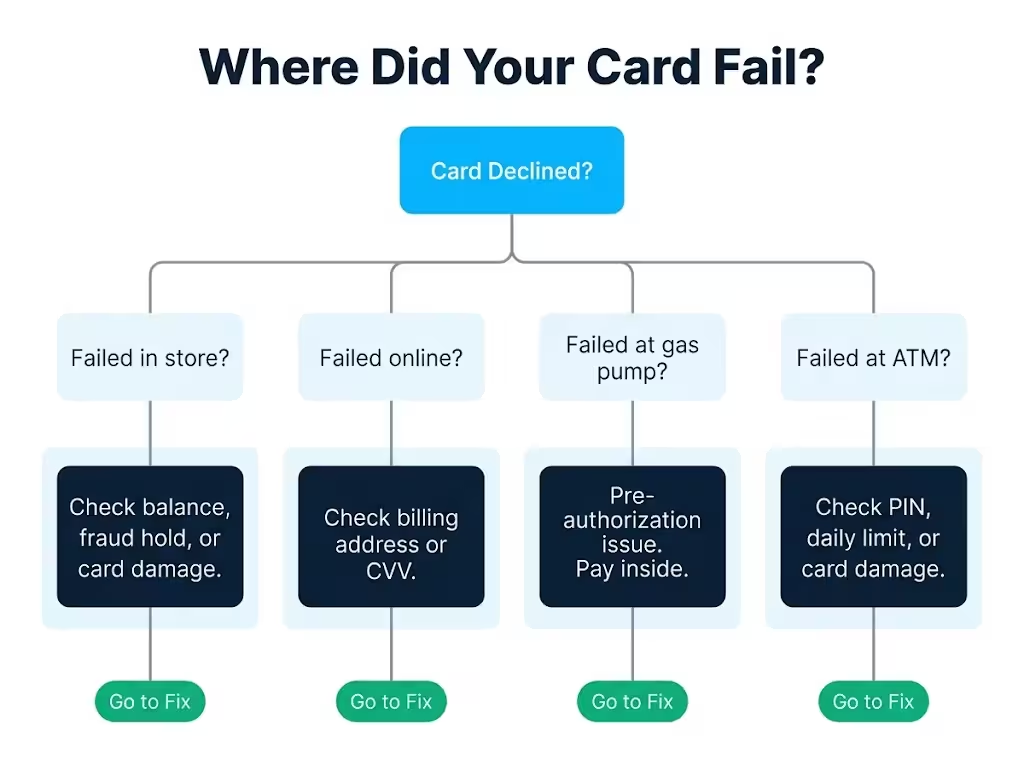
Question 1: Where did the card fail?
- Failed in a store at the register? The issue is likely your account balance, a spending limit, a fraud hold, or the physical card itself.
- Failed online but works in person? The cause is more likely a billing address mismatch, a wrong CVV, or an online security flag on your account.
- Failed at a gas pump but worked at a grocery store? That’s almost always a pre-authorization issue, not a real decline.
- Failed at an ATM? Think PIN errors, daily withdrawal limits, or a damaged card.
Question 2: Did Chase send you a text, email, or app notification?
If yes, Chase flagged the transaction itself. That points directly to a fraud hold or security block. If no notification came through, the failure is more likely on your side. It could be a limit, a card issue, or a checkout error.
Question 3: Does the card work anywhere else right now?
If the card fails at one specific store or website but works fine elsewhere, the problem may be with that merchant. A terminal outage, a payment processor error, or a merchant category restriction can lead to a failure at one location. There would be no issues on Chase’s end.
Question 4: Did you just receive this card, or did you recently report it lost?
A brand-new card that hasn’t been activated won’t work anywhere. A recently reported lost card is deactivated the moment you file the report.
Hard block vs. soft decline: what’s the difference?
This matters before you try again. A soft decline is a temporary rejection. It may go through if you retry with a different method, like using the chip instead of tap, or re-entering your card number.
A hard block means the card or account has been restricted. Retrying won’t help. Worse, swiping a hard-blocked card many times at a terminal can sometimes trigger extra security flags on your account.
If Chase sent you a notification, or if the card fails everywhere you try it, treat it as a hard block. Move straight to contacting Chase rather than retrying.
Use your answers above to jump to the section that matches your situation.
Account-Level Issues That Block Chase Cards
A large share of card declines has nothing to do with the card itself. The card is fine. The issue is with the account behind it. Account-level blocks are often the simplest to fix once you know which one applies to you.
The fastest way to check your account status is through the Chase mobile app or by logging into chase.com. Once you’re in, look at your available balance or available credit. Not your total balance: your available balance. Those two numbers are different, and that difference matters a lot.
Insufficient Funds or Credit Limit Reached
This is the most common reason for decline for both Chase debit and credit cardholders.
For debit cardholders, the transaction gets rejected the moment it would overdraw your checking account, unless you have overdraft protection set up. Even with overdraft protection enabled, some transactions may not be covered depending on how your account is configured.
For credit cardholders, hitting your credit limit doesn’t mean Chase will approve the transaction anyway. Unlike some issuers, Chase does not offer automatic over-limit approval as a default.
The charge will simply be declined. If you’ve opted into Chase’s over-limit feature on a specific card, you may be approved but charged a fee. However, this feature isn’t available on all Chase products.
To fix this right now:
- Open the Chase app and tap your card or account.
- Look at your available credit (for credit cards) or available balance (for debit accounts). Not the total credit limit or total balance. The available part.
- If you’re at or near zero, make a payment. Chase often updates your available credit within minutes of a payment posting, though it can take up to one business day in some cases.
- For debit accounts, a transfer from a linked savings account may restore available funds immediately.
One common point of confusion: a pending charge from a recent purchase may be holding funds you think are available. That pending hold counts against your balance even before it officially clears.
Daily Purchase or Transaction Limits
Chase debit cards carry a default daily purchase limit. This is separate from your account balance. Even if you have $4,000 in your checking account, a series of purchases that exceed the daily limit will result in a decline.
Chase sets these limits based on account type and history. The typical default limit for a Chase debit card is around $3,000 per day for purchases, though this varies. ATM withdrawals have a separate daily cap, usually around $500 to $1,000, depending on your account.
To check your specific limit:
- Open the Chase app, go to your account, and look under “Account Services” or “Card Controls.”
- Call Chase directly at the number on the back of your card and ask for your current daily debit limit.
To request a temporary increase:
- Call the number on the back of your card and ask for a same-day temporary limit increase. Chase can often grant this for a 24 to 48-hour window.
- This request is faster over the phone than through the app for most account types.
⚠️ Mistake to Avoid: Don’t assume your daily limit resets mid-day. Chase debit card daily limits reset at midnight Eastern Time. If you’re planning a big purchase late in the day and have already spent a lot, wait until after midnight. You can also call Chase to ask for a temporary increase before trying again.
Chase Fraud Detection Blocked Your Card
Chase’s fraud detection system runs around the clock. It looks at every transaction and compares it against your normal spending patterns. When something looks unusual, it can automatically block the card before you even realize anything happened.
This is one of the most common reasons a Chase card stops working without warning. The frustrating part is that the block can happen right in the middle of a purchase. Also, Chase doesn’t always send a real-time notification quickly enough for you to understand why.
What triggers Chase’s fraud system?
Common triggers include:
- A purchase in a city or country where you don’t normally shop
- A transaction at a merchant type you’ve never used before (like a wire transfer service or a high-value electronics store)
- Several purchases in a short window of time
- A large purchase that’s significantly higher than your typical spending
- An online purchase at a merchant that Chase’s system has flagged as higher risk
None of these means you’ve done anything wrong. Chase’s system blocks first and asks questions later. It’s a protective measure, but it can create real inconvenience.
How to confirm a fraud hold is in place:
- Check the Chase app. Open the card that was declined and look for any alerts or messages. In many cases, you’ll see a notification directly in the app.
- Check your email and text messages. Chase may have sent a verification request asking you to confirm whether the transaction was yours.
- If you don’t see any notification, call the number on the back of your card. The automated system will usually tell you if your card has a hold on it.
How to clear a fraud hold:
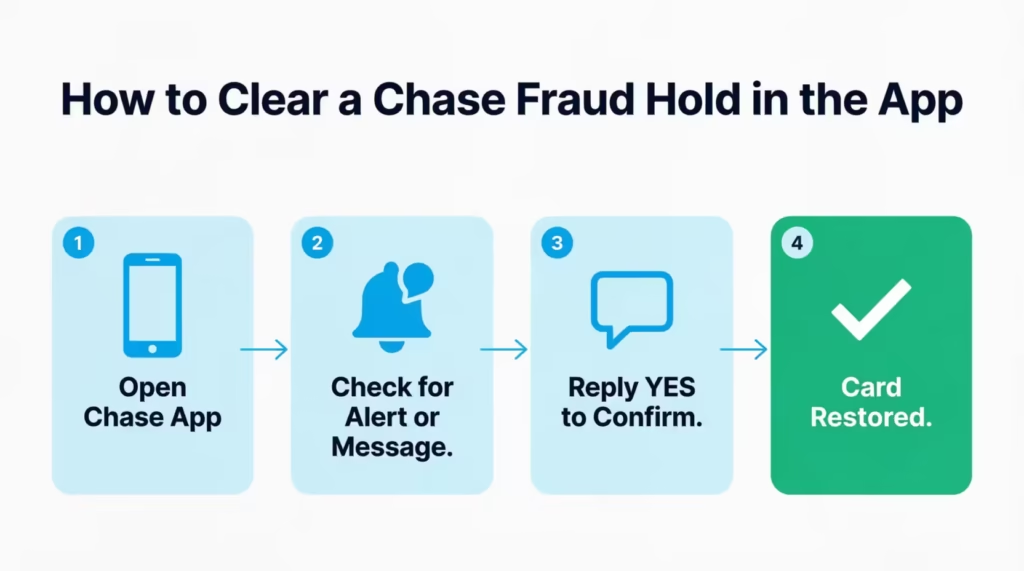
Many fraud holds can be resolved without a phone call. Here’s the self-service path first:
- Open the Chase app.
- If Chase sent a fraud alert text or push notification, respond “YES” to confirm the transaction was yours. Often, this lifts the hold immediately.
- If no message came through, look for a “Card is locked” or “Account alert” message inside the app and follow the steps there.
If the app doesn’t resolve it, call Chase at the number on the back of your card. Tell the representative exactly where and when the card was declined. They can manually review and lift the hold in most cases during the same call. The entire call typically takes under 10 minutes.
Travel to a New Location Triggered the Block
Traveling is one of the most reliable fraud triggers in Chase’s system. When your card suddenly shows activity in a different state or country, the system flags it, especially if you haven’t made purchases in that area before.
The best way to prevent this is to set a travel notice before you leave. Here’s how:
- Open the Chase app.
- Tap the profile icon, then go to “Manage travel.”
- Enter your destination and travel dates.
- Submit the notice.
Chase will note your travel plans and give your card more flexibility to approve transactions in that region during your trip. This takes about two minutes to set up and can save you a lot of trouble at checkout.
If you’re already traveling and the block has happened, call the international Chase customer service number listed on the back of your card and on chase.com. International collect calls are accepted. Ask the representative to lift the travel block and set the travel notice retroactively.
💡 Pro Tip: Set your travel notice even for nearby states. Chase’s fraud system can flag out-of-state purchases, especially if you live near a state border and rarely cross it. A quick notice before a weekend trip takes about two minutes and is worth doing every time.
Your Chase Card Has a Physical Problem
Sometimes the card itself is the problem, not the account. Physical damage is easy to overlook because it often develops gradually. A card that worked fine six months ago may have a worn magnetic stripe, a damaged chip, or a failing NFC antenna. The failure can be inconsistent at first, which makes it hard to pin down.
EMV chip failures
The chip on your Chase card communicates with the terminal each time you dip it. If the chip is scratched, cracked, or has been exposed to extreme heat, it may fail to make a clean connection. Chip failures often present as “Please try again” messages, or terminals that ask you to swipe instead of dip.
To test whether your chip is the issue: try the card at two or three different terminals. If the chip fails at every terminal but the swipe works, the chip is likely damaged.
Magnetic stripe wear
The magnetic stripe on the back of your card degrades over time. Keeping your card next to your phone or near other magnetic items speeds up this process. A worn stripe may work at some terminals with strong readers and fail at others with older or weaker ones.
Contactless/NFC failures
Tap-to-pay uses a small antenna embedded in the card. This can be damaged by bending or cracking the card. If your chip still works but tap-to-pay doesn’t, the NFC antenna may be damaged while the chip remains functional.
How to test which payment method is failing:
Try all three at the same terminal in this order:
- Tap the card (contactless)
- Dip the chip
- Swipe the magnetic stripe
If one method fails but the others work, you’ve identified which part of the card is damaged. If all three fail at the same terminal, check whether the terminal itself is working with another card before assuming the card is fully broken.
If physical damage is confirmed, request a replacement card. Instructions for this are covered in the replacement card section below.
Card Expired or Not Yet Activated
Expired cards are one of the simplest decline causes, but are easy to miss. Your expiration date is printed on the front of the card in MM/YY format. If the current month and year are past that date, the card has expired.
Chase automatically sends a replacement card in the weeks before expiration, usually to the address on file. If you moved recently and didn’t update your address, that replacement may have gone to an old address.
Unactivated cards won’t work at all. When Chase sends you a new or replacement card, it must be activated before any transaction will go through. Chase declines every attempt on an unactivated card, even if the account is in perfect standing.
To activate a Chase card:
- Via the app: Open Chase, tap the card, and select “Activate card.”
- Via phone: Call the activation number printed on the sticker attached to the new card.
- Via chase.com: Log in and navigate to card management.
Activation usually takes effect right away.
Why Your Chase Card Is Not Working Online
Online transactions have extra security layers that in-person purchases don’t. When you swipe or dip a card at a physical terminal, the chip or stripe communicates directly with the payment network. Online, there’s no physical verification. So Chase and the payment network rely on matching data points to confirm the transaction is legitimate.
This is why a card that works at every store can still fail at an online checkout. The card itself is fine. The information submitted during checkout doesn’t match what Chase has on file.
Billing Address or ZIP Code Mismatch
Every online transaction goes through a verification check called the Address Verification System (AVS). This system compares the billing address you enter at checkout against the billing address Chase has on file for your account.
If those two addresses don’t match, even by something as small as “St.” vs. “Street” or a missing apartment number, AVS can return a mismatch. The merchant’s payment system may then reject the transaction automatically.
This happens more often than most people realize. Moving without updating your Chase billing address is the most common cause.
To fix this:
- Log in to your Chase account online or in the app.
- Go to “Profile and settings,” then “Contact information.”
- Update your mailing and billing address to match exactly what you plan to enter at checkout.
- Make sure the ZIP code matches, too.
After updating, try the transaction again. The fix is usually immediate.
CVV or Card Number Entered Incorrectly
Your CVV is the three-digit security code on the back of your Chase card. It’s required for most online purchases and must be entered exactly as printed.
A single wrong digit causes an immediate decline. Multiple failed CVV attempts at the same merchant can trigger a temporary security flag on your card for online transactions.
A few things to check:
- Make sure you’re reading the correct code. Chase Visa cards have a three-digit code on the back.
- If you’re entering from memory, double-check against the physical card.
- If you’ve made multiple failed attempts, call Chase to confirm no block has been placed on online transactions.
Your Chase Account Has Been Frozen or Restricted
A frozen or restricted account is different from a fraud hold. A fraud hold is usually temporary and can often be cleared in minutes through the app or a short phone call. A full account restriction is more serious. It typically requires Chase’s direct involvement to resolve, and it can take longer to sort out.
What causes an account restriction?
Common reasons include:
- Extended delinquency: Multiple missed minimum payments on a credit card account can lead Chase to suspend the card’s purchasing ability while the balance remains outstanding.
- A dispute in progress: If Chase is investigating a fraud dispute or a billing error on your account, a temporary restriction may be placed while the review is open.
- Suspicious activity investigation: If Chase’s compliance team flags a pattern of activity for review, the account may be restricted until the review concludes.
- Regulatory holds: In rare cases, accounts can be restricted due to compliance or legal requirements.
How to confirm your account is restricted (not just declined):
Open the Chase app and go to your account overview. If your account has a restriction, you’ll typically see a message or alert there. The card won’t simply show “declined.” The account page itself will reflect the restriction status.
If you don’t see anything in the app, call the number on the back of your card and ask specifically whether your account has any restrictions or flags on it.
What the resolution path looks like:
Unlike a fraud hold, most account restrictions cannot be resolved through the app. You’ll need to speak with a Chase representative. In some cases, they may direct you to a Chase branch for in-person identity verification.
If the restriction is due to a missed payment, making the payment and waiting for it to post is often the first step before Chase will lift the restriction. If it’s a compliance or dispute-related hold, the timeline depends on the review process. Chase can give you more details about that by phone.
Does a restriction affect all Chase accounts?
Not always. If you have various Chase accounts, such as a checking account and a credit card, a restriction on one does not automatically apply to the other. This is true unless the issue is tied to your overall customer relationship with Chase. A Chase representative can tell you which accounts are affected.
Chase Card Failing in Specific Contexts – Gas Pumps, ATMs, and Pre-Auth Situations
One of the most confusing card problems is when a card works at some locations but not others. Your card worked fine at Target this morning, but it failed at the gas pump an hour later. Or it worked at one ATM last week and fails at a different one today. These context-specific failures have nothing to do with your account standing. They come from how different terminals and merchants process your card.
Why Chase Cards Fail at Gas Pumps
Gas stations handle card payments differently from most retailers. When you swipe or tap at a gas pump, the pump doesn’t charge you for the exact amount of fuel right away. It doesn’t know that amount yet. Instead, it sends a pre-authorization request to Chase, usually for a fixed amount like $100 or $125, to verify that your card can handle the expected transaction before the pump activates.
Here’s the problem: if your available balance or available credit is less than the pre-authorization amount, Chase declines the request, even if your actual fuel cost will only be $35. The pump sees the decline and won’t activate.
This catches a lot of people off guard. If your debit account shows $60 but the pump requests a $100 pre-authorisation, the card will decline. This happens even though you have enough for the gas you need.
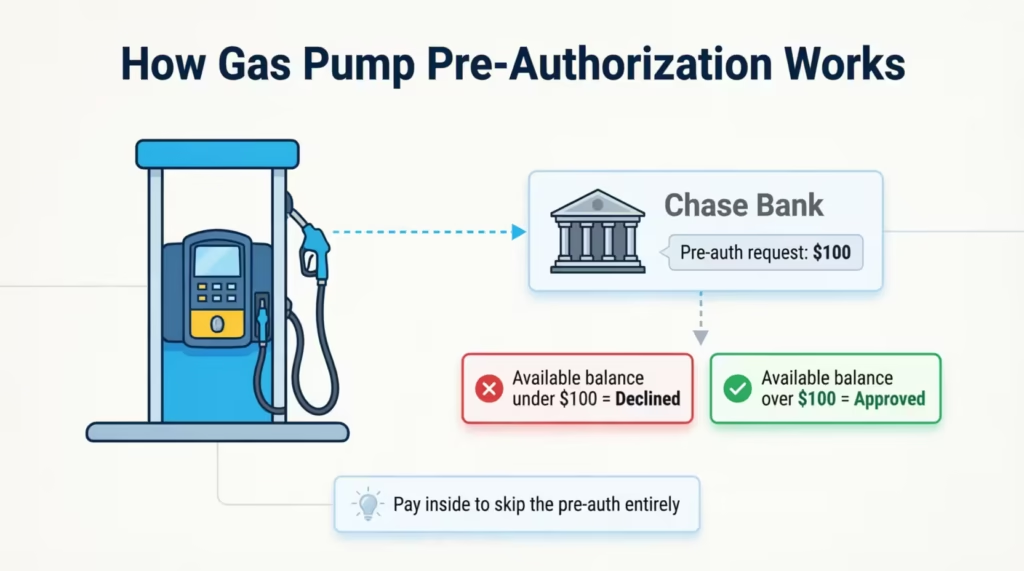
The fix: Pay inside instead of at the pump. When you pay inside with a cashier, the station charges the exact amount rather than sending a pre-authorization. You avoid the pre-auth issue entirely.
Alternatively, use a Chase credit card at the pump if available. Pre-auth holds are less likely to cause problems on a credit card with a healthy available credit balance.
Why Chase Cards Fail at ATMs
ATM failures on Chase cards usually come down to one of three things: PIN errors, daily withdrawal limits, or network compatibility.
PIN errors: Chase locks your card after a certain number of consecutive incorrect PIN entries. If you’ve entered the wrong PIN three times in a row, the card is locked at the ATM level. You’ll need to call Chase or visit a branch to unlock it. Do not keep guessing. Additional wrong entries won’t help and may extend the lockout.
Daily ATM withdrawal limits: Chase debit cards have a daily ATM withdrawal cap that’s separate from your daily purchase limit. This limit is typically $500 to $1,000 per day, depending on your account type. If you’ve already hit that cap earlier in the day, the ATM will decline even if your account has plenty of funds.
Network compatibility: Chase ATMs accept all Chase debit cards without issue. Out-of-network ATMs are generally compatible, too, but some smaller or international ATMs may not read certain card types correctly. If you’re traveling abroad and a non-Chase ATM fails, try a bank-affiliated ATM rather than a standalone kiosk ATM.
Pre-Authorization Holds Being Confused With Declines
Pre-authorization holds are not declines. They’re a common source of confusion, especially for debit card users.
When a merchant pre-authorizes your card, Chase temporarily sets aside a part of your available funds. This hold reduces your available balance right away, but it’s not a completed charge. Hotels, rental car companies, and gas stations are the most common users of pre-auth holds.
A typical scenario: Marcus, a project manager in Dallas, checked into a hotel for a three-night stay and used his Chase debit card. The hotel placed a $450 pre-authorization hold at check-in. Marcus’s available balance dropped by $450 immediately, even though the room hadn’t been charged yet.
When he tried to buy dinner that night, his card declined. Not because his account had an issue, but because the hold had temporarily reduced his available funds below what the restaurant’s payment system expected.
Pre-auth holds on debit cards can stay in place for one to five business days before they either convert to an actual charge or drop off. During that time, those funds aren’t accessible.
The practical solution: Use a Chase credit card for hotel stays, car rentals, and gas stations whenever possible. Pre-auth holds on credit cards reduce your available credit, but they don’t tie up cash the way debit holds do.
📌 Did You Know: Hotels can legally place a pre-authorization hold that’s significantly higher than your nightly rate. This can include estimated charges for incidentals, meals, and minibar access. On a debit card, this can tie up several hundred dollars for days after checkout.
Chase Credit Card vs. Debit Card – Why the Fix Is Different
Not every fix works for both card types. A Chase credit card and a Chase debit card can fail for different reasons, and the steps to resolve each one are different, too. Applying the wrong troubleshooting path wastes time.
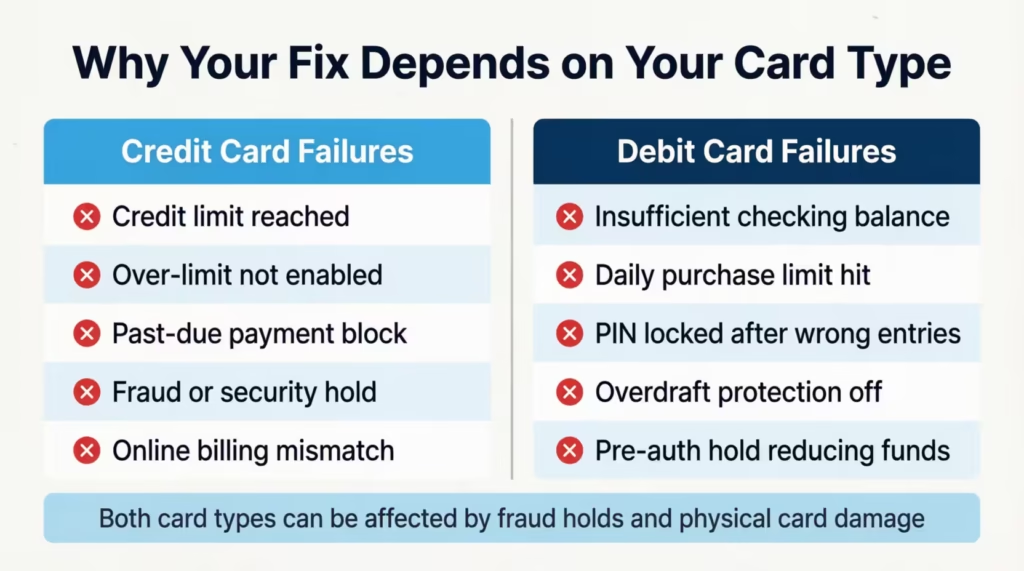
Here’s a quick breakdown of the key differences:
| Issue | Credit Card | Debit Card |
|---|---|---|
| Spending cap | Credit limit | Available checking balance |
| Daily limits | Usually none for purchases | Daily purchase and ATM limits apply |
| PIN required | Not usually (in-store) | Required at ATMs, sometimes for purchases |
| Over-limit option | Only if opted in | Not applicable |
| Overdraft | Not applicable | Depends on overdraft protection settings |
| Fraud hold path | App or phone | App or phone |
The table above shows why a debit cardholder and a credit cardholder can experience the same symptom (a declined transaction) for completely different reasons. A debit card user should check their available checking account balance first. A credit card user should check their available credit and payment status first.
Debit Card-Specific Failure Reasons
Debit cardholders face a set of decline causes that simply don’t apply to credit cards. If you’re using a Chase debit card tied to a Chase Total Checking account or any other Chase checking product, these are the causes to check first.
Insufficient checking account balance: Debit card transactions draw directly from your checking account in real time. Unlike a credit card, there’s no buffer. If the account doesn’t have enough to cover the transaction, including any pending holds already in place, the transaction is declined.
PIN locked after repeated incorrect entries: If you’ve entered the wrong PIN at an ATM or a PIN-based terminal too many times in a row, the card’s PIN function locks. You can still use the card for credit-network purchases (tap or sign) at some terminals. However, PIN-required transactions won’t work until the lock is cleared. Call Chase to unlock it.
Daily purchase and ATM withdrawal limits: As covered in the account-level section, debit cards carry daily caps on both purchases and ATM withdrawals. These limits reset at midnight Eastern Time each day.
Overdraft protection settings: If your overdraft protection is turned off and your account balance reaches zero, any transaction that would overdraw the account will be declined. If overdraft protection is linked to a Chase savings account or line of credit, the bank may cover the shortfall. This depends on how your account is configured and what type of transaction it is.
What to Do Right Now and What Comes Next
When your card stops working, the steps you take in the next five minutes matter more than the steps you take tomorrow. Some fixes work immediately. Others require follow-up. Knowing which is which saves you time and helps you plan.
Immediate actions – take these now:
- Check the Chase app first. Open the app and look for alerts, messages, or any “card locked” indicators. Many fraud holds and security flags show up here instantly. If there’s a prompt asking you to verify a recent transaction, responding “yes” can restore your card within seconds.
- Try a different payment method on the same card. If your card failed via tap, try the chip. If the chip failed, try swiping. If one method works and the others don’t, that tells you exactly which part of the card has an issue.
- Check your available balance or available credit. Don’t assume it’s fine. Open the app and confirm the number. A pending hold from an earlier transaction may have reduced your available funds without you realizing it.
- Call the number on the back of the card. If the app doesn’t resolve it, call Chase directly. Have your card’s last four digits, the name of the merchant where it declined, and the approximate time ready before you call. This speeds up the call significantly.
How to Contact Chase About a Declined Card
Chase offers several contact options depending on how fast you need help.
Fastest option: Call the number on the back of your card. This connects you to Chase’s card services team directly. For most fraud holds and account questions, a representative can review and resolve the issue in a single call. Calling early in the morning or late in the evening generally means shorter wait times.
Second option: Chase app messaging. The Chase app has a secure messaging feature where you can contact Chase without calling. This is useful for non-urgent issues or when you can’t take a phone call. Response times are usually longer than a phone call, requiring a few hours.
Third option: Visit a Chase branch in person. For account restrictions that require identity verification, or if your replacement card is urgent, visiting a branch is sometimes the fastest path. Chase branch staff can verify your identity on the spot and, in some cases, provide same-day card solutions depending on your account type.
What to have ready before you contact Chase:
- The last four digits of your card
- The name and location of the merchant where the decline happened
- The approximate date and time of the failed transaction
- A form of photo ID if going to a branch
Actions that require follow-up:
Some problems can’t be fixed in a single call or with a quick app action. These need patience:
- Replacement card delivery: Standard delivery takes 5 to 7 business days. Expedited options are sometimes available.
- Fraud investigation resolution: If Chase is actively investigating unauthorized transactions, the process may take 5 to 10 business days before your account returns to full normal status.
- Account restriction review: If Chase’s compliance or credit team placed the restriction, resolution depends on their review timeline. This can range from a few days to a few weeks, depending on the complexity.
How to Get a Replacement Chase Card
Requesting a replacement card is the right choice if you confirm physical damage, if the card has been lost or stolen, or if your current card number has been compromised. It’s important to know, though, that a replacement card won’t fix an account issue.
If your account is frozen or restricted, a new card with a different number will still be blocked until the underlying account issue is resolved.
When to request a replacement vs. when to fix the account first:
- Physical damage confirmed? Request a replacement card. The account is fine.
- Fraud held in place? Resolve the hold first. A replacement may or may not be necessary depending on whether the card number was compromised.
- Account frozen or restricted? Fix the account issue first. A replacement card won’t help.
- The card expired, and the replacement hasn’t arrived? Request a new one.
How to request a replacement card:
Through the Chase app:
- Open the app and tap your card.
- Select “Replace card” or “Card services.”
- Choose the reason (damaged, lost, stolen, etc.).
- Confirm your mailing address and submit.
By phone:
Call the number on the back of your card and ask for a replacement. The representative can process this in a few minutes.
At a Chase branch:
Visit any Chase branch with a valid photo ID. Branch staff can request your replacement card and, in some cases, may be able to provide a temporary solution while you wait.
Delivery timelines:
- Standard delivery: 5 to 7 business days
- Expedited delivery: Chase sometimes offers faster shipping on request. Ask the representative or check the app during the replacement request process. Expedited options aren’t guaranteed for all account types, but it’s worth asking, especially if you rely heavily on the card.
Virtual card number while you wait:
Chase offers virtual card numbers through Chase Pay and select digital wallets. If your physical card is out of commission and you need to make online purchases while waiting for the replacement, ask Chase whether a virtual card number is available for your account. The Chase Sapphire and Chase Freedom product lines often support this feature.
What happens to your recurring charges and saved payment info:
When Chase issues a replacement card, it sometimes issues a new card number as well, especially if the old card was compromised. If you get a new number, any merchant that has your card saved on file (streaming services, utilities, subscription apps) will need to be updated.
Chase’s automatic account updater service pushes the new card number to participating merchants, but not all merchants participate. To be safe, review your recurring charges and update them manually once your new card arrives.
Frequently Asked Questions (FAQs)
Can a declined transaction still go through?
It depends on whether it was a soft decline or a hard block. A soft decline (caused by a checkout error or a one-time system flag) can succeed if you retry with a corrected method, like re-entering your card details or switching from tap to chip. A hard block will not go through on retry, regardless of how many times you try.
How do I know if my debit card is blocked?
Open the Chase app and check your account overview for any alerts or “card locked” messages. If nothing shows in the app, call the number on the back of your card and ask the automated system or a representative whether a block or restriction is on the account.
Is Chase having issues right now?
Chase does experience occasional outages that can affect card processing across all users. Check the Chase website or search “Chase outage” on a real-time status site to confirm whether a bank-wide issue is active before troubleshooting your individual account.
How do I fix a declined debit card online?
The two most common online decline causes are a billing address mismatch and a wrong CVV. Log in to your Chase account, confirm the billing address on file matches exactly what you entered at checkout, and double-check your three-digit CVV against the physical card before retrying.
Does Chase have a virtual debit card?
Chase offers virtual card numbers through Chase Pay and select digital wallets for eligible accounts. Not all Chase debit or checking products support this feature, so contact Chase or check the app to confirm availability for your specific account.
Does Chase have a mobile wallet?
Yes. Chase Pay is Chase’s mobile payment platform, and Chase cards are also compatible with Apple Pay, Google Pay, and Samsung Pay. These digital wallet options let you pay using your phone at contactless terminals without needing a physical card.
Why is my credit card not working when I have money on it?
A Chase credit card can be declined even with available credit if the account has a fraud hold, a security restriction, or a past-due balance that triggered a purchasing block. Available credit and account standing are two separate things, and both need to be in good order for a transaction to go through.
Will trying my declined Chase card multiple times make things worse?
Yes, in some cases it can. Repeatedly swiping a hard-blocked card at a terminal can trigger additional security flags on your account. If your card fails twice in a row at the same location, stop retrying and check the Chase app or call Chase instead.
How long does a Chase fraud hold last?
A Chase fraud hold can be cleared in minutes if you confirm the transaction through the app or by phone. If left unresolved, holds typically lift within one to three business days, though this varies depending on the nature of the flag and whether Chase requires additional verification.
Does a Chase replacement card keep the same card number?
Not always. If your card was damaged or expired, Chase usually keeps the same number. If the card was lost, stolen, or compromised, Chase issues a new card number. Any merchants with your old number saved on file will need to be updated manually if they aren’t part of Chase’s automatic account updater program.
Bottom Line
A declined card is frustrating, but it’s almost always fixable once you know the cause. The key is identifying whether the issue sits with your account, the card itself, your spending limits, a fraud hold, or a context-specific factor like a gas pump pre-authorization.
Using the Chase app first can save a lot of time. It quickly clears common holds and shows account details. So, try the app before calling for help with most issues. For most cardholders, the app resolves the problem in under two minutes.
If this guide helped you get your card working again, share it with a friend or family member who banks with Chase. A quick share could save them a long, unnecessary phone call the next time their card gets declined unexpectedly.