You added someone to your Chase credit card once, and now that chapter is over. Maybe it’s an adult child who has their own card now. Maybe it’s an ex-partner after a separation. Maybe it’s a family member you helped years ago. You logged into the Chase app, poked around the account settings, and hit a wall. There is no “remove” button, and that is frustrating when you just want it done.
This guide walks you through how to remove an authorized user Chase-style, the right way, without hurting your credit or missing a step.
Short answer: Call Chase at the number on the back of your card, or send a secure message from your logged-in account, and ask them to remove the person by name.
Below, you’ll get the exact phone script, the click-by-click secure message path, credit score effects for both parties, timing tips, and how to confirm the removal actually went through.
Key Takeaways
This guide explains how to remove an authorized user from a Chase credit card, including the two official contact methods, required information, credit score effects for both parties, and timelines for confirming removal.
Core Facts:
- Chase does not offer online self-service removal; requests must go through a phone call to the number on the back of the card or a secure message from the logged-in account.
- Removing an authorized user is free, deactivates their card within hours, and does not require their permission or presence on the call.
- The removed user’s name typically disappears from the account’s online user list the same day the request is processed.
- It generally takes 30 to 60 days for the account to stop being reported on the removed authorized user’s credit file.
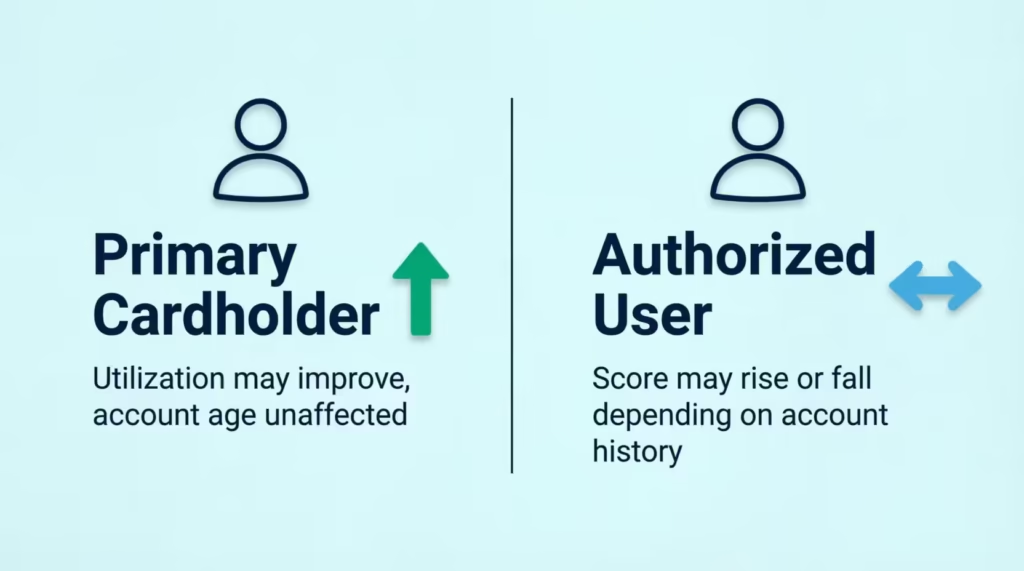
- The primary cardholder’s account age, payment history, and credit line remain unchanged, and utilization may improve if the removed user was carrying a balance.
- An authorized user can request their own removal by phone without the primary cardholder’s involvement, though they cannot use the secure message center for this.
Best for:
- Primary cardholders who added someone to a Chase card and now need them removed, such as after a separation or once the person has their own card.
- Authorized users who want to remove themselves from a Chase account without needing the primary cardholder’s cooperation.
- Anyone trying to understand how removal affects credit scores for both the primary cardholder and the authorized user.
Chase Doesn’t Let You Remove an Authorized User Online
Here is the part most people miss. Chase does not offer a self-service button to delete an authorized user from your credit card through the website or the mobile app. You can add users online in some cases, but taking someone off requires talking to Chase directly. That is why you keep hitting dead ends in account settings.
Chase confirms on its own education page for authorized users that to remove someone, cardholders must contact the issuer and request removal, and self-service removal through online banking is not a standard option for Chase credit card accounts.
There are only two real paths that work:
- Call Chase using the customer service number on the back of your card.
- Send a secure message from inside your logged-in Chase account.
Some issuers, like Citi and Capital One, let you delete users straight from the online dashboard. Chase is different. Do not waste time hunting for a hidden setting. It is not there, and knowing that upfront saves you an hour of clicking.
📌 Did You Know: You can usually add an authorized user online with Chase. But to remove one, you need a Chase agent or the secure message system. This one-way design is a security choice, not a bug.
Before You Contact Chase: What You’ll Need
Whether you plan to call or send a message, Chase will verify who you are and confirm the exact account and person. Have this information ready before you start. It makes the whole thing take a few minutes instead of half an hour.
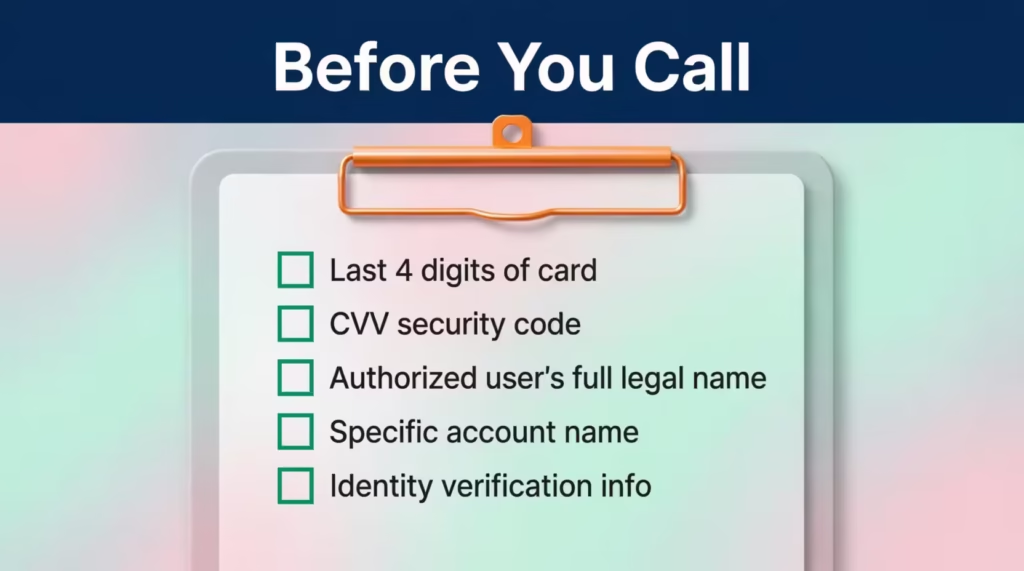
Gather these details first:
- The last four digits of your Chase credit card number. You can find this on the physical card or in the Chase Mobile app under card details.
- The three-digit security code (CVV) printed on the back of the card. Some phone reps also ask for this.
- The full legal name of the authorized user you want to remove. Use the name exactly as it appears on their card or on the account, not a nickname.
- The specific account the person is attached to, if you have more than one Chase card. Sapphire Preferred, Freedom Unlimited, and Ink Business Preferred all sit on separate accounts, and the user might only be on one of them.
- Your identity verification info. Chase may ask for the last four of your Social Security number, your date of birth, or answers to security questions on file.
If you are the primary cardholder, you have full authority to make this change. The authorized user does not need to be on the call or copied on the message. You do not need their permission, and Chase will not notify them before removal in most cases.
⚠️ Mistake to Avoid: Do not call Chase without the exact full name of the person you want removed. If there are multiple users on the account, a vague request slows things down or, worse, removes the wrong person.
How to Remove an Authorized User by Phone
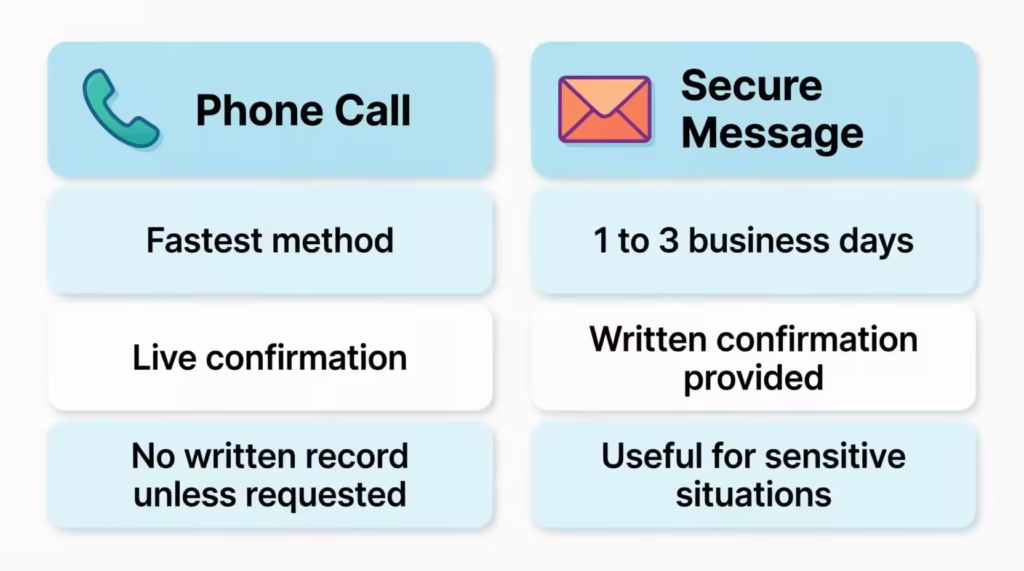
The phone method is the fastest for most people. Chase representatives can process the removal while you are on the line, and you get verbal confirmation before you hang up.
Step 1: Dial the number on the back of your Chase credit card. This routes you to the right department for your specific card product. For most Chase personal credit cards, the general customer service line is 1-800-432-3117, and this is the number U.S. News confirms for authorized user removal requests.
Step 2: Get to a live agent. The automated system will ask why you are calling. Say “authorized user” or “remove user from account.” If the menu keeps looping, press 0 or say “representative” to reach a person.
Step 3: Verify your identity. The agent will ask for the last four digits of your card, your name, and one or two identity questions. Answer clearly. This is standard.
Step 4: State your request plainly. Try this exact phrasing:
“I’d like to remove an authorized user from my account. Their full name is [First Middle Last]. Please confirm that this is the only user with that name on my account.”
Step 5: Confirm the correct account and the correct person. If you have more than one Chase card, name the specific one. Have the agent repeat the user’s full name and the account number before they process the request. This is your safeguard against removing the wrong person.
Step 6: Ask for confirmation. Before ending the call, ask:
- When will the change take effect?
- Will you receive an email or letter confirming the removal?
- Is the authorized user’s card automatically deactivated?
Write down the agent’s name and the time of the call. If anything goes wrong later, you have a reference point.
How to Remove an Authorized User Through Secure Message
If you would rather not call, or you want a written record, the secure message center inside your Chase account is the second official path. It takes a bit longer, usually one to three business days for a reply, but you get everything in writing.
Follow these exact steps from a desktop browser or the Chase Mobile app:
- Log in to your account at chase.com or open the Chase Mobile app on the Apple App Store or Google Play.
- Click the main menu icon. On desktop, it is the three-line menu in the top-left corner. In the app, tap the profile or menu icon.
- Navigate to the Secure Message Center. Look for “Secure messages” or “Messages” in the menu. This is your two-way inbox with Chase.
- Select “New Message” to start a fresh request.
- Choose the topic: “I have a question about one of my accounts.”
- Select the specific account the authorized user is attached to. If you have several, pick carefully.
- Choose “Account inquiry” as the reason.
- Compose your message. Keep it short and clear. Something like this works well:
Subject: Authorized user removal request
Hello, I am the primary cardholder on this account. Please remove [Full Legal Name of Authorized User] as an authorized user from my Chase credit card ending in [last 4 digits]. Please confirm the removal in writing once complete and let me know the effective date. Thank you.
- Send the message. Chase usually replies within 24 to 72 hours. You will get a written confirmation once the removal is processed.
The message thread stays in your inbox, so save it or take a screenshot. That paper trail is useful if you ever need to prove exactly when the person was removed, especially in a divorce or separation situation.
💡 Pro Tip: Use both methods if the situation is sensitive. Call first for immediate action, then send a secure message the same day asking for written confirmation. You get speed and a paper trail together.
What Happens to the Card and Account After Removal
Once Chase processes the request, several things happen quickly, but not always at the same moment. Knowing the sequence helps you plan.
The authorized user’s card is deactivated. The physical card in their wallet will stop working, usually within a few hours of processing. Any attempt to swipe, tap, or use the number for an online purchase will be declined. If the card was saved with a merchant for recurring payments, those charges will also fail once the deactivation goes through.
Their name is removed from the account. They no longer appear as a listed user. They lose all access to the account, including any read-only privileges they may have had.
No fee is charged for removal. Chase does not bill you or the authorized user for taking someone off the account. This is a free administrative change.
Your main account keeps running normally. Your card, your credit line, your rewards, and your billing cycle are unchanged. You do not get a new card number, and you do not need to update any of your own recurring payments.
You should destroy the old physical card. If the removed user gave the card back, cut it up so the chip and the numbers are both damaged. If they still have it, ask for it back or tell them it will no longer work. Some people also request a new card number from Chase for extra peace of mind, especially after a breakup or a lost-card situation.
Any charges the authorized user made before the removal date are still yours to pay. Removing them does not erase past purchases from the balance. The Consumer Financial Protection Bureau explains that only the primary cardholder is legally responsible for the debt on the account, even for charges made by an authorized user.
How Long It Takes and How to Confirm Removal Was Successful
Removal happens in stages, and each stage has its own timeline. Do not assume it is done just because the agent said: “You’re all set.” Verify it in three places.
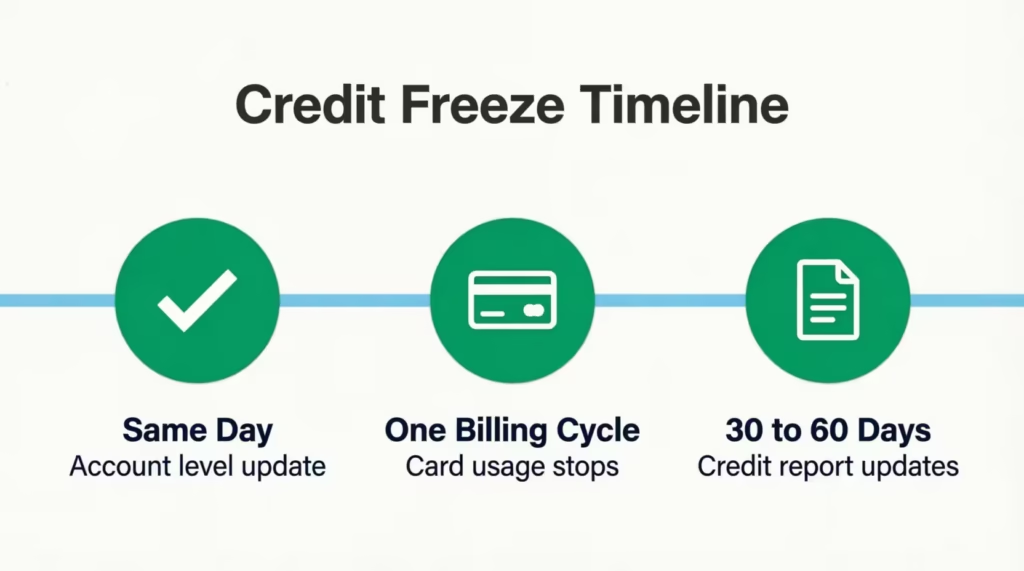
Same day: Chase account level. The moment the agent or the secure message team processes the change, the authorized user disappears from the “users on this account” list in your online profile. Log in a few hours later and check the account details section. If their name is gone, step one is done.
Within one billing cycle: Card usage. The removed user’s physical card is usually dead within hours, but give it up to one full statement cycle to see the change reflected on your next statement. Any new attempts to charge on that card should fail immediately.
30 to 60 days: Credit report update. Chase reports account changes to the three major credit bureaus, Experian, Equifax, and TransUnion, on its own reporting schedule. It usually takes one full billing and reporting cycle for the tradeline to drop off the authorized user’s credit report. Experian notes that once the primary cardholder removes the authorized user, the account generally stops being reported on that person’s credit file within one billing cycle or so.
To confirm everything is complete:
- Check your next Chase statement. The user should not appear anywhere.
- Log in to your Chase account and look at the authorized users list. It should be empty or missing that person.
- If you want to verify from the other side, the removed user can pull a free credit report from AnnualCreditReport.com after 30 to 60 days to see if the Chase tradeline has dropped off.
If more than 60 days pass and the account is still showing on the removed user’s report, one more call or secure message to Chase will fix it. Ask them to submit a bureau update.
Does Removing an Authorized User Affect Your Credit Score (as the Primary Cardholder)
Short answer: NO, not directly.
You are the primary cardholder. The account was always yours. It was opened in your name, tied to your Social Security number, and reported on your credit file from day one. Adding or removing an authorized user does not change any of that.
Your account age, your payment history, your credit limit, and your credit line all stay exactly the same. Chase keeps reporting the account normally to the credit bureaus after the removal.
There is one small indirect effect worth understanding, and it usually works in your favor.
If the person you removed was using the card, your credit utilization ratio might improve. They can’t add to the balance anymore. Utilization is the second-largest factor in your FICO Score. According to myFICO, amounts owed, which includes utilization, makes up 30% of your FICO Score. A lower balance in future months means a lower utilization ratio, which typically nudges your score upward, not downward.
Two other small notes:
- Removing an authorized user does not close the account. Closing a card can affect your score. Removing a user does not.
- Your credit history length is unaffected. The account keeps aging as long as it stays open in your name.
So if you were worried this call would tank your score, relax. It won’t.
Does Removing an Authorized User Affect Their Credit Score
This is where the answer depends on the account.
When someone is added as an authorized user, the account often shows up on their credit report, and it can help or hurt them depending on how the account is managed. When they are removed, the tradeline usually stops being reported on their file within one billing cycle. Whether that removal helps their credit or hurts it comes down to what that account was doing for them.
Their score may drop after removal if:
- The account had a long, positive history that was boosting their length of credit history. Length of credit history makes up 15% of a FICO Score, so losing an old, well-aged account can shorten their average account age.
- The account had a low utilization ratio that was helping their overall utilization number look healthy.
- The account was one of only a few positive tradelines on a thin credit file.
Their score may improve after removal if:
- The primary cardholder ran a high balance, which was pushing the authorized user’s utilization ratio up.
- The account had late payments, which were dragging their payment history down. Experian notes that a late payment on the primary’s account can appear on the authorized user’s credit history and hurt their score.
- The account was already reporting negatively.
One more thing to know: authorized users are not legally responsible for the balance, even while they are on the account. The debt itself does not follow them after removal. Only the reporting history changes.
If you are the person being removed, or you are the primary trying to protect the other party’s credit, this is the key idea. The account info vanishes from their file in the next reporting cycle. Their score then adjusts based on what remains.
Can an Authorized User Remove Themselves From a Chase Account
YES. You do not need the primary cardholder’s help to get off their Chase account. This matters for people who are stuck on an ex’s card, a former friend’s account, or a parent’s card they no longer want to be linked to.
Here is what to do if you are the authorized user who wants out:
- Call Chase at the number on the back of your card. If you no longer have the card, call the general Chase credit card customer service line at 1-800-432-3117.
- Tell the agent you are an authorized user and you want to be removed from the account.
- Verify your identity. Chase will ask for your name, date of birth, and possibly the last four digits of your Social Security number. You do not need the primary’s information for this.
- Ask for written confirmation by mail or email. Save it.
One important limit: authorized users cannot use the secure message center inside the primary’s Chase account, because they do not have their own login for that specific credit card account. The phone call is the only path available to you. Everything else has to go through the primary cardholder.
If Chase pushes back or claims they cannot remove you without the primary, ask politely for a supervisor. Federal guidance is clear that an authorized user has the right to be removed. The Consumer Financial Protection Bureau confirms that you can contact the credit card company and request removal from the account as an authorized user.
Sarah, a 28-year-old marketing coordinator, was still an authorized user on her ex-boyfriend’s Chase Freedom card two years after they broke up. She was worried his spending was inflating her utilization and dragging her score down.
She called 1-800-432-3117 on a Tuesday morning, verified her identity, and asked to be removed. The whole call took about 11 minutes. Chase mailed her a confirmation letter, and the account dropped off her Experian report about 34 days later. Her score went up 18 points the next reporting cycle.
Special Situations: Business (Ink) Cards and Multiple Authorized Users
Two setups need a slightly different approach.
Chase Ink Business Cards
If you have a Chase Ink business card, the removal process is the same in structure: phone or secure message, no online button. You still call the number on the back of the card or send a secure message from your business account inbox. What is different is the tools you get before removal.
Ink business cards give the primary account holder more control over each employee card. You can set spending limits for each person. You can also restrict certain merchant categories. Plus, you can track transactions in real-time before removing someone.
If you are unsure about removing an employee cardholder, Chase’s Access & Security Manager tool lets you adjust or revoke access first, then remove them later if needed.
When you do call to remove an employee cardholder, be extra clear about which employee. Business accounts often have several cards issued to different people, and mixing them up can pause a working card by mistake.
Multiple Authorized Users on One Account
If your Chase card has more than one authorized user, you must name the exact person you want removed. Do not say “remove all authorized users” unless that is truly what you want, because Chase agents will take that literally.
When you call or write, include:
- The full legal name of the specific user to remove.
- The last four digits of that user’s card number if you know it. This helps the agent target the right person when several users share a first name or a last name.
- A clear statement that other authorized users should remain on the account.
Double-check the confirmation. Ask the agent or the secure message reply to list which users are still on the account after the change. If the confirmation looks wrong, get it fixed on the same call or in the same message thread.
When to Time the Removal (Before or After a Statement Cycle)
Most people just want the user off as fast as possible. That is fine. If there’s no rush and you can be flexible, timing your removal with your statement cycle can optimize your credit a bit. This is important if the account helps the authorized user’s credit, and both of you want to keep that benefit.
Here are the two main scenarios.
Remove Right Away When There Is Urgency
Do it immediately, before the next statement, if:
- There has been theft, misuse, or unauthorized spending.
- You are going through a separation or divorce and want to cut financial access now.
- The relationship has broken down, and you do not trust the person with your credit line.
- The card was lost or stolen while in the authorized user’s possession.
In these cases, the risk of one more day of card access outweighs any credit reporting benefit. Call Chase, get it done, and consider asking for a new card number for yourself while you are at it.
Time It With the Statement Cycle for a Small Advantage
If the account is in good standing, both parties are on decent terms, and you just want the arrangement to wind down, consider these timing tips:
- Wait for the statement to close first, then remove. Chase reports the balance and payment activity to the credit bureaus after each statement cycle. If the account helps the authorized user’s credit, wait for one more clean cycle. This gives them an extra month of positive history before the tradeline drops off.
- Pay the balance down before removal. A low or zero balance at the time of the last reported cycle means the authorized user is not carrying a spike in utilization on their final reported month. Their credit report ends the relationship on a strong note.
- Avoid removing right before a big application. If either party plans to apply for a mortgage, auto loan, or new credit card, wait 60 days before making removals or timing changes. Big score movements right before an underwriting pull can complicate things.
The timing benefit is small. It is measured in a few points, not in a life-changing swing. But if you have the choice and no reason to rush, one clean statement cycle before removal is a low-effort win.
Frequently Asked Questions (FAQs)
Can I remove an authorized user from my credit card online?
No, Chase does not offer a self-service removal button. You must call the number on the back of your card or send a secure message from your logged-in account.
How long does it take to get removed as an authorized user?
The person disappears from your account’s user list the same day the request is processed. It takes 30 to 60 days for the tradeline to drop off the removed user’s credit report.
What happens when I remove an authorized user?
Their physical card is deactivated within hours, and their name is removed from the account. No fee is charged, and your own card, credit line, and billing cycle stay unchanged.
Will removing an authorized user hurt their credit?
It depends on what the account was doing for their file. If it was an old account boosting their credit history length, their score may drop; if it had a high balance or late payments, removal can help.
Can an authorized user remove themselves?
Yes, an authorized user can call the number on the back of the card, or 1-800-432-3117, and request removal without the primary cardholder’s involvement. They should verify their identity with their name, date of birth, and possibly the last four digits of their Social Security number.
Is there a downside to being an authorized user?
The main downside is that a primary cardholder’s high balance or late payments can appear on the authorized user’s credit report and hurt their score. Authorized users are not legally responsible for the debt, but the account activity still affects their credit file.
Can a creditor go after an authorized user for the debt?
No, only the primary cardholder is legally responsible for the balance on the account, even for charges the authorized user made. This holds true according to the Consumer Financial Protection Bureau, regardless of whether the authorized user is later removed.
How do I know the removal actually went through?
Check your online account details for the missing name the same day, then confirm on your next statement that the user no longer appears. Removed users can also pull a free report from AnnualCreditReport.com after 30 to 60 days to check for themselves.
Is there a better time to remove an authorized user?
If there’s urgency, like theft or a breakup, remove them right away. Otherwise, waiting until after your statement closes and paying down the balance first can give the authorized user one extra clean reporting cycle before the tradeline drops off.
Does removing an authorized user affect my own credit score as the primary cardholder?
No, your account age, payment history, and credit line stay the same since the account was always yours. If the removed user was carrying a balance, your utilization may even improve slightly afterward.
Wrapping Up
Removing someone from your Chase credit card feels like it should be a two-click job, and it is not, but now you know the actual playbook. Two paths work: a phone call to the number on the back of your card, or a secure message from your logged-in account.
Both are free, both are fast enough, and both leave you in control. We covered what to prepare, exactly what to say, how the credit impact breaks down for you and for the removed user, and how to time it if you have flexibility.
For most readers, calling 1-800-432-3117 yields the best results. This method is quick, verbal, and lets you confirm everything in one conversation.
If someone you know is stuck on an ex’s card, a family member’s account, or an old shared card, let them know how easy it is to get off. Share this guide with them. It could save them months of quiet credit damage.