Paying a Chase credit card should feel simple, but the moment a due date gets close, small doubts pop up fast. Which method posts today? Can I use a debit card? What if my money sits at another bank? We’ve been there too, staring at a bill and wondering if the payment will really count as on-time. In this guide, we walk you through every safe way to pay a Chase credit card, so you never guess again.
The fastest way is to log in at chase.com or the Chase Mobile app, tap “Pay card,” and submit before the daily cutoff.
Below, you’ll find step-by-step help for online, phone, mail, branch, and ATM payments, plus expert tips on timing, failed payments, and the truth about paying with cash or a debit card.
Key Takeaways
This guide explains how to pay a Chase credit card, covering five payment methods (online, app, phone, mail, and in person), workarounds for debit card and cash payments, and the timing rules that determine if a payment is on time.
Core Facts:
- Chase offers five payment channels: online at chase.com, the Chase Mobile app, phone at 1-800-436-7958, mail, and in-person branch or ATM payments.
- Chase does not accept direct debit card charges or cash for bill payment; both require linking or depositing into a bank account first.
- The CFPB’s 5 p.m. rule requires issuers to count a payment as on-time if received by 5 p.m. on the due date in the issuer’s local time zone.
- Chase mail-in payments should be sent 5 to 7 business days before the due date, addressed to Cardmember Services, P.O. Box 6294, Carol Stream, IL 60197-6294.
- External bank accounts can be linked for payments and are verified through two small deposits, usually under $1 each, within one to two business days.
- If a payment fails, Chase recommends checking account activity, fixing the funding source, repaying through the app or phone, and calling to request a late fee waiver.
Best for:
- Chase credit cardholders deciding which payment method fits their situation, including those without a Chase checking account.
- Readers confused about whether they can pay with a debit card or cash and need the correct workaround.
- Cardholders whose payment failed or posted late and need clear next steps to fix it and protect their credit report.
Ways to Pay a Chase Credit Card
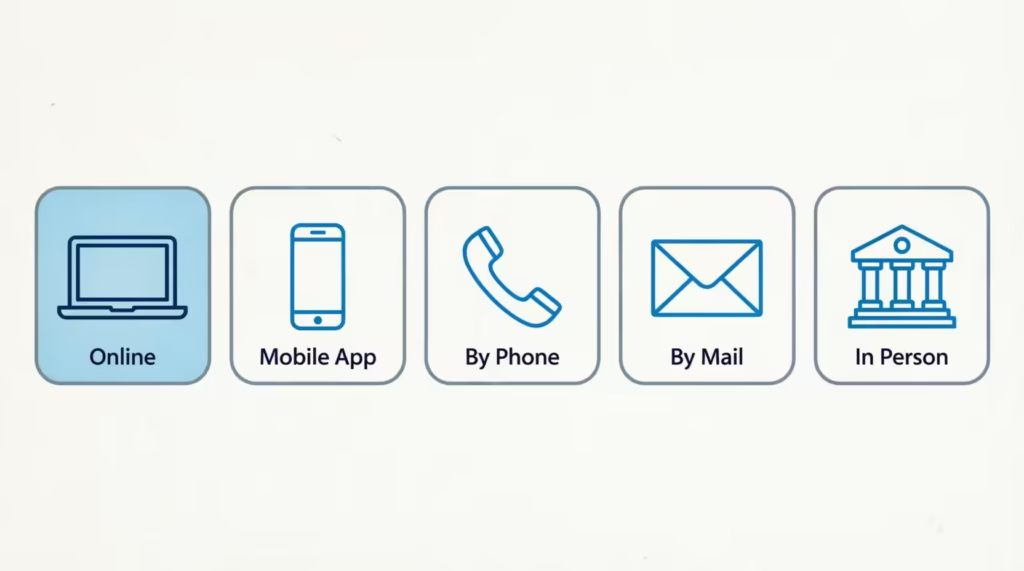
Chase gives you five main ways to send a payment, and each one fits a different situation. Knowing them up front helps you pick the fastest route today and set up a backup for later.
- Online at chase.com: Log in, pick your card, choose an amount, and submit. Best for same-day payments from a linked bank account.
- Chase Mobile app: The same features as the website, but built for your phone. Great when you’re away from a computer.
- By phone: Call the automated line to pay with a bank account. Useful when the internet is down, or you’re traveling.
- By mail: Send a check or money order to Chase’s payment address. Slow, but a solid backup if digital tools fail.
- In person: Visit a Chase branch or use a Chase ATM to submit a payment with a check, money order, or linked debit card transfer.
One quick note: Chase does not accept direct debit card charges or cash through online or phone channels. Those still work, but only through a bank account link or an in-person deposit first. We’ll unpack both later.
💡 Pro Tip: Pick one main method and one backup. If autopay is your default, keep the Chase Mobile app installed so you can send a manual payment fast when your bank account or card changes.
Autopay as a Way to Never Miss a Payment
Autopay pulls your payment from a linked checking account every month, so the due date takes care of itself. You can turn it on inside your Chase account settings under the card you want to enroll.
You get three payment amount choices:
- Minimum payment due: Keeps the account current and avoids late fees, but interest still grows.
- Statement balance: Pays the full amount from your last bill, which helps you skip interest on new purchases.
- Custom fixed amount: Sends the same set dollar amount every cycle, useful when your budget is tight.
Autopay is the single best tool against forgotten due dates. Even if you like paying by hand, setting autopay for the minimum payment due creates a safety net.
How to Pay a Chase Credit Card Online
The chase.com website is the most reliable way to submit a same-day payment. Here’s the exact path:
- Go to the login page: Open chase.com and sign in with your username and password. If you don’t have an account yet, click “Not enrolled? Sign up now” and follow the prompts.
- Pick your credit card: From the account dashboard, tap the credit card you want to pay.
- Click “Pay card”: This opens the payment screen.
- Choose the amount: Pick minimum, statement balance, current balance, or a custom amount.
- Choose the payment date: Same-day if you’re before the cutoff, or a future date.
- Choose the payment source: A linked Chase account or an external bank account.
- Review and submit: Confirm the details, then click “Schedule payment.”
- Save the confirmation number: Take a screenshot or write it down. This proves you paid on time if anything goes wrong.
Same-day payments must be scheduled before Chase’s daily cutoff. Chase generally accepts online payments as same-day up to about 11:59 PM ET, though a payment made after the 5 PM CFPB rule window may not post until the next business day. That timing matters for interest and late fees, and we’ll cover it fully in the on-time section below.
Paying Through the Chase Mobile App
The Chase Mobile app mirrors the website. Download it from the Apple App Store or Google Play, then:
- Open the app and sign in with your ID and password, or use Face ID or Touch ID.
- Tap the credit card on your dashboard.
- Tap “Pay card.”
- Set the amount, date, and payment source.
- Tap “Schedule payment” and save the confirmation.
The app is often faster than the mobile browser and lets you set up alerts for due dates.
How to Pay a Chase Credit Card by Phone
If your internet is down or you just prefer voice help, Chase offers an automated payment line. Dial 1-800-436-7958 to pay by phone using a linked bank account.
Here’s what to expect on the call:
- Verify your identity: The system asks for your card number, ZIP code, and the last four digits of your Social Security number.
- Choose “Make a payment”: Follow the automated menu prompts.
- Select your payment amount: Minimum, statement, current balance, or a custom figure.
- Confirm the bank account: If you have a linked account on file, the system pulls it up. If not, you’ll need your routing and account number ready.
- Get a confirmation number: Write this down before you hang up.
If you use a TTY device or an operator relay service, Chase supports both. Call 1-800-242-7383 for TTY help.
The automated line is free, and payments made before the daily cutoff usually credit the same day. If you need a live agent, say “representative” or press 0 during the menu.
How to Pay a Chase Credit Card by Mail
Mail is the slowest option, but it works when digital methods don’t. Chase accepts checks and money orders only, never cash.
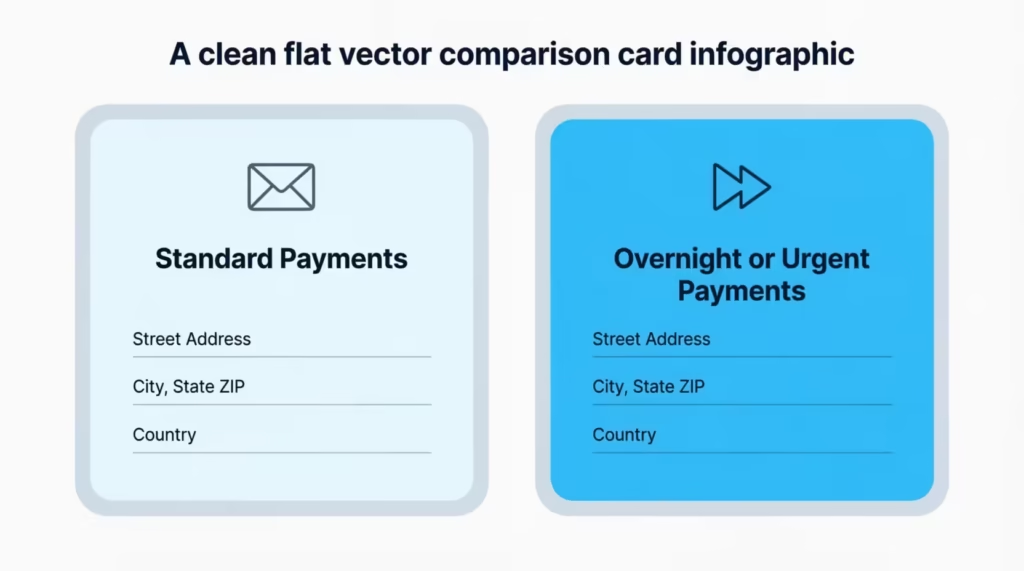
Send standard payments to:
Cardmember Services P.O. Box 6294 Carol Stream, IL 60197-6294
For urgent or overnight payments, use:
Chase Card Services Attn: Consumer Card Operations 201 N. Walnut Street, DE1-1004 Wilmington, DE 19801
Formatting rules to follow:
- Make the check or money order payable to “Chase Card Services.”
- Write your full 16-digit card account number on the memo line.
- Include your payment coupon from the paper statement if you have one.
- Use a stamped envelope and mail it at least 5 to 7 business days before the due date.
The mail-in method leaves no room for last-minute fixes. If your due date is close, use online, app, or phone instead.
⚠️ Mistake to Avoid: Sending cash through the mail. Chase will not credit cash payments received by mail, and there is no way to trace the loss.
How to Pay a Chase Credit Card with a Check
A personal check or money order is welcome by mail or at a Chase branch, but the details must be right, or your payment can bounce or misapply.
Here’s the checklist:
- Payable to: “Chase Card Services.” Never write “Chase Bank” alone.
- Memo line: Your 16-digit credit card account number in full.
- Amount: Numbers and written words must match exactly.
- Signature: Sign the check on the front line.
- Date: Use today’s date, not a future date.
Money orders work the same way and can be bought at the U.S. Postal Service, Walmart, or most grocery stores. Money orders clear faster than personal checks because the funds are already prepaid.
Keep a photo of the front and back of the check before you send it. That record helps if the payment goes missing.
How to Pay a Chase Credit Card In Person (Branch or ATM)
If you like face-to-face service, or you want a same-day paper receipt, Chase branches and ATMs both accept credit card payments.
At a Chase branch:
- Find the closest branch on the Chase branch locator.
- Bring your credit card, a photo ID, and a check or money order.
- Tell the teller you want to pay your Chase credit card.
- Get a stamped receipt with the transaction date and amount.
Branch tellers do not accept cash for credit card bills directly, but you can deposit cash into your Chase checking account first and then transfer that money to the card.
At a Chase ATM:
- Insert your Chase debit card and enter your PIN.
- Choose “More options,” then “Credit card payment” or “Transfer.”
- Pick the credit card account and enter the amount.
- Confirm and print the receipt.
ATM payments post fast, often within minutes if pulled from a Chase checking account. Non-Chase ATMs cannot pay Chase credit cards.
Can You Pay a Chase Credit Card with a Debit Card?
Short answer: not directly. Chase does not let you swipe or type a debit card number to pay a credit card bill.
The workaround is simple. Link the checking account that sits behind your debit card and use that account as the payment source. The money still comes out of the same place; it just travels as an electronic funds transfer instead of a card charge.
Two easy paths:
- Online link: Add the checking account as an external payment source in your Chase profile. You’ll enter the bank’s routing and account number.
- Chase ATM: Insert your Chase debit card and pick “Transfer to credit card.” This works only for Chase-to-Chase transfers.
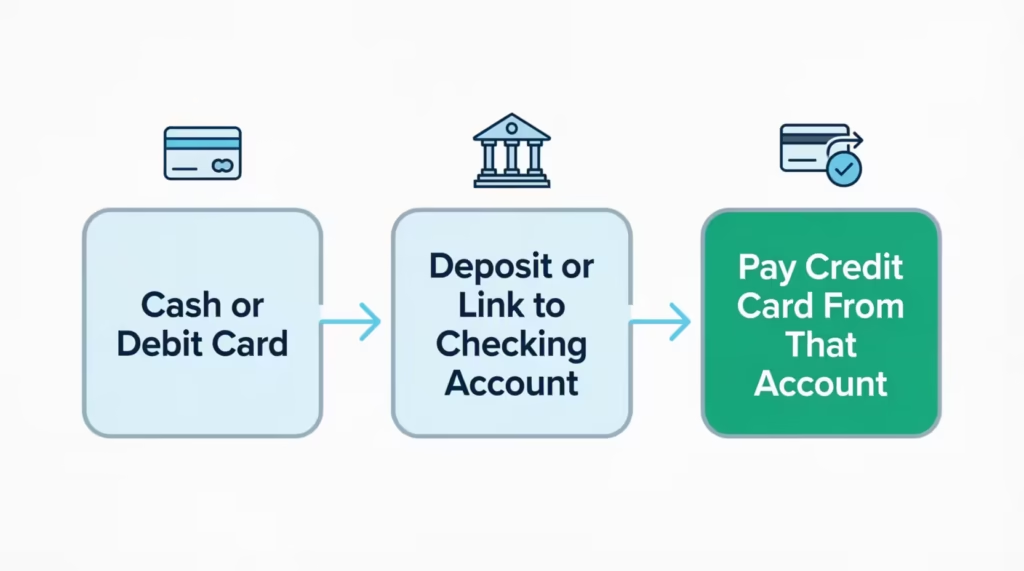
This design protects you. Debit card networks charge fees that Chase would have to pass on. Using a bank account link keeps every payment free.
Can You Pay a Chase Credit Card with Cash?
Chase does not accept cash through the mail, online, or over the phone. Cash payments are also not taken at the teller line for credit card bills.
The workaround has two steps:
- Deposit the cash into a checking account. Any bank works, but a Chase checking account is fastest. Use a Chase branch or a cash-accepting Chase ATM.
- Pay the credit card from that account. Once the deposit posts, use online, app, phone, or ATM transfer to move the money to your credit card.
The whole process usually takes one business day or less. If you must pay in cash, plan a few days ahead of the due date to avoid a late fee.
How to Pay a Chase Credit Card from Another Bank
You do not need a Chase checking account to pay a Chase credit card. Any U.S. bank account will work, and Chase does not charge a fee for the link.
Here’s how to add an external bank:
- Log in to chase.com or the Chase Mobile app.
- Open your credit card and tap “Pay card.”
- Choose “Add external account.”
- Enter the routing and account number of your other bank.
- Verify the account. Chase sends two small deposits (usually less than $1 each) within one to two business days. Confirm the amounts in your Chase profile.
- Set that account as a payment source and submit your payment as usual.
Once verified, the external account stays on file. Future payments only take a few taps.
If your other bank offers “bill pay,” you can also push the payment from that bank to Chase. That path can take three to five business days, so it works best for future-dated payments, not urgent ones.
Chase Credit Card Payment on Amazon
Some readers search for “Chase payment on Amazon” and expect to pay their monthly credit card bill through Amazon.com. That is not how it works.
Amazon’s Chase feature is called Chase Pay Over Time. It lets eligible cardholders split a single Amazon purchase into fixed monthly payments. It is a financing tool for the purchase, not a way to pay the credit card bill itself.
Here’s the quick picture:
- What it does: Turns a qualifying Amazon purchase into an installment plan on your Chase card.
- Who qualifies: Chase cardholders with eligible cards, on Amazon purchases of about $50 or more.
- How to use it: At the Amazon checkout screen, pick your Chase card, then choose the “Pay Over Time” plan option before you place the order.
- How the bill works: Each installment shows up on your regular monthly Chase statement. You still pay the statement itself through the normal methods above.
If you want to pay your Chase credit card bill, Amazon is not the place. Use chase.com, the Chase Mobile app, phone, mail, or branch instead.
When Your Chase Credit Card Payment Actually Counts as On-Time
Timing rules trip up more people than any other part of the payment process. Two terms matter: credited and posted.
- Credited: The date Chase agrees the payment counts against your due date. This is the number that matters for late fees.
- Posted: The date the money finishes clearing and lowers your balance in the account view.
A payment can be credited today but posted tomorrow. As long as it is credited on or before the due date, you are on time.
Federal rules protect you here. The Consumer Financial Protection Bureau’s rule (often called the CFPB 5 p.m. rule) says card issuers must count a payment as on-time if it is received by 5 p.m. on the due date, using the issuer’s local time zone. That is the 12 CFR § 1026.10(b) standard.
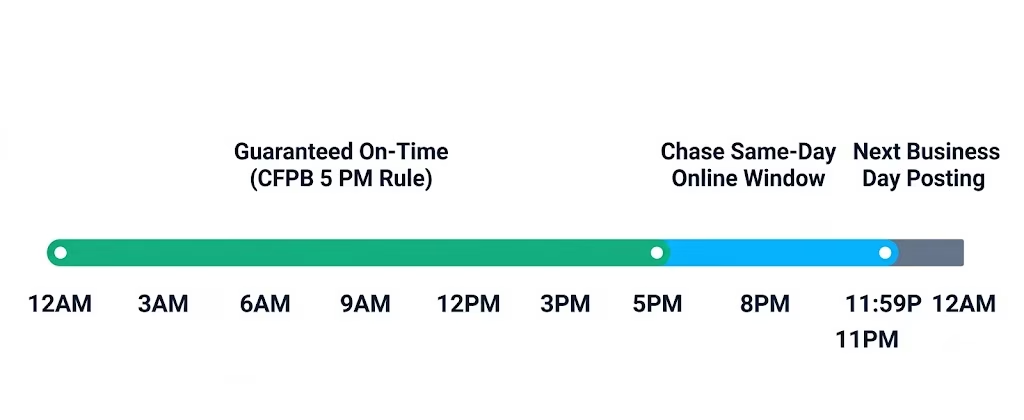
Chase goes a bit further for online and app payments. Same-day online payments made between about 8 PM and 11:59 PM ET may still be treated as same-day for late fee purposes, though the money often posts the next business day. Mailed checks credit on the day Chase receives and processes them, not the day you send them.
If you’re cutting it close, use online or the app instead of mail. And always keep the confirmation number, so you can prove the credited date.
📌 Did You Know: Chase can reverse a first-time late fee in many cases if you call and ask, especially if your account has a clean payment history. The CFPB late fee guide explains your general rights on card fees.
What to Do If a Chase Credit Card Payment Fails or Posts Late
Even careful payers hit a bump sometimes. When a payment fails or posts after the due date, the fix follows the same pattern every time.
Common reasons payments fail:
- Not enough funds (NSF): The bank account did not have the full amount on the withdrawal date.
- Wrong routing or account number: A single wrong digit sends the transfer to nowhere.
- Closed or frozen bank account: The old account cannot release funds.
- Duplicate payment blocked: Chase sometimes holds a second payment for review on the same day.
Follow these steps right away:
- Check your Chase account activity. Look for a returned payment note, an NSF fee, or a “payment reversed” line.
- Confirm your bank side too. Open your other bank’s app to check the balance and any bounce fees.
- Fix the source. Update the account number, transfer money in, or switch to a different funding account.
- Repay through the fastest method. Use the Chase Mobile app or chase.com for a same-day credit. If you’re past the daily cutoff, phone payment at 1-800-436-7958 is your backup.
- Call Chase Card Services. Dial the number on the back of your card and ask them to waive the late fee. A calm, brief call with a clean history often works.
- Watch your credit report. A single late payment does not hit your credit until it is 30 days past due. If you fix it inside that window, your credit score is safe.
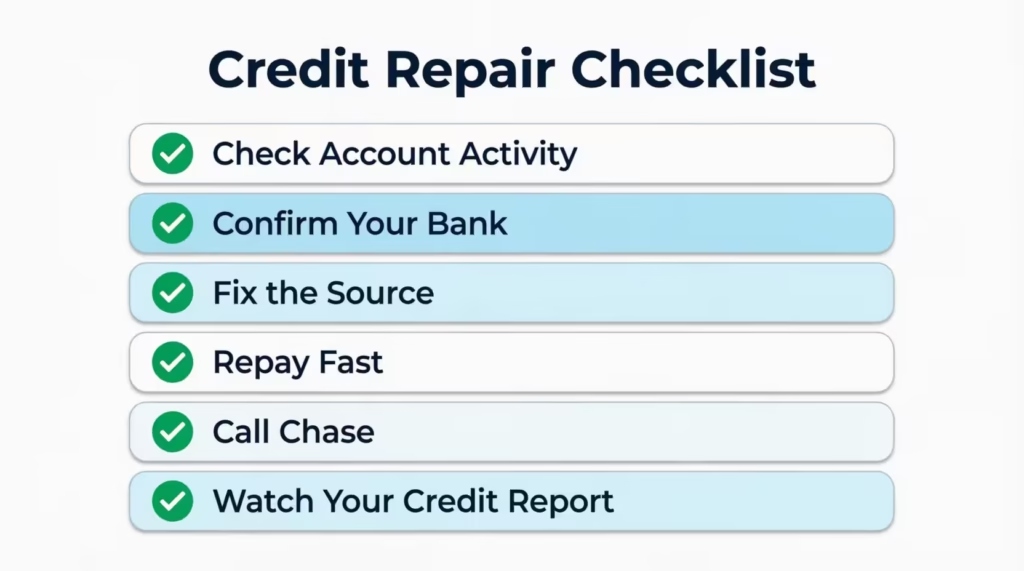
Take a screenshot of every new confirmation. That single habit resolves 90 percent of billing disputes fast.
Frequently Asked Questions (FAQs)
Can I pay my Chase credit card from another bank account?
Yes, you can link any U.S. bank account without a fee. Add it under “Add external account” on chase.com or the app, verify it with two small test deposits, then use it as your payment source.
How do I pay my Chase credit card payment?
Log in to chase.com or the Chase Mobile app, select your card, tap “Pay card,” then choose your amount, date, and payment source. Submit before the daily cutoff for same-day credit.
Can I walk into Chase to pay my credit card?
Yes, bring your credit card, a photo ID, and a check or money order to any Chase branch. Tellers do not accept cash directly for credit card bills, but you can deposit cash into a checking account and transfer it.
Can I make a Chase payment over the phone?
Yes, call 1-800-436-7958 to pay using a linked bank account through Chase’s automated line. You’ll need your card number, ZIP code, and the last four digits of your Social Security number to verify your identity.
Can I pay a Chase credit card with a debit card?
No, Chase doesn’t accept direct debit card charges for bill payment. Instead, link the checking account behind your debit card as your payment source, or use a Chase ATM to transfer funds Chase-to-Chase.
Can I pay a Chase credit card bill in cash?
Not directly through Chase’s payment channels. Deposit the cash into a checking account first, usually clearing within one business day, then pay your credit card from that account online, by app, or at an ATM.
Can I pay my Chase credit card payment at the ATM?
Yes, insert your Chase debit card at a Chase ATM, select “Credit card payment” or “Transfer,” and confirm the amount. These payments post fast, often within minutes, but non-Chase ATMs can’t process the transfer.
What time does Chase automatic payment go through?
Online and app payments must be scheduled by about 11:59 PM ET to count as same-day, though the CFPB’s 5 p.m. rule guarantees on-time credit for payments received by 5 PM in Chase’s local time zone. Mailed checks credit only once Chase receives and processes them.
What should I do if my Chase credit card payment fails?
Check your Chase account activity for a returned payment or NSF fee, then confirm your bank balance and fix the funding source. Repay quickly through the app or by calling 1-800-436-7958, and ask Chase to waive any late fee.
Wrapping Up
Paying a Chase credit card is easier once you know each channel and its cutoff. We covered five main ways to pay, from the chase.com website and the Chase Mobile app to phone, mail, and in-person options at a branch or ATM. We also cleared up the debit card and cash myths, showed you how to link an outside bank, and explained why the CFPB 5 p.m. rule protects your on-time status.
For most readers, the best way is to set up autopay for the minimum payment. Then, make a manual full-balance payment through the app. This method stops late fees and gives you full control.
If a friend or family member keeps missing Chase due dates or wonders about the Amazon Pay Over Time feature, share this guide with them. It could save them a late fee and a hit to their credit score.