When my Capital One card stops working at the worst moment, my heart sinks. Maybe the cashier is waiting, or my online cart is timing out, and the screen just says “declined.” It feels stressful, confusing, and a little embarrassing. You may wonder if it’s fraud, a system glitch, or something you did wrong. The truth is, why your Capital One card is not working usually comes down to a handful of fixable causes.
The fastest fix is to open the Capital One Mobile app, check for fraud alerts or a card lock, and confirm your card is activated with available credit.
Below, we’ll walk through every common reason, step by step, so you can get back to paying in minutes.
Key Takeaways
This guide explains why a Capital One credit card may stop working, covering card lock settings, fraud alerts, pending holds, payment restrictions, physical card damage, and travel related declines, plus how to fix each issue.
Core Facts:
- Late or missed payments can trigger an account wide restriction after 30 to 60 days, and most payments post within one to two business days.
- New, replacement, and renewal cards must be activated before use, taking under a minute via the mobile app, QR code, or activation phone line.
- Pending holds, such as a $200 hotel hold or $100 gas hold, reduce available credit and can take 3 to 7 business days to clear.
- A short security hold can occur after three or more failed attempts at the same checkout, and it typically clears within 15 to 30 minutes.
- Capital One charges no foreign transaction fees on any credit card, unlike many other banks that add a 3 percent surcharge on purchases made abroad.
- Checking Downdetector or searching for recent reports on X can confirm a system wide outage, and most Capital One outages resolve within about an hour.
Best for:
- Cardholders whose Capital One card was just declined and need to identify the cause before calling customer support.
- Authorized users facing a sudden decline who need to know which account level issue the primary cardholder must resolve.
- Travelers whose Capital One card stops working abroad and need to check for fraud holds or a wider system outage.
Immediate Things to Check First
Before you call anyone or panic at the register, run through this short checklist. Most “card not working” moments come from one of five quick-to-spot issues. You can check all of them inside the Capital One Mobile app in under two minutes.
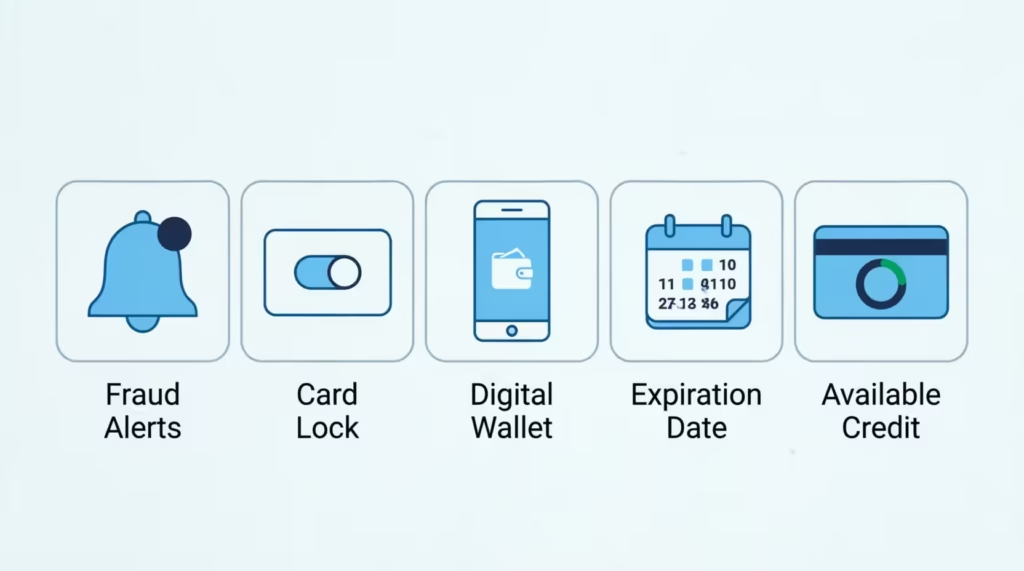
Start with fraud alerts. Capital One sends a text or push notification when it spots a purchase that looks unusual. If you didn’t reply “Yes” to confirm the charge, the system may block your card until you do. Open your messages, search for “Capital One” or “Eno,” and reply to any pending alert.
Next, check the card lock toggle. The app has a switch that lets you freeze your card with one tap. It’s easy to flip it on by accident or forget you turned it on after a lost-wallet scare. Open the app, tap your card, and look for “Lock Card.” If the switch is green or on, slide it off.
Then look at your payment method. If you tapped your phone, the issue may be with the digital wallet, not the card itself. Apple Pay, Google Pay, and Samsung Wallet sometimes drop the link to your card after a software update. Remove the card from the wallet and add it back.
After that, glance at your card’s expiration date. Cards expire on the last day of the month printed on the front. If that month has passed, your old card will stop working even if your new one hasn’t arrived yet.
Finally, check your available credit. Pull up your account in the app. If your balance is close to your limit, even a small charge can push you over and trigger a decline.
💡 Pro Tip: Turn on push notifications inside the Capital One Mobile app. You’ll get instant alerts the moment a charge is flagged, so you can approve it before the cashier moves on.
Your Card Is Declined for Every Purchase
If nothing goes through, no matter where you try, the problem is almost always at the account level, not the card level. That means something has put a hold on the whole account. The good news is that a Capital One card declined in this pattern usually has a clear cause you can spot in the app.
A Late or Missed Payment Has Restricted Your Account
When a payment is past due, Capital One may place an account restriction that blocks all new charges. This often kicks in once you’re 30 to 60 days late, though severe delinquency can trigger it sooner. You’ll usually see a banner in the app or a letter in the mail.
To fix it, open the app, go to “Pay Bill,” and make at least the minimum payment. If your account is far past due, you may need to pay the full past-due balance before the freeze lifts. Most payments post in one to two business days. If you need access today, call the number on the back of your card and ask if a same-day payment can lift the hold faster.
Card Lock Has Been Turned On
The card lock feature is one of the most common reasons for a card declining out of nowhere. You may have locked it after misplacing your wallet, then forgotten. A family member with shared app access could have toggled it too.
Open the Capital One Mobile app, tap your card, and look for the lock switch. Turn it off, then try your purchase again. The change takes effect right away, so there’s no waiting period.
New or Replacement Card Hasn’t Been Activated
If you just got a new card in the mail, it won’t work until you activate it. This is true for first-time cards, replacement cards after a fraud event, and renewal cards sent before your old one expired. Even tapping the new card on a reader won’t work without activation.
You can activate in three ways: scan the QR code on the sticker, use the “Activate Card” option in the app, or call the activation number printed on the card. Activation takes less than a minute. If you’ve been using the old card and the new one arrived weeks ago, the old card may have already been switched off, even if the expiration date hasn’t passed yet.
⚠️ Mistake to Avoid: Don’t keep swiping a card that just got declined three times in a row. Repeated tries can flag your account for fraud and lock it down even tighter.
Your Card Works for Some Purchases but Not Others
This pattern is different. Your card buys coffee in the morning, then gets declined for a laptop in the afternoon. The account isn’t frozen. Something about that specific purchase is the problem. Two causes explain almost every case.
A Large or Unusual Transaction Triggered a Fraud Check
Capital One’s fraud system watches for charges that don’t match your normal habits. A sudden big purchase, a buy in a city you don’t visit, or a charge at a merchant type you’ve never used can all trigger a fraud alert. The system blocks the charge and sends you a text or app message asking, “Did you make this purchase?”
Check your phone right away. Reply “Yes” to the text, or open the app and confirm the charge under “Recent Activity.” Once you confirm, try the purchase again within a few minutes. You can also call the fraud line on the back of your card to clear the hold faster.
To prevent this on planned big buys, you can message Eno, the Capital One virtual assistant, in the app and let it know what’s coming. While Capital One officially says travel notices aren’t required, a quick heads-up still helps.
Pending Holds Are Reducing Your Available Credit
Sometimes the card “works” but only for small charges. The culprit is often a pending hold you forgot about. Gas stations, hotels, and rental car companies place authorization holds that can be much larger than the final bill. A hotel might hold $200 a night beyond your room rate. A gas pump can hold $100 before your final fuel charge posts.
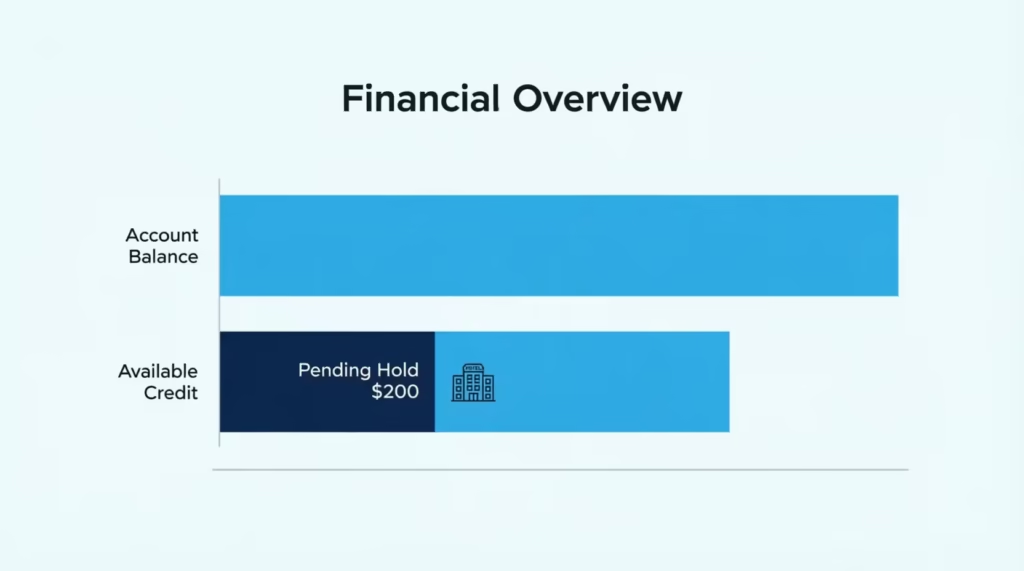
These holds shrink your available credit even though no real charge has cleared yet. Open the app and check the “Available Credit” number, not just your balance. If a hold is too high, it can take 3 to 7 business days to drop off on its own. You can call Capital One and ask them to remove a specific pending authorization if the merchant has already processed the final amount.
Your Physical Card Won’t Tap, Swipe, or Insert
Sometimes the account is fine, but the plastic itself is the problem. Cards wear out faster than people think, especially if you carry yours in a tight wallet or near other magnetic items. Here’s how to tell if the card itself has failed.
Worn Chip or Magnetic Stripe
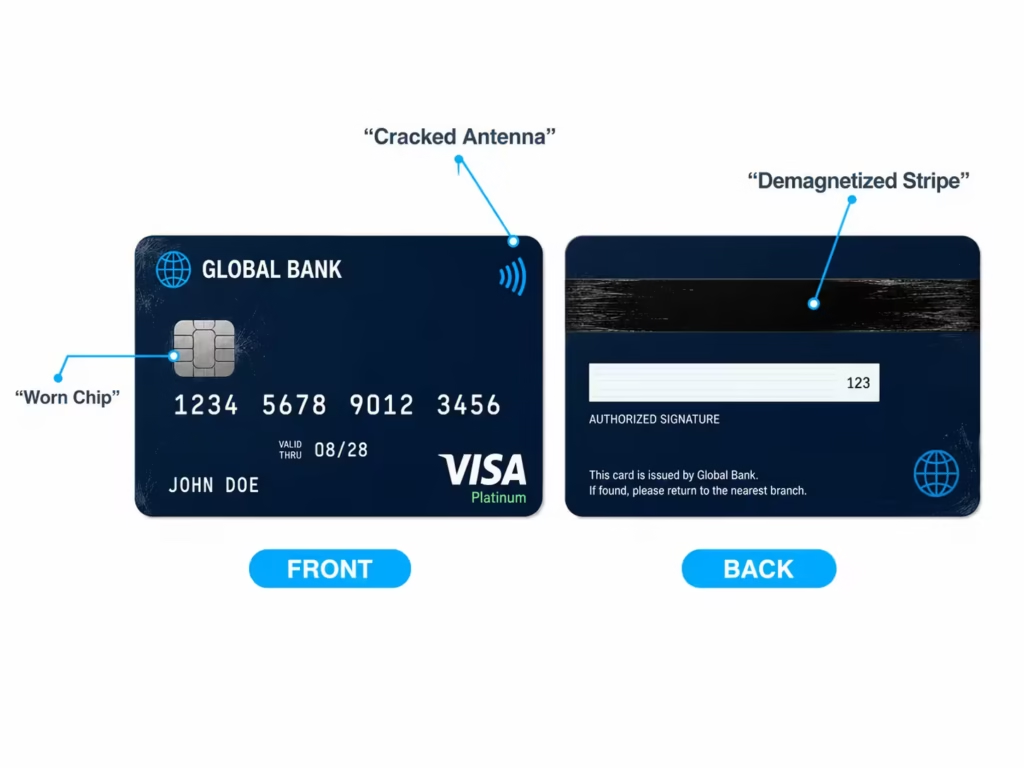
The chip card and magnetic stripe both wear down with use. A chip that’s scratched or dirty may not read on the first or second try. A magnetic stripe can demagnetize from sitting near phones, keys, or other cards with magnets. If swipes fail across many different stores, the stripe is likely the issue.
Try a quick test. Insert the chip slowly and hold it in place until the reader beeps. If it fails at three or more stores, request a free replacement through the app under “Services” > “Replace Card.” The new card usually arrives in 4 to 7 business days. While you wait, add your card to a digital wallet so you can keep paying with your phone.
Contactless (Tap-to-Pay) Not Registering
If your card won’t tap but the chip still works, the antenna inside may be damaged. The contactless payment chip is a thin loop that can crack if the card gets bent. It can also fail if the card has been near strong magnets.
Test it at two or three different tap readers. If none read it, the antenna is probably broken. You can still use the chip while you wait for a replacement, or add the card to Apple Pay, Google Pay, or Samsung Wallet to tap with your phone instead.
Online Purchases Keep Getting Declined
A card that works in stores but fails online points to a different set of problems. Online checkouts run extra checks that in-person readers skip. Two issues cause most online declines.
Card Details Don’t Match What’s on File
Online stores check your CVV, expiration date, and billing address against what Capital One has on record. Even one wrong digit will trigger a decline. The most common slip is an outdated billing address after a recent move.
Open the app, tap “Profile,” and check your home address. Update it if it’s wrong, then wait a few minutes before trying the purchase again. For the CVV, use the three-digit code on the back of the card, not the long number on the front. If you have a virtual card number through Eno, make sure you’re using the right CVV for that virtual card, since each one has its own code.
Repeated Failed Attempts Triggered a Security Hold
When the same card fails three or more times at the same checkout, the system may place a short security hold. This protects you from someone testing stolen card numbers. The hold usually clears in 15 to 30 minutes on its own.
Stop trying for now. Wait at least 30 minutes, then try once more with the correct details. If it still fails, switch to a virtual card number from Eno. Virtual numbers have their own track record and often go through when the main number is held.
Your Card Stops Working While Traveling
Travel is the single most common time for a Capital One card to act up. The fraud system sees a charge from a place you don’t usually shop, and it acts fast. This can leave you stuck at a hotel desk or a gas station far from home.
If your card is declined abroad, check your phone for a fraud alert text first. Capital One often sends one within seconds of the failed swipe. Reply “Yes” if the charge was yours, then try again. If you don’t have a signal, open the app over Wi-Fi at your hotel and confirm the charge under “Recent Activity.”
Some countries, especially in Europe, require chip and PIN instead of chip and signature. Capital One cards work with chip and PIN at most readers, but some unattended kiosks, like train ticket machines and gas pumps, may still reject U.S. cards. Try a staffed register when you can.
If you can’t reach Capital One on a local line, use the international collect call number printed on the back of your card. Most hotel front desks can place the call for you at no charge to you. Have your account number, last four digits of your Social Security number, and a recent purchase ready to confirm your identity.
For backup, set up a virtual card number in Eno before you leave home. If your physical card gets locked, you can keep paying online and through digital wallets with the virtual number while you sort it out.
📌 Did You Know: Capital One does not charge foreign transaction fees on any of its credit cards. That means once your card is unlocked, you can use it abroad without the 3% surcharge many other banks add.
How to Tell If It’s a Capital One Outage, Not Your Card
Sometimes the problem isn’t your card at all. The whole Capital One system can hiccup. When that happens, even a perfect card will fail. Knowing the signs saves you from calling support when there’s nothing they can do but wait.
Watch for these clues. The Capital One Mobile app won’t load past the login screen. The website times out or shows error pages. Charges fail across more than one of your Capital One cards. The Eno chatbot stops responding. If two or more of these line up, it’s likely an outage.
To confirm, check Downdetector.com on your phone for a spike in user reports. You can also search “Capital One down” on X (formerly Twitter). The Capital One support account posts updates during major outages.
Most outages clear in under an hour. While you wait, pay with a different card, cash, or a digital wallet token that may still work if it was saved before the outage started. Don’t keep retrying the same charge. Each failed attempt can trigger a fraud lock once the system comes back online.
Authorized User’s Card Suddenly Not Working
If you’re an authorized user on someone else’s account, your card can stop working for reasons that have nothing to do with you. The primary cardholder controls almost every setting, and changes on their end show up on your card fast.
The primary cardholder may have used the card lock feature on your specific card. Capital One lets the main account holder lock authorized user cards one at a time through the Capital One Mobile app. They may have done it for safety, then forgotten. Ask them to check the app and toggle your card back on.
The whole account may also be under restriction. If the primary cardholder missed a payment or hit the credit limit, your card stops working too, even if you’ve done nothing wrong. As an authorized user, you can see basic transaction info in your own app login, but you can’t fix payment issues yourself. The primary cardholder must take action.
For example, Jennifer, a marketing manager whose mom added her as an authorized user, found her card declined at a $230 grocery run. A quick text to her mom revealed the family account had a $1,200 hold from a hotel stay the week before. Once her mom paid down the balance by $300, Jennifer’s card worked again within two hours.
How to Get Capital One’s Help When Self-Service Doesn’t Work
Most card issues fix themselves through the app. But when they don’t, you need a person. Capital One has several support paths, and picking the right one saves time.
Which Number or Channel to Use
For most card issues, call the number on the back of your card. This routes you to the general Capital One customer service for your specific account type. The main line is 1-800-CAPITAL (1-800-227-4825), which works for credit card support 24 hours a day, seven days a week.
If you suspect fraud or your card is lost or stolen, ask to be transferred to the fraud department right away. They have more tools and can issue an emergency card faster. For travel emergencies abroad, use the collect call number printed on the back of your card. It’s free from any landlines, including hotel phones.
For non-urgent questions, message Eno in the app first. Eno can handle card replacements, transaction disputes, and many account changes without a phone wait. The in-app chat is usually faster than the phone line during business hours.
What to Have Ready Before You Call Capital One Support
Speed up your call by gathering a few things first. Have your card in front of you, or your account number if the card is lost. Know the last four digits of your Social Security number, since the rep will use it to verify your identity. Have your most recent payment amount and date ready, plus one or two recent purchases you can confirm.
If you’re calling about a declined charge, write down the date, the amount, and the merchant name before you dial. If it’s a fraud issue, list any charges you don’t recognize. Being ready cuts most calls from 20 minutes to under 10.
Frequently Asked Questions (FAQs)
Why is my Capital One credit card declining when I have money?
Pending holds from hotels, gas stations, or rental cars can shrink your available credit below your actual balance, causing declines. Check “Available Credit,” not your balance, in the app, since holds can take 3 to 7 business days to clear on their own.
How do I unrestrict my Capital One card?
Open the Capital One Mobile app, go to “Pay Bill,” and make at least the minimum payment to lift a late-payment restriction. If you’re far past due, you may need to pay the full past-due balance, or call the number on your card for a same-day fix.
How long does it take for Capital One to unrestrict your card?
Most payments take one to two business days to post and lift an account restriction. If you need access sooner, call the number on the back of your card and ask if a same-day payment can remove the hold faster.
Why is my new Capital One card declining when I have money?
New, replacement, and renewal cards won’t work until you activate them, even if you tap them on a reader. Activate in under a minute by scanning the QR code on the sticker, using “Activate Card” in the app, or calling the activation number on the card.
Is Capital One having issues right now?
Check Downdetector.com or search “Capital One down” on X for a spike in reports, since a true outage usually affects multiple cards and the app at once. Most Capital One outages clear within an hour, so try a different payment method while you wait.
Why is my credit card not working even though it’s activated?
An activated card can still decline if the card lock toggle is on, or if a fraud alert is blocking the charge until you confirm it by text. Open the Capital One Mobile app and check both the lock switch and any pending fraud alerts first.
Why do I keep getting declined when I try to use my card?
Trying the same card three or more times at one checkout can trigger a temporary security hold. This usually clears on its own in 15 to 30 minutes, so stop retrying and use a different card or a virtual card number from Eno instead.
What are common Capital One card issues that cause declines?
The most frequent causes are an accidentally enabled card lock, a fraud alert awaiting your text confirmation, an unactivated new card, and pending holds from hotels or gas stations eating into your available credit. Past-due payments can also trigger an account-wide restriction that blocks every purchase.
Does Capital One charge a fee for using my card abroad?
No, Capital One does not charge foreign transaction fees on any of its credit cards. Once your card is confirmed and unlocked for travel, you can use it overseas without the typical 3% surcharge many other banks add.
Can an authorized user fix their own declined Capital One card?
An authorized user cannot lift account restrictions or unlock their own card; only the primary cardholder can do that in the app. If your card declines unexpectedly, ask the primary cardholder to check for a card lock or an account hold from a missed payment.
Bottom Line
Getting a Capital One card to work again usually comes down to a quick app check, a fraud alert reply, or a single setting toggle. We’ve covered every common cause, from a flipped card lock to chip wear, fraud holds, online checkout errors, travel blocks, full-system outages, authorized user limits, and when to call for help.
Based on the patterns above, the most effective approach is to open the Capital One Mobile app first, since it shows the cause in seconds for most “card not working” moments.
If you know someone who travels often or shares a card with family, share this guide. It could save them a stressful checkout moment when their Capital One card stops working.