If you’re staring at a Capital One statement and your due date is creeping closer, I get the stress. We’ve all had that moment when you’re not sure which button to click, how much to pay, or whether the payment will arrive on time. This guide on Capital One credit card payment is built to remove that guesswork in minutes.
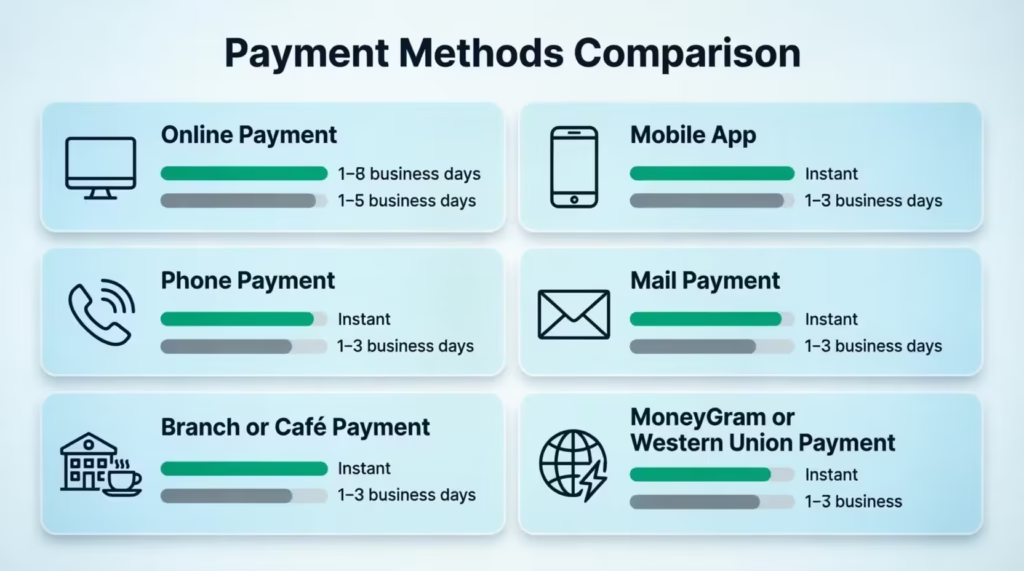
The fastest, safest way to pay is online or in the Capital One mobile app before 8 PM ET on your due date, using a linked bank account.
Below, I’ll walk you through every payment method, the actual processing times, the cutoff rules that trip people up, autopay setup, and what to do if a payment slips through. By the end, you’ll know exactly what to do today and how to never worry about it again.
Key Takeaways
This guide explains how to pay a Capital One credit card using online, mobile app, phone, mail, branch, and cash payment methods, including processing timelines, cutoff rules, AutoPay setup, payment amount options, and missed payment consequences.
Core Facts:
- Online and mobile app payments are the fastest Capital One credit card payment methods and can post the same business day when submitted before the applicable cutoff.
- Capital One allows payments by linked bank account, phone, mail, branch or Café locations, and select third-party cash payment networks.
- The regular payment deadline is midnight Eastern Time on the due date, while 8 PM ET is the safer cutoff to avoid statement-cycle timing issues.
- Paying the statement balance in full by the due date maintains the grace period and helps avoid interest on new purchases.
- AutoPay can be configured for the minimum payment, statement balance, current balance, or a fixed monthly amount using a linked bank account.
- Capital One generally does not report a late payment to credit bureaus until the account reaches 30 days past due, although late fees and interest may apply sooner.
Best For:
- People looking for the fastest and safest way to make a Capital One credit card payment.
- Cardholders deciding whether to pay the minimum payment, statement balance, or current balance.
- Anyone setting up AutoPay, changing a due date, or dealing with a missed payment.
How to Pay Your Capital One Credit Card Online
Paying online is the most reliable method, and it’s the one Capital One processes the fastest. You can finish the whole thing in under three minutes once your bank account is linked.
Here’s the exact path. Go to capitalone.com in any browser. Click “Sign In” in the top right corner. Enter your username and password. If you have more than one Capital One product, like a checking account or auto loan, you’ll see a dashboard. Look for the tile that shows your credit card name and the last four digits of your card. Click that tile to open the credit card account.
Once inside, look for the button labeled “Make a Payment.” It usually sits near the top of the page, close to your current balance. Click it. You’ll now see the payment screen, which has four parts.
First, choose how much to pay. Capital One gives you four options: the minimum payment, the statement balance, the current balance, or “Other amount,” where you type in any number between the minimum and the current balance. We’ll cover which one to pick later in this guide.
Second, choose when to pay. The default is today’s date. You can also schedule a payment up to about 60 days in advance. Picking a future date is helpful if you want the money to leave your bank on payday instead of right now.
Third, choose the bank account the money should come from. If you haven’t linked an account yet, click “Add a bank account.” You’ll need two things: your bank’s routing number (nine digits) and your account number. Both sit at the bottom of any paper check or in your bank’s app under account details. Capital One will save this account for future payments.
Fourth, review the summary screen and click “Submit Payment.” You’ll instantly get a confirmation number on screen. Capital One also sends an email receipt within a few minutes. Save both. They are your proof if anything ever goes sideways.
Processing time is simple. If you submit before the cutoff (more on that in a moment), the ACH transfer posts the same business day, and your credit becomes available within a few hours. Submit after the cutoff, and it posts the next business day. The money usually leaves your bank one to two business days later, even though Capital One credits your card right away.
💡 Pro Tip: Schedule the payment for two business days before your due date instead of the due date itself. That tiny buffer protects you if your bank has a glitch or a weekend lands awkwardly.
How to Pay Through the Capital One Mobile App
The mobile app is the same payment system, just on your phone. Download “Capital One Mobile” from the App Store or Google Play. Sign in with the same username and password you use online. You can also enable Face ID or fingerprint login, which makes future payments much faster.
Once you’re in, tap your credit card account from the home screen. Tap “Pay Bill” or “Make a Payment.” The next screens mirror the website exactly: choose the amount, choose the date, pick the bank account, and confirm.
Processing time is identical to the website, same-day if before the cutoff, next business day if after. After you submit, the app shows a confirmation screen with a reference number. You can also tap “Account Activity” to see the payment listed as “Pending” right away, and then “Posted” once it clears.
How to Verify Your Payment Went Through
This step matters more than people think. A payment is only safe once you can see it confirmed in two places.
First, check the confirmation number. It appears on the final screen right after you submit, and it also arrives by email. If you didn’t get either, the payment didn’t go through, and you’ll need to redo it.
Second, check your account activity. Sign back in to the website or app and look at the recent transactions list. A successful payment shows up as “Payment – Thank You” or simply “Payment Received.” It may say “Pending” for the first 24 hours.
Two numbers update at different speeds. Your available credit usually refreshes the same day you pay. Your balance can lag by one business day, which sometimes confuses people who think the payment failed. Wait one full business day before panicking. If after that the payment still isn’t visible, call the number on the back of your card.
How to Pay Your Capital One Credit Card by Phone
Paying by phone is the right backup when the website is down, your internet is out, or you’re traveling and want a human to confirm the payment landed.
Capital One does not publish a universal payment number because the line depends on your specific card product. Look on the back of your physical card, or at the top right corner of your monthly statement. The number printed there routes you straight to the team that handles your account.
When you call, you have two paths. The automated system lets you make a payment using your touch-tone keypad. It is free, available 24/7, and takes about three minutes. You’ll need your full card number, your bank’s routing number, and your bank account number ready before you dial.
The live agent path connects you to a customer service representative. This usually costs an “agent-assisted payment fee,” which Capital One has historically set at around $10 per transaction. Use a live agent only when the automated line cannot handle your situation, such as when you need to discuss a missed payment or a fee waiver at the same time.
Processing time by phone is same-day if your call completes before the daily cutoff. Information you’ll need before calling: card number, the last four digits of your Social Security number for identity verification, the bank routing number, the bank account number, and the amount you want to pay.
How to Pay Your Capital One Credit Card by Mail
Mail is the slowest method, and it should be your last choice if a due date is close. Use it only when you don’t have a bank account linked, you’re sending a money order, or you simply prefer paper.
Send your check or money order to this address, per the Capital One Help Center:
Capital One Attn: Payment Processing PO Box 71087 Charlotte, NC 28272-1087
Do not mail cash. It’s not insured, and Capital One will not credit a cash envelope. Use a personal check or a money order.
A few rules make sure your payment actually gets credited. Write your full credit card account number on the memo line of the check. Include the payment stub from the bottom of your paper statement if you have one. Make the check payable to “Capital One.” Use a single envelope per account, even if you have more than one Capital One card.
Processing time is the slowest part. Capital One typically takes 5 to 10 business days to receive, open, and post a mailed payment. The credit date is the date Capital One actually processes the check, not the postmark date. That distinction matters: if your due date is Friday and you mail the check on Tuesday, you will probably be late.
The safe rule is to mail at least 10 calendar days before your due date. If your due date is within the next 7 days, do not use the mail. Pay online, in the app, or by phone instead, then switch to mail later if you prefer it for future bills.
⚠️ Mistake to Avoid: Putting the wrong account number on the check or forgetting it entirely. When that happens, Capital One can’t match the payment to your account, and it sits in a holding queue while late fees pile up.
How to Pay Your Capital One Credit Card in Person
In-person payments are useful when you need same-day credit and don’t trust online banking, or when you’re paying with cash.
Capital One operates physical branches and Capital One Cafés in many U.S. cities. At a branch or café, you can pay with cash, a personal check, or a cashier’s check. There is no fee, and the payment is credited the same day if you arrive before the location’s daily cut-off (usually mid-afternoon for cash handling).
Find your nearest location using the branch and café locator on capitalone.com. Bring your physical Capital One credit card, or at a minimum, your card number, plus a government-issued photo ID. Branches and cafés are generally closed on Sundays and federal holidays, so plan around that.
Third-Party Cash Payment Options
If there’s no Capital One branch near you, three retail networks accept cash payments toward Capital One credit cards: MoneyGram, Western Union, and Kroger Money Services (found inside many Kroger-family grocery stores like Fred Meyer, Ralphs, and Fry’s).
At the counter, tell the clerk you want to make a “bill payment” to Capital One. They will ask for the biller name (Capital One) and your full credit card account number. Some networks also ask for a biller code, which is listed on their search screen under “Capital One Credit Card.”
These services charge a fee, usually between $1.50 and $5, depending on the network and the amount. Processing time is 1 to 3 business days, not same-day. So while it’s faster than mail, it’s not as fast as paying through capitalone.com. Keep the receipt until the payment shows on your account.
Capital One Payment Cutoff Times
This is the section most people skip, and it’s the one that causes the most accidental late fees. Capital One has two different cutoffs, and they apply to different situations.
The regular payment cutoff is midnight Eastern Time on the day a payment is due. As long as you click “Submit” before 12:00 AM ET, the payment counts as on-time.
The statement closing cutoff is 8 PM ET, not midnight. This applies on the day your statement cycle closes, which is sometimes (but not always) the same day a payment is due. If you submit between 8 PM and midnight ET on your statement closing day, the payment may post to the next cycle and trigger interest charges, even if it technically arrives “on the due date.”
A payment is only counted on time once it is received and posted, not just submitted. With online and app payments, “submitted” and “received” happen in the same moment. With phone payments, it’s also instant. With mail or third-party cash, “submitted” and “received” are days apart.
If your due date falls on a Sunday or federal holiday, the deadline moves to the next business day. For example, if your due date is Sunday the 14th, you have until midnight ET on Monday the 15th. Many cardholders don’t realize this and accidentally pay early when they could have waited.
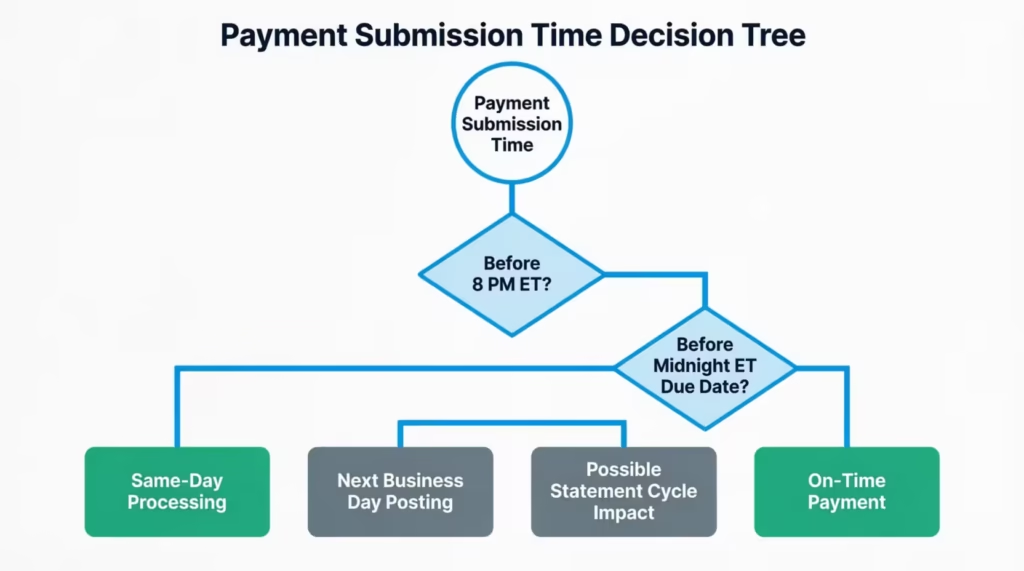
If you’re ever unsure which cutoff applies to your situation, just treat 8 PM ET as your personal deadline every time. It costs you nothing to pay a few hours early, and it removes any ambiguity.
Processing time by method, side by side:
MethodProcessing TimeCostOnline (capitalone.com)Same day if before cutoffFreeMobile appSame day if before cutoffFreePhone (automated)Same day if before cutoffFreePhone (live agent)Same dayAround $10Mail5 to 10 business daysCost of stampBranch or CaféSame dayFreeMoneyGram / Western Union / Kroger1 to 3 business days$1.50 to $5
Minimum Payment, Statement Balance, or Current Balance: Which Should You Pay?
The payment screen gives you four options, and each one has a very different financial outcome. Here’s what each means in plain English.
The minimum payment is the lowest amount Capital One will accept to keep your account in good standing. Paying only the minimum avoids a late fee and protects your credit score, but it does not stop interest from accruing. The rest of your balance keeps growing at your card’s APR every single day.
The statement balance is the total amount you owed as of the last day of your billing cycle (the statement closing date). This is the most important number on the screen. Paying the statement balance in full by the due date maintains your grace period. That means new purchases during the next cycle won’t accrue interest, as long as you keep paying the statement balance in full each month.
The current balance is the real-time total, including any new charges you’ve made since the statement closed. It is usually higher than the statement balance. Paying the current balance brings your card to a $0 owed balance for that moment, which can be helpful if you’re trying to keep your credit utilization low before applying for a loan or a new card.
The custom amount lets you pay anything between the minimum and the current balance. This is useful when you can pay more than the minimum but not the full statement; just remember that interest will accrue on whatever you leave unpaid.
The grace period is the part most people misunderstand. If you pay less than the statement balance in any given month, you lose the grace period, and interest starts accruing on new purchases from the day they post, not just on the leftover balance. To get the grace period back, you usually have to pay the statement balance in full for two consecutive cycles. The Capital One grace period explainer breaks this down in more detail.
Each option has a place. The minimum protects your credit when cash is tight. The statement balance protects your wallet from interest. The current balance protects your credit utilization ratio. The right pick depends on what you’re trying to protect this month.
How to Set Up AutoPay on Capital One
AutoPay removes the mental load of remembering due dates. Once enrolled, Capital One pulls your chosen amount from your linked bank account automatically every month.
To enroll, sign in at capitalone.com or in the mobile app. Open your credit card account. Click “Payments” or “Set Up AutoPay.” Choose the amount option (covered just below), confirm your linked bank account, and click “Enroll.”
You’ll need your routing number and account number for the bank account you want to use, if it isn’t already linked. AutoPay processes 1 to 2 business days before your due date, so the money clears in time.
Once enrolled, you’ll see a confirmation message on screen and a notice on every future statement saying “AutoPay is enabled.” Always double-check that line each month. If the AutoPay line ever disappears from your statement, something has gone wrong, and you need to re-enroll before the next due date.
Choosing the Right AutoPay Amount
Capital One gives you four AutoPay settings, and each one fits a different financial style.
Minimum payment is the safest setting for protecting your credit score, but the most expensive long-term because interest keeps building.
Statement balance is the option most financial professionals would point to for cardholders who can afford it. AutoPay pays whatever the statement says, in full, every month. Interest never accrues, and the grace period stays intact.
Current balance debits your real-time balance on the processing date. This is less common because it can pull more than expected if you’ve made recent purchases.
Fixed amount lets you set a specific dollar amount, like $200, every month. This is useful if you’re paying down a large balance on a strict plan, but it can also cause a late fee if your minimum ever rises above your fixed amount. Set the fixed amount high enough to always cover the minimum.
One more detail worth knowing: any manual payment you make before the AutoPay date reduces the AutoPay debit. So if your statement balance is $500 and you pay $300 by hand on the 5th, AutoPay will only pull the remaining $200 on the due date. This is helpful, not a glitch.
What to Watch Out For With AutoPay
AutoPay is reliable, but it has edge cases that catch first-time users off guard.
The biggest one: AutoPay can still fire even if you paid the balance in full early. The system checks your balance during a specific processing window. If your balance is anything above $0 at that moment, AutoPay pulls. To prevent a duplicate pull, your card must show a $0 balance at the start of that window. The cleanest fix is to pay manually only after AutoPay has already run that month, or pause AutoPay before paying early.
Insufficient funds trigger another issue. If your bank account doesn’t have enough money on the AutoPay date, Capital One typically tries to debit a second time a few days later. If that also fails, Capital One cancels your AutoPay enrollment entirely. You’d then need to re-enroll. Meanwhile, your card is treated as unpaid, and a late fee may apply.
Turn on payment alerts in the app to catch this fast. Capital One can send you a text or email when AutoPay processes, when it succeeds, and when it fails. Only one bank account can be linked to AutoPay at a time, so make sure the one you choose is your most reliably funded.
📌 Did You Know: A single returned AutoPay can cancel your enrollment without warning. That’s why many cardholders pair AutoPay with low-balance alerts on their bank account.
What Happens If You Miss a Capital One Payment
A missed payment isn’t a single event; it’s a chain reaction. Knowing the timeline helps you act fast and limit the damage.
The moment your payment is past due, Capital One charges a late fee of up to $40 per the Capital One Consumer Credit Card Agreement. Under the CARD Act of 2009, the first late fee in a six-month window is capped at a lower amount (historically up to $29 for a first offense), and the fee can never exceed your minimum payment due. Capital One follows these federal limits.
Next, interest kicks in. If you had a grace period, missing a payment usually ends it, and interest starts accruing on your purchases at your card’s APR. That daily interest can quickly outpace the late fee itself on larger balances.
What to do right now if you’ve missed a payment: pay at least the minimum as soon as possible, today if you can. Use the website or app, because those post fastest. Paying the minimum within a few days of the due date stops the situation from getting worse. It does not erase the late fee on its own, but it does start the clock on damage control.
Crucially, a late payment does not automatically appear on your credit report. Capital One only reports to the credit bureaus once you cross a specific threshold, which we’ll cover next.
The 30-Day Credit Reporting Threshold
This is the line that matters most for your credit score. Credit card issuers, including Capital One, generally do not report a late payment to Experian, Equifax, or TransUnion until it is at least 30 days past the due date, as explained in the Capital One guide on late payments.
That means if your payment is 1 to 29 days late, you’ll owe a late fee and possibly interest, but your credit score should not take a hit from this issuer. Pay the minimum before day 30, and you’ve avoided the worst outcome.
Once you cross 30 days, the late mark gets reported, and it stays on your credit report for up to seven years, even after you pay. The score impact is heaviest right after the report and fades over time, but the mark is visible to lenders the whole time. This is why “pay something, anything, before day 30” is the rule that matters more than any other.
How to Request a Late Fee Waiver
A late fee is not always permanent. Capital One sometimes waives a first-time late fee as a one-time courtesy, especially for cardholders with a clean payment history.
Call the customer service number on the back of your card. Once you reach a live agent, be direct and polite. Say something like: “I missed my payment for the first time, and I’ve already paid the balance in full. Is it possible to have the late fee waived as a one-time courtesy?”
Two things make a yes more likely. First, your prior payment history matters. A cardholder who has paid on time for a year or more has much better odds than someone who has been late before. Second, the situation matters: paying the full balance immediately before calling shows good faith.
This is a goodwill gesture, not a guaranteed right. The agent’s answer is final for that call, but you can always call back another day if you’re not satisfied. Many longtime Capital One customers have had at least one late fee removed this way.
How to Change Your Capital One Credit Card Due Date
If your due date keeps landing at a bad time, like the day before payday, you can change it. Capital One allows you to move your credit card due date, and it’s one of the most underused features on the platform.
You can request the change in three ways. Online: sign in at capitalone.com, open your card account, look for “Account Services” or “Manage Account,” and find “Change Due Date.” In the app: navigate to your card, tap the menu icon, and look for the same option. By phone: call the number on the back of your card and ask the agent to update your due date.
The change is not instant. It typically takes 4 to 6 weeks, or one to two full billing cycles, to take effect. You must keep paying on the old due date during the transition. Missing the old date because you’re waiting for the new one to kick in will still count as a late payment.
The most common use case is aligning your due date with your payday. If you get paid on the 1st and the 15th, setting your due date to the 5th or the 20th gives you a cushion. Some cardholders also stagger multiple credit card due dates across the month so they’re not all hitting at once. Either way, this small change makes future payments feel much easier to manage.
Frequently Asked Questions (FAQs)
How do I make a payment to my Capital One credit card?
Sign in to your Capital One account online or in the mobile app, select your credit card, click “Make a Payment,” choose the amount and payment date, then submit using a linked bank account. Payments made before the cutoff can post the same business day.
Can I pay my Capital One credit card with my bank account?
Yes. Capital One accepts payments directly from a linked checking or savings account using your bank’s routing number and account number. This is the fastest and most common payment method.
How do I make a one-time payment to my Capital One credit card?
Open the website or mobile app, select your card account, choose “Make a Payment,” enter the amount, pick a payment date, and submit. You’ll receive a confirmation number immediately after the payment is scheduled.
What payment methods does Capital One accept?
Capital One accepts payments from bank accounts online, through the mobile app, by phone, by mail using a check or money order, and in person at eligible locations. Some third-party cash payment services are also available for a small fee.
How do I pay my credit card bill online?
Log in to your account at Capital One’s website, select your credit card, click “Make a Payment,” choose the amount and date, then submit the payment from a linked bank account. The process usually takes only a few minutes.
Where can I pay my Capital One credit card payment?
You can pay online, through the Capital One mobile app, by phone, by mail, at a Capital One branch or Café, or through approved third-party bill payment services such as MoneyGram and Western Union.
Can I pay my Capital One credit card with cash?
Yes. Cash payments can be made at participating Capital One branches and Cafés. You can also use certain third-party payment networks, although they typically charge a fee and may take 1 to 3 business days to process.
What address do I send my Capital One credit card payment to?
Mail checks or money orders to: Capital One, Attn: Payment Processing, PO Box 71087, Charlotte, NC 28272-1087. Capital One recommends mailing payments at least 10 calendar days before the due date.
Where can I pay my Capital One payment in person?
In-person payments can be made at Capital One branches and Capital One Cafés. Bring your card or account number and a government-issued photo ID if required.
Is there a way to make a credit card payment instantly?
Capital One online, mobile app, phone, and branch payments can be credited the same day when completed before the applicable cutoff time. For the safest results, submit payments before 8 PM ET.
Bottom Line
Paying a Capital One credit card bill cleanly comes down to picking the right method, hitting the cutoff, and choosing how much to pay with intent. Online and app payments are fastest, mail is slowest, and the 8 PM ET cutoff is the safer mental rule for everyone.
For most readers, signing up for AutoPay on the statement balance gives the best results. It protects your credit score, keeps the grace period, and takes away the monthly stress. And if a payment ever slips, paying the minimum before day 30 is what protects your credit report.
If a friend or family member is new to Capital One or stressed about their first statement, share this guide with them. It could save them a $40 late fee and a seven-year credit mark on a single missed due date.