If you’re a Capital One cardholder with two or more accounts, you’ve probably wondered whether you can combine credit card limits. Maybe your Venture card has a $3,000 limit that feels too tight, or you want to close an old Quicksilver without losing that credit line.
Capital One does let you move limits between eligible cards, but it no longer merges two accounts into one.
In this guide, we’ll walk you through how credit limit reallocation works, what rules apply, and what to do if the option isn’t showing up yet.
Key Takeaways
This guide explains how Capital One credit limit reallocation works, including eligibility requirements, step-by-step transfer instructions, the minimum limit rule, the 30-day waiting period, credit score impact, and what to do when the option is unavailable.
Core Facts:
- Capital One discontinued account merging around 2018 to 2019. The current option is credit limit reallocation, which moves a limit between two separate open accounts without combining them.
- The reallocation feature was reintroduced in May 2024. Eligible cardholders can access it through the “I Want To” menu on their online dashboard or by calling Capital One directly.
- A minimum credit limit must remain on the source card after transfer, typically $500 though some accounts require $1,000. This minimum does not apply if you plan to close the source card.
- Capital One allows only one reallocation within any 30-day window. A second request before that window closes will be declined.
- Reallocation uses a soft inquiry only, meaning it does not appear on your credit report and will not lower your credit score. Total available credit remains unchanged after the transfer.
- Personal card limits can only transfer to other personal cards. Business card limits can only transfer to other business cards. Cross-type transfers are not supported.
Best for:
- Capital One cardholders who want more spending power on one card without applying for new credit or triggering a hard inquiry.
- Anyone planning to close a Capital One card who wants to preserve the credit limit by moving it to a card they will keep.
- Cardholders who do not see the reallocation option yet and need to understand the eligibility requirements and next steps.
Capital One No Longer Combines Accounts, But Credit Limit Transfers Are Different
Many cardholders find conflicting answers when they search this topic. The confusion usually comes from two separate features being treated as the same thing.
The first is called account combination. Capital One offered this in the past. It let cardholders merge two credit card accounts into one. The card you wanted to keep would absorb the other card’s full limit. Capital One discontinued this feature around 2018 to 2019. It isn’t available today, and Capital One hasn’t announced plans to bring it back.
The second is credit limit reallocation. This is a completely separate feature. It lets you move some or all of the credit limit from one Capital One card to another. Both cards stay open as separate accounts. Only the credit limit moves between them. This is the feature that works today for eligible cardholders.
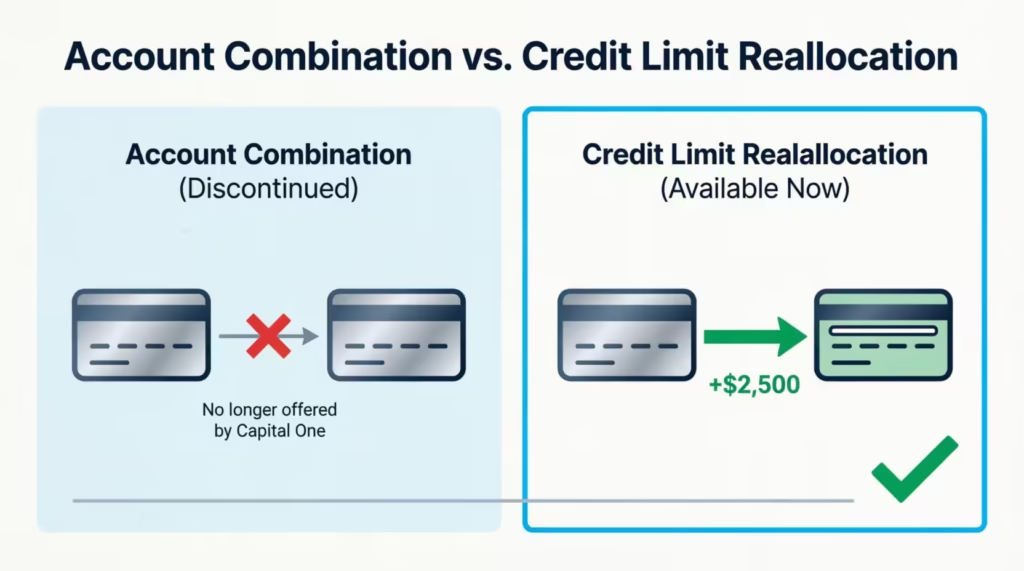
When most people ask about combining Capital One credit limits, they’re really looking for the outcome that reallocation provides: more spending power on one card. That path still exists, even though account merging doesn’t.
Does Capital One Allow You to Transfer a Credit Limit Between Cards?
Yes. Capital One does allow credit limit reallocation between eligible personal credit cards. The feature was reintroduced in May 2024 after a period when it wasn’t available. Eligible cardholders can move credit from one card to another through the online dashboard or by calling Capital One directly.
The key word is “eligible.” Not every account has access to this feature. You’ll either see the option in your account settings or you won’t. If it’s there, you can use it. If it’s missing, your account may not qualify yet.
Check your account online before calling customer service. Some representatives aren’t familiar with this feature and may say it doesn’t exist. Your online dashboard gives the most accurate picture of what’s available on your specific account.
Which Capital One Accounts Are Eligible for Credit Limit Reallocation
Eligibility isn’t universal, but there are clear patterns based on what cardholders report. Here’s what typically needs to be true for your account to qualify:
- Both cards must be in good standing. No missed payments, no delinquencies, and neither card is enrolled in a hardship or payment assistance program.
- Both cards must be from the same category. Personal cards can only transfer limits to other personal cards. Business cards can only be transferred to other business cards.
- Newer accounts may not be eligible yet. Many cardholders report that accounts needed to be open for at least six months, and in some cases a full year, before the option appeared.
- Eligibility shows up in your dashboard. Log in and look for “Transfer Credit Line” or “Manage Credit Line” under the “I Want To” menu on your card page. If that option is there, your account qualifies. If it isn’t, you’re not eligible at this time.
How to Transfer Your Credit Limit Between Capital One Cards
If the feature is available on your account, here are the steps to complete the transfer through the online dashboard.
- Log in to your Capital One account at capitalone.com. Use a desktop browser for the most reliable experience.
- Select the card you want to transfer credit away from. This is the card whose limit will decrease.
- Click “I Want To” in the lower portion of the card detail page.
- Scroll down and select “Transfer Credit Line” or “Manage Credit Line.” The exact label can vary by account type.
- Choose the card you want to receive the credit. This is the card whose limit will increase.
- Enter the amount you want to move. Keep the minimum remaining limit rule in mind before entering a number. The next section covers this rule in detail.
- Review the details and confirm. The transfer is usually processed immediately.
If no eligible cards appear at Step 4, you’ll see an error message. That means no second Capital One card under your account currently qualifies for reallocation.
You can also find this option in the Capital One mobile app. Go to your profile, tap “Account and Feature Settings,” and look for the credit line management option. The mobile layout sometimes differs from the desktop version, so if you can’t find it in the app, try the full website instead.
💡 Pro Tip: If you can’t locate the credit line transfer option in the Capital One mobile app, open capitalone.com in a desktop browser. The reallocation feature appears more consistently on the full web dashboard than in the mobile app.
How to Transfer Your Credit Limit by Phone
If you’d rather speak with someone directly, call the number on the back of your Capital One card and request a credit limit reallocation.
When you speak to a representative, use the phrases “credit limit reallocation” or “credit line transfer.” Avoid asking to “combine my cards” or “merge accounts.” Those terms describe the old account combination feature. Using them often gets a response of “we don’t offer that,” even though the reallocation feature does exist.
The phone process produces the same result as the online option. The representative will confirm which cards are eligible, ask for the transfer amount, and process it on your behalf.
Rules and Restrictions You Need to Know Before You Transfer
Credit limit reallocation at Capital One comes with specific rules. All conditions must be met for a transfer to succeed. Knowing them before you start prevents a declined request or an unexpected outcome later.
One rule applies after the transfer as well. Once a reallocation is complete, Capital One may place a temporary hold on further credit limit increases on the affected cards for one to six months. If you’re also planning to request a credit limit increase separately, submit that request first, before initiating any reallocation.
The Minimum Credit Limit That Must Remain on the Card You Transfer From
If you plan to keep both cards open after the transfer, you can’t move 100% of the limit away from the source card. A minimum amount of credit must stay behind on that card.
Based on cardholder reports, the minimum is typically $500, though some accounts have a floor of $1,000. Capital One hasn’t published a single universal figure, so the exact amount may vary by account.
Here’s a practical example. Say your Quicksilver card has a $6,000 credit limit and your SavorOne has a $2,000 limit. You want to move as much as possible to the SavorOne. If your minimum is $500, the maximum you can transfer is $5,500, leaving $500 on the Quicksilver.
If you plan to close the card you’re transferring from, this minimum doesn’t apply. The full credit limit can be moved before the account is closed.
The 30-Day Waiting Period Between Reallocations
Capital One allows only one credit limit reallocation within any 30-day window. A second transfer request made before 30 days have passed will be declined.
This matters when you need to make a larger shift between cards. If the amount you want to move exceeds what a single transfer allows, you’ll need to spread the process across multiple months.
A declined request due to timing won’t affect your credit. The transfer simply won’t go through until the 30-day window has ended.
Personal Cards and Business Cards Cannot Share Limits
Reallocation only works within the same account type. Personal card limits can only be moved to other personal cards. Business card limits can only move to other business cards.
If you hold both a personal Capital One card and a business Capital One card, you can’t transfer limits between them. Capital One treats these as two distinct account categories, and cross-type transfers are not supported.
⚠️ Mistake to Avoid: If you hold a mix of personal and business Capital One cards, don’t assume their limits can be shared. Only personal-to-personal and business-to-business transfers are allowed. A cross-type request will be declined, and there’s no workaround for this restriction.
Will Transferring Your Credit Limit Hurt Your Credit Score?
This concern is common, and the answer is reassuring. Capital One uses a soft inquiry for credit limit reallocations. A soft inquiry doesn’t appear on your credit report as a new inquiry. It won’t cause any drop in your score.
This is a key difference compared to applying for a new card. When you apply for a new Capital One card, Capital One pulls your credit from all three major bureaus. That’s a hard inquiry, and it can temporarily lower your score by a few points. Reallocation skips that step entirely.
The transfer also doesn’t change your total available credit. If you have $10,000 across two cards and move $4,000 from one to the other, you still have $10,000 in total available credit. Your overall utilization ratio stays the same.
There is one nuance worth noting. Reducing the limit on one card raises that specific card’s utilization ratio if it already carries a balance. Some newer scoring models track utilization at the individual card level, not just across all accounts combined.
For most cardholders, this is a minor factor. But if the card you’re transferring from already has a balance close to its current limit, it’s worth factoring that in before you move credit away from it.
📌 Did You Know: Capital One processes credit limit reallocations using a soft inquiry, not a hard pull. The transfer won’t appear as a new inquiry on your credit report and won’t lower your score.
What Happens to Your Credit Score If You Close a Card Without Transferring the Limit First
Closing a credit card removes its full credit limit from your total available credit. That directly raises your overall credit utilization ratio, which can lower your score.
The Consumer Financial Protection Bureau recommends keeping credit utilization below 30%. Here’s a concrete example of why that matters. Suppose you have $12,000 in total available credit and carry a $2,400 balance across your cards.
Your utilization is 20%. If you close a card with a $5,000 limit without transferring that credit first, your total available credit drops to $7,000. Your utilization on the same balance rises to about 34%, crossing that recommended threshold.
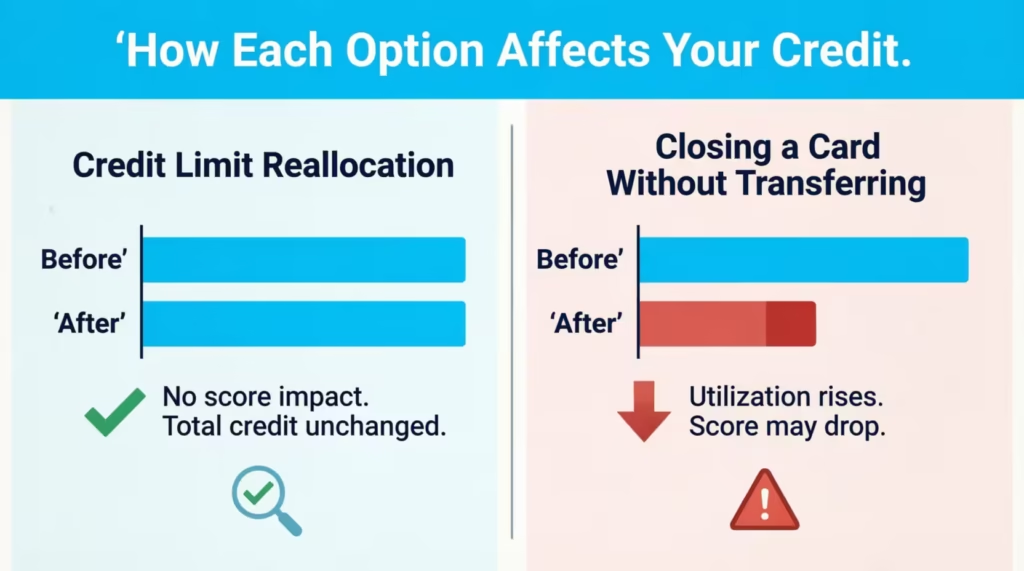
Transferring the credit limit before closing a card prevents this outcome. The limit moves to your other card, keeping total available credit intact. This is one of the strongest practical reasons to use the reallocation feature ahead of any account closure.
What to Do If the Credit Limit Transfer Option Is Not Showing on Your Account
Not seeing the option in your dashboard doesn’t mean it’s permanently unavailable. Several factors explain why it might be missing, and most of them are temporary.
Below are the most common reasons it may not appear, and what you can do about each one:
- Your account may be too new. Cardholders report that accounts often need to be open for at least six months, and sometimes up to a year, before the reallocation option appears. If your card is relatively new, check again in a few months.
- Your account may not be in good standing. A recent missed payment, an active delinquency, or enrollment in a payment plan can block access to the feature. Bring all accounts current and keep a consistent on-time payment record before checking again.
- You may only be checking the mobile app. The credit line transfer feature is more consistently visible on the desktop version of capitalone.com. If you’ve only looked in the app, try the full website on a computer.
- A customer service representative may have given you incorrect information. Some representatives aren’t familiar with the credit limit reallocation feature and will say it doesn’t exist. Before accepting that answer, check your online dashboard directly. The account portal reflects what’s actually available on your account.
- You may not have a second eligible Capital One card. The feature requires at least two qualifying Capital One cards under the same login. If you only have one card, there’s no destination for the transfer, and the option won’t appear.
If you’ve worked through all of the above and the option still isn’t showing, the next section covers what to do instead.
Alternatives When Capital One Credit Limit Reallocation Is Not Available to You
If the reallocation feature isn’t accessible on your account, the most practical next step is to request a credit limit increase on the card where you need more room.
Capital One processes credit limit increase requests with a soft inquiry only. As Capital One explains on its credit limit increase page, this applies whether you request the increase yourself or Capital One offers one automatically. The inquiry won’t affect your credit score.
Here’s how to submit a request through the online dashboard:
- Log in to capitalone.com and select the card you want a higher limit on.
- Click “I Want To,” then choose “Request Credit Line Increase.”
- Enter your current annual income, employment status, and monthly rent or mortgage payment.
- Submit the request. Some are approved immediately. Others may take a few days.
In the Capital One mobile app, go to your profile, tap “Account and Feature Settings,” and look for the credit limit increase option there.
Capital One reviews several factors when processing a request: your payment history, current income, existing credit utilization, and the age of the account. Keeping your income information up to date in your account profile improves your eligibility for both requested and automatic increases.
If your request is denied, wait at least six months before trying again. Applying too soon after a denial doesn’t improve your odds and keeps your account under closer review.
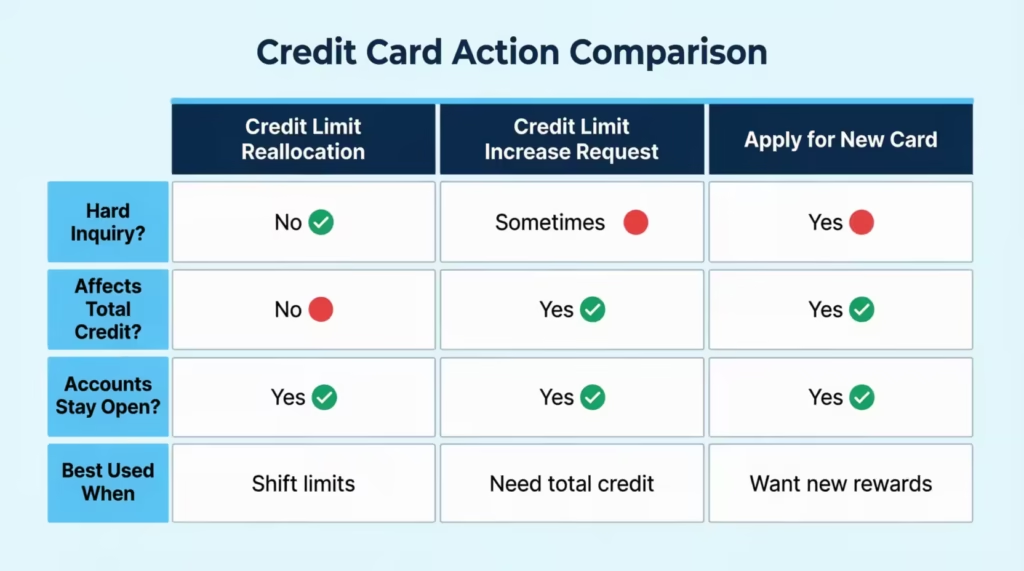
Below is a quick comparison of all three paths available to you:
Applying for a New Capital One Card as a Last Resort
If a credit limit increase isn’t approved and you still need more available credit, applying for a new Capital One card is a third option. A new card gives you a separate credit line that adds to your total available credit.
The trade-off is a hard inquiry. Applying for a new Capital One card triggers a credit pull from all three major bureaus. That hard inquiry can temporarily lower your score by a few points.
Capital One generally recommends spacing credit card applications at least six months apart. Applying sooner amplifies the short-term impact on your credit profile.
This option makes the most sense for cardholders who need more total available credit overall. It doesn’t solve the problem of wanting a higher limit on one specific existing card. A new application adds credit. It doesn’t consolidate what you already have. If the goal is to concentrate an existing limit onto a single account, a new card won’t accomplish that.
Frequently Asked Questions (FAQs)
Can I combine credit card limits with Capital One?
Capital One no longer merges two accounts into one, but it does allow credit limit reallocation, where you move credit from one card to another while both accounts stay open. The reallocation feature was reintroduced in May 2024 for eligible cardholders.
Can you merge credit card limits?
Capital One discontinued account merging around 2018 to 2019 and has not brought it back. Credit limit reallocation, which moves a limit between two separate accounts, is the current alternative for cardholders who want more spending power on one card.
What is the 6-month rule for Capital One?
Capital One typically requires an account to be open for at least six months, and sometimes up to a full year, before the credit limit reallocation option appears in your online dashboard. If your card is newer than that, check again in a few months.
How to get a $10,000 credit limit with Capital One?
The two main paths are submitting a credit limit increase request through your Capital One dashboard or using credit limit reallocation to shift an existing limit from one Capital One card to another. Both options use a soft inquiry only, so neither affects your credit score.
How quickly will Capital One increase the credit limit?
Some requests are approved immediately after you submit them online. Others may take a few days while Capital One reviews your payment history, income, and current utilization.
Will Capital One give me a second chance?
If a credit limit increase request is denied, Capital One recommends waiting at least six months before applying again. Applying for a new Capital One card is also an option, though it triggers a hard inquiry from all three credit bureaus.
What kills credit scores fastest?
Closing a credit card without transferring its limit first removes that full credit line from your total available credit, which can push your utilization ratio past the CFPB-recommended 30% threshold in one move. Applying for multiple new cards in a short period adds compounding hard inquiries on top of that.
Does transferring a Capital One credit limit affect your credit score?
Capital One processes credit limit reallocations with a soft inquiry, which does not appear on your credit report and will not lower your score. Your total available credit stays identical after the transfer, so your overall utilization ratio is unchanged.
What is the minimum credit limit that must remain on a Capital One card after a reallocation?
Capital One requires at least $500 to remain on the card you are transferring credit away from, though some accounts have a $1,000 floor. If you plan to close the source card entirely, the minimum does not apply, and the full limit can be moved before closing.
Can you transfer a credit limit between a Capital One personal card and a business card?
No. Capital One only supports reallocation within the same account category: personal card limits can only move to other personal cards, and business card limits can only move to other business cards. Cross-type transfers will be declined with no workaround available.
Bottom Line
Managing multiple Capital One cards doesn’t have to mean living with limits that don’t match how you actually spend. Credit limit reallocation gives eligible cardholders a real way to shift limits between cards with no hard inquiry and no impact on total available credit.
Start by checking the “I Want To” menu in your online dashboard for the “Transfer Credit Line” option. If it’s there, the steps are simple and the transfer processes fast. If it isn’t, a credit limit increase request is the cleanest next move.
Know someone juggling multiple Capital One accounts and wondering if they can shift their limits? Share this guide. It could save them a lot of time and a few unnecessary phone calls.