I’ve just received a brand-new Capital One credit card in the mail, and like most people, I want to start using it right away. The problem is, the card is locked until you complete a quick Capital One card activation step, and the instructions on the sticker rarely cover what to do if something goes wrong, what info you need, or what to do once it’s active.
The fastest way to activate your Capital One card is to use the online portal, the phone line, or the mobile app, and the whole process usually takes less than five minutes.
In this guide, I’ll walk you through each method step by step, share the exact details you’ll need, and show you what to do right after your card is ready to use.
At a Glance
This guide covers how to activate a Capital One credit card using three methods (online, phone, and mobile app), what personal information you need before starting, what happens immediately after activation, and how to troubleshoot when activation fails.
Core Facts:
- Three activation methods are available: online at capitalone.com/activate, by calling 1-800-227-4825, or through the Capital One mobile app — no Capital One online account is required for the online or phone methods.
- Before activating, you need the 16-digit card number, expiration date, 3-digit CVV, date of birth, last four digits of your Social Security Number, and your billing address on file.
- Activation is nearly always instant — a confirmation screen or message appears immediately, and the card is ready to use at that moment.
- A PIN is not required for activation and is not assigned automatically. You must set one separately if you plan to use the card for ATM cash advances.
- For replacement or lost cards, any saved payments on file with merchants (streaming services, utility bills) must be updated manually if the card number changes.
- If repeated activation attempts fail, Capital One may lock the process for security reasons — stopping and calling customer service at 1-800-227-4825 is the recommended next step.
Best for:
- People who just received a new Capital One card and want to activate it quickly without setting up an online account first.
- Cardholders activating a replacement or upgraded card who need to know what changes and what to update afterward.
- Anyone whose Capital One card activation is failing and needs a clear troubleshooting path.
What You Need Before Activating Your Capital One Card
Before you start, gather a few items so the process runs smoothly. Having everything ready in one place helps you avoid timeouts and identity mismatch errors.
You’ll need the physical card and some personal details that Capital One uses for identity verification. Make sure you can clearly read the numbers on the front and back of the card.
Below is the full checklist:
- The full 16-digit card number is printed on the front of the card.
- The expiration date (month and year) is shown below the card number.
- The 3-digit CVV (also called the security code) is on the back of the card.
- Your date of birth, as you listed it on the application.
- The last four digits of your Social Security Number for Social Security Number verification.
- Your billing address must match the one on file for billing address verification.
- Your phone number so Capital One can confirm your contact info if needed.
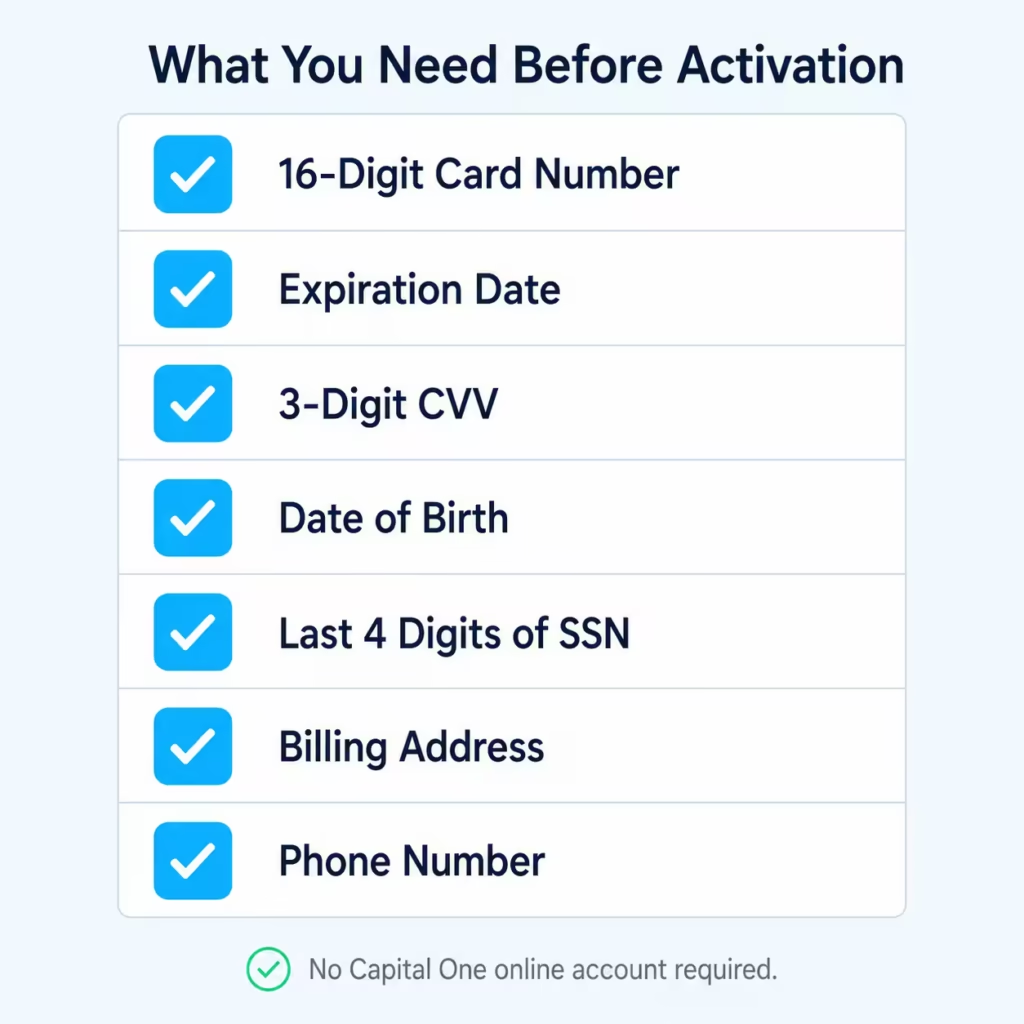
You do not need a Capital One online account to activate the card. The account number on your card is enough to start the process. An online account is helpful later for managing payments, but it’s a separate step from activation.
💡 Pro Tip: Keep the card sticker on until activation is complete. The sticker often has the exact activation URL and phone number printed on it, which saves time if you forget where to go.
What Capital One Verifies and Why
Capital One cross-checks the details you enter against the data from your original card application. This is a quick fraud check to make sure the person activating the card is the same person who applied for it.
If your date of birth, SSN, or address does not match what’s on file, the system will block the activation. The most common reason for a mismatch is a recent move. If you applied with an old address but had the card sent to a new one, the billing address on file may still be the old one.
Other common errors include typing the apartment number in the wrong field, missing a hyphen in a ZIP code, or using a maiden name versus a married name. Double-check each field before you submit.
Three Ways to Activate Your Capital One Card
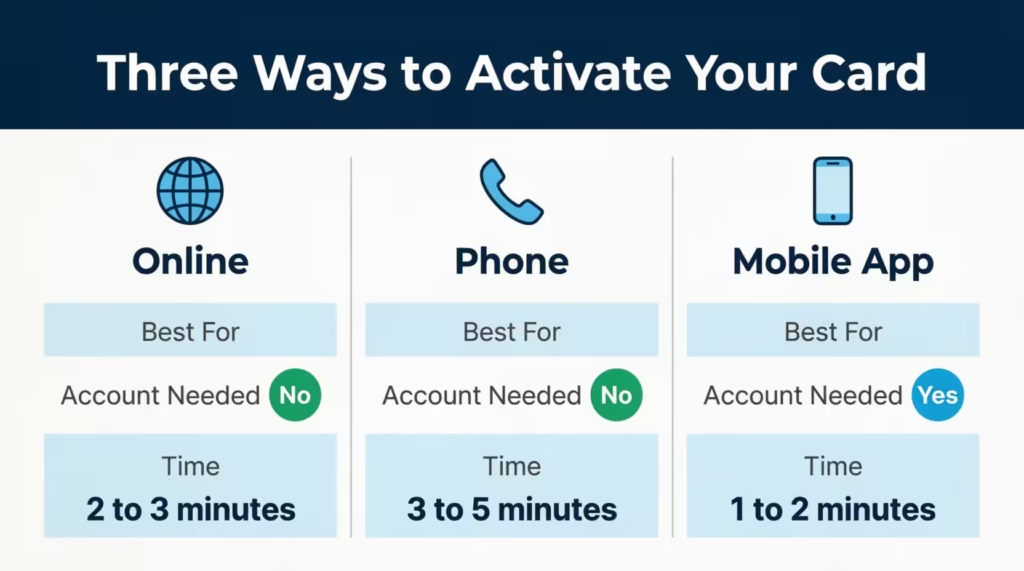
Capital One gives you three simple options. Each one works for the same goal, but some are faster or more flexible than others. Here’s a quick comparison so you can pick the best fit.
| Method | Best For | Account Needed | Time |
|---|---|---|---|
| Online at capitalone.com/activate | People with a computer or browser handy | No | 2–3 minutes |
| Phone (automated system) | People who want to do it without a screen | No | 3–5 minutes |
| Capital One mobile app | People who already use the app | Yes | 1–2 minutes |
The activate Capital One card online option is the most common path. The Capital One card activation phone number is helpful if the website is down or you can’t find your details online. The Capital One mobile app is the quickest if you’re already logged in.
How to Activate Your Capital One Card Online
The online method is fast and works from any browser. You don’t need to log in or create an account first.
Follow these steps to activate your Capital One card online:
- Open your browser and go to capitalone.com/activate. This is the official Capital One activation page.
- Enter the full 16-digit card number from the front of your new card.
- Type the expiration date and the 3-digit security code from the back.
- Confirm your identity by entering the last four digits of your SSN and your date of birth.
- Review the details and click the activation button to submit.
- Wait a few seconds for the card activation confirmation screen to load.
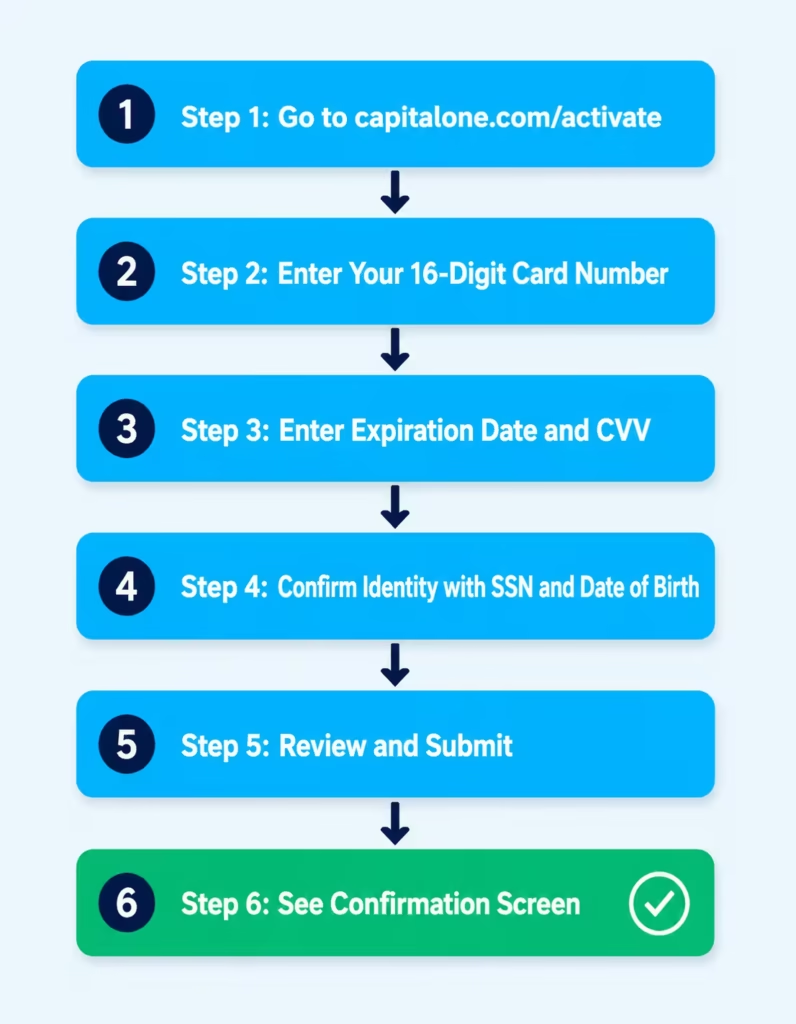
The confirmation screen usually shows a green checkmark with a message like “Your card is now active and ready to use.” Some users also get an email or text confirming the activation. If you see this screen, you’re done. You can use the card right away.
If you already have a Capital One online account, you can also activate the card after logging in. Look for the “Activate your card” prompt on the dashboard once a new card is linked to your profile.
Can You Activate Without a Capital One Online Account?
Yes, you can. Many people think they need to sign up first, but that’s not true. Activation and online account setup are two separate things.
Activation simply turns the card on. Setting up an online account lets you check balances, pay bills, and manage rewards. You can choose to skip the account setup at first and create one later when you’re ready.
How to Activate Your Capital One Card by Phone
The phone method works well if you don’t have internet access or you prefer talking through the steps. Capital One uses an automated phone system that walks you through each prompt.
To activate by phone:
- Call the Capital One card activation phone number at 1-800-227-4825. This number is also printed on the sticker attached to your new card.
- Listen for the prompt that says “To activate a new card, press 1” and follow it.
- Enter your 16-digit card number using the keypad when asked.
- Enter your date of birth and the last four digits of your SSN to verify your identity.
- Wait for the message that confirms your card is active.
The whole call takes around three to five minutes. If the automated system has trouble verifying you, say “representative” or press 0 to reach Capital One customer service. A live agent can complete the activation manually after checking a few extra details.
You’ll know it worked when the system says something like, “Your card has been activated and is ready to use.” Some people also get a follow-up text or email confirming the activation.
How to Activate Your Capital One Card Through the App
The Capital One app is the easiest option if you already use it. New users will need to download it first.
For new users:
- Open the App Store on iPhone or the Google Play Store on Android.
- Search for “Capital One Mobile” and tap install.
- Open the app and tap “Sign Up” if you don’t have an account, or “Sign In” if you do.
- Follow the prompts to create your username and password.
For existing users:
- Open the Capital One mobile app and log in.
- On the home screen, look for the “Activate your card” banner or prompt.
- Tap it and follow the on-screen steps to enter the card number, expiration date, and CVV.
- Confirm your identity if asked.
- Wait for the card activation confirmation screen to appear.
The app shows a clear success message once the card is live. You can then add the card to a digital wallet right from the same screen, which is a nice time-saver.
How to Activate a Capital One Replacement or Upgraded Card
Replacement and upgraded cards follow the same three methods (online, phone, or app). But there are a few small differences worth knowing.
For expired cards: Your new card usually arrives a few weeks before the old one expires. The old card keeps working until its expiration date. Once you activate the replacement, the old card stops working right away, even if it hasn’t expired yet.
For lost or stolen cards: The old card is already deactivated by Capital One the moment you report it. The new card often has a different card number and CVV, so any saved payments on websites (like Amazon, Netflix, or utility bills) will need to be updated with the new details.
For product upgrades: This is when you switch from one Capital One product to another, such as moving from a Platinum card to a Quicksilver card or a Venture card. The card number may or may not change depending on the upgrade. Check the welcome letter that came with the new card to see if you need to update saved payments.
In most cases, your credit card PIN setup carries over if the card number stays the same. If the card number changes, you’ll need to set a new PIN.
⚠️ Mistake to Avoid: Don’t toss the old card right away. Wait until the new card is active and you’ve confirmed your saved payments work. Then cut the old card in half before throwing it out.
How to Activate a Capital One Authorized User Card
If you’re an authorized user, the activation rules are a bit different. The primary account holder usually has to activate the authorized user card. That’s because the verification info (SSN, date of birth, and billing address) belongs to the primary cardholder, not the authorized user.
In some cases, Capital One lets the authorized user activate the card by phone using the primary holder’s info, but the safest bet is for the primary cardholder to handle it. Once active, the authorized user can use the card just like any other cardholder.
What to Do Immediately After Your Capital One Card Is Activated
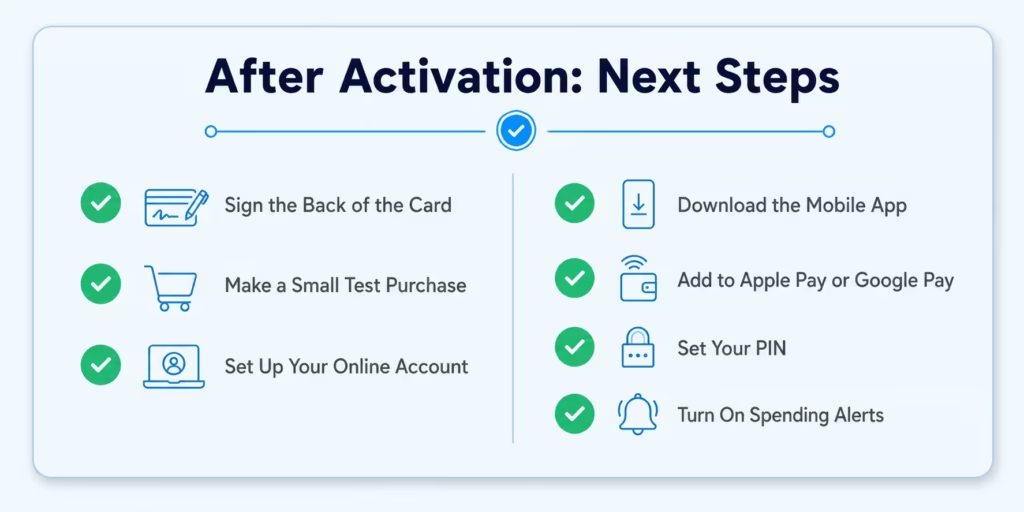
Once you see the success message, your card is ready to use status is confirmed. Here’s a quick checklist of next steps so you get the most out of your new card.
- Sign the back of the card. This is a small step, but some merchants still check signatures.
- Make a small test purchase. Try a low-value buy, like a coffee or gas, to confirm everything works.
- Set up or log in to your Capital One online account. This lets you track spending, pay bills, and view your statement.
- Download the Capital One mobile app if you haven’t already. It makes managing the card much easier.
- Add the card to a digital wallet like Apple Pay, Google Pay, or Samsung Pay. This gives you a backup in case you forget the physical card.
- Set up your PIN if you plan to use the card for cash advances or in regions that require a PIN.
- Turn on alerts for purchases, payments, and due dates. Real-time alerts help you spot fraud quickly.
These steps only take a few minutes, but they make daily use much smoother.
How to Set Your PIN After Activating Your Capital One Card
A PIN is mostly used for cash advances at an ATM or for some travel purchases overseas. Capital One does not assign a PIN automatically. You have to set one yourself.
You have three ways to set or change your PIN:
- Online: Log in to your Capital One online account, go to the card settings, and select “Set PIN.”
- Phone: Call 1-800-227-4825 and follow the prompts to set or reset your PIN.
- ATM: Some Capital One ATMs let you set a PIN after a successful transaction, though this option is less common.
Choose a PIN that you can remember, but that isn’t easy to guess. Avoid using your birthday or sequential numbers like 1234.
How Long Does Activation Take?
Activation is almost always instant. The moment the confirmation screen or message appears, the card is live and can be swiped, tapped, or used online.
In rare cases, there’s a short delay of a few minutes while Capital One’s systems update. If you try to make a purchase right after activation and it gets declined, wait five to ten minutes and try again.
If the card still won’t work after that, the issue is usually a verification problem rather than an activation delay. The next section covers what to do in those cases.
Why Your Capital One Card Is Not Activating – Troubleshooting
Most activations go smoothly, but sometimes the system blocks you. Here are the most common reasons and how to fix each one.
Card not recognized. If the system says it can’t find your card, double-check the 16-digit card number. A single wrong digit will block the process. Make sure you’re entering the new card, not an old one.
Identity mismatch. This means the SSN, date of birth, or billing address you typed doesn’t match Capital One’s records. Try the address from your original application, not your current address if you’ve moved. If you’re not sure which address is on file, call customer service to update it before trying again.
Page timeout. Online sessions usually time out after a few minutes of inactivity. If the page freezes or returns an error, close the browser, reopen it, and start over.
Card already active. Sometimes a replacement card is auto-activated by Capital One. If the system says the card is already active, try making a small test purchase. If it works, you’re done.
Repeated failed attempts. After three or four failed tries, Capital One may lock the activation for security reasons. If this happens, don’t keep trying. Stop and call customer service instead.
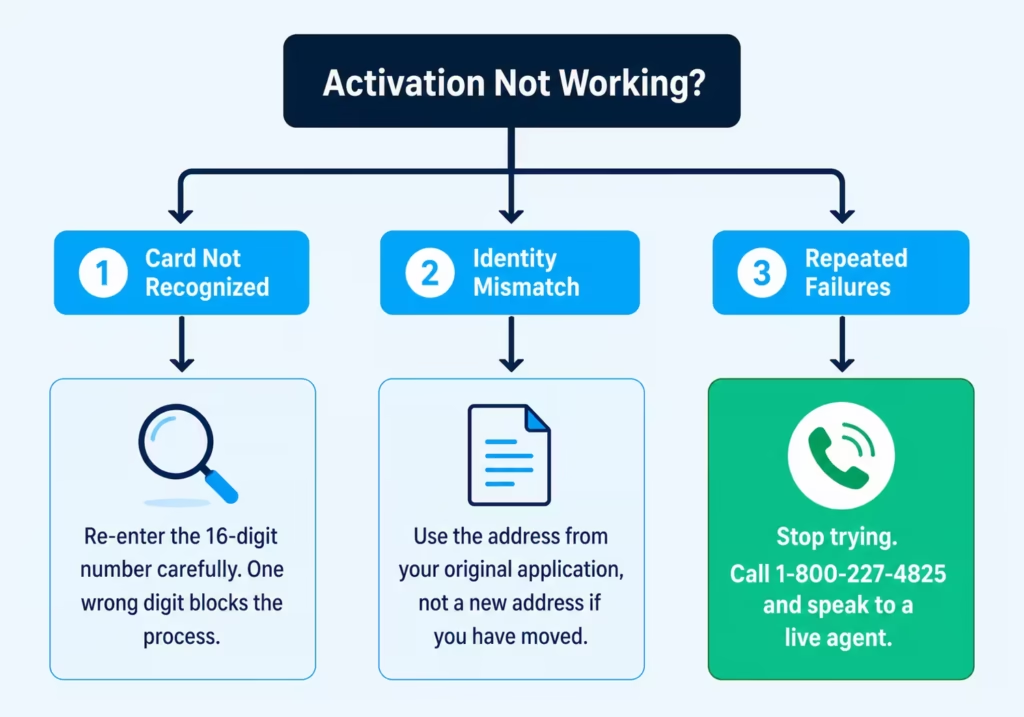
When to call customer service. If none of the above fixes work, call Capital One customer service at 1-800-227-4825. A live agent can verify your identity, fix address errors, and complete the card activation issue on their end. Have your card number, SSN, and date of birth ready when you call.
📌 Did You Know: Capital One’s fraud system sometimes blocks activations from VPNs or public WiFi because the IP address doesn’t match your usual location. If your online activation keeps failing, try again on your home network or use the mobile app on cellular data.
Frequently Asked Questions (FAQs)
Do I have to activate the new Capital One card?
Yes, every new Capital One card arrives inactive and must be activated before it can be used for purchases. Skipping activation means the card will be declined at checkout even if your account is in good standing.
What number do I call to activate my Capital One credit card?
Call 1-800-227-4825 and press 1 when prompted to activate a new card. The same number is printed on the sticker attached to your new card.
How can I tell if my new Capital One card is activated?
After completing activation online, by phone, or through the app, you’ll see or hear a confirmation that your card is active and ready to use. If you’re unsure, make a small test purchase to confirm the card works.
What happens if you don’t activate a Capital One credit card?
The card remains blocked, and any purchase attempt will be declined. There is no fee or penalty for a delay, but you simply cannot use the card until activation is complete.
Can you run a new card without it being activated?
No. Capital One locks every new card at the time it is issued, so any swipe, tap, or online transaction will be declined until you complete the activation step.
Does activating a Capital One card require ID?
Activation does not require a government-issued ID, but you must provide your date of birth and the last four digits of your Social Security Number to verify your identity. These must match the details from your original card application.
Can I activate my Capital One card without the PIN?
Yes. A PIN is not required to activate your card and is not assigned automatically by Capital One. You only need a PIN for ATM cash advances or certain overseas purchases, and you can set it separately after activation.
Does Capital One give you a virtual card immediately?
Capital One does not issue an automatic virtual card for all products at the time of application. Adding your activated card to a digital wallet like Apple Pay or Google Pay is the fastest way to use it digitally right after activation.
Can I activate my Capital One card without having it physically?
No. You need the 16-digit card number, expiration date, and 3-digit CVV printed on the card to complete activation. None of these can be retrieved without the physical card.
How long do I have to activate my Capital One card after receiving it?
Capital One does not publish a strict activation deadline, but leaving a card inactive for an extended period can prompt the issuer to cancel it. Activating within a few days of receiving it is the safest approach.
Bottom Line
Activating a new Capital One credit card is a quick task once you know which method to use and what info to have ready. The three options (online, phone, and app) all work in just a few minutes, and a quick checklist of next steps helps you get the most from your card right away.
Based on the simplicity and speed of the process, the most effective approach for most people is to use the online portal at capitalone.com/activate, since it requires no app download or phone call.
If you found this Capital One card activation guide helpful, share it with a friend or family member who just got a new card. It could save them a frustrating five minutes when their card won’t activate on the first try.