Your Capital One card just got declined, and now you’re trying to figure out what happened. You check your transaction history, and the declined charge isn’t there. That’s confusing, and it’s one of the most common problems cardholders run into when trying to view declined transactions on Capital One. The good news is that the information does exist. It’s just not where most people look.
To find a Capital One declined transaction, you need to check your Eno alerts, not your transaction history list.
In this guide, we’ll show you where to find information, how to use Eno for the decline reason, and how to fix common issues. This will help you complete your purchase.
Key Takeaways
This guide explains how to view declined transactions on Capital One, including where decline information is stored, how to use Eno alerts and chat, common decline reasons, and the steps needed to resolve them.
Core Facts:
- Capital One declined transactions do not appear in transaction history because rejected authorizations never become pending or posted charges.
- The primary way to view a Capital One declined transaction is through Eno alerts delivered by text message, email, push notification, or Eno chat.
- Eno provides the decline reason and suggested next step, including issues such as a locked card, low available credit, fraud flags, expired cards, or account restrictions.
- Dismissed decline notifications can be recovered through Eno chat history in the Capital One Mobile app, on the website, or through related email alerts.
- Available credit usually updates within one to two business days after a payment, and pending transactions reduce available credit before they settle.
- If Eno does not provide enough detail, Capital One representatives can retrieve the specific decline code associated with the failed transaction attempt.
Best for:
- Capital One cardholders who cannot find a declined purchase in their transaction history and need to determine why it was rejected.
- Users whose Capital One card was declined due to potential fraud alerts, card locks, low available credit, or account restrictions.
- Authorized users and primary cardholders who need to troubleshoot declined transactions and identify the correct resolution path.
Where to Find Declined Transactions on Your Capital One Account
Declined transactions don’t live in your standard account activity feed. If you’ve been scrolling through your transaction list looking for the rejected charge, you won’t find it there. That’s not a glitch. It’s just how Capital One’s system works.
Capital One keeps two separate types of records. Your transaction history shows charges that were authorized and settled. A declined transaction never made it past the authorization step, so it never appears in that list.
The places where declining information does surface are:
- Eno alerts are sent by text, email, or app push notification at the time of the decline
- Eno chat inside the Capital One Mobile app or on the website
- Contacting Capital One directly, where a representative can pull the specific decline code from the attempted transaction
The sections below walk you through each of these paths.
Why Declined Transactions Don’t Appear in Your Transaction List
When you make a purchase, the merchant sends an authorization request to Capital One asking to reserve funds. If Capital One approves it, the transaction shows up as pending. When the merchant settles the payment, it posts to your account and becomes part of your transaction history.
A declined transaction is a rejected authorization. Capital One says no before any funds are reserved. Because nothing was approved or settled, there’s no record to post to your account activity. The transaction never entered the system as a pending or completed charge. That’s why your transaction list looks normal even after a decline.
How to Check Declined Transactions on the Capital One Mobile App
The Capital One Mobile app is where most cardholders will find their decline information fastest. The key is knowing how to look at your Eno alerts and notifications, not the transaction feed itself.
How to do it:
- Open the Capital One Mobile app and sign in to your account.
- Tap the account that the declined card is tied to, either a credit card or a debit account.
- Look for an alert banner or notification at the top of the account screen. When a card is declined, Eno often places a notice directly in the account view.
- Tap the Eno icon (the chat bubble icon, usually in the bottom navigation bar or top of the screen). Eno is Capital One’s virtual assistant and the primary place where decline reasons are delivered.
- Check the Eno chat feed for a recent message about your declined transaction. Eno typically includes the reason for the decline and a suggested next step.
- You can also try using the search and filter tool in your transaction list. Tap “View All” next to Recent Transactions, then tap the search bar. Search by the merchant name or the approximate date. This won’t show the decline itself, but it can confirm whether a related pending or posted charge exists on the account.
Did You Know: The Capital One Mobile app lets you lock and unlock your card directly from the account screen. If a locked card is causing your decline, you can fix it in the same place you found the alert.
Both credit card and debit cardholders can follow these steps. The navigation is the same regardless of account type.
How to Check Declined Transactions on the Capital One Website
If you prefer using a desktop or laptop, the Capital One website gives you access to the same decline information through Eno. Here’s how to find it:
- Go to capitalone.com and sign in to your account.
- Click on the account tied to the declined card from your account dashboard.
- Look for the Eno chat icon on the page. On most browsers, it appears as a small chat bubble near the bottom right corner of the screen, or you can access Eno through the Help menu.
- Click to open the Eno chat window and look for a recent message about your declined transaction. Eno will show you the reason for the decline along with guidance on what to do.
- You can also use the transaction search bar above your account activity list to filter by merchant name or date. As with the app, this won’t show the decline itself, but can confirm nearby account activity.
One note worth repeating: the main transaction history list on the website will not include the declined charge. Your declined transaction record lives in Eno’s alerts, not in the account activity feed. If you’re on the right page and still don’t see the decline in your Eno chat, the next section explains how to track down a notification you may have missed.
How Eno Tells You Why Your Capital One Card Was Declined
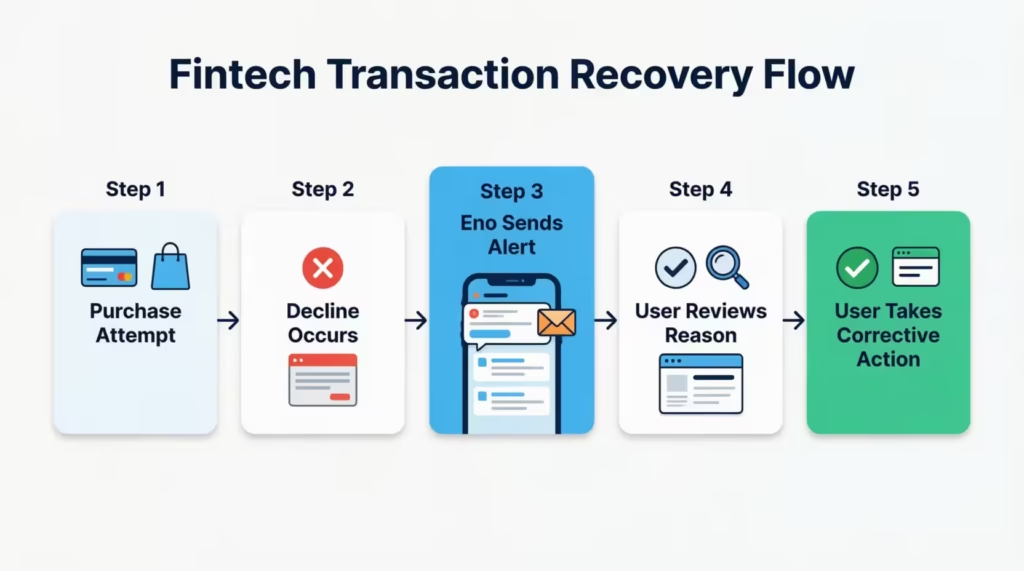
Eno is Capital One’s built-in virtual assistant, and it’s the fastest official channel for getting a decline reason. When your Capital One card is declined, Eno reaches out in real time to explain what happened and tell you what to do next.
Here’s what Eno does when a decline happens:
- It sends you an alert by push notification, email, or text message within moments of the declined transaction.
- The alert includes the reason for the decline, such as a locked card, insufficient credit, a fraud flag, or an expired card.
- It gives you a suggested action, such as unlocking your card, confirming your identity, or making a payment to restore your available credit.
Eno is automatically active for all Capital One cardholders. You don’t need to sign up for it separately or pay for any premium tier. If you have a Capital One account and your contact info is on file, Eno is already working for you.
You can access Eno in two ways. The first is through the notification or email it sent at the time of the decline. The second is through the Eno chat window inside the Capital One Mobile app or on the website, where you can review recent messages directly.
Eno gives you the reason for the decline. It doesn’t fix the problem automatically, but knowing the reason is the first step to resolving it.
How to Find a Past Eno Decline Notification You Already Dismissed
If you dismissed the Eno alert without reading it, here’s how to track it down:
- In the Capital One Mobile app: Open the app and tap the Eno icon. The chat history is stored there and includes past decline notifications. Scroll back to the time of the decline to find the message.
- In your email inbox: Search your inbox for an email from Capital One. Eno sends decline alerts by email as well as push notifications. Search for keywords like “declined” or “Capital One alert” to find it quickly.
- On the Capital One website: Sign in and open the Eno chat window. The same message history is accessible there.
If you can’t find the notification through any of these channels, calling the number on the back of your card is the next step. A Capital One representative can find the decline code for your transaction. They can explain why it was rejected.
Common Reasons Capital One Declines a Transaction
Knowing where to find the decline record is only half the answer. Understanding why Capital One declined the charge tells you what to fix. The most common reasons fall into a few clear categories, and each one has a direct resolution.
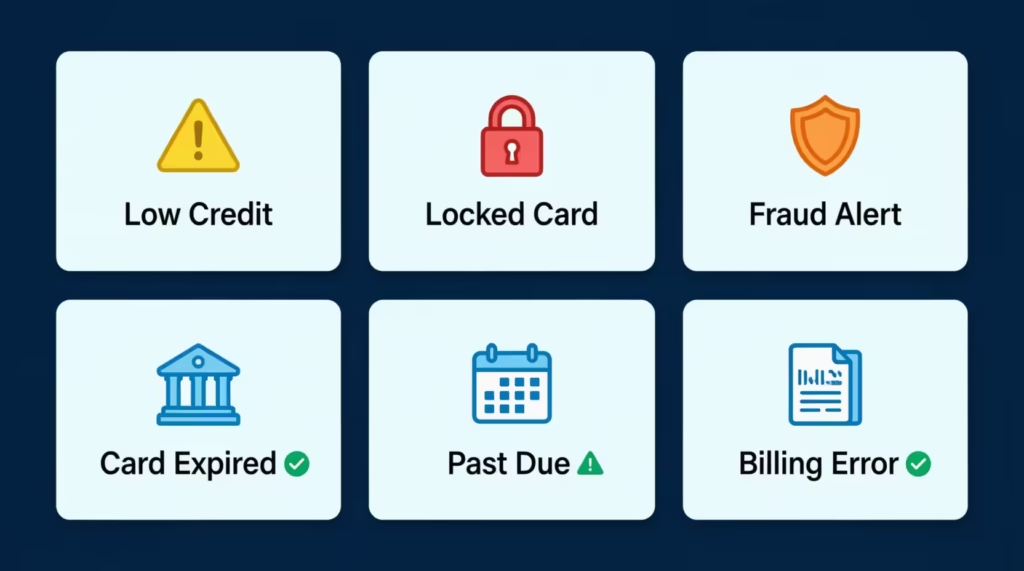
Available credit is too low.
This is the most frequent cause of declines for credit card users. If a purchase would push your balance over your credit limit, Capital One blocks it. It’s not just your credit limit that matters here. Your available credit is your limit minus your current balance, minus any pending transactions that haven’t settled yet.
A payment you made recently might not have cleared yet, which means your available credit is lower than you expect. Capital One says your available credit usually updates within one to two business days after a payment. But sometimes, it may take longer.
The card is locked.
Cards can be locked in two ways: you may have manually locked it through the app or website, or Capital One may have locked it automatically due to suspicious activity. Either way, no transactions will go through until the card is unlocked.
Fraud detection flagged the purchase.
Capital One monitors your spending patterns. An unusually large purchase, a charge from a location far from your usual area, or a transaction that doesn’t match your typical habits can trigger a fraud hold. Capital One will send a two-way fraud alert asking you to confirm whether the charge was made by you.
The card has expired or has not yet been activated.
If your card has passed its expiration date, Capital One will block new charges. A replacement card that you haven’t activated yet won’t work either. Update your card information with merchants and activate the new card as soon as you receive it.
A past-due payment has restricted the account.
Missed or late payments can result in Capital One temporarily restricting your account, which blocks new purchases. Bringing the account current is the first step to lifting the restriction.
Wrong card information entered for an online purchase.
Online purchases get declined if the card number, expiration date, CVV, or billing address doesn’t match what Capital One has for your account.
What to Do If Capital One Flagged Your Transaction as Fraud
If Capital One’s fraud detection system flagged your purchase, you’ll receive a two-way fraud alert by text or email asking, “Was this you?” This is the fastest path to resolution:
- Check your text messages or email for the fraud alert from Capital One.
- Respond “yes” to confirm the transaction was made by you.
- Once confirmed, retry the transaction at the merchant. The hold is lifted quickly after your response.
If you missed the fraud alert and the card is still declining, open Eno in the app or on the website. Eno will often prompt you to confirm recent activity there as well. You can also call the number on the back of your card to confirm your identity with a representative and clear the fraud flag manually.
⚠️ Mistake to Avoid: Don’t assume a fraud-triggered decline means your card has been compromised. Capital One flags unusual activity as a protective step, not necessarily because fraud has occurred. Responding to the alert and retrying the transaction is usually all it takes.
How to Unlock Your Capital One Card and Retry a Declined Transaction
If a locked card is the reason for your decline, here’s how to unlock it quickly:
- Sign in to the Capital One Mobile app or go to capitalone.com.
- Navigate to the account tied to the declined card.
- Find the card lock toggle. In the app, this is usually on the account home screen or under card management settings. On the website, it appears within your card account settings.
- Toggle the card to unlock.
- Retry the transaction at the merchant.
If Capital One automatically locks the card due to suspected fraud, the app may prompt you to verify your identity before unlocking it. Follow the on-screen instructions. If you can’t remove the lock yourself, call the number on the back of the card. A representative will help you review your account and lift the restriction.
What to Do If Insufficient Credit Caused the Decline
If low available credit triggered the decline, here’s what to do:
- Check your available credit in the app or on the website. Look at the “available credit” figure, not just your credit limit. Pending transactions reduce this number even before they post.
- Make a payment to free up available credit. Log in and pay online, or set up a same-day payment through the app.
- Wait for the payment to process. Available credit usually updates within one to two business days after a payment is made. If the purchase is time-sensitive, using a different card while the payment clears is a practical option.
How to Fix Card Information or Billing Address Errors for Online Purchases
Online declines caused by incorrect card details are easy to fix once you know what to check:
- Verify your card number, expiration date, and CVV against the physical card or the card details in your Capital One account.
- Check the billing address. The billing address you provide at checkout must exactly match the one on your Capital One account. This includes apartment numbers, abbreviations, and ZIP codes. If your address has changed recently, update it in the app or on the website before retrying.
- Re-enter the information carefully on the merchant’s checkout page and try again.
What Authorized Users Should Do When Their Capital One Card Is Declined
If you’re an authorized user on a Capital One account and your card is declined, the resolution path is a bit different. Authorized users don’t always receive Eno notifications the way the primary cardholder does. The primary cardholder’s account details, including the credit limit, payment status, card lock settings, and Eno alerts, are the ones that matter.
Below is what to do:
- Contact the primary cardholder first. Ask them to check the account status, review any Eno notifications, and confirm whether the card is locked or the account has a payment issue.
- Ask the primary cardholder to check the available credit. If the account is close to its limit, a purchase by another authorized user may have pushed it over.
- If the primary cardholder’s account is in good standing and the card is unlocked, ask them to contact Capital One directly. Only the primary cardholder can make account changes or speak to a representative about account-level issues. Authorized users cannot call on behalf of the primary account.
For the most common scenarios, resolving through the primary cardholder is faster than any other route.
How to Set Up Alerts So You’re Notified the Moment a Transaction Is Declined
Eno’s card decline alerts are automatically active for Capital One cardholders, but it’s worth confirming that your contact information is set up correctly so those alerts actually reach you.
How to verify your alert settings:
- Open the Capital One Mobile app and go to your profile or account settings.
- Check that your phone number and email address are current. Eno sends decline alerts to whichever contact info is on file. If your phone number changed recently, update it here.
- Enable push notifications for the Capital One Mobile app on your phone. Go to your phone’s notification settings, find the Capital One app, and make sure notifications are turned on.
- Check your notification preferences inside the app. Under account alerts or notification settings, confirm that card activity alerts are enabled.
You can also set up available credit alerts via SMS to get a heads-up before your balance gets close to your limit. This helps you avoid balance-related declines before they happen. To set this up, go to account alerts in the app or on the website, and choose an available credit threshold that works for you. Capital One will send a text when your available credit drops below that amount.
💡 Pro Tip: Set your available credit alert threshold slightly above your largest typical purchase. If your biggest regular purchase is around $200, set the alert at $250. That way, you’ll get a warning before a purchase gets declined, not after.
These alerts are free and already available to all Capital One cardholders. No premium plan or add-on is required.
When to Contact Capital One Directly About a Declined Transaction
Self-service through the app and Eno will resolve most declined transaction situations. But there are specific cases where calling Capital One is the right move:
- The card is still declined after you’ve followed the app-based steps. If you’ve unlocked the card, confirmed your identity, and retried the transaction, but the card keeps declining, a representative can investigate further.
- Eno provided no clear reason. If the decline notice didn’t give a specific reason, a Capital One agent can retrieve the exact decline code from the transaction attempt.
- Capital One locked the card automatically, and the app won’t let you unlock it through self-service. A representative can review the account, verify your identity, and lift the lock.
- The decline involves an authorized user account, and the primary cardholder has confirmed that everything looks fine on their end.
How to reach Capital One: Call the number printed on the back of your card. This connects you directly to the appropriate support line for your account type. You can also use the online chat feature available on the capitalone.com website.
Have this information ready before you call:
- The last four digits of the declined card
- The merchant name where the decline occurred
- The date and approximate time of the decline
Capital One representatives have access to the specific decline code tied to the transaction attempt. That code tells them exactly why the authorization was rejected, including reasons that Eno may not have communicated clearly in the notification.
Frequently Asked Questions (FAQs)
Can I see declined transactions on Capital One?
Declined transactions don’t appear in your Capital One transaction history because they were never approved or posted. You can find the decline reason through your Eno alert, which Capital One sends by text, email, or push notification at the moment the card is rejected.
How do I find out why my Capital One card was declined?
Open the Capital One Mobile app or go to capitalone.com, then check your Eno chat or the decline notification Eno sent you by text or email. The alert includes the specific reason, such as a locked card, low available credit, fraud flag, or expired card.
Does Capital One notify you when your card is declined?
Yes. Capital One’s virtual assistant Eno sends an automatic alert by push notification, text, or email the moment a transaction is declined. The notification includes the reason for the decline and a suggested next step.
Why is my Capital One card declining when I have money?
Even with funds available, a Capital One card can be declined if it’s manually or automatically locked, flagged for unusual activity, expired, or if the billing address entered online doesn’t match what’s on file with Capital One.
Why is my Capital One available balance not updating after a payment?
Available credit on a Capital One account typically takes one to two business days to update after a payment is made, and pending transactions also reduce it before they settle. If your balance still looks off after two business days, contact Capital One directly.
Can an authorized user see declined transactions on a Capital One account?
Authorized users typically don’t receive Eno decline alerts, since those go to the primary cardholder. If your card as an authorized user is declined, the primary cardholder needs to check the account status and Eno notifications on your behalf.
How long does it take for a Capital One fraud hold to lift after I confirm the transaction?
After you respond “yes” to Capital One’s two-way fraud alert by text or email, the hold typically clears quickly, and you can retry the transaction at the merchant right away. If the card is still declining after confirming, contact Capital One using the number on the back of your card.
Does Capital One charge a fee for declined transactions?
Capital One does not charge cardholders a fee when a purchase is declined. The declined transaction simply doesn’t go through, and no charge appears on your account.
How do I view my Capital One transaction history?
Sign in to the Capital One Mobile app or capitalone.com, then click or tap the account you want to review. Your transaction history shows posted and pending charges going back two years on the website, and statements extend that history up to seven years.
Bottom Line
Finding a declined transaction on Capital One takes a different approach than checking your normal account activity. Declined charges don’t appear in your transaction history because they were never authorized. Check your Eno alerts. You can find them in the notification you got or in the Eno chat on the Capital One Mobile app or website.
From there, identifying the reason and taking the right corrective step, whether that’s unlocking your card, making a payment, or confirming a fraud alert, gets your card working again quickly. For most declined transactions, the resolution takes just a few minutes.
If you found this helpful, share it with anyone who banks with Capital One. A quick link could save a friend or family member a frustrating trip to the store or a missed online purchase.