I know that sinking feeling. You reach for your wallet, and your Capital One card isn’t where it should be. Or maybe you spotted a charge you don’t recognize on your latest statement. Now you want to freeze your Capital One credit card fast, before anyone else can swipe it, tap it, or type the number into a checkout page. The good news? You don’t need to cancel the account.
Here’s the quick answer: Open the Capital One Mobile app, pick the card, tap “Protect and replace your card,” and switch on Lock Card. It works right away.
In this guide, I’ll walk you through every method (app, website, and phone), explain what still gets charged, and show you how to flip the lock off the moment your card turns up.
At a Glance
This guide explains how to freeze a Capital One credit card using the mobile app, website, or phone, covering what gets blocked, what still charges through, when to lock versus report lost or stolen, and the effect on your credit score.
Core Facts:
- Capital One calls the feature “Lock Card,” not “Freeze.” The toggle is found inside the “Protect and Replace Your Card” menu in the app and on the website.
- Locking blocks new in-store purchases, online transactions, cash advances, balance transfers, and most Apple Pay or Google Pay payments immediately.
- Recurring charges already authorized (subscriptions, utility auto-pay, insurance premiums) continue processing normally through a card lock.
- A Capital One card lock does not expire on its own. It stays active until you manually turn it off.
- Locking your card has no effect on your credit score. Capital One does not report card locks to Equifax, Experian, or TransUnion.
- Locking and unlocking a Capital One card is free, with no fees or limits on how many times you toggle it.
Best for:
- Cardholders who misplaced their Capital One card and want to block unauthorized use while they search for it.
- Anyone who spots an unfamiliar charge and needs to pause new spending while they investigate whether it is fraud.
- People with an old Capital One card they no longer use actively but want to keep open to preserve their credit history.
How to Lock Your Capital One Credit Card in the Mobile App
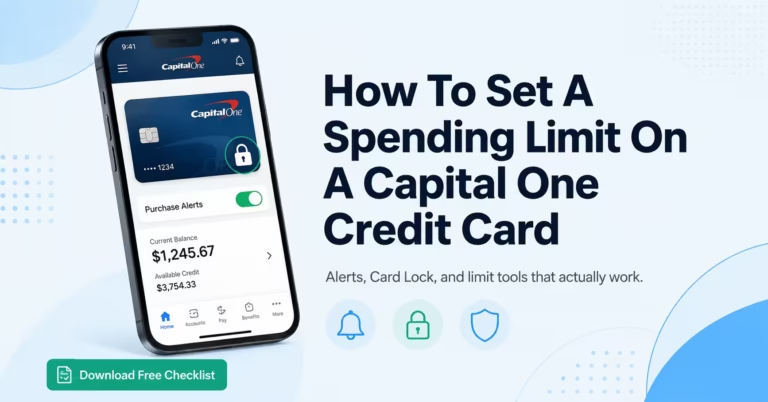
The fastest way to freeze a Capital One credit card is through the Capital One Mobile app. The whole process takes less than a minute, and the block kicks in the second you flip the switch. No call. No wait. No paperwork.
Here’s exactly how to do it:
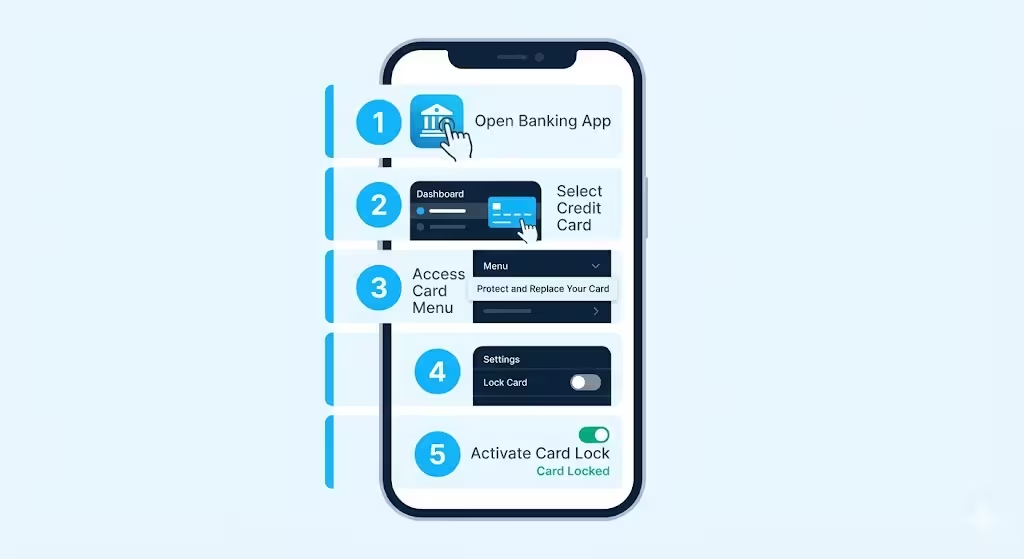
- Open the Capital One Mobile app on your phone and sign in with your username, password, or fingerprint.
- Tap the credit card you want to lock from your account dashboard.
- Scroll down until you see the section labeled “Need help?” or “Protect and replace your card.”
- Tap “Lock Card.” A toggle switch will appear.
- Turn the toggle ON. The screen will confirm that your card is now locked.
That’s it. Your card is frozen. Any new in-store swipe, tap, or online purchase using the card number will be declined right away. You don’t have to log out, restart the app, or wait for an email confirmation. The change is instant.
💡 Pro Tip: Add Face ID or fingerprint login before you ever need to lock your card. When you’re stressed about a missing wallet, the last thing you want is to fumble with a forgotten password.
If you don’t have the app yet, you can download the Capital One Mobile app free from the App Store or Google Play. You’ll need your account login to set it up. Once it’s installed, the lock feature is always two taps away.
What Capital One Calls the Freeze Feature
Here’s a small detail that trips people up. Many cardholders search online for “freeze Capital One credit card” and feel lost when they can’t find a button by that name in the app. The reason is simple: Capital One calls it “Lock Card,” not “Freeze.” Other banks may use the word freeze, but inside the Capital One app and website, you’re looking for the word “Lock.”
Both words mean the same thing. A “lock” and a “freeze” both stop new purchases on your card without canceling the account. As Capital One explains, a card lock is a security feature that lets you block certain transactions on your account without closing it Capital One.
You’ll find the toggle inside the “Protect and Replace Your Card” menu. If you don’t see it right away, scroll past your transactions and rewards. The menu sits near the bottom of the card details screen.
How to Lock Your Capital One Card on the Website
Not everyone wants to use a phone app. Maybe you’re at your desk. Maybe your phone is dead. Or maybe you just prefer a full screen for important tasks. The good news is you can lock your Capital One card online through the website, too, with the same instant effect.
Follow these steps on a computer or tablet browser:
- Go to capitalone.com and click “Sign In” at the top right corner.
- Enter your username and password to log in to your account.
- Click the credit card you want to lock from your list of accounts.
- Look for “Services” in the menu, or scroll down to the “Protect and replace your card” section.
- Click “Lock Card” and confirm your choice.
Once you confirm, your card is frozen right away, the same as it would be in the app. No waiting period. The website and the app share the same back-end system, so a change in one shows up in the other instantly.
This Capital One card lock online option is helpful if you ever lose your phone, too. As long as you can get to a browser, you can still pause your card. Just make sure you’re typing the real capitalone.com address into your browser bar and not clicking a link from a suspicious email. Phishing pages often copy the look of bank login screens.
How to Lock Your Capital One Card by Phone
What if you can’t get online at all? Maybe you’re traveling, your phone is broken, or your internet is down. You can still lock your Capital One card by phone. It just takes a bit longer because a real person has to do the work for you.
Call Capital One customer service at 1-800-CAPITAL (1-800-227-4825). This is the main line for credit card account servicing, and it’s open around the clock for card lock and fraud help at Capital One.
When the agent picks up:
- Verify your identity. They’ll ask for your full name, date of birth, the last four digits of your card, and maybe your Social Security number.
- Say clearly: “I’d like to lock my credit card.” If you think the card was stolen, say that too.
- Confirm the lock is on before you hang up. Ask the agent to read back the status so you know it’s done.
Calling is slower than tapping a button in the app. Hold times can stretch to ten or fifteen minutes during busy hours. But the result is the same: your card is frozen, and no new charges will go through. If your wallet was just stolen, the phone option also lets you order a brand-new card with a new number in the same call.
What Happens When You Lock Your Capital One Card
This is the part most people worry about. You want to pause spending, but you also don’t want your Netflix to shut off, your gas bill to bounce, or your $0 fraud protection to disappear. Let’s clear that up.
When you lock your Capital One card, new purchases get blocked, but most charges you already set up will keep working. Capital One states clearly that locking a credit card will block any new or pending transactions, but it won’t stop recurring or previously authorized charges from processing.
Here’s how to think about it. A card lock is like putting up a “no new guests” sign at a party. People already inside (your subscriptions and pre-approved charges) can stay. New ones at the door get turned away. Your account is still open, you still earn rewards on the charges that go through, and your $0 fraud liability protection stays in place.
📌 Did You Know: Even with your card locked, you’ll still owe interest on any unpaid balance, and you still need to make at least the minimum payment each month. A lock pauses spending, not your bill.
Transactions That Are Blocked
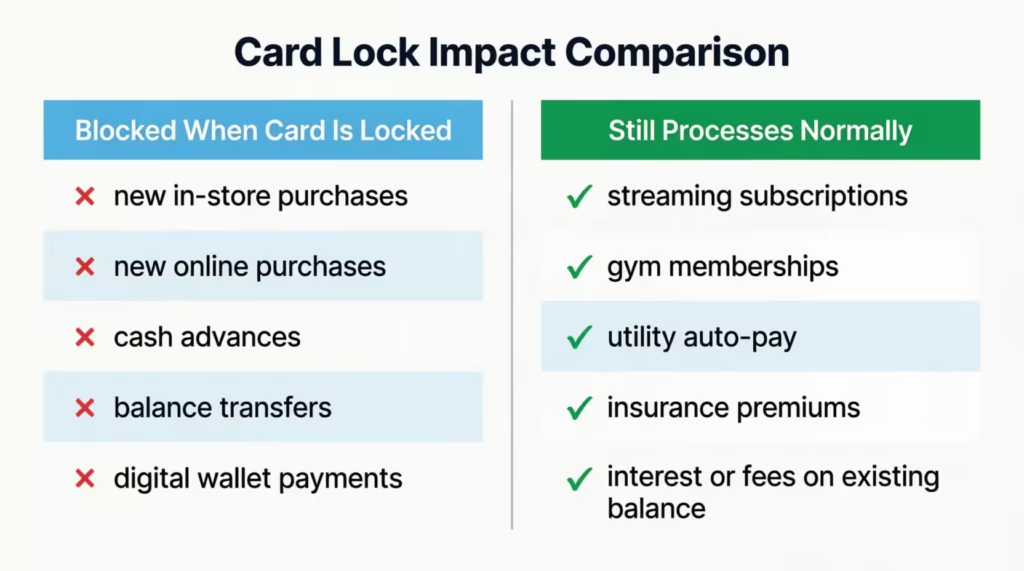
When the card lock is on, here are the types of transactions Capital One will turn down:
- New in-store purchases with a swipe, tap, or chip insert
- Most new online purchases use your card number
- Cash advances at ATMs or bank counters
- Balance transfers started after the lock is in place
- Most new digital wallet payments using Apple Pay or Google Pay are tied to that card
If a thief tries to use your card at a gas pump or a checkout, the charge will simply fail. They won’t get a clear “this card is locked” message. The transaction just gets denied like any other rejected charge.
Transactions That Still Go Through
The card lock does not break the charges you’ve already set up. These will keep running normally:
- Streaming services like Netflix, Hulu, Disney+, and Spotify
- Gym memberships and fitness app subscriptions
- Utility bills set on auto-pay (electric, water, internet, phone)
- Insurance premiums are charged monthly to your card
- Recurring charity donations or club dues
- Your monthly payments to Capital One on the balance you owe
- Interest charges that build up on any unpaid balance
- Annual or late fees that apply to your account
The reason recurring charges keep going is to protect you from a different problem: missed bills. If a card lock turned off your power or your car insurance, the cure would be worse than the disease. So Capital One keeps the lights on for charges you already approved.
⚠️ Mistake to Avoid: Don’t assume a card lock will stop a subscription you’ve been meaning to cancel. If you want to end a recurring charge, use Capital One’s separate “Expected Transactions” tool inside the app to block or cancel that specific merchant. Locking the card alone won’t do it.
Locking Your Card vs. Reporting It Lost or Stolen
This is one of the most common points of confusion. Both options stop your card from being used. But they work very differently, and picking the wrong one can leave you with extra hassle, like a brand-new card number you have to update everywhere.
Below is the simple difference:
| Feature | Lock Card | Report Lost or Stolen |
|---|---|---|
| Card number | Stays the same | Changes to a brand-new number |
| Reversible? | Yes, unlock anytime | No, the old card is dead forever |
| New plastic mailed? | No | Yes, 4 to 6 business days |
| Recurring charges | Keep going on the same number | Must be updated to the new number |
| Best for | Temporary pause or lost card | Confirmed theft or fraud |
| Time to set up | Seconds in the app | A phone call or app report |
A card lock is a pause button. Reporting the card lost or stolen is more like pressing eject. Once Capital One marks your card as lost or stolen, that 16-digit number is dead forever, even if the card falls out of your couch cushions a day later.
When Locking Is the Right Choice
Choose to lock your card when:
- You misplaced your card but think it’s somewhere in your house, car, or office. Locking buys you a day or two to find it without risk.
- You want a temporary spending pause. Maybe you’re trying to stick to a budget or pay down debt and want to remove the temptation of easy swipes.
- You see one odd charge, but you’re not sure if it’s fraud yet. Maybe it’s a forgotten free trial or a charge from a merchant with an odd name. Lock the card while you investigate.
- You want to keep an old card active without using it. A lock prevents accidental charges and helps you maintain that account’s credit history.
In all of these cases, the card and the number are still yours. Once you sort things out, you unlock it and keep going.
When to Report Lost or Stolen Instead
Pick “report lost or stolen” when:
- The card is definitely gone. You’ve searched everywhere, retraced your steps, and it’s not coming back. Don’t sit on a lock and hope.
- You see unauthorized charges you know weren’t yours. That means someone has your number, and locking won’t undo charges that have already cleared.
- The card was physically stolen, like from a pickpocket, a stolen wallet, or a break-in.
- Your card number was exposed in a data breach at a store or website.
When you report it, Capital One closes the old number for good and ships you a new card. Yes, you’ll have to update your saved card details on Amazon, Netflix, and every other site. But it’s the only way to fully cut off a thief who already has your number.
Does Locking Your Card Block Apple Pay and Google Pay?
This is a smart question because digital wallets work a little differently from a physical card. When you add your Capital One card to Apple Pay or Google Pay, the wallet stores a special token, not the real card number. So you might wonder if a card lock reaches that token, too.
In most cases, yes, locking your card will also block new Apple Pay and Google Pay charges tied to that card. Capital One notes that in some cases, a credit card lock may prevent you from making purchases with your digital wallet, though they advise checking with the issuer to be sure.
The reason most digital wallet payments get blocked is that they still run through the same Capital One account behind the scenes. The token is just a stand-in for your real card number. When the card is locked, Capital One declines the underlying charge, no matter how the payment was sent. That includes:
- Tap-to-pay at a store register
- In-app payments through Apple Pay or Google Pay
- Web checkout buttons that say “Buy with Apple Pay” or “Pay with Google”
If you suspect someone has copied your card onto their own phone’s wallet (a real type of fraud), don’t just rely on the lock. Call Capital One and report the card as stolen. That step kills the card number and any digital wallet tokens linked to it.
What About Online Purchases Using the Card Number?
Online shopping uses your raw 16-digit card number, expiration date, and security code (the CVV). When your card is locked, most new online purchases using the card number will be blocked too. The lock doesn’t care how the merchant got the number. It just looks at the account and declines new charges.
But there’s one big warning: if a thief already has your card number, locking the card only stops future charges. It does not undo charges that have already cleared, and it doesn’t change your number. If you ever see online charges that aren’t yours, treat that as a stolen-number situation. Report it to Capital One so they can close that number and issue a new one. A lock alone is not enough when your card data is already in the wrong hands.
How to Unlock Your Capital One Credit Card
Good news: turning the lock off is just as fast as turning it on. Whenever you find your card, finish your spending pause, or clear up a charge that turned out to be legit, you can unlock the card in seconds.
To unlock your card in the app:
- Open the Capital One Mobile app and sign in.
- Tap the credit card you locked.
- Scroll to the “Protect and replace your card” section.
- Tap Lock Card and turn the toggle OFF.
- You’ll see a message confirming the card is unlocked.
To unlock your card on the website:
- Sign in at capitalone.com.
- Click the locked card from your account list.
- Find the lock toggle under “Services” or “Protect and replace your card.”
- Switch it off and confirm.
Your card is ready for new purchases right away. There’s no cool-down period. You can swipe, tap, or shop online the moment the toggle turns off. If a merchant ever shows you a “card locked” message after you unlock it, give it about 30 seconds and try again. Some payment networks take a few moments to refresh.
How Long Does the Lock Last?
This is one of the best features of a Capital One card lock: it never expires on its own. Once you turn it on, the lock stays in place until you manually turn it off. You could leave the card locked for a day, a month, or a whole year, and it would stay frozen the entire time.
This is helpful if you want a long pause, like during a deployment, a long trip, or a strict savings plan. You don’t have to worry about a hidden timer ending the lock early. The only thing that unlocks your card is you tapping that toggle yourself.
Does Locking Your Capital One Card Affect Your Credit Score?
Here’s the short answer: No. Locking your Capital One card will not hurt your credit score. A card lock is a private setting between you and Capital One. It is not reported to Equifax, Experian, or TransUnion. The credit bureaus don’t even know your card is locked, so it can’t drag your score down.
Capital One confirms that locking a credit card won’t directly affect your credit, as long as you keep making at least the minimum payment on any balance you carry with Capital One. That last part matters. A locked card still owes interest on what you already spent, and you still need to pay your bill on time each month. Skipping that payment could lead to fees and a real credit score drop, and the lock won’t shield you from that.
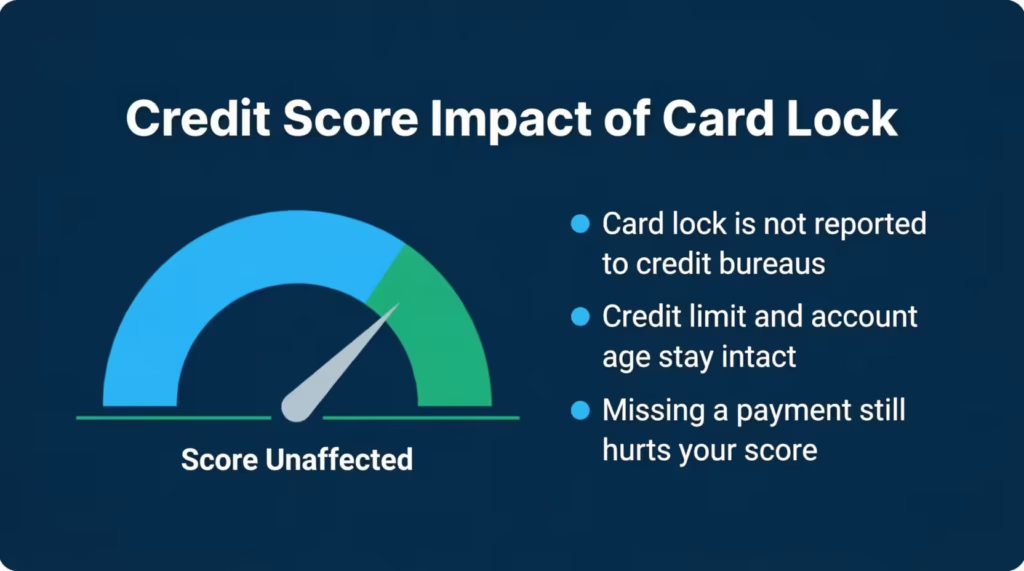
A locked card also keeps your credit limit and account age intact. That’s actually better for your score than canceling the card, which would shrink your total available credit and could shorten your average account age. If you have an old card you barely use, a card lock is a smart way to keep it active without the risk of forgotten charges.
Is There a Fee to Lock or Unlock Your Capital One Card?
There are no fees, no penalties, and no hidden costs for locking or unlocking your Capital One credit card. You can flip the toggle as many times as you want, every day if you want to, and Capital One will never charge you for it. Locking and unlocking are free security tools, built into every Capital One credit card account at no extra cost.
Just keep in mind two things that have nothing to do with the lock itself. First, your normal account fees (like an annual fee, if your card has one) still apply. Second, you’ll still owe interest on any unpaid balance, since the lock pauses new spending but not the math on what you already owe. As long as you keep paying on time, locking the card costs you absolutely nothing.
Frequently Asked Questions (FAQs)
Can someone use your card if it’s frozen?
New purchases, cash advances, and most digital wallet payments are blocked the moment you lock your Capital One card. However, recurring charges you already authorized, like subscriptions and utility auto-pay, will still process normally.
Can I temporarily pause my credit card if I think it’s stolen?
Yes. Lock the card first through the Capital One Mobile app or website while you investigate. If you confirm it was stolen or find unauthorized charges, then report it lost or stolen to get a new card number issued.
Is it better to freeze or cancel a credit card?
Locking is almost always the better choice unless the card is definitely gone or your number is confirmed compromised. Canceling a card shrinks your total available credit and can shorten your average account age, both of which can lower your credit score.
Should I freeze my credit card if I’m not using it?
Locking an unused card is a smart move. It prevents accidental charges and keeps the account open, which protects your credit score by preserving your available credit limit and account age without any risk of unauthorized spending.
How bad will it hurt my credit if I cancel a credit card?
Canceling reduces your total available credit, which raises your credit utilization ratio and can drop your score. It may also shorten your average account age if the card is one of your older accounts, which is a second scoring factor that takes a hit.
Does freezing a credit card hurt a credit score?
No. Capital One does not report a card lock to Equifax, Experian, or TransUnion, so the credit bureaus never see it. Your credit score is completely unaffected as long as you keep making at least the minimum payment on any balance you carry.
Is it a good idea to freeze your credit cards?
Locking a card makes sense any time you misplace it, spot a suspicious charge, or want a temporary spending pause. It costs nothing, takes seconds, and keeps your account open and your subscriptions running without canceling the card.
Can I still pay off my credit card if I freeze it?
Yes. A Capital One card lock only blocks new purchases. Your billing cycle, minimum payment requirement, and interest charges on any unpaid balance all continue exactly as normal while the card is locked.
Does locking a Capital One card block Apple Pay and Google Pay?
In most cases, yes. Capital One declines the underlying charge when a card is locked, regardless of whether the payment comes from a tap-to-pay terminal, an in-app purchase, or an Apple Pay or Google Pay checkout button.
Bottom Line
Freezing your Capital One card is one of the simplest, smartest moves you can make when something feels off. We’ve covered every way to do it: through the Capital One Mobile app, on the website, and over the phone. You now know what stays charged (your subscriptions and bills), what gets blocked (new purchases and cash advances), and when to choose a lock over reporting your card lost.
According to Capital One’s guidance, lock the card first if you have any doubts. Report it lost or stolen only when you’re certain it’s gone or compromised.
If you know a friend or family member who tends to misplace their wallet, send this guide their way. It could save them hours of stress the next time their card goes missing.