I tapped my card at the grocery store last month and watched the terminal flash “Declined.” Nothing was wrong with my balance. Nothing was wrong with the merchant. The problem was a quiet little word: my Capital One app was now showing in red: restricted. If you’re looking at that same word now, you know the gut-punch feeling. You just want the card to work again.
The good news: most restrictions are reversible, often within minutes.
This guide walks you through every cause, every fix, and every realistic timeline so you know exactly what to do next.
Key Takeaways
This guide explains how to unrestrict a Capital One credit card, covering the difference between a self-lock and a bank restriction, fixes for fraud alerts, past due balances, and over-limit holds, realistic timelines, and how to spot phishing scams.
Core Facts:
- A card restriction is a temporary hold Capital One places on new purchases, not an account closure, and the card typically works again once the underlying cause is resolved.
- A fraud alert restriction can clear within minutes after replying “Yes” to Capital One’s text verification, while replying “No” keeps the card paused and triggers a replacement card.
- Past due balance restrictions are resolved by paying the overdue amount, but the hold often takes about 7 to 10 days to lift even after the payment posts.
- Over-limit restrictions can be resolved with a partial payment, since lowering the balance below the credit limit frees up available credit within 1 to 2 business days of processing.
- A new card must be activated in the app or by phone before it will work, and activation removes the restriction instantly.
- Phishing texts mimicking Capital One restriction alerts often include suspicious links, mismatched card digits, or requests for full card numbers or PINs, which real alerts never ask for.
Best for:
- Capital One cardholders seeing a “restricted” status in their app who need to identify the cause before taking action.
- Cardholders trying to distinguish a self-imposed card lock from a bank-placed restriction.
- Anyone who received a suspicious text about a restricted card and wants to verify whether it is legitimate before responding.
What It Means When Your Capital One Card Is Restricted
A Capital One card’s restricted status means Capital One has placed a temporary hold on new purchases. It is not the same as closing your account. The card is still yours. Your account number is still active. The bank has simply paused outgoing charges while it checks something on its end.
Think of it as a “time-out,” not a lockout for good. In most cases, once the underlying issue is fixed, the card starts working again. Sometimes that takes minutes. Sometimes it takes a week or more. The exact wait depends on the reason behind the account’s suspended state, which we cover one by one below.
One detail trips up almost everyone: recurring charges can still go through. Your Netflix bill, your gym membership, and other auto-pay subscriptions you set up before the hold may keep posting normally. Capital One often allows these to clear because they protect you from late fees and service shutoffs. New swipes, taps, or online checkouts, however, will be blocked until the restriction lifts.
There are several different causes for a restriction. Fraud holds, late payments, hitting your credit limit, an unactivated new card, and unusual spending patterns are the most common. Each cause has its own fix and its own timeline, so the first job is figuring out which one applies to your account.
📌 Did You Know: Capital One states clearly on its own help page that a suspended or restricted card is a temporary limit, not a permanent closure, and the account can usually be reopened once the trigger is resolved.
Card Lock vs. Card Restriction: How to Tell Which One You Have
Before you call support, find out whether you are dealing with a card lock or a true restriction. They look similar in the app, but they are very different problems with very different fixes.
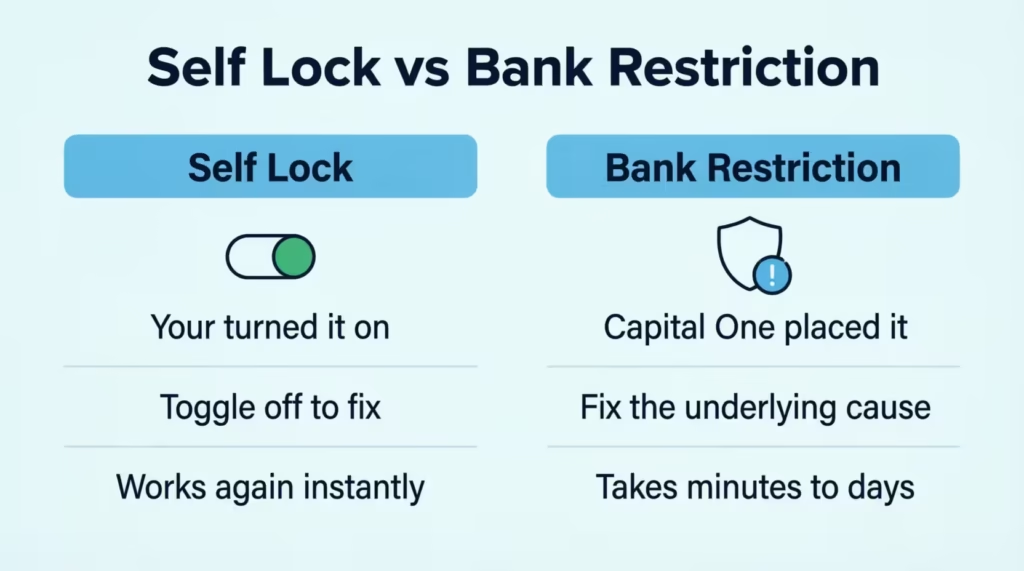
A card lock is something you turn on yourself. It is a switch inside the Capital One mobile app that lets you freeze the card if you misplace it or just want to pause spending. You can turn it off the same way you turned it on.
There is no underlying issue with your account. To unlock a Capital One credit card that you locked yourself out of, you just toggle the switch back to the “on” position, and the card works again right away.
A restriction is different. Capital One placed it on the account, not you. There is always a reason behind it, like a fraud alert, a past due balance, or a credit limit issue. You cannot remove a restriction with a toggle. You have to fix the cause first.
Here is a quick way to tell which one you are looking at:
- If you remember tapping a “lock card” button, it is a self-lock. Just toggle it off.
- If you never touched the lock setting and you got a text, email, or app alert from Capital One, it is a restriction.
- If your statement still updates normally, but new purchases get declined, it is a restriction.
How to Check Your Restriction Status in the App
Open the Capital One app and sign in. Tap the card that is being declined. Look just below the card image, where the status sits. A self-lock usually shows a clear “Locked” toggle with a slider. A restriction usually shows a banner or message that says something like “Your account needs attention” or “Card restricted.”
If you see a banner, tap it. The app will often tell you the reason in plain words. It may say a payment is past due, a charge needs your review, or your account is under review. That message is your first clue. Note what it says, because the fix is built around that specific cause.
If the app does not show a reason and just says your card is restricted, that is when a phone call makes sense. You will need a live agent to look up the trigger.
Restricted Due to a Fraud Alert: How to Fix It
A fraud alert is the most common reason a Capital One card stops working, and luckily, it is also the fastest to fix. When the bank’s system spots a charge that does not match your usual spending, it pauses the card and pings you to ask, “Was this you?”
Capital One uses a two-way text alert system to do this. You get a text from a short number, often 227898 or 227373, listing the suspect charge, the dollar amount, and the merchant.
The message asks you to reply with a simple “Yes” or “No.” Capital One confirms that valid fraud alerts will reference the transaction and ask for a one-word reply. They will never ask you to share your full card number, PIN, or password by text.
Follow these steps based on the reply you need to send:
- If the charge was really you, reply “Yes” (or follow the wording the text asks for). The bank’s system updates within seconds. In most cases, the restriction lifts right away, and you can use the card again on the very next swipe.
- If the charge was not you, reply “No.” Capital One will then block that charge, keep the card paused, and usually send a follow-up text or push notification. Open the app, go to your card, and tap Lock Card to keep it frozen while a new card is sent. Then go to “Report Fraud” inside the app to confirm the details.
- If you never got a text but you see a strange charge, open the app, tap the transaction, and choose Report Fraud. This tells Capital One the charge is not yours and starts the same dispute process.
After you reply “Yes,” the restriction normally clears within a minute or two. After you reply “No,” Capital One ships a new card, usually within 7–10 business days, and the old card stays restricted for good. The account itself stays open during all of this.
⚠️ Mistake to Avoid: Never click a link inside a fraud-alert text to “verify your card.” Real Capital One alerts only ask for a one-word reply. Any link, login page, or request for your full card number is a phishing attempt. We dig into this scam in detail later in the article.
Restricted Due to a Past Due Balance: How to Fix It
If a payment slips past its due date, the card will likely get restricted until the past due balance is paid. A delinquent account is one of the clearest causes, and the app will usually tell you straight away that a payment is overdue.
To confirm this is the issue, open the app and check the home screen. A past due account shows a red banner with the overdue amount and a due-date message. The statement page also lists “Past Due Amount” near the top.
Once you know payment is the problem, send the money in. You have three main ways to do it:
- In-app: Tap Pay on the card’s screen, choose the bank account, and pick “Past Due Amount” or “Other Amount.” This is the fastest method. Payments through the app usually post in 1–2 business days.
- By phone: Call the number on the back of your card or 1‑877‑383‑4802 to make a payment through Capital One’s automated system. You can pay with a linked bank account.
- By mail: Send a check or money order to the payment address printed on your statement. This is the slowest path. It can take 5–7 business days for the payment to arrive and be posted.
You do not always have to pay the full statement balance. To clear the restriction, you only need to bring the past due amount to zero. That said, paying the full statement helps your credit utilization ratio and keeps interest charges from growing.
After the payment posts, the card does not always turn back on right away. Many cardholders report a wait of about 7–10 days before Capital One lifts the hold, even with a paid balance. This is normal. The bank’s risk team uses that window to confirm the payment cleared and to review the account.
If you cannot pay the full past due amount, ask about a payment arrangement. Call customer service and explain the situation. Capital One can sometimes split the past due amount into smaller payments over a few weeks. This is not always offered, and it may not lift the restriction right away, but it can stop the account from sliding into deeper trouble.
Restricted Due to Exceeding Your Credit Limit: How to Fix It
If you spend right up to your credit limit (or a pending charge pushes you over it), Capital One can restrict the card until your available credit comes back. This one is fast to fix because it is just math: lower the balance, free up room, get the card working again.
Over-limit restrictions usually trigger when one of three things happens. A pending hold (like a hotel deposit or gas pump pre-authorization) eats up extra credit. A new charge pushes the running balance above the limit. A scheduled payment fails, so the available credit is never refilled.
You do not have to pay the entire statement to fix this. A partial payment works. The moment Capital One posts your payment, your credit utilization drops, and the available credit opens back up. So if your limit is $2,000 and you’re at $1,990, a $200 payment can be enough to lift the restriction.
Payment timing is the key detail people miss. Even though the app shows the payment right away, the bank still needs 1–2 business days to fully process it. The card may not work the same hour you pay. Wait one full business day, then try a small test charge.
To check the current available credit, open the app and tap the card. The “Available Credit” line sits right under the running balance. If it shows a healthy number (more than the size of your next planned purchase), the restriction has likely lifted. If it still shows $0 or a negative number, give it another day or call to confirm.
💡 Pro Tip: If you charge close to your limit on purpose (for rewards or to manage cash flow), schedule a mid-cycle payment about 5 days before each statement closes. This keeps utilization low, avoids over-limit holds, and protects your credit score at the same time.
Other Common Reasons Your Card Got Restricted
Most restrictions trace back to fraud, late payments, or over-limit issues. But a few other causes pop up often enough to mention. These are quick to spot and usually quick to fix.
Your New Card Was Never Activated
A brand-new Capital One card has to be activated before it works. If you tap it before activation, the card activation step is missing, and the card will decline (sometimes showing as restricted in the app). This catches people who get a replacement card in the mail and assume it works on arrival.
To activate, open the Capital One app and look for a banner that says “Activate Your Card.” Tap it and follow the prompts. You can also activate by phone at the number on the activation sticker. Activation is instant. The card works the moment the process finishes.
Make sure you destroy the old card after the new one is active. If both are floating around, the old one will keep declining, which can look like a fresh restriction.
Activity Capital One Flagged Without Sending an Alert
Sometimes the bank’s risk system pauses a card without sending a fraud text first. This happens when the suspicious activity is unusual but not clearly fraudulent. Examples include a sudden out-of-state gas station charge, a large online purchase from a new merchant, or a string of small “card testing” charges that do not trigger the standard alert flow.
In these cases, the app will usually show a generic “Account needs review” message, but no text comes in. The fix is simple: call the number on the back of the card. Tell the agent which charge looks unusual to you and confirm or deny it. Once the agent verifies your identity and reviews the transaction, the hold usually lifts within an hour.
If you cannot pin down a single charge, ask the agent to read the last several transactions out loud. One of them is almost always the trigger.
How long does it take to Get Your Card Unrestricted
This is the question people ask the second their card declines: how long until I can use it again? The honest answer depends on the cause. Some restrictions are clear in seconds. Others can take more than a week. The table below gives realistic timelines based on what triggered the hold and what is needed for account reinstatement.
| Reason for Restriction | Action Needed | Typical Time to Restore Card |
|---|---|---|
| Fraud alert (legit charge) | Reply “Yes” to the text | Same day, often instant |
| Fraud alert (real fraud) | Report fraud, get new card | 7–10 business days for new card |
| Past due balance | Pay the past due amount | 7–10 days after payment posts |
| Over the credit limit | Make any payment to lower balance | 1–2 business days |
| New card not activated | Activate in app or by phone | Instant |
| Risk review / manual hold | Call Capital One, verify identity | 1–7 days, sometimes longer |
Two things slow the clock down. First, a payment must fully post, not just show up as pending. Payment history updates after the bank verifies funds cleared, which is why a 7–10 day wait is common even after you have paid.
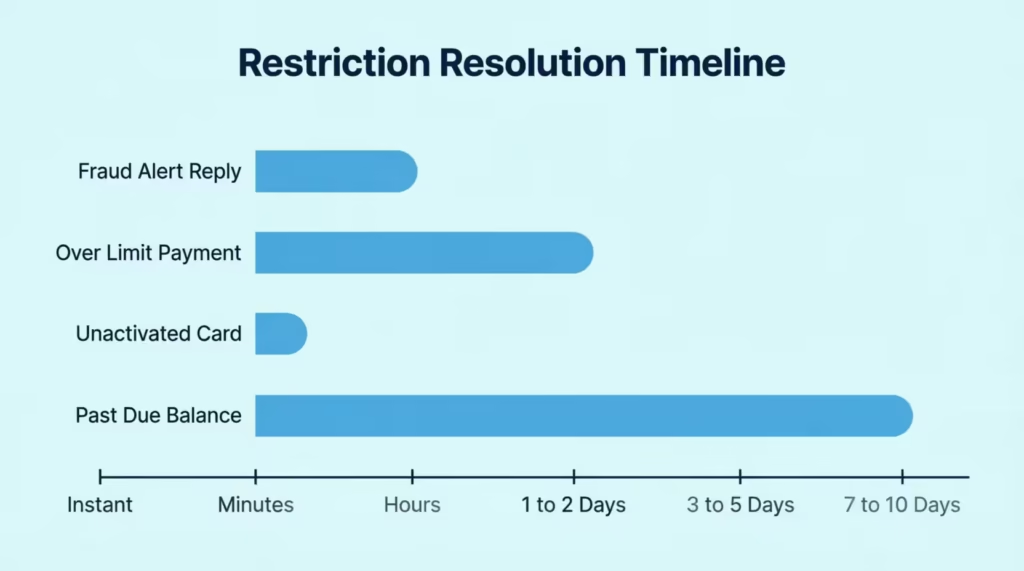
Second, if your account is under manual review (for example, after a fraud report or several declined payments), a real person needs to look at the file. That can add days. If the case stays open past 7 business days, call support and ask for a status update.
Is That “Your Capital One Card Is Restricted” Message a Scam?
Here is the part most articles skip, and it matters more than ever. The exact phrase “your Capital One card is restricted” is used heavily in real phishing texts and emails. Scammers know the moment a card stops working is the moment you are most likely to click anything that promises a fix. Don’t.
A phishing scam email or text is built to look almost exactly like a Capital One alert. The fake messages copy the bank’s tone, use a similar phone number, and include urgent words like “immediate,” “verify now,” or “your account will be closed.” Some even include the last four digits of a card, which scammers buy from data leaks.
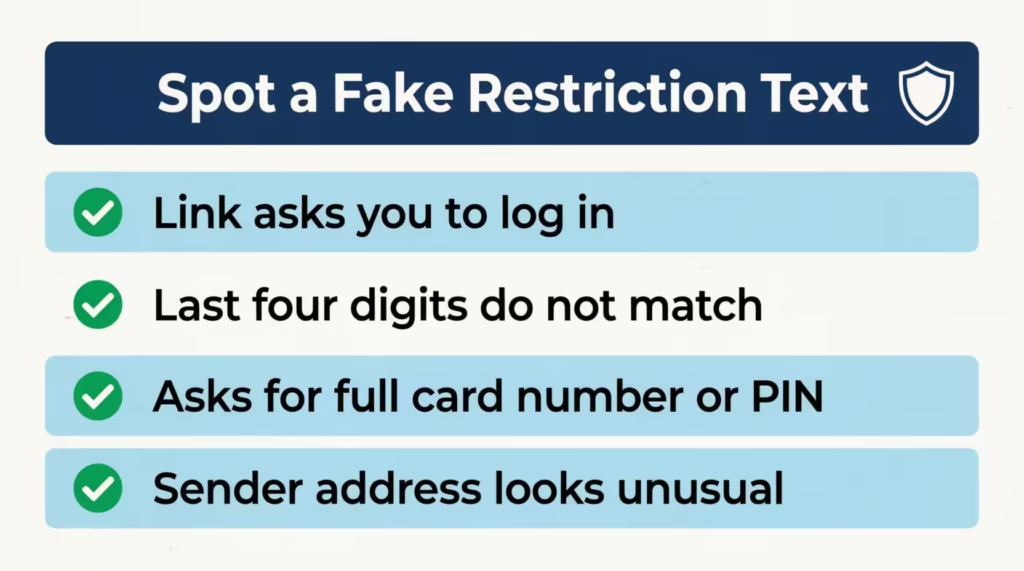
You can spot a fake by checking a few clear signs:
- It contains a link to outside the Capital One website. Real Capital One fraud texts ask for a one-word reply (“Yes” or “No”). They do not ask you to click a link to log in.
- The last four digits do not match your real card. Scammers blast the same template to thousands of people, so the digits are often wrong or missing.
- The message asks for a full card number, PIN, SSN, or password. Capital One will never request these by text, email, or even by phone unless you call them first.
- The sender’s address is odd. Real bank emails come from a capitalone.com address. Fake ones use lookalike domains like “capital-one-secure.com” or random Gmail addresses.
A real Capital One alert will reference a specific transaction (amount, merchant, last four digits) and ask for a Yes/No reply or direct you to open the official app. It will never threaten to close your account in the next 24 hours unless you click a link. According to Federal Trade Commission data, consumers reported losing more than $12.5 billion to fraud in 2024, a 25% jump from the year before, with text-message scams and impersonation of major banks among the most common attacks.
If you get any message you are not sure about, do not click anything. Open the Capital One app directly (the one already on your phone) or type capitalone.com into your browser yourself. If the restriction is real, the alert will be waiting for you inside the app. If nothing is there, you know the text was fake.
If you already clicked a link or typed in any info, act fast. Call Capital One customer service at the number on the back of your card. Tell them what you shared and when. They can lock the card, send a new one, and watch the account for new charges. Then change your Capital One password and turn on two-factor sign-in.
Does a Restricted Capital One Card Hurt Your Credit Score?
A restriction by itself does not hurt your credit score. The bureaus do not get a special “this card is restricted” note from Capital One. Your account simply keeps reporting its normal balance, limit, and payment status to credit bureau reporting agencies.
What does (or does not) affect your score depends on the cause behind the restriction:
Zero direct impact on credit score:
- A fraud hold. The hold itself is never reported to the bureaus. The card just gets replaced.
- A new card that was never activated. Activation does not change credit data.
- A single over-limit decline. The bureaus see the balance and limit, but a one-time decline is not reported.
Some impact, depending on the cause:
- A missed or late payment is the biggest risk. If a payment is 30 or more days past due when the statement closes, Capital One reports it to the credit bureaus. That single mark can drop a score by 60 to 110 points, depending on where the score started.
- Sustained high utilization. Riding close to the credit limit for several months in a row can lower the utilization-driven part of your score, even if you never miss a payment.
A late payment can stay on a credit report for up to seven years from the date it was first reported, although its impact fades a lot after the first two years. This long shadow is exactly why catching a past due balance early matters so much.
Paying within the first 29 days after the due date usually keeps the late payment off your credit report entirely, because card issuers normally only report payments that are 30 days late or worse.
So if the restriction came from a fraud alert or an unactivated card, your credit is safe. If it came from a late payment, the credit damage may already be done by the time you see the restriction, but paying fast can stop it from getting worse.
What to Do If Capital One Won’t Remove the Restriction
Most restrictions clear once the underlying cause is fixed. But sometimes the hold sticks, even after you pay, reply, and call. If you’ve already gone through the steps for your situation and the card still won’t work, here is the next move.
Start by calling Capital One again and asking to be transferred to the Account Specialist team or the credit operations group. The first agent who picks up is often a general support rep who cannot lift complex holds. Be calm, give them your case or reference number from the last call, and ask for someone with the authority to review the restriction.
Be ready to send documents. For tougher reviews, Capital One can ask for:
- A clear photo or scan of a government-issued ID (driver’s license or passport).
- Proof of current address (a recent utility bill, lease, or bank statement that matches the address on file).
- Proof of income (a recent pay stub or tax return) if the review is tied to credit-line risk.
Send these only through the secure upload link the bank gives you over the phone or in the app. Never email them to an address in a text message.
Watch for signs the account may be heading toward closure rather than reinstatement. Red flags include:
- Multiple calls with no new information given.
- A letter (paper or email from a capitalone.com address) saying the account is “under further review.”
- A request to send the card back.
- The card is being removed from the app entirely.
If any of these show up, plan for the account to close. Closure is not the end of the world, but it does mean you need a backup plan ready.
Keeping Bills and Autopay Running While Restricted
The restricted card can still pull autopay charges for some subscriptions, but you should not rely on this. Pull up a list of every service tied to that card (streaming, gym, insurance, utilities, web hosting) and update each one to a different card or bank account. This takes about 20 minutes and saves you from late fees, cancelled accounts, or hits to other parts of your credit.
If you don’t have another credit card, a debit card from your checking account works for most subscriptions in the short term. For situations where you need a new credit card, a replacement card from another issuer may be worth considering, but apply only after the Capital One situation is settled, so a fresh inquiry does not stack on top of the stress.
How to Reach Capital One About a Restriction
Capital One lists 1‑877‑383‑4802 as its main credit card customer service line, available 24/7 for card-related issues. You can also use the secure message tool inside the app, which creates a written record of every reply (handy if you need to escalate later). For in-person help, some Capital One Café locations can connect you with an account specialist by phone or tablet. However, they can’t lift restrictions right away.
When you call, have your account number, the last four digits of the restricted card, your ID, and any reference numbers from past calls ready. Write down the agent’s name, the date and time, and any case number they give you. If the issue is not resolved in that call, those notes save you hours on the next one.
Frequently Asked Questions
How do I unrestrict my credit card?
Open the Capital One app to find the listed reason, then resolve it directly: reply “Yes” to a fraud text, pay the past due amount, or pay down your balance if you’re over the limit. Most fixes take minutes to a few days once the cause is resolved.
What does it mean when your Capital One card is restricted?
A restriction is a temporary hold Capital One places on new purchases, not an account closure. Your account number stays active, and the card typically works again once the underlying issue, like a missed payment or fraud check, is resolved.
How long does it take to unrestrict a card?
It depends on the cause: fraud alerts can clear in 1-2 minutes after you reply “Yes,” over-limit holds usually lift within 1-2 business days after a payment posts, and past due restrictions often take about 7-10 days after the balance clears.
Can a restricted card become unrestricted?
Yes, most restrictions are reversible once you fix the trigger behind them. Capital One states on its own help page that a restricted card reflects a temporary limit, and the account can typically reopen after the issue is resolved.
Can Capital One restrict my account without notice?
Yes, Capital One can pause a card without sending a text alert first, usually for unusual activity but not clearly fraudulent, like a large purchase from a new merchant. In these cases, the app shows a generic “Account needs review” message instead of a specific alert.
Why is my Capital One permanently restricted?
A restriction tends to become permanent when Capital One moves toward closing the account rather than reinstating it. Warning signs include being asked to mail back the card, a letter citing “further review,” or the card disappearing from the app entirely.
Will Capital One tell me why my card was restricted?
Often yes. The app usually shows a banner explaining the reason, such as a past due payment or a charge needing review, and fraud alerts arrive by text, naming the specific transaction. If no reason appears in the app, calling the number on the back of your card gets you an answer.
Can I still use my Capital One card while it’s restricted?
New purchases get blocked, but most existing autopay subscriptions, like streaming services or gym memberships, will likely keep processing normally. It’s safer to update those subscriptions to a different card rather than relying on autopay continuing through the restriction.
How to avoid a Capital One account restriction?
Pay your statement on time to avoid past due holds, and keep your balance below your credit limit, ideally scheduling a payment about 5 days before your statement closes if you spend close to the limit. Watching for pending holds, like hotel or gas pre-authorizations, also helps prevent over-limit triggers.
What should I do if Capital One won’t remove the restriction?
Call back and ask to be transferred to the Account Specialist or credit operations team, since the first agent often lacks authority to lift complex holds. Be ready to submit a government ID, proof of address, or proof of income through the bank’s secure upload link if requested.
Final Thoughts
A restricted Capital One card feels scary in the moment, but in most cases, the fix is simple once you know which trigger you are dealing with. Fraud alerts clear in minutes with a one-word reply. Over-limit holds lift within 1–2 days after a small payment. Past due restrictions usually need about a week after the balance clears.
When the bank won’t reinstate the account, a good backup plan helps. This includes autopay updates, document submission, and a second card from another issuer. These steps keep your finances steady. To fix the issue, start by diagnosing the trigger in the app. Then, take the right action. Also, avoid any “verify now” links in your texts.
If a friend or family member is stuck on a confusing decline message, share this guide. They can fix the card today instead of guessing for a week.