I remember the first time I asked for a credit line increase. My Discover card had a low limit, my utilization kept creeping up, and I was scared one wrong click would drop my credit score. If you’re staring at your Discover account wondering how to get a bigger Discover credit card limit without hurting your credit, you’re not alone. Many cardholders freeze at this exact step.
Here’s the short answer: log into your Discover account, open Card Services, click Credit Line Increase, and submit the short form.
Below, we’ll walk through every path, every field Discover asks about, and smart moves to boost your approval odds.
Key Takeaways
This guide explains how to increase your Discover credit card limit through online, app, and phone requests, including the required income and housing information, soft versus hard credit pull rules, and how much of an increase to request.
Core Facts:
- You can request a Discover credit line increase through the website, mobile app, or by calling 1-800-347-2683, and all three paths lead to the same review team.
- Most Discover credit line increase requests use a soft credit inquiry that does not affect your credit score, and Discover asks for consent before running a hard inquiry.
- The credit line increase form asks for total annual gross income, monthly housing payment, employment status, and an optional requested new limit.
- A common guideline is to request an increase of 25 to 50 percent of your current limit, calculated by dividing planned monthly spending by 0.30.
- Online and app requests typically get an instant decision, while requests needing manual review can take 5 to 10 business days.
- Discover recommends waiting at least six months between credit line increase requests, since frequent requests can appear as a sign of financial stress.
Best for:
- Discover cardholders who want to lower their credit utilization ratio without opening a new card.
- Cardholders unsure whether requesting an increase will trigger a hard credit inquiry.
- Discover it Secured or Student cardholders looking for the specific increase process for their card type.
How to Increase Your Discover Credit Card Limit
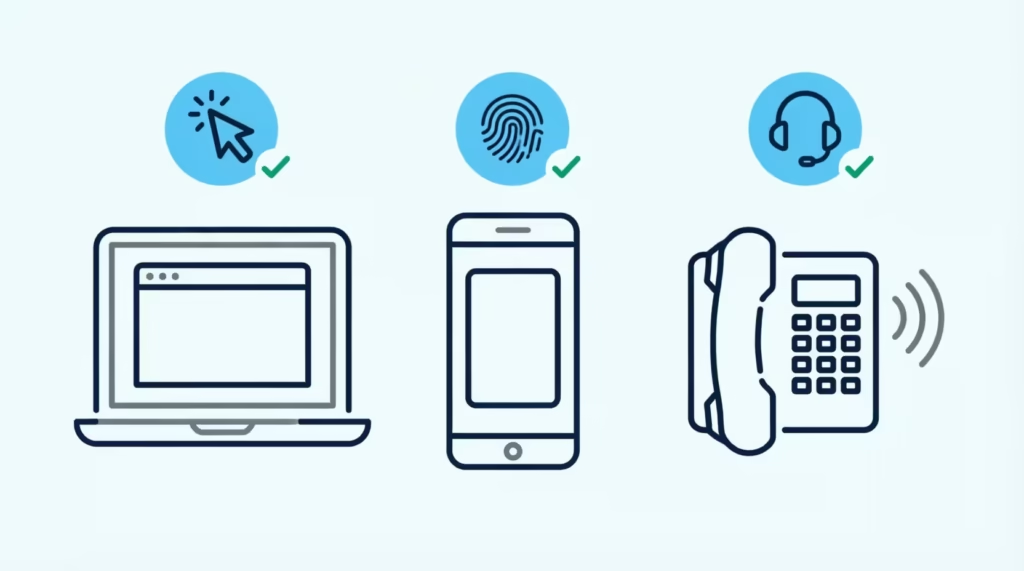
Discover gives you three easy ways to ask for a bigger limit. You can use the website, the mobile app, or a quick phone call. All three paths lead to the same review team, so pick the one that feels most comfortable.
This guide focuses on standard Discover it Cash Back and Discover it Chrome cardholders. If you have a secured card or student card, the basic steps still apply, but there are extra details we’ll cover in later sections. Before you start, make sure your income and housing info are current in your account. A quick update now saves time later.
💡 Pro Tip: Update your income in your Discover profile a few days before you request an increase. A fresh, higher income number on file often leads to a better offer.
Requesting a Credit Line Increase Online
The website method is the most popular way to submit a Discover CLI request. It’s simple and gives you a decision fast.
Follow these steps:
- Go to the Discover Account Center login page and sign in with your username and password.
- Look for the “Card Services” or “Manage” menu at the top of your dashboard.
- Click “Credit Line Increase.”
- Fill in the short form with your income, housing payment, and how much of an increase you want.
- Review your details, then click submit.
Most people get a decision on the screen in a few seconds. If Discover needs more time, they’ll tell you right there. Keep the confirmation page open or take a screenshot for your records.
Requesting a Credit Line Increase in the Discover App
The mobile app path works well if you bank from your phone. The steps are nearly the same as the website.
Follow these steps:
- Open the Discover Mobile app. If you don’t have it, download it from the Apple App Store or Google Play Store.
- Sign in with Face ID, fingerprint, or your password.
- Tap the “Services” tab at the bottom of the screen.
- Scroll down and select “Credit Line Increase.”
- Enter your income and housing payment, pick your desired new limit, and submit.
The app usually gives an instant answer, just like the website. If you get a pending status, don’t panic. Discover may just need a quick manual review.
Requesting a Credit Line Increase by Phone
Some people prefer to talk to a real person. That’s fine, and Discover’s phone team can walk you through the same form.
Follow these steps:
- Call Discover at 1-800-347-2683. This line is open 24/7.
- Say “credit line increase” when the automated system asks why you’re calling.
- Verify your identity with your card number, Social Security number, or account details.
- Tell the agent how much you want and why. A simple reason like “I want to lower my utilization” works well.
- Wait on the line for a decision, or ask when to expect a follow-up.
Phone requests can take a bit longer than online ones, but they let you ask questions in real time. That helps if your situation is unusual.
Information Discover Will Ask For
Discover keeps its credit line increase form short. Still, you should have your numbers ready so you don’t guess and slow things down.
Here’s what the credit line increase (CLI) form asks:
- Total annual gross income. This is what you earn in a year before taxes and other deductions. Include salary, bonuses, tips, freelance pay, and reliable side income. If you’re married, you can also include household income you have reasonable access to.
- Monthly housing payment. Enter your rent or your mortgage payment. If you live with family and pay nothing, enter zero. Don’t include utilities.
- Employment status. Choose from options like employed, self-employed, student, retired, or unemployed. Be honest, since Discover may verify this later.
- Requested new credit limit (optional). You can suggest a number or let Discover pick one for you.
Why does Discover ask for annual gross income and monthly housing payment? These two numbers help them estimate your disposable income. If your rent eats most of your paycheck, giving you a bigger limit is riskier for them. When your income is high and your housing cost is reasonable, a higher limit looks safer.
Have a recent pay stub or your last tax return handy so your numbers match what Discover might check.
Does Requesting a Credit Line Increase Hurt Your Credit Score?
This is the number one worry, so let’s clear it up. In most cases, a Discover credit line increase request uses a soft credit inquiry, which does not hurt your credit score at all.
Discover confirms this on its own site. As the company explains in its card education section, most credit line increase requests start with a soft pull that does not affect your credit report.
A hard credit inquiry is different. That’s the kind that can shave a few points off your FICO credit score. Discover only runs a hard pull in special cases, and they must ask you first.
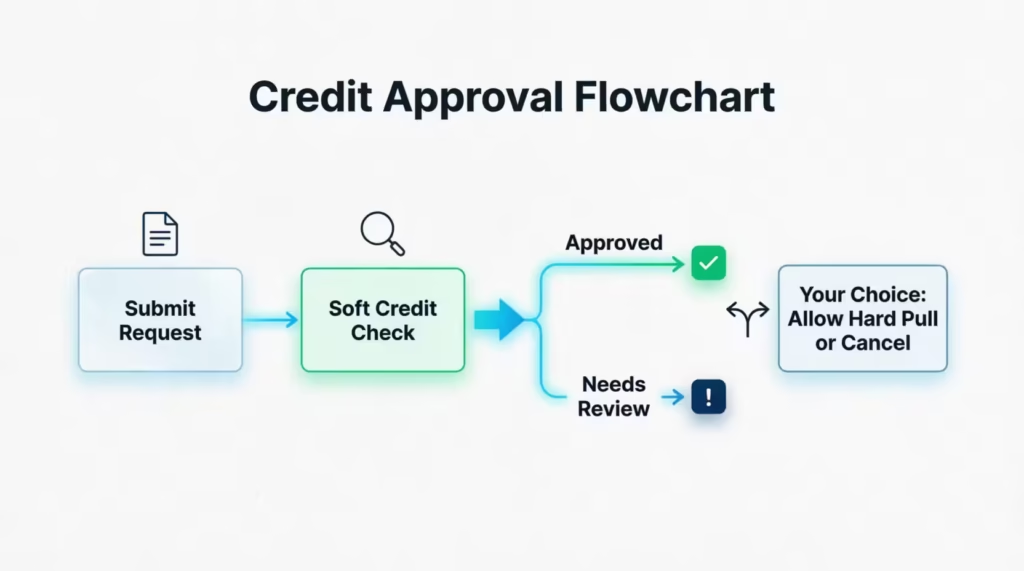
Here’s how the process usually plays out:
- Step 1: You submit the form. Discover starts with a soft inquiry.
- Step 2: If the soft data supports the request, you get approved. No hard pull happens.
- Step 3: If Discover needs a deeper look, a pop-up asks for your consent to run a hard credit inquiry.
- Step 4: You can say yes and continue, or say no and cancel the request.
The key takeaway is that you’re always in control. You will never get a surprise hard pull from Discover on a credit line increase. If you decline the hard inquiry, the request simply ends, and your credit report stays untouched.
⚠️ Mistake to Avoid: Don’t click “agree” on the hard inquiry screen without reading it. If your credit is on the edge of a big goal like a mortgage, skip the hard pull and try again in a few months.
How Much of a Credit Limit Increase to Request
Picking a smart request amount is one of the biggest reasons people get approved. Ask for too much, and Discover may say no. Ask for too little, and you don’t help your utilization enough.
Use this simple two-step method:
- Add up the expenses you want to put on the card each month. This can include groceries, gas, subscriptions, dining, and any bills you plan to charge. Say the total is $1,500.
- Divide that number by 0.30 to find a target limit. For $1,500 in monthly spend, a limit of about $5,000 keeps your credit utilization ratio near 30 percent. A limit closer to $7,500 would keep it near 20 percent, which is even better for your score.
Consider Michael, a marketing coordinator with a $2,000 Discover limit and $8,000 in current credit card debt across two cards. He asks Discover to raise his limit to $6,000. That single move can drop his utilization from a scary level to a healthier one, which often helps his FICO score in the next reporting cycle.
A good rule of thumb is to request an increase of 25 to 50 percent of your current limit. If your limit is $3,000, asking for $4,500 to $5,000 feels reasonable. Asking to jump from $3,000 to $15,000 in one shot often triggers a denial or a hard pull request.
Also, keep an eye on your available credit across all cards. A big Discover increase gives you room to breathe, but only if you don’t fill it up with new charges right away.
Does Discover Increase Credit Limits Automatically?
Yes, Discover does grant automatic credit limit increases, but not on a set schedule and not for everyone. The company reviews accounts periodically to see who qualifies for a bigger line without asking.
An automatic bump is more likely when your account shows strong signs of healthy use. Discover looks at things like:
- Payment history. On-time payments every month for at least six months in a row.
- Statement balances. Using the card often but not maxing it out.
- Credit score trend. A rising FICO credit score since you opened the card.
- Income updates. A higher income on file than when you first applied.
- Overall creditworthiness. No recent late payments, collections, or new negative marks.
Even with all these boxes checked, an automatic increase is not guaranteed. If you want more control over the timing, submit a request yourself. That way, you’re not waiting on an account review that may never come.
📌 Did You Know: Updating your income in the Discover app, even without asking for an increase, can trigger a fresh account review. Many cardholders see an automatic bump within a couple of billing cycles after they update.
Factors That Affect Approval for a Discover Credit Limit Increase
Discover’s approval decision comes down to a mix of factors. Knowing what they weigh helps you time your request for the best odds.
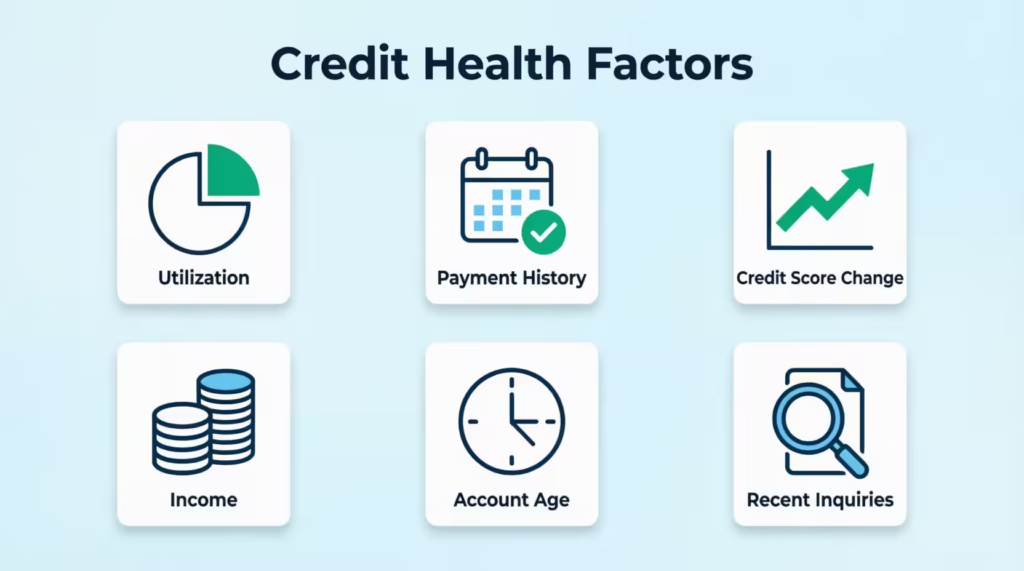
The main factors include:
- Credit utilization ratio. How much of your total credit you’re using across all cards. Lower is better.
- Payment history. On-time payments on Discover and all other accounts.
- FICO credit score changes. A rising score since your last review helps a lot.
- Income and debt-to-income ratio. More income and less debt make a bigger limit look safer.
- Length of account. Older Discover accounts with a clean track record get better treatment.
- Recent hard inquiries. Too many recent applications for credit can hurt your odds.
Ask at the best times: right after your statement shows a low balance or after a positive change. This includes a raise, paying off a loan, or an increase in your credit score.
How Often You Can Request an Increase
A common question is how long to wait between requests. The general rule is to wait at least six months between Discover CLI requests. Some cardholders wait a full year to give their credit profile more time to grow.
Why the wait? Discover flags accounts that ask for increases too often. Frequent requests can look like financial stress, even if that’s not your situation. If you ask again too soon after a denial, you’re likely to get denied a second time for the same reasons.
If your first request was approved, you can still wait six months before asking for more. That gives Discover time to see how you handle the new limit.
How Payment History and Utilization Impact Your Odds
Of all the factors Discover weighs, two matter most and you control both.
On-time payment history is the top factor. Even one missed payment in the last six months can sink your request. Set up autopay for at least the minimum payment so you never miss a due date. Then pay the rest by the due date to avoid interest.
Low credit utilization is the next big factor. If your Discover card is near the limit right now, wait until after your next statement posts with a lower balance. A card that shows 15 percent utilization looks much better than one at 80 percent, even if the total spending was the same.
A practical move is to make an extra payment a few days before your statement closes. This reduces the balance Discover reports to credit bureaus. It also boosts the utilization number they see during the review.
How to Increase Credit Limit on a Discover Secured Card
The Discover it Secured Credit Card works differently than the regular Discover it card. You put down a security deposit when you open the account, and that deposit sets your starting credit line.
Here’s the truth: you generally cannot request a traditional credit line increase on the secured card the same way you can on the regular card. The typical secured card CLI form is not available in the same spot.
You have two real paths to a higher limit:
- Add to your security deposit. You can send Discover more money to raise your deposit up to their allowed maximum. Your credit line grows by the same amount you add. Contact Discover by phone to arrange this.
- Graduate to an unsecured card. This is the bigger goal. Discover reviews secured accounts starting after about seven months of on-time payments and responsible use. When you graduate, they refund your deposit and give you an unsecured Discover it card with a new, often higher limit. From that point on, you can request credit line increases like any other cardholder.
How to increase credit limit on a Discover secured card, in practice, is really a question of card graduation. Focus on paying in full every month, keeping utilization below 30 percent, and not missing a due date. That’s the fastest way to move from a secured card to an unsecured one with more room to grow.
How to Increase Credit Limit on a Discover Student Card
Student cardholders use the same request process as regular cardholders. If you have a Discover it Student Cash Back or Student Chrome card, you can log in, go to Card Services, and submit the standard credit line increase form.
The most important step for students is updating your income first. When you opened the card, you may have listed a part-time job or an allowance. Update your annual gross income in the app if you have an internship stipend, a full-time job offer, or steady freelance work. Do this before you submit the request. A higher, more accurate number gives Discover a real reason to raise your limit.
How to increase credit limit on Discover student card after graduation is a common question too. Once you have a full-time job:
- Log in and update your income right away.
- Wait one or two billing cycles, so Discover sees a clean statement at the new income level.
- Submit a credit line increase request through the app or website.
Consider Jennifer, a recent grad who started a $58,000-a-year role as a junior data analyst. She had a $1,500 limit on her Discover it Student card. Two months after updating her income, she requested a limit of $5,000 and got approved on the spot. The card changes from a student card to a standard Discover it card after graduation for many users. This upgrade unlocks more features.
What Happens If Your Credit Limit Increase Request Is Denied
A denial stings, but it’s not the end of the road. Discover will send you an “adverse action” letter within about 7 to 10 business days that lists the exact reasons for the denial.
Common reasons for a denied Discover CLI request include:
- Short account history. Your card is less than six to twelve months old.
- High utilization. You’re using too much of your current limit or your other cards.
- Recent late payments. Even one missed payment can trigger a no.
- Too many recent credit inquiries. Lots of new applications look risky.
- Income too low compared to requested limit. The gap between your income and the new limit was too wide.
- Recent negative marks. Collections, charge-offs, or new derogatory items on your credit report.
Once you know why, you can fix the real problem before you try again. Wait at least six months, work on the specific reason from the letter, and then submit a fresh request.
Calling Discover after a denial can help you understand the letter, but it usually won’t reverse the decision on the spot. Agents can review your account and explain the reasoning in plainer terms. Do not ask for a second attempt in the same call, since that often just leads to another denial in your file.
How Long a Credit Line Increase Decision Takes
Timing depends on which channel you used and how complex your account is.
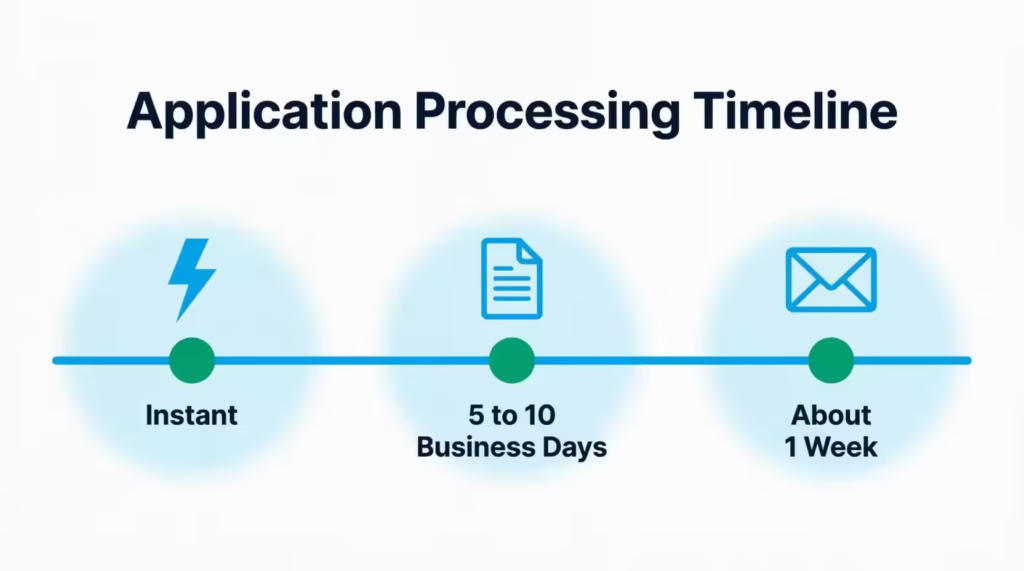
- Online and app requests most often get an instant decision. You’ll see approved, pending, or denied within a few seconds of hitting submit.
- Pending requests may take 5 to 10 business days. Discover sometimes needs a manual review or extra verification.
- Phone requests can be instant, but sometimes the agent tells you the case will be reviewed, and you’ll get a letter or account message within about a week.
If you don’t hear back after 10 business days, call Discover to check the status. A missing piece of information can sit in review longer than needed, and one quick call clears it up.
What to Do After Your Credit Limit Increase Is Approved
Getting approved feels great, but the real win comes from what you do next. A higher limit only helps your credit and finances if you use it wisely.
Here’s how to make your new limit work for you:
- Keep your spending the same. The whole point of a bigger limit is a lower credit utilization ratio. If your spending stays flat while your limit rises, your utilization drops on its own. That often boosts your FICO score in the next reporting cycle.
- Do the math. If your old limit was $3,000 and you spent $1,500 a month, that’s 50 percent utilization. If your new limit is $6,000 and you still spend $1,500, you’re at 25 percent. Same spending, much healthier ratio.
- Pay in full every month. A higher available credit balance means more room, but it also means more interest if you carry a balance. Pay the full statement balance by the due date so you never pay a cent of interest.
- Set up autopay. Autopay for at least the minimum protects you from a late payment, which would wipe out the credit gains from your new limit.
- Wait before your next request. Give yourself at least six months of clean use before asking Discover for another increase.
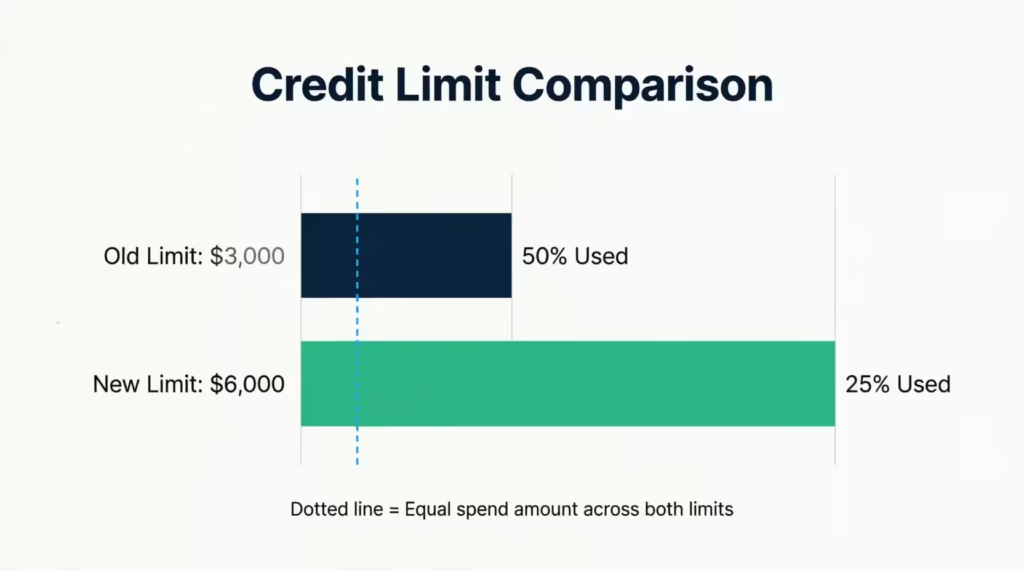
Think of the new limit as a safety net, not a spending upgrade. That mindset is what turns a bigger Discover credit limit increase into a stronger credit profile and lower interest costs down the road.
Frequently Asked Questions (FAQs)
Why won’t Discover increase my card limit?
Common reasons include an account under six months old, high utilization on your cards, a recent late payment, too many recent credit inquiries, income too low for the requested amount, or new negative marks like collections. Discover sends an adverse action letter within 7 to 10 business days explaining the exact reason.
How do I raise my Discover credit limit?
Log in to your Discover account, go to Card Services, click Credit Line Increase, and fill in your income, housing payment, and requested amount. You can also do this through the mobile app under the Services tab, or by calling 1-800-347-2683.
Will Discover increase my credit limit automatically?
Yes, Discover periodically reviews accounts for automatic increases based on payment history, statement balances, credit score trends, and income updates. It’s not guaranteed or scheduled, so updating your income in the app can help trigger a review within a couple of billing cycles.
How often should I ask Discover to increase my credit limit?
Wait at least six months between requests, and some cardholders wait a full year. Asking too often can look like financial stress and often leads to repeated denials for the same reasons.
How to trigger a credit limit increase?
Update your income in your Discover profile a few days before requesting, since a higher income on file often improves your offer. Also pay down your balance before your statement closes, so Discover sees lower utilization during its review.
Can I put a limit on my Discover credit card?
Discover doesn’t offer a feature to cap your own credit line below what they’ve approved. You can control spending manually or contact Discover directly to discuss your account options.
What if I use 90% of my credit limit?
A 90% utilization ratio looks risky to lenders and can hurt your approval odds for a credit line increase. Keeping utilization near 15% to 30% presents a much healthier picture and improves your FICO score.
How to increase credit limit on a Discover secured card?
You generally can’t request a standard credit line increase on a secured card. Instead, add more money to your security deposit, or graduate to an unsecured card after about seven months of on-time payments, which often comes with a higher starting limit.
How long does a Discover credit line increase decision take?
Online and app requests usually get an instant decision. Requests flagged for manual review can take 5 to 10 business days, and phone requests may result in a follow-up letter within about a week.
The Bottom Line
Getting a bigger Discover credit card limit is easier than most cardholders think. The three request channels, the short income form, and the soft-pull default give you a low-risk path to more spending room.
Update your income first. Keep your utilization low the month before you ask. Then, request a reasonable amount based on your monthly spending. For most readers, that combination delivers the best odds and the fastest yes.
If you know a friend or family member stressing over a low limit or high utilization, share this guide with them. The right steps could save them a denial, a hard inquiry, or months of extra interest.