Setting up a new payment or transfer for your Discover card can feel confusing fast. You log in, the bill pay screen asks for a routing number, and suddenly, you’re not sure if your credit card even has one. Most cardholders hit the same wall, and the Discover card routing number question gets even messier because Discover runs both a credit card business and a bank. It’s easy to mix them up.
The short answer: A Discover credit card doesn’t have a routing number. However, Discover Bank does have one, and you’ll use it based on what you need to do.
In this guide, we’ll cover each step. We’ll share insider tips and show you how to pay, transfer, or troubleshoot. You’ll do all this without sending money to the wrong place.
Key Takeaways
This guide explains whether a Discover credit card has a routing number, how Discover Bank’s routing number works, where to find it, and three methods for paying a Discover credit card from an outside bank account.
Core Facts:
- A Discover credit card does not have a routing number because credit cards are lines of credit, not deposit accounts, and cannot receive ACH transfers or direct deposits.
- Discover Bank’s official ABA routing number is 031100649, and it applies only to deposit products such as the Cashback Debit checking account, Online Savings account, money market accounts, CDs, and IRAs.
- The same routing number, 031100649, is used for both ACH transfers and domestic wire transfers for all U.S. Discover Bank customers.
- To find the routing number inside a Discover Bank account, log in, open the deposit account dashboard, and click “Account Details” — the routing number and account number appear together.
- Payments made through Discover’s own portal before 5:00 PM Eastern Time on a business day typically post the same day; external bank bill pay transfers can take three to five business days.
- Attempting to direct deposit a paycheck using Discover Bank’s routing number with a credit card account number will fail because the ACH system cannot match the number to a valid deposit account.
Best for:
- Discover credit cardholders who are asked for a routing number by an external bank’s bill pay system and are unsure whether their card has one.
- Anyone setting up payroll direct deposit, ACH transfers, or external app linking for a Discover Bank checking or savings account.
- Cardholders who have sent a payment to the wrong account and need to understand what happens next and what steps to take.
Does a Discover Credit Card Have a Routing Number?
No. A Discover credit card does not have a routing number of its own. This is the part that trips up most new cardholders, especially when an external bank’s bill pay screen asks for one. Credit cards are not bank accounts. They don’t hold deposits, and they don’t receive money the way checking or savings accounts do.
A routing number is a nine-digit code that tells the banking system where to send money during an ACH transfer or wire. It points to a depository institution like a bank or credit union. Since a credit card is a line of credit, not a depository account, there is no routing number attached to your card itself.
So where does Discover Bank fit in? Discover Financial Services runs two main sides of the business. One side issues credit cards. The other side, Discover Bank, holds checking and savings accounts.
Discover Bank is the part that has an ABA routing number. You may end up using that number when you pay your credit card bill from an outside bank, but that’s a routing number for the bank, not for the card.
💡 Pro Tip: When a bill pay form asks for a routing number to pay your Discover credit card, you don’t need to dig one up at all. The easiest path is to log into Discover’s own portal and pay from there. We’ll cover this further down.
Why Credit Cards and Bank Accounts Work Differently for Routing Numbers
Routing numbers exist to move money between deposit accounts. The Federal Reserve and the American Bankers Association use nine-digit codes. These codes show which bank or credit union should send or receive funds. They were built for the ACH and wire systems, which handle transfers between depository institutions.
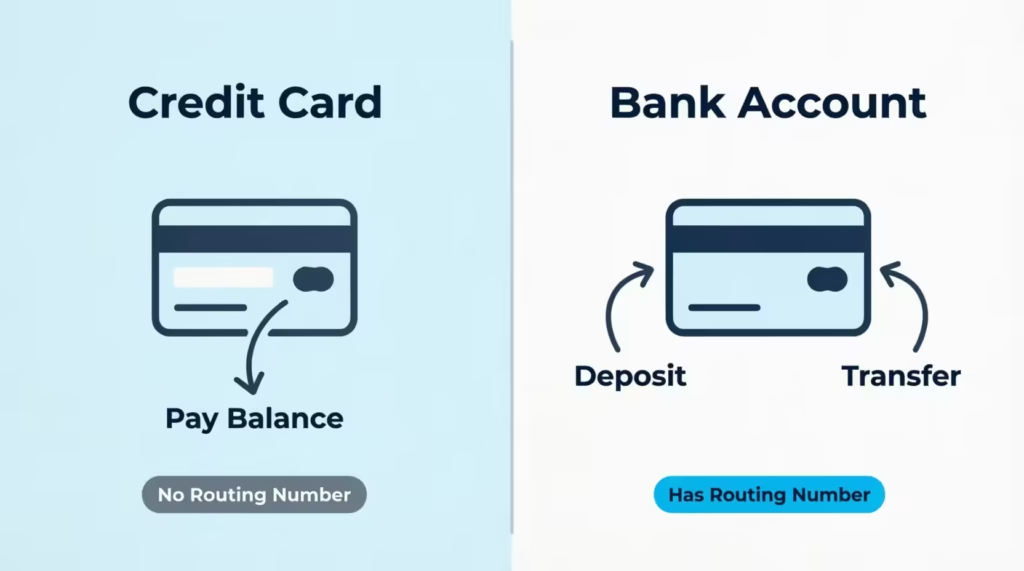
A credit card is built for a different purpose. It’s a revolving line of credit issued by a card-issuing bank. When you swipe your card, you’re borrowing money. When you pay your bill, you’re paying back that loan. Money is not sitting in your card waiting to be sent out, so there’s nothing to “route” from.
This is why you can’t deposit a paycheck onto a Discover credit card. There is no deposit container. The card account only knows how to receive payments toward your balance, not store funds for you to spend later.
What Is Discover’s Routing Number, and When Does It Apply?
The official ABA routing number for Discover Bank is 031100649. This number applies to Discover Bank deposit products. These include the Cashback Debit checking account, Online Savings account, money market accounts, CDs, and IRAs. It’s the routing number you use for ACH transfers and direct deposits into a Discover Bank account.
What it is not for: sending money to your Discover credit card. Even though both products live under Discover Financial Services, the credit card account cannot accept an ACH transfer addressed to the bank’s routing number plus your 16-digit card number.
Payroll direct deposit to a Discover credit card is not supported either. Discover Bank’s routing number is verified through public ACH databases and the Federal Reserve’s E-Payments Routing Directory, which lists all active U.S. routing numbers.
If you have a Discover Bank account, you can use 031100649 for:
- Setting up payroll direct deposit into your Discover checking or savings account
- Receiving ACH transfers from another bank
- Sending or receiving domestic wire transfers (Discover uses the same number for wires)
- Linking your Discover Bank account to apps like Venmo, PayPal, or Cash App
Always confirm the routing number inside your own Discover Bank account before sharing it with an employer or payer. Banks sometimes use different routing numbers for different regions, though Discover Bank uses the single number above for all U.S. customers.
⚠️ Mistake to Avoid: Don’t grab a routing number from a random third-party website and assume it’s correct. Always verify inside your logged-in Discover account or on Discover’s official site.
Where to Find Discover’s Routing Number in Your Online Account
Finding the number inside your own account takes about thirty seconds. Here’s the path most users will take:
- Go to Discover.com and click “Log In” in the top right corner.
- Choose “Banking” if you have a Discover Bank account. (If you only see “Credit Card,” skip to the section below on telling the two products apart.)
- Once logged in, open the account dashboard for your checking or savings account.
- Click “Account Details” or “Account Information.” The routing number and your account number will be listed together.
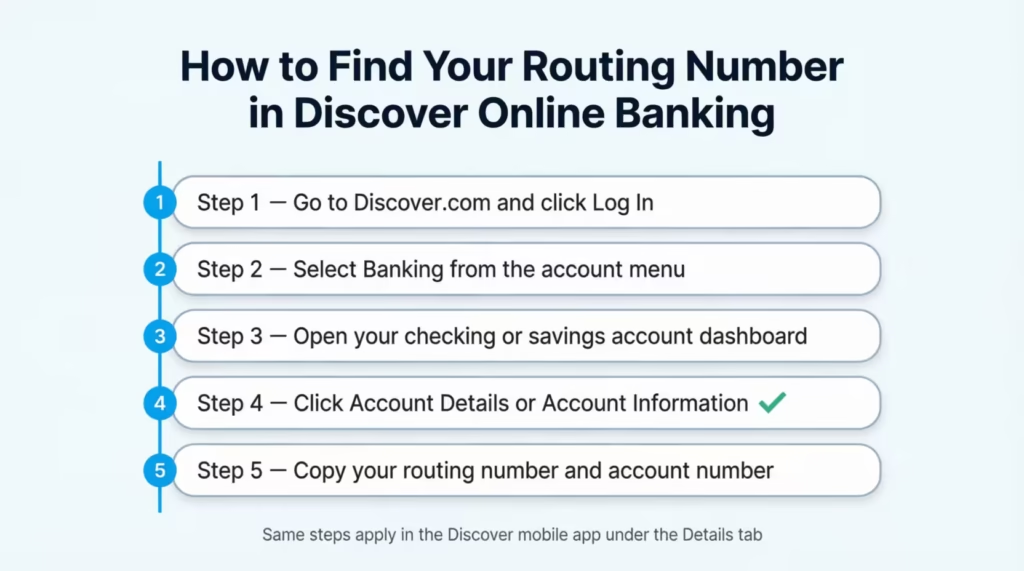
In the Discover mobile app, the steps are nearly the same. Tap your bank account, then tap the “Details” tab. You’ll see the routing number and account number side by side. You can copy and paste both directly into another bank’s transfer screen.
If you only have a Discover credit card and no bank account, you won’t see a routing number anywhere in your portal. That’s normal, and it’s the topic of the next section.
Discover Credit Card vs. Discover Bank Account: Which Do You Have?
Discover Financial Services sells two very different products, and knowing which one you hold is the key to using the right numbers. The credit card side has several products. These include the Discover it Cash Back card, the Discover it Miles card, the Discover it Student card, and the Discover it Secured card. These are all revolving credit lines. The bank side, run by Discover Bank, offers checking, savings, money market, CDs, and IRAs. These are FDIC-insured deposit accounts.
You can have one or both. They live in the same company, but they sit in separate systems with separate logins inside the Discover website.
Quick ways to tell which one you have:
- Welcome materials. If your welcome email or letter mentions a “credit limit,” “APR,” or “rewards rate,” you have a credit card. If it mentions “deposit,” “interest rate,” “APY,” or “FDIC insurance,” you have a bank account.
- Card design. A Discover credit card has the Discover logo, a 16-digit card number, an expiration date, and a CVV on the back. A Discover Bank debit card from a Cashback Debit account also has the Discover logo but is tied to your checking balance, not a credit line.
- Login screen. On Discover’s site, the login dropdown lets you pick “Card” or “Banking.” That’s the cleanest signal of which product you’re using.
- Monthly statement. Credit card statements list a balance, minimum payment, and due date. Bank statements list deposits, withdrawals, and an available balance.
| Feature | Discover Credit Card | Discover Bank Account |
|---|---|---|
| Has a routing number | No | Yes (031100649) |
| Has an account number | Yes (separate from card number) | Yes |
| Accepts direct deposit | No | Yes |
| Used for | Borrowing, rewards, building credit | Saving, spending, earning interest |
| Issuer | Discover (card issuer) | Discover Bank |
If you only have a credit card, you’ll skip the routing number entirely when paying your bill from inside Discover’s own portal. You only need a routing number when using another bank’s bill pay system. Even then, it’s the other bank that sends the payment. Discover receives it through routing.
Routing Number for Discover Bank Checking and Savings Accounts
For all Discover Bank deposit accounts, including Cashback Debit checking, Online Savings, Money Market, and CDs, the routing number is 031100649. The same number works for ACH transfers and domestic wire transfers, which is unusual since many banks use separate codes for each. International wires follow a different process. They use Discover’s wire instructions form, not just a routing number.
Use this routing number when:
- An employer or government agency sets up payroll or benefits direct deposit
- You want to link your Discover checking to PayPal, Venmo, Cash App, or Zelle
- Another bank is sending you an ACH transfer
- You’re moving money in from an outside savings or brokerage account
Pair the routing number with your full Discover Bank account number, which you’ll find in the “Account Details” section after logging in.
How to Find Your Discover Account Number for External Bill Pay
When you pay your Discover credit card from another bank, the other bank’s bill pay system will ask for an “account number.” A common mistake is to type in the 16-digit number printed on the front of your card. That’s your card number, not your bill pay account number. They are different things.
Your Discover credit card account has a separate billing account number. To find it:
- Log in to your Discover credit card account at Discover.com.
- Click the “Payments” or “Make a Payment” section.
- Look for “Account Information” or a link that says “How to pay from another bank.”
- The account number you’ll use for external bill pay is listed there. For most cardholders, the number is usually the same as their 16-digit card number. However, some payees and banks accept only the formatted version that Discover shows on that page.
Here’s where it gets practical. Many big banks, like Chase, Bank of America, Wells Fargo, and Capital One, list Discover as a known payee in their bill pay systems.
When you select “Discover Card” from your bank’s payee list, you usually only need to type your 16-digit card number. The bank handles the routing behind the scenes because Discover is a national biller in their database.
If your external bank does not have Discover preloaded as a payee, you’ll add Discover as a new biller. The information you enter looks like this:
- Payee name: Discover Card
- Account number: Your 16-digit Discover card number
- Payee address: Discover, PO Box 71083, Charlotte, NC 28272-1083 (this is the official Discover payment address)
- Payment type: Credit card payment
Notice that no routing number is needed in this flow. The external bank either sends an electronic payment through its biller network or mails a paper check on your behalf.
How to Pay Your Discover Credit Card from Another Bank
There are three reliable ways to pay your Discover credit card from outside of Discover. Each one has a slightly different setup and a different processing time. Pick the one that fits your schedule and how often you want to pay.
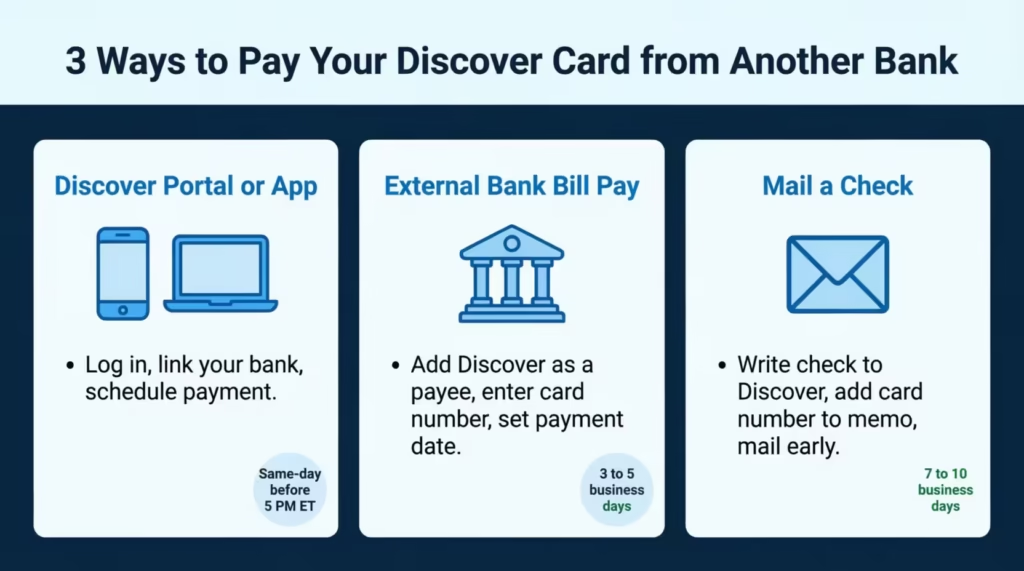
Paying Through Discover’s Own Website or App
This is the fastest and easiest method. You link your external bank account once and then pay anytime, even on the due date.
- Log in to your Discover credit card account at Discover.com or open the Discover mobile app on iOS or Android.
- Go to “Payments” then “Make a Payment.”
- Click “Add a Bank Account” and enter your other bank’s routing number and your account number from that bank.
- Discover verifies the account, usually instantly with major banks or within a few days using small test deposits.
- Once verified, schedule a one-time payment or set up AutoPay for the minimum, statement balance, or a fixed amount each month.
Payments scheduled by 5:00 PM Eastern Time on a business day are typically credited the same day. After that cutoff, the payment posts the next business day. AutoPay protects you from missed due dates and any late fees that follow.
Paying Through Your External Bank’s Bill Pay System
If you prefer to keep all your bills in one place, your outside bank’s bill pay system works too. The setup looks like this:
- Log in to your external bank’s online banking site or app.
- Open “Bill Pay” and click “Add Payee” or “Add Biller.”
- Search for “Discover Card” or “Discover Financial Services.” Most major banks already list it.
- Enter your 16-digit Discover card number as the account number.
- If asked for the payee address, use Discover, PO Box 71083, Charlotte, NC 28272-1083.
- Schedule the payment and choose the date you want Discover to receive it.
Allow three to five business days for the first payment to process. Some banks send electronically, while others mail a paper check, and check delivery can stretch the timing. Set the payment date earlier than your Discover due date to be safe. After the first payment posts successfully, you’ll know the speed your bank uses and can plan future payments more tightly.
Paying Discover by Check
Mailing a paper check is the slowest option, but it still works. Write the check to “Discover” or “Discover Card.” Put your full 16-digit card number in the memo line so the payment is applied to the right account.
Mail the check to:
Discover Financial Services PO Box 6103 Carol Stream, IL 60197-6103
Always check the back of your most recent paper statement or the “Contact Us” page on Discover’s site for the most current payment address. Allow seven to ten business days for the check to arrive and post. If your due date is near, this method is risky. Send early, or pick one of the electronic options above instead.
Can You Set Up Direct Deposit to a Discover Credit Card?
No. You cannot direct deposit a paycheck, tax refund, government benefit, or any other ACH credit to a Discover credit card. The card account is not a depository account. It has no routing number of its own and cannot accept incoming ACH credits the way a checking or savings account can. Employers and the IRS need a depository account on the receiving end. A credit card doesn’t qualify.
Some workers try to get around this. They enter Discover Bank’s routing number (031100649) and their 16-digit credit card number on a direct deposit form. This always fails.
The bank’s ACH system will look up the account number, see that it doesn’t match any deposit account, and bounce the transfer back to the sender. The money returns to your employer, who then has to reissue it, often delaying your paycheck by a week or more.
There is a workaround if you really want your Discover ecosystem to receive your paycheck. Open a Discover Bank Cashback Debit checking account. Use the routing number 031100649 and your new checking account number on your direct deposit form.
Then set up AutoPay from that Cashback Debit account to your Discover credit card. Your paycheck lands in the bank account, and Discover pulls your card payment automatically every month. It’s two products working together, not one product doing two jobs.
📌 Did You Know: Discover Cashback Debit pays 1% cash back on up to $3,000 in monthly debit card purchases. Pairing it with your Discover credit card lets you stack rewards on both spending and bill paying. (Check Discover’s Cashback Debit page for current terms.)
What to Do If Your Discover Payment Was Sent to the Wrong Place
Mistakes happen. You typed the wrong account number, picked the wrong payee, or used an outdated routing number from a third-party site. The good news is that misrouted payments rarely vanish. They almost always come back, but you’ll want to act quickly to avoid a late fee on your real Discover bill.
First, figure out what happened. There are three common outcomes:
- The payment was rejected. The receiving bank could not match the account number to a real account, so the funds bounced back to your sending bank. This usually happens within three to five business days. Check your sending bank account to see if the money has returned.
- The payment went to the wrong but valid account. This is rarer but more serious. If the routing number and account number you used happened to match someone else’s real account, the money sat there. You’ll need help from both banks to claw it back.
- The payment is stuck in processing. ACH transfers can take a few days to settle. If it’s been less than three business days, give it time before assuming something is wrong.
Steps to take right away:
- Call Discover at the number on the back of your card or at the Discover Card customer service line. Explain what happened and ask if a payment has been received.
- Call your sending bank. Ask them to trace the ACH transfer and, if possible, recall it.
- Keep a record of everything. Include dates, confirmation numbers, and the names of the representatives you spoke with.
- If your Discover due date is close or already past, ask Discover for a one-time late fee waiver. Cardholders in good standing can often get one waiver per year as a courtesy.
Returned payments typically post back to your sending account in three to five business days. When the money comes back, make a new payment. Use the verified routing and account numbers from your logged-in Discover account.
Common Mistakes When Entering Discover Routing and Account Numbers
These are the errors that catch cardholders most often. Knowing them in advance saves you a phone call or two.
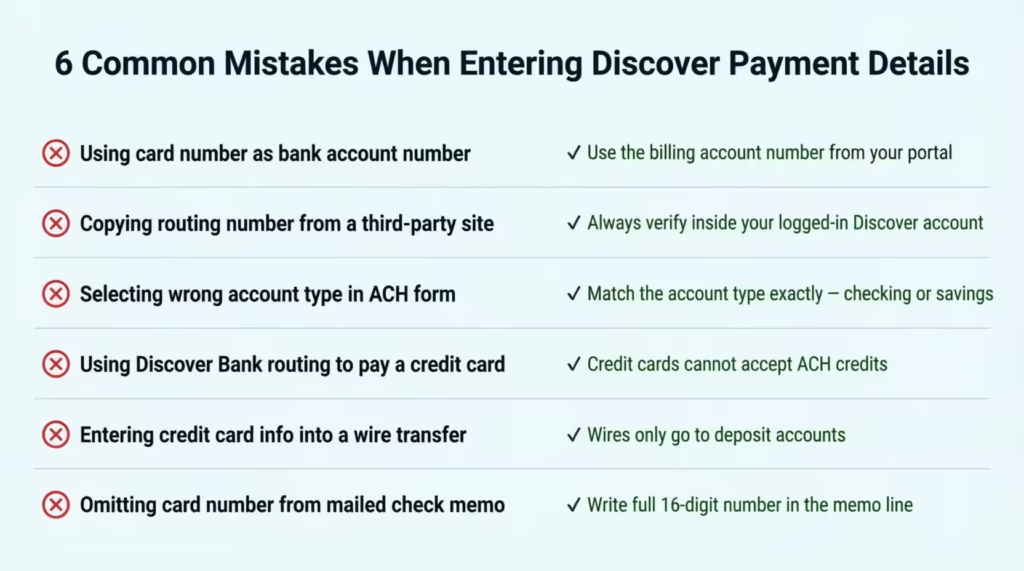
- Using the 16-digit card number as your Discover Bank account number. The card number and the bank account number are not the same. The card number is for credit card billing. The bank account number is for the deposit account.
- Pulling a routing number from a third-party blog or aggregator. Some of these sites publish outdated or wrong numbers. Always verify inside your Discover account or on Discover.com.
- Selecting “savings” when your Discover Bank account is a checking, or the other way around. ACH systems check the account type. A mismatch can cause a payment to be rejected.
- Using Discover Bank’s routing number to try to deposit money into a credit card. This will fail every time. Credit cards do not accept ACH credits.
- Entering the Discover credit card info into a wire transfer form. Wires only go to deposit accounts. There’s no way to wire money to a credit card balance.
- Forgetting to include your card number on a mailed check’s memo line. Without that number, Discover may not be able to apply the payment to your account, and the check could be returned.
Double-check every digit before you confirm a transfer. Most ACH errors happen because of one wrong number. Verifying the information takes less time than fixing a misrouted payment.
Frequently Asked Questions (FAQs)
How do I find my Discover credit card routing and account number for external payments?
Your Discover credit card doesn’t have a routing number. You can find your billing account number in your logged-in Discover portal under “Payments” or “Account Information.” For external bill pay, enter that number with “Discover Card” as the payee. Your outside bank will handle the routing automatically.
Can I see my full Discover card number online?
Yes. Log in to your Discover account, navigate to “Account Details” or “Card Details,” and your full 16-digit card number is displayed there. You can copy it directly without needing the physical card in hand.
How can I get my 16-digit card number without my card?
Log in to your Discover account at Discover.com or the Discover mobile app and open your card’s account details. Your full 16-digit number is available there, along with your expiration date and other card information.
Which credit card has a routing number?
No credit card has a routing number. Routing numbers are for banks and credit unions. Credit cards, however, are lines of credit, not deposit accounts. This means they don’t have routing numbers.
What is the 9-digit routing number on a credit card?
Credit cards do not have a 9-digit routing number. That number is only for bank deposit accounts. It helps ACH and wire systems identify a financial institution. Credit cards don’t use this system.
How many digits is a Discover card number?
A Discover credit card number is 16 digits, printed on the front of the card. This card number is separate from any bank account number and is the identifier you use when setting up bill payments from an outside bank.
How do I find my credit card billing account number?
Log in to your Discover credit card account, go to “Payments” or “Make a Payment,” and look for “Account Information” or “How to pay from another bank.” The billing account number you see there usually matches your 16-digit card number. This number is what external bill pay systems require.
How long does a Discover credit card payment take to post?
Payments submitted through Discover’s portal before 5:00 PM Eastern Time on a business day are posted the same day. Payments made after that cutoff or through an external bank’s bill pay system can take three to five business days to appear on your account.
What address do I use to mail a check payment to Discover?
Mail paper check payments to Discover Financial Services, PO Box 6103, Carol Stream, IL 60197-6103, and write your 16-digit card number in the memo line. Allow seven to ten business days for delivery and posting. Electronic payment methods are much quicker.
Wrapping Up
Paying with a Discover card from another bank doesn’t have to feel like a guessing game. The credit card itself has no routing number because it isn’t a deposit account. Discover Bank’s routing number, 031100649, only applies to checking, savings, and similar deposit products.
For most cardholders, the cleanest path is paying directly through Discover’s own portal or app, where no routing number is needed at all. Based on processing speed and the lowest risk of error, that’s the method most readers will find easiest and safest.
If you know someone setting up their first credit card payment or fighting a misrouted transfer, share this guide. It could save them a late fee and a stressful phone call.