I’ve talked to plenty of Discover cardholders who hear whispers about a “refer-a-friend” perk but can’t tell if it’s real, active, or worth their time. You may be in the same spot: someone shared a link with you, or you want to send one, and you just need a straight answer before you act. The good news is that Discover does run an active referral program, and the rules are clear once you see them in one place.
Discover has a Refer-a-Friend program. When you and your friend follow the steps, you both earn a statement credit.
Here’s a quick guide on who qualifies, how much you can earn, where to find your link, and what your friend needs to do so you both get the reward.
Key Takeaways
This guide explains the Discover Refer-a-Friend program including which cards are eligible to refer, how much both sides can earn ($50 to $100 per referral), the exact steps a referred friend must follow, what purchases do and do not qualify, and how the annual $1,000 earning cap works.
Core Facts:
- Discover runs an active Refer-a-Friend program through December 31, 2026, and it is invitation-based, meaning the referral option only appears in your account if Discover has made your account eligible.
- Both the referrer and the referred friend earn a statement credit between $50 and $100 per successful referral; the exact amount depends on the offer assigned to the referrer’s account.
- Eligible cards include Discover it Cash Back, Discover it Miles, Discover it Chrome, Discover it Student Cash Back, Discover it Student Chrome, and Discover More; the Secured and Business cards are excluded entirely.
- The referred friend must apply online through the referrer’s unique link, get approved, and make a qualifying purchase within three months of account opening for both parties to receive the bonus.
- Balance transfers and cash advances do not count as qualifying purchases; any standard merchant purchase such as groceries, gas, or a subscription payment is sufficient.
- Referrers can earn bonuses on up to 10 successful referrals per calendar year, with the counter resetting on January 1, for a potential maximum of $1,000 annually at the $100 per referral tier.
Best for:
- Current Discover cardholders (excluding Secured and Business card holders) whose accounts have been open at least one billing cycle and who know friends or family members who have never held a Discover card.
- Anyone who was referred through a friend’s link and wants to understand what purchase they need to make and within what timeframe to unlock the statement credit for both sides.
- Cardholders who do not see the referral option in their account and want to understand whether it is a temporary eligibility gap, a card-type exclusion, or an account age issue before contacting customer service.
Yes, Discover Has a Referral Program: Here’s What It Is
Discover runs an active refer-a-friend offer through December 31, 2026, and it is officially called the Discover Refer-a-Friend program. Eligible cardmembers can share a personal link. When a friend applies online, gets approved, and makes a qualifying purchase, both earn a statement credit. The reward is not cash back in the traditional sense. It’s a credit that lowers your card balance directly.
One important detail many people miss is that the program is invitation-based. Not every cardholder will see the offer in their account at the same time. Discover decides which accounts are eligible to refer, and the option only appears if your account qualifies.
As Discover’s official Refer-a-Friend terms explain, your account may not always be eligible, and the company reserves the right to alter or end the program at any time. If you don’t see the option yet, that doesn’t always mean you’re shut out. It may just mean you haven’t been invited yet, or your card type isn’t included.
So the short answer to does Discover have a referral program: yes, it’s live, it’s official, and it pays both sides when the steps are followed correctly.
How the Discover Refer-a-Friend Program Works
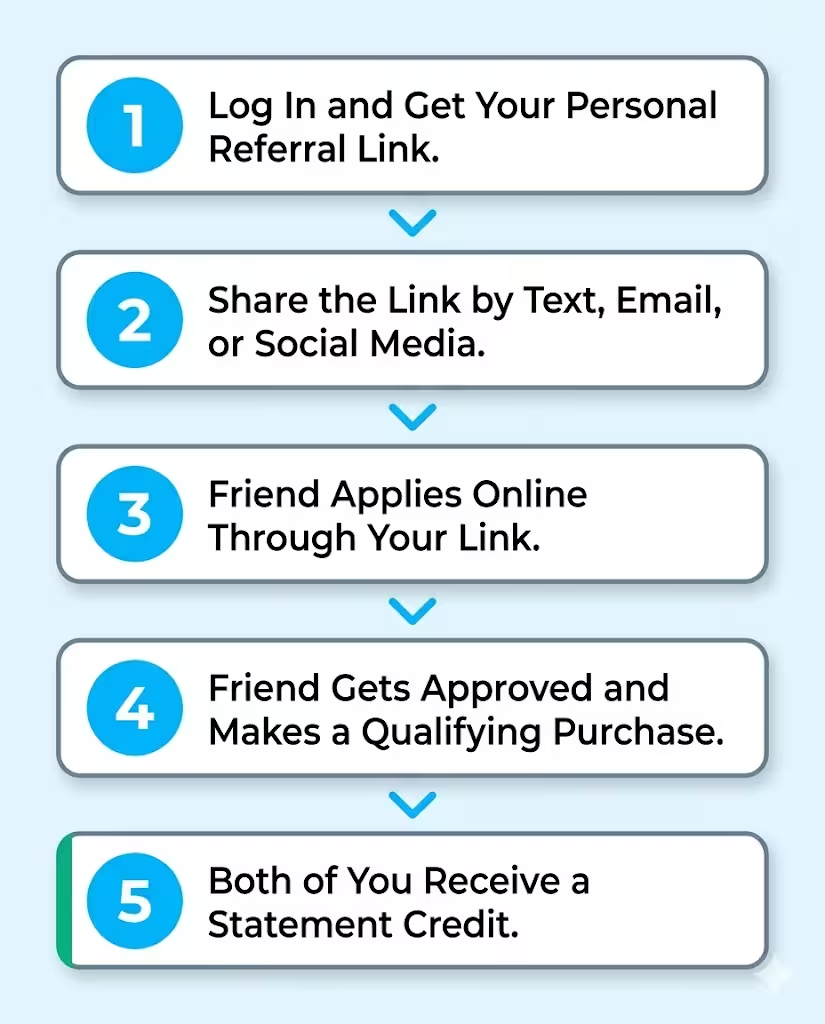
The flow is simple once you see it laid out. As an eligible cardmember, you log in, grab your personal Discover referral link, and send it to a friend by text, email, or social media. Your friend clicks the link, applies for the specific Discover card offer attached to it, and gets approved.
After that, they need to make a qualifying purchase within three months of opening the account. Once that purchase posts, the referral reward lands as a statement credit on both your account and theirs.
One rule trips up a lot of people: the application must happen online through your link. According to the Refer-a-Friend program terms posted by Discover, phone, mail-in, and other digital applications are not eligible for referral rewards. So if your friend Googles “Discover card” and applies that way, neither of you gets paid, even if approval comes through the same day.
The referral reward is separate from any Cashback Bonus your friend earns. This includes money from regular spending or Cashback Match. Cashback Match is the first-year match that Discover gives to new cardmembers. Those benefits stack. The referral statement credit is its own line item, paid in addition to whatever else the new account is already earning.
💡 Pro Tip: Send the link to yourself first and click it. You’ll see exactly which card offer is attached and what your friend will see when they apply. That way, you’re not guessing about the offer they’re getting.
Who Is Eligible for the Discover Referral Program
Eligibility has two sides: the person sending the link (the referrer) and the person applying (the referee). Both need to qualify, or no one gets paid. Discover keeps these rules in its program terms, and they are non-negotiable.
Which Discover Cards Are Eligible to Refer
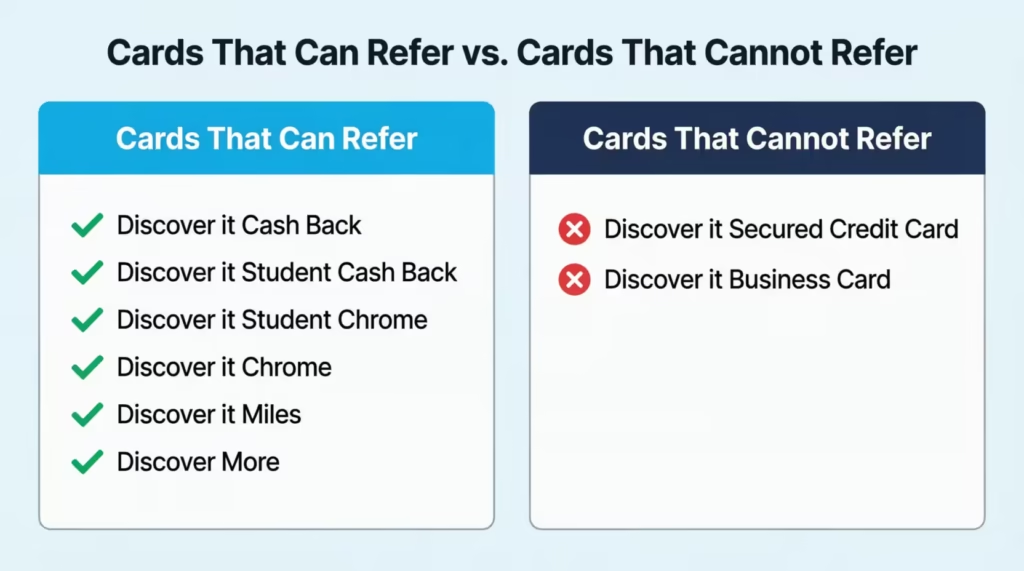
Most consumer Discover cards can refer. That includes:
- Discover it® Cash Back
- Discover it® Student Cash Back
- Discover it® Student Chrome
- Discover it® Chrome
- Discover it® Miles
- Discover More
There’s also a small waiting period. For these cards, your account must be open for at least one billing cycle before the refer-a-friend option becomes available. So if you just got approved last week, the link won’t be there yet.
Give it about a month, then check again. Your account also needs to be in good standing, meaning current on payments and not over the limit, as the Discover Refer-a-Friend page makes clear.
Which Discover Cards cannot refer?
Two cards are flat-out excluded from the program:
- Discover it® Secured Credit Card
- Discover it® Business Card
If you hold one of these, you will not see the refer-a-friend option in your app or online account at all. It’s not a glitch. The feature simply isn’t offered for those product types, so there’s no need to keep searching for it.
Who Can and Cannot Be Referred
Your friend has to be new to Discover. They cannot already have a Discover credit card, even a closed one in some cases. They also cannot have opted out of marketing communications from Discover. If they did, they’re flagged in Discover’s system and won’t qualify for the referral bonus even if their application is approved.
The third rule is the one that catches people: the application must be filed online through your link. No phone calls, no paper forms, no other websites. The link carries the tracking code that ties the referral to your account.
The Existing Cardholder Restriction: Why This Matters
This is the single most common reason referrals fail. If the person you’re referring already has a Discover card, no bonus is paid to either of you, even if their new application goes through. The system still approves them, but the referral credit never posts.
What makes it worse is that Discover will not tell you why. You won’t get a notice saying “your friend was already a cardmember.” You’ll just notice the credit never arrives. So before you send the link, ask your friend point-blank: “Do you already have, or have you ever had, a Discover card?” That one question saves both of you the disappointment of waiting weeks for a reward that was never coming.
⚠️ Mistake to Avoid: Don’t assume a friend qualifies just because they don’t remember owning a Discover card. Old student accounts or closed cards from years ago can still disqualify them. Ask directly before you share the link.
How Much Is the Discover Referral Bonus?
The bonus amount depends on the offer linked to your account. Most offers range from $50 to $100 for each successful referral. You and your friend will both get the same statement credit. So if your offer pays $100, you get $100, and your friend gets $100 after their qualifying purchase posts.
The reward is delivered as a statement credit, not a check or cash deposit. It reduces your card balance by the credit amount the next time it posts. If your offer is $50, you’ll see a $50 referral statement credit on your statement once the conditions are met.
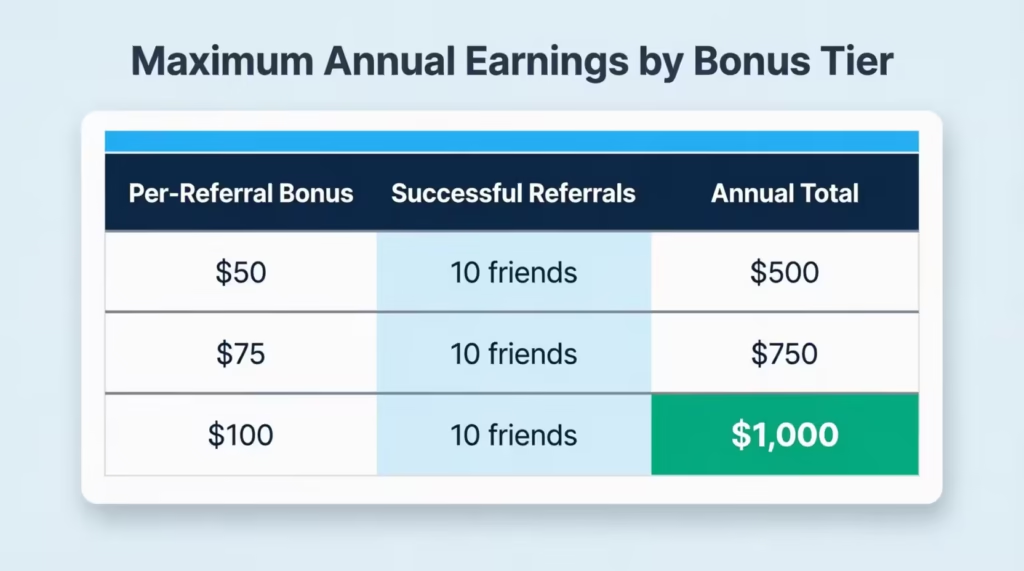
There’s also an annual referral maximum, and this is where the math gets interesting. The cap depends on your offer amount. If your link pays $50 per referral and you hit the maximum of 10 friends in a year, that’s $500 in statement credits.
If your offer is $100 per referral, the same 10 successful referrals add up to $1,000 in a single calendar year. That’s a meaningful amount of money for sharing a link with people who were probably going to apply for a card anyway.
To put the math in plain terms:
| Per-Referral Bonus | 10 Successful Referrals | Annual Total |
|---|---|---|
| $50 | 10 friends | $500 |
| $75 | 10 friends | $750 |
| $100 | 10 friends | $1,000 |
The exact dollar amount you’ll see is shown when you log in to your account and open the referral page. Discover sets it per cardmember, so don’t be surprised if a friend with a different Discover card sees a different bonus than you do.
How Many Friends Can You Refer Per Year?
You can refer up to 10 friends per calendar year and earn the bonus on each one, as long as every referral meets all the eligibility rules. The counter resets on January 1. So if you hit 10 in November, you’ll have to wait until the new year to refer anyone else for a bonus. Referrals beyond the 10-friend cap can still apply through your link, but no extra credit will be paid to you.
How to Find and Share Your Discover Referral Link
There are two main ways to get your personal Discover referral link: through the Discover mobile app or through the Discover website. The official landing page is for the Refer-a-Friend program.
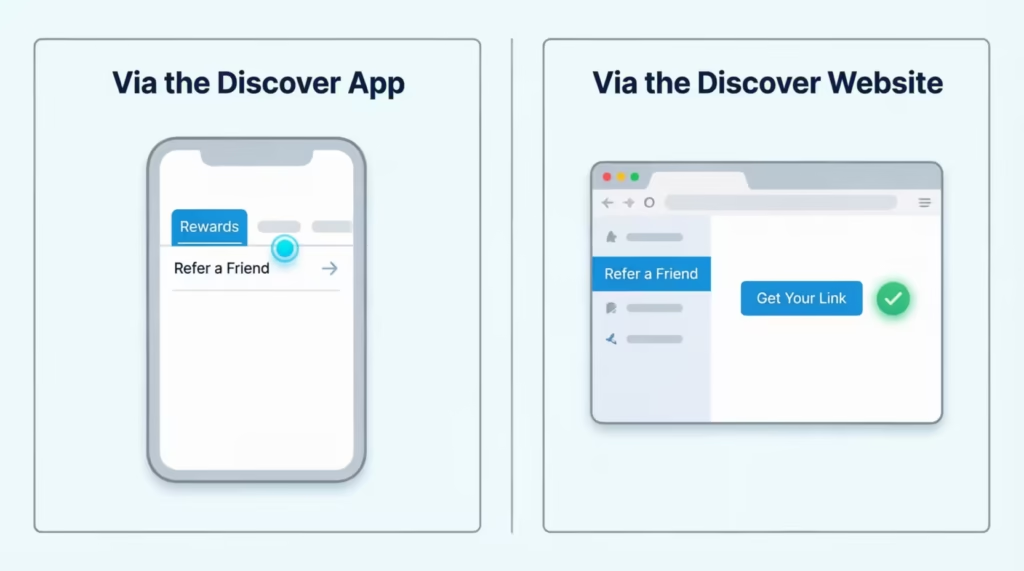
You still need to log in to see your account-specific link.
Finding Your Referral Link in the Discover App
To pull your link from the mobile app, follow these steps:
- Open the Discover app on your phone and log in.
- Tap your card on the home screen to open the card menu.
- Select the Rewards tab.
- Look for Refer A Friend in the rewards options.
- Tap Refer Now to generate and share your link.
If you don’t see “Refer A Friend” in the Rewards tab, your account isn’t currently invited, or your card type doesn’t qualify. Don’t keep tapping around. Move on to the web method below to double-check.
Finding Your Referral Link on the Discover Website
The web version takes the same path with slightly different menus:
- Go to discover.com and log in to your account.
- Click into the Account Center or main dashboard.
- Scroll to the Rewards or Refer a Friend section.
- Click into the referral page to copy your personal link.
You can also use this shortcut: go to the Refer-a-Friend program while logged in. If you’re invited, your link loads right there. If you’re not, you’ll see a generic page without a personal link.
How to Share Your Referral Link
Once your link is ready, Discover gives you several built-in sharing options on the referral page:
- Text message to a phone number
- Email straight from the referral tool
- Facebook post or message
- X (formerly Twitter) post
- Copy the link and paste it anywhere you want
The one rule that matters: your friend must click your unique link and apply through it. Sharing a screenshot, retyping the URL, or telling them to “just go apply” won’t track the referral. The link itself carries the tracking code.
📌 Did You Know: Discover’s referral link does not show your full name to the person you’re referring. It typically shows a first name only, so you can share it on social media without exposing personal details.
What the Referred Friend Must Do to Receive Their Bonus
Your friend’s side of the deal has four steps, and missing any one of them voids the bonus for both of you.
First, they must apply online using your referral link. Not a phone call, not a branch, not a separate Discover ad they saw on Instagram. The link must be the source of the application.
Second, they must be approved for the card offer attached to the link. Approval relies on Discover’s usual credit review. If their credit profile falls short, the application is declined, and no bonus is given.
Third, after approval, they need to make a qualifying purchase within three months of opening the new Discover account. The clock starts on the day the account opens, not the day the card arrives in the mail. A single purchase is enough. They don’t need to spend hundreds of dollars or hit a minimum.
Fourth, they wait. The bonus posts within 1 to 3 billing periods after the purchase clears, and it shows up as a statement credit on their account.
What Does Not Count as a Qualifying Purchase
Not every transaction on the card triggers the bonus. Discover specifically excludes two common ones:
- Balance transfers move debt from another card
- Cash advances taken from an ATM or convenience checks
A balance transfer might feel like a “purchase” because it puts a charge on the card, but Discover treats it as a separate product, not a purchase, so it won’t unlock the referral reward. Cash advances are the same. The cleanest way to qualify is a small everyday charge: groceries, gas, a streaming subscription, even a coffee. As long as it’s a normal merchant purchase that posts to the account, it counts.
How Long Does the Discover Referral Bonus Take to Post?
Discover quotes a window of 1 to 3 billing periods for the statement credit to post after a referral is approved. A billing period is roughly one month long, matching your statement cycle. You should wait about 30 to 90 days after your friend’s qualifying purchase for the credit to show up on your account.
If two billing cycles pass and you still don’t see anything, it’s worth checking two things. First, did your friend actually make a qualifying purchase (not a balance transfer)?
Second, did they apply through your exact link, online, rather than through some other channel? If both check out and a third cycle closes without credit, contact Discover customer service. You can do this through the secure message centre in your account.
Will Discover Notify You When Your Referral Is Approved?
No. Discover will not send you a notification telling you that your friend was approved or declined. This is one of the most frustrating parts of the program, and it’s stated directly in the terms. You only find out the referral worked when the statement credit actually posts to your account.
The privacy reason is simple: Discover can’t tell you another person’s application status, even if they used your link. So if you’re waiting, just keep an eye on your statements. The first sign of a successful referral is the credit line item itself.
Are Referral Bonuses Taxable?
This is the part most articles skip, and it matters. According to the Refer-a-Friend program terms on Discover’s official page, statement credits you receive may be taxable. Discover doesn’t make the final tax call. They simply flag it as a possibility and tell you to consult a tax advisor.
Here’s the practical reality. Cash back you earn from spending is generally treated as a rebate and is not taxable. But referral bonuses are different because you didn’t have to spend anything to earn them.
The IRS often treats this kind of income as miscellaneous income. If Discover pays you enough in referral rewards in a calendar year to cross the reporting threshold, they may send you a 1099-MISC form at tax time. That form gets reported on your tax return, and you owe ordinary income tax on the amount.
If you’re someone who refers a lot of friends and could pull in hundreds of dollars in a year, plan for this. Set aside a small portion of each referral credit so the tax bill doesn’t surprise you. And if you cross into 1099 territory, talk to a tax advisor about the right way to report it.
What to Do If the Referral Program Isn’t Showing in Your Account
If you log in expecting to see a referral option and there’s nothing there, don’t panic and don’t assume something is broken. There are four likely reasons, and each has a fix or a clear next step.
Reason 1: Your account hasn’t been invited yet. The Refer-a-Friend program is invitation-based. Discover chooses which accounts get the offer, and not every cardmember sees it at the same time. There’s no application or opt-in to request access. Check back in a few weeks. Invitations rotate.
Reason 2: Your account is too new. If you opened your card less than one billing cycle ago, the option won’t appear yet. Wait until at least one full statement closes, then look again.
Reason 3: Your card type isn’t eligible. Discover it® Secured and Discover it® Business cardholders are excluded from the program entirely. If you hold one of these, the option will never appear, regardless of how long you wait.
Reason 4: Try the direct link. Sometimes the menu doesn’t load the option correctly, even when an account is eligible. Go straight to discover.com/credit-cards/exclusives/sharediscover/ while logged in. If your account qualifies, the personal link appears there. If not, you’ll see only the generic landing page.
If none of these solve it and you believe you should be eligible, contact Discover through the secure message center in your account. Customer service can confirm whether your account is currently in the referral pool.
Frequently Asked Questions (FAQs)
Does Discover offer a welcome bonus?
Discover offers Cashback Match for new cardmembers, which automatically doubles all the cash back earned during the first year. This is separate from the referral bonus, and both can be earned at the same time.
What is the Discover referral bonus for 2026?
The Discover Refer-a-Friend program runs until December 31, 2026. You can earn bonuses of $50 to $100 for each successful referral. Both you and the new cardmember will get this as a statement credit.
How do I get the $100 referral bonus from Discover?
Share your personal referral link with a friend who has never had a Discover card, and make sure they apply online through that exact link. Once they are approved and make a qualifying purchase within three months, both of you receive a statement credit.
Which Discover cards are not eligible for the referral program?
The Discover it Secured Credit Card and the Discover it Business Card are excluded from the Refer-a-Friend program entirely. Cardholders of these two products will not see a referral link option in their account, regardless of how long the accounts have been open.
How many friends can you refer per year with Discover?
Discover allows up to 10 successful referrals per calendar year, with the counter resetting on January 1. At $100 per referral, that is up to $1,000 in statement credits annually.
What purchases don’t count toward the Discover referral reward?
Balance transfers and cash advances do not qualify. Your friend needs to make a standard merchant purchase, such as groceries, gas, or a subscription, for the referral bonus to post to both accounts.
What is the best way to share your Discover referral link?
Discover offers built-in sharing options. You can share via text message, email, Facebook, and X right from the referral page. Your friend needs to click your unique link to apply online. Copying the URL or applying another method won’t track the referral.
What is a good referral bonus amount?
Discover offers $50 to $100 as a statement credit for each successful referral. This amount is competitive for credit card referral programs. The exact amount shown in your account depends on which offer Discover has assigned to your specific card.
Are referral bonuses from Discover taxable?
Discover flags referral statement credits as potentially taxable income, which is different from cash back earned through spending. If your referral earnings reach the IRS reporting threshold in a calendar year, Discover may send a 1099-MISC form at tax time.
Where can I find my Discover referral link?
Log into the Discover app, tap your card, go to the Rewards tab, and select Refer a Friend. Log in at discover.com. Then, go to the referral page or visit discover.com/credit-cards/exclusives/sharediscover/ while signed in.
Wrapping Up
The Discover Refer-a-Friend program is straightforward once the rules are clear. You need an eligible card, a friend who is new to Discover, and an online application through your personal link. Both sides earn a statement credit between $50 and $100 once your friend makes a qualifying purchase within three months. With the 10-referral annual cap, motivated cardholders can earn up to $1,000 a year in statement credits.
To make the most of the program’s two-sided payout, first check if your friend has never had a Discover card. Then, you can share the link.
If you know a student or a first-time cardholder who wants cash back rewards, this guide can help them apply correctly and earn the bonus. Share it with them before they apply.