I know how stressful it feels to apply for your first real rewards credit card. You want a Discover card for the cash back or student perks, but you’re worried about getting denied, hurting your credit score, or filling out the application wrong. That uncertainty around the Discover credit card application process keeps a lot of smart people from even starting.
Here’s the short answer: pick the Discover card that matches your credit profile, gather your income and ID details, run a pre-approval check first, and then submit the full form online.
In this guide, I’ll walk you through every step, share the score thresholds Discover actually uses, and show you exactly what to do if things go sideways.
Key Takeaways
This guide explains how to apply for a Discover card, including choosing the right card for your credit profile, using Discover’s pre-approval tool, completing the application correctly, understanding approval decisions, and responding to denials or pending reviews.
Core Facts:
- Discover offers Cash Back, Miles, Chrome, and Student cards, while the Discover it® Secured Credit Card is currently unavailable to new applicants.
- Most standard Discover cards generally require a credit score of 700 or higher, while Student cards are designed for applicants with limited or no credit history.
- Discover automatically denies applications from people who already have two open Discover cards or who opened a new Discover card within the previous 12 months.
- The Discover pre-approval tool uses a soft credit inquiry that does not affect your credit score, while a full application triggers a hard inquiry.
- Applicants should prepare identification, income, address, employment, and housing information before starting the Discover credit card application, which typically takes about 10 minutes to complete.
- Application outcomes include instant approval, pending review, or denial, and Discover must notify applicants of an approval or denial decision within 30 days of receiving a completed application.
Best for:
- People applying for their first Discover card who want a step-by-step explanation of the application and approval process.
- College students seeking a Discover Student card and guidance on income reporting, eligibility, and approval expectations.
- Applicants who want to improve approval odds by checking pre-approval, understanding credit requirements, and preparing for possible denial or reconsideration.
Which Discover Card Should You Apply For?
Picking the right card is the single biggest factor in getting approved. If you apply for a card built for excellent credit when your score is only fair, you waste a hard inquiry and walk away with nothing. The good news is that the Discover credit card comparison comes down to just a few options, and matching one to your profile is straightforward.
Here are the main choices for new applicants today:
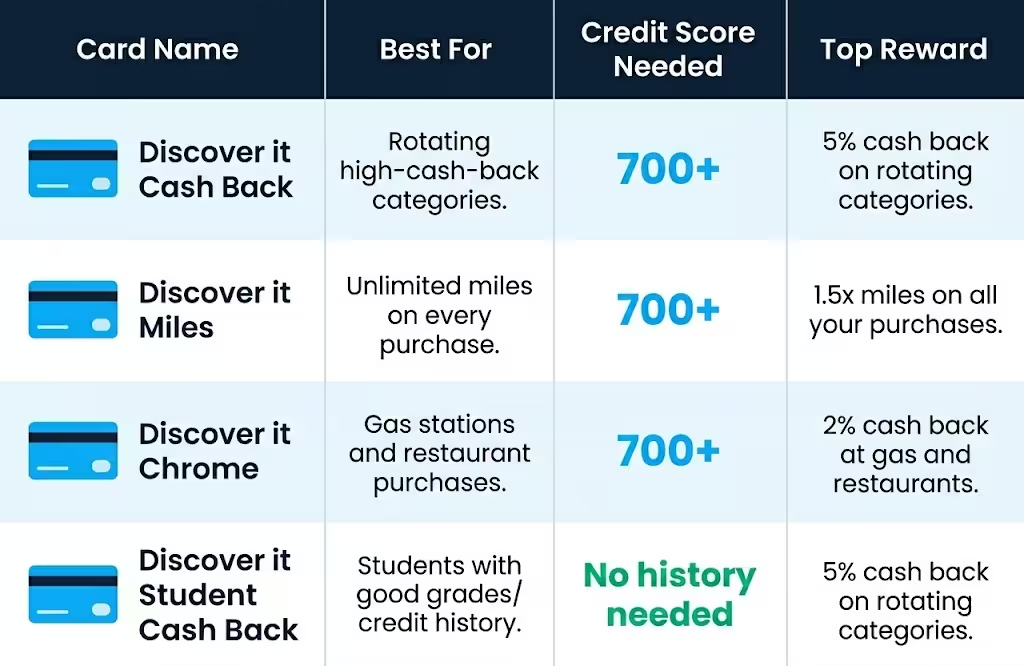
- Discover it® Cash Back: The flagship rewards card. It earns 5% cash back in rotating quarterly categories (on up to a quarterly maximum, then 1%) and 1% on everything else. Best for people with good to excellent credit who want flexible cash back.
- Discover it® Miles: A flat-rate travel card. It earns unlimited 1.5x miles on every purchase. Best for travelers who want simple rewards without tracking categories.
- Discover it® Chrome: Earns 2% cash back at gas stations and restaurants (on up to a quarterly cap) and 1% elsewhere. Best if your spending is steady in those two areas.
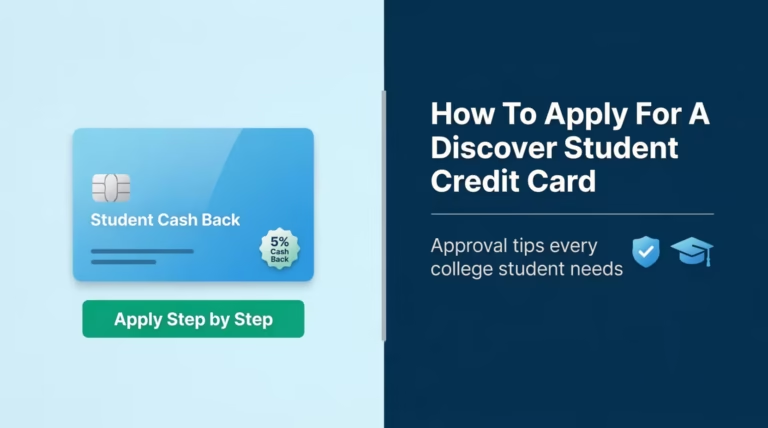
- Discover it® Student Cash Back and Student Chrome: Built for college students with little or no credit history. Same rewards structures as the adult versions, but with relaxed credit requirements.
One important update: the Discover it® Secured Credit Card is not available to new applicants right now. Capital One acquired Discover in 2025, and applications for the secured card closed in June 2026, with plans to relaunch later. U.S. News & World Report reports the pause is temporary, but for now, you’ll need to look at a different issuer if you need a secured card to build credit.
There’s also a quiet rule that catches many applicants off guard. Discover follows what people call the “two-account rule.” If you already hold two open Discover cards, or if you’ve opened a new Discover card within the past 12 months, your application will be denied automatically. So before you apply, check your wallet and your records.
💡 Pro Tip: If you’re a college student, always start with a Student card, even if your credit score is high enough for the regular Discover it Cash Back. Student cards are easier to get approved for, and you keep the same rewards rate.
Credit Score Requirements by Card
Score requirements are the number one filter Discover uses. Here’s what each card generally needs:
| Card | Typical Credit Score Needed | Who It Fits |
|---|---|---|
| Discover it® Cash Back | 700+ (good to excellent) | Established credit users |
| Discover it® Miles | 700+ (good to excellent) | Travelers with solid credit |
| Discover it® Chrome | 700+ (good to excellent) | Steady gas and dining spenders |
| Discover it® Student Cash Back | No established credit needed | Enrolled college students |
| Discover it® Student Chrome | No established credit needed | Enrolled college students |
No Discover card currently accepts applicants with bad credit, meaning scores below 640. If your score sits in that range, your best move is to build credit for a few months with a different secured card or a credit-builder loan, then come back to Discover.
For students, the rules are different. You don’t need an established credit history, but you do need to be currently enrolled in school and have a clean credit file. A clean file means no recent delinquencies, no charge-offs, and no bankruptcies. Even with thin credit, a clean record is enough.
What Discover Looks at Beyond Your Credit Score
A common myth is that approval comes down to one number. The truth is, Discover weighs several factors when deciding, and a “good” score alone won’t save an application with weak fundamentals.
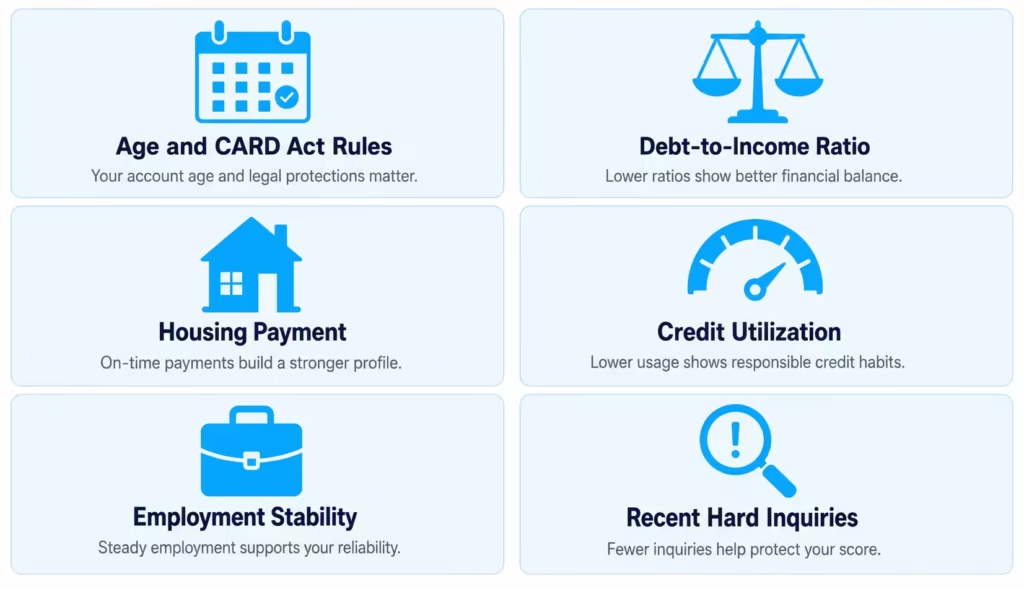
Here’s what else matters:
- Age: You must be at least 18 to apply on your own. If you’re under 21, federal law (the CARD Act) requires you to show independent income that you can use to pay the bill. Without that, you’ll need a co-signer, or you’ll need to wait.
- Debt-to-income ratio (DTI): This is the share of your monthly income that already goes to debt payments. Discover doesn’t publish a strict cutoff, but a DTI over 40% is a common red flag for any major issuer.
- Housing status and payment: Discover asks if you rent, own, or live with family, and how much you pay each month. A reasonable housing cost relative to income looks healthier.
- Total available credit and existing balances: Even with a great score, carrying high balances on other cards (above 30% utilization) signals risk.
- Employment and income stability: Steady employment, even at part-time hours, looks better than gaps.
- Recent credit applications: Several hard inquiries in the past six months suggest you’re hunting for credit, which lowers your odds.
Discover’s automated system runs all these factors in seconds. If the picture is mixed, the application moves to a manual review, which is when “pending” status kicks in (more on that below).
What to Have Ready Before You Start the Application
The online form takes about 10 minutes if you have everything in front of you. If you don’t, you’ll stop and start, and you might guess at numbers, which can lead to issues during verification. Gather these before you click “Apply.”
- Full legal name as it appears on your government ID.
- Date of birth.
- Social Security Number (SSN) or Individual Taxpayer Identification Number (ITIN). Yes, Discover accepts ITINs, which is helpful for non-citizen residents who don’t have an SSN.
- Current home address and how long you’ve lived there. If less than two years, you’ll also need the previous address.
- Phone number and email address.
- Employment status: employed, self-employed, student, retired, unemployed, or homemaker.
- Employer name (if applicable) and how long you’ve worked there.
- Annual gross income (before taxes). Be ready to support this number if asked.
- Monthly housing payment (rent or mortgage).
- Bank account info if you want to set up autopay during the application.
⚠️ Mistake to Avoid: Never round your income up to “look better.” Discover may verify it through pay stubs or tax returns, and a mismatch can lead to a denial or even account closure later for misrepresentation.
What Counts as Income on the Discover Application
The income field trips up more applicants than any other part of the form, especially students and young adults. The legal standard is that you can report any income you reasonably expect to have access to for paying the bill.
Here’s what you can include:
- Wages from full-time or part-time jobs, before taxes.
- Gig income (rideshare, delivery, etc.) is based on a reasonable annual estimate.
- Freelance and self-employment earnings.
- Scholarship money and grants that go to your living expenses, not just tuition.
- Parental contributions are used for housing, food, or other regular expenses (common and accepted for students).
- Investment income, like dividends or interest.
- Spousal income that you have reasonable access to, if you’re 21 or older.
- Alimony and child support payments you receive.
- Rental income from properties you own.
What does not count: loans you receive (including student loans), one-time gifts, or income you’re not actually receiving yet. Be honest, but also be complete. A student living at home with a part-time job and parental support might legally report $18,000 a year, not just the $6,000 from their job.
Should You Check Pre-Approval Before Applying?
Yes, almost always. The Discover pre-approval tool is the smartest first step you can take. It uses a soft inquiry credit check, which means it doesn’t show up on your credit report or affect your score in any way. The full application uses a hard inquiry, which can drop your score by a few points and stays on your report for two years.
Here’s how it works. You go to Discover’s website, enter your name, address, last four of your SSN, and income. The tool runs your file against Discover’s lending criteria and returns a result in about 30 seconds.
You’ll get one of three results:
- Pre-approved offers for specific cards. These are not guaranteed approvals, but they mean Discover sees a strong match. Most pre-approved applicants who then submit the full form are approved.
- No offers right now. This is a strong signal that a full application would likely be denied. Save the hard inquiry and work on your credit first.
- Limited offers, like a Student card only. This tells you exactly which products fit your profile today.
Pre-approved offers expire after 7 days, so once you see one you like, move ahead with the full application that week. If you wait longer, the system re-evaluates your file from scratch, and the offer may not be there anymore.
How to Complete the Discover Credit Card Application
Once you’ve picked your card and (ideally) confirmed pre-approval, the Discover credit card online application itself is straightforward. The whole form takes about 10 minutes. Here’s how to walk through it without slowing down.
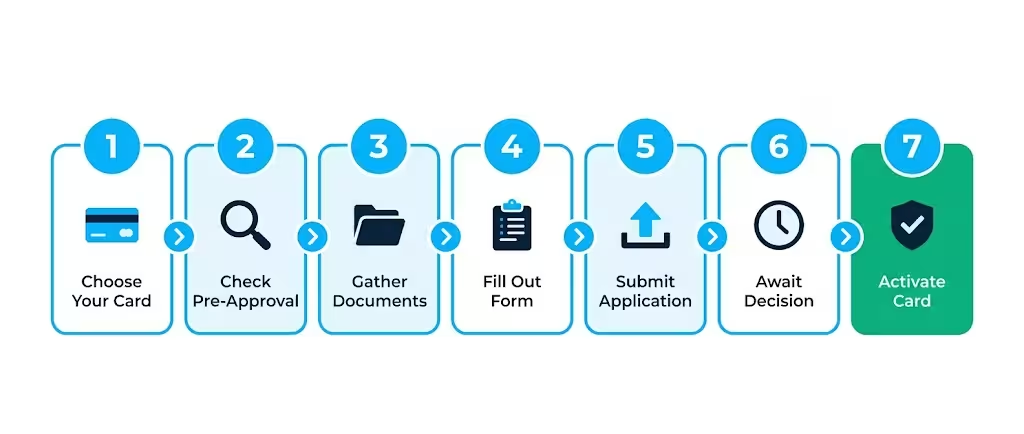
- Go to the Discover card page for the specific product you want. Click “Apply Now.”
- Enter your personal information. This is name, date of birth, SSN or ITIN, and address. Match what’s on your ID exactly. Even a small mismatch (using “Mike” instead of “Michael”) can flag the application for manual review.
- Enter your contact details. Use an email and phone number you check often. Discover sends important updates here, and may text you to verify your identity.
- Enter your housing information. Choose rent, own, or other. Enter your monthly payment. If you live with family and don’t pay, you can enter $0.
- Enter your employment and income. Select your status, employer, and length of employment. Then enter your gross annual income (before taxes), using the rules from the section above.
- Add optional features. You can opt into balance transfers, add an authorized user, or set up automatic payments now. You can also skip these and add them later from your online account.
- Review the disclosures. Discover shows the cardholder agreement, rates, and fees. Read these. The APR you’ll be offered depends on your credit, so this is where you confirm the rate before committing.
- Submit. Click the final button. The system runs an automated decision in as little as 90 seconds.
If you make a mistake on a field, fix it before you submit. After submission, you can’t edit the application, and any corrections have to happen on the phone with customer service.
What Happens After You Submit
After you hit submit, one of three things happens. Knowing which is which helps you respond the right way.
Federal law backs you up here. Under the Equal Credit Opportunity Act, lenders like Discover must notify you of approval or denial within 30 days of receiving a completed application, as detailed in the Consumer Financial Protection Bureau’s Regulation B § 1002.9. So even if you don’t hear anything right away, you have a clear legal timeline.
The three possible outcomes are:
- Instant approval: The most common result for well-matched applicants. You’ll see a screen confirming approval and your credit limit.
- Pending review: The automated system couldn’t make a clean decision and needs a human to look. This isn’t bad news; it just means more time.
- Denial: The system flagged something that didn’t meet Discover’s criteria. You’ll get a written adverse action notice in the mail explaining why.
If You’re Instantly Approved
If you see the approval screen, congratulations. Take a screenshot for your records. Your credit limit shows up on the same page or in a follow-up email. From here, your physical card arrives in 5 to 7 business days in an unmarked envelope (Discover does this for security, so thieves can’t tell which envelopes contain new cards).
While you wait, you can usually access your account online right away. Some cardholders also get a digital card number they can use immediately for online purchases, even before the plastic shows up.
Set up your online account, link your bank for autopay, and download the Discover mobile app. Doing this now means you’re ready the moment the card arrives.
If Your Application Is Marked Pending
A pending status means Discover’s underwriters are reviewing your file by hand. This is common when you have thin credit, when your income looks unusual, or when something in your file doesn’t perfectly match Discover’s automated rules. It doesn’t mean a denial is coming.
Here’s the right way to handle it:
- Wait 7 to 10 business days before calling. Calling sooner doesn’t speed anything up, because the underwriter is working through a queue.
- Watch your email and mail. Discover may request more documents, like a pay stub, a W-2, or a copy of your ID. Send these quickly, because the clock keeps ticking.
- Don’t apply for other cards in the meantime. New hard inquiries can change your file mid-review and cause a denial.
If 10 business days pass with no update, call Discover at 1-800-347-2683 and ask for an application status update. Have your application reference number ready.
What to Do If Discover Denies Your Application
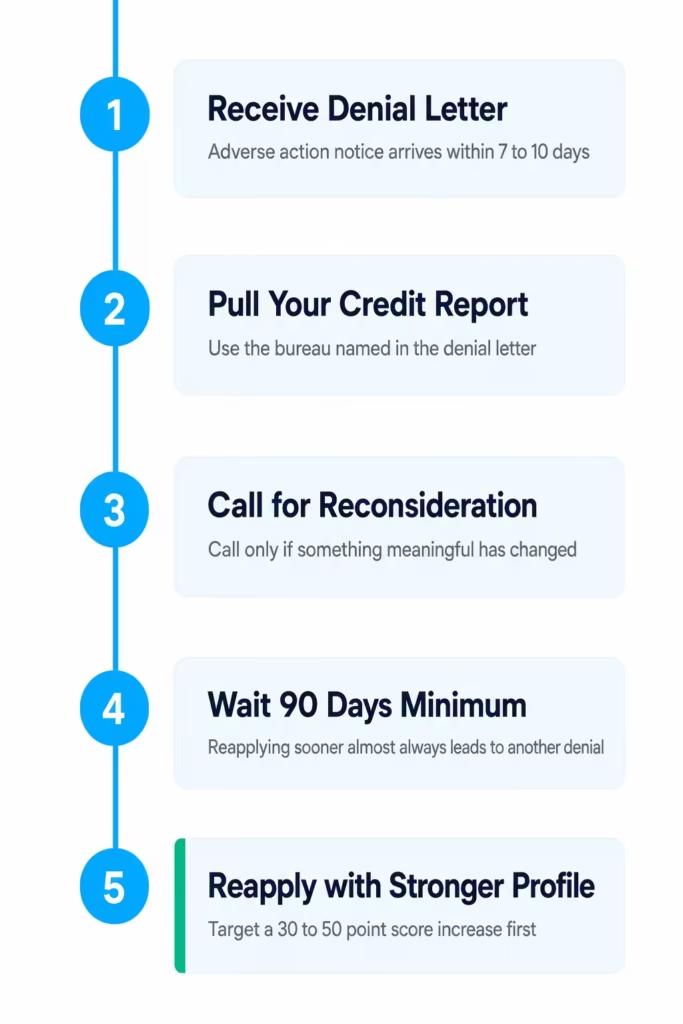
Getting denied stings, but it’s not the end. Discover (and federal law) gives you a path forward. The first thing to know is that you’ll receive an adverse action notice by mail, usually within 7 to 10 days of the decision. This letter lists the specific reasons your application was denied. Read it carefully, because every reason is something you can act on.
Common reasons include:
- Your credit score is below the threshold for the card you applied for.
- Too many recent credit inquiries.
- High balances on existing cards.
- Short credit history.
- The two-account rule (already mentioned above).
- Unverifiable income.
- A recent bankruptcy or delinquency on your credit file.
The notice also tells you which credit bureau Discover used (Experian, Equifax, or TransUnion) and gives you the right to a free copy of that report. Pull it. Look for errors. If you find something wrong, dispute it directly with the bureau.
How to Request Reconsideration
Discover doesn’t have a separate “reconsideration line” the way some other issuers do. To request a second look, call general customer service at 1-800-347-2683 and ask to speak with the new accounts department about your recent application. Be polite, be clear, and have a specific case ready.
Effective reconsideration calls usually do three things:
- Acknowledge the reason for denial. Don’t argue with it. Show you understand.
- Provide a new context that the automated system missed. Examples: “I just paid off my $4,200 car loan last week, which cuts my DTI by 12 points,” or “The late payment from 2022 was due to a billing error that’s now resolved.”
- Ask for a manual review. Give the agent room to escalate to an underwriter.
If you have nothing new to share, a reconsideration call probably won’t change the result. Use these calls when something has truly changed since you applied, or when you suspect an error.
When to Reapply After a Denial
If reconsideration doesn’t work, the next question is when to try again. Don’t reapply next week. Every application is another hard inquiry, and stacking them up makes the next denial more likely.
The right timeline:
- Minimum wait: 90 days. Reapplying inside this window almost always leads to another denial unless something major has changed in your credit profile.
- Recommended wait: 3 to 6 months. This gives you time to fix the specific issue listed on your adverse action notice (raise your score, pay down balances, add positive payment history).
- After bankruptcy or major delinquency: At least 12 months, and often 24, before approval becomes realistic.
Use the waiting period actively. Pay down balances to below 30% utilization, make every payment on time, and avoid opening new accounts elsewhere. When your score has climbed by 30 to 50 points, you’re in a much stronger spot.
When Your Card Arrives and How to Activate It
Once you’re approved, the wait for the physical card is short. Discover ships every new card in a plain, unmarked envelope by USPS first-class mail. Expect it in 5 to 7 business days. If 10 business days pass and it hasn’t arrived, call Discover at 1-800-347-2683 and request a replacement. Lost cards in the mail do happen, and a replacement ships fast.
When the envelope arrives, look for a small sticker on the front of the card with activation instructions and a phone number. Don’t throw the envelope away until you’ve activated, in case there’s any account paperwork inside.
📌 Did You Know: Even before your physical card arrives, you can often start using your Discover account for online purchases through the mobile app, which gives you a digital card number tied to your new account.
How to Activate Your Discover Card
Activation takes about a minute. You have three easy options:
- Online: Go to discover.com/activate, sign in to your account, and follow the prompts. You’ll confirm the last four digits of the card and your identity.
- Mobile app: Open the Discover app, tap on your new card, and select “Activate.” This is the fastest method if you already have the app installed.
- Phone: Call the number printed on the activation sticker. The automated system walks you through it, and a live agent is available if you need help.
After activation, take three more steps to get the most out of your card:
- Set a PIN. You’ll need this if you ever want to take a cash advance from an ATM. Cash advances carry high fees and high APR, so use them only in emergencies, but having the PIN ready is smart.
- Set up autopay. Link your bank account and choose at least the minimum payment to auto-draft each month. This protects you from accidental late fees.
- Sign up for alerts. Turn on push notifications or text alerts for new transactions, payment due dates, and credit limit changes. Discover’s alerts are some of the most useful in the industry.
Sign the back of the card with a permanent marker so a clerk can compare your signature if needed. Then store the card safely. Your account is live and ready to use.
Frequently Asked Questions (FAQs)
What credit score is needed to get a Discover card?
Most standard Discover cards, including the Discover it Cash Back, Miles, and Chrome, require a credit score of 700 or higher. The Student Cash Back and Student Chrome cards have no established credit score requirement, making them accessible to first-time applicants.
Can I get a Discover card with a 500 or 620 credit score?
No. Discover does not approve applicants with scores below 640 for any of its current card products. If your score is in that range, building credit with a secured card from a different issuer first is the recommended path before reapplying.
Can I get a Discover card with a 650 credit score?
A 650 score falls below the 700-plus threshold most standard Discover cards require, making approval unlikely for the Cash Back, Miles, or Chrome cards. Your strongest option at that score is a Discover Student card if you are currently enrolled in college.
What is the minimum income for a Discover card?
Discover does not publish a specific income minimum. What matters is that your reported income is sufficient to cover your monthly payments relative to your existing debt load, with a debt-to-income ratio above 40% flagged as a common risk signal.
Can I get a Discover card with no income?
You can still report income on your application if you have access to parental contributions for living expenses, spousal income (if you are 21 or older), scholarship funds applied to living costs, or gig and freelance earnings. Applicants under 21 must show independent income or have a co-signer.
How do you get approved for a Discover card?
Match yourself to a card that fits your credit profile, run the free pre-approval check on Discover’s website first (it uses a soft pull and won’t affect your score), and submit an accurate application with your full gross income reported. Avoiding high credit utilization and recent hard inquiries on other accounts also improves your odds.
Which Discover card is easiest to get approved for?
The Discover it Student Cash Back and Student Chrome are the most accessible, requiring no established credit history as long as you are currently enrolled in college and have a clean credit file. Even students with a credit score high enough for a standard card are advised to start with a Student card for a stronger approval chance.
Does checking pre-approval hurt your credit score?
No. The Discover pre-approval tool uses a soft inquiry, which does not appear on your credit report and has no effect on your score. Only submitting the full application triggers a hard inquiry, which can lower your score by a few points and remain on your report for two years.
What is the Discover two-account rule?
Discover automatically denies any application if you already hold two open Discover cards or if you have opened a new Discover card within the past 12 months. This rule applies regardless of your credit score, so checking your existing accounts before applying can save you a hard inquiry.
How long does it take to get a decision on a Discover card application?
Most applications receive an instant decision in as little as 90 seconds. If your file goes to manual review, expect 7 to 10 business days before a decision arrives, and federal law requires Discover to notify you within 30 days of receiving a completed application.
Bottom Line
Applying for a Discover card doesn’t have to feel like a gamble. The most effective approach is to start with pre-approval, match yourself to a card that fits your credit profile, prepare your income and ID details ahead of time, and submit a clean, accurate application.
From there, the 30-day federal notification rule, the 1-800-347-2683 line for status questions, and a clear plan for either approval or denial give you every tool you need to navigate the Discover credit card application with confidence.
If you know a friend or family member who’s nervous about applying for their first rewards card or a student card, share this guide with them. A few minutes of prep can save them a hard inquiry and a denial they didn’t deserve.