We know how stressful it feels when your card gets turned down at the worst possible moment. You’re at the register, the cashier is staring, the people behind you are sighing, and you have no idea why your Discover card is not working. It could be a hold, a limit, a chip glitch, or something even simpler.
The fastest way to fix a declined Discover card is to open the Discover app, check your account status, and call the number on the back of your card if nothing looks wrong.
Below, we’ll walk you through every cause, every fix, and a few smart backup moves so you can pay right now and stop this from happening again.
At a Glance
This guide explains why a Discover credit card stops working, covering credit limit holds, missed payments, fraud alerts, Freeze It status, expired cards, and physical or merchant-side terminal problems, plus exact fixes for each.
Core Facts:
- A pending authorization hold from a gas station, hotel, or car rental can block new purchases for up to 7 days even when the final bill is smaller than the hold amount.
- Discover’s Freeze It feature is controlled entirely by the cardholder in the app and can be switched off in seconds, unlike a security hold which only Discover can remove.
- Most fraud holds clear in 5 to 15 minutes once the cardholder confirms a flagged charge by phone or through the app.
- A standard replacement card arrives in 4 to 7 business days for free, or 1 to 2 business days with expedited shipping.
- Terminal decline code 51 typically means insufficient funds or over limit, code 05 means “do not honor,” and code 14 means the card number was entered incorrectly.
- Repeatedly swiping or tapping a declined card can trigger an additional fraud lock, so the article recommends limiting attempts to two tries before switching payment methods.
Best for:
- Cardholders whose Discover card was just declined at checkout and need an immediate fix or workaround.
- People trying to determine whether a decline is caused by their account, their physical card, or the merchant’s payment terminal.
- Anyone setting up preventive habits like spending alerts, auto-pay, or Freeze It to avoid future declines.
Check These Things First Before Troubleshooting Your Discover Card
Before you panic or call anyone, run through a quick triage. Most card problems come from just a few causes. A fast check can save you ten minutes of guessing and a lot of stress at the counter.
Ask yourself these five questions in order:
- Did the card swipe, tap, or get keyed in by hand? Each method can fail for a different reason.
- Is the balance close to the credit limit, or has a recent big purchase eaten up your available credit?
- Was a payment due this month, and did it actually post?
- Is the card past its printed expiration date?
- Did you get a text or email from Discover about fraud in the last few hours?
If question 2 is a “yes,” it is likely a limit issue. If question 3 is “yes,” it is likely a missed payment. If question 4 is “yes,” your card needs replacing. If question 5 is “yes,” skip ahead to the fraud alert section. If none of these apply, the issue may be with the merchant, the chip, or a freeze you forgot you turned on.
This short check tells you why the Discover credit card declined and where to go next in the article.
Over Your Credit Limit
Your credit limit is the total amount you can borrow. Your available credit is what you have left after subtracting current charges, pending charges, and posted balances. The two are not the same. A pending hotel deposit or gas station authorization can lock up hundreds of dollars even though the final bill is smaller.
To check your available credit, open the Discover mobile app and look at the home screen. You’ll see your balance and how much room you have left. If you’re close to the limit, the system may block the next purchase to keep you from going over.
You have two quick options. Pay down part of the balance from the app using your linked bank account. Posted payments usually free up credit within a few hours, though full clearing can take a business day. The second option is to request a credit limit increase from inside the app under “Card Services.” Approval is not instant in every case, but for long-time customers, it often is.
💡 Pro Tip: Authorization holds from gas pumps, hotels, and car rentals can sit on your account for up to 7 days. If your card was just declined and you recently filled up your tank or checked into a hotel, that may be why.
A Missed or Late Payment
A late payment can quickly cause a card to stop working. When a payment is past due, Discover may restrict new charges until the account is current. This protects both you and them from a growing balance you can’t repay.
To check, open the app and tap “Payments.” You’ll see the last payment date, the amount, and whether it posted or bounced. If your bank rejected the auto-pay due to low funds, the payment will show as failed.
To restore access, make a payment from the app right away. Use a bank account with enough funds. Once the payment posts, the account usually unlocks within a few hours. If it does not, call Discover and ask them to lift the hold manually. A live agent can often do this in one phone call.
Your Card Has Expired
Look at the front of your card. The expiration date is printed as a month and year, like 04/26. The card stops working at the end of that month. So a card marked 04/26 will not work on May 1, 2026.
Discover normally mails a new card about 30 to 60 days before the old one expires. If you moved recently and didn’t update your address, the new card may have gone to your old place. Log in to the app, tap your profile, and confirm your mailing address is right.
If the new card never showed up, request a replacement from inside the app under “Card Services.” You can also add your card to Apple Pay, Google Pay, or Samsung Pay using the digital card number while you wait for the physical one to arrive.
What to Do If Discover Placed a Fraud Alert or Security Hold
Discover watches your account 24/7 for charges that look out of place. If something seems off, like a big purchase in another state or a quick string of online buys, the system may put a temporary hold on your card. This is meant to protect you, not punish you.
You’ll usually get a text, email, or push alert asking if the charge was really you. If you ignore the message or miss it, the card may keep getting declined until you respond.
The Federal Trade Commission notes that when a card is declined, the first step is to confirm your info was entered correctly and then call the number on the back of the card to ask why. For Discover, that number is 1-800-347-2683.
When you call, have these ready:
- The last 4 digits of your card.
- The transaction amount and merchant name.
- Your billing ZIP code.
- A photo ID nearby in case the agent asks identity questions.
Most fraud holds clear in 5 to 15 minutes once you confirm the charge is real. If the charge was not yours, the agent will cancel the card and mail a new one.
Discover’s Freeze It Feature: Is It Turned On?
Discover’s Freeze It is an on/off switch you control. When it’s on, new purchases, cash advances, and balance transfers are blocked. Recurring bills you’ve already set up may still go through. Many cardholders turn this on after misplacing a card and then forget they did.
To check, open the Discover app and look at the home screen. If you see a snowflake icon or a “Frozen” label on your card, the freeze is active. To turn it off, tap the card, then tap “Freeze It” to switch it back to active. The change happens in seconds.
Freeze, it is different from a security hold. You control Freeze It from the app. A security hold is placed by Discover when its system flags activity, and only Discover can remove it.
Understanding the Difference Between a Freeze, a Security Hold, and Account Closure
These three sound alike, but they are very different things.
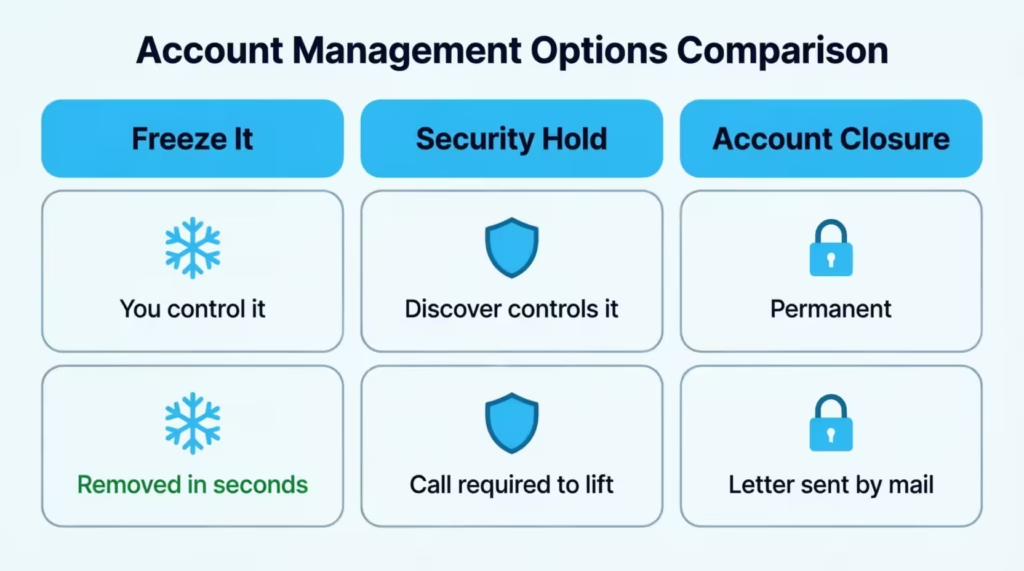
A freeze is something you turn on yourself. You can turn it off the same way, in seconds, from the app.
A security hold is set by Discover. It is usually short-term and tied to a specific suspicious charge. Once you confirm the charge, the hold lifts. You cannot remove it yourself. You have to talk to or message Discover.
An account closure is permanent. Discover, or the cardholder ends the account. The card will never work again. Closures can come from long-term missed payments, fraud findings, or a customer request. If your card is closed, you’ll usually get a letter explaining why.
To confirm which one applies to you, open the app. If it shows “Account Closed,” that is permanent. If it shows “Frozen,” you can fix it yourself. If it shows “Active” but charges still fail, there’s likely a security hold, and you need to call.
How to Unfreeze Your Discover Card
If Freeze It is on, here is the step-by-step:
- Open the Discover mobile app and log in.
- Tap your card image on the home screen.
- Find the “Freeze It” toggle.
- Tap it to switch it off.
- Wait 5 to 10 seconds and try your purchase again.
If you can’t get into the app, call 1-800-347-2683. The agent can unfreeze the card after a few quick identity questions. Reactivation is almost instant once the freeze is lifted.
Your Discover Card Is Not Working Online
Online checkouts are picky. A small typo can cause a decline that has nothing to do with your account. The most common online problems are address mismatches, wrong security codes, and merchant filters.
The Address Verification System, or AVS, checks the billing address you typed against the one Discover has on file. If even the ZIP code is different, the charge fails. If you moved or changed apartments and never updated Discover, every online purchase may fail until you fix the address in the app.
The CVV is the 3-digit code on the back of your card. If you key in the wrong digits, even once, the system declines the charge. Some merchants only let you try two or three times before locking you out for the day.
Discover also lets you set card controls in the app. You can block online purchases, international charges, or certain merchant types like gas stations or gambling sites. Open the app, tap “Card Services,” and look for “Card Controls.” If anything is toggled off, switch it back on.
Some merchants don’t accept Discover at all, mostly outside the United States. If you’re paying a foreign website, the decline may come from the merchant, not from Discover. Try a different card or a service like PayPal that may route the payment through a partner network.
Quick Online Decline Checklist
| What to Check | Where to Fix |
|---|---|
| Billing address matches Discover records | Discover app > Profile > Address |
| Correct CVV entered | Back of physical card |
| Online purchases allowed in Card Controls | Discover app > Card Services |
| Card not expired | Front of card |
| Merchant accepts Discover | Try a different card |
Your Discover Card Is Not Working In-Store or at a Terminal
A card that fails at the register, but works fine online, often points to a hardware issue. The good news is you have three ways to pay with one card. If one fails, try the next.
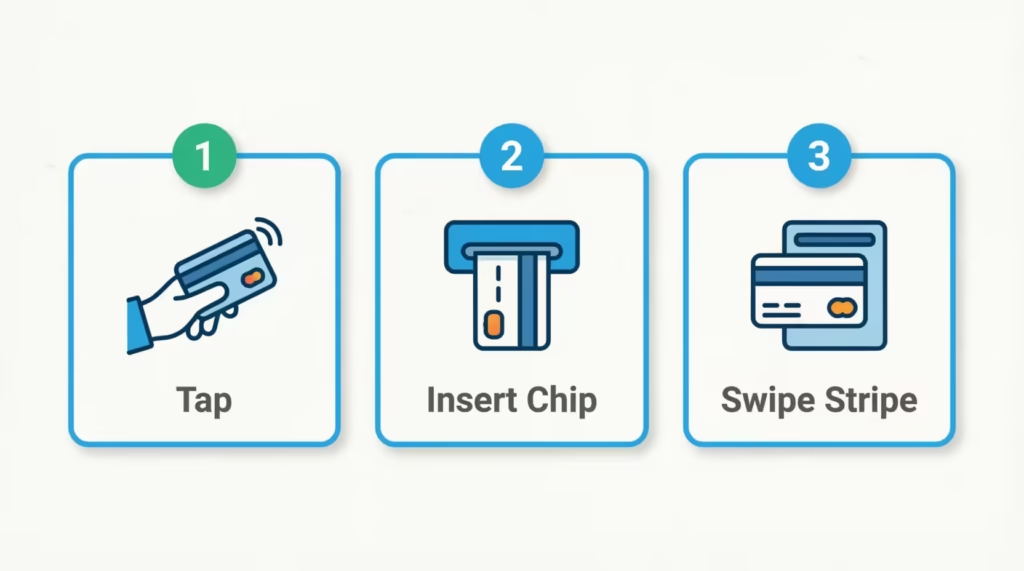
Start with tap. Hold the card flat against the contactless reader for 2 seconds. If you see a green light or hear a beep, you’re done. Contactless payment uses NFC, which is short for near-field communication. It only works at terminals that show the contactless symbol, four curved lines that look like a sideways Wi-Fi icon.
If the tap fails, try inserting. Slide the EMV chip end into the terminal slot, gold side up and facing in. Leave the card in until the screen says you can remove it. If the chip is scratched, dirty, or cracked, the reader may not pick it up. A clean cotton cloth can help with dirt.
If the insert fails, swipe the magnetic stripe. Some new terminals don’t allow swiping anymore, but many still do as a backup. The stripe can wear out over time, especially if you carry the card loose in a wallet next to keys or coins.
If all three methods fail at the same store, try a different store. If the card works at the next store, the first merchant’s terminal was the problem. If it fails everywhere, the card itself may be damaged, or there may be a hold on the account.
⚠️ Mistake to Avoid: Don’t try the same declined transaction five or six times in a row. Multiple back-to-back declines can trigger an extra fraud lock on your account, which then takes a phone call to clear.
How to Tell If the Problem Is Your Card or the Merchant’s System
When a card fails, your first thought is usually “my card is broken.” But sometimes the merchant’s system is the real issue. A simple two-step test can tell you which one it is.
Step 1: Try a second payment method at the same store. Use a different card, mobile wallet, or even cash. If the new method works, the issue is with your Discover card. If the new method also fails, the merchant’s system is likely down.
Step 2: Try your Discover card at a different store within the next 30 minutes. If it works at the new store, the first merchant’s terminal had an issue. If it also fails, the issue is your card or account.
Some declines come from the payment processor in the middle, the company that moves the money between the merchant and Discover. If their system is slow or offline, the charge may stall and show as declined even though your account is fine. There’s nothing you can do about this except wait or pay another way.
When your Discover card is not going through, the terminal sometimes shows a short code like “51,” “05,” or “14.” These are called card decline codes. Code 51 usually means insufficient funds or over limit. Code 05 means “do not honor,” which is a catch-all for issuer-side problems.
Code 14 means the card number entered was wrong. You don’t need to memorize these. The cashier can read the code and tell you, and that’s a clue you can share with Discover when you call.
Outside the United States, Discover is less widely accepted than Visa or Mastercard, though it has growing global partnerships. If you’re traveling, a decline abroad may simply mean the local network doesn’t process Discover.
Physical Card Damage: When the Card Itself Is the Problem
Cards take a lot of abuse. They flex in pockets, get scratched by keys, and sometimes go through the wash. If your card has visible damage, the fix is usually a workaround now and a replacement later.
The fastest workaround is your mobile wallet. Add your Discover card to Apple Pay, Google Pay, or Samsung Pay using the card number, expiration date, and CVV. Once added, you can tap your phone at any contactless terminal. This works even if the physical card is bent, cracked, or has a dead chip, because the wallet uses a separate digital token.
To spot the type of damage:
- Chip damage: The small gold square is scratched, chipped, or has a deep gouge across it. The terminal can’t read it. Try tapping or swiping instead.
- Stripe damage: The black magnetic line on the back is scratched, faded, or peeling. Try inserting or tapping instead.
- Crack or bend: The card flexes in the middle or won’t stay flat. The chip wiring inside may be broken. Use the mobile wallet only.
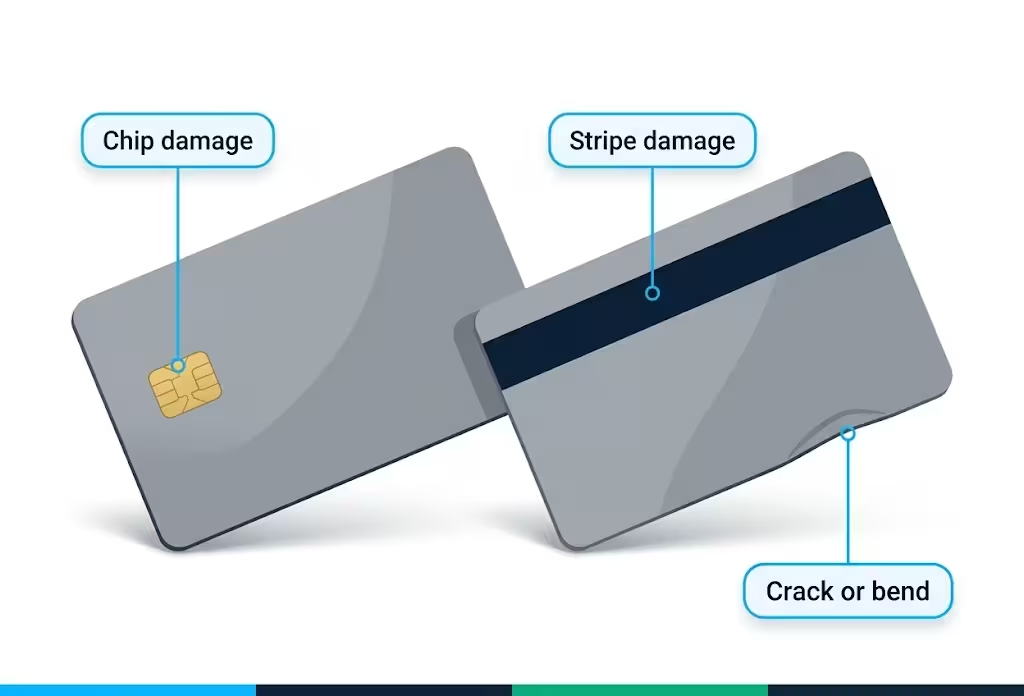
After you have a way to pay today, request a replacement. Log in to the app, tap “Card Services,” then tap “Replace a Lost or Damaged Card.” You can also call 1-800-347-2683 to order one over the phone.
How long does a Discover Card Replacement Take
A standard replacement card arrives in about 4 to 7 business days. Discover ships it for free.
If you need it faster, ask for expedited shipping when you order. Expedited cards usually arrive in 1 to 2 business days. Discover often waives the rush fee, but ask first so there are no surprises.
In the meantime, the app gives you access to a digital card number you can use online and in mobile wallets. So you don’t have to wait for the mail to start using your account again. Tap “Card Services” in the app to find it.
How to Check Your Discover Account Status
A 30-second check in the app answers most “why is my card not working” questions. Here is what to look for.
Open the Discover mobile app and log in. The home screen shows three key things:
- Current balance and available credit. If available credit is near zero, you’re at your limit.
- Payment due date. If it shows “Past Due” in red, a missed payment is blocking new charges.
- Card status icon. A snowflake means Freeze It is on. A lock or warning icon means there’s a hold.
For a deeper look, tap “Account Services,” then “Account Status.” A healthy account shows “Active” and “Account in good standing.” Anything else, like “Restricted,” “Closed,” or “On Hold,” means you need to call.
If you don’t use the app, log in at Discover.com and find the same info under the “Account Summary” tab. By phone, dial 1-800-347-2683 and follow the prompts for “account status.”
Also, check Discover spending alerts under “Notifications.” These send a text or push every time a charge hits or your balance crosses a level you choose. They make it much easier to spot issues before your card stops working.
How to Contact Discover When Your Card Is Not Working
For a card that won’t work, call 1-800-347-2683 (also shown as 1-800-DISCOVER). This is the main credit card customer service line, and it runs 24/7. You can also reach a live agent through the secure chat feature inside the app, which has shorter wait times in the evening.
Use the app’s secure message center for non-urgent issues, like updating your address or asking about a charge from last month. Call when the problem is happening right now.
Before you call, have these ready:
- Your card number or the last 4 digits.
- The transaction amount, merchant, and time of the decline.
- Your full billing address and ZIP code.
- Your Social Security number (last 4 digits) for identity checks.
- A pen and paper for any case numbers the agent gives you.
If you’re at a register, step aside so you’re not blocking the line. Most card-not-working calls take 5 to 10 minutes. If the agent needs to escalate, ask for a callback number and a case ID so you don’t lose your place if the call drops.
For lost or stolen cards, the same number works, but say “lost or stolen” when the system prompts you. That routes you faster.
What to Do Right Now If You Need to Pay and Your Card Is Not Working
You’re at the counter, your Discover card just failed, and someone is waiting. Here is the fastest path to a successful payment in the next 60 seconds.
Option 1: Try your mobile wallet. If your Discover card is in Apple Pay, Google Pay, or Samsung Pay, tap your phone at the contactless reader. The wallet uses a separate digital token, so it can work even when the physical card fails.
Option 2: Use a backup card. A second credit card, a debit card, or a prepaid card all work. This is why financial pros suggest carrying two cards from different networks.
Option 3: Ask for a brief hold. Tell the cashier you’ll be right back, step aside, and check the Discover app. If you spot a freeze or a fraud alert, you may fix it in under a minute and try again.
Option 4: Pay with cash. Not ideal, but it works. Most stores still take it.
What NOT to do: Don’t keep swiping or tapping over and over. As mentioned earlier, repeated declines can trigger a fraud lock, making things worse. Two tries are the limit. After that, switch methods or step away to troubleshoot.
📌 Did You Know: According to the Federal Trade Commission, if you can’t get a fix from your card issuer after a wrongful decline, you can report the issue to the FTC and the Consumer Financial Protection Bureau. Most issues never need this step, but it is good to know it exists.
How to Prevent Your Discover Card From Declining in the Future
Most card declines are preventable with a few small habits. Set these up once, and you’ll cut your future surprises by a lot.
Turn on spending alerts. In the app, go to “Notifications” and switch on alerts for every purchase, large purchases over a set amount, and balance thresholds. A real-time text makes it almost impossible to be surprised by a low balance or a strange charge.
Use Freeze It on purpose. If you only use your Discover card for travel or big buys, freeze it the rest of the time. When you need to spend, unfreeze it for 30 seconds, then re-freeze. This blocks most fraud cold.
Keep your contact info current. A wrong phone number or email is the top reason fraud alerts go unanswered. Open the app, tap your profile, and check that your email, phone, and address all match where you actually live and what you actually use.
Watch your credit utilization. Credit utilization is the share of your limit you’re using. If you stay under 30 percent, you give yourself room for surprise charges like hotel holds and gas pumps. If you’re often near the limit, ask for a credit limit increase or pay down the balance mid-month, not just at the due date.
Turn on auto-pay. Set auto-pay for at least the minimum payment in the app. This alone stops the most common cause of a frozen account, the missed due date. You can still pay the full balance manually each month for credit-score reasons, but auto-pay is your safety net.
Carry a backup card. Even with all of the above, terminals fail, networks blink, and life happens. A second card from a different network, like Visa or Mastercard, means you’re never stuck.
Frequently Asked Questions (FAQs)
Why is my Discover credit card declining when I have money?
Pending holds from gas stations or hotels can lock up available credit even though your balance looks low. Check the Discover app for “available credit” versus “balance,” since a recent authorization hold may be the real cause.
Is Discover having issues today, or is it just my account?
Most declines come from your individual account, like a hold, freeze, or expired card, rather than a system-wide outage. Open the Discover app to check your account status before assuming the whole network is down.
Why am I locked out of my Discover account?
A locked account usually means a missed payment, a fraud alert you haven’t responded to, or Freeze It turned on. Check the app’s home screen for a “Past Due,” “Frozen,” or “Restricted” label to see which applies.
What’s the difference between a freeze and a security hold?
A freeze is one you turn on yourself in the app and can remove in seconds. A security hold is placed by Discover after flagging suspicious activity, and only Discover can lift it.
How do you fix a declined Discover card?
Open the Discover app to check for a freeze, low available credit, or a past due payment, then fix whichever applies. If nothing looks wrong, call 1-800-347-2683 so an agent can check for a security hold.
Why is the Discover card not widely accepted everywhere?
Discover has fewer merchant partnerships abroad than Visa or Mastercard, so some international websites and stores won’t process it. Try a different card or a payment service like PayPal as a workaround.
What number do I call when my Discover card isn’t working?
Call 1-800-347-2683, the main Discover customer service line that runs 24/7. Say “lost or stolen” at the prompt if that applies, since it routes your call faster.
Will trying my card multiple times fix a decline?
No, repeated swipes or taps after a decline can trigger an extra fraud lock on your account. Stick to two attempts, then switch payment methods or contact Discover instead.
Why is my card not working even though it’s activated?
An activated card can still decline due to an expired date, a credit limit issue, or Freeze It being switched on. Activation only confirms the card is registered, not that every feature is currently unrestricted.
Can a declined transaction still go through later?
A pending authorization hold, like a hotel deposit, can show as a temporary charge even if the final transaction was declined. These holds typically clear within a few hours to 7 days, depending on the merchant type.
Bottom Line
We’ve covered every reason a Discover card stops working, from over-limit and missed payments to fraud holds, online checkout snags, chip damage, and merchant-side glitches. We also walked through what to do in the moment and how to stop it from happening again.
Based on the patterns above, the most effective approach for most cardholders is to check the Discover app first, try a mobile wallet as a backup, and call 1-800-347-2683 if nothing else clears the issue. A few small habits, like spending alerts, auto-pay, and a backup card, will keep your Discover card working when it matters most.
If you know someone who hates the panic of a declined card at checkout, share this with them. It could save them from a very awkward moment at the register.