Removing someone from your Discover card can be stressful, especially if the reason is personal. Whether it’s a relationship change, a family disagreement, or a simple account cleanup, you deserve a clear, fast answer on exactly what to do.
You can easily remove an authorized user from your Discover card. Do it online, via the mobile app, or by phone in just a few minutes.
This guide shows each method, explains what comes next, and answers common questions before you click “confirm.”
Key Takeaways
This guide explains how to remove an authorized user from a Discover card, including online, mobile app, and phone removal methods, what happens to the card immediately after removal, and how the change affects both parties’ credit scores.
Core Facts:
- Removal can be completed online, through the Discover mobile app, or by phone at 1-800-347-2683, and does not require the authorized user’s permission or knowledge.
- Removal takes effect immediately once confirmed, with no waiting period tied to the billing cycle.
- The authorized user’s physical card is deactivated at the account level the moment removal is processed, and any attempted transaction will be declined.
- Removing an authorized user does not trigger a hard inquiry and does not change the primary cardholder’s account age, credit limit, or payment history.
- The authorized user’s account history stops updating after removal, though past positive history already reported is not erased retroactively.
- For urgent situations, cardholders can freeze the account, request a new account number, or dispute unauthorized charges in addition to standard removal.
Best for:
- Primary cardholders who need to remove a former spouse, family member, or roommate from their Discover account after a relationship or living situation change.
- Anyone who has noticed unexpected charges from an authorized user and needs to cut off card access immediately.
- Cardholders who want to understand how removal affects their own credit score versus the authorized user’s credit score before making the change.
When to Remove an Authorized User from Your Discover Card
Life changes. And sometimes, those changes mean a person who once had access to your Discover account no longer should.
The most common reason is a relationship shift. A divorce or separation often makes it urgent to cut off a former spouse’s card access. An adult child who has become financially independent may not need to stay on your account any longer. A close friend added that during a period of shared finances may no longer be in the picture.
Sometimes the reason is financial concern. You may have noticed charges you didn’t expect or transactions that don’t match what you agreed to. A roommate move-out, a business partnership ending, or even a simple desire to simplify your account can all be valid triggers.
In cases of active misuse, the process becomes more time-sensitive. But the core message is the same in all of these situations: you don’t owe Discover an explanation. You are the primary cardholder. That means you have the right to remove anyone from your account at any time.
Does Discover Require the Authorized User’s Permission to Remove Them?
No. You do not need the authorized user’s consent, cooperation, or even their knowledge to remove them from your Discover account.
As the primary cardholder, you have full and unilateral control over who holds authorized user status on your account. Discover does not ask you to verify the authorized user’s identity. It does not require a reason. It does not give the authorized user a vote in the matter.
You’ll need your account access. Use your login details for online or app management. If you’re calling, have your account number ready.
One thing to keep in mind: Discover may notify the authorized user that their card access has been removed. This is a standard part of the process. But it does not delay or block your ability to remove them. The removal happens on your timeline, not theirs.
⚠️ Mistake to Avoid: Don’t delay the removal because you’re worried about an awkward conversation. The authorized user does not need to agree, and waiting only extends their access to your account.
How to Remove an Authorized User from a Discover Card Online
The fastest way to complete this process is through Discover’s online account center. The steps below reflect the current layout of the Discover portal.
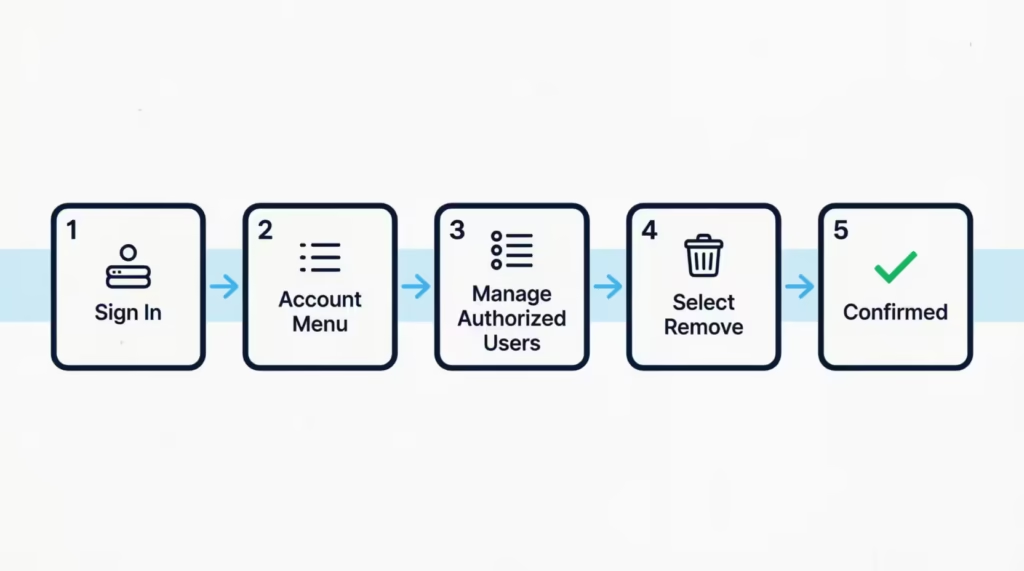
Step 1: Go to Discover.com and sign in to your account.
Step 2: Once logged in, look for the “Account” menu at the top of the page. Click on it to open the dropdown.
Step 3: Select “Manage Authorized Users” from the menu options. This will take you to a page listing all current authorized users on your account.
Step 4: Find the name of the person you want to remove. Next to their name, you’ll see a “Remove” or “Delete” option. Click it.
Step 5: Confirm your decision when prompted. Discover will ask you to verify that you want to remove this person. Click “Confirm” or “Yes, Remove.”
After you confirm, you’ll see a notification that the removal has been processed. Discover may also send you a confirmation email to the address on your account.
If you don’t see “Manage Authorized Users” in the Account menu, try navigating to “Card Management” or “Account Settings.” The label can vary slightly based on account type. If you still can’t locate it after checking both, call Discover directly at 1-800-347-2683.
How to Remove an Authorized User Using the Discover Mobile App
The Discover app (available on iOS and Android) gives you the same removal capability from your phone.
Step 1: Open the Discover app and log in with your credentials.
Step 2: Tap the menu icon (three horizontal lines or “More”) in the lower-right corner of the screen.
Step 3: Tap “Manage Account” or “Account Services,” then look for “Authorized Users.”
Step 4: Select the authorized user you want to remove.
Step 5: Tap “Remove” and confirm your choice when the app asks you to verify.
The app will display a confirmation message once the removal is complete. Keep the app updated to make sure you’re working with the most current interface.
How Long Does It Take for Removal to Take Effect?
Removal takes effect immediately. The moment you confirm the action online or through the app, that person’s authorized user status ends. Their card is deactivated at the same time.
There is no waiting period tied to the billing cycle. The removal doesn’t “process overnight” or get applied at the start of the next statement period. It happens in real time.
If you’re in a situation where you need to stop charges right now, the online and app methods are your fastest options. If speed is critical, keep reading the section below about stopping charges immediately.
How to Remove an Authorized User from Discover by Phone
If you don’t want to use the online portal or app, or if you have trouble with them, you can call Discover directly. It’s a reliable option.
Call 1-800-347-2683. This is Discover’s main customer service line, available 24 hours a day, 7 days a week.
When a representative answers, tell them: “I’d like to remove an authorized user from my account.” First, they’ll ask you to verify your identity. You might need to confirm your account number, the last four digits of your Social Security Number, or your billing zip code.
Once your identity is confirmed, provide the full name of the authorized user you want to remove. You don’t need their Social Security Number or any of their personal information.
The representative will process the removal while you’re on the call. Ask them to confirm that the change has been applied before you hang up. The call typically takes 5 to 10 minutes.
Request a confirmation number or ask whether you’ll receive an email confirmation. Either gives you a record of when the removal was completed.
What Happens to the Authorized User’s Card After Removal
This is where many people have real uncertainty, especially when the removal is urgent.
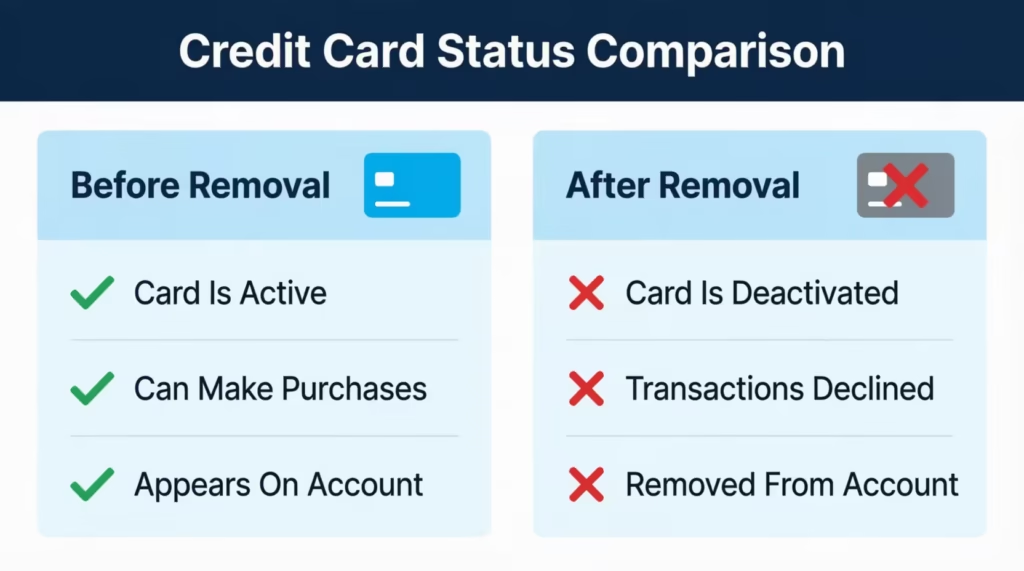
When you remove an authorized user, their physical card is deactivated immediately. Discover’s system cuts off card access the moment the removal is processed. If the authorized user attempts to use their card after that point, the transaction will be declined.
You do not need to physically retrieve the card from the authorized user for it to stop working. The deactivation happens at the account level, not the card level. The physical card becomes useless the moment removal is confirmed.
That said, if the situation is sensitive, requesting a new card number for yourself adds an extra layer of protection. This is especially worth doing if the authorized user had access to your full card number for online purchases or recurring billing. A new card number means any stored card details they have on file can no longer be used for new charges.
💡 Pro Tip: Even after removal, check your account for any charges that went through in the hours before you completed the removal. Authorized purchases made before the cutoff are still your responsibility as the primary cardholder.
How to Stop Charges Immediately If You Cannot Wait
Standard removal is immediate. But some situations call for extra action, especially if you believe the authorized user is actively making charges right now, or if you suspect the physical card information has been shared with others.
Option 1: Freeze your Discover card. You can temporarily freeze your account through the Discover app or online portal. Look for “Freeze/Unfreeze” under Card Management. A freeze prevents new purchases on all cards tied to the account, including both the primary and any authorized user cards. This is the fastest way to stop all new charges while you take next steps.
Option 2: Request a new account number. If you think your card number might be saved by an authorized user, like on a shopping site or for a subscription, call Discover at 1-800-347-2683. They can help you get a new account number. The old card number is closed off completely. Your account history and credit line carry over. Only the number changes.
Option 3: Dispute unauthorized charges. If charges were made without your knowledge or after you clearly revoked permission, you can dispute them through Discover’s fraud or dispute process. Log in to your account and select “Dispute a Charge” next to the transaction in question, or raise it with a representative by phone.
These steps work alongside the removal, not instead of it. Remove the authorized user first, then use one or more of these options if the situation warrants it.
Does Removing an Authorized User Affect Your Credit Score?
Removing someone from your account does not trigger a hard inquiry. Hard inquiries happen when a lender checks your credit for a new application. This is not that kind of action. No hard pull is generated on your report.
Your account also stays open. The account’s age, credit limit, and payment history all remain unchanged on your credit report. Removing an authorized user does not affect those factors.
The one area to watch is credit utilization. If an authorized user made purchases on a card linked to your account, your utilization ratio might look different when everything is final. But the act of removal itself doesn’t change your utilization. Only balances and credit limits affect that.
In practical terms, most primary cardholders see no change to their FICO Score as a result of removing an authorized user.
How Removal Affects the Authorized User’s Credit Score
The authorized user’s credit profile is different, and it’s worth understanding if you’re in a similar situation.
When someone becomes an authorised user, the main account’s history, age, payment record, and credit limit usually show up on their credit report. This can help a thin-file borrower build credit history quickly.
When you remove them, that account stops updating on their report. Some credit bureaus remove the account history from the authorized user’s report shortly after removal. Others may leave it for a period. The timing varies by bureau and by the credit scoring model being used. Discover does not control what the credit bureaus do with this data after you make the change.
If the authorized user was relying heavily on your account to support their credit profile, they may see a score change after removal. That is their responsibility to manage, not yours.
What Happens to the Authorized User’s Account History
Here’s the specific part that confuses most people: removal is not retroactive for the authorized user.
Your account history is positive. This includes paying on time. Your usage is low. Your account is old. This might have helped your credit report. It was helpful before the removal. That history doesn’t get erased from their past reports the moment you remove them.
Going forward, the account history stops updating for them. New payments, new balances, and new activity on your account will no longer appear on their report. What they had before removal is what they had. What they get after is nothing more from this account.
If the authorized user was using your account specifically to build credit, they should have a plan in place before removal. But again, that is their issue to navigate.
What to Do After Removing an Authorized User from Discover
The removal itself takes only a few minutes. But a few follow-up steps can make sure everything is fully cleaned up.
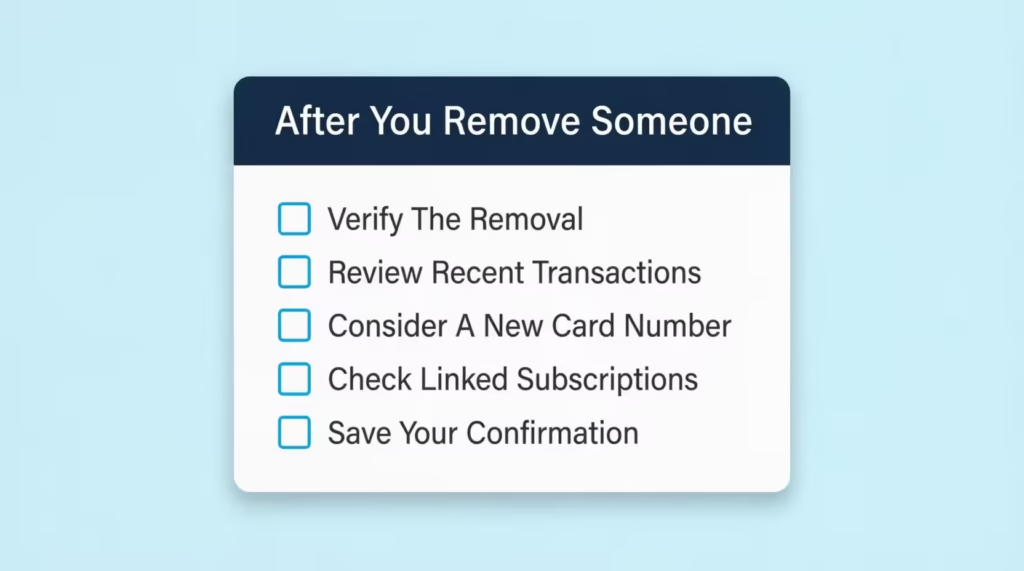
Verify the removal in your account settings. Log back into your Discover account or app and navigate to “Manage Authorized Users.” Confirm that the person’s name no longer appears. This takes 30 seconds and gives you documented proof that the change was applied.
Review recent transactions. Check the last few days of your account activity. Look for any charges made just before the removal was processed. Authorized purchases made before the cutoff are valid charges. If you see anything that looks fraudulent or unauthorized, flag it for dispute through Discover’s dispute process.
Decide whether to request a new card number. If the removed person had your card number stored online, changing your account number is a smart precaution. You don’t have to do this. But if the relationship ended badly, it cuts off any lingering access they might have through saved payment methods.
Check shared subscriptions or recurring billing. If the authorized user’s card was linked to streaming services, gym memberships, or automatic renewals, those charges might not go through. If those subscriptions are yours, update the payment method on those accounts with your primary card.
Keep a record of the removal date. Note the date and time you completed the removal, and save any confirmation email Discover sent you. If there’s ever a billing dispute tied to this person, having a clear record of when access ended is useful.
Can You Re-Add an Authorized User to Discover Later?
Yes. Removing someone is not permanent if you change your mind. You can add an authorized user back to your Discover account at any time through the same Account Center or app interface you used to remove them.
The process for adding is straightforward. You’ll need the person’s name, date of birth, and Social Security Number. Discover will issue them a new physical card once the request is processed.
Keep in mind that the new card will arrive within 5 to 10 business days. There’s no waiting period on your end before the ad request goes through.
Frequently Asked Questions (FAQs)
How do I remove someone from my Discover credit card?
Log into Discover.com or the mobile app, go to “Manage Authorized Users,” select the person’s name, and confirm the removal. You can also call 1-800-347-2683 to have a representative process it over the phone.
Is it hard to remove an authorized user?
No, it’s a simple process that takes just a few minutes online, in the app, or by phone. You don’t need the authorized user’s permission, cooperation, or knowledge to complete it.
How long does it take to get removed as an authorized user?
Removal is immediate once you confirm the action online or in the app. There’s no waiting period tied to your billing cycle.
What happens when I remove an authorized user?
Their physical card is deactivated immediately, and any attempted transaction will be declined. You don’t need to physically collect the card for it to stop working.
How do I manage authorized users on Discover?
Sign in to your account and look for “Manage Authorized Users” under the Account menu, or “Card Management” if that label isn’t visible. From there, you can view, add, or remove authorized users at any time.
Does Discover Card report authorized users?
Yes, your account history can appear on the authorized user’s credit report while they’re active on your card. Some credit bureaus remove this history after you remove it, though timing varies by bureau.
Will removing an authorized user hurt their credit score?
It can, especially if they relied on your account’s age and payment history to build their own credit profile. Past positive history isn’t erased, but new activity from your account stops appearing on their report going forward.
Does removing an authorized user affect my own credit score?
No, removing an authorized user doesn’t trigger a hard inquiry, and your account stays open with its age, limit, and payment history unchanged. The only factor to watch is credit utilization if their balances are still showing at the time of removal.
Can I add an authorized user back to my Discover card later?
Yes, you can re-add someone at any time through the same Account Center or app you used to remove them. You’ll need their name, date of birth, and Social Security Number, and their new card will arrive in 5 to 10 business days.
How do I stop charges immediately if I can’t wait for standard removal?
Freeze your card through the app or online portal to block all new purchases instantly, or call 1-800-347-2683 to request a new account number. You can also dispute any unauthorized charges directly through your account.
Bottom Line
Taking someone off your Discover account is a simple, immediate process, whether you do it online, through the app, or by calling Discover directly. The removal starts immediately. The authorized user’s card stops working as soon as you confirm. Your credit score stays the same.
If the situation requires faster action, a temporary account freeze or a new card number gives you extra protection. For most cardholders, using the Discover online portal or mobile app will be the fastest and easiest way to complete this.
If this guide helped you, share it with someone managing a joint account, authorized user setup, or a similar credit situation. It could save them time and stress.