When you return something bought with your Discover card, you expect your money back fast. But then you check your account, and things look off. Maybe the charge is still there. Maybe your balance is now negative.
Maybe your rewards changed. I’ve been there too, and I know how stressful that feels when you just want clear answers. The Discover card refund process has more moving parts than people realize, and small details can throw off the timing.
Your refund is most likely on its way and being handled correctly, but it travels through several steps before it lands back in your account.
Below, you’ll find a full walk-through, expert tips, and answers to every question you might have.
Key Takeaways
This guide explains the Discover card refund process, including how refunds move from merchant to account, typical posting timelines, rewards clawbacks, negative balance handling, and how to request a cash payout.
Core Facts:
- Refunds move through three stages: the merchant initiates the refund, the card network routes it, and Discover posts it as a statement credit to the card, not the bank account.
- Most refunds post within 5 to 10 business days, though some can take up to 30 days depending on merchant processing speed and shipping time.
- In-store returns typically post within 3 to 7 business days, while online returns can take 7 to 14 extra days due to shipping and inspection time.
- A refund does not count toward the minimum payment due; the minimum payment must still be paid separately by the due date even if a refund has posted.
- Refunds usually trigger an automatic rewards clawback, reversing the cash back earned on the original purchase, though store credit instead of a card refund keeps the rewards intact.
- A credit balance can be refunded as cash by calling Discover at 1-800-347-2683 for direct deposit (2 to 3 business days) or a mailed check (7 to 14 days).
Best for:
- Cardholders who returned a purchase and want to understand why their balance looks different than expected.
- People trying to determine whether to file a refund request or a formal dispute with Discover.
- Anyone with a credit balance on their account who wants to request that money back as cash instead of waiting to use it.
How a Discover Refund Actually Moves From Merchant to Your Account
A refund is not a direct cash transfer from the store to your wallet. It travels through a routing chain, and each stop adds a little time. Knowing this path helps you stop worrying when nothing shows up right away.
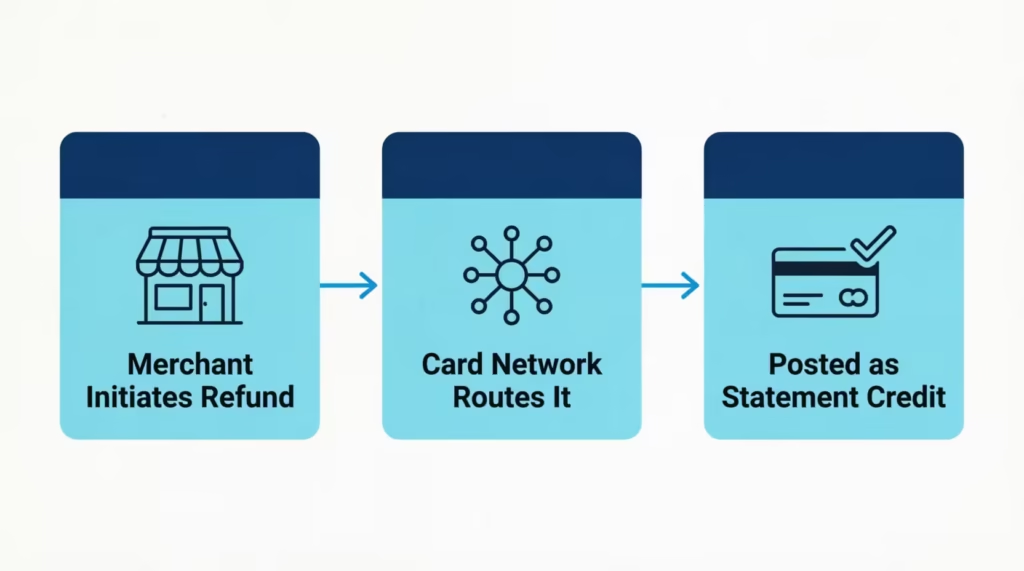
Here is the three-stage journey your money takes during the Discover card refund process:
- The merchant initiates the refund. The store, app, or service has to actually start the return on their end. They send a refund request through their payment processor. If they forget this step, nothing happens, no matter how long you wait.
- The card network routes it. Discover acts as both the network and the issuer in most cases. The refund request moves through this network routing system, which checks the original transaction and matches it to your account.
- Discover posts it as a statement credit. Once the routing checks pass, Discover applies the amount to your account. This shows up as a merchant-initiated refund, also called a statement credit. It lowers what you owe by that amount.
The refund does not go back to your bank. It goes back to the card you used. That’s why people sometimes think the money is “missing.” It’s sitting as credit on your card, not in your checking account.
💡 Pro Tip: Save the refund confirmation email or receipt from the merchant. If the refund stalls, that proof shows Discover the merchant truly started the process, which speeds up any follow-up.
How Long Does Discover Refund Take to Post
Most refunds post within 5 to 10 business days, but some can take up to 30 days. The clock does not start when you hand over the item. It starts when the merchant actually submits the refund to their processor.
Several things shape this timing:
- How fast the merchant acts. Some refund the same day. Others wait until they receive and inspect the returned item.
- Weekends and holidays. Banks and processors only work on business days. A return on Friday night may not move until Monday.
- The merchant’s own policy. Subscription services and large retailers often batch refunds, which adds days.
- Bank holidays and processing queues. These can push posting time toward the longer end.
If you’re past 10 business days with no sign of the credit, it’s time to check in with the merchant first before contacting Discover.
Why a Charge Still Shows as Pending After You Return Something
A pending transaction is a hold on funds, not a final charge. When you buy something, the merchant places a hold. When you return it, the merchant has two options. They can release the hold, or they can let the charge post and then send a separate refund.
Most stores let the charge post first. So you’ll often see both the original charge and the refund credit on your statement. They cancel each other out, but they don’t disappear. Your account will list two lines, one negative and one positive, for the same amount. This is normal accounting, not a mistake.
If the charge is still pending after about 7 days and no refund is showing, call the merchant. They may have voided the sale without telling you, or the hold may just need more time to drop off.
In-Store vs. Online Return Refund Timing
The speed depends on how the return happens.
- In-store returns are usually faster. The cashier scans the item, processes the return on the spot, and the refund moves into the network the same day. You’ll often see it on your account within 3 to 7 business days.
- Online returns take longer. You ship the item back. The seller waits for it to arrive. They inspect it. Only then do they start the refund. This easily adds 7 to 14 extra days before the money even enters the routing system.
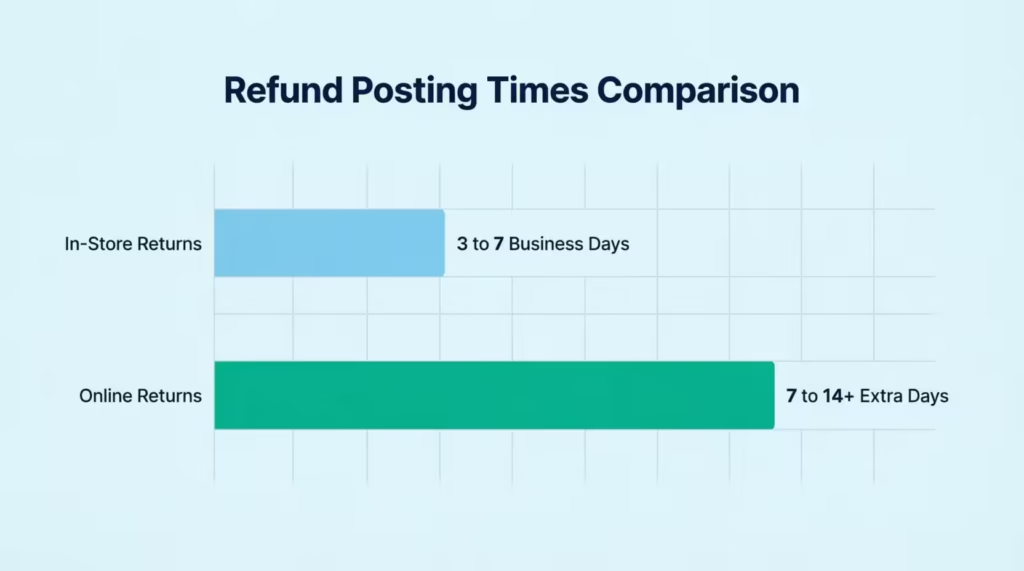
Plan for online returns to take two to three weeks from the day you ship.
What a Negative Balance Means on Your Discover Account
A negative balance, also called a credit balance, means Discover owes you money. It happens when a refund posts after you’ve already paid the bill for that purchase.
Here’s a simple example. Sarah, a marketing coordinator, pays her Discover bill in full each month. She paid her $620 statement, which included a $180 jacket. The next week, she returned the jacket. The $180 refund was posted, but she’d already paid for it. Now her account shows a balance of -$180.
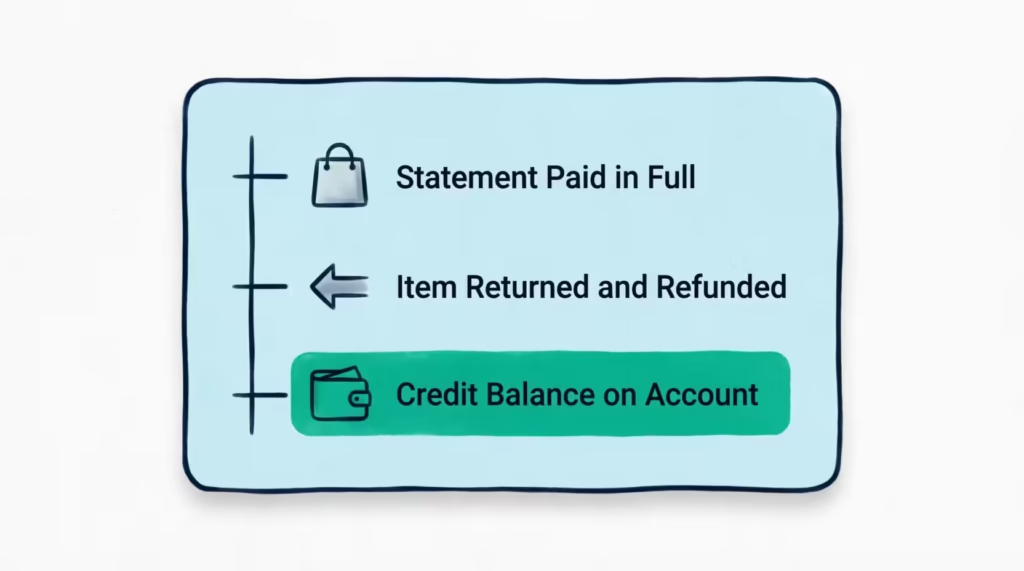
A negative balance is not a problem. Key facts to know:
- It does not hurt your credit score. Credit bureaus see it as a $0 balance or sometimes a positive sign. Your credit utilization ratio stays low or at zero, which helps your score.
- It applies automatically. Your next purchase will pull from this credit first. So if Sarah buys $100 of groceries, her balance becomes -$80 instead of $100.
- You don’t need to do anything. The money is safe and tied to your account.
If you don’t want to wait and use it up through future purchases, you can request a credit balance refund as cash. That section is coming up below.
Does a Refund Count Toward Your Minimum Payment Due
No. A refund does not count as a payment. This is one of the biggest mistakes people make, and it can cost real money.
A refund and a payment are two different things on your account. A payment is money you send from your bank to Discover. A refund is money a merchant sends back. Your minimum payment due is based on the activity from your last billing cycle, and it must still be paid by the due date.
Picture this. Michael, a freelance designer, has a $300 minimum payment due on the 15th. On the 10th, a $400 refund posts. He sees his balance drop and assumes he’s covered. He skips making a payment. On the 16th, Discover charges a late fee of up to $41, and his account is reported as late.
To stay safe:
- Always make at least the minimum payment by the due date, even if a refund has just been posted.
- If a refund made your balance negative, you still owe nothing extra, but pay any prior charges that were on the last statement.
- Check your statement balance, not your current balance, when deciding what to pay.
⚠️ Mistake to Avoid: Treating a refund as your monthly payment. The statement credit lowers your balance, but it does not satisfy the minimum payment due. Always send a separate payment by the due date to avoid late fees and credit score damage.
Do You Lose Rewards or Cash Back When You Get a Refund
Yes, refunds usually trigger a rewards clawback. This means Discover takes back the cash back you earned on the original purchase.
The logic is simple. The cash back rewards program pays you for spending money. If you return the item, you didn’t really spend that money. So the rewards tied to that transaction are reversed.
How it shows up:
- The reversal is automatic. You don’t have to do anything.
- It appears as a negative line in your rewards activity, usually with the same merchant name.
- If you redeemed those rewards already as a statement credit, Discover may show a small balance owed equal to the clawed-back amount.
There’s one case where you may keep rewards. If the store gives you store credit or a gift card instead of refunding your card, the original purchase still stands on your account. In that situation, the cash back stays since the spending was not reversed.
For partial refunds, only the rewards on the refunded portion get clawed back. If you bought $200 of items and returned $50 worth, you keep the rewards on the remaining $150.
How to Get a Discover Credit Balance Refunded as Cash
If you have a credit balance and want actual cash instead of waiting to spend it on future purchases, you can request a payout. Discover offers two main ways to get this money out.
Method 1: Call Discover customer service.
- Dial the number on the back of your card. The main line is 1-800-DISCOVER (1-800-347-2683).
- Tell the agent you want to request a credit balance refund.
- Choose how you want the money: a paper check mailed to your address on file, or a direct deposit to your linked bank account.
- Confirm the amount and your details. Direct deposit usually takes 2 to 3 business days. Mailed checks can take 7 to 14 days.
Method 2: Send a written request.
- Log in to the Discover Account Center to find the correct mailing address for credit balance requests.
- Write a short letter with your name, account number, mailing address, the amount of the credit balance, and how you’d like the refund delivered.
- Sign and date the letter, then mail it.
Written requests take longer but create a paper trail, which helps if the amount is large.
Before you call, check your account credit total on your statement so you know the exact amount you’re owed.
The Legal Rule That Forces a Refund After Six Months
Federal law, through the Truth in Lending Act and Regulation Z, requires credit card issuers to refund any credit balance over $1 if it has been on the account for more than six months. This applies to Discover and every other major issuer.
So even if you never call or write, a credit balance sitting on your account will eventually be sent to you, usually as a check mailed to the address Discover has on file. But six months is a long time to wait for your own money. Requesting it yourself is much faster.
Refund vs. Dispute: Which Process Applies to Your Situation
A refund and a dispute are not the same thing. Picking the wrong one can waste weeks.
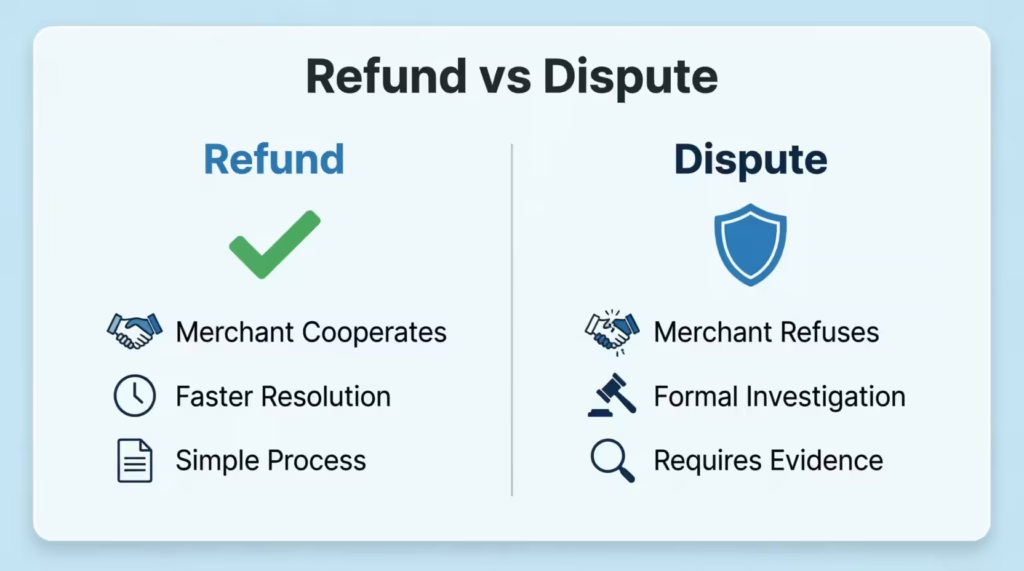
- A refund is when the merchant cooperates. You return the item or cancel the service, and the store agrees to send your money back. This is fast, simple, and goes through the normal refund posting flow.
- A dispute, also called a chargeback, is when the merchant refuses to help, or when the charge itself is wrong, fraudulent, or unauthorized. You file this through Discover, not the store. It’s a formal process under the Fair Credit Billing Act, and Discover investigates on your behalf.
Use a refund when:
- The store agrees that the return is valid.
- You canceled a subscription, and it’s within their policy.
- The merchant says they will process it.
Use the Discover dispute process when:
- The charge was never authorized by you.
- You returned the item, and the merchant refuses to refund.
- The product or service was never delivered.
- The charge amount is wrong, or you were billed twice.
Disputes can take 30 to 90 days. The Consumer Financial Protection Bureau (CFPB) requires creditors to acknowledge a dispute within 30 days and resolve it within two billing cycles, up to 90 days. During that time, you do not have to pay the disputed amount.
What to Do If the Merchant Refuses to Refund You
If the store will not cooperate, you have a clear path forward.
- Gather your documents. Keep the receipt, the return tracking number, screenshots of return policies, and any emails or chat logs with the merchant.
- Try one more time in writing. Send a final email asking for the refund and stating you will dispute the charge if it’s not resolved. Give them a deadline, like 5 to 7 days.
- Open a dispute with Discover. Log in to the Discover Account Center, find the transaction, and click the dispute option. Or call the number on your card.
- Submit your evidence. Upload the documents you gathered. The more proof, the faster the case moves.
- Wait for the provisional credit. Discover often applies a temporary credit while they investigate, so you aren’t stuck paying for something that’s in dispute.
Be specific about the reason. “Merchandise returned, refund not received” works better than “I want my money back.”
What Happens to a Refund If Your Discover Card Was Closed, Replaced, or Expired
The good news: your money is not lost. Discover handles each situation in a specific way.
- Card replaced (same account, new number). The account is still active. The refund posts normally to that account, even though the card number changed. You’ll see it on your next statement.
- Card expired, but the account is still open. Same as above. The expiration date doesn’t close the account. The refund will post to your account credit balance with no problem.
- Account fully closed. The refund still goes to Discover from the merchant. If your account is closed but has a balance you owe, the refund applies to that first. If a credit balance is left after that, Discover will mail you a check to your last known address.
In all three cases, the most important step is making sure Discover has your current mailing address. Log in to the Discover Account Center and update your contact info before a refund is expected.
If you closed your account and changed addresses, call Discover right away to update where any checks should go. Otherwise, the check may be returned and held until you contact them.
What to Do If a Discover Refund Doesn’t Show Up
If 10 business days have passed and your refund still isn’t visible, work through this checklist in order. Doing it in this exact sequence saves time.
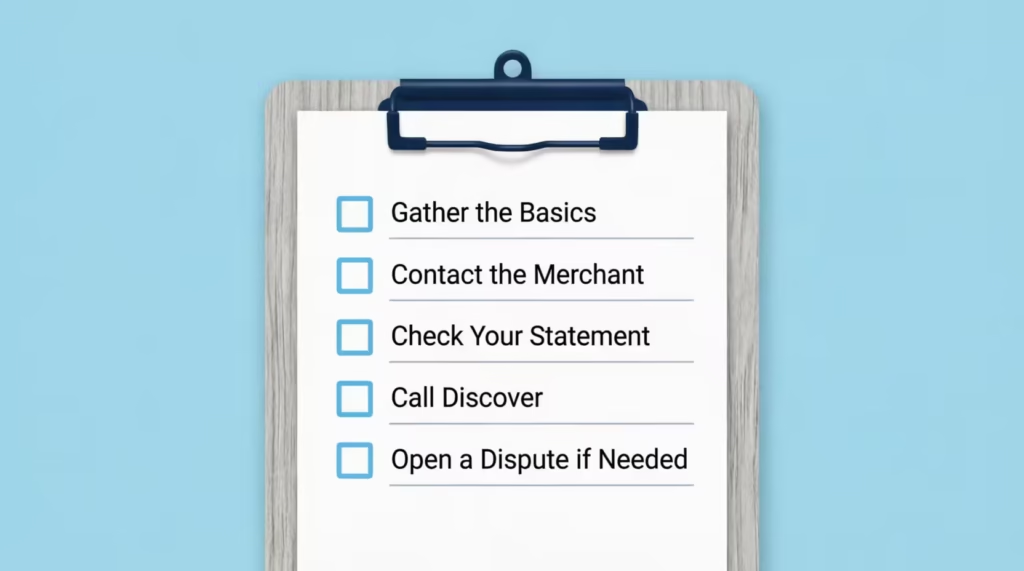
Step 1: Gather the basics.
- Original purchase date and amount.
- Merchant name as it appears on your statement.
- Date of return or cancellation.
- Refund confirmation number or email from the merchant.
- Return tracking number if you shipped the item.
Step 2: Contact the merchant first.
Call the store and ask for the refund’s processing date and reference number. Many “missing” refunds are simply ones the merchant never actually submitted. If they can’t prove it was sent, ask them to process it now.
Step 3: Check your statement carefully.
Log in to the Discover Account Center. Search the merchant’s name. Sometimes refunds show up under a slightly different name than the original charge, especially for online sellers using third-party processors.
Step 4: Call Discover.
If the merchant insists they sent it but you don’t see it, call Discover. Give them the merchant’s reference number. They can search the network records and confirm whether the refund truly arrived.
Step 5: Open a dispute if needed.
If the merchant won’t help and Discover can’t find the refund, file a dispute. Provide all the proof you gathered in step 1. Under the merchant return policy plus federal billing protections, Discover will investigate and credit your account if your case checks out.
📌 Did You Know: Federal law gives you up to 60 days from when the disputed statement was sent to file a billing dispute under the Fair Credit Billing Act. After that window, you may lose the right to chargeback protection, so move quickly when something looks off.
Frequently Asked Questions
How long does a Discover refund take to post?
Most refunds appear within 5 to 10 business days from when the merchant submits them. Some can take up to 30 days, mostly because of shipping time, merchant processing, or weekends. The wait starts when the merchant actually sends the refund, not when you return the item.
Does a refund count as a payment on Discover?
No. A refund lowers your balance, but it does not count as your monthly payment. You still need to send the minimum payment by the due date. If you skip it because you saw a refund, you can be charged a late fee and reported as late.
Why is my Discover balance negative after a refund?
Your balance turns negative when a refund posts after you’ve already paid the bill for that purchase. Discover now owes you money. This does not hurt your credit score, and the credit will apply to your next purchase automatically.
Do I lose rewards when I get a refund on Discover?
Yes, in most cases. The cash back you earned on the original purchase is reversed when the refund posts. This is called a rewards clawback. If the store gave you store credit instead of refunding your card, the rewards usually stay.
Can I get my Discover credit balance refunded as cash?
Yes. Call Discover at 1-800-347-2683 and ask for a credit balance refund. You can choose a mailed check or direct deposit to your bank. Direct deposit takes 2 to 3 business days. A mailed check takes 7 to 14 days.
What if a merchant won’t refund my Discover purchase?
Save all proof, then file a dispute with Discover through the Account Center or by phone. Submit your receipts, return tracking, and any messages with the seller. Discover often gives you a provisional credit while they investigate the case.
What happens to a refund if my Discover card was replaced?
The refund still goes to your account, since the account number stays the same when your card is replaced. You’ll see it post normally, even though the physical card number on the front is different.
Wrapping Up
The Discover card refund process moves through three steps: the merchant starts it, the network routes it, and Discover posts it as a credit. Most refunds clear in 5 to 10 business days. Refunds do not replace a minimum payment, often trigger a rewards clawback, and can create a safe negative balance you can cash out.
Disputes are different from refunds and need to be filed through Discover when a merchant won’t cooperate.
Based on these steps, the most effective approach is to keep your receipts, track timing, and act fast when something looks off.
If you know someone who recently returned a big purchase, share this guide so they avoid late fees and lost rewards.