If you’ve heard about virtual card numbers and wondered whether your Discover card supports them, you’re not alone. Many Discover cardholders aren’t sure the feature even exists, or they can’t figure out where to find it in the app or on the website.
Getting a Discover virtual card number is straightforward once you know exactly where to look.
In this guide, we walk you through every step, from generating your number to using it safely at checkout, so you can shop online with real confidence.
At a Glance
This guide explains how to generate and use a Discover virtual account number, covering eligibility, step-by-step instructions for the mobile app and desktop portal, what card details you receive, and where virtual numbers do and do not work.
Core Facts:
- Discover’s virtual account number feature is free for eligible cardholders, including Discover it Cash Back, Discover it Chrome, and Discover it Miles, and connects directly to your existing account with no separate application required.
- Each virtual account number is generated fresh and includes three unique details: a 16-digit card number, an expiration date, and a CVV, all different from your physical card.
- Once you navigate away from the generation screen, that exact virtual number cannot be retrieved; you must generate a new one for any future transaction.
- Virtual numbers can be generated in the Discover mobile app (iOS and Android) or at Discover.com by navigating to your card account, selecting Manage, then choosing Get Virtual Account Number.
- Purchases made with a virtual account number earn the same rewards as your physical card and appear on the same monthly billing statement with the same credit limit and due date.
- Virtual numbers are not usable at physical point-of-sale terminals, ATMs, car rental pick-up counters, or hotel check-in desks, and are unreliable for recurring subscription billing.
Best for:
- Discover cardholders making one-time purchases at new, small, or lesser-known online retailers where they are unsure of the merchant’s data security practices.
- Online shoppers who want to keep their physical card number private without switching payment platforms or setting up a digital wallet.
- Anyone who has experienced concern about merchant data breaches and wants to limit exposure to a single transaction-specific number rather than their permanent card number.
Does Discover Offer a Virtual Credit Card Number?
Yes, Discover does offer virtual card numbers. The feature is called a Virtual Account Number, and it’s available to eligible Discover cardholders at no extra charge. It doesn’t require a new card application or a separate account. It connects directly to your existing Discover account.
A virtual account number is a unique card number that is different from the one printed on your physical card. You create it in your Discover account. Then, use it for online or phone purchases. The charge appears on your regular Discover account, like any purchase with your physical card.
This is a native Discover Bank feature. You access it directly through the Discover mobile app or through your account on Discover.com. There’s no third-party app or add-on required.
Which Discover Cards Are Eligible?
Most standard Discover credit cards support virtual account numbers. This includes the Discover it® Cash Back, Discover it® Chrome, and Discover it® Miles cards.
If you’re not sure whether your specific card qualifies, log into your Discover account and navigate to the “Manage” section of your card. If the virtual account number option appears, your card supports it. If it doesn’t show up, call Discover customer service at the number on your card to check your product eligibility.
📌 Did You Know: Discover’s virtual account numbers are tied to your actual account. This means your credit limit, billing cycle, and rewards program all stay exactly the same when you use one.
How Discover’s Virtual Card Number Works
Before you generate your first virtual account number, it helps to understand exactly what you’re working with. That way, you’ll know why it’s safe to use and what to expect at checkout.
A Discover virtual account number is a separate, usable card number that routes transactions back to your real Discover account. The merchant processes the charge against the virtual number, not your physical card number. Your actual card number stays private throughout the transaction.
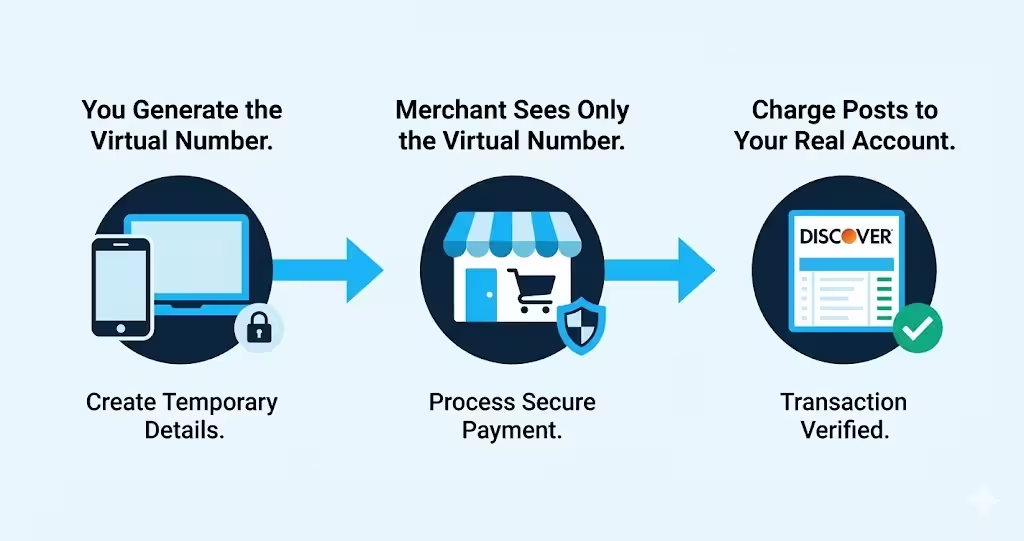
Your physical card details stay protected. The merchant only sees the virtual number. So, even if that merchant’s system is later compromised, your information remains safe. A data breach at a retailer would expose the virtual number, not the real one tied to your account.
Discover’s implementation uses a number that is linked to your account but distinct from your physical card. The charge still goes to your Discover account, your credit limit is the same, and your statement is the same. The only thing that changes is the card number the merchant sees.
Is the Virtual Number Different Every Time You Generate One?
Yes. Each time you generate a virtual account number through Discover, you receive a new, unique number. The number isn’t reused across sessions.
This matters for a couple of practical reasons. First, you should copy or note the number before leaving the screen. You can’t get the same number back after closing that session. If you need a new number later, you’ll generate a fresh one. Second, each new number you generate is independent. So, if a number from a past purchase is compromised, it won’t affect numbers used in other transactions.
The number is generated fresh each time through the Discover app or website. There’s no bank of saved numbers to scroll through.
How to Get Your Discover Virtual Card Number on the Mobile App
Most cardholders find it easiest to generate a virtual account number directly from the Discover mobile app. The app is available for both iOS and Android, and the navigation path is the same on both platforms.
Start by opening the Discover mobile app and logging into your account. Once you’re on the home screen, follow these steps:
- Tap the card image or the account you want to use at the top of the home screen.
- Tap “Manage” from the card detail screen.
- Look for the “Virtual Account Number” option in the manage menu.
- Tap “Get Virtual Account Number.”
- Confirm your identity if prompted (this may be a PIN, Face ID, or Touch ID step).
- Your virtual account number will appear on screen, along with an expiration date and security code.
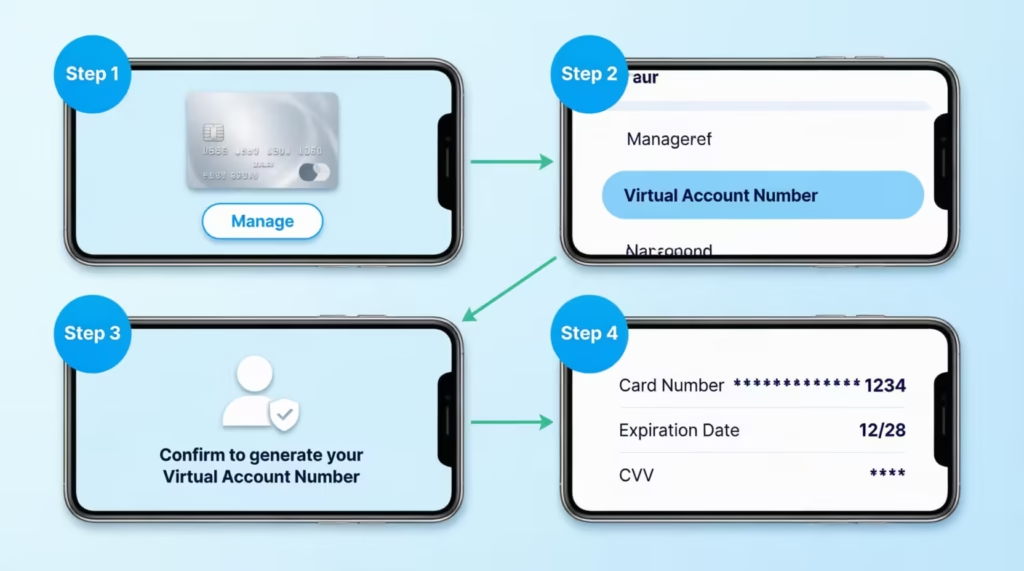
If you don’t see “Virtual Account Number” in the Manage menu, make sure your app is updated to the latest version. Older versions of the app occasionally nest this option under a card security or card details submenu. If it still doesn’t show up after updating, your card might not support the feature. You may also need to use the desktop portal instead.
What Card Details You Receive (Number, Expiration Date, and CVV)
When your virtual account number appears, you’ll see three pieces of information. Each one is specific to the virtual number, not copied from your physical card.
- The virtual card number: A 16-digit number that is different from your physical card number. This is what you’ll type into the card number field at checkout.
- Expiration date: A date assigned specifically to this virtual number. It’s different from the expiration date on your physical card. Use this date, not the one on your card, when filling in the expiration field online.
- Security code (CVV): A 3-digit code that is unique to the virtual number. Use this code, not the CVV on the back of your physical card, when prompted at checkout.
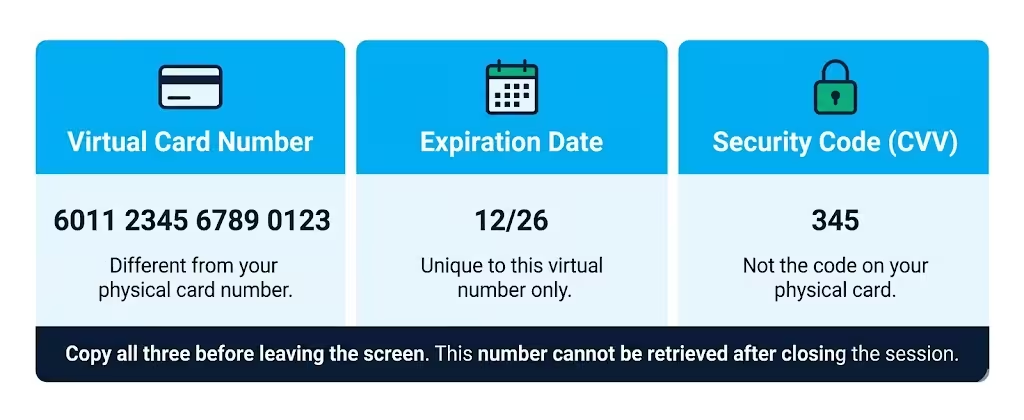
Take a moment to copy all three details before leaving the screen. Once you navigate away or close the session, you won’t be able to retrieve that exact number again. If you need to shop across multiple browser tabs or windows, copy the details to a secure place first.
How to Get Your Discover Virtual Card Number on the Desktop Portal
If you prefer to generate your virtual account number from a laptop or desktop computer, the process runs through Discover.com. The path is slightly different from the mobile app but leads to the same result.
Log in to your account at Discover.com, then follow these steps:
- Click on your card account from the account dashboard.
- Click “Manage” in the top navigation area of the card account page.
- Select “Virtual Account Number” from the dropdown or submenu options.
- Click “Get Virtual Account Number.”
- Complete any identity verification prompt if it appears.
- Your virtual account number, expiration date, and security code will display on screen.
The desktop path is handy if you’re shopping on your computer. You can see the virtual number in one tab while checking out in another. The card details function just like those in the mobile section above. This includes the unique expiration date and CVV tied to the virtual number.
💡 Pro Tip: Open the Discover portal in one browser tab and your shopping cart in another. That way you can flip between them quickly without needing to write anything down.
How to Use Your Discover Virtual Card Number at Online Checkout
Once you have your virtual account number, expiration date, and security code in hand, using it at checkout is simple. The process is identical to entering your physical card details.
At the payment page of any online retailer, fill in the fields as follows:
- Card number field: Enter the 16-digit virtual account number, not your physical card number.
- Expiration date field: Enter the expiration date shown for your virtual number. Don’t use the date printed on your physical card.
- CVV or security code field: Enter the 3-digit code shown with your virtual number. Don’t use the code on the back of your physical card.
- Cardholder name field: Enter your name exactly as it appears on your Discover account. This doesn’t change.
- Billing address field: Enter the billing address associated with your Discover account. This is the same address you’d use with your physical card. The virtual number is tied to the same account, so the billing address doesn’t change.
After you submit the payment, the merchant processes the transaction against the virtual number. From the merchant’s perspective, it looks like a normal card-not-present transaction.
You’ll receive a charge on your Discover account just as you would with your physical card. Confirmation emails and order summaries from the merchant will show the virtual number, which is expected.
If a transaction is declined, check that you entered all three details correctly. Also, make sure the expiration date matches the virtual number’s date, not your physical card’s.
Does a Discover Virtual Card Number Earn the Same Rewards?
Yes. Purchases made with a virtual account number earn the same rewards as purchases made with your physical Discover card. The virtual number is just a different face on the same account. Discover sees the charge as coming from your account regardless of which number was used.
Discover it® Cash Back cardholders earn 5% cash back on certain categories each quarter. This applies to qualifying purchases made with a virtual number at those merchants. The same everyday 1% applies to all other purchases. There’s no difference in the earning rate between the physical card and the virtual number.
There’s also no scenario in which using a virtual number forfeits or reduces your rewards. The charge posts to your account in the same way, and cash back or miles accumulate normally.
Does the Virtual Card Number Share the Same Billing Statement?
Yes. All charges made with your virtual account number show up on the same monthly bill as your physical card purchases. There’s no separate statement, no separate minimum payment, and no separate due date.
The virtual number draws from the same credit limit as your physical card. A purchase made with the virtual number reduces your available credit by the same amount as any other charge. Your total balance, minimum payment, and payment due date remain unchanged.
The only visual change on your statement is that the transaction line shows the virtual number instead of your physical card number. This helps you easily spot which charges are from online virtual card use.
Where a Discover Virtual Card Number Will Not Work
Virtual account numbers are designed for online and phone purchases. They’re not built for every situation. Knowing where they fall short saves you from a declined transaction at the wrong moment.
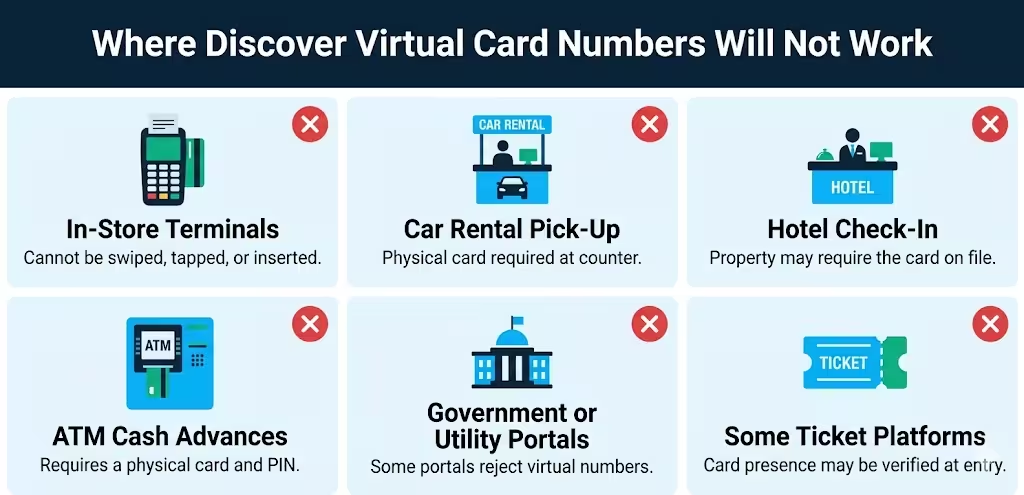
In-store purchases at a physical terminal: A virtual number can’t be entered into a chip reader, swiped, or tapped at a point-of-sale terminal. It exists only as a string of digits. For in-store shopping, use your physical Discover card or a compatible mobile wallet.
Car rental pick-up counters: Most car rental companies require the physical credit card that was used to book the reservation to be present at pick-up. Even if you booked online using a virtual number, the agent at the counter will ask to see the actual card. In this case, use your physical Discover card to book and pick up.
Hotel front desk check-in: Hotels often place a hold on the card presented at check-in. Many properties require the physical card that matches the reservation. If you booked with a virtual number, you may encounter problems at check-in. Book hotel stays directly with your physical card to avoid issues.
ATM cash advances: Virtual account numbers can’t be used at ATMs. A cash advance requires a physical card and a PIN, neither of which a virtual number supports.
Some government or utility portals: Certain government payment portals and utility payment systems have additional card verification requirements that virtual numbers can’t satisfy. If a payment fails on one of these sites, try your physical card.
Some ticket or event platforms: A handful of platforms that verify card presence at event entry may flag virtual numbers. When in doubt, purchase event tickets with your physical card.
When a virtual number doesn’t work, the solution is straightforward: use your physical Discover card for that transaction.
Can You Use a Discover Virtual Card for Recurring Subscriptions?
This requires some caution. Discover’s virtual account numbers are generated fresh each time. A new number doesn’t persist across sessions. When you use a virtual number for a subscription, like a streaming service or utility, the merchant keeps that number. They keep it for future billing. The problem is that this particular number may expire before the merchant tries to charge it again.
If a subscription merchant tries to bill an expired or unknown virtual number, the charge will probably fail. This can lead to service interruptions, late fees, or account suspensions with the merchant.
For one-time or single-session online purchases, a virtual number works very well. For monthly subscriptions, using your physical Discover card is safer and more reliable. That way, the merchant’s recurring charge always reaches an active, valid number tied to your account.
How a Discover Virtual Card Number Protects You From Fraud
The core benefit of using a virtual account number is what happens when things go wrong on the merchant side.
Data breaches at online retailers are a known risk. When a merchant’s system is compromised, attackers can access stored card numbers. If you paid with your physical Discover card number, that number is exposed and potentially usable by a bad actor. You’d need to request a new card, update every account where you saved that number, and wait for a replacement.
When you pay with a virtual account number, the merchant stores only that virtual number. If their system is breached, the attackers get the virtual number, not your real physical card number. Your actual card number remains safe and unchanged.
Beyond that, Discover’s fraud protection applies to virtual number transactions just as it does to physical card transactions. Discover’s $0 Fraud Liability Guarantee means you won’t be held responsible for unauthorized charges made with your account, including those involving a compromised virtual number.
This combination makes virtual numbers great for shopping at new, small, or lesser-known online stores. You might feel less sure about their security practices. The potential exposure is limited to one number tied to one transaction, not your entire card.
Discover Virtual Card Number vs. Using Apple Pay or Google Pay
Virtual account numbers and digital wallets, like Apple Pay and Google Pay, keep your card number safe. They help protect you when you shop online. However, they operate in different ways. Understanding the difference helps you pick the right tool for the right situation.
Apple Pay and Google Pay work by tokenizing your card. When you add your Discover card to a digital wallet, the wallet generates a device-specific token that represents your card. At checkout, the merchant receives that token, not your actual card number. This process happens automatically and is handled at the device and network level. You don’t manually enter card details. You authenticate with Face ID, Touch ID, or a PIN, and the payment is sent.
Discover’s virtual account number is a manually generated number that you type into a form. It’s useful because it works wherever a standard card number can be used. This includes shops that don’t support Apple Pay or Google Pay. You generate it, copy the details, and enter them into whatever form the merchant presents.
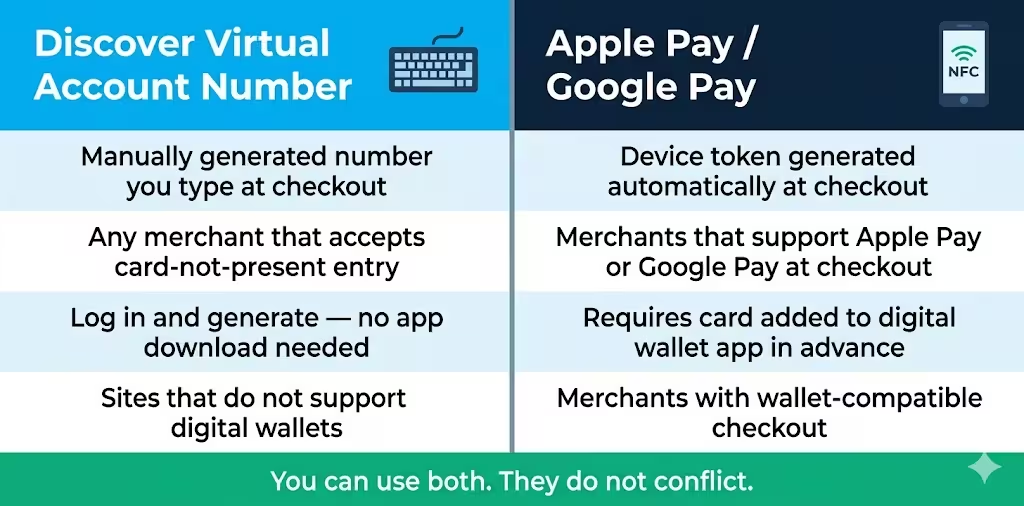
A practical breakdown of when each option fits best:
| Situation | Best Option |
|---|---|
| Merchant has an Apple Pay or Google Pay button | Digital wallet – faster and equally secure |
| Merchant requires typing card details into a form | Virtual account number |
| You’re on a desktop browser without wallet integration | Virtual account number |
| Shopping at an unfamiliar merchant on mobile | Either works – virtual number gives manual control |
| You want to avoid sharing your real card number | Both accomplish this |
You can use both methods. They don’t conflict with each other. Use digital wallets when the merchant supports them. If you need to enter card details manually at checkout, use a virtual account number.
Frequently Asked Questions (FAQs)
Can a virtual card be a credit card?
Yes, a virtual card can be a credit card. It’s just a digital number connected to your current credit card account. Discover’s virtual account numbers connect directly to your Discover credit line, so they function as credit cards in every practical sense.
Is there a virtual-only credit card?
Most virtual card numbers, like Discover’s, link to a physical credit card account. They are not standalone products. Discover’s virtual account number is an extra feature for eligible cardholders. It’s not a separate card you apply for on your own.
Are virtual credit cards truly free?
Discover’s virtual account number feature is available at no extra charge to eligible cardholders. There’s no application fee, no monthly cost, and no need for a separate account. It’s a built-in feature of your existing Discover card.
How do I get a virtual Discover card?
Log into your Discover account on the mobile app or at Discover.com, tap or click your card account, navigate to “Manage,” and select “Get Virtual Account Number.” The process takes under two minutes and requires no new application.
How can I see my full virtual card number?
Your full 16-digit virtual account number appears on screen immediately after you generate it through the Discover app or Discover.com. Copy it before you close the session. Once you leave, that exact number is lost.
What card details do I receive when I generate a Discover virtual account number?
You get three pieces of information: a 16-digit virtual card number, a unique expiration date, and a 3-digit CVV. These are all different from your physical card. Use all three virtual details at checkout, not the numbers printed on your physical card.
Can I use my Discover virtual card immediately after generating it?
Yes. The virtual account number is ready to use the moment it appears on screen. Enter the number, expiration date, and CVV at any online checkout just as you would with a physical card.
Is a virtual card safer than a physical card?
Yes, for online purchases, a virtual number hides your real card number from merchants. If a retailer’s system is breached, only the virtual number is exposed, leaving your actual Discover card number safe and unchanged.
Can I use a Discover virtual card number for recurring subscriptions?
Using a virtual number for subscriptions can be risky. It might expire before the merchant bills you again. This can lead to failed charges and service interruptions. For ongoing subscriptions, your physical Discover card is the more reliable option.
How do I view my virtual Discover card?
Open the Discover mobile app or log in at Discover.com, select your card account, tap “Manage,” and choose “Virtual Account Number.” The number displays on screen along with its expiration date and CVV for immediate use.
Wrapping Up
Generating and using a Discover virtual account number takes less than two minutes once you know where to look. The feature is in the Discover mobile app and on Discover.com. It’s free for eligible cardholders and earns the same rewards as your physical card. The steps are the same whether you’re on iOS, Android, or a desktop browser: log in, navigate to Manage, and select Virtual Account Number.
Virtual numbers are great for one-time online purchases with new or unknown merchants. For subscriptions, car rentals, and hotel check-ins, using a physical card is better. For many online shoppers, using a Discover virtual card number is the best way to keep their real card details safe. You can shop as usual without any changes.
If you know someone who shops online frequently and hasn’t set up a Discover virtual card number yet, share this guide with them. It could spare them a lot of headaches if a merchant’s system ever gets breached.