You opened your American Express app, spotted something called “Pay Over Time,” and now you’re not sure if it’s helping you, hurting you, or quietly charging interest you never agreed to. Maybe the setting was already on. Maybe a recent purchase moved into a balance you thought you’d paid off. Either way, American Express Pay Over Time can feel confusing when you didn’t choose it yourself, and the wrong move could cost you real money.
Pay Over Time is an optional Amex feature that lets you carry eligible charges as a revolving balance with interest, instead of paying them in full each month.
In this guide, I’ll walk you through how it works, what it costs, how it shows up on your statement, and how to switch it on or off in a few taps. By the end, you’ll know exactly what to do with it.
Key Takeaways
This guide explains how American Express Pay Over Time works, including which cards offer it, how eligible charges are determined, how daily interest accrues, shared limit rules, and how to turn the feature on or off.
Core Facts:
- Pay Over Time is built into the Amex Green, Gold, and Platinum cards (personal and Business versions) and is typically set to Active automatically when the account opens.
- Eligible charges include regular purchases, foreign transaction fees on those purchases, and the Annual Membership Fee; cash advances and certain insurance premiums are not eligible.
- Interest is charged from the transaction date for charges added directly to Pay Over Time, or from the day after they move into that balance on the Closing Date.
- The Pay Over Time Limit is shared across three balance types combined: the Pay Over Time balance, the Cash Advance balance, and any active Plan It plan balances.
- Switching Pay Over Time on or off can be done anytime through the online account or by phone, with no credit check and no impact to credit limit.
- Plan It splits purchases of $100 or more into fixed monthly installments with a fixed monthly fee and no compounding interest, unlike the revolving Pay Over Time balance.
Best for:
- Cardholders who were auto-enrolled in Pay Over Time and want to understand what the setting actually does before changing it.
- People deciding between carrying a Pay Over Time balance, using Plan It for a large purchase, or paying early with Pay It.
- Cardholders whose Pay Over Time feature shows as suspended and need to understand what triggered it and how to resolve it.
What Is American Express Pay Over Time
American Express Pay Over Time is an optional feature built into select Amex cards. It lets you carry a balance on eligible charges with interest, instead of paying your full bill every month. You can see it as a “carry a balance” switch. This turns a regular Amex card into a credit card for some purchases.
To understand why this feature even exists, it helps to know the charge card vs credit card story behind Amex. For decades, American Express was famous for charge cards, not credit cards. A charge card has no preset spending limit, and the full balance is due in full each billing cycle. Pay the bill, repeat. There was no “minimum payment” option, and no interest, because you weren’t supposed to revolve a balance at all.
That worked fine for many cardholders, but life sometimes throws bigger bills your way. A new laptop. A wedding deposit. A business trip that hit the card all at once. So Amex added a way to pay those over time without forcing you to apply for a separate credit card. That is the feature you see today.
With Pay Over Time turned on, eligible charges get moved into a separate “Pay Over Time” balance. You still owe a minimum payment each month, but you don’t have to clear the full amount at once. Interest then starts to build on the carried balance, day by day, based on your APR.
One thing that stays the same: rewards. Using this feature does not change how you earn or redeem Membership Rewards points. You still earn points the same way on eligible spending, and your points don’t expire or shrink because you carried a balance. The only catch is that the interest you pay can quietly eat into the dollar value of those rewards, which I’ll cover later.
📌 Did You Know: Amex card numbers that start with 37 trace back to the company’s original charge card design from the late 1950s. The “Pay Over Time” feature is the modern bridge that lets these old-school charge cards act like credit cards when you need them to.
Which Amex Cards Offer It
Not every American Express card has this feature. It is built into the cards that started life as charge cards. That includes:
- The American Express® Green Card (personal and Business versions)
- The American Express® Gold Card (personal and Business versions)
- The Platinum Card® from American Express (personal and Business versions)
Amex credit cards, such as the Blue Cash Everyday® and Blue Cash Preferred® Cards, come with a standard credit limit. They also revolve balances by default. They don’t need a separate “Pay Over Time” switch.
If you’re not sure whether your card has it, log in to your online account and look at the Balance Details area. If you see a “Pay Over Time” line item or setting, your card supports it.
How American Express Auto-Enrolls You in Pay Over Time
Here’s the part that surprises most cardholders. Pay Over Time is usually set to “Active” the moment your account opens. You don’t have to apply for it or accept a special offer. If your card supports it, it’s most likely already on.
This is why people often spot it on their statement or app and ask, “Wait, how did I sign up for this?” In most cases, you didn’t sign up. The auto-enrollment happened in the background when the card was approved.
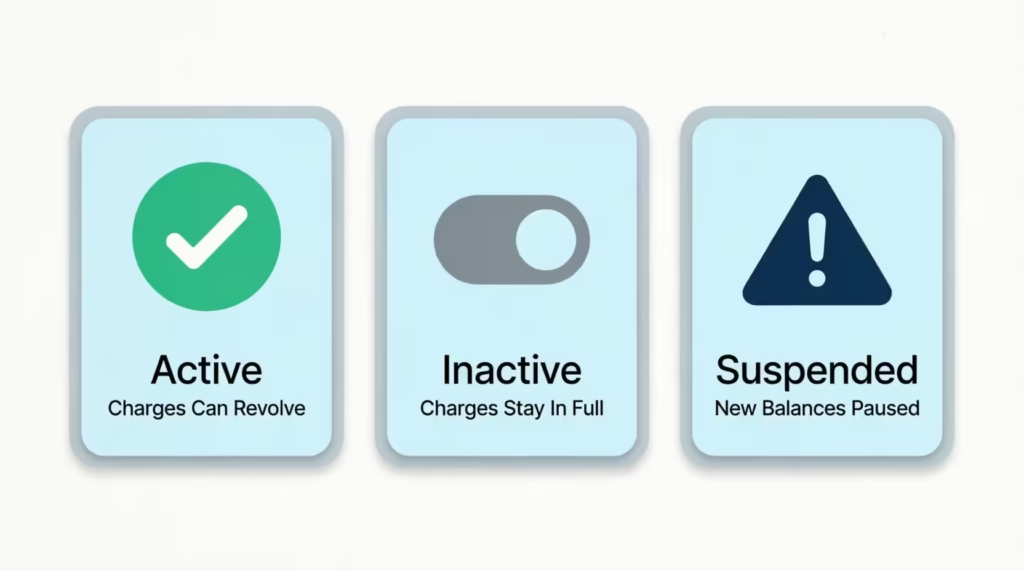
What does “Active” actually mean for your billing? When the feature is set to Active, eligible charges are automatically added to your Pay Over Time balance. If you don’t pay the Account Total New Balance by the due date, those eligible charges start to revolve, and interest builds on them.
When the setting is “Inactive,” eligible charges still post to your card, but they stay in the Pay in Full balance. That means the whole amount is due by the payment due date, just like a classic charge card. If you miss that payment, you may face late fees and other penalties, but not the same kind of revolving interest that Pay Over Time creates.
Flipping this switch on or off does not require a credit check. As American Express explains on its official page, you can change or view the Pay Over Time setting at any time through your online account or by calling the number on the back of your card.
There’s no hard pull on your credit and no impact to your credit score from toggling the feature. That’s true whether you turn it on for a one-time purchase or shut it off completely.
So if you didn’t choose to enroll, you’re not alone. The good news is that switching it off, if that’s what you want, is quick and won’t hurt your credit.
Which Charges Are Eligible for Pay Over Time
Not every charge on your card can revolve. Only certain types qualify. Understanding the difference between eligible and ineligible charges helps you see which transactions will go into the Pay Over Time balance. It also shows which ones you’ll need to pay in full.
Eligible charges include:
- Regular purchases made by you or any Additional Card Member on the account
- Foreign transaction fees tied to those purchases
- Your Annual Membership Fee for the card
Ineligible charges include:
- Cash advances, including cash equivalents like American Express® Travelers Cheques
- Certain insurance premiums
- Other fees you owe directly to American Express
So if you charge a $1,200 flight, that purchase is eligible and can move into your Pay Over Time balance. If you take a $300 cash advance from an ATM, that amount is not eligible and lands in your Pay in Full balance instead.
What happens to ineligible charges is simple but important. They get added to your Pay in Full balance, and the full amount is due by the payment due date that month. If you only pay the minimum, those ineligible items can still create late fees or trigger other issues, even when your Pay Over Time balance looks fine.
This is also why a cardholder might pay “the minimum” and still see warning notices. Pay Over Time eligibility doesn’t cover everything, and the Pay in Full portion can’t be carried.
⚠️ Mistake to Avoid: Treating cash advances as a normal purchase. Cash advances are never eligible for Pay Over Time, often carry a higher APR, and start charging interest from day one. Use the card for purchases, not for cash.
Understanding Your Pay Over Time Limit
Your Pay Over Time Limit is not the same as a spending limit. This is one of the biggest sources of confusion for Amex cardholders, so it’s worth unpacking.
The Pay Over Time Limit is the maximum amount you can carry as a balance with interest or place into a Plan It plan. It is not a cap on what you can spend with the card. Many Amex cards have no preset spending limit. This means your spending power can change based on your purchase history, payment record, credit, and other factors. The Pay Over Time Limit is a different number.
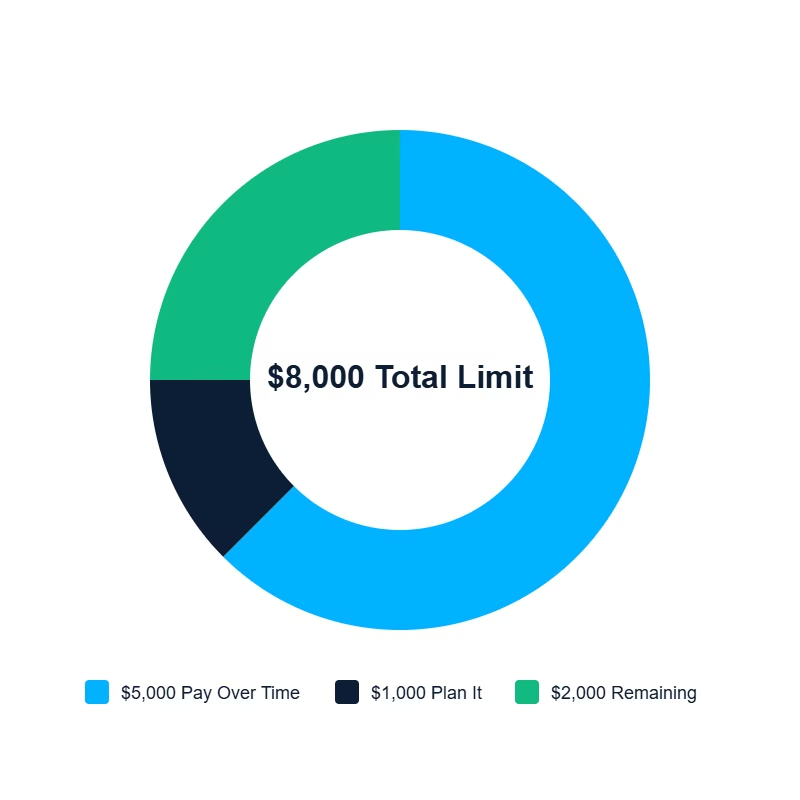
Here’s the part most people miss. The limit is shared across three balance types: your Pay Over Time balance, your Cash Advance balance, and any active Plan It plan balances. According to American Express, the Pay Over Time Limit applies to the total of your Pay Over Time, Cash Advance, and Plan It balances combined.
If your Pay Over Time Limit is $8,000, and you have $5,000 in Pay Over Time and $1,000 in an active Plan It plan, you only have $2,000 left. This means you don’t get a fresh $8,000 each time; it’s shared across all three buckets.
To check your current limit, log in to your online account, open your card, and look at the Balance Details section. You’ll see the limit listed there along with how much of it you’re already using.
What Happens If You Go Over the Limit
If you make a purchase that pushes the total over your Pay Over Time Limit, that excess does not get carried with interest. Instead, the over-limit portion is added to your Pay in Full balance and is due by the payment due date that month.
Your card will likely still let the purchase go through, but you should expect a larger bill the next time it posts. If you can’t pay the Pay in Full portion in full, you may face late fees or other account issues, even if your Pay Over Time balance looks healthy.
How Interest Is Calculated on Pay Over Time Balances
The cost of carrying a balance is where Pay Over Time gets expensive fast, so the mechanics are worth knowing in detail.
Interest on a Pay Over Time balance is based on a daily interest accrual model. Every day a charge sits in your Pay Over Time balance, a small slice of interest is added based on your daily rate, which is your APR divided by 365. The next day’s interest is then calculated on the new, slightly larger balance. That’s how compounding interest works on a credit card balance.
The timing of when interest starts also matters. Per American Express, for charges added automatically to a Pay Over Time balance at the time they post, interest is charged from the transaction date.
If charges move from your Pay in Full balance to your Pay Over Time balance on your Closing Date, interest is charged. This starts the day after they are added to your Pay Over Time balance. Either way, interest does not wait politely until the next statement, the way many people assume.
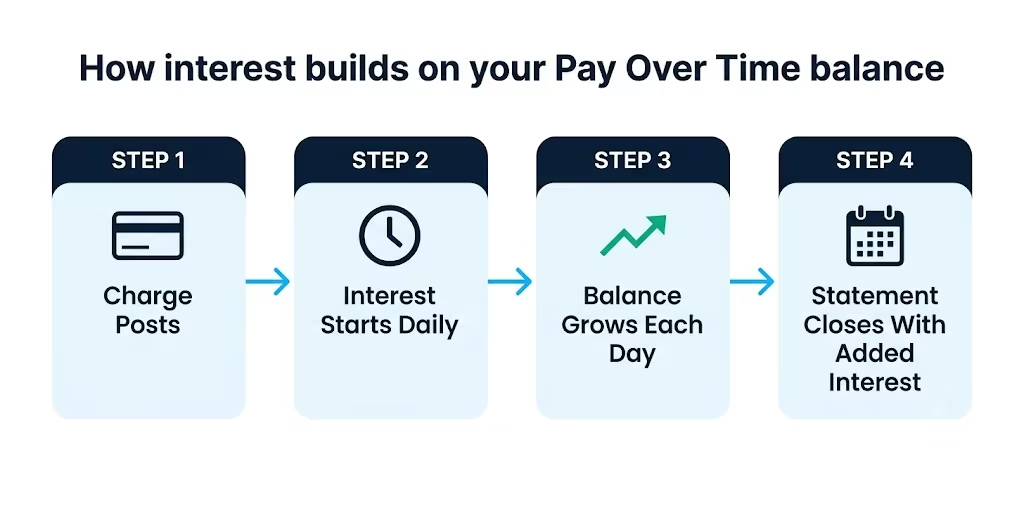
A quick example. Picture David, a marketing director at a small consulting firm. He charges a $3,000 business trip on his Amex Gold Card on the 5th of the month. Pay Over Time is Active. He pays only the minimum that cycle.
From day one, interest is building on the full $3,000, day by day, at his variable APR. By the time his next statement closes, the balance is no longer $3,000. It’s $3,000 plus all the daily interest that piled up.
The only way to fully avoid interest is to pay your Account Total New Balance in full by the Payment Due Date shown on your statement. If you do that, eligible charges that were added to Pay Over Time during the cycle don’t get hit with interest. Pay less than the full Total New Balance, and interest applies to anything still revolving.
Current Pay Over Time APR Ranges
The APR on Pay Over Time is variable. It moves up or down as the U.S. Prime Rate changes. As of 2026, Amex Pay Over Time APRs typically fall in a wide range from roughly the high teens to the high 20s, depending on the card and your creditworthiness. For context, the Federal Reserve tracks revolving consumer credit and overall interest rate trends in its monthly G.19 release, which is a useful reference for how credit card rates move over time.
The exact APR for your card is shown in your Cardmember Agreement and inside your online account under Balance Details. That’s the figure to trust, since rates differ between Green, Gold, and Platinum, and between personal and Business products. Always check your live rate before deciding to carry a balance.
💡 Pro Tip: Even a “low” Pay Over Time APR will usually cost you far more than the dollar value of any Membership Rewards points you earn on the same purchase. Avoid carrying a balance just to “earn more points.” The math almost never works in your favor.
How the Minimum Payment Is Determined
Your Minimum Payment Due is not a random number. American Express builds it from several pieces. As outlined on the official American Express page, the Minimum Payment Due includes all charges that were not added to a Pay Over Time and/or Cash Advance or Plan balance, plus a portion of your Pay Over Time and/or Cash Advance balance, any interest accrued, and any Plan Payment Due.
In plain terms, the minimum payment usually covers:
- Your full Pay in Full balance (charges that can’t revolve)
- A small part of your Pay Over Time and Cash Advance balances
- All interest charged that cycle
- Any monthly Plan Payment Due from a Plan It plan
Paying only the minimum keeps your account in good standing, but it leaves most of your Pay Over Time balance in place. That balance keeps building interest each day, which is why carrying a balance for months can become very expensive, even on a “premium” card.
Why Your Pay Over Time Feature Might Show as Suspended
A “suspended” Pay Over Time feature can feel alarming, but it usually points to a clear cause. Suspension does not mean your card is canceled. It means American Express has paused your ability to carry new balances and create new Plan It plans, while regular purchases on the card may still work.
Common triggers for suspension include:
- A past due payment on the account
- A returned payment that didn’t clear
- Your account being enrolled in a payment program with Amex
- General account standing issues that prompt a closer review
When suspended, eligible charges that would normally revolve get pushed into your Pay in Full balance instead. You can’t add new charges to Pay Over Time, and you can’t start a new Plan It plan. Existing Plan It plans typically continue on their original schedule.
To resolve it, the path is usually straightforward. Bring the account current by paying any past due amount, replace any returned payment with a successful one, and contact American Express to confirm next steps.
Calling the number on the back of the card is the fastest way to ask what specifically triggered the suspension and what they need to lift it. Often, suspension lifts once the underlying issue is fixed, but Amex makes the final call on whether to restore the feature.
Pay Over Time vs. Plan It vs. Pay It: What’s the Difference
These three Amex features sound similar, but they work very differently. Mixing them up can lead to wrong assumptions about cost and timing.
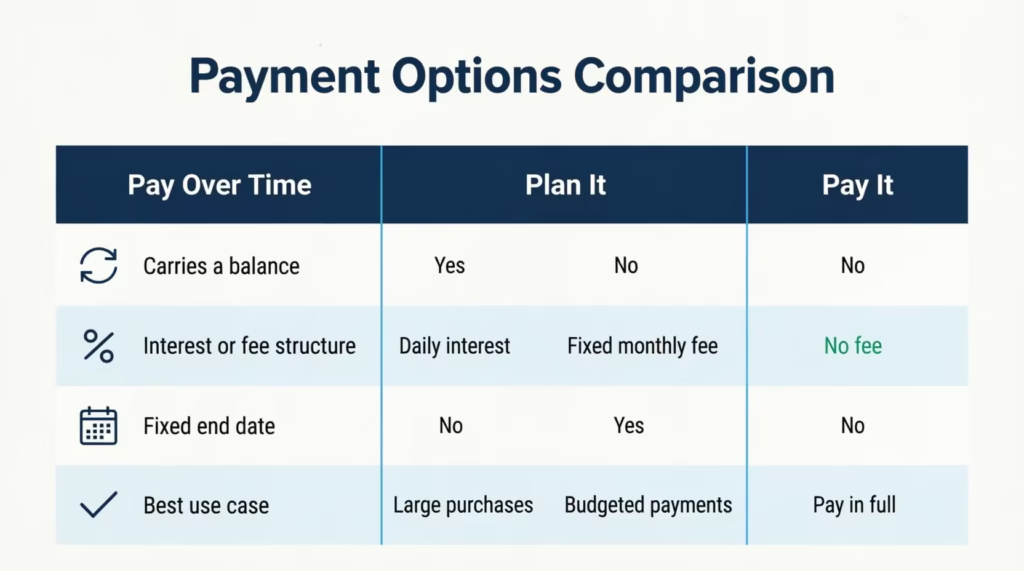
Pay Over Time is the revolving balance feature. Eligible charges sit in a Pay Over Time balance, daily interest builds, and you pay it down on your own schedule, as long as you make at least the minimum payment due each month. There’s no fixed end date and no fixed monthly fee. Cost depends on your APR and how long the balance sticks around.
Plan It is a buy now, pay later style installment feature. As described by American Express, Plan It allows you to split purchases of $100 or more into fixed monthly installments with a fixed monthly fee. There’s no compounding interest on the plan itself. You pick a plan duration up front (often 3 to 24 months), and the fixed fee plus installment amount is added to your minimum payment each month. You know exactly what you’ll pay and when. Plan It is a good fit for a single larger purchase you want to predictably pay off, like a $1,500 laptop.
Pay It is different again. It’s a quick mobile payment tool inside the American Express® App. With Pay It, you can chip away at your balance throughout the month by making small payments toward specific purchases. There’s no fee, no interest mechanic, and no installments. It just reduces your balance early. Many people use it after a big dinner or shopping trip to pay off that charge before the statement even closes.
A simple way to keep them straight:
- Pay Over Time = carry a balance, pay interest, flexible timing
- Plan It = fixed installments, fixed fee, set end date, no compounding interest
- Pay It = pay charges off early in the app, no fee, no balance carried
When does each make more sense? Pay Over Time helps for short-term cash flow needs where you’ll clear the balance fast. Plan It is usually cheaper for a planned large purchase you’ll need months to pay off, because the fee is fixed and the end date is set. Pay It is for anyone who simply wants to make small extra payments throughout the month without changing their billing structure.
How Pay Over Time Affects Your Credit Score and Rewards
This is a fair question to ask, because anything that looks like a revolving balance can raise concerns about your credit score. With Amex Pay Over Time, the impact is more subtle than on a traditional credit card.
Many of the cards that offer this feature have no preset spending limit. That changes how credit utilization is read on your credit reports. On a traditional card, utilization is your reported balance divided by your reported credit limit.
On a no preset spending limit card, there’s no fixed limit to report, so the math behind your utilization ratio works differently. The Pay Over Time Limit usually isn’t reported to credit bureaus like a standard credit limit. So, it doesn’t work the same way on your credit file.
What does affect your score is your payment behavior. Pay on time, keep balances under control, and your account standing stays healthy. Miss payments, let balances grow, or cause a suspension. Then, late or missed payments will show up negatively, just like on any credit account.
On the rewards side, the good news is that nothing changes. Using Pay Over Time does not reduce how many Membership Rewards points you earn on eligible spending. You still earn the same multipliers on dining, travel, groceries, or whatever category the card promotes. Points also don’t expire just because you carried a balance.
The hidden cost is in dollars, not points. If you carry a $2,000 balance for a year and pay hundreds of dollars in interest, those interest charges can easily wipe out the cash value of the points you earned on that spending. The membership rewards program isn’t directly harmed by Pay Over Time. However, the interest you pay can quietly reduce the actual value of those rewards.
How to Turn Pay Over Time On, Off, or Check Your Status
If you want to take control of this feature, there are two easy ways to manage it. You can use your online account or the American Express® App, or you can call the number on the back of your card.
To check your current status online:
- Log in to your account at americanexpress.com.
- Pick the card you want to manage.
- Open Account Services or the Payments & Credits menu.
- Find the Pay Over Time setting. Your current status (Active, Inactive, or Suspended) is shown there.
To activate Pay Over Time:
- From the same Pay Over Time section, choose to switch the setting to Active.
- Read the on-screen confirmation about how eligible charges will be added to your Pay Over Time balance going forward.
- Confirm the change. Your setting updates right away.
To deactivate or cancel Pay Over Time:
- Open the Pay Over Time setting page in your online account or app.
- Choose to set the feature to Inactive.
- Confirm the change. Eligible charges from then on will land in your Pay in Full balance instead of revolving.
A few things to keep in mind when you switch it off. Any existing Pay Over Time balance does not vanish. You still owe that balance, and interest keeps building on it until it’s paid down. Setting the feature to Inactive only changes how future charges are handled. Any active Plan It plans continue to run on their original schedule.
If you’d rather not use the app or website, you can call the customer service number printed on the back of your card. A representative can confirm your status, switch the setting on or off, and answer any questions about your specific balance. As Amex confirms on its Pay Over Time page, this change can be made any time through your online account or by phone.
Switching the setting on or off does not trigger a credit check, doesn’t change your credit limit, and doesn’t put your account standing at risk. So if Pay Over Time has been quietly active and you’d rather not carry balances, there’s no downside to flipping it to Inactive today.
Frequently Asked Questions (FAQs)
Can I turn off Pay Over Time on Amex?
Yes, switch the setting to Inactive anytime through your online account or by calling the number on the back of your card. Future eligible charges then go to your Pay in Full balance, but any existing balance still owes interest until paid off.
What happens if I turn off Pay Over Time?
Future eligible charges land in your Pay in Full balance and are due in full each billing cycle, just like a classic charge card. Any Pay Over Time balance you already carry doesn’t disappear and keeps accruing interest until you pay it down.
Does Pay Over Time affect your credit score?
Many Pay Over Time cards have no preset spending limit, so the balance usually isn’t reported to credit bureaus the way a standard credit limit is. What actually affects your score is payment behavior: paying on time keeps your account healthy, while missed payments or suspension hurt your score.
How do I qualify for Pay Over Time?
Pay Over Time comes built into the Amex Green, Gold, and Platinum cards (personal and Business versions) and is typically set to Active automatically when your account opens. You don’t apply separately; check the Balance Details section of your online account to confirm whether your card has it.
How much interest does Amex charge on Pay Over Time?
The APR is variable and tied to the U.S. Prime Rate, typically ranging from the high teens to the high 20s as of 2026 depending on the card and your creditworthiness. Your exact rate is listed in your Cardmember Agreement and under Balance Details in your online account.
What qualifies for Amex Pay Over Time?
Eligible charges include regular purchases, foreign transaction fees on those purchases, and your Annual Membership Fee. Cash advances, certain insurance premiums, and other fees owed directly to Amex are not eligible and go to your Pay in Full balance instead.
Are there any downsides to turning on Pay Over Time on Amex?
Interest accrues daily starting from the transaction date, so even a short carried balance can add up fast. The interest paid can also outweigh the cash value of any Membership Rewards points earned on that same spending.
Can I pay off my Pay Over Time balance early?
Yes, you can pay down your Pay Over Time balance anytime beyond the minimum payment, which reduces the daily interest charged going forward. There’s no penalty for paying it off faster than the minimum schedule requires.
Is Pay Over Time a good idea?
Pay Over Time works best for short-term cash flow needs where you’ll clear the balance quickly, since daily interest builds the longer it sits. For a planned large purchase, Plan It is often cheaper because it uses a fixed fee instead of compounding interest.
What’s the difference between Pay Over Time and Plan It?
Pay Over Time lets you carry a balance with daily compounding interest and no fixed end date, while Plan It splits a purchase of $100 or more into fixed monthly installments with a fixed fee and no compounding interest. Plan It gives you a set payoff date; Pay Over Time doesn’t.
Wrapping Up
American Express Pay Over Time is a quiet but powerful setting on Green, Gold, and Platinum cards.
Here’s a summary of what we’ve discussed:
- What it is
- How Amex auto-enrolls you
- Eligible charges
- Limit sharing with Plan It and cash advances
- Daily interest buildup
- Steps for a suspended status
- How to toggle settings in your account
To manage your credit card effectively, follow this simple advice: watch your settings, use Pay Over Time for short-term needs, and try to pay your Total New Balance in full whenever you can. Plan It is often the cheaper choice for a planned large purchase, and Pay It works well for fast in-app payments.
If you know a friend or family member with an Amex Gold, Platinum, or Green Card who has never checked this setting, share this guide with them. It could save them from months of surprise interest on a feature they didn’t even know was switched on.