I’ve been there too. You log into your American Express account, hoping to grab a clean copy of your credit report, maybe for a mortgage broker, a rental application, or just your own peace of mind, and then you can’t find the button anywhere. The dashboard is busy, the menu labels are vague, and you start wondering if Amex even lets you save the file at all. If you’re trying to figure out how to download a credit report from Amex, you’re far from alone.
Here’s the short answer: Amex shows your credit report in a free tool called MyCredit Guide. You can save it by using your browser’s “Print to PDF” feature. There isn’t a download button available.
Below, you’ll get the exact navigation path, what the report actually contains, what it leaves out, and where to go when Amex isn’t enough.
Key Takeaways
This guide explains how to access and save a credit report through American Express MyCredit Guide, covering the desktop and mobile navigation paths, the print-to-PDF workaround for saving the file, what the Experian report includes, and when to use AnnualCreditReport.com instead.
Core Facts:
- American Express provides free credit monitoring through MyCredit Guide, available to both cardholders and non-cardholders in the U.S., with no fee, trial period, or paid upgrade tier.
- MyCredit Guide displays your FICO Score 8 and a full credit report sourced exclusively from Experian. Equifax and TransUnion data are not included.
- There is no download button inside MyCredit Guide. To save your credit report as a PDF, use your browser’s Print to PDF function after expanding every section of the credit report tab.
- The credit report inside MyCredit Guide refreshes approximately every 30 days. Checking your report more frequently will not show new data until the next monthly update.
- Checking your own credit report through MyCredit Guide counts as a soft inquiry and does not affect your credit score, regardless of how often you check.
- AnnualCreditReport.com is the federally authorized source for free weekly credit reports from all three bureaus and offers a direct PDF download button, unlike the Amex tool.
Best for:
- Amex cardholders who want to monitor their Experian credit report monthly at no cost and receive alerts when new accounts or score changes appear.
- Anyone preparing for a mortgage, auto loan, or rental application who needs to check all three bureau reports before a lender pulls a hard inquiry.
- People who suspect a credit error or identity theft and need a saved PDF copy of their current credit report to share with a lender, attorney, or dispute department.
What American Express Provides Through Its Credit Report Feature
American Express provides free access to MyCredit Guide. This credit monitoring tool is available to both cardholders and non-cardholders. It’s available to anyone in the U.S. who signs up. It shows two main things: your credit score and your full credit report, both from a major bureau. You can log in or enroll at the official MyCredit Guide portal.
It’s important to set expectations early. MyCredit Guide is a monitoring tool, not a formal credit file like the ones banks pull when you apply for a mortgage. It’s meant to help you watch your credit between major events, spot suspicious activity, and track score changes month to month. Lenders may see something slightly different when they pull a hard inquiry on you.
There’s no fee, no trial period, and no upsell to a paid tier. It’s a customer-facing service Amex offers as part of its broader credit education push.
The Difference Between Your Amex Credit Score and Your Full Credit Report
People mix these two up all the time, and the difference matters.
Your credit score is a single three-digit number. Inside MyCredit Guide, that number is your FICO® Score 8, based on data from Experian. It’s the same scoring model many lenders rely on, though not the only one they use. Experian notes that FICO Score 8 is one of the most widely used scoring models in consumer lending.
Your credit report is the full document behind that number. It shows all the accounts you’ve opened. It lists your payment history for each one. It also includes every credit inquiry, public records like bankruptcies, and any collection accounts. The score is the summary. The report is the source data.
Both live inside MyCredit Guide, but they’re on different screens. The home dashboard shows your score first. To see the full report, you have to click into a separate tab. We’ll walk through that path below.
Which Credit Bureau Does Amex Use for Your Credit Report?
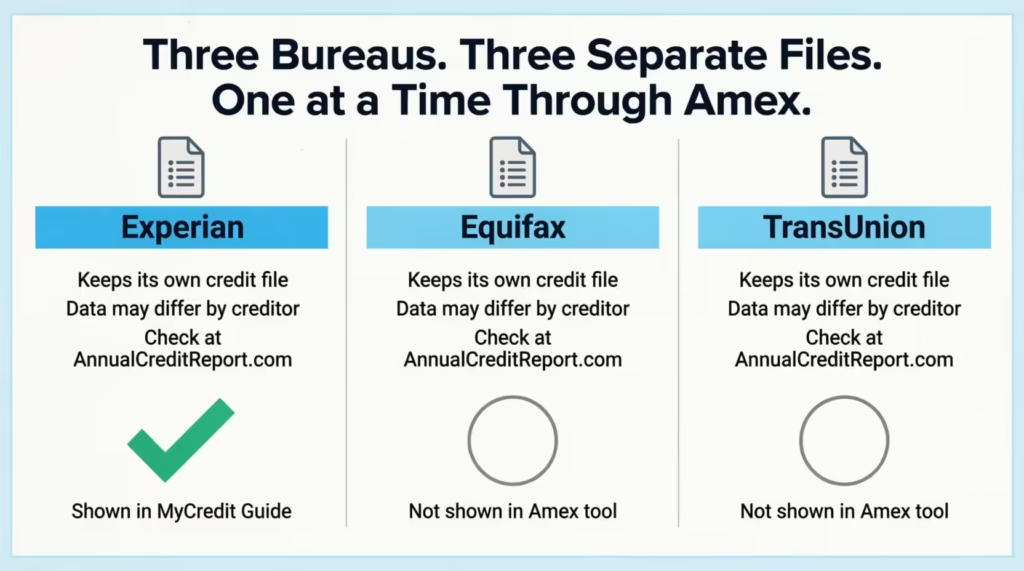
Amex uses Experian as the source for the report shown in MyCredit Guide. That’s confirmed directly on the American Express MyCredit Guide overview page, which states that MyCredit Guide “allows you to view your FICO® Score and Experian® credit report.”
This matters because there are three major credit bureaus in the U.S.: Experian, Equifax, and TransUnion. Each one keeps its own version of your credit file, and the three files often don’t match exactly. A creditor might report to one bureau but not the others. An old collection might still show on one report and have already aged off another.
So the report you see through Amex reflects only one of three possible pictures of your credit. If you need the full picture, especially before a mortgage or major loan, you’ll want reports from all three. The official place to get them is AnnualCreditReport.com, which we cover later in this guide.
How to Access Your Credit Report Through Your Amex Account (Desktop)
Here’s the exact path on a desktop browser. The steps assume you’re already an American Express cardholder, but the tool is also available to non-cardholders who sign up separately.
Step 1: Go to americanexpress.com and log in with your User ID and password.
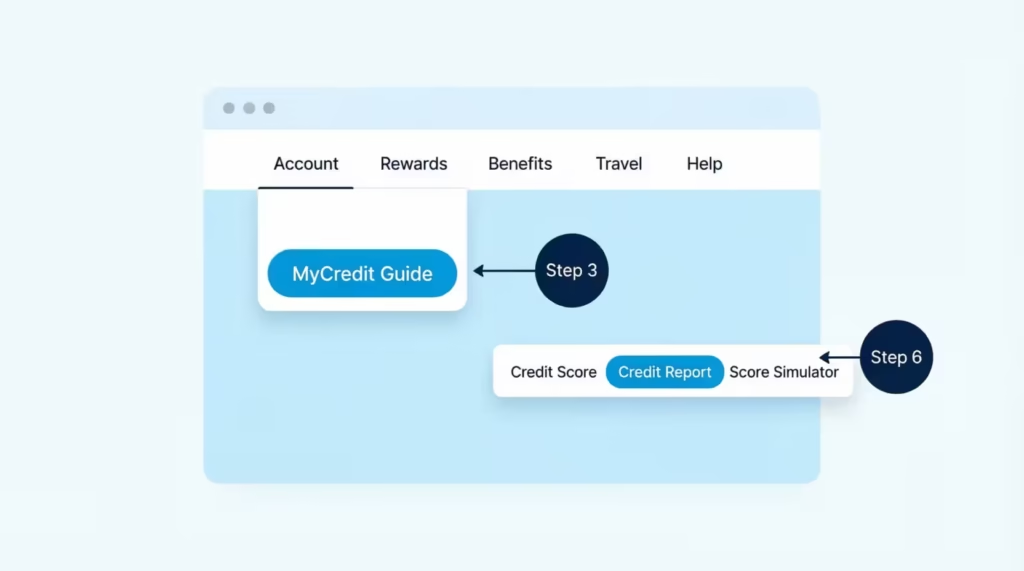
Step 2: Once you’re on your account dashboard, look at the top navigation bar. You’ll see tabs like Account, Rewards, Benefits, Travel, and Help. Hover over Account (some users will see Account Services depending on the page version).
Step 3: A dropdown menu opens. Scroll down to the section labeled Credit Tools or Tools & Resources, depending on what your account shows. Click on MyCredit Guide.
Step 4: You’ll be redirected to the MyCredit Guide portal. If this is your first time, you’ll need to enroll. Enrollment is free. You just need to confirm some identity details, like the last four digits of your Social Security number and your date of birth. This is a soft pull, so it does not affect your score.
Step 5: Once you’re inside MyCredit Guide, the home screen shows your current FICO Score 8 at the top. Below it, you’ll see tabs for Credit Score, Credit Report, Score Simulator, and Alerts.
Step 6: Click the Credit Report tab. This opens your complete Experian credit report. It is divided into sections like account history, inquiries, public records, and personal information.
That’s the desktop path. If you can’t find the MyCredit Guide link inside your Amex dashboard, you can also go straight to mycreditguide.americanexpress.com and log in with the same credentials.
How to Access Your Credit Report on the Amex Mobile App
The mobile app path is slightly different but just as quick.
Step 1: Open the American Express Mobile App. If you don’t have it, you can download it for free from the Apple App Store or Google Play.
Step 2: Log in with your User ID and password, or use Face ID/fingerprint if you’ve set it up.
Step 3: On the home screen, scroll down past your card and recent transactions until you see a section called Tools or Account Services.
Step 4: Tap MyCredit Guide. On some devices, this opens inside the app. On others, it launches your phone’s browser and takes you to the MyCredit Guide site. Either way, you’ll land on the same dashboard.
Step 5: Tap the Credit Report tab to view the full report.
The mobile view is condensed compared to desktop, so each section of the report may be collapsed by default. Tap the section headers to expand them.
How to Navigate to the Full Report View Inside MyCredit Guide
This is where most people get stuck. By default, MyCredit Guide opens to the score overview screen, which shows your FICO Score 8, recent score changes, and factors affecting your score. A lot of cardholders see this page and think it’s the whole product.
It’s not. The full credit report is on a separate tab.
On the desktop, look at the top of the MyCredit Guide page. You’ll see a row of tabs. Click the one labeled Credit Report. On mobile, the same tab is usually accessed through a menu icon (three lines or three dots) in the corner.
Once you’re inside the Credit Report view, you’ll see your report organized into sections:
- Personal Information: Your name, addresses, dates of birth on file, and employers reported.
- Accounts: Every credit card, loan, and credit line, with balance, payment status, and history.
- Inquiries: Every soft and hard pull in the past two years.
- Public Records: Bankruptcies or court judgments, if any.
- Collections: Any accounts sent to a collection agency.
Each section is expandable. Click or tap to drill into the details.
How Often Can You Access Your Credit Report Through Amex?
You can log in and view your credit report through MyCredit Guide as often as you want. There’s no daily or monthly limit on views.
The report itself refreshes monthly. Experian updates Amex with a new file about every 30 days. So, even if you check daily, the data won’t change between updates. The only time it changes is if there’s an alert event, like a new account opened in your name.
Checking your own report through MyCredit Guide is always a soft inquiry, so frequent self-checks don’t hurt your score. Your access here is different from your federal rights under the Fair Credit Reporting Act (FCRA). This law lets you get a free report from each of the three bureaus every week at AnnualCreditReport.com. Using Amex’s tool does not use up that entitlement.
How to Save or Download Your Amex Credit Report as a PDF
Here’s the honest answer most guides skip: there is no “Download PDF” button inside MyCredit Guide. Amex doesn’t offer a one-click export. If you want a saved copy of your Amex credit report, you have to use your browser’s Print to PDF feature as a workaround.
⚠️ Mistake to Avoid: Don’t screenshot the report page by page. The full credit report can run 10 to 20 screens, and screenshots leave out account details that get cut off in the side panels. Use Print to PDF instead, it captures the full layout.
Below is how to do it on each device.
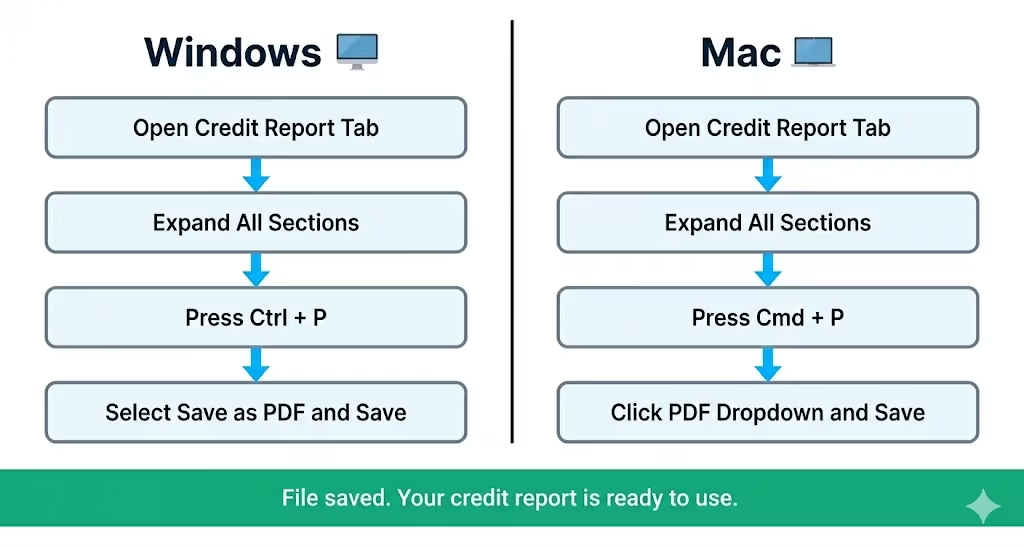
On a Windows computer:
- Inside MyCredit Guide, click the Credit Report tab and let the full report load.
- Expand every section you want to save (Accounts, Inquiries, Public Records, etc.). If a section is collapsed, the PDF won’t capture its contents.
- Press Ctrl + P on your keyboard.
- In the print window, change the destination from your printer to “Save as PDF” or “Microsoft Print to PDF.”
- Click Save, name the file, and pick a folder.
On a Mac:
- Follow the same steps to expand all sections.
- Press Cmd + P.
- In the bottom-left of the print dialog, click the PDF dropdown.
- Choose Save as PDF, name the file, and save.
On an iPhone or iPad:
- In Safari, open the MyCredit Guide credit report page.
- Tap the Share icon (the square with the arrow pointing up).
- Scroll down and tap Print.
- On the print preview, pinch outward on the thumbnail to enlarge it, this turns it into a PDF.
- Tap the Share icon again and save to Files or send to email.
On an Android phone:
- In Chrome, open the credit report page.
- Tap the three-dot menu in the top right.
- Tap Share, then Print.
- Change the destination to Save as PDF.
- Tap the download icon and pick a save location.
A few things to know before you print. The mobile version of MyCredit Guide is responsive. This means the PDF on your phone might look stretched or cut off compared to the desktop version.
If the file matters (you’re submitting it to a lender or attorney), do it from a desktop browser. Also, MyCredit Guide doesn’t display every historical line item on a single page, so older closed accounts may need to be expanded one at a time before printing.
Does Checking Your Credit Report Through Amex Affect Your Credit Score?
No. Checking your own credit report through Amex MyCredit Guide does not affect your credit score. Not even a little. You can check it every day for a year, and your score will be unaffected by the checks themselves.
This is because self-checks count as soft inquiries.
A soft inquiry happens when you check your own credit, when a lender pre-screens you for an offer, or when an existing creditor reviews your account. Experian explains that soft inquiries do not affect your credit scores and are visible only to you when you view your own report.
A hard inquiry, on the other hand, happens when a lender pulls your credit because you applied for new credit, a car loan, a mortgage, a new credit card. Hard inquiries typically shave a few points off your score and stay on your report for up to two years.
The Amex MyCredit Guide tool is built specifically to allow unlimited self-checks. That’s the whole point of a credit monitoring service: you can watch your file as often as you like without penalty.
💡 Pro Tip: If you’re prepping for a mortgage, check your Amex credit report weekly in the three months leading up to your application. It’s a free way to catch errors or surprise accounts before a lender sees them, and none of those checks will cost you a single point.
What’s Inside the Credit Report You See Through Amex
When you open the full Experian report inside MyCredit Guide, you’re looking at roughly the same document a lender would see if they pulled your Experian file (with a few formatting differences). It’s broken into these main sections.
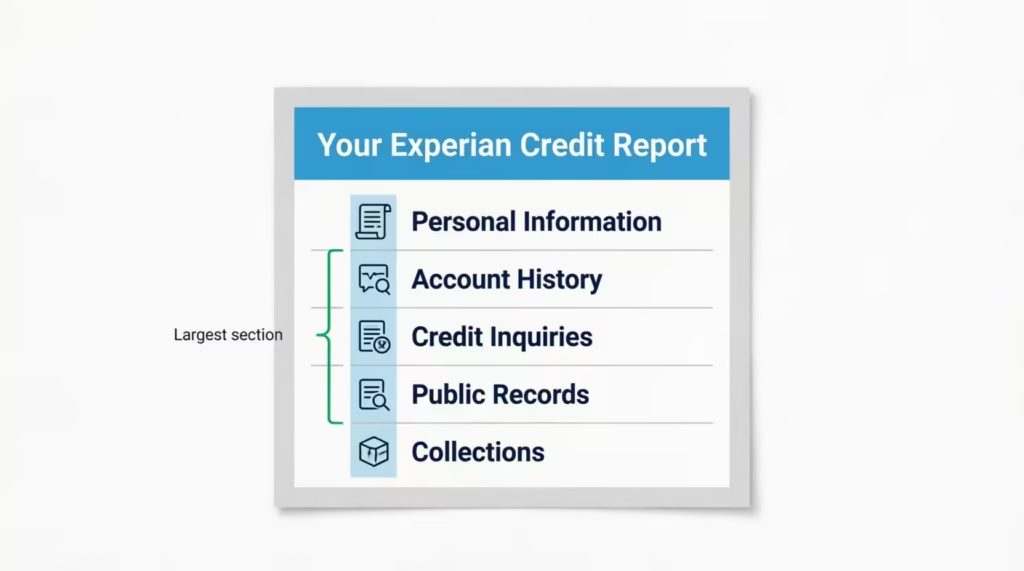
Personal Information. Your legal name, current and previous addresses, dates of birth on file, Social Security number (partially masked), and current and former employers as reported by creditors. Errors here are common, especially old addresses you haven’t lived at in years. They’re harmless but worth fixing if they pile up.
Account History. This is the biggest section. Every credit account in your name, open or closed within the past 7 to 10 years, is listed here. For each account, you’ll see the creditor name, account type (credit card, auto loan, mortgage), date opened, credit limit or original loan amount, current balance, payment history (month by month, often shown as a grid of green/yellow/red marks), and current status (open, closed, paid as agreed, etc.).
Credit Inquiries. Every soft and hard pull on your Experian file from the past two years. Hard inquiries are listed separately from soft inquiries, since only hard ones affect your score. You’ll see the date and the name of the company that pulled your file.
Public Records. Court judgments, tax liens (now rare on credit reports), and bankruptcies. Most people will see this section empty, which is the goal.
Collections. Any account that has been charged off and sold to a collection agency. These accounts can hurt your score significantly and stay on your report for up to seven years from the original delinquency date.
The MyCredit Guide tool also overlays identity theft monitoring on top of the report. If a new account appears that you didn’t open, you’ll get an alert. That’s separate from a credit report dispute, which is the formal process you’d use to challenge an inaccurate entry.
What the Amex Credit Report Does Not Include
A lot of people assume the report inside MyCredit Guide is “the credit report,” but it’s really one slice of your credit picture. Here’s what it doesn’t show.
Equifax and TransUnion data. The MyCredit Guide report comes only from Experian. If a creditor reports to Equifax but not to Experian, the account won’t show up here. This often happens with smaller lenders, utilities, or rent-reporting services.
Real-time updates. The report refreshes monthly, sometimes longer between refreshes if there’s no new activity. So a payment you made yesterday won’t show up until the next cycle. This is the same cadence Experian uses for most free credit monitoring tools, but it’s worth knowing if you’re tracking a specific change.
FCRA-compliant disclosure. If you’re disputing something formally, applying for a security clearance, or replying to a denial letter, you may get a specific FCRA disclosure. This copy has details like full account numbers and certain internal codes. You won’t see these in the MyCredit Guide. For that, you go directly to Experian’s disclosure portal or use AnnualCreditReport.com.
Specialty consumer reports. ChexSystems (banking), LexisNexis (insurance), and the National Consumer Telecom and Utilities Exchange don’t appear on your standard credit report. You won’t find them in MyCredit Guide.
When to Go Beyond Amex and Use AnnualCreditReport.com Instead
Amex’s tool is great for routine monitoring. But there are specific situations where it’s not enough, and you need to go to AnnualCreditReport.com.
AnnualCreditReport.com is the only federally authorized source for free credit reports from all three bureaus, mandated under the Fair Credit Reporting Act. The Federal Trade Commission confirms that consumers now have permanent access to free weekly credit reports from Equifax, Experian, and TransUnion through this site. No credit card. No trial. No subscription pitch.
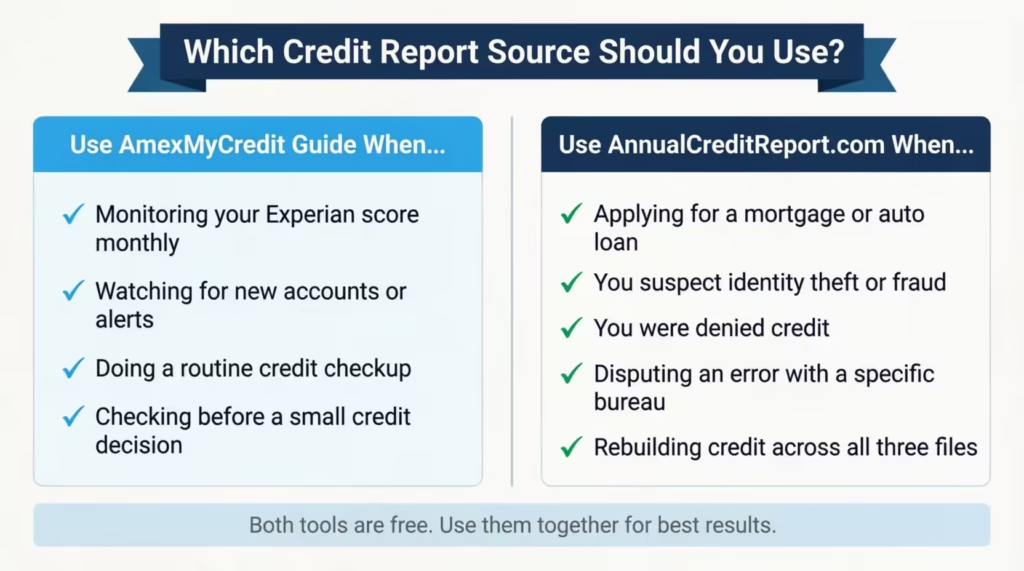
Use AnnualCreditReport.com instead of (or in addition to) Amex when:
- You’re applying for a mortgage or auto loan. Lenders pull all three bureaus. You need to see what each one has.
- You suspect identity theft or fraud. A thief may have opened an account that reports to only one bureau. Checking only Experian could miss it.
- You’ve been denied credit. The denial may be tied to a report from a bureau that isn’t Experian.
- You’re disputing an error with a specific bureau. You want to see exactly what that bureau has on file before you file a dispute.
- You’re rebuilding credit. Comparing all three reports helps you find accounts that may need to be added, updated, or removed.
The Consumer Financial Protection Bureau also lists AnnualCreditReport.com as the primary route for accessing your free credit reports, which is worth bookmarking as a reference.
How to Get Free Reports from All Three Credit Bureaus
The process at AnnualCreditReport.com takes about 10 minutes per bureau if you have your information ready.
- Go to annualcreditreport.com and click Request your free credit reports.
- Fill in your name, current address (and previous address if you’ve moved in the last two years), date of birth, and Social Security number.
- Select which bureaus you want to request from. You can pick all three at once or stagger them across the year. Many people pull one bureau every four months as a free rolling check.
- Each bureau will ask 3 to 5 identity-verification questions based on your credit history. These are pulled from your file, things like “Which of these streets have you lived on?” or “Which of these lenders did you have a loan with in 2018?” Answer carefully. If you fail the quiz, you’ll have to request the report by mail.
- Once verified, your report opens in a new tab or window. Download the PDF directly (the bureaus do offer a real download button here, unlike Amex). Save it somewhere safe.
- Repeat the process for the other two bureaus.
Print copies are also available by phone (1-877-322-8228) or by mail if you’d rather not go online.
What to Do After You’ve Reviewed Your Credit Report
You’ve got your report. Now what? The next step depends on what you find.
If everything looks correct, your job is monitoring. Log in to MyCredit Guide once a month and skim the dashboard. Set up the email and text alerts so you’re notified anytime a new account appears, a balance changes significantly, or your score moves. The monitoring is free and runs in the background. You don’t have to do anything else unless an alert fires.
If you spot an error, you have the right to dispute it.
Common errors include:
- Accounts you don’t recognise
- Balances that don’t match your records
- Payments marked late when they weren’t
- Accounts are still listed as open after you closed them
To dispute, contact the credit bureau directly. For an Experian report (the one Amex shows you), use the Experian online dispute portal. For Equifax and TransUnion, use their portals through their websites. The bureau has 30 days to investigate and respond.
If you see an account you didn’t open, that’s likely identity theft. Take three steps in order:
- Place a fraud alert. Call any one of the three bureaus. They’re required by law to notify the other two. The alert lasts one year and tells lenders to verify your identity before opening new credit.
- Place a credit freeze. Stronger than an alert. A freeze locks your file so no new credit can be opened in your name until you lift it. The Federal Trade Commission’s identity theft response guide walks through the full recovery checklist.
- File a report at IdentityTheft.gov to create an official recovery plan and dispute fraudulent accounts.
Even after you’ve taken action, keep MyCredit Guide active. Soft inquiries cost you nothing, and the monthly snapshot is one of the easiest early-warning systems available. The point of credit monitoring isn’t to check obsessively; it’s to make sure no surprise lands on your file without you knowing about it.
Frequently Asked Questions (FAQs)
Can you download your full credit report from Amex?
Amex does not offer a direct download button inside MyCredit Guide. To save your report, use your browser’s Print to PDF feature after expanding every section of the credit report tab.
How do I turn my credit report into a PDF?
Open your full credit report in the browser. Expand every section so nothing is collapsed. Then, press Ctrl+P on Windows or Cmd+P on Mac. Choose “Save as PDF” as the destination. On mobile, use the Share then Print shortcut in Safari or Chrome.
Does Amex pull TransUnion for its credit monitoring tool?
No. Amex uses Experian exclusively for the credit report and FICO Score 8 shown inside MyCredit Guide. TransUnion and Equifax data do not appear in this tool.
Does an Amex card show on your credit report?
Yes. American Express accounts show up in the account history section of your credit report. They look like any other credit card and display your balance, credit limit, payment history, and account status.
How do I download my Experian credit report as a PDF?
The easiest routes are MyCredit Guide via Amex (Print to PDF workaround) or AnnualCreditReport.com, which offers a real PDF download button after you verify your identity directly through Experian.
How do I get my entire credit report?
To see everything, go to AnnualCreditReport.com. You can get free reports from all three bureaus: Experian, Equifax, and TransUnion. Amex’s MyCredit Guide covers only your Experian file.
How much does it cost to get a copy of your credit report?
Nothing. Amex MyCredit Guide is free and has no trials or paid tiers. AnnualCreditReport.com offers free weekly reports from all three bureaus, as required by federal law.
How do I download my Amex credit card statement?
Log in to your American Express account, navigate to your card’s statement history, and use your browser’s Print to PDF option to save a statement. Amex does not offer a one-click PDF export for statements, similar to its credit report tool.
How often does the credit report in MyCredit Guide update?
Experian refreshes the data inside MyCredit Guide approximately once every 30 days. Checking your report more frequently will not show new information until the next monthly update cycle.
Wrapping Up
We’ve walked through where Amex’s credit tool is. We explained how to get to the full Experian report. We also shared the print-to-PDF workaround for saving it. Lastly, we discussed when to go beyond Amex for a complete tri-bureau picture from AnnualCreditReport.com.
For most cardholders, the best way is to use MyCredit Guide for monthly checks. Then, visit AnnualCreditReport.com before any big lending event. That combination covers both the day-to-day watch and the moments when accuracy really matters.
If you know someone getting a mortgage, applying for a rental, or worried about identity fraud, share this guide. Knowing how to download a credit report from Amex can save them hours of confusion.
If this helped you, share it on social media with anyone who’s about to apply for a loan or rebuild their credit. It could save them a costly moment of error.