When my first Amex statement landed, I stared at three different “balance” numbers and a payment screen I couldn’t find. That moment is what this guide fixes. If you’re sitting with a due date coming up, unsure whether to pay the statement balance or the minimum, and not 100% sure which method posts in time, you’re in the right place.
The quickest and safest way to pay your American Express credit card is to log in at americanexpress.com or use the Amex app. Then, submit a one-time payment from a linked bank account before 8:00 p.m. ET.
Below, we walk through every method, the right amount to pay, how long each one takes, and how to fix a returned payment so it never costs you a fee again.
Key Takeaways
This guide explains how to pay an American Express credit card bill using five methods, including the payment cutoff time for same-day posting, the right amount to pay to avoid interest, AutoPay setup, and how to handle returned payments.
Core Facts:
- Online payments at americanexpress.com and in-app payments post the same day when submitted before 8:00 p.m. Eastern Time; bank bill pay takes 3 to 5 business days electronically, and mailed checks take 7 to 10 business days.
- American Express accepts payments online, through the Amex mobile app, by phone at 1-800-472-9297, through your bank’s bill pay service, and by mailing a check to the processing address listed on your statement.
- Paying the full statement balance by the due date keeps the grace period intact and results in zero interest charges; paying only the minimum due prevents a late fee but allows interest to accrue on the remaining balance.
- AutoPay set to Statement Balance is the recommended option for most cardholders because it eliminates missed payments and keeps the account interest-free without requiring manual action each month.
- When linking a bank account, instant verification (via bank login) allows payment immediately, while micro-deposit verification takes 1 to 3 business days and should not be used if the due date is within 5 days.
- A returned payment triggers a fee starting at $29 (up to $40 for repeat occurrences within six billing periods) and can result in a late payment reported to the credit bureaus, which may lower a credit score by 60 to 110 points.
Best for:
- New Amex cardholders who are unsure which payment method posts in time and need to avoid a late fee before their first due date.
- Existing cardholders who have received a returned payment notice and need immediate steps to fix the problem before it affects their credit report.
- Anyone currently paying only the minimum due who wants to understand the interest cost and how to switch to AutoPay on the full statement balance.
What You Need Before You Make a Payment
A failed Amex payment almost always traces back to one of three missing items. Get these ready first, and the rest of the process takes under five minutes.
You’ll need an active Amex online account. If you haven’t created one yet, head to the American Express registration page and sign up using the 15-digit number on the front of your card. Amex card numbers are 15 digits, not 16 like Visa or Mastercard, and the full number is what links your physical card to your online profile.
You’ll also need your full 15-digit card number handy. It’s printed on the front of the card. If you’re paying by phone or mail, you’ll be asked for it. If you’ve already misplaced your card, the number also appears at the top of your statement.
Then grab your bank’s routing number and your checking or savings account number. The routing number is a 9-digit ABA routing number printed on the bottom-left of any paper check. Your account number sits right next to it.
You can also find both inside your bank’s mobile app, usually under “Account details” or “Direct deposit info.” If you don’t have a paper check, your bank’s app is the fastest source.
Finally, know your payment due date and the amount you plan to send. Your due date is printed on every statement and shown on your Amex dashboard.
You’ll also want to decide in advance: are you paying the statement balance, the minimum, or a custom amount? That decision is covered in detail later in this guide, but having it settled now means you won’t second-guess yourself on the payment screen.
💡 Pro Tip: Save your routing and account numbers inside your password manager (not in plain notes) the first time you link them. The next time you switch payment methods, you won’t be hunting for a check at 11 p.m. the night before your due date.
How to Pay Your Amex Bill Online
Paying online at americanexpress.com is the most common and fastest method. The whole flow takes about three minutes once your bank is linked. Here’s exactly where to click.
Go to americanexpress.com and log in with your User ID and password. If two-factor authentication is on, approve the prompt on your phone.
From the home dashboard, find the card you want to pay. Each card you own shows as its own tile. Click “Make a Payment” directly on that tile, or use the top navigation and choose “Payments & Statements,” then “Make a Payment.”
On the payment screen, pick how much to send. Amex shows three preset options: Statement Balance, Minimum Due, and Other Amount. Statement Balance keeps you out of interest. Minimum Due keeps you out of late fees but not interest. Other Amount lets you type any number between the minimum and the current balance. Tap the option that matches your plan.
Choose the bank account you want to pay from. If you’ve already linked one, it appears in the dropdown. If not, the screen offers a “Link a new bank account” option, covered below.
Pick the payment date. The default is today. You can schedule up to your due date. Payments submitted by 8:00 p.m. ET typically post the same day, while later submissions roll to the next business day, WalletHub reports.
Review the summary screen carefully. Confirm the card, the amount, the bank account, and the date. Then click “Submit Payment.”
How to Link a Bank Account to Your Amex Account
If this is your first online payment, you’ll be asked to add a bank. Amex offers two verification paths, and choosing the right one saves days.
The first option is instant verification. You’ll see a “Verify instantly” or “Link with your bank login” button. This connects through Plaid using your online banking username and password. Most major U.S. banks (Chase, Bank of America, Wells Fargo, Capital One, and dozens more) support it. Verification finishes in under a minute, and you can pay immediately after.
The second option is micro-deposit (sometimes called trial deposit) verification. You enter your routing and account numbers manually. Amex then sends two small deposits, usually under $1 each, to your bank in 1 to 3 business days.
You log back in, enter the exact amounts, and the link activates. This path takes longer, but it’s your only option if your bank doesn’t support instant linking or if you prefer not to share your online banking details.
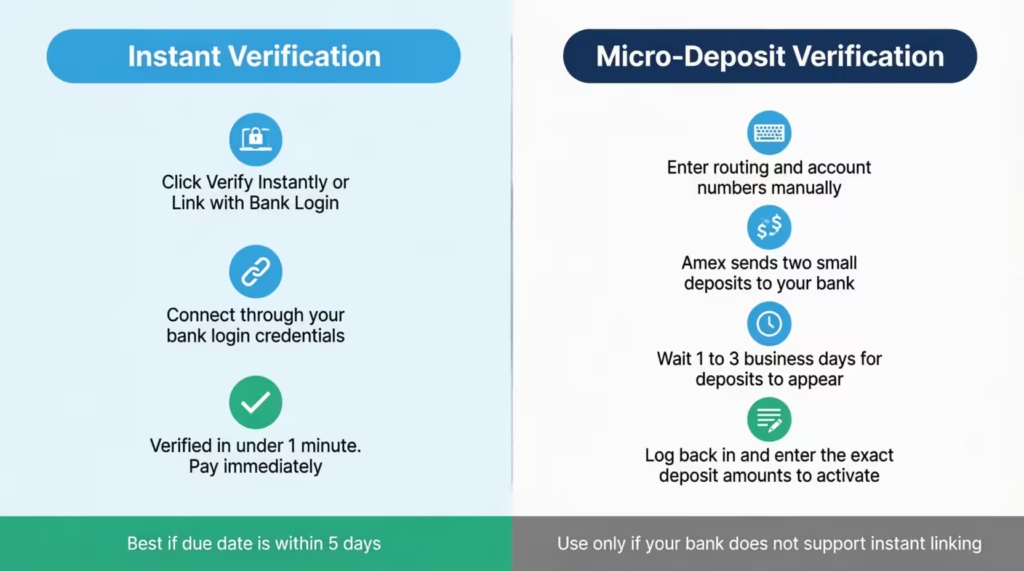
Pick instant verification if your due date is within 5 days. Micro-deposits will not clear in time. Sarah, a marketing manager at a Boston tech startup, learned this the hard way when she chose micro-deposits with three days left on her cycle. The deposits posted the day after her due date, and she paid a late fee that could have been avoided by switching to instant verification at the start.
How to Confirm Your Amex Payment Was Submitted
A successful submission triggers three signals. If you don’t see all three, the payment did not go through.
The first signal is the on-screen confirmation page. You’ll see a green check, a confirmation number, the amount, the bank account, and the scheduled date. Take a screenshot. The confirmation number is what Amex customer service uses if there’s ever a dispute.
The second is the email receipt. Amex sends it to the email on file within a few minutes. The subject line reads “Your payment has been scheduled” or “Your payment has been received.”
The third is the dashboard update. Within the same session, refresh your Amex home page. The payment appears under “Pending Payments” or “Recent Activity” with the date it will post. Once it posts, your available credit goes up by the payment amount.
How to Pay Your Amex Bill Through the Mobile App
The Amex mobile app uses a slightly different layout from the website, which trips up first-time users. The steps below match the current iOS and Android versions of the Amex app, available on the App Store and Google Play.
Open the app and log in with your User ID, password, or biometric login (Face ID, Touch ID, or fingerprint). If you have multiple cards, the home screen shows all of them. Tap the card you want to pay.
Look for the “Pay” tab at the bottom of the screen on iOS, or the “Make a Payment” button mid-screen on Android. Both lead to the same flow. Tap it.
Choose the payment amount. The same three options appear: Statement Balance, Minimum Due, or Other Amount. Tap your choice.
Select the linked bank account. If you need to add a new one, the app supports both instant verification and manual entry, just like the website.
Pick the date and review the summary. Tap “Submit” or “Confirm Payment.”
The in-app confirmation appears immediately. You’ll get an “Activity” entry showing the pending payment. The app also sends a push notification if you have notifications enabled. Email confirmation arrives the same way as the website method.
A small but useful detail: iOS users can add an Amex payment widget to the home screen, so the next month’s due date and amount show without opening the app. Android currently shows due date reminders via push notification only.
How to Pay Your Amex Bill by Phone
The phone option is ideal for cardholders who lack reliable internet, prefer voice systems, or are travelling and can’t use their usual devices. Amex confirms the pay-by-phone number is 1-800-472-9297, available 24/7.
Dial the number. The automated system answers. You’ll be asked to enter or speak your 15-digit card number. Have it ready before you call.
The automated system handles standard payments without a fee. Stay on the line and follow the prompts to pay from a previously linked bank account. If you haven’t linked a bank yet, you’ll need your routing and account numbers ready, because the system will prompt for both.
If you’d rather speak to a live agent, say “Representative” or press 0 at any point in the menu. A customer service agent can complete the payment for you. There’s no extra fee for agent-assisted payments at this time.
After the payment is taken, the system reads back a confirmation number. Write it down. It’s your proof of payment if anything is disputed later. You’ll also receive an email confirmation within minutes if your contact info is current.
A phone payment submitted before 8:00 p.m. ET typically posts the same day. Calls placed later go to the next business day, so try to call before the cutoff if your due date is today.
How to Pay Your Amex Bill Through Your Bank
If you’d rather pay from your bank’s website than from Amex, your bank’s online bill pay service is the route. It works, but timing is the catch.
Log in to your bank’s online banking portal or app. Find the “Bill Pay,” “Pay Bills,” or “Online Bill Pay” section. Wells Fargo calls it “Bill Pay,” Chase calls it “Pay & Transfer,” and Bank of America calls it “Bill Pay” as well.
Add American Express as a new payee. Search by name, then enter your 15-digit Amex card number as the account number. Your bank may auto-fill the correct mailing address (the Los Angeles PO Box covered below). If it doesn’t, paste it in manually.
Schedule the payment. Pick the amount and the send date. This is the part that catches people. Bank bill pay does not always send the payment electronically. Many banks still mail a paper check to Amex’s processing center, which adds days.
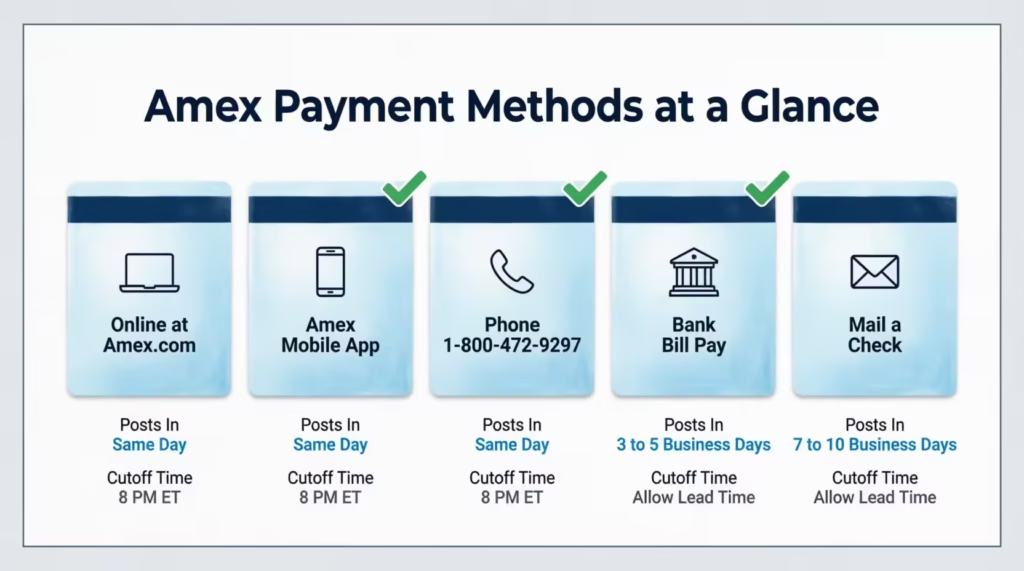
⚠️ Mistake to Avoid: Treating bank bill pay like an instant ACH transfer. Many bill pay services mail a physical check on your behalf, especially for smaller community banks. Schedule the payment 5 to 7 business days before your due date, not 1 or 2.
The safest approach is to expect a lead time of 3 to 5 business days for major banks sending ACH electronically. For any bank that uses a paper check, plan for 7 to 10 business days. If your bank’s bill pay screen shows a “delivery date” or “estimated arrival,” go by that, not the “send date.”
Once the payment posts at Amex, it will show up under “Recent Activity” on your Amex dashboard. Until then, both your bank and Amex consider it in transit.
How to Pay Your Amex Bill by Mail
Paying by mail still works, and some cardholders prefer it for record-keeping or because they don’t bank online. The catch is timing. Mail is the slowest method by a wide margin.
Write a personal check made payable to “American Express.” Do not abbreviate to “Amex.” On the memo line, write your full 15-digit card number. This is how Amex matches the check to your account if the payment coupon gets separated.
Include the payment coupon from your paper statement if you have one. The coupon has a barcode that speeds up processing. If you don’t have the coupon, the card number on the memo line is enough.
Mail the envelope to the standard payment address. American Express lists this address on its contacts page:
| Mail type | Address |
|---|---|
| Standard payment | American Express P.O. Box 96001 Los Angeles, CA 90096-8000 |
| Overnight courier | American Express Attn: Express Remittance Processing 20500 Belshaw Ave. Carson, CA 90746 |
Send the check at least 7 to 10 business days before your due date. The mailing date is not the receipt date. Amex credits the payment when the check arrives and clears, not when you drop it in the mailbox. Tracking is not provided unless you use certified mail or an overnight courier.
Amex Credit Card Payment Mailing Addresses
For most personal Amex credit cards, the Los Angeles PO Box is the right destination. If you have a business card, an International Dollar Card, or a card from outside the U.S., check the mailing address on your latest statement. This is important because these cards may go to different processing centres.
Never send cash. Always send a personal check, cashier’s check, or money order. Cash that’s lost in the mail is gone, and Amex will not credit a payment it didn’t receive.
Statement Balance, Minimum Payment, and Current Balance: Which One to Pay
The three balance numbers on your Amex screen mean three very different things. Picking the right one is the difference between paying $0 in interest and paying hundreds of dollars per year.
The statement balance is the total amount you charged during the last billing cycle, locked in on your statement closing date. Paying the full statement balance by the due date keeps you in your grace period, which means you owe zero interest on new purchases. The grace period on most consumer Amex cards runs about 21 to 25 days from the statement closing date to the payment due date.
The minimum payment due is the smallest amount Amex will accept to keep your account in good standing for that cycle. Paying only the minimum keeps you out of late fees but does not protect you from interest charges.
The unpaid part of your statement balance begins to earn interest at your card’s purchase APR the day after the due date. New purchases also start accruing interest from the transaction date until you pay them off completely.
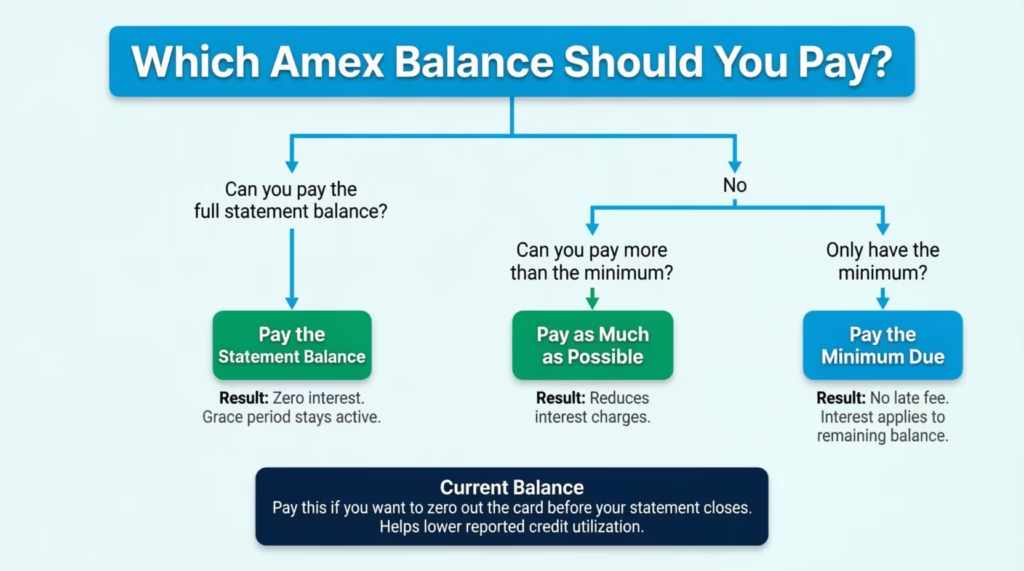
The current balance is the live total of everything you owe right now, including charges from the new billing cycle that aren’t on a statement yet. You can pay this amount to zero out the card right away. This helps if your credit utilization is reported soon, but it’s not necessary to avoid interest.
Here’s a concrete example. Michael, a project lead at a Denver consulting firm, had a statement balance of $2,400 and a minimum due of $40. He paid the minimum, thinking he was safe. The remaining $2,360 accrued interest at 24.99% APR, costing him roughly $50 in finance charges that month, plus interest on new purchases. Had he paid the full statement balance, his interest cost would have been $0.
The decision rule is simple. Pay the statement balance in full to avoid interest. Pay the minimum only if cash flow leaves you no other option, and pay off the rest as soon as possible.
Pay the current balance if you want to clear the card before a big purchase or before your statement closes. This helps keep your credit utilisation low. A Consumer Financial Protection Bureau explainer notes that a credit card payment received by 5 p.m. local time on the due date is on time, but Amex actually allows it until 8:00 p.m. ET online, which is more generous.
How to Set Up Autopay on Your Amex Account
Autopay is the single best protection against a missed due date. Once it’s on, Amex automatically pulls the amount you choose from your linked bank account on or before your due date every month.
To enroll, log in to americanexpress.com or open the Amex app. From the card dashboard, find “Account Services” on the website or the gear icon in the app. Look for “AutoPay” or “Set Up AutoPay.” Tap it.
Confirm the bank account that will be used. If you have multiple linked accounts, pick the one with the steadier balance. Most people use their primary checking.
Choose your AutoPay amount. The three options match the manual payment choices: Statement Balance, Minimum Payment Due, or Fixed Amount. Statement Balance is the default and the one most cardholders should pick. The setup wizard then shows your next scheduled withdrawal date, which is two business days before your payment due date.
Review and submit. Amex sends a confirmation email and shows AutoPay as “Active” on your dashboard. You’ll also see an “AutoPay scheduled” indicator next to your upcoming due date.
To modify or cancel, go back to the same AutoPay screen. You can change the amount, change the bank account, or turn AutoPay off. Changes take effect the next billing cycle, so if your next AutoPay is processing in the next 2 days, the upcoming withdrawal may still go through.
Which Autopay Amount Should You Choose
Pick the AutoPay amount based on your goal, not on habit. The right setting depends entirely on what problem you’re trying to solve.
If your goal is to avoid interest entirely, choose Statement Balance. Amex takes the full amount you owe from the last billing cycle. Your grace period remains. You won’t owe any interest if your bank account has the funds.
If your goal is to avoid late fees and you plan to manage interest separately, choose Minimum Payment Due. This is the safety net option. It guarantees you’ll never miss a payment, but you’ll still owe interest on the unpaid balance.
If you want a predictable monthly amount, choose Fixed Amount. You enter a dollar value (for example, $500), and Amex pulls exactly that amount each cycle. This is useful for budgeting, but only protects against late fees if your fixed amount is at least equal to the minimum due.
For most cardholders, Statement Balance is the safest choice. It costs the same as paying in full manually, removes the chance of human error, and keeps your account interest-free.
📌 Did You Know: With AutoPay on Statement Balance, you can still make extra manual payments during the cycle. This helps lower your reported credit utilization before your statement closes. AutoPay only pulls what’s left of your statement balance when the scheduled date arrives.
How Long Does an Amex Payment Take to Process
Processing time changes the answer to a critical question: “Will my payment be on time?” The window depends entirely on the method.
Online payments at americanexpress.com and in-app payments are the fastest. A payment submitted by the cutoff usually posts the same day, and your available credit updates within minutes to a few hours. Submissions after the cutoff post the next business day.
Phone payments via the automated system or a live agent have the same-day or next-day timing as online payments. This depends on when you make the call.
Bank bill pay is the slowest electronic method. Allow 3 to 5 business days when your bank sends an ACH transfer, and longer if your bank mails a paper check. The “delivery date” your bank shows you is the safest target.
Mail payments take 7 to 10 business days from drop-off to being posted on your account, sometimes longer around holidays. Postmark date does not count as payment date. Amex credits the payment when the check is received and processed.
| Payment method | Typical processing time | Same-day eligible? |
|---|---|---|
| Online (americanexpress.com) | Same day to next business day | Yes, by 8 p.m. ET |
| Mobile app | Same day to next business day | Yes, by 8 p.m. ET |
| Phone (1-800-472-9297) | Same day to next business day | Yes, by 8 p.m. ET |
| Bank bill pay (ACH) | 3 to 5 business days | No |
| Bank bill pay (mailed check) | 5 to 10 business days | No |
| 7 to 10 business days | No |
What Time Does Amex Cut Off Same-Day Payments
The cutoff is 8:00 p.m. Eastern Time for online, app, and phone payments. A submission at 7:59 p.m. ET on your due date is on time. A submission at 8:01 p.m. ET on the same day will post the next business day, and depending on how Amex codes the timestamp, it may still be considered late.
If you live in a different time zone, set a personal cutoff in your phone’s clock. 8:00 p.m. ET equals 7:00 p.m. CT, 6:00 p.m. MT, and 5:00 p.m. PT. Don’t wait until the last hour. Brief tech glitches do happen, and a failed submission at 7:55 p.m. PT is too close to the wire.
What Counts as an On-Time Amex Payment
A payment is on time when Amex receives and posts it on or before your statement’s payment due date. The submission date matters more than the postmark date for most methods, but the rules differ slightly by channel.
Online, app, and phone payments are on time if submitted by 8:00 p.m. ET on the due date. Bank bill pay is on time only if the funds arrive at Amex by the due date, not when you initiated the transfer. Mail payments are on time only if the check is received and processed by the due date. The U.S. postmark does not protect you from a late fee.
If your due date falls on a weekend or federal holiday, Amex extends the on-time deadline to the next business day. So a Sunday due date effectively shifts to Monday at 8:00 p.m. ET for online channels.
What Happens If Your Amex Payment Is Returned
A returned payment is a payment your bank refused to fund after Amex tried to pull it. The most common cause is insufficient funds, but wrong account numbers, closed accounts, and bank holds all cause returns, too.
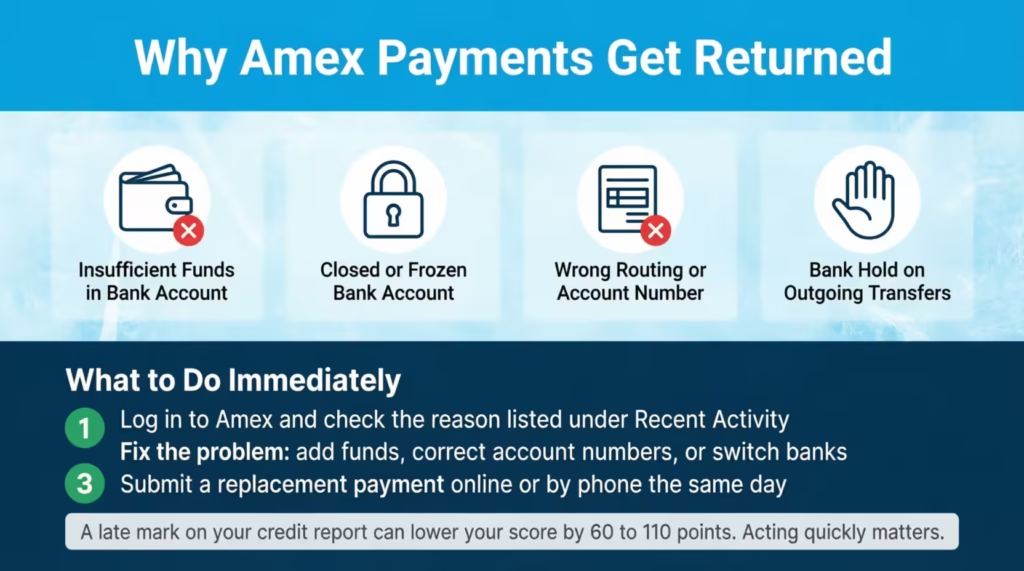
When this happens, Amex charges a returned payment fee. Per the Amex Gold Card Cardmember Agreement, the first returned payment fee is $29, and the fee can be up to $40 if it happens again within the same six billing periods.
Your fee may differ by card type, so check your Cardmember Agreement. However, the starting fee of $29 usually applies to most consumer Amex cards. Your bank may also charge its own returned item or NSF fee on top of that, sometimes $35 or more.
Beyond fees, a returned payment can also trigger a late payment if the second attempt doesn’t clear before your due date. A payment is considered late when it’s 30 days past due. At this point, Amex reports it to the credit bureaus. Just one late report can reduce a credit score by 60 to 110 points. Acting fast matters.
If you discover a returned payment, take three steps immediately. First, log in to your Amex account and check the exact reason listed under “Recent Activity.” It will say “Payment Returned” with a brief reason.
Second, fix the underlying problem: transfer funds into your bank account, correct the routing or account number, or switch to a different linked bank. Third, submit a replacement payment the same day, preferably online or by phone, so it posts before your due date.
If the due date has passed and you have a late fee, call Amex at 1-800-472-9297. Ask for a courtesy refund of the returned payment fee and the late fee. Amex will often waive one or both for cardholders with a clean prior history, especially if it’s the first time. Be polite, explain what happened, and ask directly.
How to Prevent a Returned Amex Payment
Prevention is mostly about checking three things before you submit.
First, confirm the available balance in your bank account, not just the posted balance. Pending charges from debit purchases or other autopayments can leave the account short on the day Amex pulls funds. Build in a buffer of at least one full statement payment.
Second, double-check the routing and account numbers when linking a new bank. Even one wrong digit causes the payment to bounce. Use instant verification with Plaid when you can. This checks bank credentials to confirm the account exists before any funds move.
Third, watch your bank’s daily ACH limits. Some banks cap outgoing ACH transfers at $5,000 or $10,000 per day. If you’re paying a large Amex balance and your daily limit is lower, the bank will return the payment automatically. Call your bank to raise the limit before scheduling a large payment, or split the payment across two days.
If AutoPay returned the payment, fix the bank account inside the AutoPay settings immediately. Otherwise, the next cycle will fail too, compounding the fees.
Frequently Asked Questions (FAQs)
Can I pay my Amex bill at a bank branch?
American Express does not accept in-person payments at bank branches. You can pay online at americanexpress.com, through the Amex app, by phone at 1-800-472-9297, through your bank’s bill pay service, or by mailing a check.
Can I pay my Amex bill with a debit card?
American Express does not list debit card payments as an accepted method. Payments are made by linking a bank account directly using your routing and account numbers, either through the Amex website, app, or phone system.
Is it better to pay Amex online?
Yes, for timing reasons. Online and app payments submitted before 8:00 p.m. ET are posted the same day, while bank bill pay needs 3 to 5 business days, and mailed checks need 7 to 10 business days to reach your account.
What is the best way to pay off an Amex card?
Set up AutoPay on the Statement Balance option so the full amount owed each cycle is pulled automatically from your bank account. This eliminates the risk of a missed payment and keeps your grace period intact, so you pay zero interest.
What time is the Amex payment cutoff for same-day posting?
The cutoff is 8:00 p.m. Eastern Time for online, app, and phone payments. That is 7:00 p.m. CT, 6:00 p.m. MT, and 5:00 p.m. PT. Payments submitted after that cutoff post the next business day.
How long does an Amex payment take to post?
Online and app payments post the same day if submitted before 8:00 p.m. ET. Bank bill pay takes 3 to 5 business days electronically, or 7 to 10 business days if your bank sends a paper check.
What happens if my Amex payment is returned?
Amex charges a returned payment fee starting at $29, and up to $40 if it happens again within six billing periods. Your bank may also charge its own NSF fee, and if the replacement payment misses your due date, Amex can report a late payment to the credit bureaus.
Should I pay my Amex statement balance or just the minimum?
Pay the full statement balance to avoid interest charges entirely. Paying only the minimum keeps your account in good standing but leaves the unpaid balance accruing interest at your card’s purchase starting the day after the due date.
Final Thoughts
Paying your Amex card on time is mostly a matter of picking the right method, the right amount, and the right timing. Online or app submissions before 8:00 p.m. ET post the same day, bank bill pay needs 3 to 5 business days, and mail needs 7 to 10.
Paying the full statement balance keeps you out of interest, while the minimum due only protects you from late fees. Setting AutoPay to Statement Balance is the best choice for most cardholders. It eliminates human error and keeps the grace period intact.
For most readers, using AutoPay to pay your American Express credit card on the statement balance works best. Just add a calendar reminder close to the due date for extra help.
If you know a friend or family member who just got their first Amex card and is anxious about that first payment, share this guide with them. It could save them a $29 returned payment fee, a 60-point credit hit, or both.