When a relationship shifts, a child moves into adulthood, or a shared financial arrangement ends, the convenience of having an authorized user on your Amex card can suddenly feel like a liability.
Many cardholders worry about making mistakes. They fear hurting their credit or upsetting the other person. If you’ve been searching for clear directions on how to remove an authorized user from an Amex online or by phone, you’re not alone.
The fastest way is to log into your American Express account, open the Account Services menu, select the authorized user, and choose Remove.
In this guide, we’ll walk you through every step, the credit effects, the consent rules, and what to do with the card afterward, so nothing gets missed.
Key Takeaways
This guide explains how to remove an authorized user from an American Express account, including online and phone removal steps, consent rules, credit score effects, and the difference from closing an account entirely.
Core Facts:
- Only the Basic Card Member can remove an authorized user, while an authorized user can only request removal of their own name from the account.
- Online removal is done through Account Services and Manage Additional Card Members, with the change taking effect within minutes to a few hours.
- Phone removal for personal cards uses 1-800-528-4800, and business cards use 1-800-492-3344; calls typically take 10 to 20 minutes.
- The Basic Card Member does not need the authorized user’s consent to remove them, since the primary cardholder holds full legal authority over the account.
- For the Basic Card Member, removal usually causes little to no credit score change because account age, credit limit, and payment history remain tied to their file.
- For the authorized user, removal can raise, lower, or barely affect their score depending on whether the account had a clean low-balance history or a high-balance, late-payment history.
Best for:
- Primary cardholders who want to end one person’s card access without closing the account or losing rewards and credit history.
- Authorized users who want to remove their own name from someone else’s account without needing the primary cardholder’s permission.
- Anyone deciding between removing a single user and closing the account entirely, based on differing effects on credit utilization and rewards.
Before You Remove an Authorized User: What You’ll Need
Removing an authorized user goes faster when you gather a few details first. Amex uses these details to confirm you are the Basic Card Member and that the request is real. Missing one item can cause delays, dropped calls, or a failed online action.
Start with your 15-digit American Express account number. You can find it on the front of your card, on a recent billing statement, or inside your online account profile. If you only know the last four digits, the customer service number can still help, but full account verification will take longer.
Have your own personal details ready. These include your full legal name, date of birth, the last four digits of your Social Security Number, and the billing address tied to the account. Amex may also ask for the card security code on the back, or send a one-time code to your phone or email.
You’ll also need the authorized user’s information. This means their full legal name as it appears on the card, and ideally their date of birth. If the person has more than one card on your account, write down which card you want to remove. Removing the wrong person is a common mistake when more than one authorized user shares the account.
Finally, keep your phone or computer ready. If you go the online route, log in before you start the request. If you call, find a quiet space where you can speak clearly and confirm details. The whole process takes about 5 to 15 minutes when you have everything in hand.
💡 Pro Tip: Take a screenshot of your authorized user list before you start. That way, you’ll have proof of who was on the account, the date, and the exact card number, which helps if any billing question shows up later.
Who Can Remove an Authorized User From an Amex Account
Only the Basic Card Member can fully remove an authorized user from an American Express account. The Basic Card Member is the person who opened the account first. They are legally responsible for the balance, and their name is on the primary card. American Express treats this person as the account owner for all major changes, including adding or removing supplementary cardholders.
An authorized user, sometimes called an extra card member, does not have the same powers. They can use the card to make purchases, view their own activity in some cases, and request a replacement for their own card.
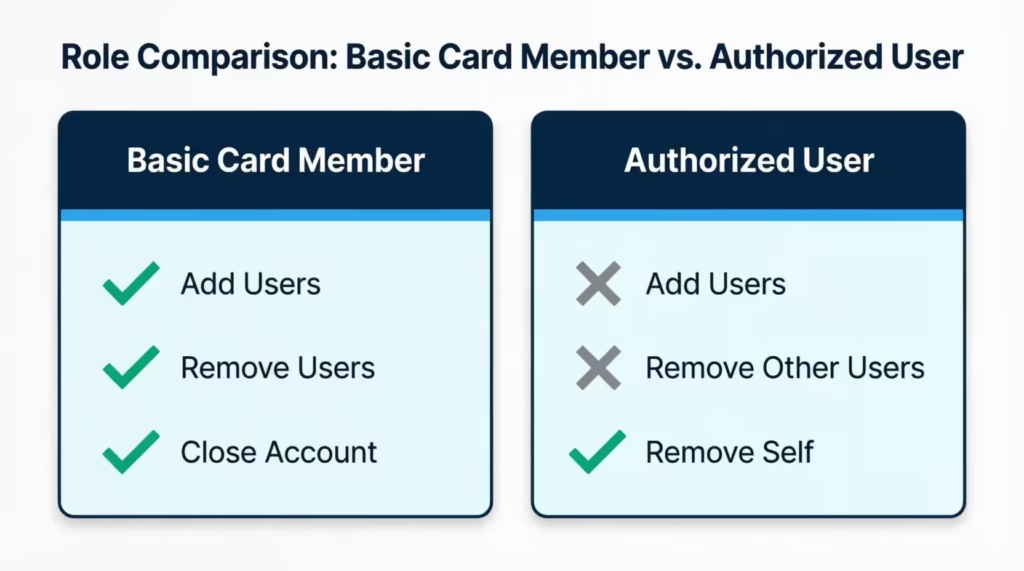
They cannot add other users, close the account, or change the primary cardholder’s information. What they can do, however, is request that their own name be taken off the account. That self-removal path is covered in a later section.
If the Basic Card Member has set up an Account Manager or given another person a power of attorney, that person may also be allowed to make changes. This usually applies to elderly parents, estate situations, or business owners who delegate account control. Amex confirms this authority through written records on file, so a phone agent will check before making any change.
In short, the rule is simple. If your name is on the original application as the main cardholder, you have full authority. If you are a more card member, you can only remove yourself, not anyone else.
How to Remove an Authorized User From Amex Online
The online portal is the fastest way to take someone off your account. Most users finish in under five minutes. Amex updates the change in your account right away, and the extra card stops working within minutes to a few hours.
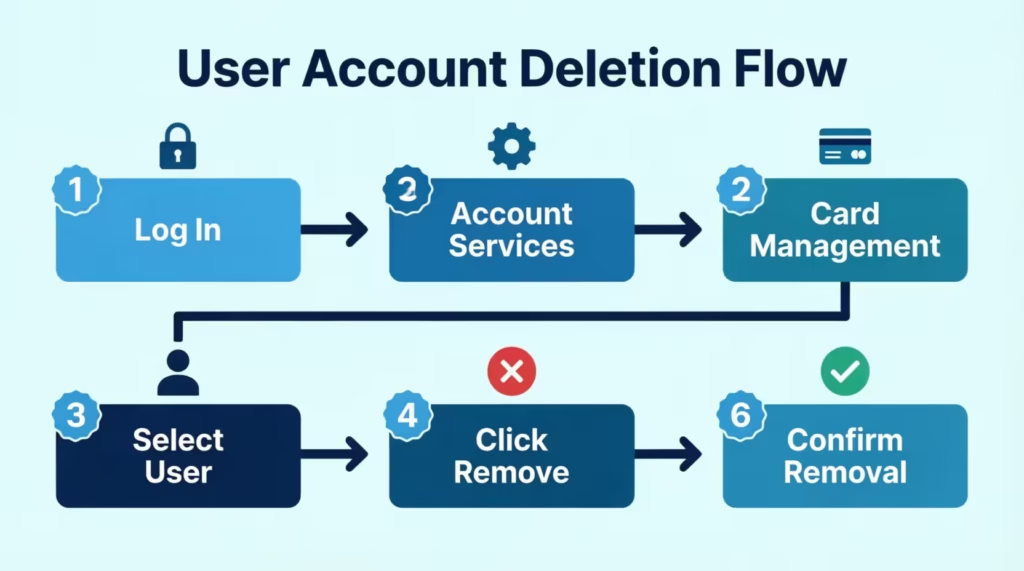
Follow these steps to remove the authorized user from the Amex online:
- Visit the American Express login page and sign in with your User ID and password. If you don’t have an online profile yet, you’ll need to create one before you can manage users.
- From the main account screen, click Account Services in the top menu. On mobile, tap the profile icon or the menu button, then choose Account Services.
- Scroll to the section labeled Card Management or Extra Cards. The exact wording can vary based on your card product.
- Click Manage Additional Card Members. You’ll see a list of every authorized user attached to your card.
- Select the name of the person you want to remove. A new screen will open with their card details and account history.
- Click the Remove Card option. Amex will ask you to confirm the action. Read the on-screen message carefully, since this step ends the user’s access right away.
- Confirm the removal. You may get a prompt to enter your password again or a one-time code sent to your phone or email. This extra step protects the account from unwanted changes.
- Save or print the confirmation page. Amex will also send an email to your inbox within a few minutes.
If you don’t see the option to manage extra card members, your card product might not support online removal. Some older Amex cards, joint accounts, or business cards still need a phone call. In that case, move to the next section.
⚠️ Mistake to Avoid: Don’t close your browser before the confirmation screen loads. If the page times out before you see the success message, the removal may not save, and the card could still be active. Always wait for the green check and the confirmation email.
How to Remove an Authorized User From Amex by Phone
If the online option does not work, or you want to talk to a real person, call American Express customer service. The general number for personal cards is 1-800-528-4800. You can also find this customer service number on the back of your card or on your latest billing statement. For business cards, call 1-800-492-3344.
Pick a time when you can talk without interruption. Calls usually take 10 to 20 minutes, depending on hold times and how many users you want to remove. Late evenings and weekends tend to have shorter waits.
When the agent answers, you can say something simple like: “I’m the Basic Card Member, and I’d like to remove an authorized user from my account.” The agent will then ask you a few account verification questions to confirm your identity.
Be ready to share your account number, your full name, date of birth, and the last four digits of your Social Security Number. They may also ask the name of the authorized user you want to remove and the reason, though you do not need to give a detailed answer.
Once your identity is confirmed, the agent will process the removal while you are on the line. Ask them to read back the change before you hang up. A good script is: “Can you confirm the date the removal takes effect and that no future charges from that user will post to my account?”
Before ending the call, request a confirmation in writing. The agent can send this by email or mail. Note the agent’s name, the date, and the case or reference number. Keep this record in a safe place for at least 12 months. If a charge from the removed user shows up later, this proof will help you dispute it with no trouble.
Can an Authorized User Remove Themselves From an Amex Account?
Yes. An authorized user can remove themselves from an American Express account without the Basic Card Member’s approval. This option exists because being on someone else’s card can affect your credit, your finances, and even your privacy. Amex respects your right to step away from an account you no longer want to be tied to.
To remove yourself as an authorized user on an Amex, you’ll need to call the same number on the back of your extra card, usually 1-800-528-4800 for personal cards. The online portal usually does not give authorized users full control to remove their own profile. A phone call is the most reliable path.
When you reach an agent, say: “I’m an additional card member, and I’d like to remove myself from this account.” The agent will verify your identity using your name, date of birth, and the card number you hold. They may also ask for the last four digits of your Social Security Number if it was used when you were added.
After the agent confirms your identity, they will process the removal. The Basic Card Member does not need to be on the call. Amex may, but does not have to, notify the primary cardholder that the change was made. After the removal is final, your authorized user card will no longer work. The account history might disappear from your credit report in one to two billing cycles.
This path is helpful in many real-life cases. Take Sarah, a 24-year-old marketing assistant who had been on her mother’s Amex card since college. After landing her first full-time job, she wanted to build credit in her own name and no longer wanted the account showing on her credit report. One 12-minute call to Amex cleared her name from the account, and the change showed up on her credit report within six weeks.
Do You Need the Authorized User’s Consent to Remove Them?
No, the Basic Card Member does not need the authorized user’s consent to remove them from an American Express account. As the primary cardholder, you have full legal authority to add or remove extra card members at any time. Amex will not call, email, or text the authorized user to ask if the change is okay. The process moves forward based on your request alone.
That said, while consent is not required, a courtesy notice is often a smart move. Letting the authorized user know before you remove them stops surprise declines. This can happen at the checkout, gas pump, or online cart. Using the card for regular bills, like a phone plan or streaming service, means an unexpected decline can disrupt service. This situation can also cause stress for both of you.
In some cases, silent removal makes more sense. These include separation or divorce, suspected misuse of the card, a roommate who has moved out and stopped paying, or a relationship that has ended on bad terms. In these moments, your priority is to protect your account and your credit. You are within your rights to act first and explain later, or not at all.
If you choose to notify the authorized user, keep it short and clear. A simple text or short message works well. Something like: “Just a heads up, I’ve removed the Amex card from your name effective today. Please destroy the card.” This protects you legally and keeps the conversation respectful.
What Happens to the Authorized User’s Card After Removal
Once the removal is complete, the authorized user’s card stops working. American Express deactivates the card number in their system, and any future swipe, tap, or online acquisition will be declined. Recurring charges already linked to that card number will also fail on the next billing date.
The physical card itself, however, does not disappear. The authorized user still has the plastic or metal card in their wallet. It cannot be used to make new charges, but it does still show personal information like the card number, expiration date, and CVV. To prevent any risk of fraud or misuse, the card must be destroyed.
Here is a clear card neutralization checklist:
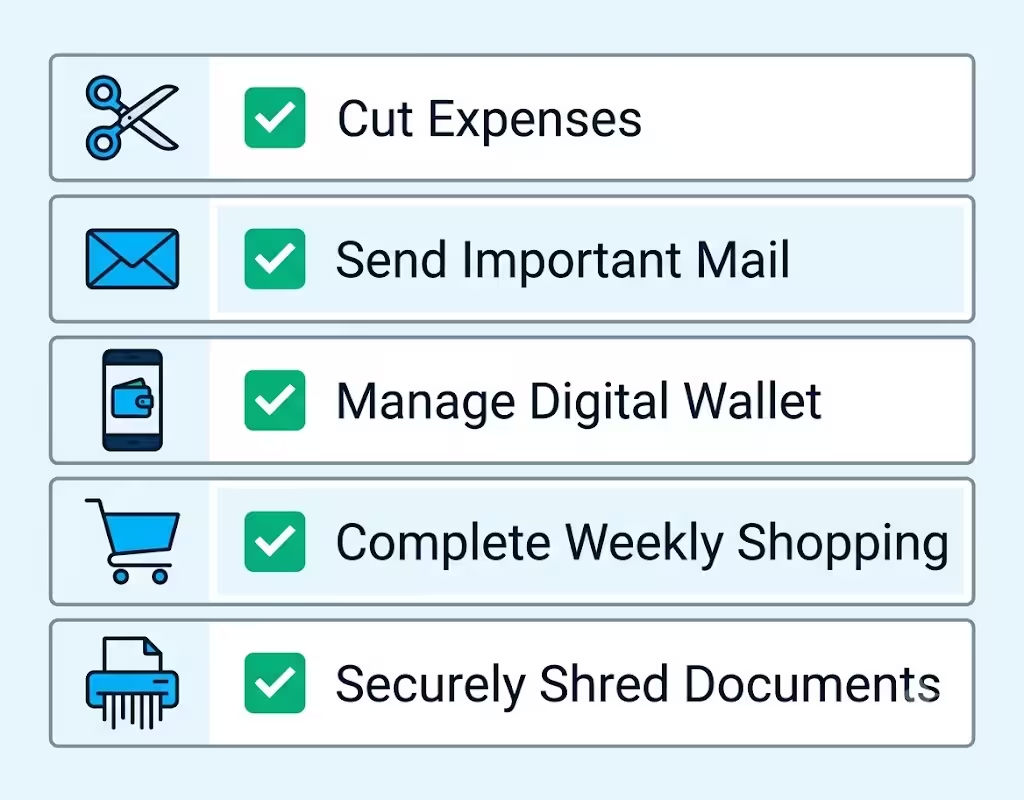
- Cut the card into at least four pieces with scissors, making sure to slice through the chip and the magnetic stripe.
- For metal Amex cards, do not try to cut the card. Instead, mail it back to Amex in a secure envelope, or call customer service to request a prepaid return label. Trying to bend or break a metal card at home can cause injury.
- Delete the saved card from any digital wallet, like Apple Pay, Google Wallet, or Samsung Pay.
- Remove the card from any online shopping site, subscription service, or auto-pay setup that may still have the number on file.
- Shred any old paper statements or welcome letters that show the full card number.
To confirm the removal went through, log back into your Amex account 24 hours after the request. The authorized user’s name should no longer appear under Additional Card Members. Your next statement will also list only the active cardholders. If the name is still there after a full billing cycle, call customer service right away.
If a charge from the removed user appears after the removal date, contact Amex within 60 days of the statement. The Fair Credit Billing Act lets you dispute unauthorized charges. Amex will look into the charge through its fraud protection rules.
Does Removing an Authorized User Affect Your Credit Score?
For the Basic Card Member, removing an authorized user usually has little to no effect on your own credit score. Your credit profile is built on your history with the account, not on who else has been allowed to use it. The account stays open in your name, the credit limit stays the same, and the payment history continues to report under your file.
A few credit factors stay tied to you no matter what:
- Account age. The account opening date does not change, so your length of credit history is safe.
- Credit limit. The credit line stays in place, which means your overall available credit does not drop.
- Payment history. Every on-time payment you have made still counts toward your FICO Score and VantageScore.
- Credit utilization. The balance and the spending limit on the card remain yours, so your utilization ratio is not disturbed by the removal itself.
The Consumer Financial Protection Bureau says that removing an authorized user from your account does not change what the card issuer tells credit bureaus. The CFPB explains that authorized users are considered users of the account, not co-owners, so the responsibility and the score impact stay with the primary cardholder.
There is one small case to watch. If the authorized user was making large payments on your card, and you forget to cover those bills going forward, your balance could rise. A higher balance pushes up your credit utilization, which can pull your score down. The fix is simple: review your auto-pay, your monthly spending, and any shared bills before you remove the user.
Does Removing an Authorized User Affect Their Credit Score?
For the authorized user, the credit effect can be larger, and it depends on how much of their credit profile was built on your account. When someone becomes an authorized user, the card issuer usually shares the full account history.
This includes details like the account’s age, balance, limit, and payment record. All this information goes to the person’s credit file. Once they are removed, that history may drop off, sometimes within 30 to 60 days.
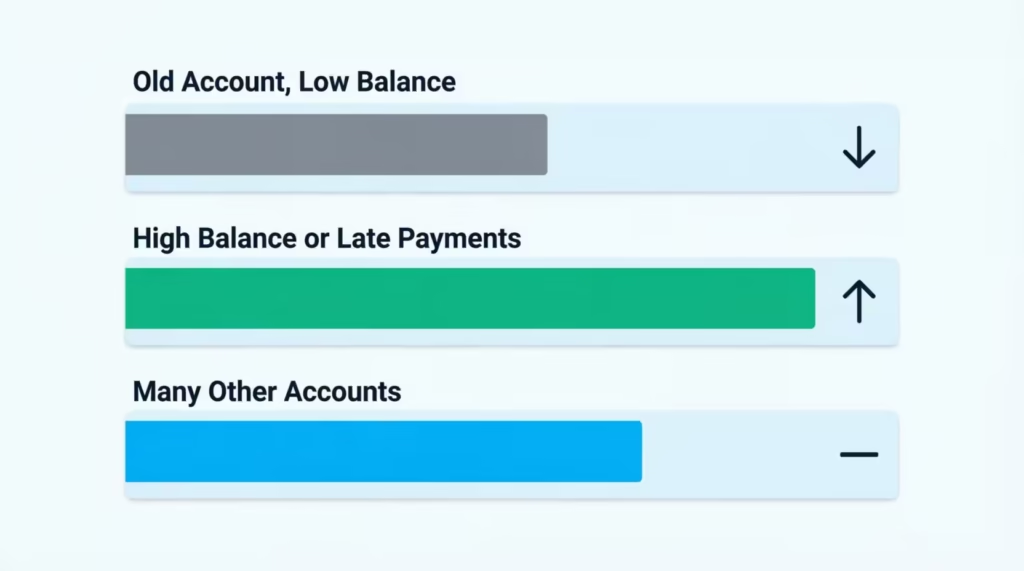
The impact can go three ways:
- If your account was old, had a low balance, and had a clean payment record, removal can hurt the authorized user’s score. They lose the age, the available credit, and the perfect payment record that helped lift their file.
- If your account had high balances, late payments, or both, removal can actually help the authorized user. Their utilization ratio drops, the late marks come off, and their score may rise within one or two reporting cycles.
- If the authorized user has many other accounts in their own name, the removal may barely move their score at all. Their own credit history will carry most of the weight.
Experian notes that authorized user accounts are reported to all three major credit bureaus by most large issuers, including American Express. So once Amex updates the change, the trade line should be removed from Experian, Equifax, and TransUnion files in due course.
For example, Michael, a college senior with a thin credit file, was added to his father’s Amex Gold card in 2018. When the card was removed in 2025, his FICO Score dropped from 752 to 698 within two months because he lost seven years of account age and a $20,000 credit line.
He had no other open accounts at the time, which made the drop sharper. Once he opened a secured card in his own name and used it well for six months, his score recovered to the mid-720s.
The lesson is clear: account history matters, and timing matters too. If you are the primary cardholder, consider letting the authorized user know what may happen so they can plan ahead.
Removing an Authorized User vs. Closing the Amex Account
Removing an authorized user and closing the Amex account are two very different actions. Both involve a change to the account, but they affect you, the other person, and your credit in very different ways. Choosing the wrong path can cost you points on your score, lose you years of credit history, or leave a charge hanging.
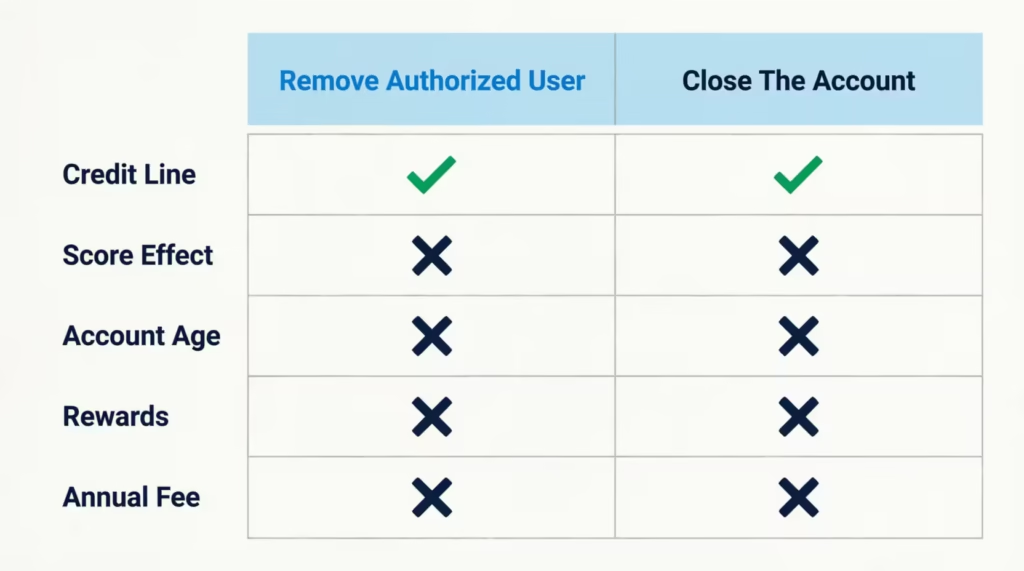
The table below shows the key differences:
| Factor | Remove Authorized User | Close the Account |
|---|---|---|
| Who keeps the credit line | Primary cardholder keeps the full line | Credit line is closed for everyone |
| Effect on your score | Little to no change | May drop due to higher utilization across other cards |
| Effect on account age | No change, account stays open | Closed account ages out after 10 years on most reports |
| Rewards and points | Stay in your account | May be lost if not redeemed before closing |
| Annual fee | Still charged if applicable | No more annual fees after closing |
| Best for | Ending one person’s access only | Ending the entire card relationship with Amex |
Removing the supplementary card holder is a smart choice. It lets you keep your card, rewards, and credit line while preventing a specific person from using it. This is the most common case for parents whose children no longer need help, or for partners going through a split who still each want their own cards.
Closing the account is a bigger step. It ends the card for everyone, ends future spending, and ends the rewards earnings. It also raises your overall credit utilization because you lose that credit limit from your total available credit. Before you close, redeem any Membership Rewards points, pay off the balance in full, and confirm there are no pending charges.
If you are not sure which path to choose, think about your goal. If you only want to stop one person from using the card, remove that user. If you want to walk away from American Express entirely, close the account. You can always remove first, see how things feel, and close later if needed.
Next Steps for the Authorized User After Removal
If you’ve just been taken off an American Express account as an authorized user, follow these steps. They will protect your credit and help you build a strong financial future in your own name.
Start by pulling your credit reports from all three bureaus. You can get free weekly reports through AnnualCreditReport.com, the only site backed by the federal government for free reports. Check that the closed authorized user account either still appears with a clean payment record, or is fully removed. Both outcomes are normal, but errors do happen, and a quick check now can save problems later.
If the trade line has wrong dates, mistaken late payments, or other errors, dispute it with the credit bureau showing the incorrect info. The Federal Trade Commission walks you through the process step by step on its consumer credit dispute page. The bureau has 30 days to investigate and respond.
Next, apply for a credit card or loan in your own name. Good first steps include:
- A secured credit card backed by a small deposit, often $200 to $500.
- A credit-builder loan from a local credit union or an online lender.
- A student credit card, if you are in school.
- A starter card from a bank where you already have a checking account.
Use the new account well. Keep the balance low, under 30 percent of the limit, and pay the full balance every month. Within six to twelve months, you should see a new positive history on your credit report, which can replace the lost authorized user account.
Watch your score for the next three to six months. Free services like Experian, Credit Karma, or your bank’s credit tool will show the score and the factors moving it. If you see a sudden drop, log in and check what changed. Most dips fix themselves within a billing cycle or two.
📌 Did You Know: According to the Federal Reserve Survey of Consumer Finances, the average American holds around four credit accounts, and credit profiles with a mix of accounts tend to score higher than profiles with only one trade line. Building your own mix early gives you more room to grow.
Frequently Asked Questions (FAQs)
Can I remove myself as an authorized user on an Amex card?
Yes, you can remove yourself without the primary cardholder’s approval. Call 1-800-528-4800, tell the agent you’re an additional card member who wants off the account, and verify your identity with your name, date of birth, and card number.
How long does it take to get removed as an authorized user?
The removal itself takes about 5 to 20 minutes online or by phone. The change typically clears from your credit report within 30 to 60 days, though one case took six weeks.
How do I remove an authorized user from my Amex account?
Log in to your Amex account, open Account Services, then Card Management, and select Manage Additional Card Members. Choose the person’s name and click Remove Card, then confirm with a password or one-time code.
Do I need the authorized user’s consent to remove them?
No, the Basic Card Member has full authority to remove an authorized user at any time without their consent. Amex will not contact the authorized user to approve the change, though sending a courtesy notice is recommended.
What happens when you get removed as an authorized user?
Your card stops working immediately, since Amex deactivates the card number in their system. The account history may drop from your credit report within 30 to 60 days, which can raise or lower your score depending on the account’s payment history.
Will removing an authorized user hurt my credit score?
For the primary cardholder, removal usually has little to no effect since your account age, limit, and payment history stay intact. For the authorized user, the impact depends on the account; a clean low-balance account can lower their score, while a high-balance or late-payment account can raise it.
How do I cancel my Amex authorized user?
Sign in to your Amex account, go to Account Services, then Manage Extra Card Members, and select Remove Card next to their name. You can also call 1-800-528-4800 and ask an agent to process the removal while you’re on the line.
What should I do with the authorized user’s card after removal?
Cut a plastic card into at least four pieces through the chip and magnetic stripe. For metal cards, mail them back to Amex instead of cutting them, and delete them from any digital wallets or saved payment methods.
Is removing an authorized user different from closing the account?
Yes, removing a user only ends one person’s access while you keep the credit line, rewards, and account age. Closing the account ends everything for everyone and can raise your credit utilization across other cards.
Wrapping Up
Removing an authorized user from an American Express card is far simpler than most cardholders fear. The online portal handles most cases in minutes, the phone line covers the rest, and the credit impact on the Basic Card Member is usually minimal.
The authorized user can also step away on their own, no permission needed from the primary cardholder. Remove the card online first. Then, confirm in writing. Finally, destroy the card right after.
If you know a parent, partner, or friend juggling shared Amex access, share this guide so they can act with confidence, too.