I’ve watched too many sharp servicemembers lose the $895 Amex Platinum annual fee waiver by clicking “Apply” one week too early. The card is a huge perk for military life, with lounge access, hotel credits, and travel insurance. But the rules around the Amex Platinum military application are strict, and one timing mistake can lock you into that fee for the life of the account.
The fix is simple: verify your covered borrower status in the official DoD database before you submit any application.
Below, we’ll walk through the laws, the timing, the spouse rules, and the exact steps so you get approved with a $0 fee on day one.
Key Takeaways
This guide explains how to apply for the Amex Platinum military fee waiver, including MLA and SCRA eligibility rules, database verification steps, application timing, and welcome bonus eligibility.
Core Facts:
- The Military Lending Act and Servicemembers Civil Relief Act both waive the $895 annual fee, but MLA applies to new cards opened during active duty while SCRA applies to cards opened before active duty began.
- Covered borrower status under the MLA is checked once, at the exact moment the account is opened, and that status cannot be changed or corrected afterward.
- Active duty servicemembers across all branches, Guard and Reserve members on qualifying federal orders over 30 days, and military spouses of active duty servicemembers can qualify as MLA covered borrowers.
- Title 32 state-status orders often do not trigger MLA coverage even when they exceed 30 days, so checking the official MLA database directly is required regardless of order type.
- The MLA database at mla.dmdc.osd.mil returns an instant “covered” or “not covered” result using a name, date of birth, and Social Security number or ITIN.
- The annual fee waiver and the welcome bonus are independent benefits, so military applicants can earn the full welcome bonus while paying a $0 annual fee.
Best for:
- Active duty servicemembers applying for a new Amex Platinum card who want the annual fee automatically waived.
- Military spouses with current DEERS dependent status who want to apply for their own Platinum card as the primary cardholder.
- Servicemembers who held the Platinum card as civilians before entering active duty and need to request SCRA relief on an existing account.
Who Qualifies for the Amex Platinum Military Fee Waiver
Two federal laws can erase the Amex Platinum annual fee for you. They are the Military Lending Act (MLA) and the Servicemembers Civil Relief Act (SCRA). Both produce the same result, a $0 fee. But they work in very different ways, and they cover different people.
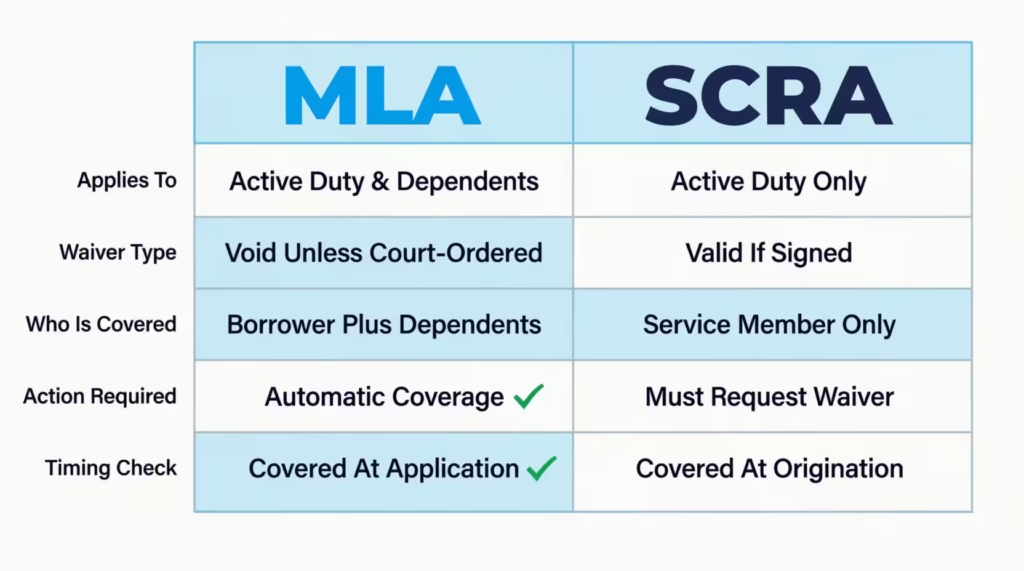
Here is the short version of who qualifies:
- Active duty servicemembers in any branch (Army, Navy, Air Force, Marines, Coast Guard, Space Force) are covered borrowers under the MLA.
- National Guard and Reserve members are covered if they’re serving on qualifying federal orders of more than 30 days.
- Military spouses are also covered borrowers under the MLA when their servicemember is on active duty, per the Department of Defense rule at 32 CFR Part 232.
The reason this matters is simple. The pathway that applies to you, MLA or SCRA, decides how you apply, when you apply, and whether the fee waiver is automatic or something you must request. Pick the wrong path, and the waiver doesn’t trigger. Pick the right one, and your card opens with a $0 fee from the very first day.
SCRA vs. MLA: Which One Applies to Your Situation
The biggest source of confusion in any Amex Platinum military application is the gap between these two laws. They sound similar. They both protect servicemembers. But they cover different moments in time.
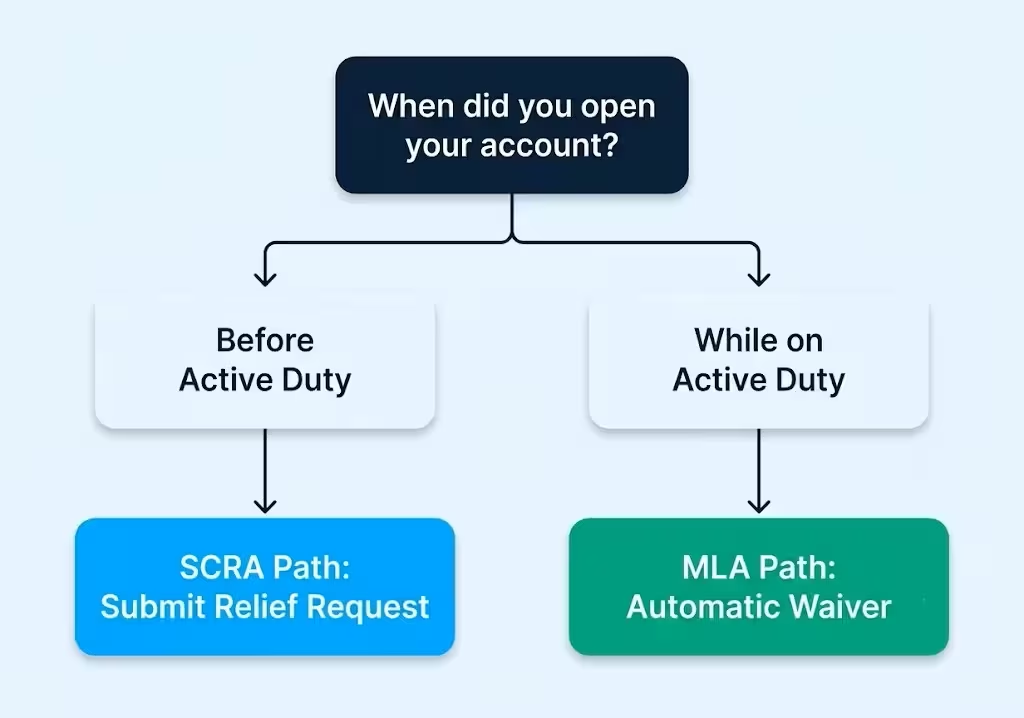
Here’s the key rule to remember:
- SCRA covers accounts you opened BEFORE active duty began. If you had the Platinum card as a civilian and later joined the military, you would use SCRA. You request relief, and Amex refunds or waives the fee.
- MLA covers accounts you open WHILE on active duty or on qualifying orders. If you’re applying for a brand-new Platinum card today, and you’re already on active duty, MLA is your law.
This distinction decides your whole game plan. SCRA is a request you submit after the fact. The MLA waiver is automatic, but only if your status shows up in the DoD database at the exact moment you click “Apply.” That single difference creates almost every horror story you’ll see in military finance forums.
The Military Lending Act final rule, found in 32 CFR § 232.3, defines a “covered borrower” as a servicemember (or dependent) at the time they become obligated on the credit transaction. The clock matters.
📌 Did You Know: Once an account is opened as “non-covered” under the MLA, that status sticks for the entire life of the card. You cannot fix it later by submitting orders. This is why timing your application correctly is the single most important step in this guide.
Title 10 vs. Title 32 Orders: Why It Matters for Guard and Reserve
If you’re in the Guard or Reserve, this part is for you. Not every set of orders triggers MLA protection.
- Title 10 orders are federal active duty orders. They generally support MLA coverage, and the fee waiver flows from them.
- Title 32 orders are state-status orders, even when they last 30 days or more. They often do not trigger MLA coverage, because the servicemember isn’t on federal active duty.
So the order type on your paperwork is not enough to assume coverage. The safest move, every single time, is to check the MLA database directly using your name, date of birth, and Social Security number. If the database says you’re a covered borrower, you are. If it doesn’t, you’re not, no matter what your orders look like on paper.
Military Spouse Eligibility and Application Path
Military spouses get one of the most generous protections in federal credit law, but the rules trip people up.
A spouse of an active duty servicemember is a covered borrower under the MLA. That means a spouse can apply for the Amex Platinum as the primary cardholder on their own application and still get the $895 fee waived. You do not have to be an authorized user on your servicemember’s card to get the benefit.
Here’s how the two paths look in real life:
- MLA path (most common for spouses): You apply for your own Platinum card while your spouse is on active duty. Your name must be in DEERS as a dependent. When Amex checks the MLA database during your application, your covered borrower status comes back “yes,” and the fee is waived automatically.
- SCRA path: SCRA protections generally don’t extend an independent fee waiver to a spouse opening a brand-new card. SCRA is mostly built around the servicemember’s pre-existing accounts. So spouses applying today should plan to use the MLA route, not SCRA.
A few practical notes if you’re a spouse applying on your own:
- Your own credit score and income are what Amex uses to approve the application. Your servicemember’s credit history doesn’t transfer over.
- You can list household income, which can include your spouse’s military pay, on the application. That can help approval odds if your personal income is lower.
- Being added as an authorized user on your servicemember’s account is a different path. You don’t get your own welcome bonus or your own credit history boost that way.
Sarah is a military spouse and an elementary school teacher. Her husband, an Army captain, is stationed at Fort Liberty. She applied for her own Platinum in early 2026.
Her name was current in DEERS, her MLA database check came back covered, and her annual fee was waived on day one. She also got the full welcome bonus as the main applicant, which she wouldn’t have received if she were just an authorized user.
Checking Your MLA Covered Borrower Status Before You Apply
This is the single most important action step in the entire guide. Before you submit your Amex Platinum military application, verify yourself in the official DoD database.
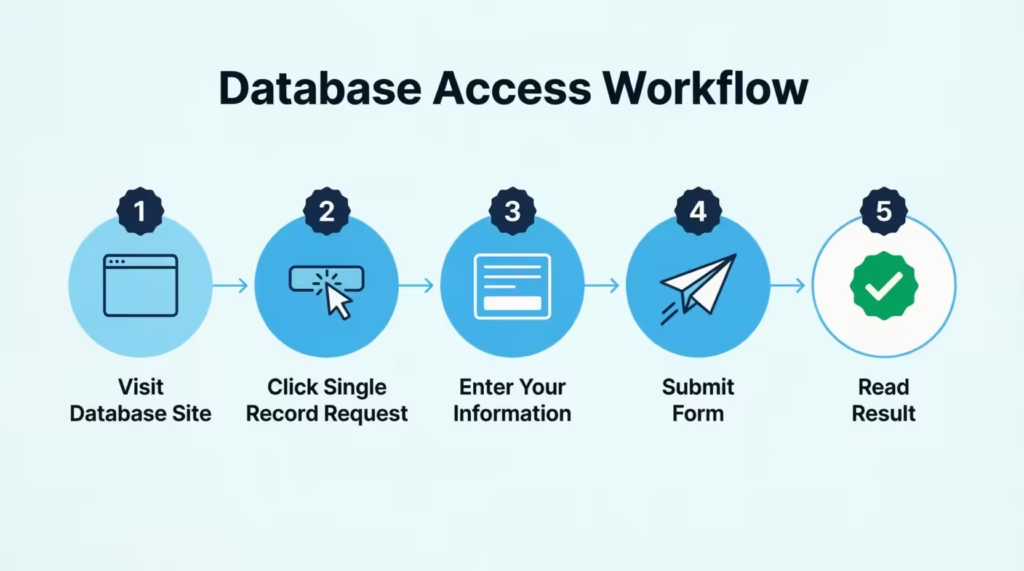
Follow these steps:
- Go to the official MLA database at mla.dmdc.osd.mil.
- Click “Single Record Request.”
- Enter your last name, date of birth, and Social Security number (or ITIN). Spouses use their own information, not their servicemember’s.
- Submit the form. The result returns instantly.
- Read the result. The screen will say either “covered” or “not covered” for the date you entered.
A “covered” result is what you want. It’s the same result Amex will see when they check your status during your application. If you’re covered today, you’ll be covered when Amex pulls the database, and your fee waiver should apply automatically.
If the result says “not covered,” do not apply yet. Wait until your status is reflected. This usually happens within 24 to 72 hours after your orders begin or after your spouse’s status updates in DEERS, but it can take longer.
💡 Pro Tip: Print or save a PDF of your “covered” database result on the same day you apply. If Amex ever questions your eligibility later, you’ll have a timestamped record of your status at the exact moment of account origination.
Timing Your Application Around Your Order Date
The Military Lending Act checks your covered borrower status at the moment of account origination, not later. That single sentence is the reason the timing trap is so painful.
If you apply on a Monday, but your active duty status doesn’t post to the DMDC database until Wednesday, your account is flagged as “non-covered” for life. No appeal. No after-the-fact fix. Amex will charge you $895 every year until you cancel the card.
So here’s the timing decision tree you should follow:
- Orders haven’t started yet: Do not apply. Wait.
- Orders just started in the past few days: Check the MLA database first. If it says “covered,” you can apply. If it says “not covered,” wait 24 to 72 hours and check again.
- You’ve been on active duty for weeks or months: You’re almost certainly already in the database. Verify with one quick check, then apply.
- You’re a spouse, and your servicemember just entered active duty: Wait until your DEERS dependent status updates, then check the MLA database under your own information.
The waiting feels painful, especially if you’re excited about the welcome bonus. But waiting 48 hours to save $895 a year forever is one of the best returns on patience you’ll ever earn.
⚠️ Mistake to Avoid: Do not apply during your final weekend as a civilian before shipping out to basic training. Your status won’t be in the DMDC database until after you’re sworn in and your records process. Applying early permanently forfeits the waiver.
Credit Score and Approval Requirements for Amex Platinum
The Platinum card is a premium product, and approval isn’t automatic just because the fee can be waived. Amex looks at the same standards for you as for any civilian.
In general, applicants tend to see better approval odds with:
- A FICO score of 700 or higher, with 720+ being a safer floor for first-time Amex applicants.
- A clean recent credit history, with no recent late payments, charge-offs, or new bankruptcies.
- Stable income, which for military applicants means your base pay plus your BAH (Basic Allowance for Housing) and BAS (Basic Allowance for Subsistence). Yes, you can list your full taxable and non-taxable military income on the application.
- A low credit utilization ratio, ideally under 30% across all your cards, before you apply.
Some military-specific factors to think through:
- PCS moves can sometimes create small gaps in your credit file if address changes weren’t reported on time. Pull your credit report from AnnualCreditReport.com before applying and fix any errors.
- Junior enlisted credit profiles (E-1 to E-4) tend to be thin, since you may only have one or two years of credit history. Amex can still approve a thin file, but the odds are better if you have at least one revolving account that’s 12+ months old.
- A hard inquiry will hit your credit report when you apply. It drops your score by about 5 points and stays on your report for two years. So don’t apply unless you’re confident in your timing and your file.
If you’re worried about your credit, you can use the Amex pre-approval tool to check for offers without a hard pull. A pre-approval isn’t a guarantee, but a “yes” is a strong signal you’ll be approved.
Step-by-Step: How to Apply for Amex Platinum as a Servicemember
There is no separate military application portal for Amex Platinum. You apply through the standard civilian application page, just like anyone else. The military fee waiver is applied behind the scenes when Amex checks your covered borrower status during account origination.
Here’s the full walkthrough:
- Verify your status in the MLA database first. See the section above. Do not skip this step.
- Go to the Amex Platinum application page.
- Click “Apply Now.” If you already have an Amex Online Services account, log in first so the application can pre-fill your information.
- Fill out the application as a normal civilian applicant. Use your legal name as it appears in DEERS, not a nickname. Use your current military address or your permanent home address, whichever matches your credit file.
- For income, list your full military compensation, including base pay, BAH, BAS, and any special pay. The Amex form lets you enter your total annual income.
- Submit the application. Amex runs a hard credit pull and, in parallel, checks the MLA database for your covered borrower status.
- Wait for the decision. Most applicants get an instant approval. Some go to a 7-to-10 day review. A small number get a “pending” message and need to call reconsideration.
- After approval, log in to your new account. Look at the “Account Details” or “Statements” page. Your annual fee should show as $0.00 (or be refunded within 1 to 2 billing cycles if it was posted first).
If you don’t see the $0 fee right away, don’t panic. Move to the post-approval section below.
Documents to Have Ready Before Applying
Amex doesn’t always ask for paperwork, but you should keep these ready in case they do:
- Active duty orders (current set, showing your status and dates).
- DD-214 if you’re requesting SCRA on a card you opened before service. (Active duty applicants don’t need this.)
- A letter from your commanding officer confirming your current active duty status, if your orders are hard to read or are sealed.
- LES (Leave and Earnings Statement) from the past 30 days, since it shows your pay and active duty status.
If Amex requests documents, they’ll usually direct you to upload them through the Amex Document Center in your online account. You can also fax them to the number Amex provides or mail them to the address on the request letter. Uploading is fastest.
Welcome Bonus Eligibility for Military Applicants
A common worry: Does the fee waiver disqualify you from the welcome bonus? The answer is no.
The annual fee waiver and the welcome bonus are completely independent of each other. You can earn the full welcome bonus (currently 80,000 to 175,000+ Membership Rewards points, depending on the offer cycle) while paying $0 in annual fees.
Standard bonus rules still apply:
- You can only earn the Platinum welcome bonus once per lifetime per Amex’s “once per lifetime” rule.
- You must hit the minimum spend requirement (usually $8,000 in the first 6 months) on eligible purchases.
- Your card must be open and in good standing when the bonus posts.
A junior officer at O-2 or O-3 pay can easily earn $8,000 in six months. This is possible by managing regular household expenses. You can also boost your savings by using the card for PCS costs or monthly bills.
What Happens After Approval: Fee Waiver Timing
Once you’re approved, the experience differs slightly depending on whether you came in through the MLA path or the SCRA path.
For MLA applicants (new cards opened during active duty), the fee waiver is usually automatic at account opening. Your first statement should already show a $0 annual fee. In some cases, the $895 fee posts first and then gets credited back within 1 to 2 billing cycles. Either result is normal.
For SCRA applicants (existing cards from before service), the waiver is not automatic. You must submit an SCRA relief request to Amex (covered in a section below). Once approved, Amex refunds the annual fee for each year you’re on active duty.
Here’s what you should expect in the first 60 days after a new MLA approval:
- Day 1 to 7: Card arrives. You activate it. The account dashboard should reflect a $0 annual fee.
- First statement (Day 28 to 35): Annual fee should appear as $0 or be offset by a “Military Fee Credit” line item.
- Day 60 to 90: If the fee was charged and then credited, both lines settle. Net balance on annual fee is zero.
💡 Pro Tip: Set a calendar reminder for 60 days after card opening. Pull up your account, search the transactions for “annual fee,” and confirm the net is $0. Catching an issue at 60 days is much easier than catching it at the renewal a year later.
What to Do If the Annual Fee Isn’t Waived
If your annual fee posts and stays posted after 1 to 2 full billing cycles, take action. Don’t wait.
Follow these steps:
- Recheck the MLA database for the date your account was opened. Use the “Multiple Record Request” feature if available, or the single record request with the date of origination. If you were covered on that day, you have evidence.
- Call Amex at the number on the back of your card and ask for the “Military Benefits” or “SCRA/MLA” team. The general phone number is 1-800-528-4800.
- Submit a formal request through the Amex SCRA/MLA request page. Attach your active duty orders, your most recent LES, and a screenshot of your “covered borrower” database result if you saved one.
- Get a case number from the representative and follow up in 7 to 10 business days if you don’t hear back.
If your status was correctly “covered” at origination and Amex still denies the waiver, you have the right to escalate. Servicemembers can file a complaint with the Consumer Financial Protection Bureau, which handles servicemember-specific complaints through its Office of Servicemember Affairs.
Applying for SCRA Relief on an Existing Platinum Card
This section is for the servicemember who already had the Amex Platinum as a civilian and then entered active duty. Your path is different.
You do not file a new application. You file an SCRA relief request on your existing account. Amex then waives the annual fee for the period you’re on active duty and refunds any fees already charged during that period.
Here’s how to submit the request:
- Log in to your Amex online account at americanexpress.com.
- Go to Account Services, then “Benefits,” then “Servicemembers Civil Relief Act.”
- Fill out the SCRA request form with your active duty start date.
- Upload a copy of your active duty orders or your DD-214 (for past service that overlapped with the card being open).
- Submit. Amex usually processes SCRA requests within 30 days.
After approval, you’ll see:
- Annual fee credit posted to your account, usually within 1 to 2 statements.
- Interest rate reduced to 6% APR on any balance accrued before active duty (this is the broader SCRA benefit, not just the fee waiver).
- A confirmation letter or in-app message stating SCRA benefits are active.
If you’ve served on active duty for several years and haven’t submitted an SCRA request, Amex usually refunds the fees for that time. Just make sure to provide the necessary documentation. Don’t leave that money on the table.
Common Mistakes That Get the Waiver Denied
Almost every denied Amex Platinum military waiver traces back to one of these errors. Read this list before you click “Apply.”
- Applying before your MLA status is reflected in the DMDC database. This is the number one mistake. Even one day too early can permanently block the waiver on that account.
- Assuming Title 32 Guard orders automatically qualify. They often don’t. Always check the MLA database, regardless of what your orders say.
- Confusing the SCRA process with the MLA process. SCRA is for pre-existing cards. MLA is for new applications. Submitting the wrong type of request can delay your case by weeks.
- Not having documentation ready. When Amex asks for orders or an LES, slow responses can stretch the review out for 30+ days. Have your files in a folder on your phone before you apply.
- Applying as a spouse without confirming your DEERS dependent status. If your name isn’t current in DEERS, the MLA database won’t return “covered,” and your waiver won’t trigger.
- Using a different legal name on the application than what’s in DEERS. A name mismatch can cause the database check to fail. Apply with your full legal name exactly as it appears in your military records.
- Closing and reapplying to “fix” a fee issue. Closing the card forfeits your welcome bonus eligibility under the once-per-lifetime rule. Always try the SCRA/MLA request route first.
Avoid these seven traps. Your Amex Platinum military application will go smoothly, and the fee will be waived automatically.
Frequently Asked Questions (FAQs)
How do I get my Amex Platinum annual fee waived for military service?
Check your covered borrower status in the official MLA database before you apply. The waiver activates automatically when Amex looks up that database during your application. If you already hold the card and entered service afterward, submit an SCRA relief request instead.
Is Amex Platinum still free for military members?
Yes, active duty servicemembers and their spouses who qualify as covered borrowers under the Military Lending Act pay a $0 annual fee on the Platinum card. The waiver applies automatically when Amex checks the DoD database during account opening.
How does Amex verify military status for the fee waiver?
Amex checks the official MLA database right when you submit your application. They look for “covered borrower” status linked to your name, date of birth, and Social Security number. This check happens behind the scenes, with no separate military application required.
How often does Amex verify military status after the card is opened?
Amex checks your covered borrower status once, at the exact moment your account is opened. That status is locked in for the life of the account and isn’t rechecked or updated later, even if your orders or duty status change.
Can Guard and Reserve members get the Amex Platinum fee waived?
Only if they’re on qualifying federal orders, specifically Title 10 orders, since Title 32 state-status orders often don’t trigger MLA coverage. Checking the MLA database directly is the only reliable way to confirm eligibility, regardless of order type.
What credit score is needed for an Amex Platinum military application?
A FICO score of 700 or higher gives reasonable approval odds, with 720+ considered a safer floor for first-time Amex applicants. Approval also depends on a clean recent credit history and credit utilization under 30%.
Can military spouses apply for their own Amex Platinum card?
Yes, a spouse of an active duty servicemember can apply as the primary cardholder. They can also have the fee waived under the MLA if their DEERS dependent status is current. Their own credit score and income determine approval, not the servicemember’s.
Does the military fee waiver affect the Amex Platinum welcome bonus?
No, the annual fee waiver and the welcome bonus are completely independent. Military applicants can earn the full welcome bonus, typically requiring $8,000 in spend within 6 months, while still paying $0 in annual fees.
What’s the difference between SCRA and MLA for the Amex Platinum fee waiver?
SCRA applies to cards opened before active duty. You must submit a relief request after that. MLA covers new cards opened during active duty and automatically waives the fee. Most applicants today use the MLA path since they’re applying for a new card.
What should I do if my Amex Platinum annual fee isn’t waived?
Check the MLA database for your account opening date to confirm your covered status. Then, call Amex at 1-800-528-4800. Ask for the Military Benefits or SCRA/MLA team. Get a case number and follow up within 7 to 10 business days if you don’t hear back.
Wrapping Up
To get the Amex Platinum with the $895 fee waived, focus on three key points:
- Know if you qualify for SCRA or MLA.
- Check your covered borrower status in the DoD database on the same day you apply.
- Time your application based on your orders, not your excitement.
For many active duty servicemembers and their spouses applying now, the MLA path is best. It provides an automatic waiver when you open an account, so no extra paperwork is required. We’ve gone over the verification steps, the timing decision tree, and the troubleshooting playbook. This way, nothing will catch you off guard.
If you know a fellow servicemember, spouse, or Guard member about to apply for a premium card, send this guide their way. One shared link could save them $895 a year for the life of their account.