I get it. You finally sat down to use your American Express Gift Card, picked out what you wanted, hit pay, and the screen flashed “declined.” The card has money on it, the cashier or app insists otherwise, and now you’re stuck holding a gift that feels broken. Most of the time, an Amex gift card not working issue is not a real failure. It’s a small mismatch between the card and the checkout system.
The fix is almost always one of three things: register a billing address, check the exact balance, or switch the way you pay.
Below, you’ll find every reason this happens, plus the exact steps to spend every dollar on the card, even when one platform refuses to take it.
Key Takeaways
This guide explains why Amex gift cards get declined, covering activation, balance checks, billing address registration, platform restrictions, and fixes for Amazon, PayPal, Apple Pay, and delivery apps.
Core Facts:
- An Amex Gift Card must be activated at AmexGiftCard.com/activate using the card number, four-digit code, and security code before it can be used.
- Online checkouts use an Address Verification System, so a gift card without a registered name and billing address at AmexGiftCard.com will fail that check.
- Most online stores do not allow split tender payment, meaning the full order total must be covered by the single card balance.
- The Amex Gift Card uses a 15-digit number and a four-digit CVV on the front, which differs from standard 16-digit cards with a three-digit CVV.
- Recurring billing and subscriptions are blocked on Amex Gift Cards under the Cardholder Agreement, so monthly services will reject the card.
- Apps like DoorDash place a pre-authorization hold above the order total to cover estimated tax and tip, which can decline a card even when the balance covers the actual purchase.
Best for:
- Anyone whose Amex Gift Card is declining online and needs to identify whether the cause is activation, balance, or billing address.
- Shoppers trying to use a gift card on Amazon, PayPal, Apple Pay, Cash App, Shein, or DoorDash and hitting platform-specific errors.
- People with an awkward leftover balance looking for ways to spend the full amount without losing money to a failed transaction.
Why American Express Gift Cards Get Declined (The Core Reasons)
Before blaming the store, it helps to know how these cards actually work. An Amex Gift Card looks like a credit card, but it acts like a prepaid card. It carries a fixed dollar amount, has no link to your bank, and follows different rules from a normal Amex credit card.
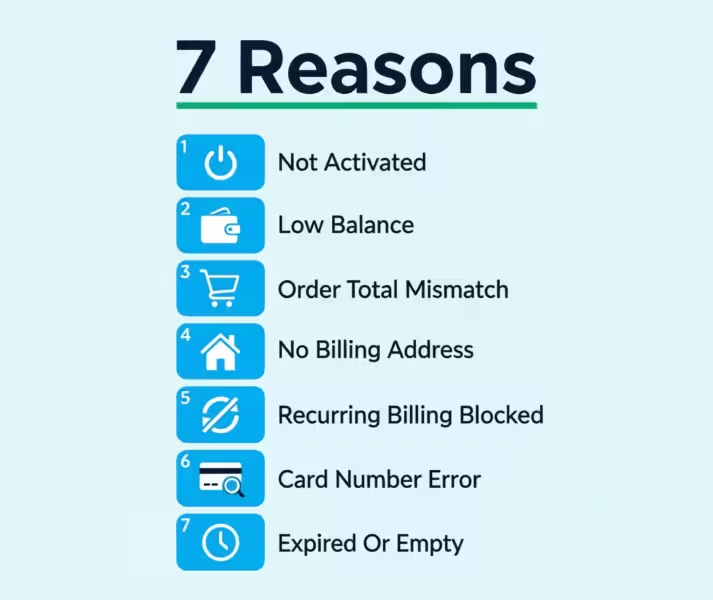
When a checkout system rejects it, the reason almost always comes from one of seven simple problems. Once you spot the right one, the fix is usually quick.
A prepaid card decline is rarely random. The processor checks the card number, the funds, the billing details, and the type of purchase. If even one of those checks fails, the whole payment fails. So the goal is to go through each check, one by one, and see which one is blocking you.
The Card Isn’t Activated Yet
A brand-new Amex Gift Card will not work until you activate it. This step gets skipped more often than you’d think, especially with cards bought in stores or sent as eGifts.
To activate a physical card, visit AmexGiftCard.com/activate and enter the card number, the four-digit code on the front, and the security code on the back. You can also call the toll-free number printed on the back of the card. For eGift Cards, click the link in the original email from American Express. Activation usually takes less than a minute. After that, the card is ready to spend.
If you try to use the card before activating it, the checkout will show a generic “declined” or “invalid card” error. The merchant won’t know why. Your card simply isn’t “live” yet.
Checking Your Balance Before You Try Again
A card with less money on it than the order total will always fail. Most online checkouts won’t tell you that. They just say “card declined.”
To check the current balance, go to AmexGiftCard.com and enter the card number and four-digit code. The site shows the exact dollar amount left, plus a list of recent transactions. You can also call the number on the back of the card and use the automated system.
Knowing the precise balance matters because gift cards can carry odd amounts after partial use. A card listed as “$100” may now hold $63.27. Trying to pay $75 with $63.27 will look like a random decline, even though the real issue is just a few dollars short.
💡 Pro Tip: Write the remaining balance on a sticky note and keep it with the card. Each time you use it, update the number. This saves you from guessing at checkout and avoids the “why did my Amex egift card not working” panic mid-purchase.
Your Order Total Doesn’t Match the Card Balance
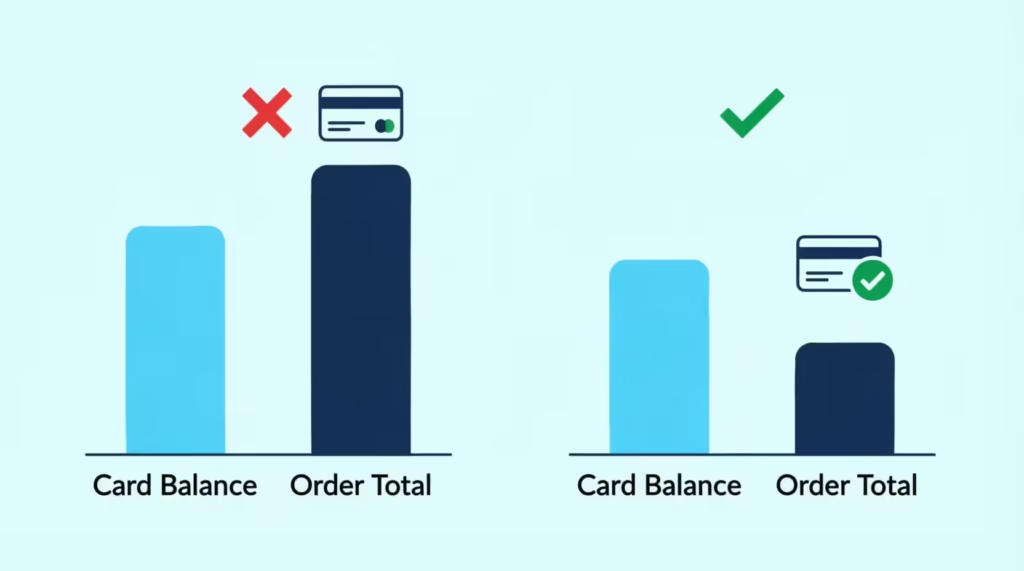
This is the single biggest reason gift cards get declined. Most online stores do not allow split tender payment. That means you can’t pay part of the order with the Amex gift card and the rest with another card or PayPal. The whole order must come off one card.
If your cart is $80 and the card has $50, the system tries to charge $80 to the card. It fails, and the order won’t go through. The store treats it as a failed payment, not a partial one.
The fix is to bring the order total down to match the balance, or below it. Remove items, choose cheaper shipping, or apply a coupon. Aim to leave a small buffer of one or two dollars in case taxes or shipping shift the final number. A card with $50 should be used on an order of $48 or $49, not $50 exactly.
A few stores do allow split tender payment in person. Walmart, Target, and most grocery store registers let the cashier run the gift card first, then charge the rest to a second card. This works at the physical register, not always online. If the card has an awkward balance and you want to spend every cent, an in-store visit is often the cleanest path.
The Card Isn’t Registered With a Name or Billing Address
Online checkouts run something called an Address Verification System, or AVS. The store sends the billing ZIP code to the card network. The network checks if that ZIP matches the address on file. If there’s no address on file, the check fails, and the order gets declined.
Out of the box, an Amex Gift Card has no name and no billing address tied to it. You have to add one yourself.
To register the card, go to AmexGiftCard.com and look for the “Register Your Card” option. Enter your name, your real billing address, and your ZIP code. This information is what you’ll use at any online checkout that needs billing info. Use the same address every time, because mixed details will cause more AVS declines.
Card registration takes about two minutes and only needs to happen once per card. After that, online purchases on most major sites work the same way as a regular credit card.
Recurring Billing and Subscriptions Are Not Allowed
The Amex Gift Card Cardholder Agreement blocks recurring billing. You can’t use the card for monthly subscriptions, auto-pay services, or any charges that happen automatically. Netflix, Spotify, gym memberships, and SaaS tools will all reject the card, even if it has plenty of money.
This is a structural rule, not a bug. The card is designed for one-time purchases only. Trying to use it for a subscription will either decline at signup or fail on the second billing cycle.
If you want to use the card for a streaming service or subscription, the workaround is to buy a gift card for that specific service. For example, use the Amex card to purchase a Netflix gift card or a Spotify gift card from a third-party retailer. That gift card then funds the subscription, and the recurring rule no longer applies.
Double-Check the Card Number, CVV, and Expiration Date
A small typo can cause a full decline. The Amex Gift Card uses a 15-digit number, not 16 like Visa or Mastercard, which confuses some checkout forms. The CVV (security code) on Amex is four digits, not three, and sits on the front of the card, not the back.
Look closely at the card. The number 1 can look like a lowercase L. The number 0 can look like the letter O. A 6 can look like an 8 in some print fonts. Read each digit out loud as you type it, and use a well-lit area.
Also, confirm the expiration date. Amex prints this as MM/YY. If the form asks for MM/YYYY, you’ll need to add the “20” in front. So 09/27 becomes 09/2027.
The Card Is Expired or Already Fully Redeemed
Amex Gift Cards used to have expiration dates, and older cards may still show one. If you got the card a few years ago, flip it over and check the date. An expired card cannot be used at any merchant. American Express provides free replacements for expired cards that still have a balance. You can request one at AmexGiftCard.com or by calling the number on the back.
The other possibility is that the card is already empty. If you, or whoever gifted it, used it earlier, the balance may be $0. The website balance check confirms this in seconds. A $0 card looks active and valid to the eye, but every purchase will fail.
Why Your Amex Gift Card Isn’t Working on Amazon
Amazon is one of the trickiest places to use an Amex gift card, not working on amazon scenario. Amazon’s checkout is strict about two things: address verification and full-payment coverage. Both trip up gift card users constantly.
When you add the card to your Amazon account, you must enter a billing address that matches the address registered on the gift card itself. If the gift card has no address on file, Amazon’s AVS check fails, and the card gets rejected. So step one is always card registration at AmexGiftCard.com first, using the same name and address you’ll enter on Amazon.
Amazon also does not support split tender payment between two credit or gift cards on the same order. Your cart total has to come in at or below the Amex gift card balance, including tax and shipping. If your Amex card holds $74.18 and your cart is $74.99, the order fails. Drop something from the cart, switch to free shipping, or wait for a sale.
The cleanest workaround is also the most overlooked. Use the Amex Gift Card to buy an Amazon Gift Card for the exact balance. Visit the Amazon Gift Card page. Select “eGift Card.” Enter the exact amount from your Amex card, down to the cent. Then, check out with your Amex card as the payment method.
Once the Amazon eGift Card lands in your account, the balance loads to your Amazon wallet. From then on, Amazon treats it as store credit, which can be combined with any other payment method and used on any order, no matter the total.
⚠️ Mistake to Avoid: Don’t try to load the Amex Gift Card directly as an Amazon balance top-up. Amazon’s “Reload your balance” page only accepts bank accounts and credit cards tied to verified accounts. You must buy an Amazon Gift Card as a product instead.
Why Your Amex Gift Card Isn’t Working on PayPal
PayPal and prepaid gift cards have a long, complicated history. As of now, PayPal usually does not let you link or fund your account with a prepaid Amex Gift Card. This is not a glitch on your end. It’s a structural block written into PayPal’s payment rules.
PayPal needs a card that can pass a card verification hold. This is a small temporary charge, often $1.00 or $1.95, that the system places to confirm the card is real and tied to a verified bank or credit line.
Prepaid gift cards often fail this check for two reasons. First, the card has no name or address by default. Second, prepaid cards don’t always support the type of authorization PayPal uses for new card links.
There is no real workaround at the PayPal account level. You can register the gift card with a name and billing address, then try to add it again, but most users still hit the same wall. You can try adding it as a one-time guest payment at some merchants that accept PayPal. This method often works because it skips the account-link step. Even then, success is not guaranteed.
If PayPal keeps rejecting the card, accept that this is a prepaid card restriction and move on. Use the card directly at any online store that takes American Express, instead of trying to fund a PayPal account with it. You’ll spend the balance just as easily, without the verification headache.
Why Your Amex Gift Card Isn’t Working With Apple Pay
Apple Pay does support Amex Gift Cards, but the add-card process trips up many users. To add the card to your digital wallet, open the Wallet app on your iPhone. Tap the plus sign in the top corner. Choose “Debit or Credit Card.” You can then scan the card with your camera or enter the details manually.
A few things commonly go wrong here. The scan often misreads the 15-digit Amex number. Type it in manually for better results. The billing address you enter in Apple Pay must match the address you registered on the card at AmexGiftCard.com. If those two don’t match, Apple Pay will accept the card, but every purchase will fail later at checkout.
Apple Pay also runs a verification check during setup. Sometimes this check times out or comes back inconclusive. If that happens, the card sits in a “Pending” state and won’t work. Wait one to two hours, then try again. Some setups clear on their own once the verification queue catches up on Amex’s side.
If the card adds fine but gets declined at a store, it could mean the store doesn’t take Amex. Also, the order total might be more than the balance. Apple Pay does not split payments across cards inside a single transaction, so the same balance rule applies. The Amex card must cover the full charge.
📌 Did You Know: A small number of merchants who accept Apple Pay still reject Amex at the contactless terminal. The card can be added to your wallet but rejected at checkout. If that happens, ask the cashier if they accept American Express at all. If not, switch to a different store.
Why Your Amex Gift Card Isn’t Working on Cash App
Cash App is a peer-to-peer payment app, and like PayPal, it runs a card verification hold to confirm new cards. Prepaid Amex Gift Cards often fail this step.
When you add the card to Cash App, the app asks for the card number, expiration, CVV, and ZIP code. The ZIP must match the one registered on the gift card. If the card has never been registered, there’s no address to match against, and Cash App will block the link. The exact error message can be vague, like “card not supported.”
Cash App also has policies against using prepaid gift cards to fund a Cash App balance or send money to other users. Even when the card adds successfully, in-app payments can fail. Some users find a workaround. They register the card with a name and address first. Then, they add it as a debit card for one-time purchases at supported merchants. This method does not fund the Cash App wallet itself.
If Cash App keeps rejecting the card, spend the balance somewhere else. Most big online stores take Amex directly. So, there’s no reason to use Cash App when simpler options are available.
Why Your Amex Gift Card Isn’t Working on Shein
Shein checkout problems with prepaid cards often stem from two key issues. First, there can be problems with billing address registration. Second, order totals might not match.
Shein asks for a full billing address during checkout, separate from the shipping address. This billing address must match the one you registered on the Amex Gift Card. If you skipped card registration, the AVS check fails, and the order is declined.
Go to AmexGiftCard.com, register the card with your real address, and then return to Shein and re-enter that exact billing address at checkout. Match the ZIP code, street, and city character-for-character.
The second issue is the order total. Shein does not allow split tender payment on a single order. The Amex card must cover the full cart total, including taxes, shipping, and any handling fees. If the balance on the card is $42, your cart total must come in at $42 or less. Use coupon codes, remove low-priority items, or pick a slower shipping method to nudge the total under the card balance.
If both of those check out and the card is still declined, try a different browser or clear your cart and start fresh. Shein’s checkout sometimes caches old payment errors, and a clean session can resolve them.
Why Your Amex Gift Card Isn’t Working on DoorDash
DoorDash declines on prepaid cards usually trace back to one specific problem: pre-authorization holds. When you place an order, DoorDash doesn’t just charge the food total. It places a temporary hold on the food, tax, delivery fee, and an estimated tip.
So if your order is $18 of food, the actual authorization request might be for $25 or more. If your Amex Gift Card only holds $20, the authorization fails, and the order is declined. The card balance covered the meal, but not the buffer.
To avoid this, check your Amex Gift Card balance before ordering and aim to leave a cushion of at least 25 to 30 percent above your expected food total. A $15 order should be placed with a card holding at least $20. If your balance is tight, set the tip to $0 in the app, complete the order, and tip the driver in cash at the door.
DoorDash also requires that the billing ZIP on your gift card match the ZIP you enter in the app. If you haven’t registered the card at AmexGiftCard.com, do that first. Use the same address you have on your DoorDash account to keep the verification clean.
How Pre-Authorization Holds Cause False Declines
A pre-authorization hold is a temporary lock that merchants place on a card to make sure funds exist for an estimated charge. The actual charge comes later, once the final amount is known.
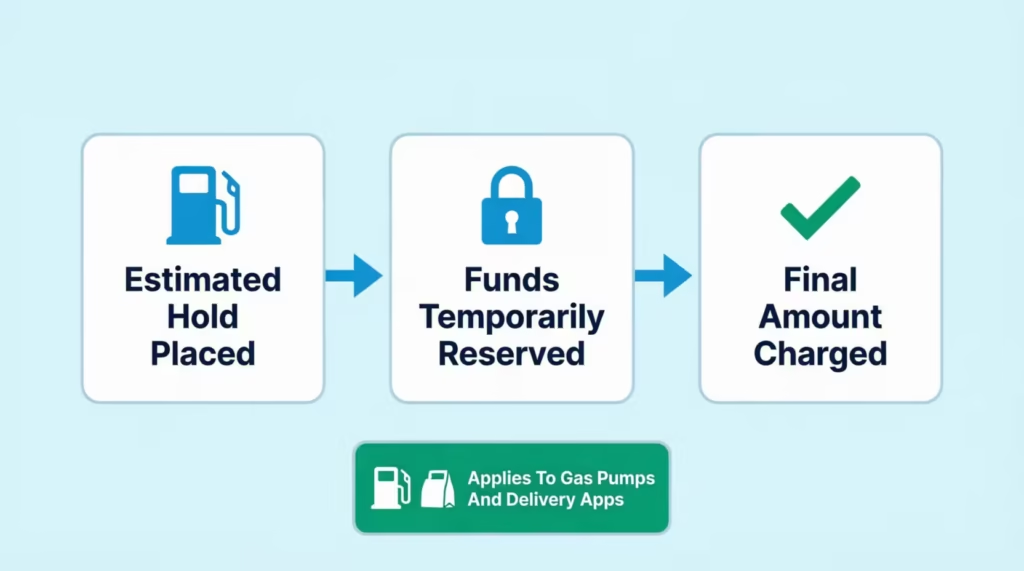
This is most common at gas pumps, where the pump may pre-authorize $100 or more before you’ve pumped a single gallon. Restaurants do the same when they add a 20 percent tip buffer to your bill. Hotels, car rentals, and delivery apps like DoorDash all run pre-authorizations that are higher than the final charge.
For a prepaid card with limited funds, this is a major problem. Your $30 card can fail a $50 gas pump authorization, even if you only plan to buy $20 of gas. The pump doesn’t know that yet, so it asks for the full possible amount.
The fix is to pay inside, not at the pump, for gas. At restaurants, ask the server to run only the exact bill total and hand the tip in cash. At delivery apps, set the in-app tip to zero and tip the driver directly. These small changes help your gift card balance match the authorization request. This way, you won’t face any hidden blocks.
What to Do If a Platform Will Never Accept Your Gift Card
Some platforms will never work with an American Express gift card, not working situation, no matter what you try. PayPal, Venmo, Zelle, and most cryptocurrency platforms structurally block prepaid cards. If you’ve registered the card, checked the balance, and matched the billing address but still get declined, then the problem is with the platform, not the card.
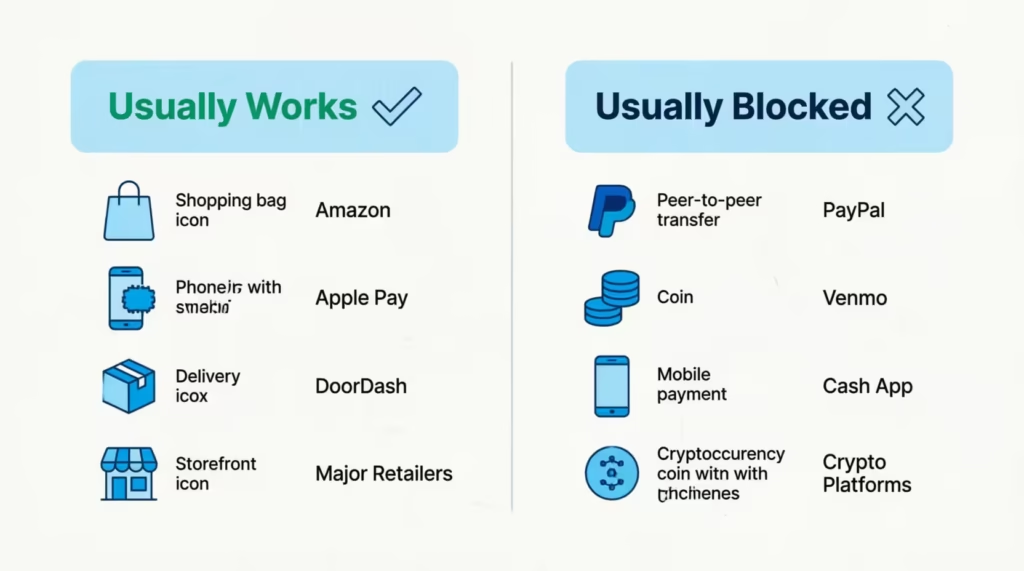
When that happens, switch your strategy. Use the card on platforms that accept American Express directly. Most major retailers accept Amex Gift Cards, both online and in-store. This includes Walmart, Target, Best Buy, Home Depot, Macy’s, and Nordstrom. You can also use the card at any restaurant, gas station (pay inside), or grocery store that takes Amex.
For an awkward leftover balance, the cleanest exit is to use the card at a store that allows split tender payment in person. Hand the cashier the gift card first and ask them to charge it for the exact balance. Then pay the rest with another card or cash. Big-box retailers and grocery chains handle this every day.
A few balance-spend options work well for small leftover amounts:
- Buy a same-day eGift card from a major retailer for the exact balance, then use that eGift card on a future purchase
- Add the card to your Amazon account by purchasing an Amazon Gift Card for the exact balance, which converts the funds into Amazon credit
- Use the card at a checkout that allows multiple tender types, like a grocery register, and split the payment with the cashier
If the card has expired or you suspect a real defect, contact American Express directly through the support number on AmexGiftCard.com. They can verify the balance, check for damage, and issue a replacement card if needed. Keep the original card and any receipt until the new one arrives.
The American Express Gift Card is meant for one-time purchases. You can use it at merchants that accept Amex. Just make sure you have a registered billing address and enough balance to cover the entire order. As long as those three pieces line up, the card works the same as a regular Amex card. When they don’t, the fixes above will almost always get you spending again.
Frequently Asked Questions (FAQs)
Why is my Amex gift card being declined?
The most common causes are an unactivated card, a missing billing address for verification, or an order total that exceeds the card balance. Check the balance at AmexGiftCard.com and confirm registration before trying again.
Why is my Amex card declined when I have money on it?
Most online stores require the full order to be charged to one card, so even a small shortfall between your balance and the total causes a decline. A $50 balance against a $52 order will fail even though funds exist.
Do American Express gift cards need to be activated?
Yes, physical cards must be activated at AmexGiftCard.com/activate using the card number and codes before any purchase will go through. Skipping this step causes a generic “declined” error with no explanation.
Do I need to register my Amex gift card?
Yes, registering your name and billing address at AmexGiftCard.com lets the card pass the Address Verification System most online checkouts run. Without registration, the AVS check has nothing to match, and the order gets rejected.
Do Amex gift cards expire?
Older cards may carry an expiration date printed on the back, and an expired card will not work at any merchant. American Express provides free replacements for expired cards that still have a remaining balance.
Is there a PIN for Amex gift cards?
Amex Gift Cards don’t use a PIN the way debit cards do. Instead, the four-digit code on the front and the CVV on the back serve as the verification details needed to activate and use the card.
Can I use an Amex gift card on Amazon?
Yes, but you must register the card with a billing address that matches what you enter on Amazon, and your cart total must be at or below the card balance. A cleaner workaround is buying an Amazon Gift Card for the exact balance using your Amex card.
Can I transfer an Amex gift card to Venmo?
No, Venmo structurally blocks prepaid cards like Amex Gift Cards from funding an account. Spend the balance directly at a retailer that accepts American Express instead.
Where can I use an Amex gift card?
Most major retailers accept Amex Gift Cards both online and in-store, including Walmart, Target, Best Buy, Home Depot, Macy’s, and Nordstrom. They also work at restaurants and gas stations when you pay inside rather than at the pump.
Why does my Amex gift card keep getting rejected even with a balance?
A common hidden cause is a pre-authorization hold, where apps like DoorDash request more than the order total to cover estimated tax and tip. A $20 balance can fail a $25 authorization even though the actual food cost is only $18.
Wrapping Up
Most declines come down to the same handful of issues: a card that’s not activated, a missing billing address, an order total that’s higher than the balance, or a platform that structurally blocks prepaid cards
First, register the card at AmexGiftCard.com. Then, check the balance before each purchase. Make sure the order total matches the card balance. This way, split-payment limits won’t cause any issues.
For tough spots like PayPal or Cash App, switch to a retailer that takes American Express directly. Found this helpful? Share it with a friend who just got a gift card and is stuck at checkout, because this guide can save them an hour of frustration.