If you’ve ever stared at your Discover account screen, unsure where to click, or wondered whether your payment will actually post on time, you’re not alone. Knowing how to make a Discover credit card payment the right way can save you from late fees and credit score headaches.
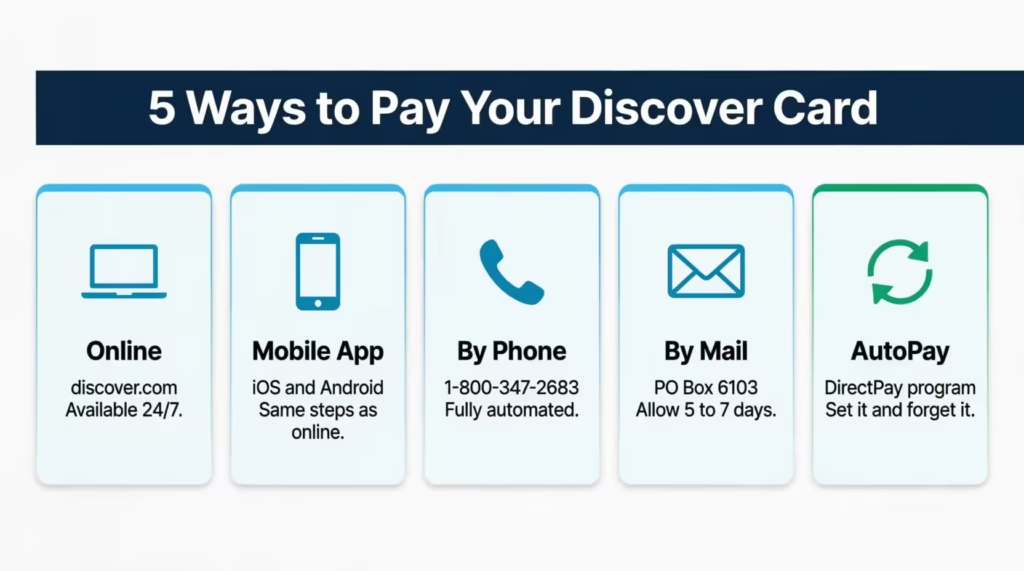
The good news: you have five clear ways to pay, and each one takes just a few minutes.
In this guide, we’ll walk through every method, explain exactly when your payment posts, and show you how to set up autopay so you never worry about this again.
Key Takeaways
This guide explains how to make a Discover credit card payment using online, mobile app, phone, mail, and automatic payment methods, including account setup, payment posting rules, autopay options, late-payment consequences, and credit-reporting timelines.
Core Facts:
- Discover credit card payments can be made online, through the mobile app, by phone, by mail, or through DirectPay automatic payments linked to a bank account.
- Online, mobile app, and phone payments submitted before midnight Eastern Time on regular business days post the same day, subject to specific cutoff exceptions.
- Payments submitted on a statement closing date must be received before 5:00 p.m. Eastern Time to post that day; later payments post the next business day.
- Mail payments are credited on the date Discover receives the payment, not the mailing date, and should be sent five to seven business days before the due date.
- DirectPay autopay supports minimum payment, minimum plus a fixed amount, statement balance, or custom payment options and automatically withdraws funds on the due date.
- Discover may charge a late fee of up to $41 after a missed payment, while payments that reach 30 days past due are reported to the three major credit bureaus.
Best for:
- People who need step-by-step instructions for making a Discover credit card payment using any available payment method.
- Discover cardholders who want to understand payment posting deadlines, statement closing date rules, and available autopay settings.
- Anyone trying to avoid late fees, protect their payment history, and understand when missed Discover payments can affect credit reports.
What You Need Before Making Your First Discover Payment
Before you sit down to pay, it helps to gather a few things first. Running into a missing piece mid-process can leave your payment incomplete right when you’re up against a deadline.
If you’re making a payment online or through the Discover mobile app, you’ll need your login credentials (your username and password). If you haven’t registered yet, you’ll need your credit card number, expiration date, and the CVV printed on the back of your card. You’ll also need your street address, zip code, date of birth, and Social Security number to create your account.
You’ll also need to have a bank account ready to link as your payment source. Online and app payments pull funds directly from a connected checking or savings account. Make sure you have your bank account number and routing number handy before you start.
Phone and mail payments work differently. If you call Discover directly to pay, you can use a bank account already on file or provide a new one during the call. Mail payments use a check or money order, so no digital banking connection is needed.
How to Add a Bank Account to Your Discover Account
Linking your bank account is a one-time setup step. Once it’s done, you won’t need to repeat it unless you switch banks.
Start by logging into your Discover account at discover.com. Navigate to the Payments section and look for the option to add or update a bank account. You’ll enter your bank’s routing number (the nine-digit number at the bottom-left of a check) and your account number (the longer number printed next to it). If you don’t have a check handy, your bank’s website or mobile app will show these numbers under account details.
After you enter the information, Discover may send a small test deposit to your bank account to confirm ownership. This usually clears within one to two business days. Once confirmed, your bank account will appear as an available payment source every time you go to pay your bill.
How to Pay Your Discover Card Online
Paying online is the fastest and most flexible option. The process takes about two minutes, and you can schedule a payment for today or for a future date.
Here’s how to do it:
- Go to discover.com and sign in with your username and password.
- From your account overview, click the “Payments” tab in the main menu at the top of the page.
- Select “Make a Payment” from the dropdown.
- Choose how much you want to pay. Your options are the minimum payment due, the statement balance, the current balance, or a custom amount. (If you’re not sure which to pick, the section below on payment amounts breaks this down.)
- Select your payment date. You can pay today or schedule a future date before your due date.
- Confirm which bank account the payment will come from.
- Review the payment summary and click “Submit.”
You’ll see a confirmation screen with your payment details. Keep that confirmation number somewhere accessible, just in case. The Discover online portal is available 24 hours a day, seven days a week, so you can log in and pay whenever it’s convenient for you.
⚠️ Mistake to Avoid: Don’t log out before you reach the confirmation screen. If you close the browser too early, the payment may not go through. Wait until you see a confirmation number before you close the tab.
How to Pay Your Discover Card Through the Mobile App
If your phone is within reach more often than your laptop, the Discover mobile app handles bill payments just as well as the desktop site. The navigation is slightly different, but the steps are just as direct.
First, download the Discover mobile app from the App Store (iOS) or Google Play (Android) if you haven’t already. Log in with the same credentials you use on the website.
From the home screen:
- Tap your credit card account to open the account detail screen.
- Tap “Payments” near the bottom of the screen.
- Select the payment amount (minimum due, statement balance, current balance, or custom).
- Choose the payment date.
- Confirm your bank account as the payment source.
- Tap “Submit” and wait for the confirmation screen.
The same payment posting rules apply to app payments as to online payments. If you submit before midnight Eastern Time on a regular day, the payment posts the same day. The timing section below covers this in full.
How to Pay Your Discover Card by Phone
Some people prefer to pay by phone, especially if they’re not comfortable with online banking or if they need to speak with someone directly. Discover’s phone payment system is fully automated, so you don’t have to wait on hold with a representative unless you choose to.
Call 1-800-347-2683. This is the number on the back of your Discover card and on your statement.
When the automated system answers:
- Listen for the “Make a payment” option and select it.
- Enter or say the last four digits of your Social Security number to verify your identity.
- State the payment amount you’d like to pay.
- Confirm that you want to use the bank account already on file, or provide the routing and account numbers for a different bank account.
- The system will confirm your payment details. Approve the transaction to finish.
The phone line is available around the clock. Payment posting follows the same cutoff rules as online payments, so the timing section below applies here too.
How to Pay Your Discover Card by Mail
Mailing a payment is a reliable option if you prefer paper transactions or don’t have online access. The key is giving yourself enough time. Mail payments post on the day Discover receives your envelope, not the day you send it.
Send your check or money order to:
Discover PO Box 6103 Carol Stream, IL 60197-6103
Here’s what to include and how to prepare your payment:
- Write a check or money order payable to Discover. Cash is not accepted by mail.
- Write your Discover credit card account number on the memo line of your check or money order.
- Detach the payment coupon from your paper statement and include it with your check. If you don’t have a coupon, write your account number clearly on a separate slip of paper.
- Do not use staples, paper clips, or tape on the check. Don’t fold the check.
- Use a standard envelope with a stamp.
Plan to mail your payment at least five to seven business days before your due date. That window accounts for postal transit time and Discover’s internal processing. If your payment arrives after your due date, it’s considered late regardless of when you mailed it.
Minimum Payment, Statement Balance, or Current Balance: Which to Choose
When you reach the payment screen, you’ll see several amount options. This choice matters more than most people realize. Picking the wrong one doesn’t just affect this month’s bill; it can cost you money in interest charges every single month.
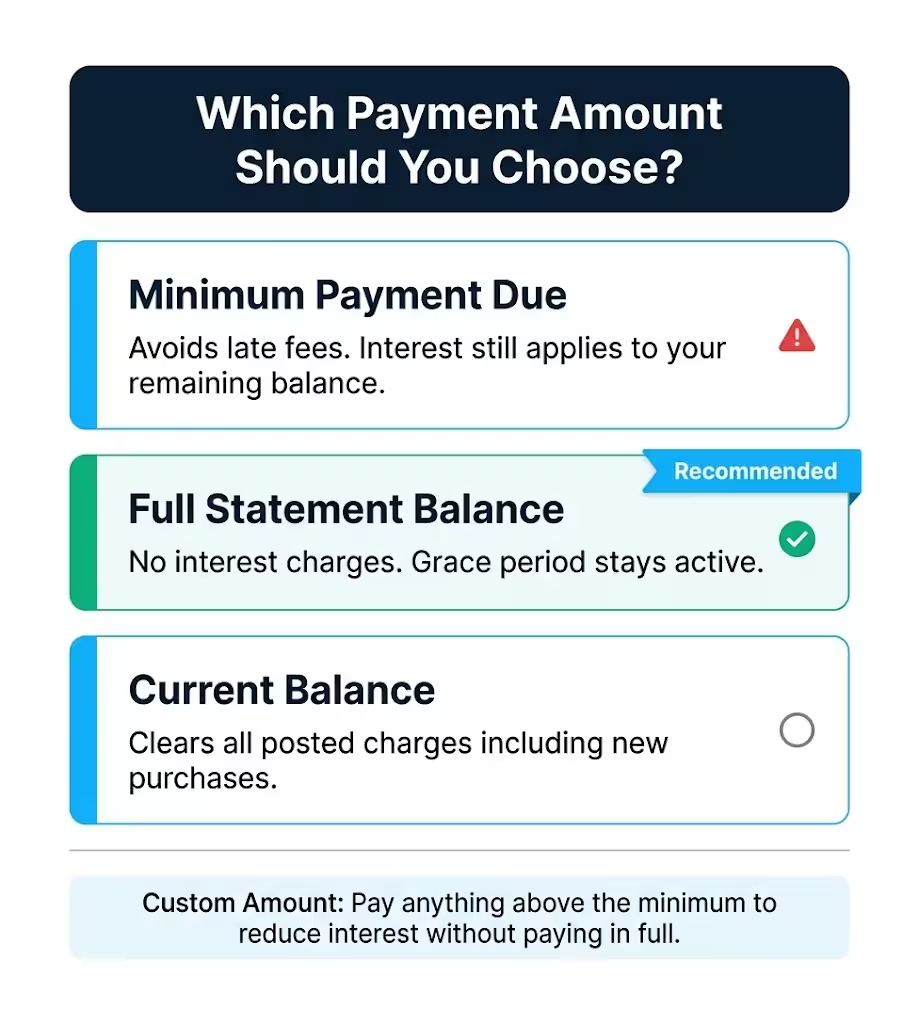
Here’s what each option actually means:
Minimum payment due is the smallest amount Discover requires to keep your account in good standing for this billing cycle. Paying it prevents a late fee and protects your payment history. However, it does not prevent interest from accumulating on the remaining balance. If you carry a $500 balance at a 22% APR and pay only the minimum each month, you’ll pay significantly more than $500 by the time the balance is gone, and it’ll take much longer to clear it.
Statement balance is the total amount charged to your account during your most recent billing cycle, as shown on your last statement. Paying this full amount by the due date keeps you in Discover’s grace period, which means no interest charges on new purchases going into the next cycle. This is the amount most financial advisors recommend paying each month when possible.
Current balance includes your statement balance plus any new charges you’ve made since your last statement closed. Paying the current balance wipes out everything posted to your account up to that moment. It’s the cleanest option if you want a completely clear balance.
Custom amount lets you pay anything between the minimum and your full balance. If you can’t pay the full statement balance this month but want to reduce what you’re carrying, a custom amount helps. Just know that interest will still apply to whatever unpaid balance remains.
The most important thing to understand: paying only the minimum is not the same as paying off your card. It keeps the account current, but interest compounds on the remaining balance until it’s paid in full.
📌 Did You Know: Payment history makes up 35% of your FICO credit score, according to myFICO. Consistently paying at least the minimum on time, every month, has a bigger positive impact on your score than the payment amount itself.
When Discover Payments Post: Cutoff Times and Timing Rules
Submitting a payment and having it actually count as on time are two different things. Discover has specific cutoff rules that determine when a payment is credited, and missing them by even a few hours can result in a late fee.
Here’s how the timing works:
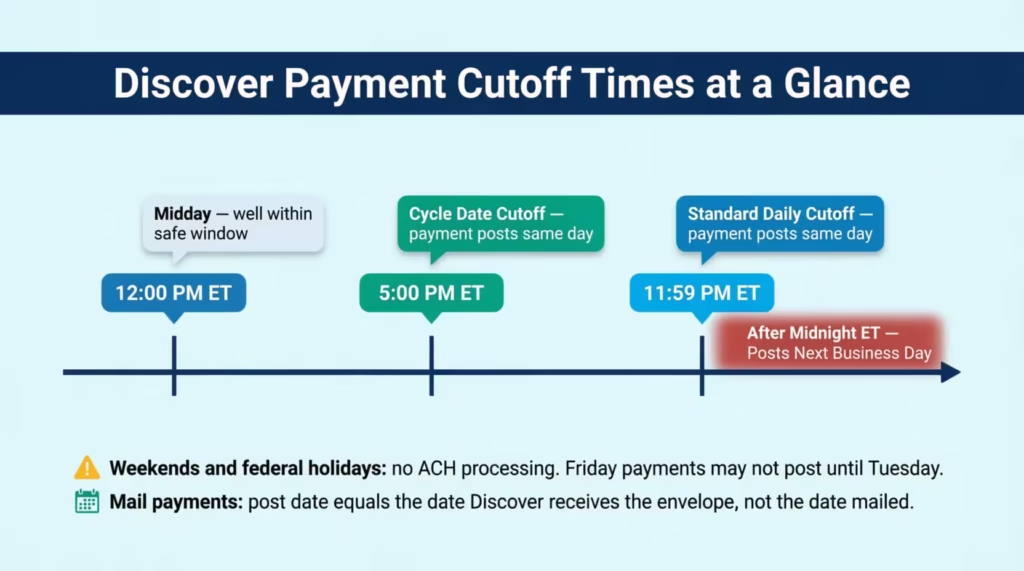
Standard rule: Online and mobile app payments submitted before midnight Eastern Time on any regular business day post to your account that same day.
Cycle date exception: If your payment falls on your statement closing date (the day your billing cycle officially ends), a stricter cutoff applies. That payment must arrive before 5:00 p.m. Eastern Time to post the same day. Anything after 5:00 p.m. on the cycle date posts on the next business day.
So here’s a practical example. If your billing cycle closes on the 15th of each month and you submit a payment at 6:00 p.m. ET on the 15th, that payment won’t post until the 16th, even though you submitted it “on time” by most definitions. If the 15th is also your due date, that payment is late.
Weekends and federal holidays matter too. ACH transfers (the system that moves money from your bank account to Discover) do not process on Sundays or federal holidays. A payment submitted on a Friday evening may not post until the following Tuesday if Monday is a federal holiday. If your due date falls on a weekend or holiday, pay the business day before to be safe.
Phone payments follow the same cutoff rules as online payments.
Mailed payments post on the date Discover receives the envelope, regardless of when you sent it.
How Long Until Your Payment Reflects in Available Credit
After your payment posts, your available credit doesn’t always update instantly. Discover may reflect the increased credit line immediately, or it may take up to one business day after posting.
Your payment is still considered on time the moment it’s received before the cutoff. The available credit display catching up is a separate process. If your available credit hasn’t updated within two business days of your payment posting, contact Discover’s customer service at 1-800-347-2683 to confirm the status.
Payments made by check or money order through the mail may take a bit longer to fully reflect in your available credit, since they require Discover to manually process the physical item.
How to Set Up Automatic Payments on Your Discover Card
Setting up autopay is the most reliable way to make sure you never miss a payment again. Discover’s autopay system is called DirectPay, and it automatically pulls your payment from a linked bank account on your regular due date each month.
There’s no fee to enroll. Here’s how to set it up online:
- Log in to your Discover account at discover.com.
- Click the “Activity & Payments” tab in the main navigation.
- Select “Automatic Payments.”
- Enter your bank account’s routing number and account number (or select an account you’ve already linked).
- Choose your preferred payment amount. (This is covered in the next section.)
- Your payment will be withdrawn on your regular due date by default. If you’d like to change that date, click “Change Payment Due Date” from the DirectPay settings page.
- Review and confirm.
You can also set up DirectPay through the Discover mobile app under the Payments menu, or call 1-800-347-2683, and a representative can help you enroll by phone.
Once set up, you don’t have to do anything each month. Discover will automatically pull the payment on your due date. You should still review your statement each month to track charges and confirm the payment went through as expected.
Choosing the Right DirectPay Payment Amount
DirectPay offers four payment amount options. The one you choose determines whether autopay actually protects you from interest charges or just protects you from late fees.
Minimum payment due: Discover pulls the minimum required payment each month. This guarantees on-time payment and no late fee, but interest will keep accruing on any balance you carry. Good as a safety net if your monthly budget varies.
Minimum payment plus a fixed additional amount: You set a specific extra dollar amount on top of the minimum. For example, minimum plus $50. This reduces your balance faster than the minimum alone, though interest still applies to what’s left.
Statement balance: Discover pulls the full statement balance each month. This is the option that actually eliminates interest charges, as long as your checking account can cover it. For most people who consistently carry manageable balances, this is the strongest choice.
Custom amount: You set a specific dollar figure, as long as it’s at least the minimum due. Useful if you want to target a specific payoff amount each month.
One important note: make sure your linked checking account has enough funds to cover the payment before your due date. If the payment is declined because of insufficient funds, Discover may still charge a late fee, and the autopay protection you set up won’t help that month.
How to Change or Cancel Your Discover Autopay
Life changes, and so do budgets. If you need to update your autopay amount, switch bank accounts, or turn off DirectPay entirely, it’s straightforward.
Log in to your account and go to “Activity & Payments”, then “Automatic Payments.” From there, you can update any of your settings.
You can also call 1-800-347-2683 to make changes over the phone.
Important: Any changes or cancellations must be completed before 5:00 p.m. ET on your due date to take effect for that billing cycle. Changes submitted after that point will apply starting the following month.
Canceling autopay doesn’t affect your Discover account or card. It simply means you’ll need to make manual payments going forward each month.
What Happens If You Miss a Discover Credit Card Payment
If your due date has already passed, the priority is to act now. The consequences of a missed payment get more serious the longer you wait.
Here’s what happens on a timeline:
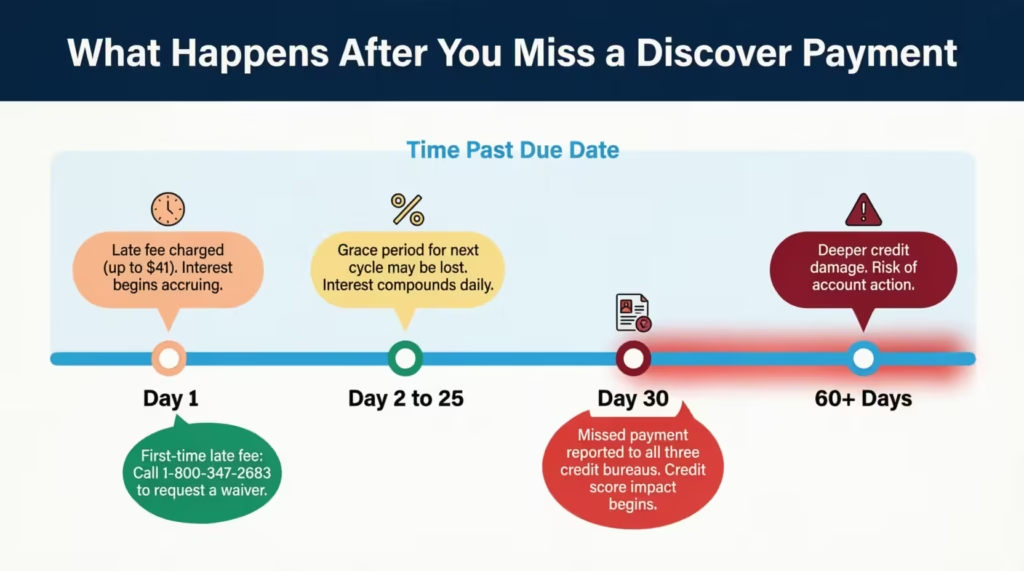
The day after your due date: A late payment fee applies to your account. Discover charges up to $41 for a missed payment, with one exception noted below. Interest also begins accruing on your unpaid balance right away at your card’s regular APR. Discover does not charge a penalty APR for late payments, which is better than most issuers.
The next billing cycle: You may lose the grace period for that cycle. That means interest will apply to new purchases right away, not at the end of a 25-day grace window.
At 30 or more days past due: Discover reports the missed payment to all three major credit bureaus. This is when the real credit score damage happens. Experian notes that a single late payment reported at 30 days can meaningfully lower your credit score, particularly if your credit history has otherwise been clean.
The right move right now, if you’re already past due: make at least the minimum payment immediately. A partial payment is far better than no payment, and getting something posted before the 30-day mark can be the difference between a fee and a permanent credit report entry.
💡 Pro Tip: If you’re within a few days of your due date, online and phone payments are your fastest options. Mailing a check at this point will almost certainly arrive too late.
How to Request a Late Fee Waiver from Discover
Discover has a policy most cardholders don’t know about: the first late fee on your account is automatically waivable. This is a standard account benefit, not a special negotiation.
Call Discover at 1-800-347-2683 and let the representative know it’s your first late payment and you’d like to request the fee waiver. Have your account number ready. The waiver typically applies without any additional steps or requirements.
This one-time waiver covers fees up to $41. After that, subsequent late fees apply at the standard rate. Requesting the waiver does not affect your credit score and doesn’t change your account status in any negative way.
When Discover Reports Late Payments to Credit Bureaus
There’s an important distinction between a payment that’s a few days late and one that crosses the 30-day threshold.
One to 29 days late: Discover can charge a late fee, and interest begins accruing, but the missed payment is not reported to the credit bureaus. Your credit score is not affected at this stage.
30 or more days late: Discover reports the delinquency to all three major credit bureaus (Equifax, Experian, and TransUnion). A 30-day late mark can remain on your credit report for up to seven years and will impact your score significantly, especially in the short term.
Two additional things worth knowing:
Cash advances and balance transfers don’t get the grace period. Interest on those begins the day the transaction posts, even if you pay your full statement balance on time. If you’ve used either of these features, your next statement may show interest charges even if you paid in full.
The 30-day mark is the line you need to protect. If you’re approaching it and can’t pay the full balance, paying even just the minimum before day 30 stops the credit bureau reporting clock. It doesn’t eliminate the fee or the interest, but it protects your credit history from a formal delinquency entry.
Frequently Asked Questions (FAQs)
Why can’t I make a payment on my Discover credit card?
The most common reason is that no bank account has been linked to your Discover account yet. Log in, go to the Payments section, and add your bank’s routing number and account number before trying again.
Is it better to pay online or by mail?
Online payments are faster and safer for your due date. Mail payments take five to seven business days to arrive, and Discover counts the receipt date as the payment date, not the postmark date, which creates real late-fee risk.
How should I pay off my Discover credit card?
Pay the full statement balance every month if possible. This eliminates interest charges and preserves your grace period. If you can’t pay the full balance, pay as much above the minimum as your budget allows to reduce the interest that accumulates.
What address do I send my Discover credit card payment to?
Mail your check or money order to: Discover, PO Box 6103, Carol Stream, IL 60197-6103. Write your credit card account number on the memo line and include your payment coupon from your statement.
How do I access my Discover account?
Go to discover.com and enter your username and password. If you haven’t registered yet, click “Register an Account” and have your card number, expiration date, CVV, and Social Security number ready to complete setup.
Does Discover charge a fee to pay by phone?
No. Discover’s automated phone payment system at 1-800-347-2683 is free to use. There is no service or convenience fee for making a payment through the phone line.
Does paying only the minimum affect my grace period?
Yes. Paying less than your full statement balance means interest starts accruing on your remaining balance right away. The 25-day grace period, where no interest applies to new purchases, only stays active when you pay the statement balance in full each month.
Can I cancel a Discover payment after I submit it?
You may be able to cancel a scheduled future payment by logging into your account before the payment is processed. A payment that has already been submitted for the current day typically cannot be reversed, so contact Discover at 1-800-347-2683 immediately if you need to make a change.
What is the phone number for the Discover card?
The main Discover customer service and payment phone number is 1-800-347-2683. You can use this number to make a payment through the automated system, set up DirectPay autopay, or speak with a representative.
Can I pay my Discover credit card bill through the mobile app?
Yes. Download the Discover app on iOS or Android, log in, select your credit card account, and tap “Payments.” The app supports one-time payments and autopay setup, and it follows the same payment posting cutoffs as the website.
Bottom Line
Making a Discover card payment doesn’t need to be complicated. You can pay online, through the mobile app, by phone, or by mail, and each method is straightforward once you know the steps. Understanding the payment posting cutoffs, especially the cycle date rule, helps you avoid fees you’d otherwise never see coming.
Choosing the right payment amount, ideally the full statement balance when your budget allows, keeps interest charges from quietly compounding month after month.
Based on the timing risks involved, setting up DirectPay autopay at the statement balance level is the most reliable way to protect both your account standing and your credit score long-term.
If you know someone who just got their first Discover card, share this guide with them. It’ll help them get set up right from the start.