Holding two or more Amex cards feels great until you sit down to manage them. Maybe one card has a big credit line you barely use, while your favorite card keeps hitting its limit. Or you wonder if your points from each card sit in separate piles. Trying to combine American Express cards sounds like the obvious fix, but the answer isn’t as simple as one button click.
The short answer: Amex lets you move credit limits between most cards and pool rewards points automatically, but it won’t merge two accounts into one.
This guide walks you through every option, every rule, and every limit, so you know exactly what’s possible before you log in.
Key Takeaways
This guide explains how to combine American Express cards across three dimensions: moving credit limits between cards, pooling Membership Rewards points automatically, and sharing points with family members using the authorized user workaround and its 90-day requirement.
Core Facts:
- Amex does not allow two separate card accounts to be merged into one account number; each card keeps its own statement, account number, and payment due date permanently.
- Credit limit transfers between Amex cards are done online through the “Transfer Available Credit” tool under Account Services, and most changes appear on both accounts within minutes.
- Both cards involved in a credit limit transfer must be at least 60 days old, and after a card is used as a donor, it cannot donate again for approximately 180 days.
- The donor card must retain a minimum balance (roughly $500 to $1,000) after a transfer, and credit cannot be moved between business and personal Amex cards or between charge cards and credit cards.
- A credit limit transfer does not trigger a hard inquiry and does not change total available credit, so it has no direct negative effect on a credit score.
- Membership Rewards points from multiple eligible Amex cards pool automatically into one shared balance; cash-back cards like Blue Cash Preferred earn separately and cannot be converted to Membership Rewards points.
- Points are forfeited immediately if the cardholder closes their last Membership Rewards-earning card; keeping at least one eligible card open protects the entire balance.
- Amex does not allow direct point transfers between two separate cardholders’ accounts, but adding a family member as an authorized user for at least 90 days allows points to be transferred into that person’s airline or hotel loyalty account.
Best for:
- Amex cardholders whose new card received a low starting credit limit and who want to rebalance existing credit from an older, underused card without applying for a credit increase.
- Cardholders planning to close an Amex card who want to preserve that card’s credit line by moving it to a card they actively use before closing.
- Couples or family members who want to combine points-earning toward a shared travel goal using the authorized user transfer method.
What “Combining” American Express Cards Actually Means
The word “combine” gets used three different ways online, and each one means something very different. Before you try anything, it helps to know which one you actually want. Picking the wrong path can waste time, or worse, lead you to close a card you didn’t need to.
When most people say they want to combine American Express cards, they really mean one of three things. The first is merging two card accounts into a single account number. The second is moving credit from one card to another, often called a credit limit transfer. The third is pooling rewards points so they all sit in one balance.
Amex does not allow the first one. You cannot merge two separate card accounts into one shared account number, and you cannot fuse their histories. But the second and third options are very real, and both can save you time and money when used right.
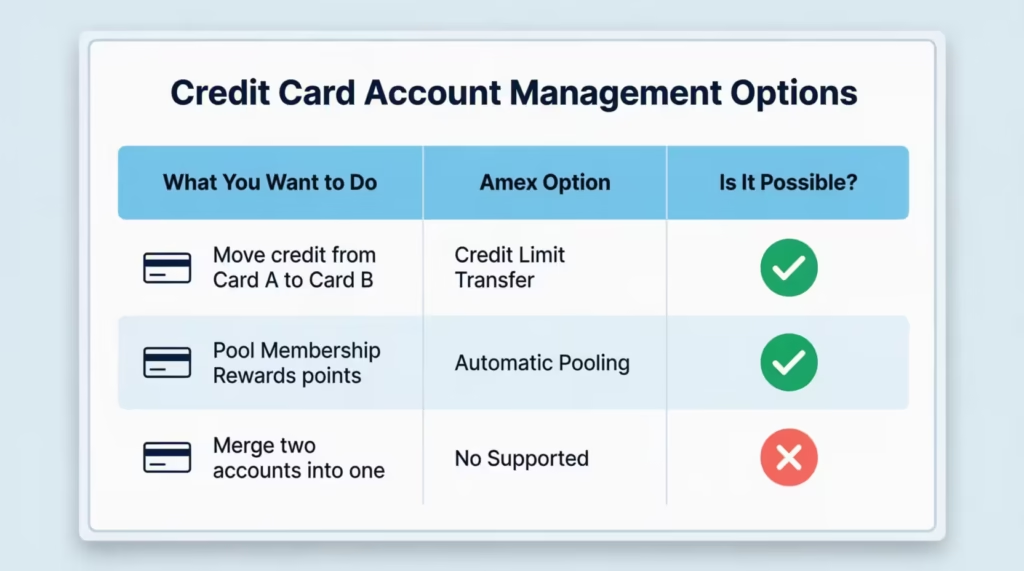
Here’s a quick map of what each path does, so you know where to focus:
Can You Actually Merge Two American Express Accounts Into One?
No. Amex does not let you merge two separate card accounts into a single account number. Each card you own keeps its own account, its own statement, and its own payment due date. Even if both cards are in your name, both are personal cards, and both earn the same kind of rewards, the accounts stay separate forever.
Some readers expect that closing one card “into” another should be possible, the way some banks let you fold a checking account into a primary one. Amex doesn’t work that way. Each card counts as a separate product. You can reduce your cards by either closing them or downgrading to a no-fee version in the same product line.
So if your real goal is one cleaner profile, the next best thing is to consolidate credit lines onto your main card and let your points pool naturally. You’ll get the simplicity you want without losing anything important.
What a Credit Limit Transfer Between Amex Cards Is
A credit limit transfer is when you move a portion of the credit limit from one of your Amex credit cards to another card you already own. Amex calls this “transfer available credit,” and it’s the main way to rebalance how your credit is spread out across your wallet.
Why would someone do this? A few common reasons come up. Maybe you just got approved for a new Amex card with a low starting limit, and you want to boost it using credit from an older card you barely use.
Maybe you’re getting ready to close a card and want to keep its credit line in your account instead of losing it. Or maybe your everyday rewards card keeps hitting its limit, while a backup card sits with thousands of unused credit.
The most important thing to know: a credit limit transfer does not give you new credit. You are not borrowing more from Amex. You are simply reshuffling the credit Amex has already approved. If Card A has a $10,000 limit and Card B has a $5,000 limit, moving $3,000 from A to B leaves you with $7,000 and $8,000. The total stays $15,000.
One key limit to flag up front: credit limit transfers work only between Amex credit cards. Charge cards like the Platinum Card or the classic American Express Gold Card are not part of this system. Charge cards don’t have a preset spending limit in the same way, so they can’t send or receive credit through this tool.
💡 Pro Tip: Before transferring credit off a card, check if that card still earns useful rewards or has perks tied to its limit. Moving too much credit off your daily driver can leave you bumping against the new lower ceiling.
How to Transfer a Credit Limit Between Your American Express Cards
The process is fully online, takes about five minutes, and doesn’t need a phone call. Here are the steps to move credit between two cards in your name.
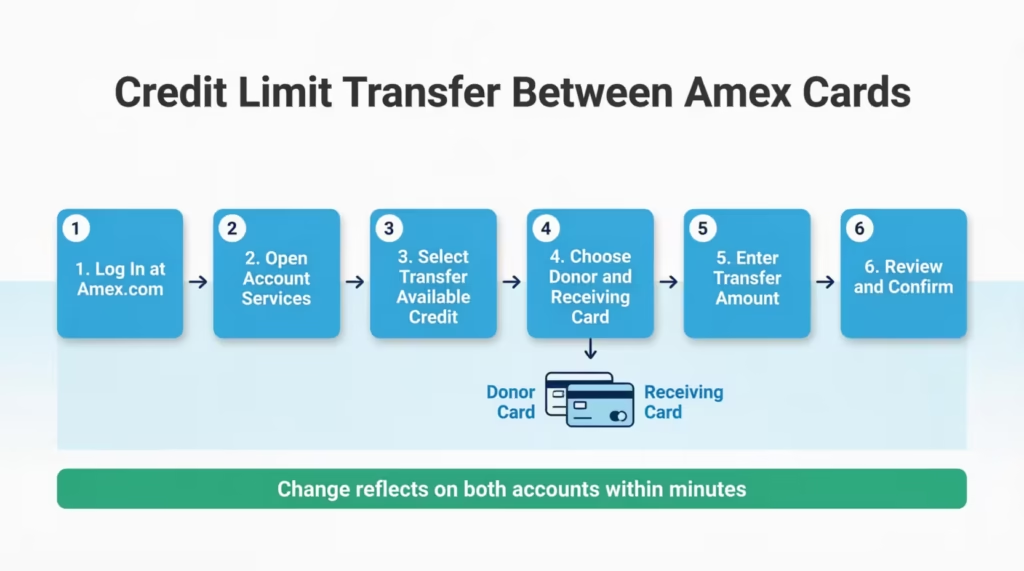
Step 1: Log in to your Amex account. Sign in at americanexpress.com with your User ID and password. The mobile app does not currently offer the credit transfer tool, so use a desktop or mobile browser instead.
Step 2: Open the Account Services menu. Once you’re signed in, look for the “Account Services” tab in the top menu. From the dropdown, choose “Payment & Credit Options.” This is where Amex hides most of the tools that change how your credit works.
Step 3: Select “Transfer Available Credit.” Inside Payment & Credit Options, you’ll see a link or button called “Transfer Available Credit.” Click it. If you only see one card, that means you don’t have a second eligible card yet, or the second card is a charge card and doesn’t qualify.
Step 4: Pick the donor card and the receiving card. The “donor” card is the one giving up credit. The “receiving” card is the one that gets the boost. Make sure you’ve thought about which card you actually use more often. Once you pick them, Amex will show you the current limits on both.
Step 5: Enter the amount to transfer. Most users can only enter amounts in multiples of $100. Amex will also show the maximum you can transfer, which depends on the rules covered in the next section. Stay within that cap.
Step 6: Review and confirm. Double-check the donor card, the receiving card, and the dollar amount. Hit confirm. In most cases, the change shows up on both accounts within minutes. You can refresh your account dashboard to see the new limits.
If something looks off after the transfer, give it up to 24 hours before calling Amex. Most updates are instant, but a small share takes a bit longer to fully reflect.
What to Do If Your Credit Limit Transfer Request Is Denied
A denial usually means you broke one of the eligibility rules.
The main reasons are:
- The donor card is too new (less than 60 days old).
- The receiving card hasn’t been open long enough.
- The donor card’s balance is close to its limit.
- You tried to transfer from a business card to a personal one.
If you get denied online, first check the timing rules in the next section to see which one you missed. Then wait until the rule clears. For example, if your donor card is 45 days old, wait another 15 days and try again.
If you’ve already passed all the timing tests and still get denied, call the Amex Customer Service line on the back of your card. A representative can manually review and approve your request.
This often happens if your account is in good standing and your reason makes sense, like a big purchase or planned card closure. Don’t apply for a credit limit increase as a workaround unless you actually want a new line, because that often does trigger a hard pull.
The Eligibility Rules for Amex Credit Limit Transfers
Amex sets several rules for credit reallocation, and not all of them are written on the public website. Some are informal but consistently enforced. Knowing them all before you start saves you a denial.
These rules mainly cover three things: how much credit must stay on the donor card, how old each card needs to be, and which card types can talk to each other. The rules below apply to U.S. personal Amex credit cards.
The Minimum Balance Requirement on the Donor Card
Amex doesn’t let you drain a card all the way down to zero. The donor card must keep a minimum credit line after the transfer, usually around $500 to $1,000, depending on the card type. So if your donor card has a $4,000 limit and the floor is $1,000, the most you can move out is $3,000.
This rule exists to keep every card “usable” after a transfer. Amex doesn’t want cards sitting open with $0 in available credit, since that creates confusion and reporting headaches. It also gives you a safety cushion in case you ever need to use the donor card again.
The exact floor isn’t published, so you’ll see it only when you enter an amount the system rejects. Start by trying to leave $1,000 on the donor card, and adjust down if Amex allows more.
The 60-Day and 180-Day Timing Rules
Two timing rules come up again and again in Amex transfer denials. Both cards involved must be at least 60 days old before they can take part in a credit transfer. This applies to both the donor and the receiving card. A brand-new card you just got last month won’t qualify.
The second rule is about how often you can transfer credit from the same card. After you move credit out of a card, you have to wait around 180 days before you can move credit out of that same card again. You can still receive credit on it in the meantime, but you can’t be the donor twice in six months.
⚠️ Mistake to Avoid: Don’t apply for a new Amex card and try to transfer credit to it within the first 60 days. The system will reject the request, and reapplying too quickly looks worse on your account history.
These timing rules aren’t always shown on the website, but they’re enforced behind the scenes. If you plan a transfer around a new card, mark your calendar for day 60 and day 180.
The Business Card to Personal Card Restriction
You cannot transfer credit from an Amex business card to an Amex personal card, or the other way around. Business credit and personal credit exist in separate systems at Amex. This is true even if both cards are under your name and linked to the same Social Security number.
This catches a lot of small business owners off guard. If you have an American Express Business Cash card with a high limit, you cannot send that credit over to your personal Blue Cash or Cash Magnet card. Personal-to-personal transfers and business-to-business transfers are fine. Mixed transfers are not.
The same wall applies to charge cards. A charge card and a credit card cannot share credit either, because charge cards don’t have a fixed preset limit to share.
Does Transferring Credit Limits Between Amex Cards Hurt Your Credit Score?
No. A credit limit transfer between two Amex cards is a reallocation, not a new credit application. Amex is not extending you any new money, so they do not run a hard inquiry or a soft pull on your credit report when you move credit from one card to another. Your FICO score and VantageScore should not change because of the transfer alone.
This is one of the biggest reasons people use credit limit reallocation instead of asking for a credit limit increase. A formal credit limit increase request often does come with a hard inquiry, which can knock a few points off your score for up to a year. A transfer skips that step completely.
Your total available credit also stays the same after a transfer. Your credit utilization relies on the total credit across all your cards. So, moving credit from Card A to Card B doesn’t change your overall ratio. The utilization on Card B will decrease (good), but Card A’s may increase (less good). Lenders mostly look at total utilization, so this is usually a wash.
One exception worth flagging: if you transfer credit off a card and then close that card right after, the closure itself can affect your score. Closing a card reduces your total available credit and can shorten your average account age. The transfer is harmless on its own, but pair it with a closure, and your score may dip a bit.
📌 Did You Know: A credit limit transfer can also help with new card approval. If Amex has told you that you’re at your “total exposure” limit with all their cards, moving credit from one card can help. This creates space for Amex to approve your new application.
Do American Express Membership Rewards Points Combine Automatically?
Yes. If you have two or more Amex cards that earn Membership Rewards points, the points combine automatically into a single Membership Rewards account. You don’t have to click a button, fill out a form, or call anyone. As soon as a second Membership Rewards-earning card is added to your profile, the two card balances flow into one shared pool.

This pooling rule comes straight from American Express’s own program FAQ, which states that holders of multiple eligible products may be automatically linked to the same Rewards account. When you log in to check your rewards balance, you’ll see one number. This number shows the total from all your Membership Rewards-earning cards.
This is very different from how Chase Ultimate Rewards or Citi ThankYou Points work. With Chase, each card has its own points balance until you actively combine them through the website. Amex skips that step. The pooling is built into how the Membership Rewards program is set up.
A few important details to keep straight. First, only Membership Rewards-earning cards take part in the pool. The Amex Gold Card, Platinum Card, Green Card, and the Amex EveryDay family all earn Membership Rewards points, so they all pool together.
Second, Amex cash-back cards like Blue Cash Preferred and Blue Cash Everyday earn cash back rewards instead, and that cash sits with each card separately. Cash-back rewards never get converted to Membership Rewards or pooled into the points balance. Third, business and personal Membership Rewards accounts are kept separate. Your Business Gold’s points pool with your Business Platinum’s points, but not with your personal Gold’s points.
What Happens to Your Points When You Close an Amex Card?
This is where many cardholders get nervous, and rightly so. If you close every Amex card that earns Membership Rewards, your points balance is forfeited. They don’t sit and wait. They don’t roll into a different program. The moment you have no Membership Rewards-earning cards left open, the points disappear.
The fix is simple: always keep at least one Membership Rewards-earning card open while you have points you want to keep. Even a no-annual-fee option like the Amex EveryDay Card (if still available) or the basic Amex Green keeps your points safe. Plus, it gives you a place for your pool to live.
Here’s how this plays out in real life. Michael, a freelance graphic designer, held both the Amex Gold and Amex Platinum cards. He earned 240,000 Membership Rewards points in three years.
When he decided to drop the $695 Platinum annual fee, he asked Amex to downgrade the Platinum to a no-fee product instead of closing it outright. Because his Gold card stayed open, his 240,000 points stayed safely in his Membership Rewards account throughout the whole change.
Before you close any Amex card, run through this three-step check:
- List every Amex card on your profile and mark which ones earn Membership Rewards points.
- If the card you’re closing is the last Membership Rewards-earning card, do not close it. Either downgrade it to a no-fee Membership Rewards card or transfer your points to a partner airline or hotel program first.
- If you have other Membership Rewards cards still open, your points are safe, and you can close them freely.
Can You Share or Combine Amex Points With a Family Member?
Direct sharing is not allowed. American Express doesn’t allow you to transfer Membership Rewards points between accounts. This rule applies even if you live together, share finances, or are married. Each Membership Rewards account belongs to one primary cardholder. Points can’t be shared using normal tools.
This is a real difference from some hotel programs and airline programs, which let two members move miles between each other for a fee. Amex has no such “points transfer” feature between two separate Membership Rewards accounts. Calling customer service will not unlock it. No fee can buy it.
That said, there’s one well-known workaround that comes close, which is the authorized user path. It’s not a true transfer between two accounts, but for many couples and families, it solves the same problem.
The Authorized User Workaround for Sharing Points
The workaround uses Amex’s transfer partner rules. Membership Rewards points can be moved to airline and hotel programs, not just in your own name, but also in the name of an authorized user on your card.
The official Membership Rewards Program Terms and Conditions explain that an Additional Card must be issued to that Additional Card Member at least 90 days before you can link your program account to their partner account.
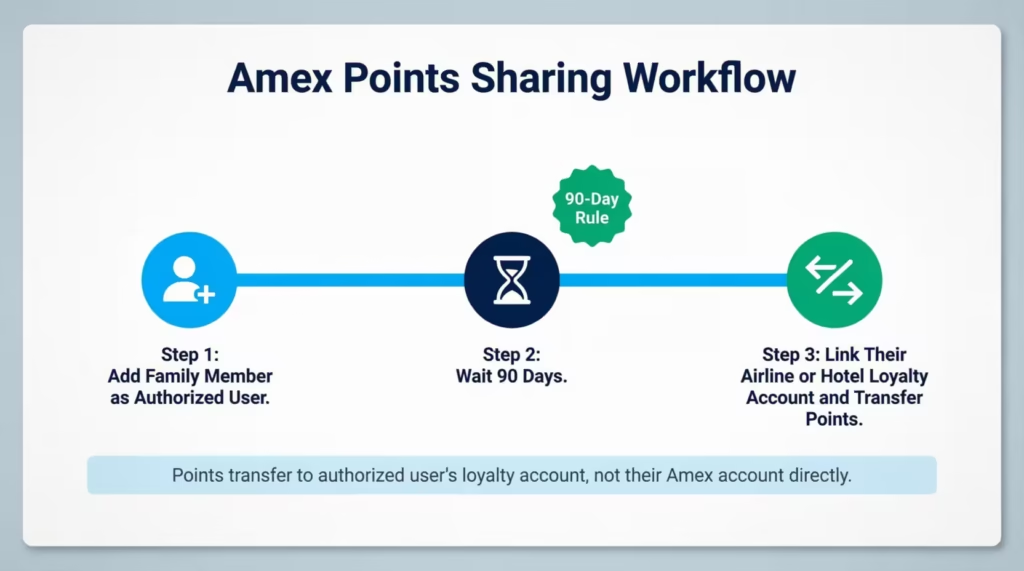
Here’s how it works in practice. Say your spouse has their own Delta SkyMiles account. Add your spouse as an authorized user on one of your Membership Rewards cards. Wait 90 days.
Then, from your Amex login, link your spouse’s Delta SkyMiles account as a transfer partner. You can now move your Amex points into your spouse’s Delta account, and your spouse can book flights for the family using those miles.
A few things to keep in mind. The authorized user needs to have a transfer partner account in their own name before you can link it. The 90-day clock starts when Amex actually issues the authorized user card, not when you apply. And you can only transfer to airline or hotel programs through this method. You can’t transfer “Amex points” directly to your spouse as raw Membership Rewards.
When Moving Credit Between Amex Cards Makes Sense
Not every wallet needs a credit transfer. The tool shines in a few specific situations, and it’s worth knowing them so you can decide whether to use it.
Scenario 1: A new Amex card got approved with a low limit.
Imagine Sarah, a marketing manager, just got approved for the Amex Blue Cash Preferred with a $3,000 starting limit. She also holds an older Amex Cash Magnet card with a $12,000 limit she rarely uses.
By transferring $6,000 from her Cash Magnet to her new Blue Cash Preferred, she maintains her total credit. This rebalances it toward the card she intends to use daily. Her utilization on the new card stays low, even when she puts groceries, gas, and streaming bills on it.
Scenario 2: A reader is planning to close an underused Amex card.
David, a software engineer, has held the Amex Cash Magnet for six years with a $9,000 limit but rarely touches it. He’s getting ready to close it before the next no-fee account review.
Before he hits cancel, he transfers $7,000 of that credit line over to his everyday Blue Cash Preferred. His credit stays with Amex instead of disappearing. His total available credit remains steady, and the closure affects his utilization less.
Scenario 3: A primary spending card keeps hitting its limit.
Jennifer is an operations director. She spends about $4,500 a month on business supplies using her Amex Blue Business Cash.
However, her starting limit is just $5,000. She regularly bumps against the ceiling near the end of each cycle. She transfers $4,000 from her older Amex Business Plus. This gives her main spender some breathing room. Now, she doesn’t need to apply for a credit limit increase or open a new card.
When not to do it. A credit transfer can backfire in a few cases. Don’t drain a card you’re trying to build history on, since a near-zero limit can look strange on your credit report. Don’t transfer credit just to chase a sign-up bonus on a card you don’t really need.
And don’t move credit onto a card you plan to close soon, because the credit goes away the moment that card is closed.
Frequently Asked Questions (FAQs)
Can I transfer my Amex points to my son?
You cannot transfer Membership Rewards points directly to another person’s account, including a family member. To work around this, add your son as an authorized user on your card for at least 90 days. Then, link his airline or hotel loyalty account to get point transfers.
Do Amex points expire?
Amex Membership Rewards points don’t expire on a set schedule. However, you lose them right away if you close your last card that earns Membership Rewards. Keep at least one eligible card open to protect your balance.
Can my wife and I combine our Amex points?
No. American Express Membership Rewards points cannot be combined into one account. However, spouses can usually transfer points to the same eligible airline or hotel loyalty account, provided the account holder is an authorised user and meets programme rules.
Can I have two Amex cards?
Yes, you can hold multiple American Express cards at the same time, and each one keeps its own account number, statement, and payment due date. Amex does not merge them, but credit limits and Membership Rewards points can be managed across cards.
Can you share an Amex card with your spouse?
You can add your spouse as an authorized user. This gives them a card linked to your credit limit. They can also earn points for your Membership Rewards pool. Your spouse won’t have a separate account. All activity will show under your main account.
What are the disadvantages of Amex points?
Membership Rewards points are forfeited permanently if you close all your eligible Amex cards, and you cannot transfer them directly to another person’s account. Cash-back rewards earned on Amex cards like Blue Cash are also kept completely separate and can never be converted to points.
Can you transfer Amex points to a partner?
Yes, you can transfer Membership Rewards points to an airline or hotel loyalty account of an authorized user on your card. However, that person must have had the authorized user card for at least 90 days first. You cannot transfer raw Membership Rewards points between two separate Amex accounts.
What is the best partner to transfer Amex points to?
The article does not name a single best transfer partner, as the right choice depends on your travel goals. Amex does allow point transfers to both airline and hotel loyalty programs linked to your account or an authorized user’s account.
How long do I have to wait before transferring credit between Amex cards?
Both cards involved must be at least 60 days old before a credit limit transfer is allowed. After moving credit out of a card, you must wait approximately 180 days before using that same card as a donor again.
Does transferring a credit limit between Amex cards affect my credit score?
No. A credit limit transfer between two Amex cards is a reallocation of existing credit, so Amex does not run a hard inquiry, and your total available credit stays the same. Your overall credit utilization ratio is unchanged by the transfer itself.
Wrapping Up
The path to combine American Express cards isn’t one big button, but a small set of tools that each solve a different problem. Amex won’t merge two account numbers. However, you can move credit lines between most personal credit cards. Also, Membership Rewards points pool automatically when a second eligible card is added to your account.
Sharing points with family takes the 90-day authorized user route. Based on the rules covered above, the most effective approach is to map your goal first, then pick the matching tool.
If you know a friend juggling multiple Amex cards, share this guide on social media. They can save points and balance their credit properly.