When I added my teenage son as an authorized user on my Amex card, I quickly realized I needed a way to keep his spending in check.
Many parents, spouses, and small business owners face the same worry: how do you stop a shared card from being used too much? Learning how to set a spending limit on Amex card accounts can feel confusing at first, especially when the rules differ for primary cardholders.
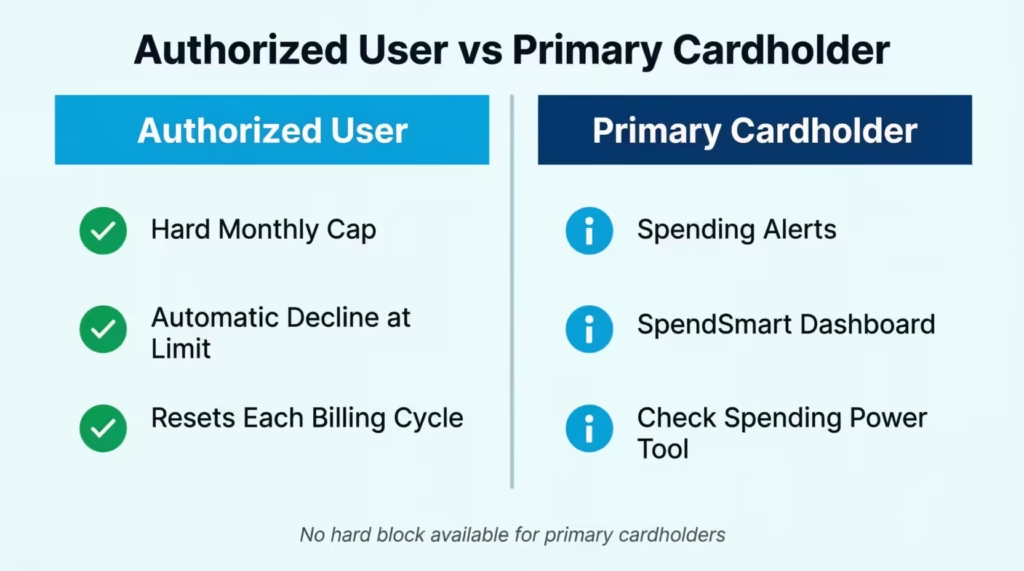
Amex lets you set a hard dollar cap on authorized users, but primary cardholders can only use alerts and tracking tools, not a fixed block.
In this guide, we’ll walk through every step, share expert tips, and help you pick the right amount for your needs.
Key Takeaways
This guide explains how to set a spending limit on an Amex card for authorized users, covering the online and app setup process, timing rules for when caps take effect, which charges are excluded from the cap, and how primary cardholders can monitor their own spending using Amex tools.
Core Facts:
- Amex allows a hard monthly spending cap only for authorized users, not for the primary cardholder. The cap causes an automatic card decline at the point of sale once the dollar amount is reached.
- The minimum authorized user spending cap Amex allows is $200 per billing cycle. Caps can be set or changed through americanexpress.com or the Amex mobile app under Account Services, then Manage Spending Limits.
- A first-time cap does not count spending that already occurred in the current billing cycle; it applies only from the moment it is set. Changing an existing cap takes effect immediately and counts current-cycle spending against the new number.
- Certain charges are excluded from the authorized user cap, including annual card fees, cash advances, interest charges, late fees, foreign transaction fees, and returned payment fees. The cardholder’s total balance can exceed the cap due to these exclusions.
- A declined charge from hitting the spending cap does not affect the authorized user’s credit score or the primary account standing. The cap resets automatically at the start of each new billing cycle.
- Primary cardholders on No Preset Spending Limit cards can use the Check Spending Power tool to confirm in advance whether a large purchase will be approved. The check does not affect credit.
Best for:
- Parents who have added a teenager or college student as an authorized user and want a firm monthly dollar limit without relying on the user’s self-discipline.
- Small business owners or managers who issue employee cards and need to cap monthly spending by role, such as office staff versus traveling sales representatives.
- Primary cardholders on No Preset Spending Limit cards who need to plan a large purchase and want to confirm approval before going to checkout.
Does Amex Let You Set a Spending Limit?
Yes, Amex does let you set a firm dollar cap, but only for authorized users, not for the primary cardholder. This is one of the most common mix-ups people run into. If you’re the main person on the account, you can track and watch your spending, but Amex won’t block your card once you hit a self-chosen number.
For additional card members, the story is different. You can set a hard monthly cap that stops their card from working once they reach the amount you pick. This is a true block, not just a warning. The cap resets each billing cycle.
It also helps to know that some Amex cards, like the Platinum or Gold, use No Preset Spending Limit (NPSL). That doesn’t mean unlimited spending. It means Amex looks at your payment history, credit profile, and account usage to decide what’s allowed. Other Amex cards have a fixed credit line, which works more like a standard credit card.
So, how to set a spending limit on an Amex credit card access depends on who you’re managing. If it’s an authorized user, you get a real cap. If it’s your own spending, you’ll need monitoring tools instead.
Authorized User Limits vs. Personal Spending Controls
The split is simple but important. Authorized user limits are hard caps. Once your teen or employee hits the dollar amount, the card stops working at checkout. The transaction is declined right there.
Personal spending controls for the primary cardholder are softer. You can set up alerts, view your spending power, and check balances often, but the card will keep working as long as Amex approves each charge. There’s no built-in feature that says “stop me at $1,500 this month” for your own card. This is why pairing tools matters so much, and we’ll cover that later.
How to Set a Spending Limit for an Authorized User (Online)
Setting an Amex authorized user spending limit through the website takes only a few minutes. Before you start, make sure of two things. First, the authorized user must already be added to your account. Second, you’ll need your Amex login details ready.
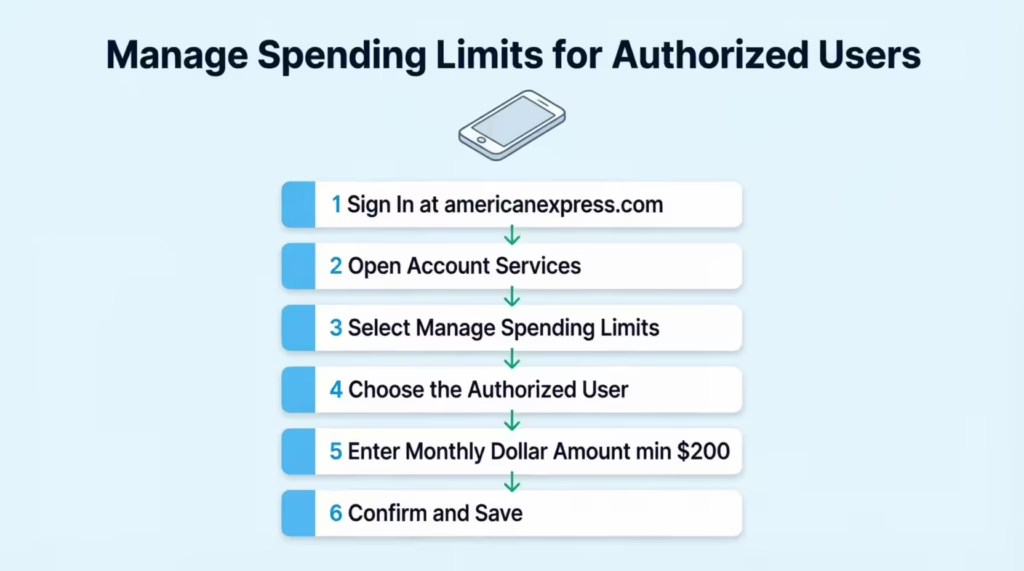
Follow these steps to set a spending limit on Amex card accounts through the desktop site:
- Sign in to your account at americanexpress.com.
- Click on Account Services in the top menu.
- Find Card Management and select Manage Spending Limits.
- Pick the authorized user from the list shown.
- Enter the monthly dollar amount you want to cap their spending at.
- The minimum you can set is $200 per billing cycle.
- Confirm your choice and save the change.
Once saved, the cap is active. But here’s a key detail many people miss. If this is the first time you’re setting a limit, it won’t count the spending that already happened earlier in the current cycle. The cap starts fresh from the moment you set it. If you’re changing an existing limit, the new number applies right away and counts current cycle spending.
💡 Pro Tip: Set the limit a bit higher than the user’s normal monthly spending. This gives room for one-time needs like school fees or a small emergency without forcing a temporary increase.
How to Set a Spending Limit via the Amex Mobile App
The mobile app makes this even easier, and you can do it from anywhere. Download the Amex app from the App Store or Google Play if you don’t have it yet.
Open the app and sign in. Tap your Account icon at the bottom, then scroll to Card Management. Select Manage Spending Limits and pick the authorized user. Type in the monthly cap amount, making sure it’s at least $200, and tap Save. You’ll get a confirmation message, and the new cap is in place.
The app shows the same options as the website, so you don’t lose any control by going mobile.
Choosing the Right Spending Limit Amount
Picking the right number is more art than science, but a few clear scenarios can guide you. The floor is $200, which is Amex’s set minimum. From there, the right amount depends on who’s using the card and why.
For a student authorized user, like a college freshman, $300 to $500 a month often works well. This covers gas, a few meals out, school supplies, and small surprises without leaving room for big mistakes. Sarah, a parent in Ohio, set her daughter’s cap at $400 when she started college. After two months, she bumped it to $500 because textbook costs ate into the monthly budget faster than expected.
For a household authorized user, such as a spouse who handles groceries and family errands, $1,500 to $3,000 is a more realistic range. This depends on your household size, grocery costs, and whether the card covers fuel or kids’ activities.
For an employee on a business card, the right limit ties to job role. A sales rep who travels might need $5,000 a month to cover hotels, meals, and client lunches. An office assistant buying supplies might only need $800.
Here’s a quick reference table:
| User Type | Suggested Monthly Range | Notes |
|---|---|---|
| Student | $300 – $500 | Adjust for textbooks and emergencies |
| Spouse/Partner | $1,500 – $3,000 | Based on household needs |
| Employee (Office) | $500 – $1,500 | Office supplies, light travel |
| Employee (Sales) | $3,000 – $7,000 | Travel, client meals, lodging |
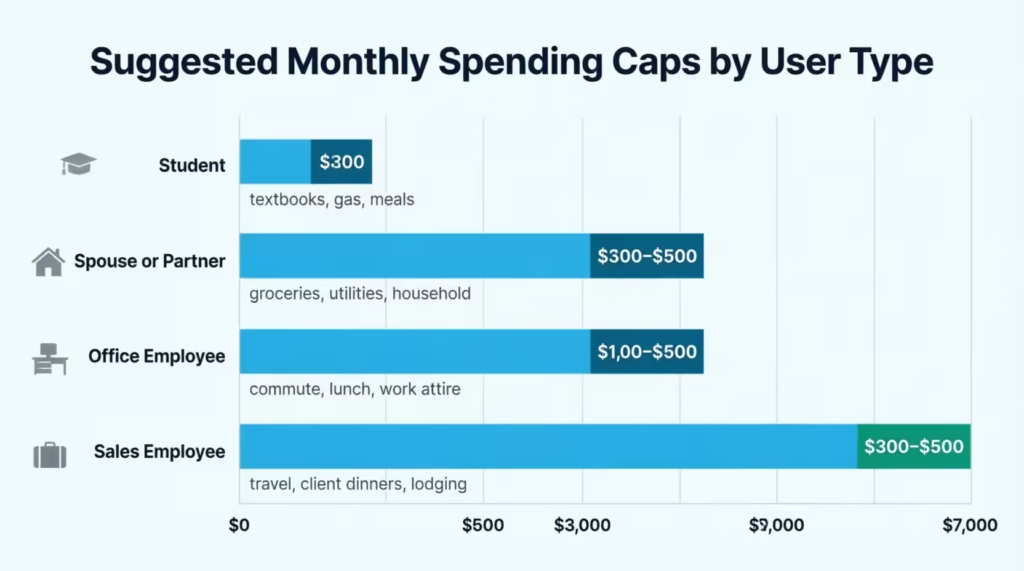
Plan to review the cap every two to three months. If the user keeps hitting the limit too soon, raise it. If they’re spending far below, you can lower it to tighten control.
When Does an Amex Spending Limit Take Effect?
Timing is the area where most people get tripped up. The rule depends on whether you’re setting a limit for the first time or changing one that already exists.
When you set a limit for the first time, it’s not retroactive. Say your billing cycle started on the 1st of the month, and on the 15th, your authorized user has already spent $400. If you set a $500 cap on the 15th, that $400 doesn’t count toward the new cap. The user can still spend another $500 before being blocked, for a total of $900 in that cycle.
When you change an existing limit, the new number takes effect right away and counts the spending that has already happened. Using the same example, if a $1,000 cap was in place and you lower it to $500 on the 15th, the user is already past the new cap. Their card will decline the next charge.
The cap resets at the start of each new billing cycle. So if your cycle closes on the 30th, the counter goes back to zero on the 1st.
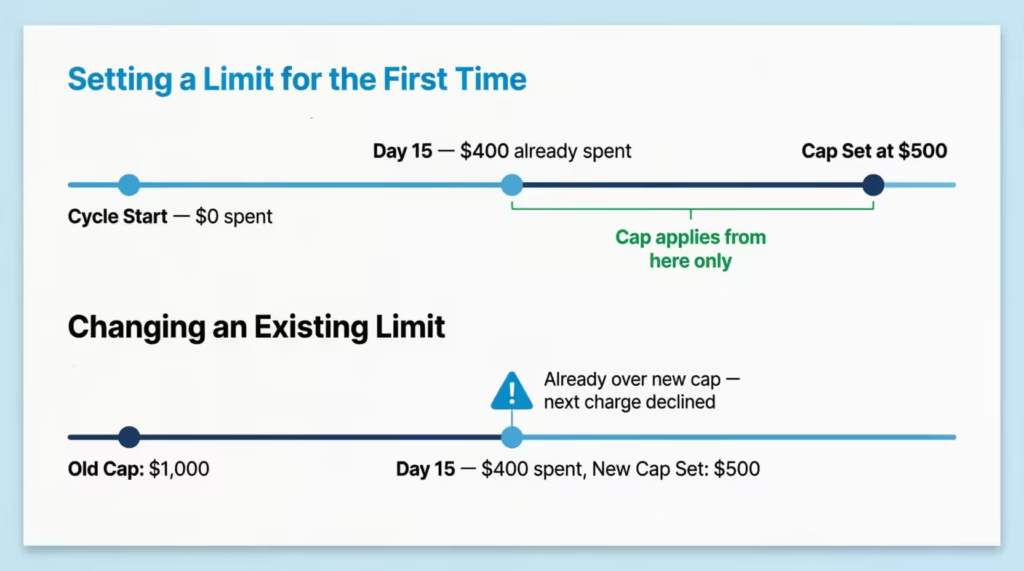
⚠️ Mistake to Avoid: Don’t set a first-time limit late in your billing cycle and expect it to catch past spending. It won’t. Set caps at the start of a fresh cycle for the cleanest control.
What Transactions Are Not Covered by the Spending Limit?
Not every charge counts toward the cap. This catches many cardholders off guard, so it’s good to know what slips through.
The following are typically excluded from the authorized user spending limit:
- Annual card fees: The yearly fee on your Amex card isn’t blocked by the cap.
- Cash advances: If the card allows cash advances, these are usually outside the cap.
- Interest charges: Any finance fees added to your balance don’t count.
- Late fees and penalty charges: These post to the account but don’t trigger the block.
- Foreign transaction fees: Extra fees on overseas purchases may post outside the cap.
- Returned payment fees: Charges from a bounced payment aren’t included.
The exact list can vary by card, so check your Card Member Agreement for the full set of exclusions tied to your account.
Here’s an important point. If your authorized user spends right up to the cap, and then an annual fee posts a few days later, your total balance can be more than the cap you set. The card will still block new purchases, but the bill you owe might be a bit higher than expected.
How to Set Spending Alerts to Go With Your Limit
A hard cap is only half the story. Pairing it with spending alerts gives you eyes on the account in real time. Without alerts, you might not know your authorized user is close to the cap until their card gets declined at the register.
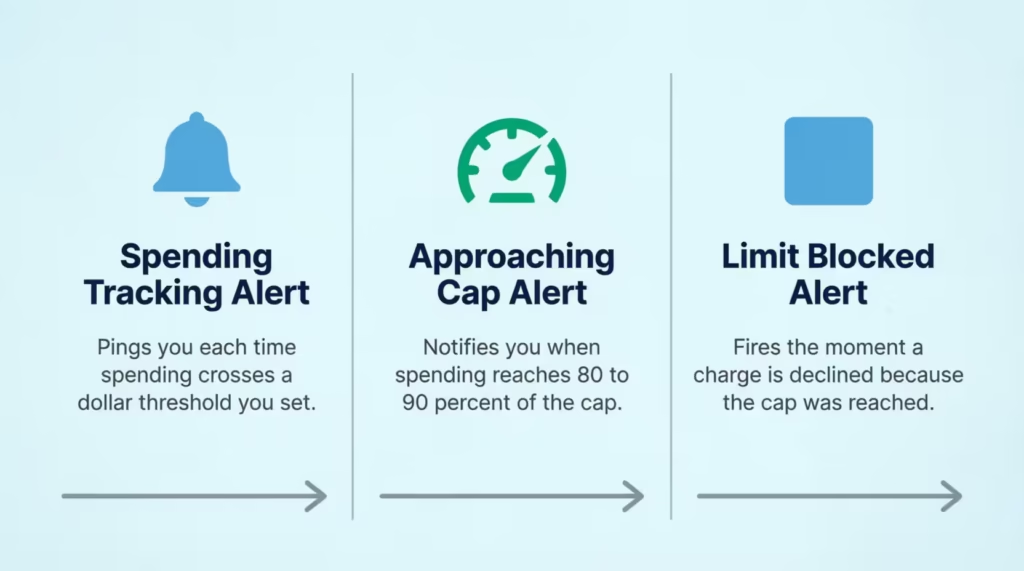
To turn on alerts, log in to the Amex app or website. Go to your account menu, find Notifications and Alerts, then select Card Alerts. You’ll see a list of alert types you can switch on. Choose push notifications, email, or text messages based on what works best for you.
Three alerts work especially well alongside a spending limit.
Spending Tracking Alert
This alert pings you when spending on the card crosses a dollar threshold you pick. For example, you can set it to notify you each time the authorized user’s spending passes $250, then again at $500, and so on. It’s a soft check-in, not a block, but it keeps you in the loop without having to log in.
Approaching Card Limit Alert
This one tells you when the user is getting close to the cap. Amex usually sends this when spending hits a high share of the limit, often around 80% to 90%. If your cap is $1,000 and the user has spent $850, you’ll get a heads-up. This gives you time to decide whether to raise the cap or let them hit the wall.
Limit Blocked Alert
This alert fires the moment a charge is declined because the cap was reached. It’s the most important one to keep on. Without it, your authorized user might feel embarrassed at checkout, while you have no idea what happened. With it, you can call them, raise the limit if needed, or confirm the block is working as planned.
How to Change or Remove an Authorized User Spending Limit
Life changes, and so should your caps. Whether your kid is heading to college, your employee got a promotion, or a family member is traveling, you may need to adjust or remove a limit.
To change a limit, follow the same path you used to set it. Sign in, go to Account Services, find Manage Spending Limits, pick the user, and enter a new amount. The change takes effect right away. If you raise the cap, the user can spend more from that moment forward. If you lower it, current cycle spending counts against the new number.
To remove a limit completely, choose the option to delete or turn off the cap for that user. After this, the authorized user can spend up to the card’s credit line. For NPSL cards, they can spend whatever Amex approves for each transaction.
📌 Did You Know: Removing a spending limit doesn’t remove the authorized user from your account. The person stays on the card, and their charges still post to your statement. To fully remove someone, you’ll need to cancel them as an authorized user in a separate step.
What Happens When an Authorized User Hits the Limit
When the cap is reached, the next purchase attempt is declined at the point of sale. The card reader will show a decline message, and the user may feel confused, especially if they don’t know a cap is in place. They can still use the card for charges that fall outside the cap, like adding funds in some cases, but most regular buys won’t go through.
The decline doesn’t hurt the user’s credit. It also doesn’t affect your account in any negative way. The cap resets at the start of the next billing cycle, and the card works normally again.
It’s a smart move to tell the authorized user upfront that a limit is in place. This avoids awkward moments at checkout and keeps trust strong.
How to Temporarily Increase a Limit for a Specific Purchase
Sometimes life throws a one-off cost, like a car repair, a school trip, or a needed flight. You can raise the cap just for that purchase and then lower it back.
Log in, go to Manage Spending Limits, and bump the number up to cover the planned buy. Once the charge clears, sign back in and reset the cap to your usual amount. The change is instant in both directions.
For example, Michael, a small business owner, kept his sales rep at a $3,000 monthly cap. When the rep went to an urgent client meeting out of state, Michael increased the cap to $4,500 for two days. After the trip, he lowered it back to $3,000. This kept tight control while still letting the work get done.
How to Monitor Your Own Amex Spending (Without a Hard Cap)
Primary cardholders don’t get a hard block, but Amex offers strong tools to help you stay on top of your own spending. Three features work well together.
SpendSmart is a built-in dashboard that breaks down your charges by category, like dining, travel, or gas. It shows month-over-month trends and helps you spot where your money is going. You can access SpendSmart through your online account under the Statements & Activity section. It’s free for most Amex cardholders and updates as charges post.
Spending Alerts work for primary cardholders too, not just authorized users. Set a threshold alert at any dollar amount that matters to you, like $1,000 or $2,500 per cycle. When you cross it, you’ll get a ping. This isn’t a block, but it acts like a tap on the shoulder telling you to slow down or check in.
Check Spending Power is the third tool, and it’s especially handy for NPSL cardholders. It lets you ask Amex in advance if a large charge will go through.
Using Check Spending Power Before a Large Purchase
If you’re planning a big buy, like a $4,000 laptop or a flight booking, Check Spending Power can tell you ahead of time if Amex will approve it. This is a lifesaver for No Preset Spending Limit cards, where there’s no fixed number you can point to.
To use it, log into the Amex app or website and look for Check Spending Power under your account tools. Enter the dollar amount you plan to spend. Amex reviews your account on the spot and tells you yes or no. The check itself doesn’t hit your credit. It’s just a heads-up.
If the answer is no, you can either lower the amount, pay down part of your balance first, or split the purchase across two cards. If the answer is yes, you can buy with confidence, knowing the charge won’t be declined.
This tool fills the gap that a hard cap would, giving primary cardholders a way to plan large spending without surprises at checkout.
Frequently Asked Questions (FAQs)
Why does my Amex have no preset spending limit?
Cards like the Amex Platinum and Gold have a No Preset Spending Limit. This means Amex looks at your payment history, credit profile, and account use for each purchase. They don’t give you a fixed credit line. This is a card design choice, not a sign of a problem with your account.
Is a preset spending limit good or bad?
No Preset Spending Limit offers more buying flexibility than a fixed credit line. Amex looks at each charge one by one. This can let you make bigger purchases if your account history is solid. The tradeoff is that you cannot point to a firm number when budgeting, so pairing the card with spending alerts is important.
How long does it take for my Amex spending limit to reset?
The authorized user spending cap resets automatically at the start of each new billing cycle, which is typically monthly. No action is required on your part; the counter goes back to zero the day the new cycle begins.
How does Amex set credit limits?
For cards with a fixed credit line, Amex bases the limit on factors like your payment history, credit profile, and overall account usage. Cards with no preset spending limit don’t follow a fixed number. Instead, they check each transaction on its own using the same criteria.
What if I use 90% of my Amex authorized user spending limit?
Amex sends an Approaching Card Limit alert when authorized spending hits about 80 to 90 percent of the limit. This gives you time to decide if you want to raise the limit or let the user reach the cap. If you take no action, the next purchase attempt that exceeds the cap will be declined at checkout.
How do I adjust my Amex authorized user spending limit mid-cycle?
Log in to americanexpress.com or the Amex app, go to Account Services, select Manage Spending Limits, choose the user, and enter the new amount. If you lower the limit mid-cycle, spending already made in that cycle counts toward the new lower number immediately.
What is the minimum spending limit you can set for an Amex authorized user?
The minimum cap Amex allows for an authorized user is $200 per billing cycle. Any amount you set must be at least $200; there is no option to set a lower figure through the app or website.
Does hitting the authorized user’s spending cap hurt their credit score?
No. A declined charge caused by hitting an Amex authorized user spending cap does not affect the user’s credit score or your account standing. The cap is a cardholder-set control, not a credit event, and the card resumes normal operation when the next billing cycle begins.
Do all charges count toward the Amex authorized user spending limit?
No. Certain charges are excluded from the cap, including annual card fees, cash advances, interest charges, late fees, and foreign transaction fees. This means the total balance for an authorized user can sometimes go above the cap amount. This can happen even after their card is blocked for new purchases.
Wrapping Up
Managing spending on an Amex card looks different depending on your role. Authorized users can have a set dollar limit. Primary cardholders use alerts, SpendSmart, and Check Spending Power for tracking.
The best way is to pair an authorized user cap with all three alert types. This gives you real-time awareness and a strong stop. Setting a clear limit on the Amex card not only protects your wallet but also builds smart spending habits for everyone using it.
If you know a parent or business owner sharing a card, share this guide so they can set the right controls today.