You need cash before payday, and your money lives in Venmo. So you’re searching for cash advance apps that work with Venmo, and the answers online are confusing. Some say yes. Some say no. Most don’t explain why.
The short answer: very few apps send money straight into a Venmo balance, but several can still work with Venmo through your Venmo debit card, your Venmo routing number, or a linked bank account.
This guide shows you which apps fit each path, what it really costs, and what to do if nothing connects.
At a Glance
This guide explains how cash advance apps connect to Venmo, including direct payout methods, the Venmo routing number workaround, real fee layers, and what to do if no app connects to your account.
Core Facts:
- Most cash advance apps deposit into a linked bank account or debit card rather than directly into a Venmo balance, since Venmo functions as a payment app rather than a traditional bank account.
- Venmo provides a routing number and account number through its Direct Deposit settings, which some cash advance apps accept as a manual bank account entry for ACH deposits.
- MoneyLion’s Instacash terms state that transfers through PayPal, Venmo, Zelle, and similar services do not qualify as eligible direct deposits for income verification.
- Venmo’s instant transfer fee is 1.75% of the amount sent, with a $0.25 minimum and a $25 maximum, while standard transfers are free and take one to three business days.
- The Venmo Credit Card allows cash advances at ATMs but charges a fee of $10 or 5% of the advance, whichever is greater, plus a cash advance APR of about 30.74% as of January 1, 2026.
- If no app connects to a Venmo-linked account, opening a free checking account that supports standard bank-linking tools can serve as a bridge to receive the advance before transferring it to Venmo.
Best for:
- Readers who use Venmo as their primary spending account and want to know which cash advance apps can actually reach their Venmo balance or card.
- People who were rejected by a cash advance app despite having regular Venmo activity and want to understand why income verification failed.
- Anyone deciding between waiting for a free standard transfer or paying for an instant transfer to move an advance into Venmo.
Why Most Cash Advance Apps Don’t Deposit Directly Into Venmo
Here’s the core issue. Cash advance apps were built for traditional checking accounts. When an app approves you, it usually sends the money one of two ways. It makes an ACH deposit into your linked bank account, or it pushes the funds to a linked debit card.
Venmo sits outside that system. Venmo is a payment app with a balance, not a full bank account like these apps expect. So when you open a cash advance app and search for “Venmo” in the bank list, it often doesn’t show up at all.
That’s why “works with Venmo” almost always means something indirect. The advance lands in a bank account or on a debit card that you can access from Venmo. Then you move the money over yourself. For cash advance apps for Venmo users, that extra step is normal, not a red flag.
The practical result: your money often ends up next to Venmo, not inside it. Once you know that, the rest of this article gets much easier to use.
Direct-to-Venmo vs. Indirect Workaround: How to Tell the Difference
Keep this simple test in mind as you read each app below.
Direct means the funds land in your Venmo balance or on your Venmo debit card without you doing anything extra. You open Venmo, and the money is there or spendable.
Indirect means the advance lands somewhere else first, like a checking account or a different debit card. You then move it into Venmo yourself. Venmo’s standard bank transfer is free and takes one to three business days. Its instant transfer costs 1.75% of the amount, with a $0.25 minimum and a $25 maximum, per Venmo’s official fee schedule.
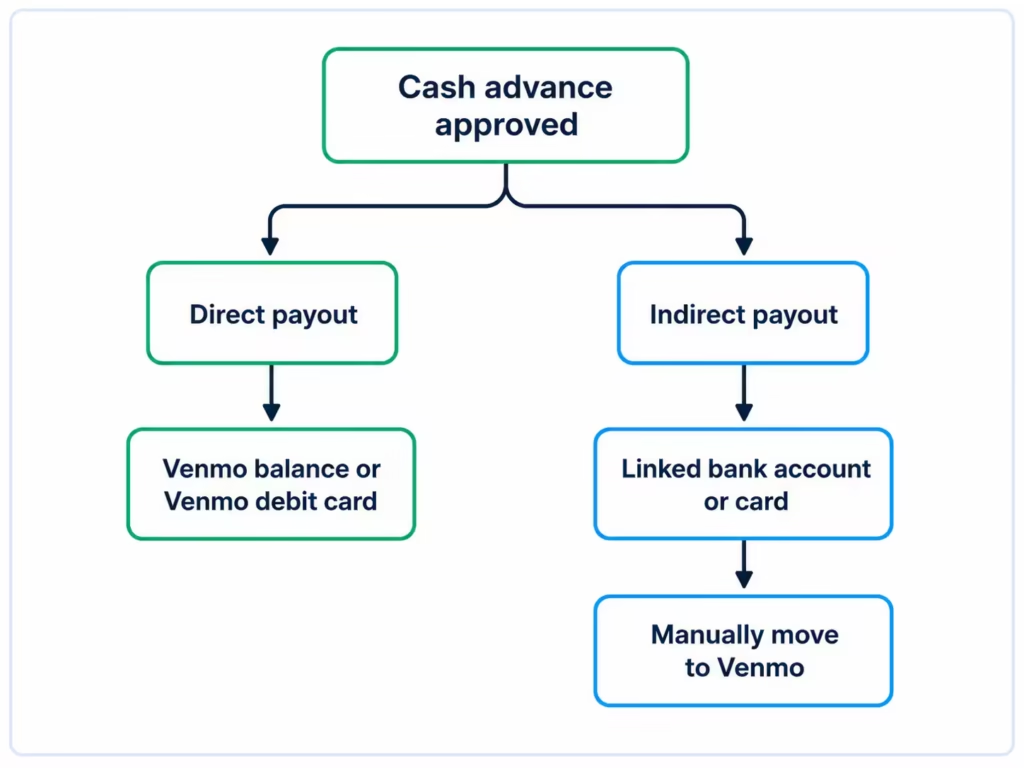
Indirect isn’t bad. It’s just slower or slightly more expensive. Knowing which type you’re signing up for saves you from a wasted application.
Why Venmo Doesn’t Work With Plaid (and Why That Matters for Eligibility)
Most cash advance apps use a bank-linking service, often Plaid, to verify your income. Plaid connects to your bank and shows the app your deposit history, balance patterns, and spending. That data is how the app decides your advance limit. Plaid’s own explanation of how linking works describes it as a secure, permission-based connection between your accounts and the apps you choose.
This creates two separate problems for Venmo users, and it’s worth splitting them apart.
The first problem is payout. Even when Venmo appears in an app’s bank list, the connection may only support basic linking, not the full data the app wants. Whether Venmo shows up at all can depend on the app and the linking service it uses.
The second problem is eligibility, and it’s the bigger one. Most apps approve you based on recurring direct deposits from an employer into a checking account. Transfers from friends on Venmo don’t count as income. MoneyLion’s Instacash terms say this plainly: transfers through PayPal, Venmo, Zelle, and similar services do not qualify as eligible direct deposits. Other apps apply similar logic.
So if you applied with only Venmo activity and got rejected, this is likely why. The app wasn’t refusing Venmo as a payout destination. It couldn’t see qualifying income at all.
📌 Did You Know: Getting paid through Venmo from a client or friend is not the same as a payroll direct deposit. Cash advance apps almost always treat them differently when they check your eligibility.
Using Venmo’s Routing and Account Number as a Workaround
Here’s a fix many people miss. Venmo actually gives you a routing number and an account number. They come with Venmo’s direct deposit feature, and some apps will accept them as an ACH destination, just like a regular bank.
To find them in the Venmo app: go to the Me tab, tap the Settings gear, tap Direct Deposit, then tap Show Account Number, as laid out in Venmo’s Direct Deposit FAQ. If you haven’t set up direct deposit yet, you may need to complete that setup first.
Then, inside the cash advance app, don’t search for “Venmo” in the bank list. Choose the option to add a bank account manually, and type in your Venmo routing and account numbers instead.
A few honest caveats:
- Not every app’s payment processor will accept these numbers. Some will reject the routing number outright.
- This method can help with payout, but it usually won’t fix the income-verification problem described above. The app may still need to see a traditional checking account to approve you.
- Timing looks like a normal ACH deposit. That often means one to three business days, not instant.
Venmo Debit Card vs. Traditional Bank Debit Card Compatibility
The Venmo debit card is a real Mastercard tied to your Venmo balance. When an app offers “send to a debit card” as an instant payout option, the Venmo card can sometimes receive it because the transfer runs over card networks rather than through a bank link.
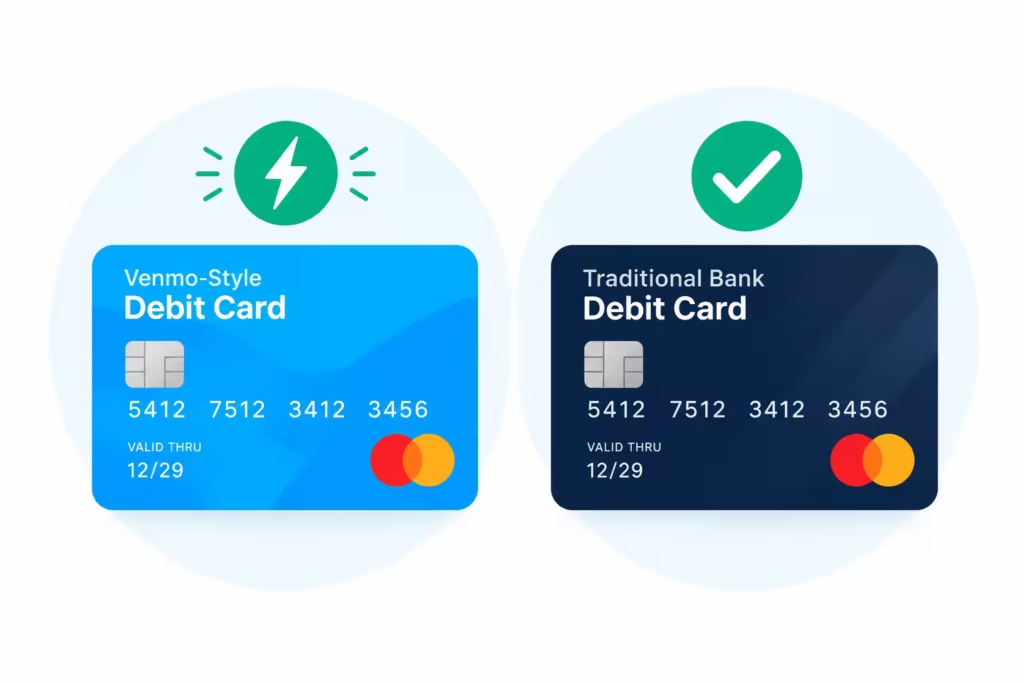
But treat this as “may work,” not “will work.” Some apps restrict which cards qualify, and prepaid-style or fintech-issued cards get declined more often than cards from big banks. If your Venmo card fails at the payout step, it’s usually the app’s card rules, not a problem with your Venmo account.
You should keep a backup plan ready if you rely on immediate cash. If the app rejects your Venmo card, try linking your traditional bank account instead.
This avoids the strict rules often placed on prepaid or digital cards. It might take longer to receive your money, but it is much more likely to be accepted. Keeping your main bank account details handy ensures you can still get paid even when specific cards face restrictions.
Cash Advance Apps That Can Send Funds Directly to Venmo
Now the part you came for. “Direct” here means the advance can reach your Venmo balance or Venmo debit card without a stop at a traditional bank. Two realistic paths exist.
The first path is apps that pay out to a linked debit card. If an app lets you add any debit card for fast funding, your Venmo debit card is a candidate. MoneyLion Instacash is a common example. It offers advances of up to $500, with higher limits advertised for users who set up qualifying direct deposits in a MoneyLion account, per MoneyLion’s Instacash page. Fast funding goes to a linked debit card, which is where a Venmo card may fit. Keep in mind: your Venmo transfer history won’t qualify you. So, link a checking account for the income check, then pick the card for payout.
The second path is the routing number method from the previous section. Any app that lets you manually add a bank account for an ACH deposit could, in theory, send money straight to your Venmo balance. Success varies by app, so test with a small advance first.
One honest limit: no major cash advance app advertises a native “send to Venmo” button. Anyone claiming otherwise is blurring the direct and indirect paths. Check the app’s current payout options before you apply, since these can change.
Cash Advance Apps That Require a Linked Bank Account as a Bridge to Venmo
This is the larger group, and it still counts as working with Venmo. It just takes one extra step.
Apps like EarnIn, Dave, Brigit, and Empower generally deposit into a linked checking account. EarnIn, for example, centers its product on wages you’ve already earned and uses accounts from partner banks in its flow, as described on EarnIn’s official site. Brigit connects to your bank to check your income pattern before offering an advance. Dave’s ExtraCash works through an eligible linked account with recurring deposits.
If you have any checking account, even one you barely use, the bridge method looks like this:
- Link that checking account to the cash advance app.
- Get approved and receive the advance there.
- Move the money from that account to Venmo, using either the free standard transfer or the 1.75% instant transfer.
That last step is where the cost hides. On a $100 advance, Venmo’s instant transfer takes $1.75. On $500, it’s $8.75, based on Venmo’s instant transfer fee of 1.75%. Keep that number in mind for the cost section below.
💡 Pro Tip: If your employer can split your paycheck, you can send part of it to Venmo’s direct deposit and part to a checking account. That builds deposit history on both sides and keeps your options open.
Comparing Real Fees and Total Cost Across Venmo-Compatible Apps
“No interest” headlines don’t tell you what an advance costs. The real price stacks up in layers, and speed is usually the most expensive layer.
| Cost layer | How it usually works | When you pay it |
|---|---|---|
| Subscription or membership | Flat monthly fee on some apps | Every month, advance or not |
| Instant funding fee | Small charge, often a flat fee or percentage | When you want money in minutes instead of days |
| Optional tip | Tip-based model, voluntary but nudged | At the time of the advance |
| Venmo instant transfer | 1.75% (min $0.25, max $25) | Only if you move money into Venmo instantly |
Here’s a quick way to compare. Say you need $100 by tonight. Add it all up: the monthly fee (divide by the number of advances you’ll likely take), the instant funding fee, any tip you plan to leave, and the Venmo transfer fee if your app pays out indirectly. If that total lands near $10, your $100 advance costs 10%. That’s still far cheaper than most payday loans, but it’s not free.
If you can wait one to three business days, the math improves fast. Standard ACH deposits and standard Venmo transfers are both free on the Venmo side, according to Venmo’s help center. An app that’s “free” can cost more than one with a flat fee if its only fast option is expensive. Run the layers before you pick.
⚠️ Mistake to Avoid: Don’t compare apps by their headline fee alone. A $1 monthly fee with an $8 express charge can cost more than a $5 monthly fee with free fast funding, depending on how quickly you need the cash.
Eligibility Requirements for Venmo-Compatible Cash Advance Apps
Requirements differ by app, but the baseline pattern looks like this:
- Recurring income. Most apps want to see regular deposits, usually payroll, hitting your account on a predictable schedule.
- Account history. A checking account that’s been open and active for a while works better than a brand-new one.
- Balance behavior. Some apps check that your balance stays positive or above a small threshold between paychecks.
- A soft credit check in some cases. Most cash advance apps skip hard credit pulls, but a few may run a soft check, which doesn’t hurt your score.
The big divide is between apps that can work with Venmo-linked details and apps that need a traditional bank. Apps in the second group won’t move on Venmo activity alone, no matter how healthy your Venmo balance looks. And if your Venmo account is new, expect thin results everywhere: there’s little history for anyone to verify.
Before you apply, check three things in the app’s help pages: whether your bank or card is supported, what income proof it needs, and whether it runs any credit check. Two minutes of checking beats a wasted signup.
State Restrictions and Availability Limits
Not every cash advance app operates in every state. State lending laws differ, and some apps limit where they offer advances or change their terms by location.
The quick check: enter your ZIP code or state on the app’s signup or help page before you fill out a full application. Most apps flag availability early in the flow. If an app isn’t offered in your state, don’t try to work around it. Pick a different option from this guide instead.
How to Safely Link a Cash Advance App to Your Venmo-Linked Accounts
Linking financial accounts feels risky, and a little caution is healthy. The good news: legitimate apps follow a predictable pattern.
A safe linking flow never asks for your Venmo username and password directly inside a random screen. Instead, you’ll see a secure connection window from a known linking service or a bank-level login page, and the connection is encrypted. Plaid’s consumer pages explain how this permission-based connection works and how you can manage or disconnect it later.
Red flags to walk away from:
- An app asks for your Venmo login in a plain text field.
- You’re told to send a “verification payment” to a stranger first.
- The app has no clear company name, privacy policy, or fee disclosure.
- Reviews mention surprise charges that support won’t explain.
Stick with apps that publish their terms openly. MoneyLion posts its Instacash terms and conditions publicly, including what counts as an eligible deposit. That kind of transparency is what “reputable” looks like.
Step-by-Step: Getting a Cash Advance Into Venmo
Pull it all together with this sequence.
- Decide how fast you need the money. Tonight means instant options with fees. This week means free standard transfers.
- Pick your path. If you have a Venmo debit card, try an app with debit-card payout. If you have any checking account, the bridge method is the most reliable. If you have neither, try the Venmo routing number method.
- Link your account. Use the manual account-entry option with your Venmo routing and account numbers, or link your checking account through the app’s secure flow.
- Apply and check your limit. First advances are often small. Limits tend to grow with on-time repayments.
- Confirm the money landed. Check your Venmo balance or card in the app. If you used the bridge method, move the funds into Venmo and choose standard or instant based on urgency.
- Note the repayment date before you spend the advance.
Finally, set up a payment reminder on your phone. Missing a due date can lead to extra fees or damage your access to future advances. Stay organized to keep your finances stress-free and avoid unexpected costs. If you run into issues, reach out to the app’s support team right away. They can help you spot errors before they become problems.
How Repayment Works Once the Advance Reaches Venmo
Repayment rarely comes out of Venmo itself. The app withdraws what you owe from the linked account or card you set up, usually on your next payday.
If the money isn’t there on the repayment date, outcomes vary by app. Some retry the debit. Some charge no late fees but pause your access to new advances. Some may send the debt to collections after extended nonpayment. Read the repayment terms in your specific app, and if payday shifts, look for an option to move your repayment date before it hits.
Can Venmo Itself Give You a Cash Advance?
Venmo app doesn’t offer payday-style advances or loans. There’s no “borrow” button in Venmo.
The one Venmo-native option is the Venmo Credit Card, issued by Synchrony. It’s a regular credit card, and like most credit cards, it allows cash advances at ATMs. The cost is steep, per Venmo’s fee page and the Venmo Credit Card terms from Synchrony Bank: a fee of $10 or 5% of each advance, whichever is greater, plus a cash advance APR of the prime rate plus 23.99%, which came to about 30.74% as of January 1, 2026. Interest on cash advances usually starts right away, with no grace period.
That makes it a different animal from the apps above. A $100 cash advance on the card costs at least $10 upfront before interest, while app-based advances often cost less for small amounts. For most people needing $50 to $500, a cash advance app is the cheaper route.
What to Do If No Cash Advance App Will Connect to Your Venmo Setup
If every path above failed, you’re not out of options. You just need a bridge.
The most reliable fix is opening a free online checking account that works with Plaid and similar linking tools. Several well-known fintech accounts have no monthly fees and no minimum balance, and you can open one from your phone in minutes.
You don’t have to give up Venmo. The new account only exists to receive the advance. Once the money lands, transfer it to Venmo and use it as you normally would.
If that doesn’t work fast, here are some short-term options. You can ask your employer for a payroll advance. You can also check local community assistance programs. Another choice is to call a nonprofit credit counselor for help with bigger issues.
And timing matters. If your Venmo account is new, trying again after a few months of regular activity can change the answer. More history means more data for apps that do accept Venmo-linked details, and it means a stronger case everywhere else too.
Frequently Asked Questions (FAQs)
Can Venmo give you a cash advance?
Venmo itself has no cash advance feature. The Venmo Credit Card, issued by Synchrony, allows cash advances at ATMs, but charges a fee of $10 or 5% of the advance plus a cash advance APR of around 30.74%.
What apps accept Venmo for cash advance?
MoneyLion Instacash can pay out to a linked debit card, which may include your Venmo card. EarnIn, Dave, Brigit, and Empower typically require a linked checking account first; then you move funds to Venmo yourself.
Does Brigit work with Venmo?
Brigit connects to a traditional bank account to check your income pattern before approving an advance. It deposits into that linked account, so you transfer the funds into Venmo as a separate step.
Does Earnin work with Venmo?
EarnIn works through partner bank accounts rather than depositing directly into Venmo. You link a checking account to receive the advance, then move the money into Venmo using a free or instant transfer.
How can I borrow money on my Venmo?
You can’t borrow directly inside Venmo. Instead, use your Venmo debit card for apps offering card payouts, or enter your Venmo routing and account numbers manually when an app asks you to add a bank account.
How long does it take to get a cash advance into Venmo?
Instant transfers land within minutes but cost 1.75% of the amount, with a $0.25 minimum and $25 maximum. Standard transfers using your Venmo routing number or a linked bank account are free but take one to three business days.
What’s the cheapest way to move a cash advance into Venmo?
Choose the standard transfer option instead of instant funding whenever you can wait one to three business days. Standard ACH deposits and standard Venmo transfers are both free, while instant transfers charge 1.75% per transaction.
Why did a cash advance app reject my Venmo account?
Most apps require recurring payroll direct deposits to verify income, and Venmo transfers from friends or clients don’t qualify. MoneyLion’s Instacash terms specifically exclude Venmo, PayPal, and Zelle transfers as eligible income sources.
Wrapping Up
Most cash advance apps don’t send money straight into a Venmo balance, but that doesn’t lock you out. Your real paths are a Venmo debit card payout, Venmo’s routing and account numbers, or a linked checking account as a bridge.
A practical approach: match the app to your urgency, add up every fee layer before you commit, and confirm your state’s availability first.
Know someone who pays bills through Venmo and keeps running into this wall? Share this guide with them. It could save them a failed signup and a wasted fee.