I know why you’re here. A bill just hit, or rent is a few days short, and your money mostly lives inside PayPal, not a regular bank. You’ve probably typed “cash advance apps that work with PayPal” more than once, only to find blog posts that dodge the real question: can the money actually land in PayPal, or not?
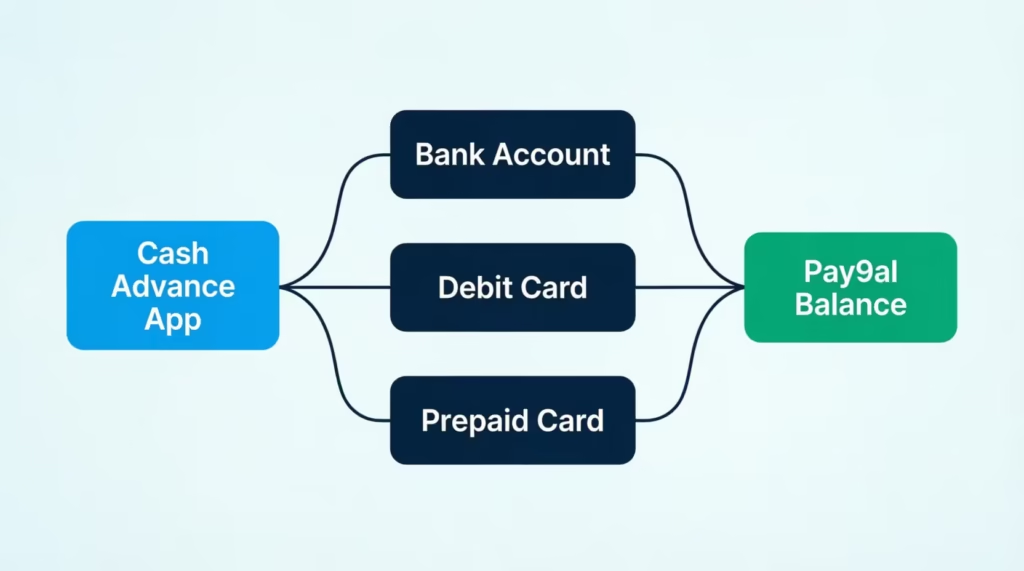
Here’s the short answer. No major cash advance app deposits funds directly into your PayPal balance, but several apps can reach PayPal through a linked bank, debit card, or prepaid card in minutes.
Below, you’ll get the exact apps, the real fees, the fastest routing method, and what to do if you have no bank account at all.
Key Takeaways
This guide explains how cash advance apps work with PayPal, including the three routing methods (bank link, debit card, prepaid card), specific apps that support each path, real transfer fees, and how to spot apps that falsely claim PayPal compatibility.
Core Facts:
- No cash advance app deposits funds directly into a PayPal balance; money must first land in a linked bank account, debit card, or prepaid card before moving into PayPal.
- EarnIn offers up to $150 per day and about $1,000 per pay period, while Dave and MoneyLion Instacash both offer advances up to $500.
- PayPal charges an instant transfer fee of 1.75% of the amount, with a $0.25 minimum and $25 maximum, while standard bank transfers into PayPal are free but take 1 to 3 business days.
- Apps like Dave, MoneyLion, and Empower offer their own checking accounts with routing and account numbers that can accept direct payroll deposits.
- None of the apps covered (EarnIn, Dave, MoneyLion, Brigit, Empower, Cleo) run a hard credit check for the cash advance product itself.
- A $200 advance example in the article showed combined app and PayPal instant fees totaling about $12.49, compared to $0 when using free standard delivery methods.
Best for:
- Readers who receive most of their money through PayPal and need to move a cash advance into that balance quickly.
- People without a traditional bank account who need a prepaid card or app-issued debit card as a workaround.
- Anyone trying to verify whether an app’s “works with PayPal” claim is real before signing up and sharing personal information.
Why No App Deposits a Cash Advance Directly Into Your PayPal Balance
Before picking an app, it helps to clear up the biggest myth. PayPal is a payments platform, not a bank. It holds a balance for you, but it doesn’t act like a checking account in the eyes of most lenders. That matters because almost every cash advance app needs a real checking account to check your income and to pull the repayment back later.
So when an app says it “works with PayPal,” it does not mean the cash lands inside your PayPal wallet on its own. The money first lands in a linked bank account or on a debit card. From there, PayPal pulls it in when you add that bank or card to your PayPal profile.
Think of PayPal as the last stop, not the first. The app sends money to your bank or card. Your bank or card is already tied to PayPal. The funds then show up in your PayPal balance through a normal transfer.
The next section shows the three real ways to make that final hop happen, so you can pick the one that fits your setup. Keywords used naturally: cash advance apps that work with PayPal, PayPal balance, linked bank account, direct deposit.
The 3 Real Ways to Get a Cash Advance Into PayPal
There are three working methods. Each one uses PayPal’s built-in ability to accept money from a bank or card you already own. You just need one of these to be true for you.
Link the Bank Account Your Advance Is Deposited Into
This is the most common path, and the cheapest one over time. You open a cash advance app, tell it to deposit into your regular checking account, and then add that same bank account inside PayPal.
Here’s how the flow works in real life:
- Set your cash advance app to send funds to your checking account.
- In PayPal, go to Wallet, then “Link a bank.”
- Enter the same account and routing numbers, or log in through Plaid.
- Wait for the advance to hit your bank, usually the same day.
- Move it from your bank into PayPal using “Add money.”
Standard transfers from a bank into PayPal are free, but they can take one to three business days. If you need it in your PayPal balance right now, you’ll pay the instant transfer fee, which is covered later.
Add the Debit Card Tied to Your Advance Account to PayPal
Many apps, like Dave and MoneyLion, come with their own debit card. If your advance sits on that card, you can add the card to PayPal and push funds into your PayPal balance in minutes.
You’ll need the card number, expiration date, and CVV. PayPal may run a small verification charge first, then refund it. Once verified, you can add money by choosing that debit card as the source.
This method is fast, but debit-card pulls into PayPal usually cost more than bank pulls. That’s a tradeoff you’ll balance based on how urgent the need is.
Use a Prepaid Card From the Advance App
Some cash advance apps offer a prepaid Visa card as the payout option, which helps if you don’t have a bank account at all. You load the advance onto the prepaid card. Then you add that card to PayPal the same way you’d add a debit card.
Watch two things here. First, not every prepaid card is accepted by PayPal, so check the fine print before you sign up. Second, prepaid cards sometimes charge their own reload or ATM fees on top of what the app already charges.
Keywords used naturally: linked bank account, linked debit card, prepaid Visa card, PayPal debit card.
Best Cash Advance Apps That Work With PayPal
Below are the apps that offer a workable route into PayPal in 2026. The comparison focuses on how each one actually reaches your PayPal balance, not just general reviews.
| App | Max Advance | PayPal Path | Speed Fee | Credit Check |
|---|---|---|---|---|
| EarnIn | $150/day, up to $750–$1,000/pay period | Bank link, then move to PayPal | Lightning Speed fee ~$1.99–$5.99 | No |
| Dave | Up to $500 | Dave debit card added to PayPal, or bank link | Express fee, tiered by amount | No |
| MoneyLion Instacash | Up to $500 | RoarMoney debit card or bank link | Turbo fee, varies | No |
| Brigit | $25–$500 | Bank link only | Free (2–3 days) or paid instant | No |
| Empower (now Tilt) | Up to $400 | Bank link, or Empower debit card | Instant transfer $1–$8 | No |
| Beem | Up to $1,000 (tiered) | Bank link | Instant fee applies | No |
| Cleo | Up to $250 | Bank link | Instant fee ~$3.99+ | No |
Details you can act on:
EarnIn lets you cash out up to $150 per day and about $1,000 per pay period. There are no mandatory interest charges, only an optional tip and the Lightning Speed fee if you need it in minutes. The money goes to your bank, which you then add to PayPal.
Dave offers ExtraCash advances up to $500 with no interest, no credit check, and no late fees. An optional express delivery fee applies if you need it in minutes; slow delivery is free. You can send funds to a Dave account with a debit card, and that card can be added to PayPal.
MoneyLion Instacash goes up to $500 with 0% APR and no monthly fee. A Turbo fee applies if you want it instantly with MoneyLion. Funds can land on the RoarMoney debit card, which then links to PayPal.
Brigit advances $25 to $500 and requires a paid plan for larger amounts. The Plus plan is $8.99/month, and the Premium is $14.99/month for the higher limit. Free delivery takes 1–3 business days.
Empower (Tilt) advances up to $400 with an $8 monthly subscription and small instant transfer fees. It has its own debit card too, which helps if you don’t have a checking account.
Beem and Cleo round out the list. Both use bank links to your existing checking account, which you then connect to PayPal.
What You’ll Need to Qualify
Every app on this list looks at similar things:
- A checking account with steady deposits, usually 60 to 90 days old
- Direct deposit from a job, gig platform, or benefits program
- A phone number and email you can verify
- ID, sometimes just name and date of birth, sometimes a photo ID
- Enough cash flow to cover the repayment on your next paycheck
Empower and Dave sometimes allow their own accounts to stand in for a traditional checking account. That’s useful if you’re unbanked.
💡 Pro Tip: Sign up with the app first and let it deposit into your own bank once, so you can see the true speed. Only then move the money to PayPal. That way you’ll know how long the full trip really takes for your specific setup.
Keywords used naturally: best cash advance apps that work with PayPal, EarnIn, Dave, MoneyLion Instacash, Brigit, Empower, Beem.
Cash Advance Apps That Work With PayPal Direct Deposit
Direct deposit is different from a one-time transfer. Here, you’re asking your employer’s payroll or a gig platform to send your regular paycheck through the app’s system and then out to PayPal.
Only a few apps can serve as a direct deposit hub the way a bank does. Dave, MoneyLion, and Empower all offer built-in checking accounts with routing and account numbers that accept payroll deposits. Once your paycheck lands there, you can move it into PayPal by adding that account or the tied debit card to your PayPal profile.
Practical setup, step by step:
- Open a checking account inside the cash advance app (Dave Spending, MoneyLion RoarMoney, or Empower).
- Get the routing and account numbers from inside the app.
- Give those numbers to your employer’s HR portal or your gig app’s payment setup.
- Add the same account to PayPal as a linked bank, or add the debit card to PayPal.
- When your paycheck arrives, transfer any amount you need into PayPal.
This setup also unlocks bigger cash advances for most users, because the app now sees your income clearly. Your linked bank account is basically the app’s own account, which simplifies verification.
⚠️ Mistake to Avoid: Do not route your paycheck to a brand new advance-app account without keeping a backup. If the app freezes your account for review, your paycheck can sit stuck for days. Keep at least one other place to receive money in an emergency.
Keywords used naturally: cash advance apps that work with PayPal direct deposit, direct deposit, linked bank account.
Cash Advance Apps That Work With PayPal Without a Bank Account
If you don’t have a checking account, you have fewer options, but you still have some. The trick is to use an app that offers its own prepaid card or debit card as the payout method.
Two paths tend to work best:
- App-issued debit card. Empower (Tilt) and Dave issue their own debit cards attached to their in-app accounts. You get the advance on the card, add the card to PayPal, then move funds into your PayPal balance.
- Prepaid Visa card path. A few apps still support sending funds to a prepaid Visa card. PayPal accepts many prepaid cards, though not all. Check PayPal’s card-linking screen before you commit to an app that only offers prepaid.
There’s also the option of a PayPal-issued debit card, which pulls straight from your PayPal balance. That doesn’t solve the deposit problem by itself, but once funds are in PayPal, it makes them spendable anywhere.
Be honest with yourself about the tradeoffs. Without a real bank, advance limits are usually smaller, sometimes $100 or less at first. Fees may stack because each hop, from the app to the card and from the card to PayPal, can carry its own charge. Still, for someone who runs their money through PayPal, this path beats the alternative of a payday storefront.
Keywords used naturally: cash advance apps that work with PayPal without a bank account, prepaid Visa card, PayPal balance.
Cash Advance Apps That Work With PayPal With No Credit Check
Good news for anyone worried about credit. Most cash advance apps skip the credit check entirely. They’re built on income verification, not FICO scores. They look at your paycheck patterns, your account balance history, and how often you overdraft.
Apps that combine no credit check with a workable PayPal path include EarnIn, Dave, MoneyLion Instacash, Brigit, Empower, and Cleo. None of them will pull a hard inquiry from Experian, Equifax, or TransUnion for the advance itself. Some may run a soft pull only to confirm your identity, which does not affect your score.
A quick word on inquiry types. A soft inquiry is only visible to you and does not lower your score. A hard inquiry shows up to lenders and can trim a few points. Cash advance apps use soft checks or no checks at all for the advance product.
If You’re Rejected or Offered $0
Getting rejected without a credit check surprises many people. The reason is usually one of these:
- Your account is too new. Most apps want to see 60–90 days of deposit history.
- Deposits are too small or too irregular. Apps look for a steady rhythm.
- Frequent overdrafts. That signals risk, even without a credit report.
- Your bank is not supported by Plaid or the app’s verification partner.
What to try next:
- Keep your checking account active for another month, then reapply.
- Add a second deposit source, such as a side gig, so income looks more stable.
- Switch to an app that runs its own checking account, like Dave or Empower, so it can see the full picture.
- Start with a smaller advance if the app lets you choose, since approvals often begin at $25–$50 and grow with use.
Keywords used naturally: cash advance apps that work with PayPal no credit check, no credit check, income verification.
Free Cash Advance Apps That Work With PayPal
“Free” is a word that needs a close read in this space. A truly free app lets you get an advance without a monthly subscription fee and without a mandatory instant fee. Slow delivery still has to be free too.
By that strict standard, only a handful qualify:
- EarnIn. No subscription, no mandatory fee. Optional tip. Optional Lightning Speed fee if you need it fast.
- MoneyLion Instacash. No monthly fee. Standard delivery is free. Turbo delivery costs extra.
- Dave ExtraCash. No interest, no late fees. Optional tip and express fee. Note: Dave charges a small membership fee for the account itself, so it’s not fully free like EarnIn.
Brigit, Empower, and Cleo all charge monthly subscriptions to unlock the advance, so they don’t fit the “free” definition even though the underlying advance has 0% interest.
Here’s the catch that trips people up. The advance can be free from the app, and PayPal can still charge a fee when you move money from your bank or card into your PayPal balance instantly. PayPal’s instant transfer fee is currently 1.75% of the amount, with a minimum of $0.25 and a maximum of $25. Standard transfers stay free but take a day or three.
So a $100 “free” advance can still cost you about $1.75 if you rush the last step into PayPal. Slow it down, and the whole trip is free.
📌 Did You Know: PayPal makes standard bank transfers free, but “instant” pulls from a debit card or an instant push out to a bank both trigger the same 1.75% fee. Choosing “standard” instead of “instant” is often the easiest way to keep an advance truly free.
Keywords used naturally: free cash advance apps that work with PayPal, subscription fee, instant transfer fee.
Instant Cash Advance Apps That Accept PayPal
Speed matters when a bill is due today. The route you pick has a big impact on how fast the money hits your PayPal balance.
Which method is fastest into PayPal?
- Linked debit card route. Fastest. Once the advance lands on the app’s debit card, adding money to PayPal from a card is usually near-instant.
- Bank link with instant transfer. Fast, but has two speed layers. The app has to send to your bank, then PayPal has to pull it in. Instant on both sides can be under 30 minutes.
- Bank link with standard transfer. Slow. Free, but can take 1–3 business days.
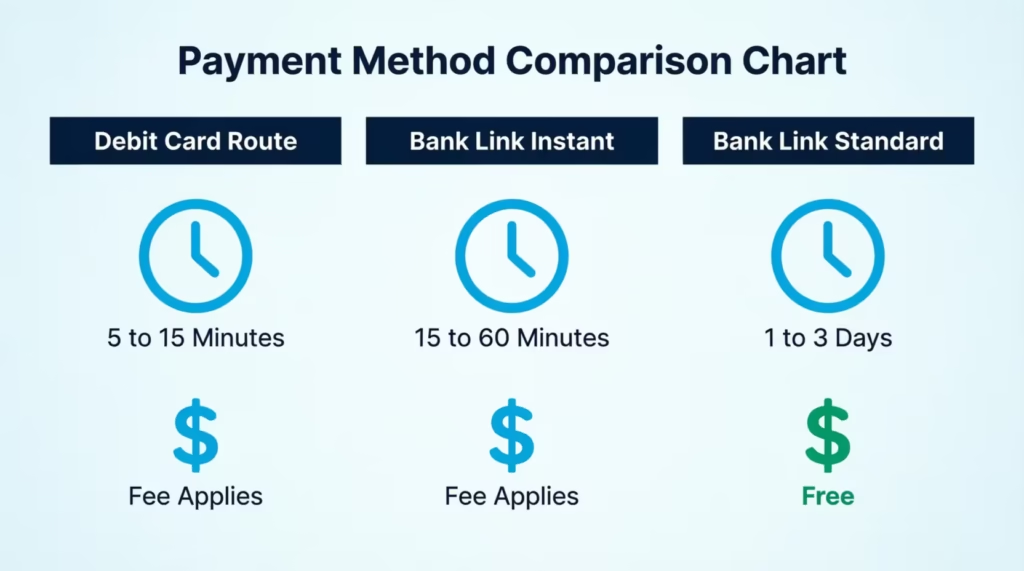
Typical timeframes for the full trip, from tap to PayPal:
| Method | Time to PayPal | Extra Cost |
|---|---|---|
| App debit card added to PayPal | 5–15 minutes | Instant fee on the app side + PayPal 1.75% |
| Bank link with app’s express and PayPal’s instant | 15–60 minutes | Instant fee both sides |
| Bank link with standard delivery both sides | 1–3 business days | Free |
The cost of speed adds up quickly. EarnIn’s Lightning Speed can be $1.99–$5.99, MoneyLion’s Turbo is often $1.99–$8.99, and Dave’s express fee is tiered by advance size. Add PayPal’s 1.75%. A $100 rushed advance can cost around $3 to $10 all-in.
Keywords used naturally: instant cash advance that accepts PayPal, instant transfer fee, linked debit card.
Fees to Watch for When Routing a Cash Advance Through PayPal
Fees rarely come from one place. They stack across the app, PayPal, and the total can feel higher than expected. Below is the full picture, so you can figure out the true cost before you tap Confirm.
App-side fees to expect:
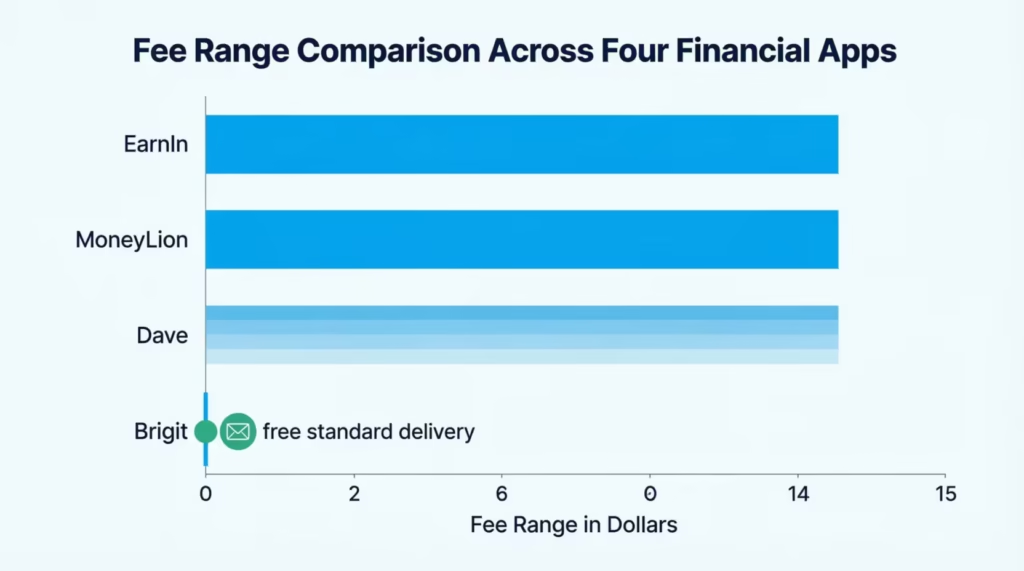
- Subscription fee. Brigit charges $8.99–$14.99 per month, Empower charges $8 per month, Cleo charges $5.99–$14.99 per month. Dave charges a small monthly membership too.
- Optional tip. EarnIn and Dave allow tips. These feel voluntary, but the default is often preset to a few dollars.
- Express or Turbo fee. This is the fee to move money right now. It changes with the advance size. Expect anywhere from $1.99 to $13.99 on a $100–$500 advance.
PayPal-side fees to expect:
- Adding money from a debit card instantly. PayPal charges 1.75% of the amount to move it into PayPal fast from a card, with a $0.25 minimum and $25 maximum.
- Standard bank transfer into PayPal. Free, but takes 1–3 business days.
- Instant transfer out to a debit card or bank. Also 1.75%, same caps. This matters if you plan to move money out of PayPal after receiving it.
How to calculate the true total cost. Suppose Sarah, a rideshare driver in Ohio, needs $200 in her PayPal wallet tonight to book a hotel. She uses MoneyLion Instacash for $200 with an $8.99 Turbo fee.
It hits her RoarMoney card in minutes. She then pushes it into PayPal instantly from her card, paying 1.75%, which is $3.50. Total cost of speed: about $12.49 on a $200 advance. Slow the whole thing down and the same $200 could cost $0.
The rule of thumb is simple. Every “instant” button you tap adds a fee. If you can wait a business day, most of these charges vanish.
Keywords used naturally: instant transfer fee, subscription fee, PayPal balance.
How to Avoid Apps That Falsely Claim PayPal Support
Some app store listings say “works with PayPal” when they really mean “you can pay your PayPal card bill using our app,” which is not the same thing. Others just add PayPal to their marketing copy for search traffic. A quick check keeps you out of the trap.
Red flags to look for:
- The app store description mentions PayPal only once, buried at the end.
- The website’s help center has no article that says “deposit to PayPal.”
- Reviews mention users being told to link a bank instead, with no PayPal option shown.
- The app promises “instant PayPal deposit” but never explains the mechanics.
- The company is very new, has no working help chat, or hides its terms.
Where to verify the real payout method before you sign up:
- Open the app store listing. Scroll to screenshots. Look for a withdrawal or cash-out screen with PayPal listed as an option.
- Visit the official help center. Search “PayPal.” A legit app will have a clear article showing steps.
- Check the app’s terms of service under “Funding” or “Payout.” It’ll list where money can be sent.
- Read the newest one-star reviews. Angry users usually reveal the truth about payout limits fast.
Quick verification checklist before signing up:
- Does the app clearly list PayPal as a supported payout or funding target?
- Does the help center explain the exact steps to reach your PayPal balance?
- Are the fees for each step disclosed in dollars, not vague words like “small fee”?
- Are the app’s cash advance terms available before you hand over your ID?
- Do recent user reviews confirm the PayPal path works today, not two years ago?
If an app can’t clear that list, skip it. There are enough real options that you don’t need to gamble.
Keywords used naturally: cash advance apps that work with PayPal, payout method, PayPal balance.
Frequently Asked Questions (FAQs)
Does PayPal do cash advances?
No, PayPal itself does not offer cash advances or loans. It only receives money from a linked bank, debit card, or prepaid card that a cash advance app deposits into first.
What apps work with PayPal for an instant cash advance?
EarnIn, Dave, MoneyLion Instacash, Brigit, Empower, Beem, and Cleo all route advances to a bank or debit card that can then transfer into PayPal. None deposit directly into a PayPal balance.
Can you get a cash loan through PayPal?
PayPal doesn’t issue loans or set borrowing limits since it isn’t a lender. Cash advance apps like Dave or MoneyLion handle the advance, and you move the funds to PayPal afterward.
What app will give me $200 instantly?
MoneyLion Instacash offers up to $500 and can land funds on a RoarMoney debit card within minutes for a Turbo fee. EarnIn offers up to $150 per day with an optional Lightning Speed fee for instant delivery.
Can I pull money off my PayPal card at an ATM?
A PayPal-issued debit card pulls directly from your PayPal balance and can be used at ATMs like a regular debit card. This works once cash advance funds have already been moved into PayPal, not before.
Does Klover accept PayPal?
The article doesn’t cover Klover specifically, so its PayPal compatibility can’t be confirmed here. Apps confirmed to route to PayPal through a bank or debit card link include EarnIn, Dave, MoneyLion, Brigit, Empower, Beem, and Cleo.
How do I get cash from PayPal instantly?
Add the bank account or debit card that received your cash advance to your PayPal wallet, then choose the instant transfer option. This carries a 1.75% fee with a $0.25 minimum and $25 maximum.
How can I get $100 or $20 free on PayPal?
No cash advance app deposits free money directly into PayPal. EarnIn and MoneyLion Instacash come closest to free, since they charge no mandatory subscription fee and only add costs if you choose instant delivery.
Is a cash advance app the same as a payday loan?
Cash advance apps differ from payday loans by skipping credit checks and charging no mandatory interest, only optional tips or instant-transfer fees. Advances also top out at lower amounts, usually $25 to $1,000, depending on the app.
The Bottom Line
Getting a cash advance into PayPal isn’t as direct as many app listings suggest, but it’s very doable once you know the map. No app deposits straight into a PayPal balance, so the real work is picking the right routing method: bank link, debit card link, or prepaid card.
Based on the data above, EarnIn and Dave give the cleanest paths for most readers, because they combine no-credit-check advances with debit cards or bank links that PayPal accepts. Watch for stacked instant fees, and slow it down whenever you can.
If a friend or family member banks mostly through PayPal, share this guide with them on social media. It could save them hours of dead ends and a few dollars in avoidable fees.