If you rely on Cash App as your main money account, running short before payday can feel stressful. You open one advance app after another, only to see “unsupported bank” pop up. It’s frustrating, and it makes you wonder if any cash advance apps that work with Cash App even exist.
The short answer: yes, a small group of apps can fund your Cash App, but only through specific workarounds.
In this guide, we’ll walk you through which apps work, how to link them the right way, and the traps to skip.
Key Takeaways
This guide explains how to fund a Cash App account through outside cash advance apps, including Cash App’s own Borrow feature, three linking workarounds for Plaid incompatibility, and which apps support debit card push, manual routing, or bridge bank funding.
Core Facts:
- Cash App Borrow charges a flat 5% fee plus a 1.25% weekly late fee, offers $20 to $1,500 depending on account history, and is unavailable in Colorado and Iowa.
- Most advance apps reject Cash App because Plaid, the bank-linking service they rely on, does not support Cash App’s partner bank structure with Sutton Bank and Wells Fargo.
- Three funding workarounds exist: debit card push (fastest, minutes), manual routing and account number entry (1-3 business days), and a bridge bank account as a backup method.
- EarnIn, Klover, MoneyLion Instacash, Dave ExtraCash, and Brigit all support Cash App funding through debit card push or manual routing, none of which run a hard credit check.
- Instant delivery to a debit card typically costs an extra fee ranging from about $1.99 to $8.99, while standard ACH delivery is free but takes 1 to 3 business days.
- B9 is designed for unbanked or 1099 users and can send funds to an external Cash Card, making it an option for readers without a traditional bank account.
Best for:
- Cash App users who get rejected by advance apps through Plaid and need a working linking method.
- Readers without a traditional bank account who rely on the Cash Card as their main debit card.
- Anyone comparing fees and speed across EarnIn, MoneyLion, Dave, Klover, Brigit, Albert, B9, and Cleo before choosing an app.
Does Cash App Offer Its Own Cash Advance?
Cash App has a feature called Cash App Borrow, but it isn’t offered to every user. It works more like an invite. Cash App looks at your account history, and if you qualify, a “Borrow” tile shows up inside the Banking tab. If you don’t see it, you can’t request it. There’s no waitlist, no form, and no way to force approval.
To have a real shot at Borrow, your account usually needs to check a few boxes. You should be receiving at least $300 in direct deposits each month into Cash App. Your account should be active, with regular use and a solid payment record on the Cash Card. Cash App also reviews how long you’ve had the account and whether past Borrow loans, if any, were paid back on time.
Loan amounts start small. Many users are offered $20 to $200, and some see limits up to $1,500 after building history. The fee is a flat 5% of the borrowed amount, plus a 1.25% weekly late fee if you miss the four-week payback window. So a $100 loan costs $5 upfront, and you repay $105 total.
Cash App Borrow is not offered in every state. Users in Colorado and Iowa are currently locked out. If your state is supported but you still don’t see the option, the reason is almost always account activity. Boost your direct deposits, use your Cash Card more often, and check back after a few weeks.
📌 Did You Know: Cash App Borrow does not do a hard credit check. Approval is based only on how you use Cash App, so your credit score won’t move up or down from taking a loan through this feature.
Why Most Cash Advance Apps Don’t Work Directly With Cash App
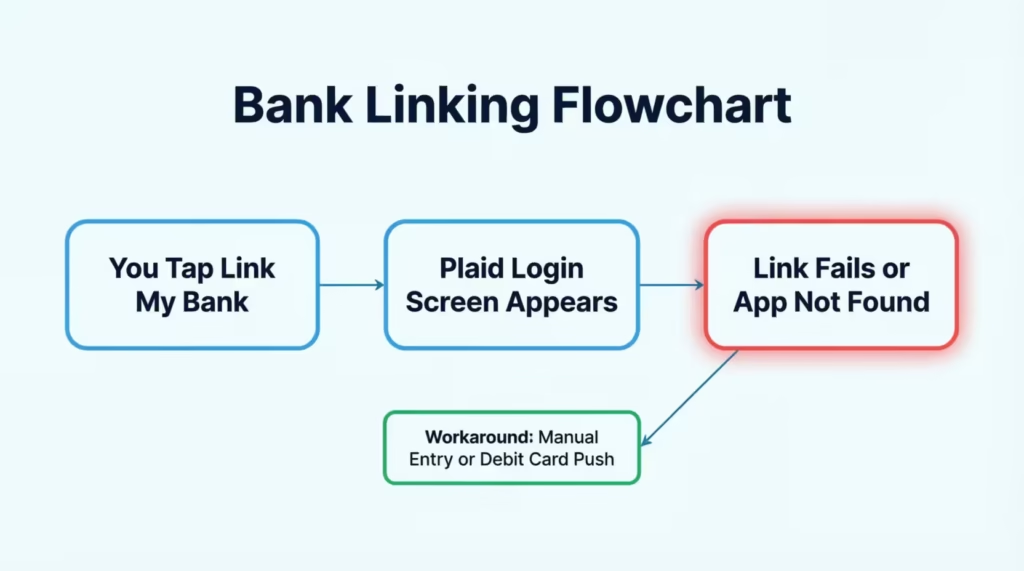
The main reason most advance apps reject Cash App is a company called Plaid. Plaid is the tech bridge that connects apps like Dave, Brigit, and MoneyLion to your bank account. When you tap “link my bank,” Plaid is what pops up and asks for your login. It reads your balance, your deposits, and your spending patterns.
Here’s the catch. Cash App is a financial services company, not a full traditional bank. Its accounts run through partner banks like Sutton Bank and Wells Fargo, but the Cash App layer sits on top. Plaid does not support that setup for most cash advance apps. So when you search “Cash App” inside the Plaid screen, either it doesn’t appear, or the link fails right after login.
Beyond Plaid, advance apps also study your income deposits. They want to see a steady paycheck landing in the account you link. Cash App does support direct deposit with its own routing and account numbers, but the app you’re using still needs to accept that routing number as a valid bank input. Many don’t.
There’s also a risk factor. Advance apps repay themselves by pulling money on your next payday. If they can’t reliably pull from Cash App, they lose money. So they block it on purpose. That’s why “works with Cash App” claims are so rare, and why you need to check before you sign up.
The Three Ways a Cash Advance App Can Actually Fund Your Cash App Account
If an app cannot link to Cash App through Plaid, it can still send you money in three other ways. Knowing these methods is the key to picking an app that will really work.
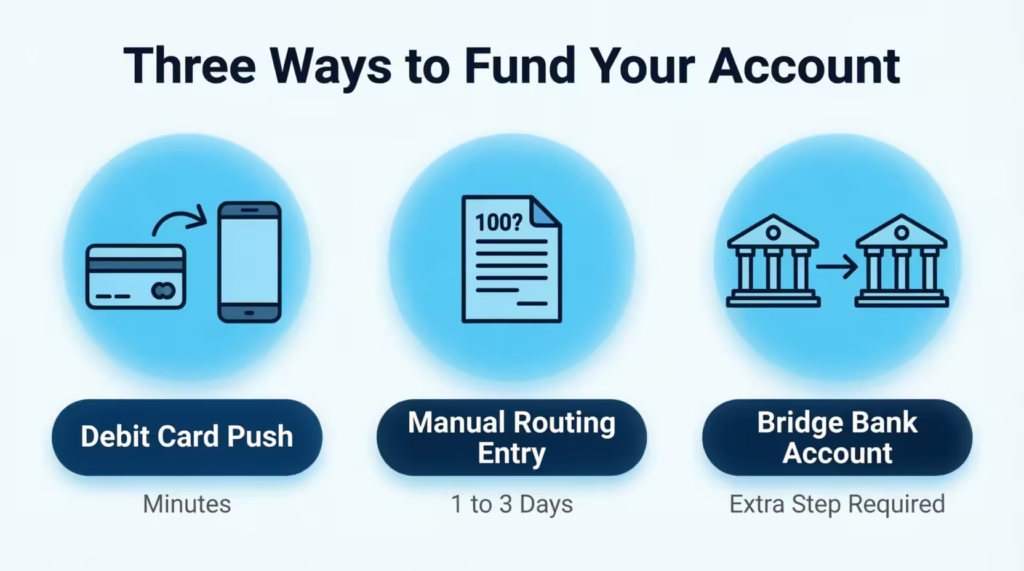
The first method is a debit card push. You give the app your Cash App debit card number (the one tied to your Cash Card). The app sends the funds through the card network, and the money lands in your Cash App balance in minutes. This is the fastest and most reliable route.
The second method is manual routing and account number entry. Cash App gives every account a routing and account number, found under the Money tab. You type these into the advance app instead of using the Plaid login screen. If the app accepts manual entry, funds arrive by ACH transfer, usually in 1 to 3 business days.
The third method is a bridge bank account. You link a traditional bank (like Chime, Varo, or a big bank) to the advance app. The advance drops into that bank. Then you move the money from that bank into Cash App using the Cash App “Add Cash” feature. It’s an extra step, but it opens the door to almost any advance app.
Cash Advance Apps That Work With Cash App as a Bank
A few apps treat Cash App like a bank account through manual routing entry. This means you can skip Plaid and just type in Cash App’s routing and account numbers.
EarnIn is the most well-known option here. EarnIn does not use Plaid for every user. It lets you enter routing details directly, and it verifies income by reading your timesheet or GPS location instead of your bank feed. That makes it a strong match for Cash App users who get paid hourly.
Klover also allows manual bank entry in some cases. Klover pulls smaller advances, usually up to $200, and it uses points from ads and surveys to raise your limit. Some users report success linking their Cash App routing number, though the app may still ask for a linked debit card for repayment.
Brigit and Albert technically support manual entry, but they run stricter income checks. If your paycheck doesn’t clearly land in Cash App as a labeled direct deposit, they may reject the link. Test it before you count on it.
Cash Advance Apps That Work With Cash App Direct Deposit
If your paycheck is set up to hit Cash App as a direct deposit, more advance apps become open to you. A labeled direct deposit shows the app that real income flows into the account, which is what they use to set your advance limit.
To set this up in Cash App, tap the Money tab, then Direct Deposit, then copy your routing and account numbers into your employer’s payroll form. Once two or three paychecks have landed, apps like EarnIn, MoneyLion Instacash, and Dave ExtraCash are more likely to approve you when you enter those numbers manually.
MoneyLion Instacash offers up to $500 with no interest and no monthly fee. To fund Cash App directly, you’ll need to add your Cash Card as your delivery method. Instacash pushes money to debit cards in minutes for a small express fee, or free within 12 to 48 hours.
Dave ExtraCash offers up to $500 as well, and it charges a small monthly membership. Dave lets you send advances to an outside debit card, so entering your Cash App card details usually works, even if Plaid rejects your Cash App login.
💡 Pro Tip: Before you apply, add your Cash Card as an “external debit card” in the advance app’s settings. This unlocks card-push delivery even when bank linking fails.
Cash Advance Apps That Work With Cash App Without a Bank Account
Many Cash App users don’t have a traditional bank account at all. That’s fine. You still have real options, because the Cash Card acts as a debit card in most systems.
EarnIn works well for the no-bank crowd. It can send your advance straight to the Cash Card through its Lightning Speed feature. You just enter the card number, expiration, and CVV under payout settings.
Klover also supports debit card payout to Cash Card in many cases. Since Klover advances are small, this method is great for covering a $50 or $100 gap.
B9 is another option worth knowing. B9 was built with unbanked and underbanked users in mind. It issues its own account, but it can also send funds to an external Cash Card. If you’re paid in cash tips or on a 1099, B9 is more flexible than most.
Avoid apps that require a “verified checking account” with a major bank. These almost always mean a brick-and-mortar bank, not a fintech like Cash App or Chime.
Cash Advance Apps That Work With Cash App No Credit Check
None of the well-known advance apps run a hard credit check through Experian, Equifax, or TransUnion. That’s one of the biggest reasons people choose them over payday loans or personal loans. Your FICO score won’t drop from applying.
Instead, these apps look at your cash flow. They check how often you get paid, how much you earn, and whether your account goes negative often. That means you can be approved even with a low credit score or thin credit file.
Top no-credit-check apps that also support Cash App payout include EarnIn, Klover, MoneyLion Instacash, Dave ExtraCash, and Brigit. Each one uses income and spending data instead of pulling your credit report. The trade-off is that your first advance is often small, sometimes just $20 to $50, until you build a payback history.
Free Cash Advance Apps That Work With Cash App
“Free” needs a clear meaning here. Most advance apps are free in one of two ways. Either they charge zero interest and zero required fees, or they charge no subscription but ask for an optional tip or express fee if you want funds instantly.
EarnIn is free if you’re willing to wait 1 to 2 business days for standard delivery. Lightning Speed to your Cash Card costs a small fee, but the app itself has no monthly charge.
MoneyLion Instacash is free with standard ACH delivery. There’s no interest and no membership fee for the basic tier. Only the instant transfer costs extra.
Klover is fully free at its base level. It funds itself through ads and data, not subscriptions. Advances arrive in 2 to 3 business days at no cost.
Free Cash Advance Apps That Work With Cash App No Credit Check
If you want both zero cost and zero credit check, the shortlist is short but solid: EarnIn (standard delivery), Klover (standard delivery), and MoneyLion Instacash (standard delivery). Each one skips the credit bureaus and skips the fees, as long as you don’t need the money in the next few minutes.
Set expectations up front. Standard means 1 to 3 business days, sometimes longer over weekends. If your bill is due today, “free” may not be the right pick.
Any Cash Advance Apps That Work With Cash App (Full Comparison)
Here’s a side-by-side view of the main options, based on how each app can fund a Cash App account.
| App | Max Advance | Fee Style | Cash App Funding Method | Speed |
|---|---|---|---|---|
| EarnIn | Up to $150/day, $750/pay period | Tip + Lightning Fee | Cash Card debit push OR manual routing | Minutes to 2 days |
| MoneyLion Instacash | Up to $500 | Free or Turbo fee | Cash Card debit push | Minutes to 48 hrs |
| Dave ExtraCash | Up to $500 | $1/month + express fee | Cash Card debit push | Minutes to 3 days |
| Klover | Up to $200 | Free or express fee | Manual routing or Cash Card | 2 to 3 days |
| Brigit | Up to $250 | $9.99/month | Manual routing (case by case) | Minutes to 3 days |
| Albert | Up to $250 | Optional tip | Bridge account or manual entry | Minutes to 3 days |
| B9 | Up to $500 | Membership tiers | External debit card push | Minutes |
| Cleo | Up to $250 | $5.99/month | Bridge account only | 3 to 4 days |
Reading the table, the debit card push apps give you the fastest, most reliable link to Cash App. Manual routing works too, but it takes longer and depends on the app’s income verification passing.
Instant Cash Advances That Work With Cash App
Instant in this space means “arrives in a few minutes to a few hours.” It almost always costs extra. Standard delivery is free but slow, and instant delivery adds a fee ranging from about $1.99 to $8.99 depending on the app and the amount.
For instant funding into Cash App, use apps that push to your Cash Card. EarnIn Lightning Speed and MoneyLion Turbo both deliver within minutes to a debit card. Dave also offers express delivery to a debit card for a small fee. These are the three most reliable instant paths.
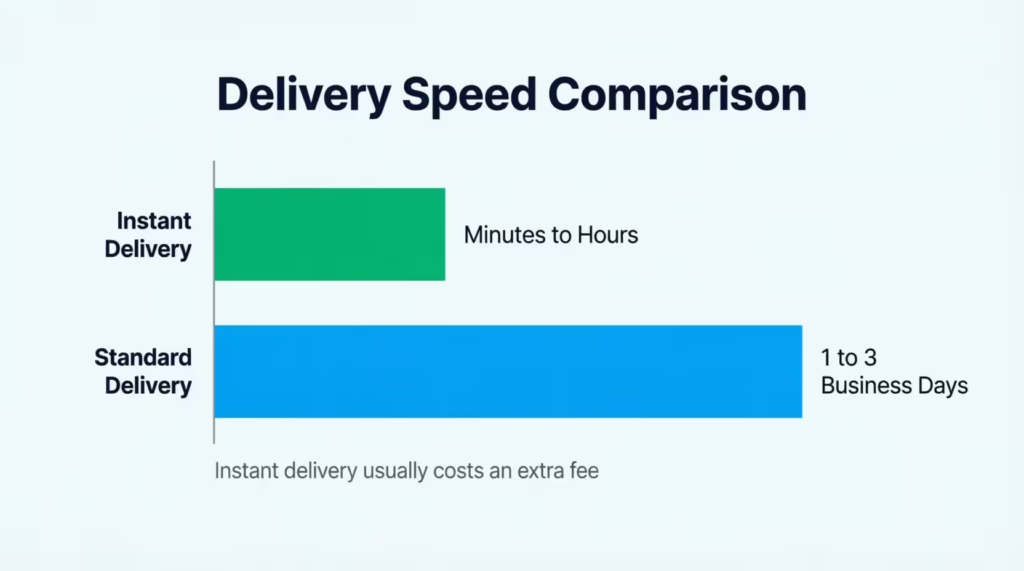
Standard delivery, by contrast, goes through ACH. That takes 1 to 3 business days, sometimes longer if a weekend or holiday is in the middle. If your bill is due in an hour, pay the express fee. If you can wait, save the money and pick standard.
⚠️ Mistake to Avoid: Don’t pay an express fee if the app can only send funds by ACH to your routing number. ACH is always 1 to 3 days, even with an “instant” upsell. Instant only works through card networks.
How to Link a Cash Advance App to Your Cash App Account
Linking is the step where most users get stuck. Here are the three methods, walked through in plain steps.
Using Your Cash App Debit Card
This is the easiest path. Open your advance app and go to the payout or delivery settings.
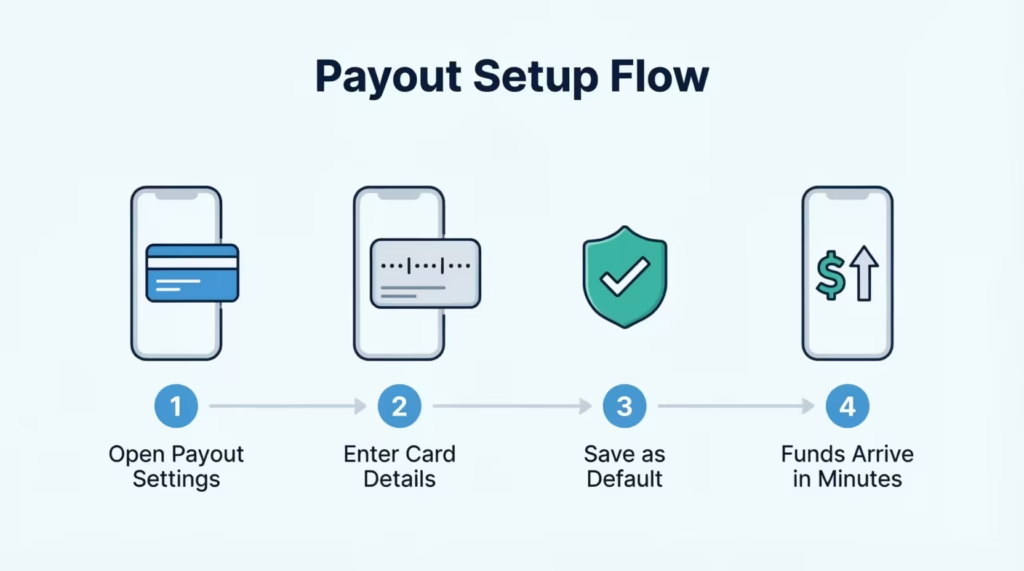
- Choose “Add debit card” or “External debit card.”
- Grab your Cash Card. If you don’t have a physical card, open Cash App, tap the Card tab, and view your virtual Cash Card details.
- Enter the 16-digit card number, the expiration date, and the CVV.
- Save the card as your default payout method.
Once linked, any advance you accept goes to the Cash Card, which means the money hits your Cash App balance in minutes.
Using Manual Routing and Account Number Entry
If the app doesn’t accept debit cards, look for a “Link bank manually” or “Enter routing and account” option.
- Open Cash App, tap the Money tab, then Direct Deposit.
- Copy the routing number and account number.
- Paste them into the advance app’s manual bank form.
- If asked for a bank name, type Sutton Bank or Wells Fargo (Cash App will show which one applies to your account).
The advance will arrive by ACH transfer, usually within 1 to 3 business days.
Using a Linked External Bank Account as a Bridge
If neither method works, use a bridge account.
- Open a free account with Chime, Varo, or another bank that supports Plaid.
- Link that account to the advance app through Plaid.
- Once the advance lands in the bridge bank, log into Cash App.
- Tap Banking, then Add Cash, and pull the funds into Cash App from your bridge bank.
This route takes an extra step, but it works with almost every advance app on the market.
How to Spot Scam or Lead-Gen “Cash App Compatibility” Guides
Many websites that promise “cash advance apps compatible with Cash App” are lead-gen traps. They collect your info, sell it, and route you to high-cost lenders. Watch for these red flags.
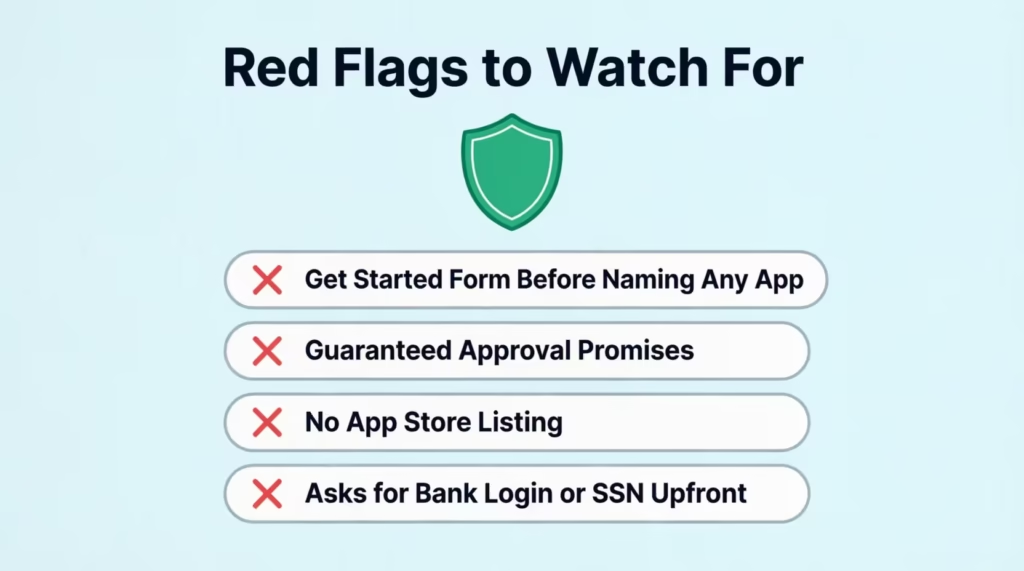
The site pushes you to a “Get Started” form before naming any actual app. Real reviews name apps up front. Lead-gen pages hide the app until you enter your phone number, email, or Social Security number.
The article promises guaranteed approval or no requirements. Every real advance app has some requirement: a linked debit card, a paycheck history, or a minimum account age. “Guaranteed” is a marketing lie.
The listed “apps” don’t have their own App Store or Google Play page. Search each name in the App Store and Google Play before you sign up. If it’s not there, it’s not a real app.
The site asks for your bank login, SSN, or full Cash App PIN upfront. No legitimate advance app collects those before you even see your offer.
Stick with apps that publish clear fee tables, list a real company address, and have thousands of App Store reviews. The Consumer Financial Protection Bureau also lets you search complaints by company name, which is a fast way to check credibility.
Frequently Asked Questions (FAQs)
Do any cash advance apps work with Cash App?
Yes, a small group of apps can fund Cash App, mainly through debit card push, manual routing entry, or a bridge bank account. Direct Plaid linking usually fails since Cash App runs through partner banks like Sutton Bank and Wells Fargo.
Can I use EarnIn with Cash App?
Yes, EarnIn works well with Cash App. It supports manual routing entry and can send funds straight to your Cash Card through its Lightning Speed feature in minutes.
Does Dave accept Cash App?
Yes, Dave ExtraCash can fund Cash App by sending advances to an external debit card. This works even when Plaid rejects the Cash App login, since Dave allows up to $500 with a small monthly membership fee.
Does Albert work with Cash App?
Albert technically supports manual bank entry for Cash App, but it runs stricter income checks. If your paycheck doesn’t clearly show as a labeled direct deposit, Albert may reject the link.
What loan apps work with Cash App?
EarnIn, Klover, MoneyLion Instacash, Dave ExtraCash, and Brigit can all fund Cash App through debit card push or manual routing. Brigit and Albert run stricter income checks than the others.
How to get $200 dollars fast on Cash App?
Cash App Borrow offers $20 to $200 for qualifying users, appearing as a Borrow tile in the Banking tab. Outside apps like MoneyLion Instacash or Klover can also push up to $200 to your Cash Card within minutes to a few days.
Does Plaid accept Cash App?
No, Plaid does not support Cash App for most cash advance apps since Cash App is a financial services company, not a traditional bank. Searching “Cash App” in the Plaid screen often shows no results or fails right after login.
How can I borrow $300 from Cash App?
Cash App Borrow can offer up to $1,500 once you build account history, though most users start with $20 to $200. Regular direct deposits of at least $300 monthly and consistent Cash Card use improve your odds of a higher offer.
How to use Cash App if you don’t have a bank account?
You can still get advances through your Cash Card acting as a debit card. EarnIn and Klover both support debit card payout directly to the Cash Card, and B9 caters specifically to unbanked or 1099 users.
Wrapping Up
Getting a cash advance into Cash App takes a bit of extra work, but it’s very doable once you know the map. Cash App Borrow is the simplest route if you qualify, and outside apps like EarnIn, MoneyLion Instacash, and Dave ExtraCash can deliver funds through your Cash Card or manual routing.
For most readers, the debit card push method will deliver the best results because it’s fast, reliable, and skips the Plaid problem entirely.
If you know a friend who relies on Cash App and hits a cash squeeze before payday, share this guide with them; it could save them hours of trial and error.