I’ve been there. You check your Chime balance, payday is still three days away, and you need cash right now. So you download a cash advance app, plug in your Chime login, and get hit with the worst message: “We can’t connect to your bank.” It’s frustrating, and it makes you wonder if your Chime account is the problem.
The good news? Plenty of cash advance apps that work with Chime exist, and some fund your account in minutes.
This guide walks you through the ones that actually connect, what they cost, and how to get approved fast.
Key Takeaways
This guide explains which cash advance apps connect with Chime accounts, including Chime’s own SpotMe and MyPay tools, third-party app fees, credit check requirements, and how to fix rejected bank links.
Core Facts:
- Chime SpotMe offers fee-free overdraft coverage starting at $20 and growing to as much as $200, requiring at least $200 in qualifying direct deposits within the last 34 days.
- Chime MyPay provides up to $500 in earned wage access, with free delivery in 24 hours or instant delivery for a 3% fee capped at $5.
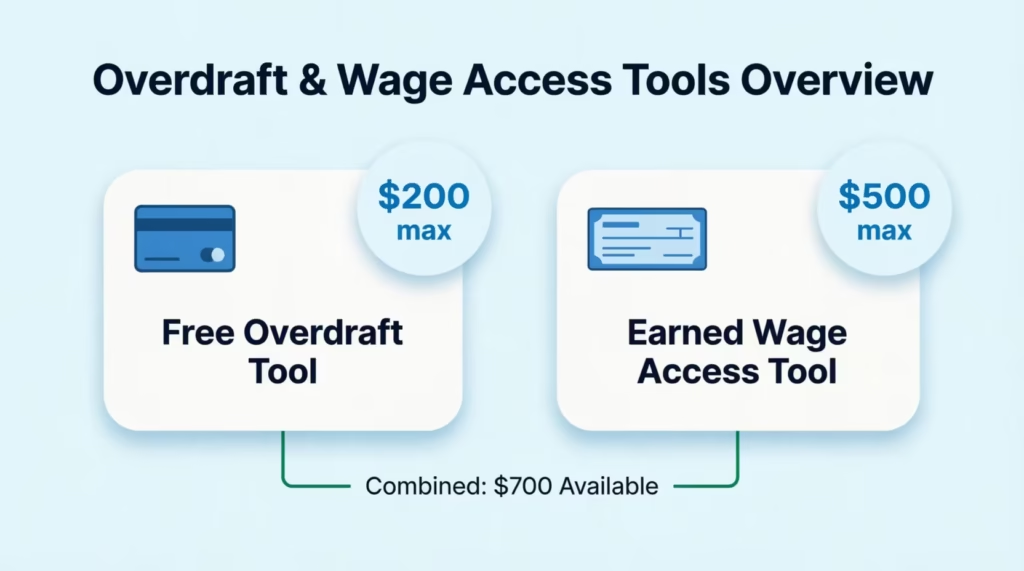
- Stacking SpotMe and MyPay gives access to up to $700 in short-term funds directly through Chime without a third-party app.
- Third-party apps like Earnin, Dave ExtraCash, and MoneyLion Instacash offer advances ranging from $150 to $1,000 with instant fees between $0.49 and $15 depending on the app.
- Most cash advance apps use Chime deposit history and account activity for approval instead of a traditional credit check or credit score pull.
- Bank link failures are commonly caused by temporary Plaid outages, new Chime accounts under 30 days old, or a negative or pending balance, and can often be fixed by retrying the link or waiting a few hours.
Best for:
- Chime account holders who want free options like SpotMe or MyPay before paying for a third-party cash advance app.
- Gig workers, freelancers, or benefits recipients without traditional payroll deposits looking for apps that accept non-payroll income.
- Anyone whose cash advance app rejected their Chime account and needs troubleshooting steps to reconnect.
Chime’s Built-In Cash Advance Tools: SpotMe and MyPay
Before you download another app, look inside Chime first. Chime offers two free tools that many members forget about, and together they can cover most small cash shortfalls.
Chime SpotMe
SpotMe is Chime’s fee-free overdraft feature. It lets your debit card or ATM withdrawal go through even when your balance hits zero. New members usually start with a $20 limit. Over time, that limit can grow to as much as $200, based on your deposit history and account activity, according to Chime.
Here’s what to know:
- Cost: $0. There are no interest charges or overdraft fees.
- Where it works: Debit card purchases and ATM withdrawals. It doesn’t work for ACH transfers, wire transfers, or Pay Anyone transfers over your balance.
- Eligibility: You need at least $200 in qualifying direct deposits within the last 34 days. Most gig apps, payroll, and government benefits count.
- Repayment: SpotMe gets paid back automatically from your next deposit.
SpotMe is best for small gaps. If you just need $30 for gas or $45 for groceries, this covers it without a single fee.
Chime MyPay
MyPay is Chime’s earned wage access tool. It gives you up to $500 before your next paycheck. New users often start around $20 to $50 and grow their credit limit as they build direct deposit history.
Two delivery choices matter here:
- Free option: Funds arrive within 24 hours at no cost.
- Instant option: A 3% fee applies, with a $2 minimum and a $5 maximum per advance. So a $100 instant advance costs $3, and a $500 instant advance costs $5.
There’s no subscription, no interest, and no late fees. To qualify, you need consistent direct deposit activity to your Chime Checking Account. Payroll works best, but many members with steady gig income also qualify.
Combined Ceiling
Stack both tools, and you can access up to $200 from SpotMe plus $500 from MyPay. That’s $700 in short-term cash without touching a third-party app.
💡 Pro Tip: Use SpotMe for tiny debit purchases and save MyPay for larger bills like rent or utilities. That way, you keep each tool’s limit free for when you truly need it.
Best Cash Advance Apps That Work With Chime
If Chime’s built-in tools don’t cover what you need, several third-party apps play well with Chime. Below are the ones members report as most reliable, with real-world limits and fee ranges.
| App | Max Advance | Base Cost | Instant Fee to Chime |
|---|---|---|---|
| Earnin | $150/day, $1,000/pay period | Free (optional tip) | ~$2.99–$4.99 |
| Dave ExtraCash | $500 | Up to $5/month membership | 5% of advance ($5–$15) |
| MoneyLion Instacash | $500 ($100 per disbursement) | Free | $0.49–$8.99 |
| Brigit | $250 | $8.99–$15.99/month | Included with paid plan |
| Albert Instant | $250 | $14.99/month (Genius) | Included with paid plan |
| Klover | $200 | Free | $2.99–$14.99 |
| Empower | $300 | $8/month | ~$1–$8 |
| Current Paycheck Advance | $500 | Free (Premium tier for higher limit) | Included |
| Varo Advance | $500 | Small flat fee per advance | Included |
Earnin stands out because it uses your timesheet or GPS to verify hours worked, and it charges no mandatory fees. You tip what feels fair. Advances start around $85 per day for new users and grow with usage.
Dave ExtraCash works well for Chime holders because approval is based on account activity rather than credit. The 5% service fee is capped at $15, which keeps large advances predictable.
MoneyLion Instacash requires no subscription and no credit check. The catch is that you can only pull $100 at a time, so getting the full $500 means five separate transfers.
Brigit is best if you want automatic overdraft protection and don’t mind a subscription. It also offers credit-building tools that some members find useful.
Klover is the most flexible for non-traditional income. It uses points and ads to unlock higher advances, so gig workers and freelancers often qualify faster here than elsewhere.
Instant Cash Advance With Chime Account
Speed matters when rent is due tomorrow. Most apps offer two delivery lanes: standard (free, 1 to 3 business days) and instant (a small fee, minutes to a few hours).
For a true instant cash advance with a Chime account, focus on apps that push funds directly to your Chime debit card through Visa Direct or Mastercard Send. That’s the fastest route. An ACH transfer to Chime takes 1 to 3 business days, even from “instant” apps, because Chime processes ACH through Bancorp Bank or Stride Bank on standard bank rails.
Typical instant fees to Chime:
- MoneyLion Turbo delivery: $0.49 to $8.99 based on advance size.
- Dave Express delivery: 5% of the advance, minimum $5, maximum $15.
- Earnin Lightning Speed: Around $2.99 to $4.99.
- Chime MyPay instant: 3%, capped at $5.
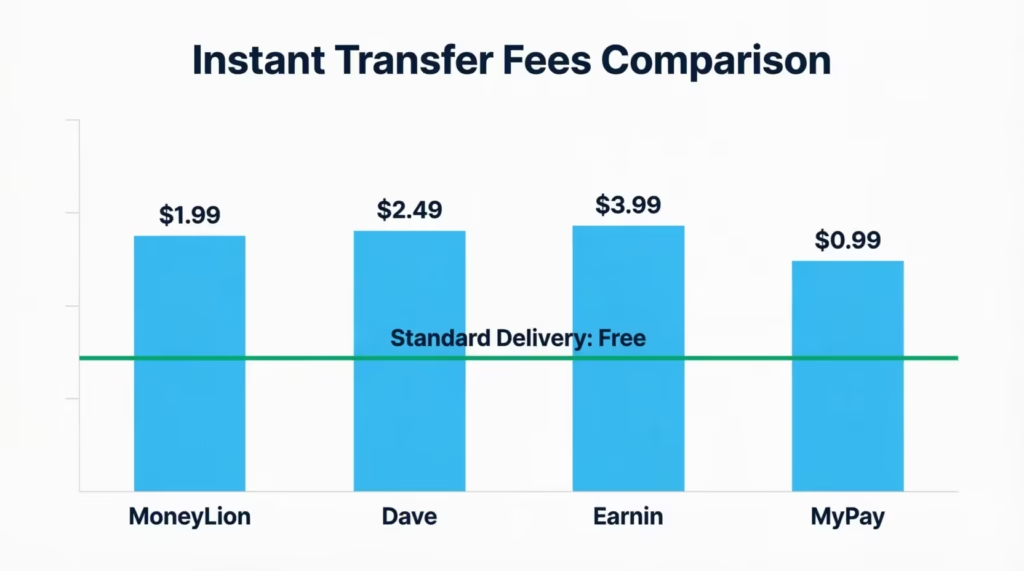
Standard delivery is genuinely free at most apps but arrives 1 to 3 business days later. Weekends and federal holidays don’t count. If you request a standard advance on Friday afternoon, expect Monday or Tuesday funding.
⚠️ Mistake to Avoid: Don’t pay the instant fee if payday is tomorrow anyway. Standard delivery often arrives before your next paycheck, so you save the fee and get the money in time.
Cash Advance Apps That Work With Chime No Credit Check
Almost every major cash advance app skips traditional credit checks. They don’t pull your FICO score. They don’t report to Equifax, Experian, or TransUnion when you take an advance. Approval runs on your bank activity instead.
Apps that use no credit check and pair well with Chime:
- Klover: No credit pull. Uses transaction history and optional points.
- MyPay (Chime’s own): No credit check ever.
- MoneyLion Instacash: No hard or soft pull for the advance itself.
- Albert Instant: No credit check for advances (though signup uses ID verification).
- Earnin: No credit check. Uses work verification instead.
- Dave ExtraCash: No credit pull for the advance.
How they decide instead: These apps look at your Chime deposit patterns. They want to see money flowing in regularly. Two months of steady deposits, no repeated negative balances, and no red-flag activity like frequent chargebacks usually clears you.
One risk to know: Cash advance apps don’t hurt your credit if you repay on time. But if you default and the app sends the debt to collections, that collection account can appear on your credit report and damage your score. Repay every advance on your scheduled date to avoid this.
Cash Advance Apps That Work With Chime No Direct Deposit Required
Not everyone has a W-2 paycheck. Gig workers, freelancers, DoorDash drivers, Uber drivers, and folks on government benefits often lack traditional payroll deposits. Several apps still approve these income types.
“No direct deposit required” doesn’t mean “no income required.” It means the app accepts non-payroll income like:
- Cash App or PayPal transfers labeled as work income
- SSI or SSDI deposits
- Unemployment or state benefits
- Regular gig platform payouts
- Rental income deposited into Chime
Apps that accept non-payroll income:
- Klover: Very flexible. Approves many income types.
- Brigit: Accepts consistent deposits even without payroll tags.
- Empower: Flexible on income sources.
- Albert Instant: Reviews deposit patterns rather than requiring payroll.
- MoneyLion Instacash: Works with recurring non-payroll deposits.
Apps that generally require true payroll direct deposit:
- Earnin: Wants employer-verified hours or payroll deposits.
- Current Paycheck Advance: Needs a Current account with qualifying payroll.
- Dave ExtraCash: Prefers payroll deposits, though some non-payroll income qualifies.
Gig, Freelance, and Benefits Income Compatibility
Here’s how different income types stack up when applying to any cash advance apps that work with Chime:
- DoorDash, Uber, Instacart drivers: Klover, Brigit, and MoneyLion approve most drivers after 30 to 60 days of consistent payouts to Chime. Earnin sometimes works if the platform sends payroll-style deposits.
- Freelancers paid through Stripe, PayPal, or Cash App: Klover and Brigit are the strongest bets. Look for apps that read deposit frequency rather than employer names.
- SSI, SSDI, and VA benefits: These deposits are usually accepted by Klover, MoneyLion, and Brigit. Advance limits may start lower because benefit amounts are fixed.
- Unemployment benefits: Klover and Brigit typically accept these. Empower may too, though limits stay conservative.
Approval odds go up when your Chime account shows 60 or more days of consistent deposits, keeps a positive balance most days, and avoids frequent overdrafts.
Free Cash Advance Apps That Work With Chime No Direct Deposit Required
If you want zero cost and don’t have payroll, your options narrow but still exist.
Genuinely free (no subscription, no mandatory fee):
- Klover: Free base tier. You can access small advances by watching ads or earning points. Instant transfer is optional.
- MoneyLion Instacash: No subscription. Standard delivery to Chime is free. You only pay if you want Turbo delivery.
- Chime MyPay: Free within 24 hours. No subscription ever.
- Earnin: No subscription. Tips are optional, and standard Cash Out to Chime is free.
Watch for these “hidden” costs even at free apps:
- Instant delivery fees (avoidable by choosing standard)
- Optional tips (you can set to $0)
- Membership upsells that unlock higher limits
- Late fees if repayment fails (some apps waive these, others don’t)
To keep an advance truly free, pick standard delivery, skip the tip, and repay on the scheduled date. That’s it.
Cash Advance Apps That Work With Chime No Subscription
Subscription-based cash advance apps charge $5 to $16 per month even when you don’t take an advance. That adds up. If you only need occasional help, a no-subscription app makes more sense.
No subscription required:
- Earnin: Free base service. Optional tips.
- MoneyLion Instacash: No membership needed for the standard advance.
- Klover: Free tier available.
- Dave ExtraCash: Charges up to $5 per month, which is small but technically a membership. Advances also carry a 5% service fee.
- Chime MyPay: No subscription at all.
Subscription-based cash advance apps (charge monthly whether you borrow or not):
- Brigit: $8.99 to $15.99 per month.
- Albert: $14.99 per month for Genius.
- Empower: $8 per month.
- Current Premium: Small monthly fee for higher limits.
When a subscription actually pays off: If you take 2 or more advances per month, or you want extras like credit-building, budgeting tools, or automatic overdraft protection, a paid plan can be worth the cost. If you take one advance every few months, skip the subscription and stick with Earnin, MoneyLion, or Klover.
Any Cash Advance Apps That Work With Chime (When One Rejects Your Account)
Sometimes an app you’ve tried before suddenly rejects your Chime account. It’s aggravating, but it’s usually fixable. Here’s why it happens and what to do.
Common reasons for rejection:
- Plaid bank linking errors: Plaid is the middleware most cash advance apps use to connect to Chime. If Chime’s API is down or Plaid is refreshing, the link fails temporarily.
- Chime not on the app’s bank list: A few apps still route users through a short list of “big banks.” Chime shows up under Bancorp Bank or Stride Bank in these lists, so scroll for those names.
- Insufficient deposit history: New Chime accounts under 30 to 60 days old often get rejected.
- Pending transactions or negative balance: Apps check your balance in real time. A pending charge or negative balance can trigger auto-rejection.
- Multiple failed repayments elsewhere: If another app reported you as unpaid, some services share risk data and decline you.
Step-by-step fixes:
- Log out of the cash advance app and log back in.
- Retry the Chime link using your Chime login credentials directly, not via manual routing.
- If Plaid fails, try again in 2 to 4 hours. Plaid outages are common but short.
- Wait until pending transactions clear and your balance goes positive.
- If the app doesn’t list Chime, look for “The Bancorp Bank” or “Stride Bank” instead.
- Try a different app. If Earnin rejects you, MoneyLion or Klover might approve instantly.
Does Earnin work with Chime? Yes, but Earnin has had rolling Chime support. Some members link fine on the first try. Others need to wait for Earnin’s Chime rollout to reach their state. If Earnin fails, MoneyLion and Dave are strong alternatives that consistently accept Chime.
How to Link a Cash Advance App to Your Chime Account
Follow these steps to link a cash advance app to your Chime account:
- Open the cash advance app and go to the “Link Bank” or “Add Bank Account” screen.
- Search for Chime. If Chime doesn’t appear, search “The Bancorp Bank” or “Stride Bank.”
- Choose “Log in with credentials” (Plaid method). Enter your Chime username and password.
- Complete Chime’s verification prompt. Chime may send a text code to confirm the link.
- If Plaid fails, use manual entry. Find your Chime routing number and account number inside the Chime app under “Move Money” → “Direct Deposit.”
- Confirm micro-deposits if the app uses that method. Two small deposits (usually under $1) will hit your Chime account within 1 to 2 business days. Enter the exact amounts back in the app to verify.
Once linked, most apps take 24 to 72 hours to review deposit history before approving your first advance.
Cash Advance Apps That Work With Chime Negative Balance
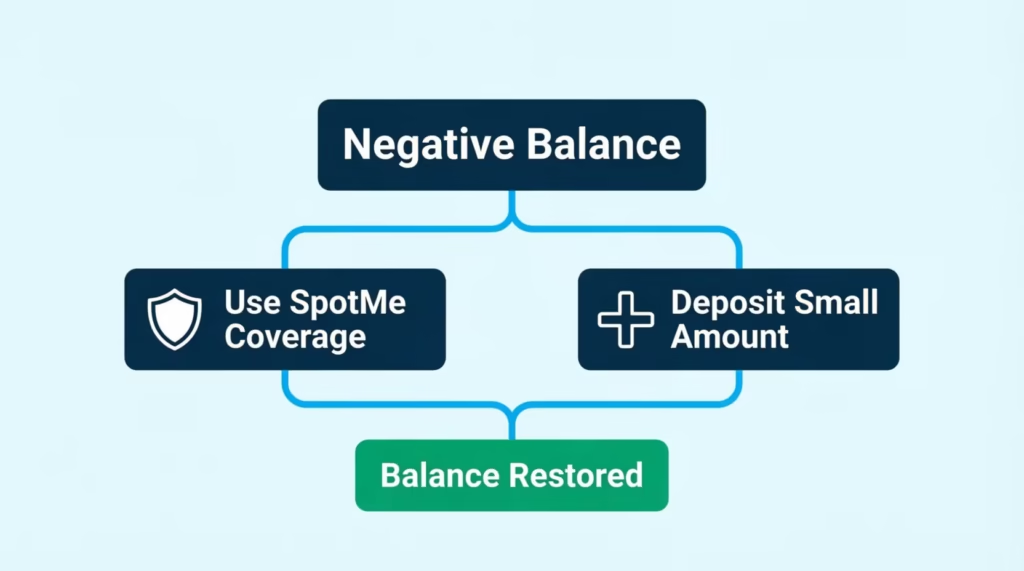
A negative Chime balance blocks most cash advances. Apps see the negative balance and assume you can’t repay. But some apps are more lenient than others, and there are ways to unlock approval fast.
Why negative balances block approval:
Cash advance apps look at your current balance right before funding. A negative balance signals higher default risk. To protect their loss rates, most apps auto-decline until your balance turns positive.
More lenient options:
- Chime SpotMe: Actually designed to cover you when you overdraft. It’s the exception, not the rule. As long as you’re within your SpotMe limit, you’re covered even below $0.
- Klover: Sometimes approves small advances despite a slight negative balance if your deposit history is strong.
- MoneyLion: Reviews recent deposits alongside current balance.
Apps that almost always decline with a negative balance:
- Dave ExtraCash
- Brigit
- Albert Instant
- Empower
- Earnin (usually pauses your Cash Out until the balance is positive)
How to get approved despite a negative balance:
- Use SpotMe first if you have coverage. SpotMe brings you back to zero, and then some apps re-approve you.
- Deposit even a small amount to move your balance above zero. Some apps re-check within minutes.
- Wait for your next scheduled deposit. Payroll or gig payouts usually clear the negative balance and reset app eligibility.
- Repay any past-due advance from another app. Many services share default data.
Repayment on payday is automatic for most apps, so a Chime SpotMe overdraft can create a repayment loop if you’re not careful. Watch your dates.
Eligibility Requirements Across Cash Advance Apps
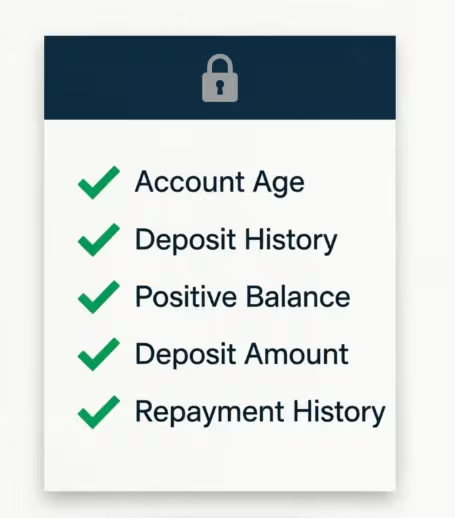
Most apps use similar criteria to approve Chime users. Here’s what “qualifying” usually means:
1. Direct deposit history:
- Minimum: 30 days of activity for most apps.
- Preferred: 60 to 90 days of consistent deposits.
- Chime SpotMe: At least $200 in qualifying direct deposits in the last 34 days.
2. Deposit thresholds:
- Most apps want to see $200 or more per pay cycle deposited into Chime.
- Some apps like Brigit need a $200 minimum across 2 to 3 recent deposits.
- Higher deposits unlock higher limits. A user with $1,500 biweekly deposits can qualify for a $500 advance faster than a user with $300 weekly.
3. Account age:
- Chime accounts older than 60 days get approved more often.
- Brand-new Chime accounts (under 30 days) may need to build history first.
4. Positive balance history:
- Frequent overdrafts hurt approval odds.
- A pattern of positive balances between paydays helps.
5. Limit growth over time:
- Most apps start you at a low limit ($20 to $85) and increase it as you repay on time.
- After 3 to 6 on-time repayments, expect your limit to double or triple.
📌 Did You Know: Repaying advances early can boost your limit faster than repaying on the exact due date. Apps read early repayment as low-risk behavior.
Choosing the Right Cash Advance App for Your Situation
Picking the right app depends on three questions.
1. How fast do you need the money?
- Within an hour: Choose MoneyLion Turbo, Dave Express, or Earnin Lightning Speed. Expect a $1 to $15 instant fee.
- Same day or next day: Chime MyPay standard (free within 24 hours) is unbeatable.
- 1 to 3 days is fine: Any app’s free standard delivery works.
2. How much do you need?
- Under $200: SpotMe, MyPay, Klover, or Brigit.
- $200 to $500: Dave ExtraCash, MoneyLion Instacash, MyPay, Current, or Varo.
- Over $500: Stack two apps. Try MyPay ($500) plus a third-party app like MoneyLion or Dave.
3. What does your income look like?
- Traditional payroll: Any app works. Earnin and Dave are great fits.
- Gig or freelance: Klover, Brigit, Empower, MoneyLion.
- Government benefits: Klover, Brigit, MoneyLion.
- No consistent income: Focus on MyPay first, since it’s tied to Chime’s own review.
Understanding the Three Types of Fees You’ll Encounter
Cash advance apps hide their costs in different places. Watch for all three:
Subscription fees: A flat monthly charge, regardless of usage.
- Brigit: $8.99 to $15.99 per month.
- Albert: $14.99 per month.
- Empower: $8 per month.
- Dave: Up to $5 per month.
If you take one advance a year, a $10 monthly subscription costs you $120 for that single advance. Avoid subscriptions unless you use the app monthly.
Optional tips: Tips look voluntary but often nudge you toward paying.
- Earnin: Suggested $1 to $14. Set to $0 if you want.
- MoneyLion: No tips required.
Tips are 100% optional at every legitimate app. You can always set them to zero without losing the advance.
Instant transfer fees: The fastest funding lane always costs extra.
- Chime MyPay: 3%, capped at $5.
- Dave ExtraCash: 5%, $5 to $15.
- MoneyLion Turbo: $0.49 to $8.99.
- Earnin Lightning Speed: $2.99 to $4.99.
Standard delivery is free everywhere. Only pay the instant fee when the timing genuinely matters.
Add all three fee types together to see the real cost. A “free” $100 advance from Brigit actually costs $8.99 that month if you’re paying the subscription. A “no subscription” $100 advance from Dave costs $5 in service fees plus another $5 to $15 if you want it instant. Do the math before you tap “Confirm.”
Frequently Asked Questions
What instant cash advance apps work with Chime?
MoneyLion Turbo, Dave Express, and Earnin Lightning Speed all fund Chime accounts within minutes to hours. Expect a fee between $0.49 and $15 depending on the app and advance size.
What app will give me $200 instantly?
MoneyLion Instacash lets you pull up to $100 per disbursement toward a $500 total, so two instant transfers get you to $200. Turbo delivery fees run $0.49 to $8.99 per transfer.
Can I get a loan if I only have a Chime account?
Yes. Apps like Klover, MoneyLion, Earnin, and Chime’s own MyPay approve users based on Chime deposit history rather than requiring a traditional bank or credit check.
Does Plaid accept Chime?
Yes, Plaid is the connection method most cash advance apps use to link to Chime. If the link fails, it’s usually a temporary Plaid outage rather than a rejection of Chime itself.
What apps are compatible with Chime?
Earnin, Dave ExtraCash, MoneyLion Instacash, Brigit, Albert Instant, Klover, Empower, Current, and Varo all connect with Chime accounts. Chime’s own SpotMe and MyPay tools also work directly within the app.
How can I get an instant loan through Chime?
Chime MyPay offers up to $500 with instant delivery for a 3% fee capped at $5. For faster third-party options, MoneyLion Turbo or Dave Express deliver within minutes for a small added fee.
Where can I borrow $100 instantly without direct deposit?
Klover, Brigit, and MoneyLion Instacash accept non-payroll income like gig payouts, SSI, or unemployment deposits. MoneyLion caps each disbursement at $100, so this covers the request in one transfer.
Does Beem work with Chime?
The article doesn’t cover Beem’s compatibility with Chime, so this can’t be confirmed here. Check Beem’s app directly or search for “The Bancorp Bank” or “Stride Bank” when linking, since Chime sometimes appears under those names.
What loan companies accept Chime bank?
Dave, MoneyLion, Earnin, Brigit, Albert, Klover, Empower, Current, and Varo all accept Chime. Chime often shows up under “The Bancorp Bank” or “Stride Bank” in an app’s bank list, so search those names if Chime doesn’t appear directly.
Why would a cash advance app reject my Chime account?
Common causes include a temporary Plaid linking error, a Chime account under 30 days old, a negative or pending balance, or prior unpaid advances flagged by another app. Logging out and back in or waiting a few hours often resolves Plaid issues.
Wrapping Up
Chime users have more options than most people realize. You can get short-term cash without a credit check or payroll requirement. SpotMe offers $200 in overdraft coverage. MyPay allows for a $500 advance. Plus, apps like MoneyLion, Dave, Earnin, Klover, and Brigit give access to $50 to $1,000.
Start with Chime’s free tools. Then, add a no-subscription app like MoneyLion or Klover if you need more features.
Know someone stretched thin before payday? Share this guide with them because it could save them real money and hours of app-switching frustration.