Getting rejected by a cash advance app is frustrating, especially when you just need gas money to keep driving tonight. Most cash advance apps for DoorDash drivers fail at the same step: they can’t read 1099 gig income the way they read a W-2 paycheck.
Yes, some cash advance apps do work with DoorDash income, and a few approve Dashers based on bank deposit history instead of employer payroll.
Below, you’ll learn why apps reject gig workers, which app types accept DoorDash earnings, what the real costs look like, and the exact steps to apply and get funded.
Key Takeaways
This guide explains why cash advance apps reject DoorDash income, how cash-flow apps verify gig deposits instead, real fee examples, and the exact steps to apply and get funded.
Core Facts:
- Most cash advance apps look for a single employer, a fixed pay schedule, and consistent deposit amounts, which DoorDash’s irregular 1099 payouts do not match.
- Cash-flow apps like Dave, Brigit, and Klover approve based on bank deposit history instead of employer payroll, using services like Plaid to review the account.
- DoorDash Fast Pay charges $1.99 per cash-out, limited to once per day, and requires at least 25 completed deliveries and two weeks of activity.
- New cash advance app users typically start with small offers in the $20 to $100 range before published maximums like Dave’s $500 or Klover’s $750 apply.
- Common app costs include monthly subscriptions (Brigit $8.99 to $15.99, Dave up to $5), optional tips, and instant transfer fees such as Dave’s 1.5% option.
- Daily Fast Pay cashouts send money to a debit card, which many advance apps cannot read as income, weakening approval odds compared to weekly direct deposit.
Best for:
- DoorDash drivers whose applications to mainstream cash advance apps have been rejected and want to understand why.
- Dashers deciding whether to use DoorDash Fast Pay or a third-party cash advance app for an upcoming expense.
- Gig workers who want a clear, step-by-step process for applying to an app built for irregular 1099 income.
Why Most Cash Advance Apps Reject DoorDash Drivers
Most cash advance apps were built around one idea: a steady paycheck. Their systems look for a single employer, a fixed pay schedule, and deposits that land in roughly the same amount every week or two.
DoorDash income breaks all three of those rules. As a Dasher, you’re a 1099 independent contractor, not a W-2 employee. There’s no employer payroll record to verify. Your deposits come from a platform, not a company HR system. And the amounts change from week to week based on how much you drove.
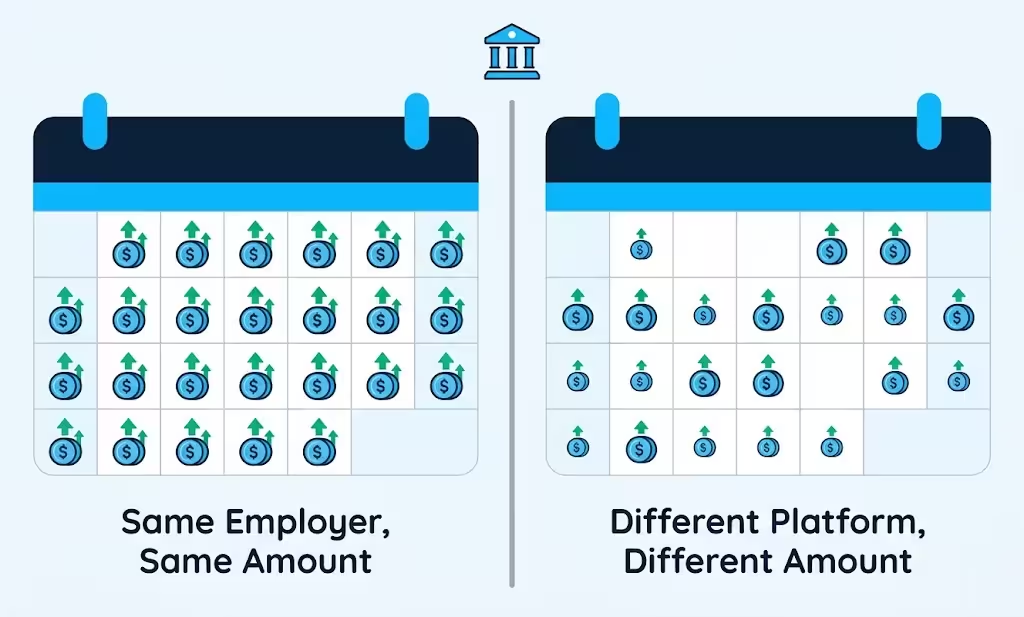
So when an app scans your bank account, it often doesn’t see “income.” It sees irregular transfers from a source it doesn’t recognize as an employer. The result is a denial, a very small offer, or a verification loop that goes nowhere.
That’s why applying to the wrong app wastes your time during an emergency. The problem usually isn’t your earnings. It’s the mismatch between how you get paid and what the app was designed to verify.
How Cash Advance Apps Actually Verify Gig Income
Cash advance apps generally use one of two income verification models.
The payroll-detection model looks for classic paycheck signals: a recurring direct deposit from one employer, on a set schedule, in a predictable amount. Some apps also ask for a work email or timesheet. If you can’t show those, this model can’t confirm you.
The cash-flow model works differently. Instead of asking where you work, it asks how money moves through your account. The app reviews your deposit history, balance patterns, and spending. Regular DoorDash payouts can count as income under this model, even though they aren’t payroll.
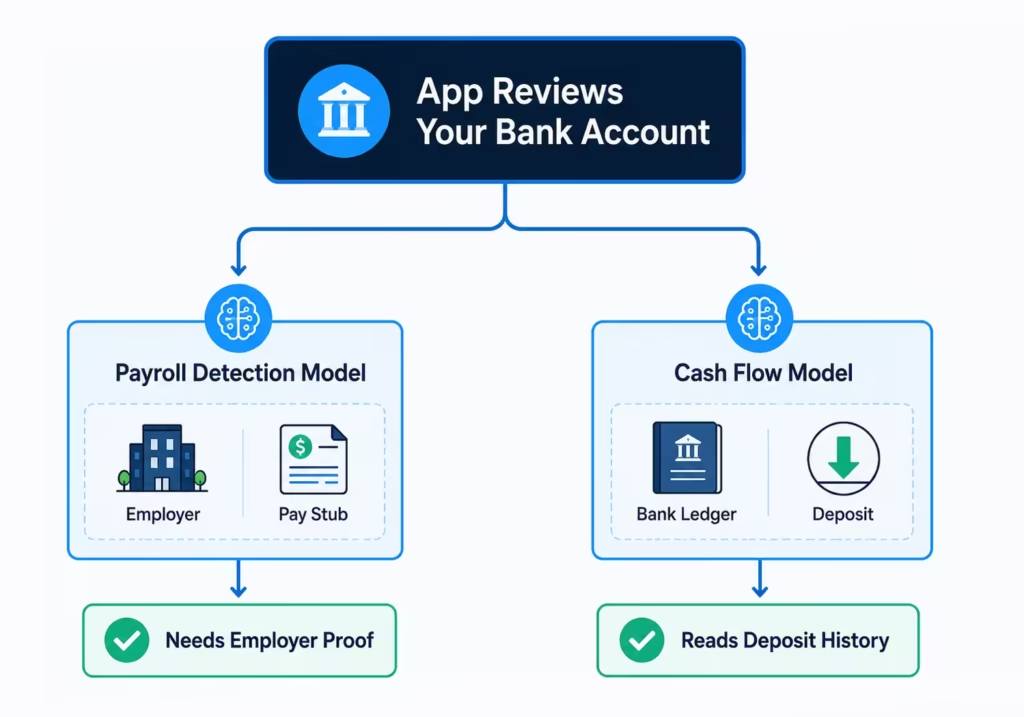
Most apps connect to your bank through a service like Plaid. When you link your account, the app can review your deposit pattern, balances, and transaction history. That data drives its cash flow underwriting decision.
There’s a quick way to tell which model an app uses. Check its requirements page. If it asks for an employer, pay stub, or work email, it’s payroll-based. If it asks you to link your bank and show deposit history, it’s likely a cash-flow app that can work with gig deposits.
DoorDash Fast Pay and Instant Cashout vs. Third-Party Cash Advance Apps
Before downloading any outside app, check the tool already sitting in your Dasher app.
DoorDash Fast Pay lets you cash out your earnings to a debit card on demand. DoorDash’s help center lists a $1.99 fee per cash out, with a limit of one cash out per day. To qualify, you need at least 25 completed deliveries, at least two weeks of activity, and an active debit card on file. The standard weekly direct deposit stays free.
| DoorDash Fast Pay | Third-party cash advance app | |
|---|---|---|
| What you get | Money you already earned | An advance, sometimes beyond your current balance |
| Typical cost | $1.99 per cash out | Subscription, tip, or instant transfer fee |
| Speed | Usually minutes | Free transfers often take 1 to 3 business days; instant costs extra |
| Credit check | None | Usually none |
| Effect on advance eligibility | Can weaken your deposit pattern | Depends on the app’s verification model |
Fast Pay is usually the cheaper choice when you only need money you’ve already earned. A cash advance app makes more sense when you need more than your current DoorDash balance, or when you want to keep a clean weekly deposit pattern for other financial products.
How Daily Instant Cashouts Affect Advance-App Eligibility
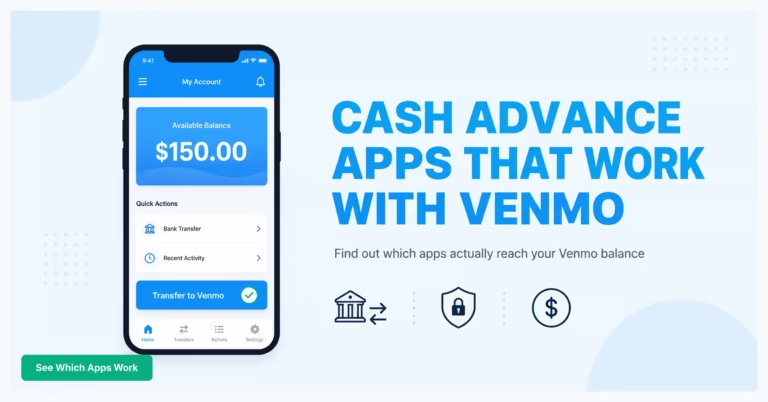
Here’s the catch many Dashers miss. Fast Pay sends money to your debit card. Many advance apps read debit card transfers poorly or not at all. What they expect to see is a weekly ACH deposit from DoorDash landing in your checking account.
If you cash out every day, your checking account shows little or no DoorDash income. The app can’t verify earnings it can’t see, and you get denied without ever learning why.
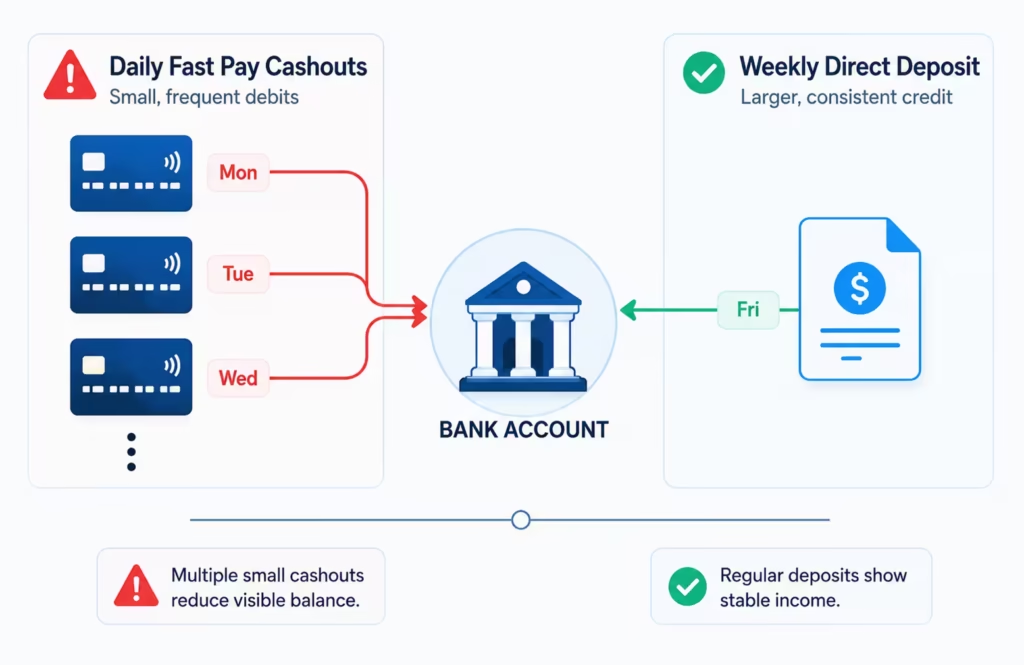
That’s the tradeoff: convenience today versus approval odds later. If you plan to apply for an advance soon, consider switching back to weekly direct deposit for a few weeks first so a clear deposit pattern can build up.
⚠️ Mistake to Avoid: Applying for an advance while cashing out daily through Fast Pay. With no weekly ACH deposits in your checking account, many apps will reject you no matter how much you earn.
Types of Cash Advance Apps That Work With DoorDash Income
Cash advance apps for gig workers fall into three broad categories. Knowing which is which saves you from applying to apps that can’t approve you.
Cash-flow apps. These review your bank deposits instead of employer payroll. Dave, Brigit, and Klover sit in this group. Brigit bases Instant Cash eligibility on your checking account activity rather than an employer. Dave’s ExtraCash offers advances from $25 to $500 with a membership fee of up to $5 per month. Klover advertises advances up to $750 with no credit check, interest, or late fees.
Gig-specific apps. These are built for 1099 workers and connect to gig platforms or read platform payouts directly. Terms vary widely in this category, so read the fee schedule carefully before signing up. Some charge flat fees or use repayment structures that look different from a standard advance.
Hybrid-income apps. Some apps mainly want W-2 income but may approve you if you also have a part-time payroll job. Earnin, for example, says full-time independent contractors with no W-2 income usually won’t qualify, while hybrid earners who stack gig work with a W-2 job may.
If DoorDash is your only income, start with the first two categories. They’re the ones built to read your deposits.
Eligibility Requirements to Have Ready Before You Apply
Requirements vary by app, but most cash-flow apps ask for some version of the following. Have these ready before you apply, especially mid-emergency:
- A checking account with regular activity. Many apps want to see at least one to three months of history, so a brand-new account can hurt your chances.
- Recent DoorDash deposits landing in that account. Weekly ACH payouts read better than daily debit card cashouts.
- Steady monthly income. Thresholds vary by app and often aren’t published. Many apps look for consistent deposits rather than a fixed dollar floor.
- Bank account linking through Plaid or a similar service. Make sure your bank is supported.
- Identity verification. Expect to confirm your name, address, and Social Security number. No credit check doesn’t mean no identity check.
Meeting these basics doesn’t guarantee approval, since each app applies its own criteria. But having them lined up prevents the most common rejection triggers.
If You Don’t Have a Traditional Bank Account
Some Dashers route payouts to a reloadable prepaid card instead of a checking account. A few apps can work with certain prepaid accounts, but support is inconsistent across providers.
Confirm two things with the app before applying: whether it accepts your specific card, and whether deposits to that card count as income. If the answer to either is no, a low-cost online checking account that supports Plaid linking is often the smoother path to approval.
If you choose to open a new checking account, look for options with low monthly fees. Many online banks offer free accounts designed specifically for gig workers. Once you open the account, link it to your app immediately. This helps the platform verify your banking setup right away. A solid connection ensures that your earnings arrive on time without extra delays.
How Advance Amounts Are Calculated From Irregular DoorDash Earnings
Cash-flow apps set your advance limit based on what they see in your account: average deposit size, deposit frequency, balance trends, and overdraft history.
New users usually start small. Initial offers often land in the $20 to $100 range, because the app has no repayment history with you yet. Published maximums like Dave’s $500 or Klover’s $750 are ceilings, not starting points.
Limits tend to grow after on-time repayments, usually over several cycles rather than overnight. And because your DoorDash income changes week to week, your offered amount can move up or down between advances. If you applied expecting $500 and got offered $40, that’s a normal starting point, not a dead end.
Understanding the Real Cost: Fees, Tips, and Subscriptions
“No interest” doesn’t mean free. Most apps charge in one or more of these ways:
| Fee type | How it works | Real examples |
|---|---|---|
| Monthly subscription | You pay monthly for access to advances | Brigit: $8.99 to $15.99 per month; Dave: up to $5 per month |
| Optional tips | The app suggests a tip with each advance | Tip-based models like Earnin’s |
| Instant transfer fee | Free standard delivery takes 1 to 3 business days; express costs extra | Dave lists an optional 1.5% fee for transfers to an external debit card |
To compare apps, calculate your true cost per use. Add everything you paid in a month, then divide by the number of advances you took.
Example: a $15.99 subscription plus two $3 instant transfer fees comes to $21.99 for two advances, or about $11 each. If you only needed money you’d already earned, compare that against a $1.99 Fast Pay cash out.
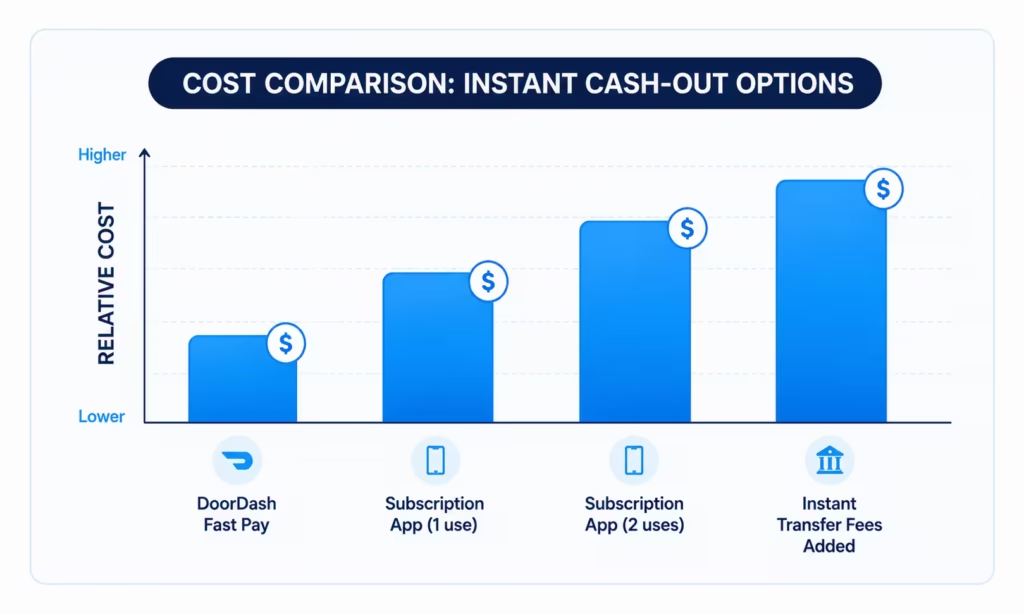
📌 Did You Know: A “free” advance with a $15.99 monthly subscription can cost more per use than a $1.99 DoorDash Fast Pay cash out, depending on how often you borrow.
No Credit Check Doesn’t Mean No Risk
Most of these apps skip credit checks, but a missed repayment still has consequences. The auto-debit can trigger overdraft fees from your bank if your balance is low. Repeated failed repayments can cost you access to the app, and unpaid balances can in some cases end up with collections.
Also, credit-building features are usually separate products. A basic no-credit-check advance typically doesn’t build your credit, even if the same company sells a credit-builder product alongside it.
Regulators have been watching this space too. The Consumer Financial Protection Bureau has examined whether some paycheck advance products should be treated as loans under truth-in-lending rules, which tells you the fee structures are taken seriously at the federal level.
You should read the fine print before signing up. Check the app’s terms to see exactly how they handle missed payments. Look for clear information about hidden fees or membership costs. Understanding the actual price of these advances helps you make the safest choice for your wallet.
Repayment Timing and Overdraft Risk
Most cash advance apps pull repayment automatically on your next expected deposit date. With gig income, that date is an educated guess. If the debit lands before your DoorDash payout does, you can get hit with an overdraft fee from your bank.
A few habits lower that risk:
- Set your repayment date for just after your weekly DoorDash deposit lands, not before.
- Keep a small buffer in your account on repayment day; even $10 or $20 helps.
- If the app lets you pick or change the date, use that option every time your schedule shifts.
- If a slow week is coming, check whether the app offers an extension before the debit hits.
- Turn on low-balance alerts from your bank so a surprise debit never catches you off guard.
💡 Pro Tip: Take your advance early in your DoorDash payout week and set repayment for the day after your weekly deposit. You’ll repay from fresh earnings instead of an empty account.
Signs a Cash Advance App Isn’t a Good Fit for Gig Work
You can rule out a bad-fit app in minutes by checking for these red flags before you download:
- It requires employer verification, a work email, or pay stubs.
- It asks for timesheets or a fixed work schedule.
- Its FAQ never mentions 1099 income, gig work, or self-employment, or says those don’t qualify.
- The monthly membership fee costs more than the advance you can realistically qualify for.
- There’s no clear fee page before signup. Legitimate apps publish their fees.
Two or more of these usually means the app was built for W-2 employees. Move on and save yourself a wasted application.
Step-by-Step: How to Apply and Get Funded
Follow this sequence to go from download to funded with the fewest surprises:
- Pick the right app type. Choose a cash-flow or gig-specific app, and confirm on its official site that 1099 income is accepted before you download.
- Fix your deposit pattern first. If you’ve been cashing out daily, switch DoorDash payouts to weekly direct deposit into your checking account. Let at least one or two weekly deposits land before applying.
- Download the app and link your bank. Connect the same checking account that receives your DoorDash deposits, usually through Plaid. Official apps are free on the App Store and Google Play; download from the developer’s official listing.
- Complete verification. Let the app review your deposit history and confirm your identity.
- Review the offer before accepting. Check the advance amount, every fee, and the repayment date. If the fee page is hard to find, treat that as a warning sign.
- Choose your transfer speed. Free standard delivery often takes 1 to 3 business days. Pay for instant delivery only if the emergency truly can’t wait.
- Confirm repayment timing. Make sure the auto-debit date lines up with your deposit schedule, and set a reminder for the day before.
Watch your bank balance. Ensure you have enough money in your account to cover the repayment on the due date. An overdraft fee from your bank can quickly wipe out the benefit of an advance. If your income varies, keep a small cushion of extra cash in your account as a safety net. Only borrow what you are certain you can pay back.
Frequently Asked Questions (FAQs)
Can I get a cash advance if I work for DoorDash?
Yes, cash-flow apps like Dave, Brigit, and Klover approve DoorDash drivers based on bank deposit history instead of employer payroll, so your 1099 income can qualify even without a W-2 job.
What cash advance apps work with DoorDash?
Dave offers $25 to $500 advances for a membership fee up to $5 a month, Brigit bases approval on checking account activity, and Klover advertises advances up to $750 with no credit check or interest.
How do I get a cash advance directly from DoorDash?
Use DoorDash Fast Pay to cash out your earnings to a debit card for a $1.99 fee. You need at least 25 completed deliveries, two weeks of activity, and a debit card on file.
Can I get a loan if I work for DoorDash?
Traditional bank loans typically require W-2 verification that DoorDash income can’t provide, but cash-flow apps offer advances based on your deposit history instead of a loan application.
Does Earnin work with DoorDash?
Earnin usually requires W-2 income, so full-time Dashers without a payroll job typically won’t qualify. Drivers who also work a part-time W-2 job may be approved through that income instead.
Can you borrow money from DoorDash?
No, DoorDash Fast Pay only advances money you’ve already earned for a $1.99 fee. It doesn’t lend funds beyond your current balance the way a third-party cash advance app can.
What are the best cash advance apps for DoorDash drivers?
Start with cash-flow apps like Dave, Brigit, or Klover, or a gig-specific app built for 1099 workers. These read your deposit history instead of requiring employer payroll verification.
Can I get a cash advance with bad credit as a DoorDash driver?
Most cash-flow apps skip credit checks entirely and approve based on your deposit history instead. But a missed repayment can still trigger bank overdraft fees or loss of app access.
How much can a new DoorDash driver get from a cash advance app?
New users usually start small, often in the $20 to $100 range, since the app has no repayment history with you yet. Limits can grow after a few on-time repayments.
Wrapping Up
The reason most apps reject Dashers comes down to design: they verify payroll, not gig deposits. A practical approach is to use DoorDash Fast Pay for small gaps involving money you’ve already earned, and a cash-flow or gig-specific app when you need a true advance.
Keep weekly ACH deposits flowing into a checking account, compare the real cost per use, and line up repayment with your payout date.
If this guide helped you, share it with a fellow Dasher who’s tired of rejections from cash advance apps for DoorDash drivers. It might save their week.