Finding cash advance apps for Varo is harder than it should be. Lists online disagree with each other. Some say an app works. Others say it doesn’t. And signing up just to get declined wastes your time when a bill is due.
The short answer: Varo has its own built-in advance, and a handful of third-party apps, including Dave, MoneyLion, Klover, and Cleo, are widely reported to connect to Varo accounts. EarnIn does not, based on EarnIn’s own unsupported-bank list.
Below, you’ll find which apps are worth trying, what it costs to move money into Varo, why a “supported” app can still decline you, and what to do if nothing works.
At a Glance
This guide explains which cash advance apps work with Varo Bank, including Varo’s own built-in advance option, verified third-party apps, delivery costs, approval factors, and what to do if declined.
Core Facts:
- Varo Advance is Varo Bank’s built-in cash advance feature, offering $20 to $250 for new users and up to $700 for customers with qualifying direct deposit history.
- Varo Advance charges a single flat fee ranging from $1.60 to $100 based on the amount borrowed, with no interest, no credit check, and no subscription fee.
- Varo Advance eligibility generally requires $800 or more in qualifying direct deposits, a positive account balance, and no outstanding advance already open.
- Dave, MoneyLion Instacash, Klover, and Cleo are currently reported to reliably connect to and fund a Varo bank account.
- EarnIn currently lists Varo Bank on its own published unsupported-bank list, despite some third-party sources claiming compatibility.
- Standard delivery to an external bank like Varo is typically free but takes 1 to 3 business days, while instant delivery to an external account usually carries an extra fee.
Best for:
- Varo Bank customers comparing their built-in Varo Advance offer against outside cash advance apps before signing up for anything new.
- Readers who tried an app listed as “Varo compatible” and want to understand why they were still declined.
- Anyone considering more than one cash advance app in the same pay period and wanting to understand the repayment risk first.
Varo Advance: The Built-In Cash Advance Option
Before downloading anything new, check your Varo app. Varo Bank offers its own cash advance product called Varo Advance, built directly into the app you already use.
The money deposits straight into your Varo Bank account. There’s no outside app to connect, no subscription fee, and no tipping model. Varo charges no interest, no credit check, and no late fees, according to Varo’s cash advance page. It also charges no instant transfer fee, since the funds never leave Varo.
Borrowing starts at $20 to $250 for new users. Over time, qualifying customers can build up to $700. You get 30 days to repay, and you pick the repayment date yourself.
For most Varo customers, this is the cheapest and fastest path. The cash lands in your account right away, and the fee structure is a single flat fee you see before you accept.
Varo Advance Eligibility Requirements
Varo lists its core requirements on its cash advance page. To qualify, you generally need:
- An active Varo Bank account that isn’t closed or suspended
- No overdrawn Varo accounts, with an available balance of $0.00 or more
- Qualifying direct deposits of $800 or more, either into Varo or into a linked external account
- All past Varo Advance payments made on time
- No outstanding advance already open
The $800 figure is the one that trips people up. What counts is a qualifying direct deposit, like payroll, pension, or government benefits. Money from friends, person-to-person transfers, and similar informal deposits may not count toward the threshold.
Your eligibility isn’t fixed. Varo reviews accounts on an ongoing basis, so your offer can appear, grow, or disappear as your deposit activity changes. A new account with little history often starts with no offer at all.
Varo Advance Fees and Borrowing Limits
Varo uses one flat fee per advance. Per Varo’s official disclosures, fees range from $1.60 to $100 based on the amount you borrow. You see the exact fee in the app before you confirm, so there’s no math to guess at.
Initial limits run from $20 to $250. With a steady direct deposit history, limits can climb to $500 or even $700 over time.
There’s no interest, no late fee, and no subscription. Varo doesn’t report advances to the credit bureaus, so using one won’t build or hurt your credit score. If you miss your chosen repayment date, Varo doesn’t add penalties, but an unpaid balance can block you from taking another advance until it’s settled. You have up to 30 days to repay.
💡 Pro Tip: Open your Varo app and tap the Advance tile before signing up for any outside app. Your current limit and exact fee show up in seconds, with no new account and no extra data sharing.
Why “Works With Varo” Doesn’t Guarantee Your Approval
Varo is a fully chartered bank, Varo Bank, N.A., not a fintech app riding on a partner bank. That matters because apps connect to Varo through Plaid, the same way they connect to Chase or Wells Fargo. Technically, the link usually works.
But a successful bank link and an approved advance are two different things. Plaid compatibility means your bank shows up in the app’s dropdown and your account can be verified. Approval is a separate decision the app makes by reading your deposit history.
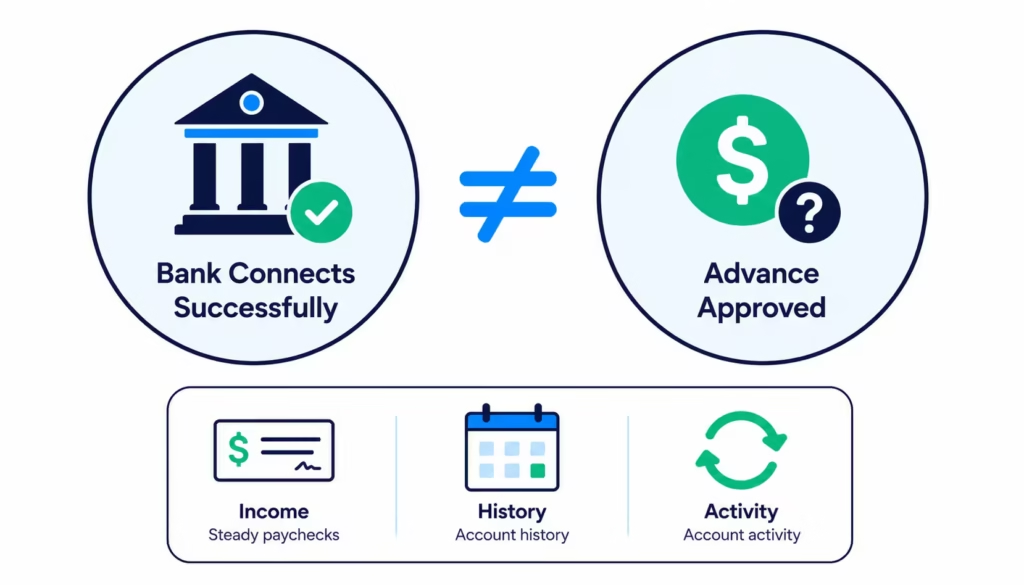
This is why someone can link Varo to an app in two minutes and still get a $0 offer. The most common reason is income detection. Apps look for steady payroll deposits from an employer. If your Varo balance is mostly funded by transfers from friends, Cash App payments, or gig payouts that don’t look like payroll, the app may not recognize your income at all.
New accounts run into the same wall. A Varo account opened last week has almost no history for an app to read. Thin history usually means a small offer or none at all, even when the bank itself is “supported.”
So when you read that an app works with Varo, translate it correctly: the connection will probably succeed. Whether you get money is a separate question that depends on your deposits.
Cash Advance Apps That Reliably Work With Varo
Based on current reports and each app’s own documentation, these apps have the strongest track record of connecting to Varo and funding an external account. Compatibility can change, so treat this as a starting shortlist, not a permanent guarantee. The next section covers how to verify each one yourself before signing up.
Dave ExtraCash
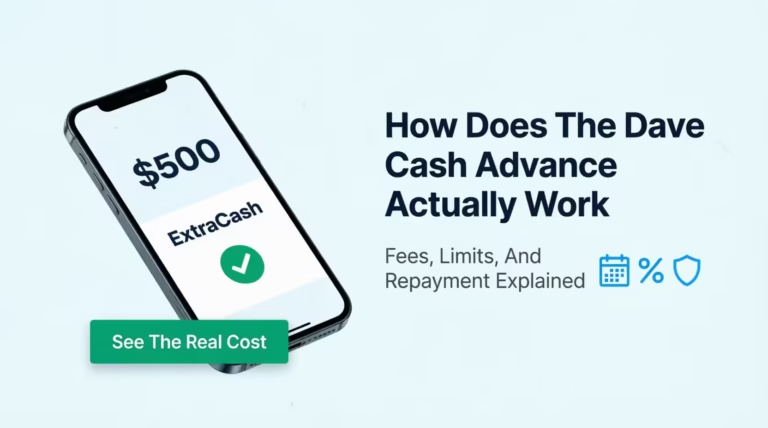
Dave’s advance product offers up to $500 for eligible members, typically authorized within minutes, per Dave’s ExtraCash page. There’s no interest, no credit check, and no late fees.
Dave charges a membership fee of up to $5 per month, and there’s a 5% service fee per advance ($5 minimum, $15 maximum), which Dave calls an overdraft fee in its membership documentation. Sending money to an external bank account like Varo is free but takes up to 3 business days. Express delivery to an external debit card costs 1.5% of the amount.
MoneyLion Instacash
Instacash offers advances up to $500, with higher limits possible for customers who direct deposit into a MoneyLion account. Standard delivery to an external checking account like Varo is free. Optional Turbo delivery within minutes costs extra, and it costs more for external accounts than for MoneyLion’s own account, per MoneyLion’s pricing page. No interest and no credit check.
Klover
Klover advertises advances up to $400 with no interest, no late fees, and no credit checks, per its cash advance overview. There’s no required membership fee; Klover+ is optional. Klover uses a points system where activities like watching ads or scanning receipts can raise your advance limit. Standard transfers are free, with a fee for instant delivery.
Cleo
Cleo offers cash advances of roughly $20 to $250, with first-time users typically limited to $20 to $100, according to Cleo’s app listing. The simplest path is a paid subscription (Plus, Pro, or Builder), though Cleo says you can apply without one by contacting customer service. Express delivery to an external account carries a fee, and free delivery takes a few days.
For delivery costs to Varo specifically, see the cost comparison section below.
Apps With Inconsistent or Disputed Varo Compatibility
Two popular apps sit in a gray zone where sources flatly disagree, and one of them is actually settled if you check the primary source.
EarnIn
Some third-party lists claim EarnIn works with Varo. EarnIn’s own help center says otherwise. Varo Bank appears on EarnIn’s official list of unsupported banks, alongside Chime, Current, and MoneyLion’s RoarMoney. EarnIn notes its supported-bank list changes over time as its connection provider evolves, so the status could shift. As of now, treat EarnIn as not working with Varo, no matter what a listicle says.
Brigit
Reports on Brigit are genuinely mixed. Some sources list Varo as supported, while user reports describe failed or unstable connections. Brigit requires a paid membership for its Instant Cash feature, so a failed connection after paying stings more. If you try it, confirm the link works before paying for a plan.
Why does this happen? Bank integrations change. Apps switch connection providers, update their underwriting, or drop banks quietly. A blog post written a year ago may describe a setup that no longer exists.
The practical move: never trust a list over the app itself. Check the app’s current help center or try the bank-linking step during signup before committing to anything.
Cash Advance Apps That Don’t Currently Support Varo
Some apps aren’t a “maybe.” They’re built around their own accounts and won’t fund Varo directly.
Chime MyPay requires a Chime checking account with qualifying direct deposits. Current’s Paycheck Advance works the same way: you must receive eligible payroll deposits into a Current account, per Current’s own eligibility page. Albert’s Instant Advance requires an Albert Cash account first, according to Albert’s help center.
These aren’t bad products. They just don’t send advances to an outside bank like Varo. If a Varo deposit is what you need, skip them.
How to Verify an App Will Connect to Your Varo Account Before You Sign Up
A two-minute check beats a wasted signup. Run through this before creating an account anywhere:
- Search the app’s help center first. Look for a supported or unsupported banks page. EarnIn publishes one, and other apps answer compatibility questions in their FAQs. A current statement from the company beats any blog post.
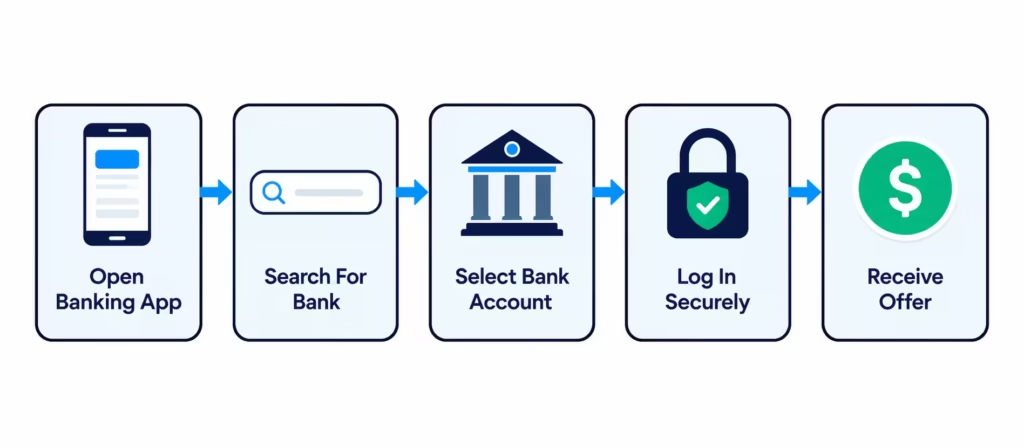
- Start signup and stop at the bank-linking step. Most apps ask you to connect your bank early, before you finish a profile. When the Plaid window opens, search “Varo.” If it appears and connects, the app supports your bank at the technical level.
- Watch what a failure looks like. An endless loading spinner, a “connection failed” error, or Varo missing from the search results all mean the same thing: this app won’t work for you right now. Close it and move on.
- Read the fee screen before accepting. Once linked, check what delivery to your Varo account costs and how long free delivery takes. This is where surprises hide.
One caution: linking a bank usually means agreeing to share your account data. That’s a real tradeoff, so only link apps you’re seriously considering.
Is It Safe to Link Your Varo Account via Plaid?
Plaid is the connection layer most of these apps use. In modern implementations, you enter your Varo login into Plaid’s window, not the app’s. Plaid passes the app read access to things like your balance and transaction history. The app itself doesn’t store your Varo password.
That said, read access is still meaningful. The app can see your deposits, spending, and balance patterns, which is exactly how it decides your advance size. Plaid uses encryption and standard security certifications. However, each app’s privacy policy decides how it handles data afterward.
If something feels off during linking, like requests for permissions the advance doesn’t seem to need, or no clear privacy policy, stop. A legitimate app explains what it accesses and why.
What It Actually Costs to Get Your Advance Into Varo
Here’s the part most roundups skip. Apps quote their advance limits and their headline fees. But your real question is narrower: what does it cost to land money in your Varo account, and how fast?
Most third-party apps follow the same pattern. Standard ACH delivery to an external bank like Varo is free but takes 1 to 3 business days. Instant delivery costs extra, and it often costs more for an external account than for the app’s own card.
| App | Free delivery to Varo | Instant/express cost to an external account |
|---|---|---|
| Varo Advance | Instant, $0 | Not applicable (funds stay in Varo) |
| Dave ExtraCash | Up to 3 business days, $0 | 1.5% to an external debit card |
| MoneyLion Instacash | Standard delivery, $0 | Turbo fee, higher for external accounts (percentage of advance, per MoneyLion pricing) |
| Klover | Standard transfer, $0 | Small instant delivery fee |
| Cleo | 3 to 4 days, $0 | Express fee, roughly $4 to $15 based on Cleo’s FAQ |
Varo Advance is the outlier. Since the money never leaves Varo, delivery is instant and free. That’s a structural advantage no third-party app can match for a Varo customer.
When is paying for instant delivery worth it? When a bill hits today, and the fee is smaller than a late fee or a missed payment. If you have even one business day of slack, free standard delivery usually wins. A $5 to $9 instant fee on a $100 advance is a steep price for impatience.
⚠️ Mistake to Avoid: Requesting an advance at 9 p.m. for a bill due the next morning, then discovering the free option takes 3 days. Check the delivery speed and fee screen before you confirm, not after.
What Determines Whether You’ll Be Approved
Approval isn’t random. Across apps, the same handful of factors drive both the yes-or-no decision and the size of your offer.
Deposit type matters most. Apps want to see payroll: recurring deposits from an employer or benefits provider. Person-to-person transfers from friends, Cash App or Venmo deposits, and irregular cash ins often don’t register as income. Two people with the same monthly total can get opposite results based on how the money arrived.
Account age. Most apps want at least a few weeks to a few months of history in the connected account. A Varo account opened recently has little data to score, so early offers tend to be small or zero.
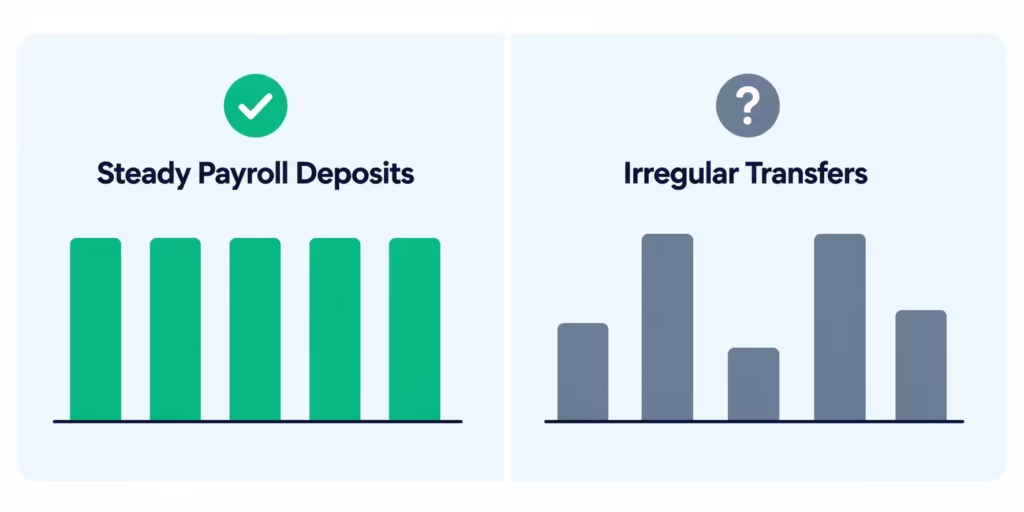
Consistency beats size. A steady $600 every two weeks usually outperforms a random $1,500 one month and nothing the next. Apps are trying to predict your next payday, and predictability is the whole game.
Limits grow with track record. First offers are small almost everywhere: $20 to $100 is typical. Repay on time a few times, and limits climb. This is normal design, not a sign something’s wrong.
There’s no traditional credit check with these products. Approval lives and dies on your deposit history.
Best Options for Gig Workers and Irregular Income
Gig income is where approval gets tricky, because apps built to detect a biweekly paycheck can struggle with five Uber deposits and a DoorDash payout.
Some apps evaluate broader account activity rather than demanding strict payroll. Dave says its system analyzes over 180 data points, including gig and irregular work, per Dave’s ExtraCash page.
Klover also evaluates linked-account activity beyond a single employer deposit. Neither guarantees approval, but both are structurally friendlier to non-payroll income than apps that demand a single recurring employer.
Set realistic expectations. Irregular income usually means lower starting limits and a longer runway before offers grow. A practical target: keep 30 to 60 days of consistent deposits flowing into the account you link, even if the amounts vary. Consistency of rhythm matters more than consistency of amount.
How to Link a Cash Advance App to Your Varo Account
The process is similar across apps. These steps take most people under ten minutes:
- Get your Varo details ready. Open the Varo app and find your routing and account numbers under your account details. You may not need them if the app uses Plaid, but have them handy.
- Download the app and start signing up. Create your account with basic info like your name, email, and phone number.
- Choose “bank account” as your payout method. When the app asks where to send money, pick the external bank account or ACH option, not the app’s own card.
- Search for Varo in the linking window. The Plaid screen will have a search bar. Type “Varo” and select Varo Bank. Log in with your Varo credentials inside the Plaid window.
- Wait for your first offer. After linking, the app reads your deposit history. This can be instant or take a short verification period. Your first advance offer then appears in the app.
If Varo doesn’t appear in the search, that app doesn’t support your bank right now. Don’t force it with manual routing numbers unless the app explicitly offers that path.
The Risk of Using Multiple Cash Advance Apps at Once
When one advance isn’t enough, stacking two or three apps in the same pay period can feel like a fix. It’s the most dangerous move in this whole space, and almost nobody warns about it.
Each app independently schedules a repayment auto-debit on your detected payday. App A doesn’t know App B exists. If you take three advances in one week, three debits can hit your Varo account in the same window.
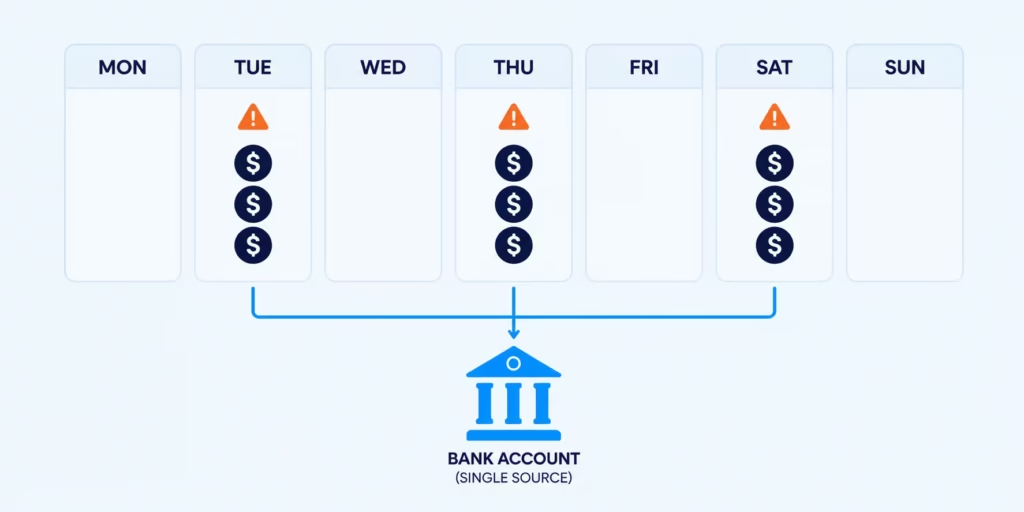
Varo doesn’t charge overdraft fees, which helps. But a thin balance still means debits fail or your account sits near zero right when your actual expenses land. And failed or late repayments do real damage: apps respond by shrinking or zeroing your future offers. Stack enough failed repayments, and every app’s limit drops at once, right when you needed them most.
Treat advances as sequential, not simultaneous. Use one app, repay it, then consider another if you still need help. If you’re regularly needing more than one advance per pay cycle, the advance isn’t solving the gap. It’s just moving it to next payday, with fees.
If No App Approves You, What to Do Next
Getting declined everywhere is frustrating, but it usually points to a fixable cause: not enough readable deposit history.
Build history with Varo first. Route your payroll or benefits direct deposit into Varo and keep it there for 30 to 60 days. This helps meet Varo Advance’s $800 qualifying deposit requirement. It also makes your account easier to read for third-party apps.
Check for earned wage access through your job. Some employers offer programs that let you access earned wages early through payroll itself. These don’t depend on your bank’s compatibility at all, since the money flows through your employer. Ask HR or check your payroll portal.
Avoid the payday loan fallback. Payday loans carry APRs that often run from 300% to 800%, as Current notes in its comparison, plus mandatory fees and aggressive collection cycles. Cash advance apps, for all their quirks, don’t charge interest at all. A payday loan during a temporary decline period can turn a two-week gap into a months-long debt cycle.
Give the rebuild 30 to 60 days. That window sounds slow when you need money now, but it’s the fastest reliable path to actual eligibility.
Varo Advance or a Third-Party App: Which to Try First
Everything above points to a simple order of operations.
Start with Varo Advance. It deposits instantly into your account for free, charges one visible flat fee, and requires no new app, no new data sharing, and no subscription. For a Varo customer, no outside product beats that structure.
Switch to a third-party app if one of these is true:
- Varo Advance declined you or hasn’t offered yet.
- You need more than your Varo limit.
- You want a backup for future gaps.
In that case, Dave, MoneyLion Instacash, and Klover have the strongest current Varo compatibility, with Cleo as a subscription-based alternative.
A quick decision framework:
- Deposit history under 30 days: Expect declines everywhere. Build history first.
- Need money today: Varo Advance if eligible. Otherwise, a third-party app with express delivery, knowing it costs extra.
- Can wait 1 to 3 days: Any compatible app with free standard delivery, or Varo Advance for $0.
- Need more than $250 to $500: Compare your Varo limit against Dave’s and MoneyLion’s higher ceilings, keeping each app’s fees in view.
Whichever route you pick, verify compatibility inside the app before signing up for anything paid, and borrow against one paycheck at a time.
Frequently Asked Questions (FAQs)
Which cash advance app is similar to Varo?
Dave ExtraCash, MoneyLion Instacash, and Klover are like Varo Advance. They give small cash advances with no interest and no credit check. All three are reported to connect reliably with Varo accounts.
What cash advance apps accept Varo?
Dave, MoneyLion Instacash, Klover, and Cleo are currently the strongest bets for connecting to and funding a Varo account. Compatibility can shift over time, so confirm the link works during signup.
Does EarnIn work with Varo?
No. EarnIn’s help center lists Varo Bank as unsupported, along with Chime and Current. Some older blog posts say otherwise, but that’s not accurate.
Does Brigit work with Varo?
Reports are mixed. Some users connect easily, but others face failed or unstable links. So, check the connection before paying for Brigit’s membership.
Does Plaid work with Varo?
Yes. Varo is a fully chartered bank. It connects through Plaid, just like traditional banks such as Chase. You can usually find it in an app’s bank search list.
What app gives a cash advance instantly?
Varo Advance deposits instantly into your Varo account for free since the funds never leave Varo. Third-party apps like Dave and MoneyLion charge an extra fee for instant delivery to an external account.
Where can I borrow $200 instantly?
Varo Advance offers $20 to $250 for new users with no instant fee, deposited directly into your Varo account. Klover also advertises advances up to $400 with no interest.
What happens if I don’t repay a Varo Advance on time?
Varo doesn’t charge late fees or report missed payments to credit bureaus. An unpaid balance will block you from taking a new advance until it’s settled, and you have up to 30 days to repay.
Can I use multiple cash advance apps at the same time with Varo?
You can, but it’s risky. Each app takes its own repayment on your payday. If you stack two or three apps, you might face multiple withdrawals from your low Varo balance in the same week.
Wrapping Up
The landscape of cash advance apps for Varo comes down to a few verified facts. Varo’s own Advance is free to receive, instant, and the cheapest option for eligible customers. Dave, MoneyLion, Klover, and Cleo are the strongest third-party bets. EarnIn currently lists Varo as unsupported, unlike older lists claim.
A practical approach is checking your Varo Advance offer first, then verifying any outside app’s compatibility in-app before paying for a membership or instant delivery.
Know someone banking with Varo who’s hunting for a quick advance? Share this guide so they can skip the apps that won’t connect and find one that actually will.