Shopping online with your real Citi card feels risky. One data breach at a random retailer, and your card number is out there. You may have heard Citi offers a virtual card feature, but you have no idea if your card supports it, where to click, or how the checkout actually works.
The fastest way to get a Citibank virtual card is to log in to citi.com on a desktop browser, open your eligible card’s account page, and click “Virtual Account Numbers” to generate a temporary 16-digit number.
Below, you’ll find every step, screen, and rule you need, plus what to do if your card doesn’t qualify.
Key Takeaways
This guide explains how to get a Citibank virtual card, including the exact login steps, how to set spending limits and expiration dates, which cards qualify, and where virtual numbers do not work.
Core Facts:
- A Citi virtual account number is a temporary 16-digit number linked to your real card, with its own CVV and expiration date, generated through the “Virtual Account Numbers” tool on citi.com.
- Most personal Citi cards qualify, including the Double Cash, Strata Premier, Custom Cash, Rewards+, Simplicity, Premier, and Prestige cards, while store cards and most business or debit cards are not eligible.
- The virtual number generation tool works best on a desktop browser; the Citi Mobile App only lets you view existing numbers, not create new ones.
- Expiration dates can be set up to about 12 months out, and spending limits can be edited, extended, or closed early at any time from the account dashboard.
- Charges made with a virtual number still post to your real Citi statement and earn the same rewards rate as your physical card.
- Virtual numbers do not work at hotels, rental car counters, in-person stores, or with digital wallets like Apple Pay and Google Pay.
Best for:
- Citi cardholders who want to shop online at new or unfamiliar websites without exposing their real card number.
- Anyone signing up for a free trial who wants to cap potential charges using a low spending limit.
- Cardholders whose card is not eligible and need to compare alternatives like Click to Pay, digital wallets, or PayPal.
What a Citi Virtual Account Number Is
A Citi Virtual Account Number (VAN) is a temporary 16-digit card number that Citi creates for you on demand. It links back to your real credit card in the background. But the merchant only sees the fake number.
Think of it as a paper mask over your real card. It has its own number, its own CVV, and its own expiration date. You choose how much it can spend and how long it stays active.
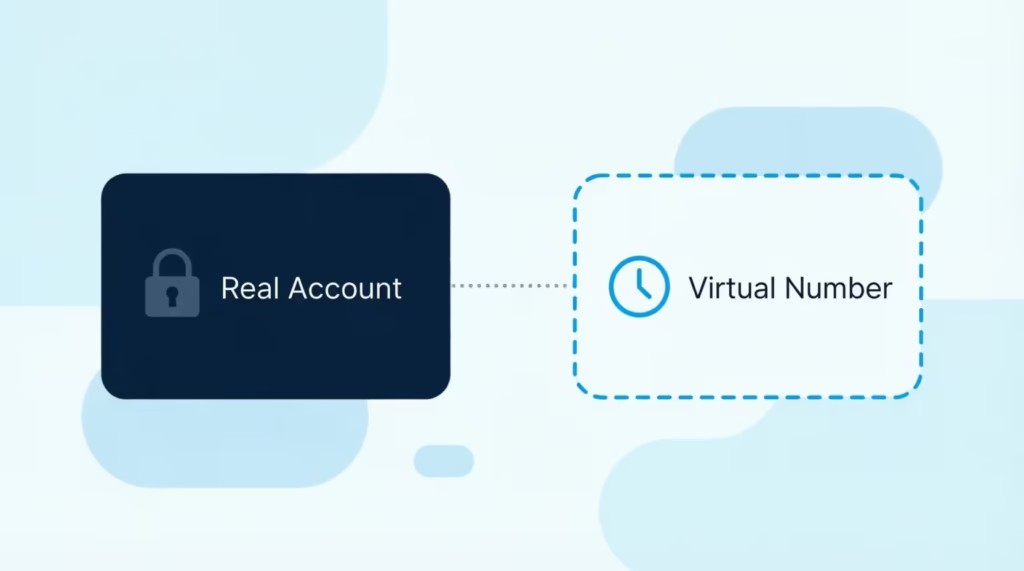
If the merchant gets hacked, the leaked number is useless. Your real card stays safe. This kind of fraud protection for online shopping is why many people use virtual numbers for free trials, one-time buys, and new websites they don’t fully trust.
The charges still show up on your normal Citi statement. Your rewards still work. Your billing cycle does not change. Only the number changes.
📌 Did You Know: A virtual number is not a new card. It is just an alias for your existing account, so your credit limit and APR stay the same.
Which Citi Cards Are Eligible
Most personal Citi credit cards support virtual numbers. This includes the Citi Double Cash, Strata Premier, Custom Cash, Rewards+, and Simplicity cards. Older cards like the Citi Premier and Prestige also work.
Store cards are the main problem. Cards like the Home Depot Citi Card, Best Buy Card, or Macy’s Card usually do not offer the virtual number feature. These are co-branded retail cards, and Citi manages them under a different system.
Business cards from Citi also often lack this feature. If you have a Citi Business card, log in and check, but do not count on it.
Debit cards from Citi do not have virtual numbers either. This tool is for credit cards only.
How to Confirm Your Card Qualifies
To check if your card qualifies, follow these steps:
- Go to citi.com and log in with your username and password.
- Click on your card to open the account details page.
- Look at the left-hand menu or the “Services” tab.
- Search for the phrase “Virtual Account Numbers” or “Virtual Card Numbers.”
If you see the link, your card is eligible. If the link is missing, your card does not support the feature. You can also call the number on the back of your card and ask, “Does my card support Citi Virtual Account Numbers?” A rep can confirm in under a minute.
Where to Find Virtual Account Numbers on Citi’s Site and App
The virtual number tool lives inside your online account, not in a separate app. Start by opening citi.com in a desktop web browser like Chrome, Edge, or Safari.
After you log in, click the card you want to use. On the account overview page, look at the left sidebar. Scroll down until you see “Services” or a link that says “Virtual Account Numbers.” Click it.
On your first visit, Citi may ask you to install a small browser plug-in or open a pop-up window. Allow the pop-up. If your browser blocks it, click the small icon in the address bar and pick “Always allow pop-ups from citi.com.”
Once the tool opens, you’ll see a page with your card name, a “Generate” button, and fields for spending limit and expiration.
Does the Citi Mobile App Support It?
The Citi Mobile App does not offer full virtual number creation for most users right now. You can view virtual numbers you already made, but the “create new” flow works best on the desktop site.
If you only have a phone, open your mobile browser and go to the desktop version of citi.com. Tap the three-dot menu in Chrome or Safari and select “Request Desktop Site.” Then log in and follow the same steps as on a computer.
💡 Pro Tip: Bookmark the Virtual Account Numbers page after your first visit. That saves you three or four clicks every time you shop online.
How to Generate Your First Virtual Card Number
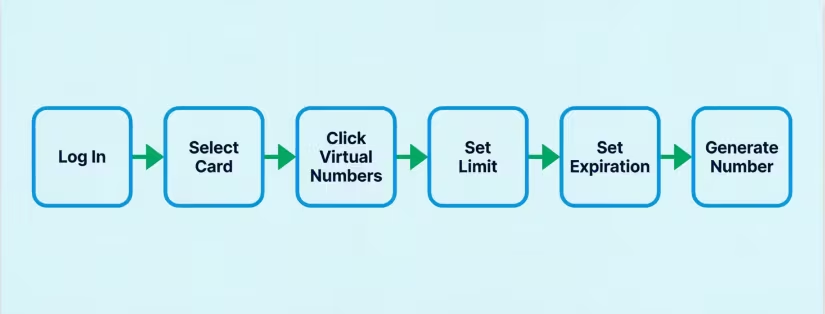
Follow these steps in order:
- Log in to citi.com on a desktop browser.
- Pick your card from the account list.
- Click “Virtual Account Numbers” in the side menu.
- Allow the pop-up if your browser blocks it.
- Click “Generate a Virtual Account Number.”
- Set your spending limit (see the next subsection).
- Set the expiration date.
- Click “Submit” or “Generate.”
The tool will show you a fresh 16-digit number, a three-digit CVV, and an expiration date. It also shows your billing ZIP code, which stays the same as your real card.
Copy all four items into a safe place. A password manager like 1Password, Bitwarden, or your browser’s built-in password tool works well. Do not screenshot the number and leave it in your camera roll.
The number is ready to use right away. There is no waiting period.
Setting a Spending Limit and Expiration Date
The spending limit is the total dollar amount the virtual number can charge. If you set it to $50, the merchant can charge up to $50. Any charge over that gets declined.
For a free trial, set the limit to $1. That way, if the company tries to bill you after the trial, the charge fails. You keep the trial. You avoid the surprise fee.
For a one-time purchase, set the limit slightly higher than the total. If your order is $47.99, set the limit at $50. This leaves room for small taxes or shipping tweaks.
For subscriptions you want to keep, pick a higher cap based on 12 months of charges. A $9.99 monthly service needs a limit near $130 to cover a year.
The expiration date can go up to about 12 months out. Shorter is safer for one-time buys. Longer is fine for trusted subscriptions.
⚠️ Mistake to Avoid: Setting the limit at the exact purchase price. Sales tax, shipping, or a small price change will make the charge fail and confuse the merchant.
How to Use the Virtual Number at Checkout
At the merchant checkout page, type the virtual number into the credit card field just like you would a normal card. Enter the CVV, the expiration date, and your name.
The billing address is the trickiest part. Use the same address that is on file for your real Citi card. If the addresses do not match, some merchants will decline the payment. Check your Citi profile for the exact address format if you are unsure.
Do not enter the virtual number as a “debit card” or “gift card.” It is a credit card, and the checkout system treats it that way.
Once you submit, the payment processes like any other credit card charge. You’ll get a confirmation email from the merchant, and the charge will appear on your Citi account within a day or two.
Autofill and Saved Payment Methods
Browsers often try to autofill saved cards. Turn off autofill for the field, or delete the old saved cards, before you paste the virtual number. Otherwise, your browser may swap in your real card without you noticing.
Do not save the virtual number to the merchant’s account for future orders. Virtual numbers expire, and a saved one will break next time. If you shop at that store often, save your real card there and use a virtual number only for one-off risky sites.
Digital wallets like Apple Pay and Google Pay do not accept virtual numbers. Those wallets need your full real card, which they tokenize on their own.
What Happens After You Use It (Rewards, Refunds, Statements)
Every charge on a virtual number rolls up to your real Citi credit card. Your statement shows the merchant name, the date, and the amount, just like a normal purchase.
The virtual number itself does not appear on your paper or PDF statement. Instead, you’ll see the same layout you always see. This makes tracking easy but can also make it harder to tell which purchase came from which virtual number. Keep your own short log if you use many at once.
Do You Still Earn Rewards?
Yes. Points, cash back, and miles earn the same way. A $100 charge on your virtual number for the Citi Double Cash earns the same 2% back as a $100 charge on the real card. The rewards rate, category bonuses, and welcome offer spend all count.
Nothing about the virtual number changes your card’s earn rate. The rewards live on your real account.
What Happens With Returns
Refunds route back to your real Citi account, even if the original virtual number has expired or been closed. The merchant sends the refund to the number they were paid on. Citi then maps that back to your real card automatically.
You do not need to reopen the virtual number to get your money back. If a merchant says the refund failed because the “card was closed,” call Citi. A rep can push the refund through to your real account in a few minutes.
Managing, Editing, and Deleting Virtual Numbers
Head back to the Virtual Account Numbers page in your online account dashboard. There, you’ll see a list of every virtual number you’ve made. Each row shows the number (partly masked), the limit, the expiration date, and its status.
You can:
- Edit the spending limit up or down.
- Extend the expiration date, up to 12 months out.
- Close a number early if you no longer need it.
- View the recent charges tied to that number.
Closing a virtual number is smart when you finish a one-time buy or cancel a subscription. It stops any future charges, even mistaken ones. Closed numbers cannot be reopened, but you can always make a new one.
Review your list every few months. Close old numbers you no longer use. This keeps your account tidy and easier to audit.
Where Virtual Card Numbers Don’t Work
Virtual numbers are great online, but they fail in a few spots. Know these ahead of time so you don’t get stuck at the counter.
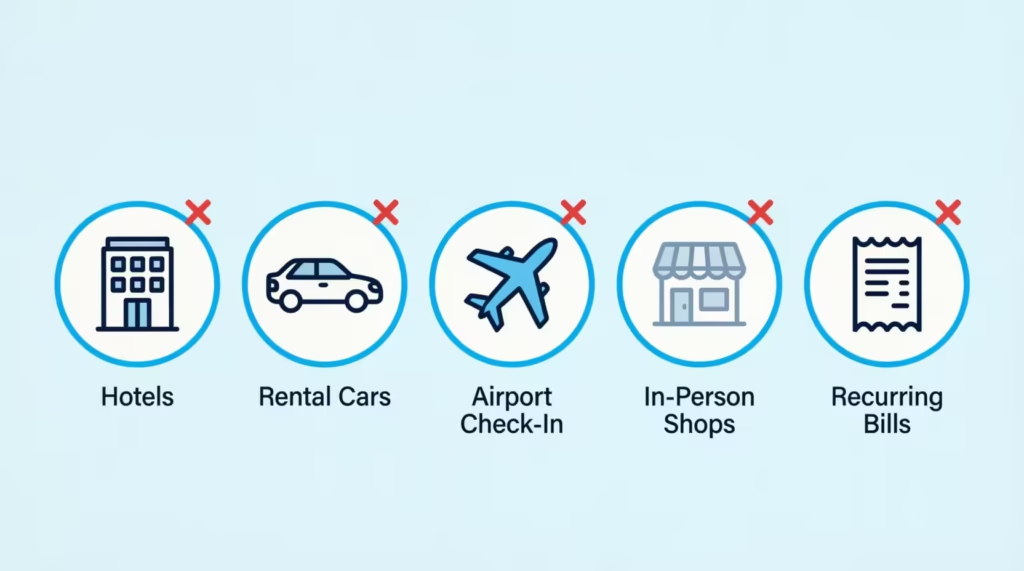
- Hotels: Front desks often swipe a physical card at check-in to hold a deposit. The virtual number has no plastic, so the hotel cannot swipe it. Some hotels also verify the card is real by asking to see it.
- Rental cars: Car rental agencies almost always ask for the physical card that made the booking. A virtual number booking will fail at pickup.
- Airline tickets used with airport check-in verification: Some carriers ask to see the card used to buy the ticket. A virtual number cannot show up in your wallet.
- In-person shopping: There is no plastic and no chip. Stores cannot use a virtual number at the register.
- Recurring bills tied to identity checks: Utilities and some insurers verify the account details closely. A short-limit virtual number can fail the next auto-charge.
For any of these, use your real card or a digital wallet like Apple Pay or Google Pay.
If Your Citi Card Isn’t Eligible
Store cards and some older accounts do not support virtual numbers. You still have strong options.
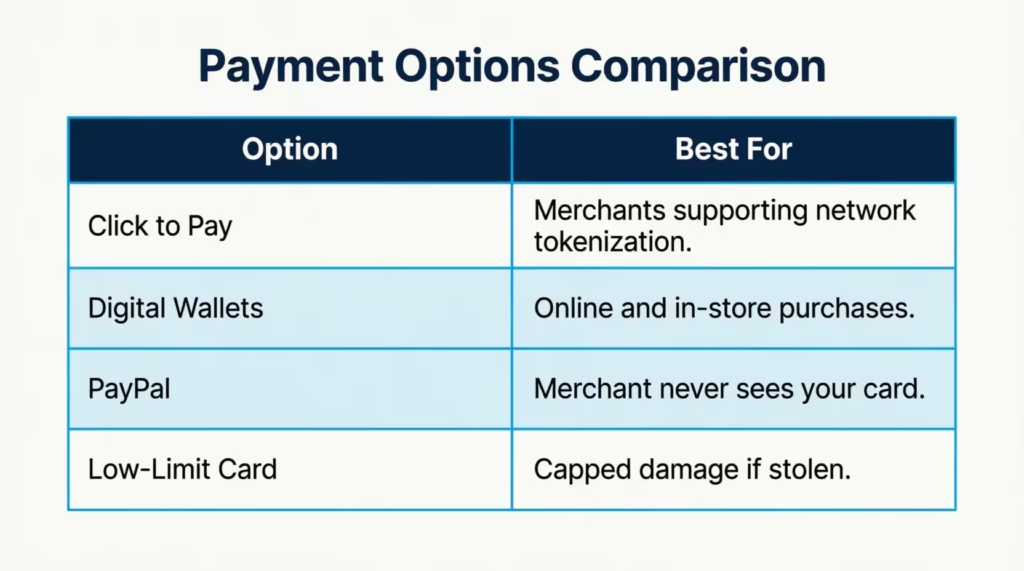
Click to Pay is a checkout tool built by Visa, Mastercard, and other networks. You save your Citi card once, and merchants that support Click to Pay let you check out with just an email and code. The merchant never sees your real number. Look for the Click to Pay icon at checkout, or set it up on the Click to Pay site.
Digital wallets are the other strong path. Add your Citi card to Apple Pay, Google Pay, or Samsung Pay. Each wallet creates a token, which is a random number that stands in for your real one. Merchants that accept these wallets only see the token, not your real card. This works both online and in stores.
PayPal is another safe layer. Link your Citi card to PayPal and check out with your PayPal login. The merchant sees only PayPal, not your card.
A separate low-limit card is the last option. Some people open a card with a small credit line just for online use. If it gets stolen, the damage is capped by the low limit.
Security Best Practices to Pair With Virtual Numbers
A virtual number is one layer of safety. Stack a few more habits on top for full peace of mind.
- Turn on two-factor authentication (2FA) for your Citi login. Use an authenticator app like Google Authenticator or Authy, not SMS, when Citi offers the choice.
- Check the site’s URL before you enter any card details. Look for HTTPS and a small lock icon in the address bar. If either is missing, back out.
- Use a strong, unique password for your Citi account. A password manager makes this simple.
- Set up alerts in your Citi account. Get a text or email every time your card is charged. Fake charges show up fast this way.
- Review your statement at least once a month. Match each line to a real purchase.
- Watch phishing emails that pretend to be from Citi. Real Citi emails never ask for your password or full card number. When in doubt, go to citi.com by typing the URL, not by clicking the email link.
- Keep your browser and phone up to date. Security patches close the holes that scammers use.
Pair these habits with virtual numbers, and your online card use becomes very hard to attack.
Frequently Asked Questions (FAQs)
How do I get a Citi virtual card?
Log in to citi.com on a desktop browser, open your eligible card’s account page, and click “Virtual Account Numbers.” Click “Generate,” set a spending limit and expiration date, and your new 16-digit number is ready instantly.
Does Citibank give you a virtual card right away?
Yes, there’s no waiting period. Once you generate a virtual number through the Virtual Account Numbers tool, it’s ready to use immediately at checkout.
Where can I find my Citi virtual card number?
Your virtual numbers live on the Virtual Account Numbers page inside your citi.com account, not in a separate app. Each entry shows the masked number, spending limit, expiration date, and status.
How do I use a Citi card without the physical card?
Generate a virtual account number on citi.com and enter it, along with its own CVV and expiration date, into the card field at checkout. It works like a normal credit card but only online, since it has no physical plastic.
Does Citi have a virtual debit card?
No, the virtual number tool only works with Citi credit cards. Debit cards are not eligible for virtual account numbers.
Is a virtual account number the same as a card number?
A virtual account number is a stand-in for your real card number, not a new card. It carries its own 16 digits, CVV, and expiration date, but any charges still bill to your actual Citi credit account.
Are Citi virtual cards free?
Yes, generating a Citi virtual account number costs nothing. It’s a built-in feature for eligible cardholders through their online account.
What are the downsides of using a virtual card?
Virtual numbers don’t work at hotels, rental car counters, in-person stores, or with digital wallets like Apple Pay. They can also fail on recurring bills, like utilities, that verify account details closely.
Which Citi cards are eligible for virtual account numbers?
Most personal cards qualify, including the Citi Double Cash, Strata Premier, Custom Cash, Rewards+, Simplicity, Premier, and Prestige. Store cards like Home Depot or Best Buy, along with most business and debit cards, typically don’t support the feature.
Do virtual card charges still earn rewards?
Yes, charges made with a virtual number earn the same points, cash back, or miles as your real card. A $100 purchase on a Citi Double Cash virtual number still earns the standard 2% back.
Wrapping Up
Citi’s virtual number tool is a simple, free way to shop online with less risk. You log in on a desktop, open the Virtual Account Numbers page, set a limit and expiration, and get a fake 16-digit number that maps to your real card. Rewards still work. Refunds still work. Only the number changes.
Based on the steps above, the most effective approach is to make a fresh virtual number for every new merchant and to keep the spending limit tight for free trials.
If a friend or family member shops online often but still uses their real card, share this guide with them. It could save them from a costly fraud cleanup later.