You want to add a spouse, child, or family member to your Citi credit card, but the menu names aren’t obvious, and you’re not sure what information you’ll need or what rules apply. If you’re asking, “How do I add an authorized user to my Citi card?” you’re in the right place.
The short answer: log in to your Citi account online or in the Citi Mobile App, go to Services, select Credit Card Services, and choose Authorized Users to submit their information.
Below are the exact steps for each method. You’ll see what to gather before starting, the rules on age and fees, and how adding someone affects both of your credit profiles.
At a Glance
This guide explains how to add an authorized user to a Citi credit card, including exact steps for online, app, and phone, required information, age and fee rules, and how the arrangement affects credit and payment liability.
Core Facts:
- Adding an authorized user requires logging in, going to Services, then Credit Card Services, and selecting Authorized Users to enter their information.
- Most Citi cards have no minimum age for authorized users, but the Costco Anywhere Visa by Citi requires the user to be at least 18 and a Costco member.
- Most Citi consumer cards do not charge a fee to add an authorized user, though fee policies can vary by card.
- The primary cardholder remains 100% responsible for all charges the authorized user makes, and the authorized user has no legal payment obligation to Citi.
- Credit impact depends on whether Citi reports authorized user activity to the credit bureaus; if it does, on-time payments and account age can help the authorized user’s credit.
- An authorized user can make purchases and view account activity if granted access, but cannot add other users, change account settings, or take legal responsibility for the bill.
Best for:
- Primary Citi cardholders who want to add a spouse, child, or family member and need the exact click-by-click steps.
- Parents considering adding a child to build the child’s credit history and wanting to understand permissions and risk first.
- Cardholders who want to understand liability and credit impact before adding someone to their account.
What You Need Before You Start
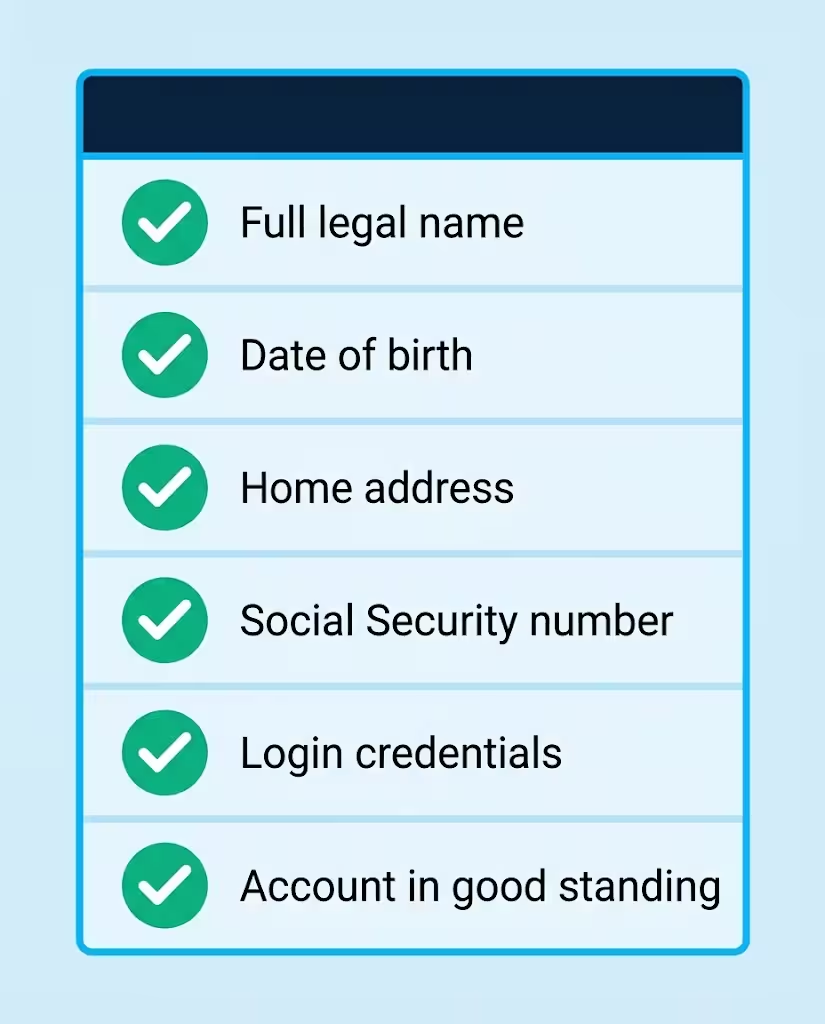
Getting stuck mid-application is the most common reason people abandon this task. Gather everything on this short checklist first, and you can finish in one sitting:
- The authorized user’s full legal name, exactly as it appears on their government ID
- Their date of birth
- Their home address, if it’s different from yours
- Their Social Security number, since some Citi cards request it during setup even though it isn’t always required
- Your own Citi login credentials for the website or mobile app
- Confirmation that your account is in good standing, with no past-due balance blocking account changes
Having these six items ready before you log in takes the guesswork out of the process.
Age and Eligibility Requirements
Here’s some good news: most Citi cards have no minimum age for authorized users. Outside of any issuer-set age rule, it’s entirely up to you as the primary cardholder to decide who gets added, as Citi’s own authorized user guide confirms.
One important note: a credit card issuer can decline a request in certain situations, such as when the person you’re adding doesn’t meet the card’s age requirement. So while denials are rare for authorized users, they’re possible.
Costco Anywhere Visa by Citi — Special Age and Membership Requirement
The Costco Anywhere Visa Card by Citi is the big exception to the “no minimum age” rule. Because this card is tied to a Costco membership, authorized users must meet two extra conditions:
- The authorized user must be at least 18 years old
- The authorized user must be a Costco member
This applies to both the personal and business versions of the card. If you were hoping to add a teenager to your Costco card to build their credit early, that request will be declined. Most other Citi cards, like the Citi Double Cash Card or Citi Strata Premier Card, don’t carry these restrictions.
Is There a Fee to Add an Authorized User?
Most Citi consumer cards do not charge a fee for adding an authorized user. That said, fee policies can vary by card product and by issuer in general, and some cards on the market do charge an annual fee per authorized user. If you want certainty for your specific card, check your cardmember agreement or call the number on the back of your card before you add anyone.
How Many Authorized Users Can I Add?
The maximum number of authorized users depends on the card issuer’s policies, and Citi doesn’t publish a single universal limit across all its cards. Citi’s own guidance says to contact the card company if you’re unsure. If you plan to add several people, like multiple children, a quick call to customer service will confirm the cap on your specific account.
💡 Pro Tip: If you’re adding more than one person, do them all in the same session. It saves repeat logins and lets you review everyone’s permissions side by side.
How to Add an Authorized User Online
The fastest method is through Citi’s website. Citi confirms that cardholders can add an authorized user at citi.com, and the click path looks like this:
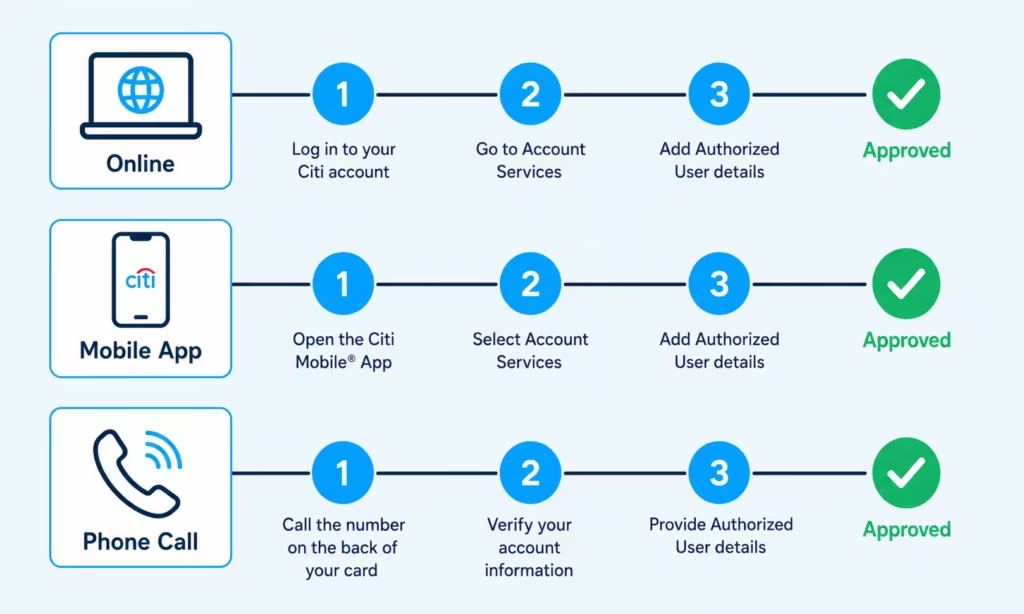
- Log in to your account at citi.com with your user ID and password.
- From your account dashboard, select Services in the main menu.
- Click Credit Card Services.
- Select Authorized Users.
- Choose the option to add a new authorized user.
- Enter their personal information: full legal name, date of birth, address, and Social Security number if the form asks for it.
- Set permissions for the new user, such as whether they get online account access. (More on this in the permissions section below.)
- Review everything and submit.
Approval is typically quick for authorized user requests, since no new credit application is involved. Once approved, Citi mails a physical card in the authorized user’s name.
Keep in mind that Citi updates its site layout from time to time, so menu labels may shift slightly. If you don’t see “Credit Card Services,” look under your Profile or account management settings for the Authorized Users option.
How to Add an Authorized User via the Citi Mobile App
Prefer your phone? Citi confirms you can also add an authorized user through the Citi Mobile App, and the process mirrors the website:
- Download the official Citi Mobile App from the Apple App Store or Google Play if you don’t have it yet. Look for the app published by Citibank, N.A.
- Open the app and log in with your usual credentials.
- Tap the menu or More option to reach your account management tools.
- Look for Card Management or Services, then tap Manage Authorized Users.
- Tap to add a new authorized user.
- Enter their information just as you would online: name, date of birth, address, and SSN if requested.
- Set their access permissions and submit.
The app route is especially handy because you can manage the new card later from the same place, including locking it if it’s ever lost.
How to Add an Authorized User by Phone
If you’d rather talk to a person, or you hit a snag online, calling works just as well:
- Call the customer service number on the back of your Citi card. This routes you to the team that handles your specific card product.
- Tell the representative you want to add an authorized user to your account.
- Have the authorized user’s full legal name, date of birth, address, and Social Security number ready, since the representative will ask for these details.
- The representative will process the request and confirm whether the addition is effective right away or requires any follow-up.
Phone requests are handled by the representative. So, calling is often the easiest choice if you don’t like navigating menus.
Adding an Authorized User at a Citi Branch
A less common option: if you live near a Citi branch, you can ask about adding an authorized user in person. Bring a valid photo ID and the authorized user’s information with you. This route makes sense if you’re already visiting a branch or if the online and phone options aren’t working for you.
Setting Permissions and Access Controls for the Authorized User
This is the step most guides skip, and it’s where you decide how much access the new user actually gets.
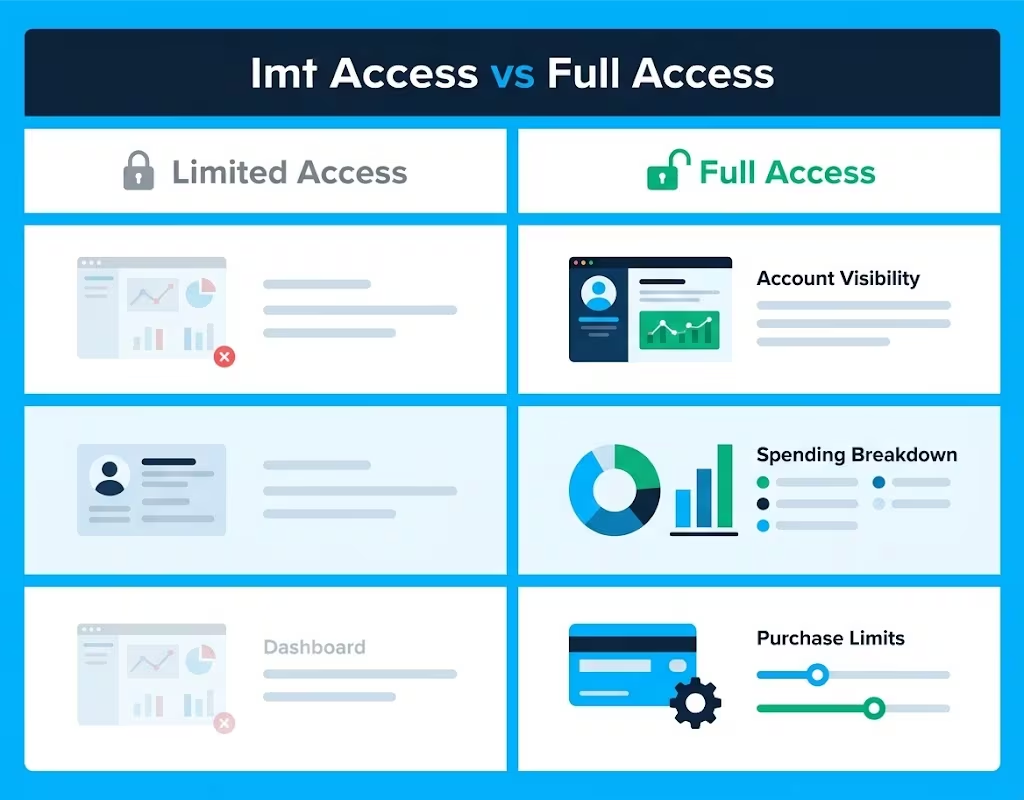
When you add someone, the primary cardholder has to grant the authorized user access on citi.com or in the Citi Mobile App, according to Citi’s account update page. In other words, an authorized user doesn’t automatically get their own login to view the account. You choose whether to enable that.
This matters a lot if you’re a parent adding a college-age child. You can give them a card to use while keeping account visibility in your hands, or you can grant them online access so they can track their own spending and learn how the account works.
Citi has also been rolling out newer management features on certain cards that give primary cardholders more control, including the ability to:
- Set purchase limits on what an authorized user can spend
- Turn ATM cash advance access on or off per user
- See each authorized user’s spending broken out on the monthly statement
- Lock, replace, or report a card lost or stolen on a card-by-card basis
- Have replacement cards mailed directly to the authorized user’s address
The features available depend on your card product. Check your account or call the number on the back of your card to find out which controls apply to you.
⚠️ Mistake to Avoid: Don’t assume an authorized user can see everything by default, and don’t assume the opposite either. Access is only granted when you set it up, so review the permissions screen carefully before you submit.
Can You Set a Spending Limit for an Authorized User?
On Citi cards where the newer authorized user features have rolled out, yes. The primary cardholder can set purchase limits that cap how much an authorized user spends. Note that this is different from the account’s overall credit limit, which stays the same no matter how many users are on the card.
If your card lacks a hard spending limit, keep an eye on the monthly statement. Check the per-user spending breakdown. Then, agree informally with the authorized user on how to use the card.
What an Authorized User Can and Cannot Do
Setting expectations up front prevents most conflicts later. Here’s the general picture:
An authorized user can:
- Make purchases with their own card, with charges added to your account balance
- View account activity, transactions, and statements (if you’ve granted them online access)
- Make payments toward the balance
- Receive and activate their own physical card in their name
An authorized user cannot:
- Add or remove other authorized users
- Change account settings, credit limits, or personal details
- Enroll in or cancel account-level features on your behalf
- Take legal responsibility for the bill
One more thing to plan around: after you add someone, the physical card is mailed out. Issuers commonly quote a delivery window of roughly 7 to 10 business days, though Citi’s exact timing can vary by card. If the authorized user needs the card before a specific date, like the start of a trip or a semester, submit the request at least two weeks ahead to be safe.
Who Is Financially Responsible for Authorized User Charges
This is the most important section in this article, so read it before you submit anything.
You, the primary cardholder, are 100% responsible for every charge on the account, including everything the authorized user spends. The authorized user has no legal obligation to pay Citi anything. Experian puts it plainly: the primary account holder is solely responsible for making the monthly payments, no matter who made the purchases.
Citi also notes that many primary cardholders have a private arrangement. In this setup, the authorized user pays them back for their own charges. That’s a reasonable approach, but understand what it is: an informal agreement between the two of you. Citi will always look to you for payment, and any unpaid balance lands on your account and your credit report.
Only add someone you genuinely trust with your credit line. A spending spree you didn’t expect is your problem, not theirs, at least as far as Citi is concerned.
How Adding an Authorized User Affects Credit
The credit impact depends on one key fact: whether the issuer reports authorized user activity to the three major credit bureaus (Equifax, Experian, and TransUnion)
Citi explains that if the card company reports authorized users to the bureaus, the arrangement can affect credit; if it doesn’t, there’s no effect at all. Here’s how it breaks down for each of you.
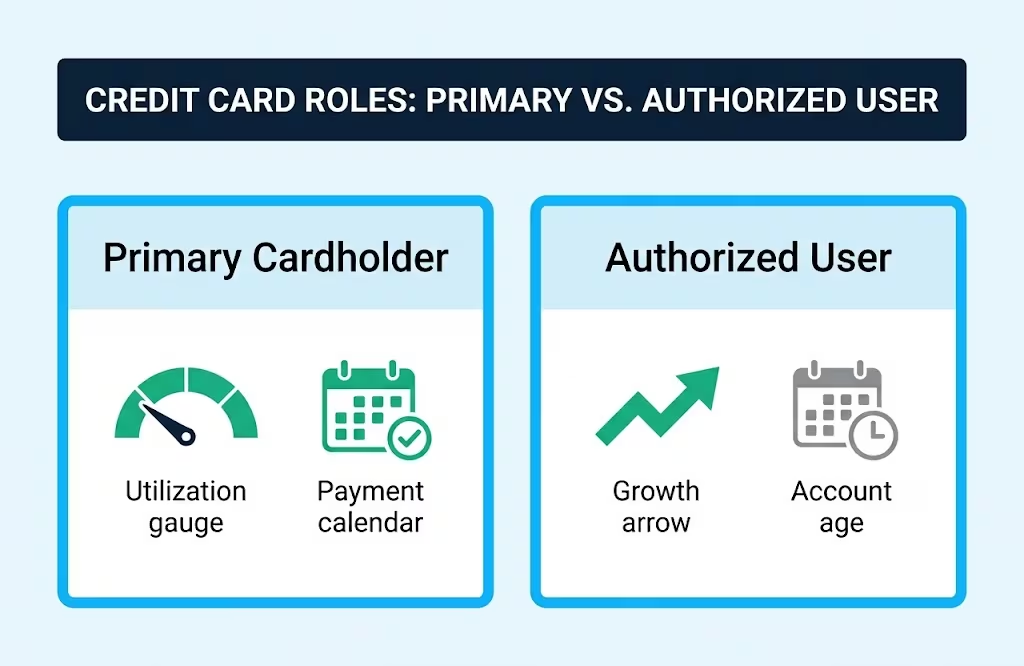
Impact on the Primary Cardholder’s Credit
Simply adding someone doesn’t hurt your credit. There’s no hard inquiry for the authorized user, because they aren’t applying for credit.
What can change is your credit utilization ratio, which is the share of your available revolving credit that you’re using. Adding a user doesn’t change your credit limit, but it often changes your balance, since another person is now spending on the account.
If their spending pushes your balance higher relative to your limit, your utilization rises, and your scores could dip. If the balance stays low relative to the limit, there’s little to worry about.
The bigger risk is behavioral. You’re in charge of the payments. If you miss a payment because of a higher bill, it hurts your credit directly.
Impact on the Authorized User’s Credit
This is usually the whole point of the exercise, especially for parents helping a child build credit. When the issuer reports the account to the bureaus, Experian notes that the account’s payment history appears on the authorized user’s credit reports. The effects can run in both directions:
- On-time payments by you can add years of positive payment history to the authorized user’s credit file, which can significantly benefit their scores.
- The age of your account factors into their length of credit history, so being added to an older account can help.
- Late or missed payments (30 days or more past due) on the account can hurt their scores too.
- High balances matter: if the account’s balance climbs above roughly 30% of its credit limit, utilization can drag down scores for both of you.
📌 Did You Know: If the card issuer doesn’t report authorized user activity to the credit bureaus, being added does nothing for the authorized user’s credit at all, good or bad. Reporting is the whole mechanism, so it’s worth confirming with your issuer if credit building is your goal.
How to Remove an Authorized User Later
Nothing about this arrangement is permanent, and removing someone is usually simpler than adding them.
The primary cardholder can typically remove an authorized user through the online account or by calling customer service, per Citi’s guidance. To remove someone online, follow these steps: log in, go to Services, then Credit Card Services. Next, click on Authorized Users and select the person to remove.
Some issuers allow authorized users to remove themselves. They can do this by contacting the card company directly, but policies differ. To complete a removal, you’ll generally need the account or card number, your name as the primary cardholder, and the authorized user’s name.
After removal, destroy their physical card, and remember that any charges they already made remain your responsibility.
Frequently Asked Questions (FAQs)
Can I add an authorized user to my Citi credit card?
Yes, you can add an authorized user to any Citi credit card as the primary cardholder. You can do this online, through the Citi Mobile App, by phone, or at a Citi branch, and most cards have no minimum age requirement.
Do Citi authorized users have the same card number as the primary cardholder?
No, authorized users receive their own physical card in their name with a unique card number. Their charges still post to the primary cardholder’s account balance.
Does adding an authorized user to your credit card build their credit?
It can, but only if Citi reports authorized user activity to the credit bureaus. When it does, on-time payments and the account’s age can add positive history to the authorized user’s credit file within a few months.
Will my credit score go down if I add an authorized user?
Not automatically. Your score only drops if the authorized user’s spending pushes your balance above roughly 30% of your credit limit, or if a payment gets missed.
Can I add my 10-year-old as an authorized user on my credit card?
Yes, on most Citi cards, since there’s no minimum age requirement. The one exception is the Costco Anywhere Visa by Citi, which requires the authorized user to be at least 18 and a Costco member.
What is the Citibank authorized user fee?
Most Citi consumer cards don’t charge a fee to add an authorized user. Fee policies can vary by card, so it’s worth confirming on your specific cardmember agreement.
How do I activate my Citi card as an authorized user?
Authorized users activate their card the same way a primary cardholder does, typically by calling the number on the activation sticker or logging in online. The card arrives by mail roughly 7 to 10 business days after being added.
Can I add an authorized user after I get my credit card?
Yes, there’s no waiting period. You can add someone anytime your account is open and in good standing, using the same online, app, or phone process.
How do I add an authorized user to my Citi AAdvantage credit card?
The process is the same as any other Citi card: log in online or in the app, go to Services, then Credit Card Services, and select Authorized Users. The AAdvantage card follows Citi’s standard no-fee, no-minimum-age policy unless stated otherwise on your account.
Is there a downside to adding an authorized user?
The main risk is financial: you remain 100% responsible for every charge they make, even without your knowledge. It’s best to only add someone you trust, since any unpaid balance affects your credit, not theirs.
Wrapping Up
To add an authorized user to your Citi card, follow these steps:
- Log in online or through the app.
- Go to Services.
- Select Credit Card Services.
- Click on Authorized Users, then enter their details.
It only takes a few minutes!
Most Citi cards have no minimum age and no fee, though the Costco Anywhere Visa requires the user to be 18 and a Costco member.
Set permissions carefully during setup. Agree on spending expectations upfront. Remember, every charge is legally yours.
If this guide on adding an authorized user to a Citi card helped you, share it with a partner, parent, or friend. They’ll appreciate knowing how to get it right the first time.