I got my first Amex card hoping to enjoy the Uber benefit, and like many new cardholders, I almost lost my first month’s credit because I had no idea it required so many small toggles, links, and rules to actually work. If you’re staring at your Uber app wondering where your Amex Uber credit went, or you’re afraid to lose it before the month ends, you’re not alone.
Here’s the short answer: link your Amex card inside the Uber wallet, accept the Uber Cash benefit, and select Uber Cash as your payment method at checkout each time.
In this guide, you’ll get step-by-step setup, the new backup payment rule, and rescue tips for credits about to expire.
Key Takeaways
This guide explains how to activate, apply, and protect your Amex Uber Cash benefit, covering card-by-card credit amounts, the required linking and checkout steps, the November 2024 payment rule, expiration mechanics, and international restrictions.
Core Facts:
- Amex Gold deposits $10 in Uber Cash per month ($120 annually); Amex Platinum deposits $15 per month with a $20 bonus in December ($200 annually); Delta SkyMiles Reserve Amex covers an Uber One membership instead of ride cash (up to $120 annually).
- Uber Cash is a digital wallet balance, not a statement credit. It does not roll over and expires at midnight on the last day of each month.
- Your Amex card must be added to the Uber wallet as the active default payment method for the monthly deposit to trigger and for Uber Cash to apply at checkout.
- The Uber Cash toggle must be switched on at the payment screen before confirming each ride or Uber Eats order, or the credit will not be applied.
- As of November 2024, Amex must be the default payment card in Uber. If a Visa or Mastercard is set as the default, Uber Cash will not apply even if your balance is positive.
- The Amex Uber Cash benefit is restricted to US-based rides and orders. It cannot be applied to trips or deliveries placed outside the United States.
Best for:
- Amex Gold or Platinum cardholders who have never received Uber Cash despite having an eligible card linked.
- Cardholders who saw their Uber Cash stop applying after late 2024 due to the backup payment rule change.
- Anyone who has lost monthly credits to expiration and wants a reliable system to use the full benefit before the month resets.
Which Amex Cards Come With an Uber Credit
Not every American Express card includes an Uber benefit, and the amount you get depends entirely on which card sits in your wallet. The three main cards that carry this perk are the Amex Gold, the Amex Platinum, and the Delta SkyMiles Reserve Amex. Each one delivers the benefit in a slightly different way, which is why so many cardholders get confused when they read about it online.
The benefit usually arrives as Uber Cash, which is a digital balance that lives inside your Uber account. It is not a statement credit you get back later. It sits in your Uber wallet and waits for you to spend it. If you do not spend it within the month, most of these credits expire.
The eligible Amex cards each work a little differently, so it helps to know your card before you try to link anything.
How Much Uber Cash Each Card Provides
Here’s a clear breakdown of what each card gives you:
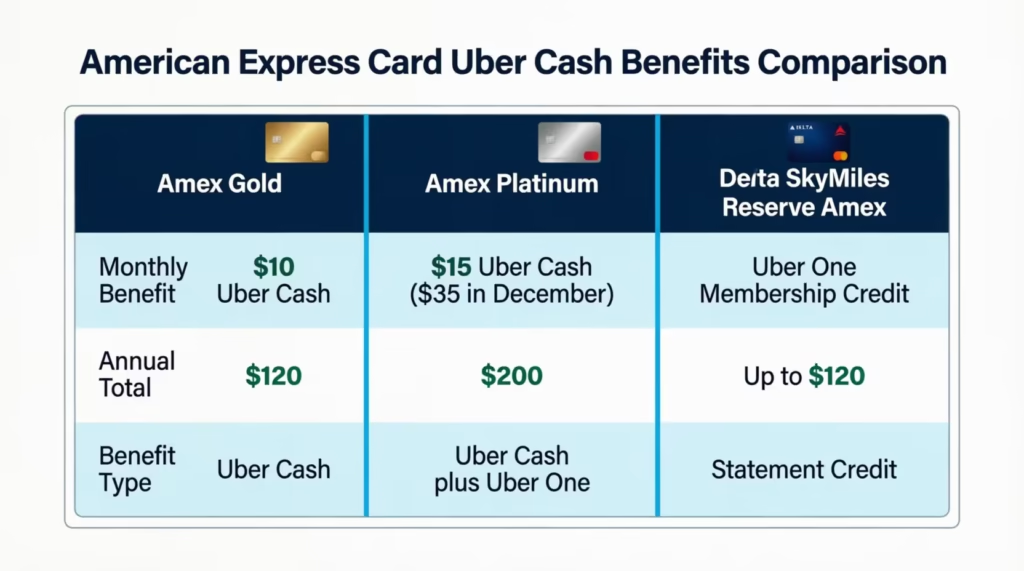
| Amex Card | Monthly Uber Cash | Annual Total | Notes |
|---|---|---|---|
| Amex Gold | $10 | $120 | Resets every month, US only |
| Amex Platinum | $15 monthly + $20 December bonus | $200 | Higher bonus in December |
| Delta SkyMiles Reserve Amex | Uber One membership credit | Up to $120 | Statement credit toward Uber One |
The Amex Gold Uber credit drops $10 into your account on the first of every month, as outlined on the American Express Gold Card benefits page. The Amex Platinum Uber Cash gives you $15 monthly, plus an extra $20 in December to reach $200 for the year. The Delta Amex Uber One credit works differently because it covers an Uber One membership instead of giving you ride cash.
You must add the card as the payment method in your Uber wallet for the credit to drop each month. The card has to be the one charging your trip, even partially, for the Uber Cash to show up.
What Happens if You Have Both an Amex Gold and Platinum
If you carry both cards, the credits do not stack into one giant balance the way you might expect. Uber Cash from each card lands in the same Uber wallet, but each card’s credit still has its own expiration and its own linking requirement.
You only need to keep both cards added to your Uber account as payment methods. Every month, the system will deposit $10 from Gold and $15 from Platinum (or the December bonus). These amounts will add up to your total Uber Cash balance for spending. The total expires at the end of the month, so plan to use the full combined amount before the calendar flips.
How to Link Your Amex Card to the Uber App
Linking your card is the first real step, and it’s where most new cardholders get tripped up. If the card is not added inside the Uber wallet correctly, the Uber Cash benefit will never deposit, no matter how long you wait. This is the root cause of most “my credit never showed up” complaints.
Open the Uber app on your phone and sign in. If you don’t have it, you can download it from the Apple App Store or Google Play.
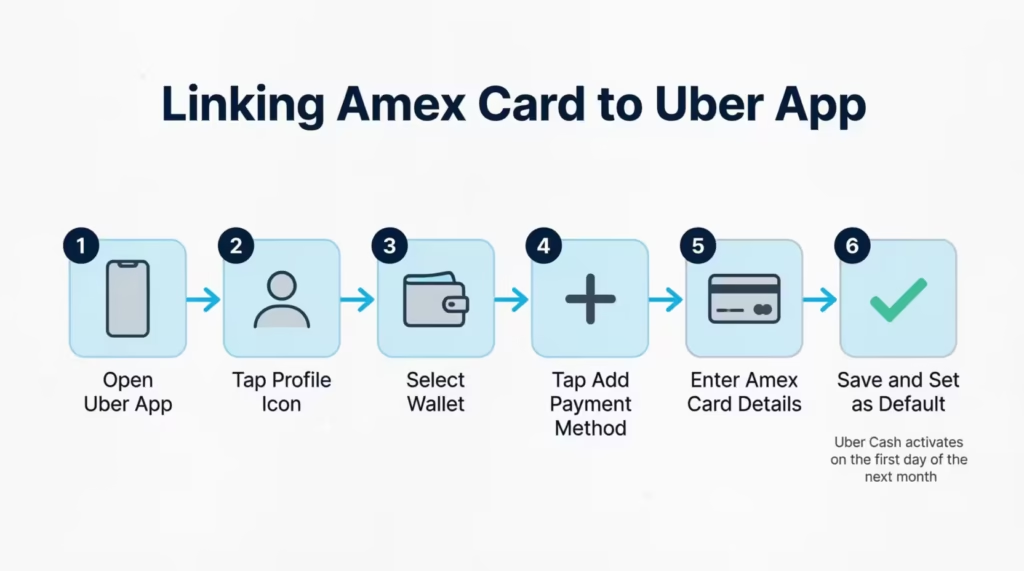
Follow these steps to add your Amex card to your Uber account:
- Tap your profile icon in the bottom right corner.
- Select Wallet from the menu.
- Tap Add Payment Method.
- Choose Credit or Debit Card.
- Enter your Amex card number, expiration date, and CVV.
- Save the card.
- Tap the new Amex card in your wallet and set it as the default if you want it to be the main charge card.
Once the card is saved, Uber will check your eligibility for the Uber Cash benefit within a few minutes. The Uber Cash activation prompt usually appears in your wallet on the first day of the following month, not instantly. So if you add the card mid-month, expect the first deposit on the first day of the next month.
💡 Pro Tip: Add your Amex card to Uber on the last day of the month. That way the next morning, your Uber Cash drops right into your wallet, and you have a full 30 days to use it.
How to Confirm Your Uber Cash Balance After Linking
After you link the card, check your Uber wallet to confirm the credit landed. Open the app, tap your profile, and tap Wallet again. At the top of the page, you’ll see an Uber Cash section with a dollar balance.
If the balance shows $0 on the first day of the month, give it a few more hours. Sometimes the system takes until midday to process credits. If a full day passes and you still see $0, your card might not be properly linked, or the system might not have recognized the eligible Amex card yet. In that case, remove the card and add it again from scratch.
How to Apply the Uber Credit to a Ride
Having the Uber Cash sitting in your wallet is only half the job. You also need to make sure it actually applies to your ride at checkout. This is where Pain Point 2 lives: people see the balance, but it never reduces their fare.
The key step is the Uber Cash toggle. On the payment screen, right before you confirm a ride, you should see an option that says Use Uber Cash. This toggle must be turned on. If it’s off, Uber will charge your card the full amount and leave the credit untouched.
Here’s how to redeem Uber Cash on a ride:
- Open the Uber app and request a ride as you normally would.
- On the ride confirmation screen, tap the payment method.
- Select your Amex card as the payment method.
- Look for the Uber Cash option above or below the card.
- Make sure the toggle next to Uber Cash is switched on.
- Confirm the ride.
Uber will apply your available Uber Cash first, then charge any remaining balance to your Amex card. The Amex card payment method on Uber must stay linked, even when the credit covers your entire ride, because of the November 2024 rule covered below.
How to Use the Credit on Uber Eats Orders
The same Uber Cash works on Uber Eats orders. Open the Uber Eats app, build your order, and head to checkout. On the payment screen, tap the payment method and switch on Uber Cash, just like you do for rides.
The credit applies the same way. Uber Cash gets used first, and any leftover charge goes to your Amex card. Many cardholders prefer using Uber Eats. Food delivery costs typically range from $15 to $30, fitting nicely within the monthly credit limit.
What Happens When the Credit Doesn’t Cover the Full Cost
If your ride or Uber Eats order costs more than your Uber Cash balance, the system splits the payment automatically. Say you have $10 in Uber Cash and your ride is $17. Uber will take the full $10 from your balance and charge $7 to your Amex card. You don’t have to do anything extra. Just make sure the toggle is on.
This is helpful because it means you never waste a partial credit. A small $4 Uber Cash leftover still applies to a $20 ride. Just keep the toggle on every single time.
Using the Credit on Uber Grocery Delivery
Uber Cash also covers Uber grocery delivery, which is one of the most underused ways to spend the benefit. If your area has Uber-supported grocery stores, you can place an order through the Uber Eats grocery section under the Grocery category. At checkout, switch the Uber Cash toggle on, and the credit applies the same way it does on food orders.
This is a smart option in months where you don’t ride much and don’t feel like ordering takeout. A grocery order can soak up your full $10 or $15 credit without effort.
The November 2024 Rule Change: Why Your Backup Payment Method Matters
In November 2024, Amex made a quiet but important change to how the Uber Cash benefit works. Before this update, you could use your Uber Cash even if a non-Amex card was set as your main Uber payment method.
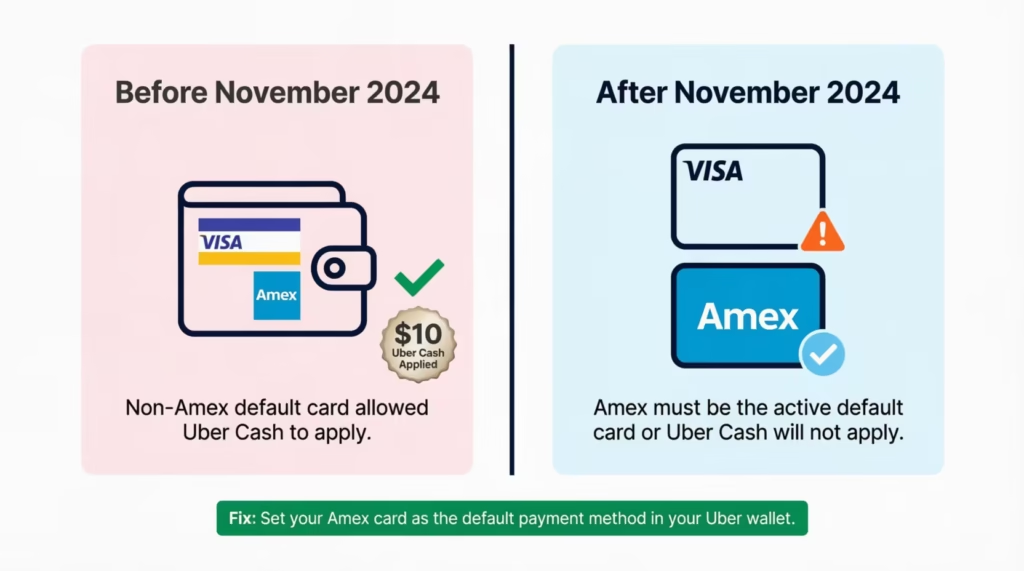
After the change, your Amex card must be the active card on file, or the Uber Cash will not apply. The update was confirmed in the Uber Cash terms and conditions shared by Uber.
If you use a Visa or Mastercard as your default Uber payment, your Uber Cash might go unused at checkout. This can happen even if you have an eligible Amex card linked. The system needs to see the Amex as the charging card, even when the credit covers the whole ride.
To avoid losing the credit:
- Open your Uber wallet.
- Set your eligible Amex card as the default payment method.
- Remove any non-Amex backup payment if it has been blocking the credit.
- At checkout, confirm both the Amex card and the Uber Cash toggle are selected.
⚠️ Mistake to Avoid: If you keep a Visa or Mastercard as your default Uber payment after November 2024, you’ll lose your monthly Amex Uber Cash. Switch the default to your Amex right now if you haven’t already.
Many long-time cardholders suddenly saw their Uber Cash not applying late in 2024 and into 2025. This change is due to a new Uber payment method requirement. Once your Amex is the active card, the benefit returns to normal.
How the Amex Platinum Uber One Credit Works
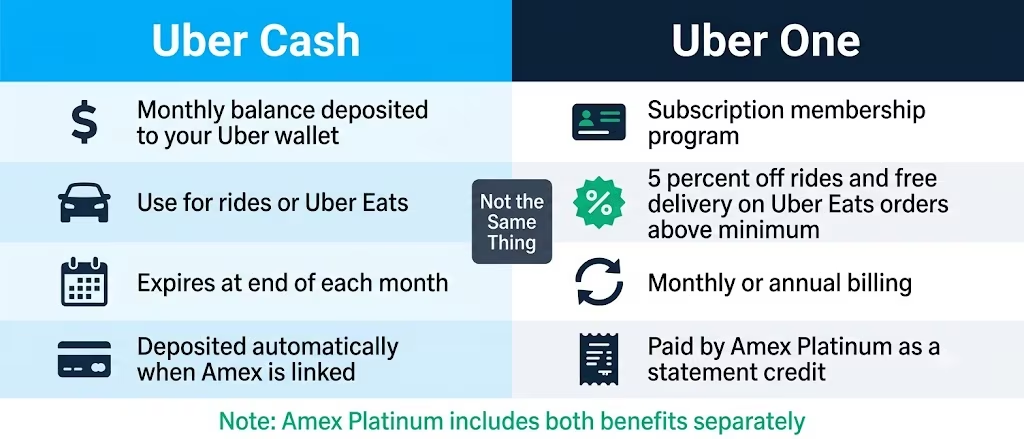
The Amex Platinum gives you two separate Uber benefits that often get mixed up: Uber Cash and Uber One. Uber Cash is the $200 yearly ride credit (split monthly). Uber One is a separate membership perk worth up to $120 a year. They are not the same thing, and they don’t replace each other.
Uber One is Uber’s paid membership program. It gives you free delivery on Uber Eats orders above a certain amount, 5% off rides and food, and other perks. The membership costs about $9.99 a month or $96 a year, as listed on the Uber One membership page. With the Amex Platinum, the cost gets covered as a statement credit when you pay with your Platinum card.
The $200 Uber Cash on Platinum still works the same as before. It deposits in monthly chunks. The Uber One credit is separate and only triggers when you pay for the Uber One membership with your Platinum card.
How to Activate Uber One With Your Amex Platinum Card
To get the Uber One membership credit, you need to sign up for Uber One and pay with your Amex Platinum. Follow these steps:
- Open the Uber app or Uber Eats app.
- Tap your profile, then Uber One.
- Tap Try Uber One or Subscribe.
- Choose monthly or annual billing.
- Select your Amex Platinum card as the payment method.
- Confirm the subscription.
Once you pay with the Platinum, Amex will issue a statement credit for the membership cost, up to the annual cap. The credit usually shows up on your Amex statement within one to two billing cycles. You do not need to do anything else to claim it.
How the Delta Amex Uber Credit Works
The Delta SkyMiles Reserve Amex card gives you an Uber benefit too, but it works differently from the Gold or Platinum. Instead of monthly Uber Cash, the Delta Amex covers your Uber One membership through a statement credit. This is part of Amex’s effort to bundle ride and food perks with travel cards.
The Delta Amex rideshare credit applies when you pay for your Uber One membership with your Delta card. Once charged, Amex credits the amount back on your statement. You can use Uber One to save on rides to and from the airport, which lines up nicely with the travel focus of the Delta card.
How to Set Up the Delta Amex Uber One Credit
Setting up the credit is similar to the Platinum process but uses your Delta card:
- Make sure your Delta SkyMiles Reserve Amex is added to your Uber wallet.
- Open the Uber app and go to Uber One under your profile.
- Sign up for Uber One if you don’t already have it.
- Set the Delta Amex as the payment method.
- Confirm the subscription.
Each month you pay for Uber One on the Delta card, Amex will issue a statement credit, up to the yearly cap on the card’s benefit. Check your monthly Amex statement to confirm the credit posted. If it does not appear after two billing cycles, contact Amex customer service to investigate.
Why Your Amex Uber Credit Is Not Showing Up
If your credit didn’t show up, it’s likely for one of three reasons: the card isn’t linked properly, the Uber Cash toggle is off, or the November 2024 backup payment rule is blocking it. Sometimes more than one of these issues stacks together.
Start by checking the basics:
- The Amex card is added to your Uber wallet.
- The card is set as the default payment method.
- The Uber Cash toggle is switched on at checkout.
- Your account region is set to the United States.
If all four of those check out and you still don’t see the credit, the issue may be on Amex’s side. Sometimes new cardholders see their Uber Cash delayed by one full billing cycle because Amex has not yet activated the benefit on the card. In that case, calling the number on the back of your Amex card and asking customer service to manually enroll your card in the Uber benefit can fix it.
The Credit Appears in My Balance But Never Reduces My Ride Cost
This happens when the Uber Cash sits in your wallet but does not get applied at checkout. The fix is almost always the toggle. Before you confirm any ride or Uber Eats order, open the payment screen and check that Use Uber Cash is switched on.
If the toggle is on and the credit still doesn’t apply, the November 2024 rule may be the culprit. Make sure your Amex card, not a Visa or Mastercard, is the default payment method. If a non-Amex card is set as the backup, change it before you book.
Using the Credit When You Have a Business Profile in Uber
Business profiles in Uber are a known edge case. If you have a personal and a business profile, Uber Cash only applies to rides booked under your personal profile. A business profile has its own billing setup. It usually connects to your employer’s payment method. So, the Uber Cash benefit won’t apply automatically.
Before you request a ride, check the profile selector at the top of the ride confirmation screen. Switch to Personal if you want to use your Uber Cash. After the ride, you can submit the trip as an expense to your employer manually if needed.
Does the Amex Uber Credit Work Internationally?
The Amex Uber credit is United States only. Uber Cash from your Amex card can’t be used for rides or Uber Eats orders outside the US. This is true even if your Amex card is active and you have Uber Cash in your wallet. This catches a lot of travelers off guard, especially on the Platinum card, which is built for international use.
If you travel abroad and try to book an Uber in Paris, Tokyo, or London, your Uber Cash balance will not apply. The ride will charge to your card at the full international rate. The credit stays in your wallet, but it is locked to US-based rides and orders.
A workaround that some cardholders use: book Uber Eats from a US address while overseas, like sending food to a family member or a friend back home. The credit applies as long as the order is placed within the US service area. This is not perfect, but it can rescue a credit that would otherwise expire while you travel.
📌 Did You Know: Even Uber rides in US territories like Puerto Rico can be hit-or-miss for the Uber Cash benefit. Test the toggle before you confirm a ride to avoid an unexpected full-fare charge.
How to Make Sure You Use Your Amex Uber Credit Before It Expires
The biggest reason cardholders lose this benefit is simple: they forget. The monthly Uber Cash resets at the end of each month, which means if you do not use it by 11:59 PM on the last day, it disappears. There is no rollover. The unused balance is gone.
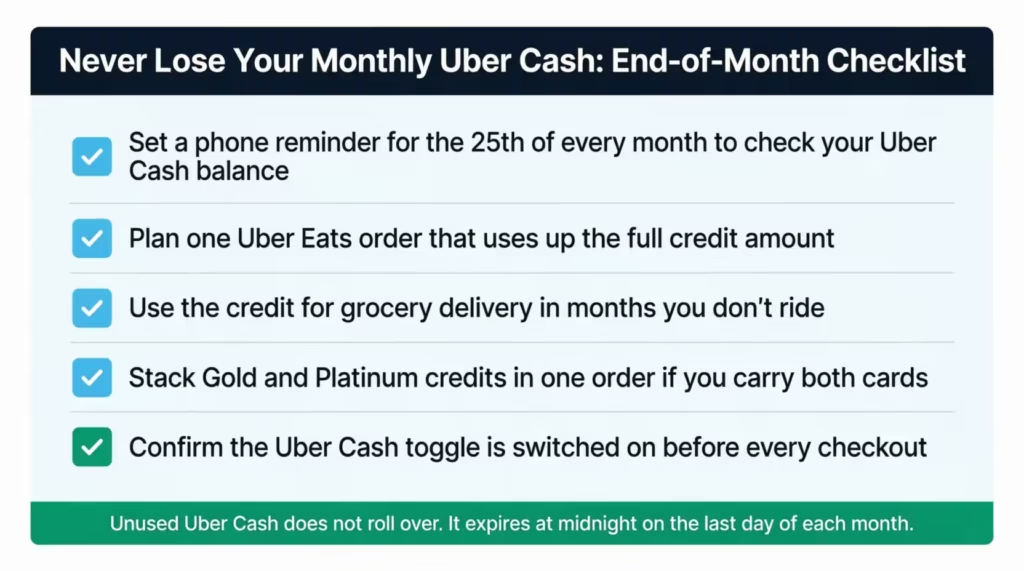
To stop this from happening every month, build a small routine around it:
- Set a monthly phone reminder on the 25th of each month to check your Uber Cash balance.
- Plan one Uber Eats order each month that uses up the full credit.
- If you don’t ride often, use the credit for grocery delivery instead.
- Stack your Gold and Platinum credits in the same Uber Eats order if you have both cards.
Sarah, a marketing manager at a Chicago tech startup, was losing $10 each month. This went on for nearly a year. Then, she set up a recurring calendar reminder. After that, she started ordering coffee and pastries from a local cafe through Uber Eats on the 28th of each month. In one year, she saved $120 by simply remembering to use the credit.
To maximize your Amex Uber benefit, treat the monthly Uber Cash like a “use it or lose it” reward, similar to vacation days. Building a small system around it makes the difference between a wasted perk and a real $120 to $200 a year benefit.
What to Do if Your Credit Already Expired Unused
If you missed the deadline and your credit expired, there is no automatic recovery. Once the monthly cycle ends, Uber Cash does not roll back into your account. However, you can still take action:
- Call the Amex customer service number on the back of your card.
- Explain that your Uber Cash did not get used due to a technical issue, like the card not being properly linked or the November 2024 rule blocking it.
- Ask if Amex can issue a one-time courtesy credit to cover the lost benefit.
Amex agents have discretion to issue goodwill adjustments, especially for new cardholders who got confused by the rules. This works once or twice, not monthly. After that, your only fix is to set up the system above and stop missing the deadline.
Frequently Asked Questions (FAQs)
Are Uber credits the same as Uber Cash?
Uber Cash is the official term for the digital balance Amex deposits into your Uber wallet each month. “Uber credits” is informal shorthand for the same thing; both refer to the same spendable balance that covers rides and Uber Eats orders.
Why can’t I use my Uber One credits for rides?
Uber One is a membership program, not a ride credit. The Amex benefit that covers it pays your Uber One subscription fee as a statement credit and does not add Uber Cash to your wallet for rides.
How do I get the $20 Uber Eats bonus on Amex Platinum?
Amex Platinum cardholders receive $20 extra in December, bringing that month’s Uber Cash deposit to $35 instead of the usual $15. This bonus is automatic once your Platinum card is linked to your Uber wallet.
Does the Amex Uber Cash credit work outside the United States?
The Amex Uber Cash benefit is restricted to US-based rides and Uber Eats orders. Your balance stays in your wallet but cannot be applied to trips or deliveries placed outside the United States.
Does the Amex Uber Cash credit work with an Uber business profile?
Uber Cash only applies to rides booked under your personal Uber profile. If you switch to your business profile, the credit will not apply, and your employer’s payment method will be charged instead.
Where did my Uber credits go?
Amex Uber Cash expires at the end of each calendar month with no rollover. If you did not use the balance before midnight on the last day of the month, it is gone and cannot be recovered automatically.
Why won’t Uber let me use my Uber credits?
A November 2024 rule requires your eligible Amex card to be the active default payment in your Uber wallet. If a Visa or Mastercard is set as your default, Uber Cash will not apply at checkout even if your balance is positive.
How do I use my Amex Uber Cash on Uber Eats?
Open the Uber Eats app, build your order, and tap the payment method at checkout. Turn on the Uber Cash toggle and confirm your order. Your available balance will be used first. If there’s any leftover amount, it will be charged to your Amex card.
Why isn’t my Amex working on Uber Eats?
The most common cause is the November 2024 rule: your Amex must be set as the default payment in your Uber wallet, not a Visa or Mastercard. Also confirm the Uber Cash toggle is switched on at checkout before you place the order.
Wrapping Up
To use your Amex Uber credit effectively, follow these steps:
- Make your Amex the default payment for Uber.
- Keep the Uber Cash toggle on at checkout.
- Set a monthly reminder to spend your credit before it expires.
The 2024 rule change made the backup payment setup more important than ever, and skipping it is the top reason credits disappear. With the right setup, an everyday Gold or Platinum cardholder can pull a full $120 to $200 a year out of a benefit most people lose to expiration.
If you know someone with a new Amex card who is unsure how the Uber perk works, share this guide with them. It could save them from losing hundreds of dollars in monthly credits they didn’t even know they had.