Figuring out how to pay your Citi credit card shouldn’t feel like a puzzle. Whether your due date is tomorrow or you’ve been wondering about the safest way to set things on autopilot, choosing the wrong method or missing a cutoff time can cost you real money.
Citi gives cardholders several ways to make a payment, and each one works a little differently.
In this guide, we’ll walk you through every option step by step, plus show you how to avoid late fees and protect your credit score.
Key Takeaways
This guide explains how to pay a Citi credit card using online, mobile app, phone, mail, and in-person methods, including payment timing, AutoPay setup, due date changes, and steps to take after a missed payment.
Core Facts:
- Citi credit card payments can be made online at citi.com, through the Citi Mobile App, by phone, by mail, or at participating Citibank branches and ATMs.
- Online and mobile app payments receive same-day credit when submitted before midnight Eastern Time, although the bank account debit may take two to three business days.
- Phone payments typically post the same day, and paying by phone is the only payment method that allows the use of a debit card.
- Mailed payments must arrive by the due date to be considered on time, and delivery can take five to seven business days.
- AutoPay can be configured for the minimum payment, statement balance, current balance, or a custom amount, with statement balance payments helping preserve the grace period.
- Citi does not report a late payment to credit bureaus until it is at least 30 days past due, giving cardholders time to correct a missed payment before credit reporting occurs.
Best for:
- People who want to understand every available Citi credit card payment method and choose the option that fits their schedule.
- Cardholders setting up AutoPay, linking a bank account, or changing a payment due date for easier account management.
- Anyone who recently missed a Citi credit card payment and wants to understand the potential fees, timing rules, and next steps.
Ways to Pay Your Citi Credit Card
Citi makes it easy to pay your bill through a handful of different channels. Knowing all your options helps you pick the one that fits your schedule and situation best.
Here’s a quick look at every method available:
- Online at citi.com – The fastest and most convenient option for most cardholders. You can pay right away or schedule a future date.
- Citi Mobile App – Same features as the website, but from your phone. Great if you’re on the go.
- By phone – Call Citi’s customer service line and pay through an automated menu. This is also the only channel where you can use a debit card to pay.
- By mail – Send a check or money order to Citi’s payment address. Works well if you don’t use online banking, but it takes the longest.
- In person – Pay at a Citibank branch or a Citibank ATM. Best for cardholders who already bank with Citi.
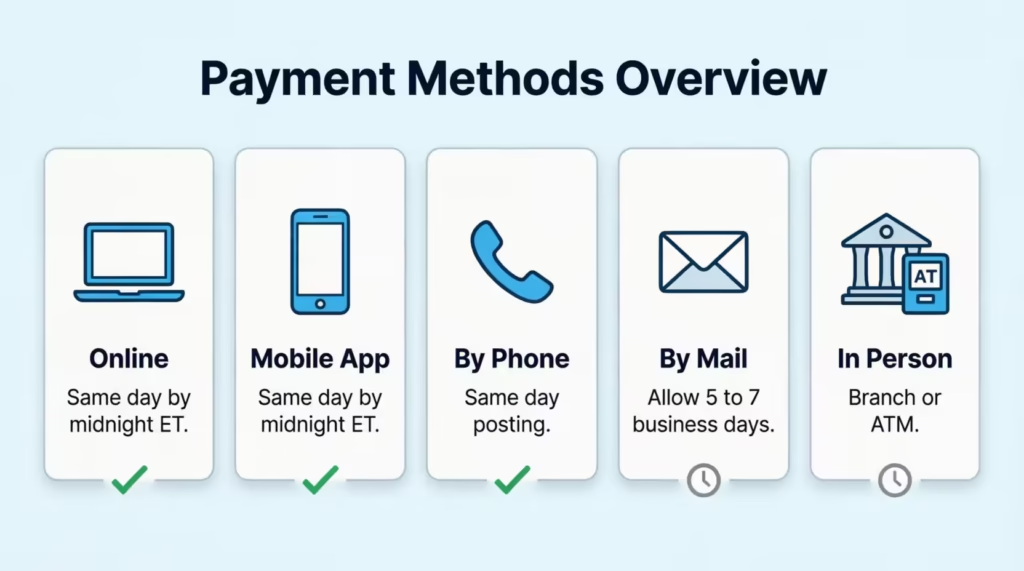
Each method has its own timing rules. Some posts to your account the same day. Others can take several business days. We’ll cover all of that in detail below, so you’re never caught off guard.
How to Pay Your Citi Credit Card Online
Paying through the Citi website is the most popular method. It’s quick, it’s secure, and payments are credited to your account the same day as long as you submit before midnight Eastern Time.
This is the way to proceed:
- Go to citi.com and log in to your account. If you don’t have an online account yet, click “Register” and follow the prompts using your card number.
- From your account dashboard, click “Make a Payment.”
- Choose your payment amount. You’ll see three main options: the minimum payment due, the statement balance, or a custom amount. (We cover what each of these means in the “How Much to Pay” section below.)
- Select your payment date. You can pay right away or schedule a future date as long as it’s before your due date.
- Choose your payment source. This is the bank account the money will come from. If you haven’t linked one yet, see the next section.
- Review the details, then click “Submit.”
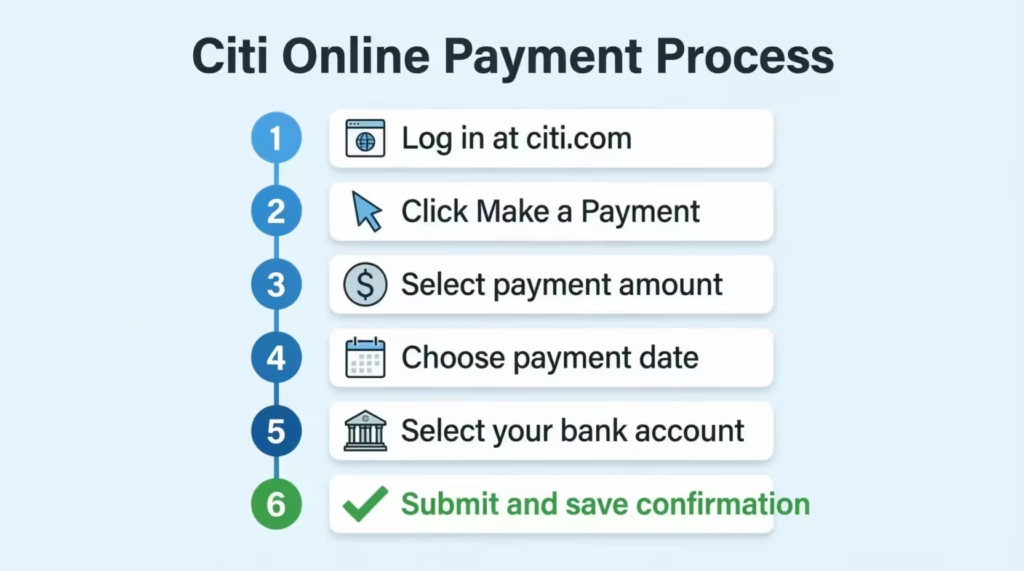
You’ll get a confirmation number right away. Keep it until the payment shows up in your account history.
How to Link a Bank Account for Online Payments
Before you can pay online for the first time, you need to add a payment source. This is a one-time setup. Once it’s saved, you can use it for every future payment without re-entering anything.
Below is how to add a bank account:
- On the Payments screen, look for “Add a New Payment Account” or “Manage Payment Accounts.”
- Select your account type: checking, savings, or money market.
- Enter your bank’s routing number and your account number. You can find both on a paper check or through your bank’s app or website.
- Click “Add” to save the account.
The account must be from a U.S. bank or credit union that accepts electronic debits. Most major banks and credit unions do. Once it’s saved, you won’t need to repeat these steps.
How to Pay with the Citi Mobile App
The Citi Mobile App works the same way as the website. The layout is just a little different on a smaller screen.
Below the navigation path:
- Open the Citi Mobile App and log in.
- Select your credit card account from the home screen.
- Tap “Make a Payment” (or “Payments or Move Money” depending on your app version).
- Choose your payment amount, the bank account to pull from, and the payment date.
- Tap “Submit” to confirm.
Payment history is available under your account activity inside the app. If you’ve already linked a bank account through the website, it will show up in the app as well. No need to add it again.
How to Pay Your Citi Credit Card by Phone
Paying by phone is a solid option if you prefer talking to someone or don’t have online access. It’s also the only way to pay using a debit card, which we’ll explain in a moment.
To make a phone payment, call 1-800-950-5114. The automated system is available 24 hours a day, seven days a week.
Have the following ready before you call:
- Your Citi credit card number
- Your bank routing number
- Your checking or savings account number
The automated menu will guide you through entering your payment amount and account details. If you’d rather speak to a representative directly, stay on the line and follow the prompts to reach a live agent.
Phone payments typically post to your account the same day. This makes it a good option when your due date is very close, and you want peace of mind that the payment will land on time.
Paying with a Debit Card by Phone
If you want to pay your Citi credit card bill using a debit card, the phone is the only way to do it. You can’t use a debit card online or in person at a branch.
To pay with a debit card, call 1-800-950-5114 and follow the prompts. You can use the automated system or ask for a live representative. Have your debit card number and billing information ready.
Debit card payments post to your account immediately. That makes this method especially useful when you need a quick payment credit, and the funds are already in your checking account.
⚠️ Mistake to Avoid: Don’t wait until the last hour of your due date to call. Phone payment lines can sometimes have hold times. Call earlier in the day to avoid cutting it close.
How to Pay Your Citi Credit Card by Mail
Mailing a check or money order is a reliable option if you don’t use online banking or prefer to keep a paper trail. Just know that mail is the slowest of all payment methods. Citi needs to receive your payment by the due date, not just have it postmarked by then.
Standard mailing address:
Citibank P.O. Box 9001037 Louisville, KY 40290-1037
Overnight or express delivery:
Citibank Express Payments 6716 Grade Lane, Building 9, Suite 910, Louisville, KY 40213
If you have a Costco Anywhere Visa card by Citi
Use a different address: P.O. Box 78019, Phoenix, AZ 85062
Before you send your payment, follow these steps:
- Write a check or get a money order. Do not send cash.
- Write your full credit card account number on the memo line of the check. This makes sure Citi applies it to the right account, especially if you have more than one card.
- Mail it early enough to arrive by your due date. Budget at least five to seven business days for delivery, especially around holidays.
If you’re sending a larger payment or want extra security, use certified mail or a traceable shipping service so you have proof of delivery.
How to Pay Your Citi Credit Card in Person
If you prefer to handle things face-to-face, Citi lets you pay at a branch or through a Citibank ATM.
At a Citibank branch: Walk in and a teller can process your credit card payment. This works for any Citi credit cardholder, regardless of whether you have a Citi bank account.
At a Citibank ATM: Cash payments are accepted at Citibank ATMs, but only up to $3,000 per credit card account per calendar month. To use this option, you do need a deposit account (checking or savings) with Citibank.
Keep in mind that Citibank branches aren’t available in every city. If you don’t live near one, the online, phone, or mail options will serve you better. You can find your nearest branch or ATM at citi.com using the branch locator tool.
When Your Citi Payment Will Post
Making a payment before your due date is only half the equation. Knowing when that payment actually posts to your account helps you avoid late fees even when timing is tight.
How posting works for each method:
| Payment Method | Same-Day Credit | Notes |
|---|---|---|
| Online (citi.com) | Yes, if submitted by midnight ET | Bank debit takes 2-3 business days |
| Citi Mobile App | Yes, if submitted by midnight ET | Same rules as online |
| By phone | Yes, typically same day | Debit card payments post immediately |
| By mail | No | Varies by delivery time; allow 5-7 business days |
| In person (branch/ATM) | Generally same day | Confirm with teller |
A few important timing rules to know:
The midnight Eastern Time cutoff is the key deadline for online and app payments. If Citi receives your payment request before midnight ET, your account balance is credited as of that calendar day. Your bank account, however, won’t be debited for another two to three business days.
Weekends and holidays don’t count as business days. If your due date falls on a Saturday, Sunday, or federal holiday, the due date shifts to the next business day. That gives you a little extra time, but don’t count on it as a habit.
Available credit may take up to seven business days to update. Citi’s own policy states that even after your payment posts, your available credit line may not reflect the full amount for up to seven business days. If you need your credit limit restored quickly to make a large purchase, plan your payment well in advance.
Payments from an external bank (a bank different from the one that issued your card) may take longer to process than payments from a Citi bank account.
📌 Did You Know: If you pay online before midnight ET on your due date, your payment counts as on time, even if your bank doesn’t send the funds to Citi until two or three days later. The credit date is what matters for late fee purposes.
How to Set Up AutoPay for Your Citi Credit Card
Setting up AutoPay is one of the most effective ways to protect your credit score. It means you’ll never miss a payment because you forgot, were traveling, or had a busy week.
Here’s how to enroll through the website:
- Log in at citi.com and go to the Payments section.
- Click “Manage AutoPay.”
- If you haven’t linked a bank account yet, select “Add a New Payment Account” and enter your routing number and account number.
- Select your payment amount. (See the H3 below for a breakdown of your choices.)
- Choose your payment frequency. You can pay in one installment per billing cycle or split it into two equal payments.
- Select your payment date.
- Read and agree to the Terms and Conditions, then click “Enroll.”
You’ll see a confirmation with the details of your first scheduled AutoPay. To set it up through the Citi Mobile App instead, tap “Payments or Move Money,” then “Manage AutoPay” and follow the same steps.
To edit or cancel AutoPay at any time, go back to the Manage AutoPay screen and update your preferences. Changes take effect before the next scheduled payment as long as you make them a few days in advance.
Choosing the Right AutoPay Amount
This is the most important decision in the AutoPay setup, and it’s the one most cardholders rush through. The amount you choose has a direct impact on whether you pay interest or not.
Citi gives you four options:
Minimum Payment Due: This is the smallest amount required to keep your account in good standing. Choosing this protects you from late fees and credit score damage, but it does not prevent interest from building up. If you carry a balance month to month, interest will compound daily on what’s left unpaid.
Statement Balance: This is the full amount owed as of your last billing cycle close. Paying this amount in full every month is the key to keeping your grace period and paying zero interest on purchases. For most cardholders, this is the best setting to use.
Current Balance: This reflects your real-time balance, including any new charges made after your last statement closed. AutoPay may offer this as an option, but selecting it can lead to overpayments since it includes new charges that aren’t yet due.
Custom Amount: Choose this if you want to pay more than the minimum but can’t always cover the full statement balance. Just make sure the custom amount is at least as high as the minimum payment due to avoid late fees.
If your goal is to avoid interest, choose a statement balance. It’s the only option that reliably preserves your grace period month after month.
How Much to Pay on Your Citi Credit Card
When you log in to make a payment, you’ll see several numbers on your account screen. They don’t all mean the same thing, and paying the wrong one can cost you in interest charges.
Minimum Payment Due is the floor. It’s the smallest amount Citi will accept to keep your account current. It’s calculated as either a small percentage of your balance or a flat fee, whichever is greater. Paying only the minimum protects you from a late fee and a credit score hit, but Citi will charge interest on the remaining balance. That interest compounds daily, meaning it grows a little every single day until the balance is cleared.
Statement Balance is the total amount you owed when your last billing cycle closed. Paying this full amount by your due date does two things. First, it keeps your grace period intact. Second, it means you pay zero interest on purchases. Citi’s grace period is at least 23 days from the close of your billing cycle to your due date. As long as you pay the full statement balance within that window, new purchases won’t accrue interest.
Current Balance is the live, up-to-the-moment number. It includes your statement balance plus any new charges you’ve made since your last statement closed. Paying the current balance isn’t necessary to avoid interest. The statement balance is the target. Paying the current balance can sometimes mean you’re paying for purchases that aren’t technically due yet.
What happens if you don’t pay the full statement balance? You lose your grace period. Once the grace period is gone, interest starts accruing on new purchases from the day you make them, not just on your existing balance. Citi compounds interest daily, so the cost adds up faster than most people expect.
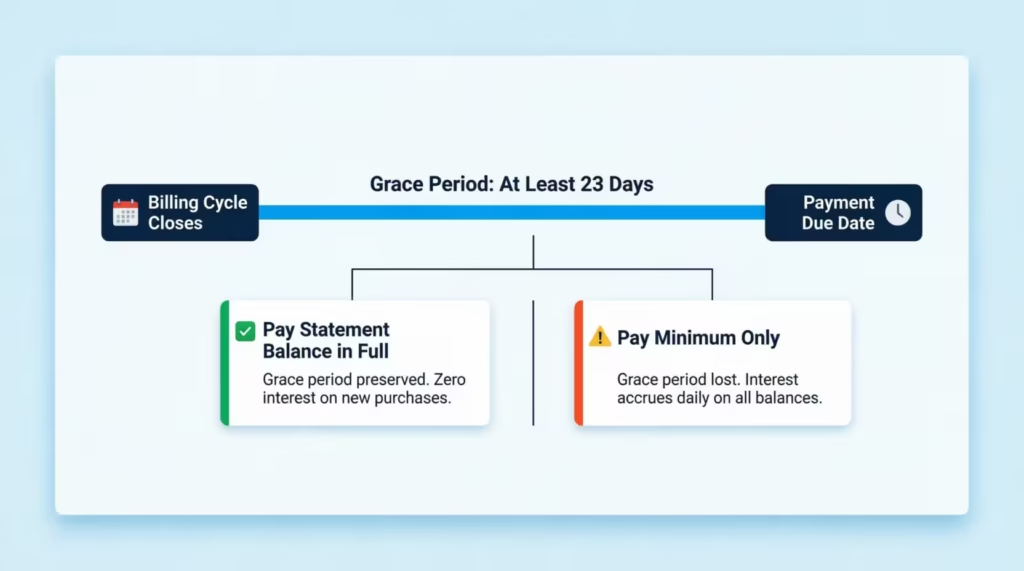
How to restore the grace period if you’ve lost it: Pay your full statement balance for two consecutive billing cycles. After that, the grace period kicks back in, and new purchases stop accruing interest from day one.
What to Do If You Miss a Citi Credit Card Payment
Missing a payment feels stressful, but quick action reduces the damage significantly. Here’s exactly what to do, in order.
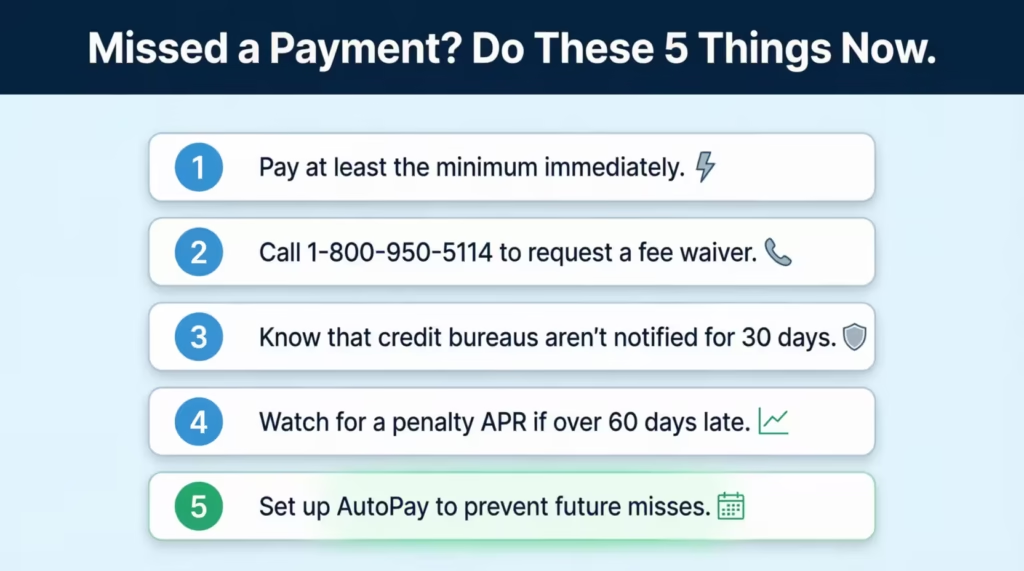
Step 1: Pay immediately.
Log in to citi.com or the Citi Mobile App and submit a payment right now. The sooner you pay, the sooner the damage stops. You don’t need to pay the full balance. At a minimum, pay at least the minimum payment due.
Step 2: Call Citi and request a fee waiver.
Call 1-800-950-5114 and ask to have the late fee waived. Citi charges between $29 and $40, depending on your card and account history. For first-time late payments, Citi will often waive the fee as a courtesy. Be polite, explain that this was an oversight, and ask directly. If the representative says no, ask to speak with a supervisor.
Step 3: Know the 30-day credit reporting window.
A late payment is not reported to the credit bureaus until it’s at least 30 days past due. That means if you missed your due date by a day or a week, your credit score is still safe as long as you pay before that 30-day mark hits. One late payment won’t show up on your credit report if you act fast.
Step 4: Watch for a penalty APR.
If a payment is fewer than 60 days late, Citi may apply a penalty APR to new transactions. If the payment goes 60 or more days past due, the penalty APR can apply to your existing balance as well. The penalty rate can reach 29.99% depending on your card terms. If this happens, call Citi to request a rate review, especially if your account has a strong history.
Step 5: Set up AutoPay going forward.
Once the immediate situation is resolved, set up AutoPay for at least the minimum payment due. This acts as a safety net even if you forget to log in during a busy month.
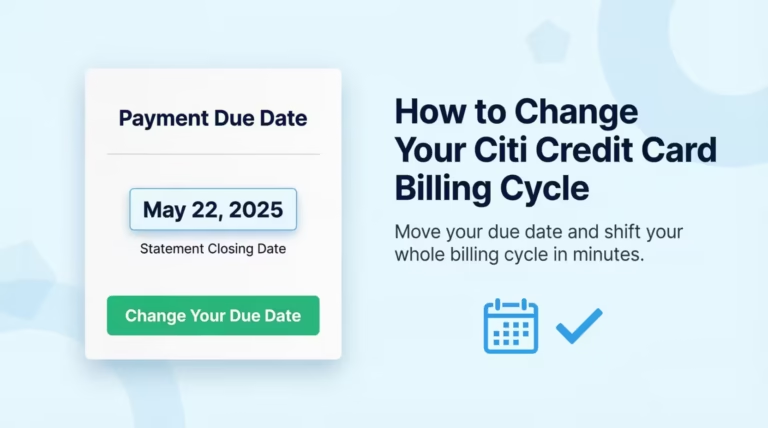
How to Change Your Citi Credit Card Due Date
If your due date always seems to fall at the wrong time of the month, you can change it. This is a one-time fix that can make managing your payments a lot less stressful going forward.
Cardholders who get paid on the 15th and have a due date on the 5th, for example, are constantly at risk of cutting it close. Moving the due date to the 20th lines things up with actual cash flow instead of fighting against it.
Here’s how to change your due date through the Citi Mobile App:
- Open the app and go to “Services.”
- Tap “Card Services.”
- Select “Payment Due Date.”
- A calendar will appear with the available date options. Not every date is selectable. Citi’s internal billing cycle protocols limit your choices to a specific range of dates. Pick the one that works best for your schedule.
- Confirm your selection.
You can also request a due date change online by navigating to the Account Management section and selecting the due date option, or by calling 1-800-950-5114.
Important timing note: The change takes effect within two billing periods, not immediately. Your new due date will appear on a future statement. In the meantime, keep paying on your current due date as usual. Don’t assume the new date is active until you see it on a statement.
Your AutoPay date will automatically update to match the new due date once the change takes effect.
💡 Pro Tip: Pick a due date that falls three to five days after your regular payday. That way the funds are always settled in your account before the payment pulls, and you’re never left scrambling.
Frequently Asked Questions (FAQs)
Is there a fee to pay my Citi card online?
Citi does not charge a fee for making payments online through citi.com or the Citi Mobile App. Standard online payments are free regardless of whether you pay manually or use AutoPay.
How do I speak with a real person at Citibank?
Call 1-800-950-5114 and stay on the line through the automated menu prompts without pressing any options, or press “0” to be routed toward a live representative. Have your card number ready to speed up the process.
Will a one-day-late Citi payment hurt my credit score?
No. Citi does not report a late payment to the credit bureaus until it is at least 30 days past due, so a payment that is one day late will not appear on your credit report as long as you pay before that 30-day mark.
How long does it take for a Citi payment to show up on my account?
Online and app payments are credited to your account the same day if submitted before midnight Eastern Time, but your available credit line can take up to seven business days to fully update.
What happens to my AutoPay if I change my Citi due date?
Your AutoPay date updates automatically to align with the new due date once the change takes effect, which typically happens within two billing periods. You do not need to re-enroll or manually adjust your AutoPay settings.
Is it better to pay online or mail a Citi payment?
Online is faster and safer for most cardholders. Online payments are posted the same day if submitted before midnight Eastern Time, while mailed checks can take five to seven business days to arrive and process, creating a real risk of a late payment.
How do I pay my Citibank bill without logging in?
Call 1-800-950-5114 to pay through Citi’s automated phone system, which is available 24 hours a day and does not require online account access. You can also mail a check or money order to P.O. Box 9001037, Louisville, KY 40290-1037.
What is the 800-950-5114 Citi number used for?
1-800-950-5114 is Citi’s main credit card customer service line, used for making phone payments, requesting late fee waivers, setting up AutoPay, and reaching a live representative for account questions.
How do I log in to my Citibank credit card account online?
Go to citi.com and click “Sign In” at the top of the page. If you have not registered yet, click “Register” and follow the prompts using your credit card number to create a username and password.
Can I pay my Citi credit card with a check?
Yes. Make the check payable to Citibank, write your full credit card account number on the memo line, and mail it to P.O. Box 9001037, Louisville, KY 40290-1037. Allow at least five to seven business days for it to arrive and be posted.
Bottom Line
Citi gives cardholders a lot of flexibility when it comes to making payments. Online and mobile payments are the fastest and most convenient options for most people. Phone payments work well for those who prefer to speak with someone or need to use a debit card. Mail and in-person options are there when you need them, but they require more lead time.
The most effective approach is to set AutoPay to your statement balance. This protects your grace period, eliminates interest charges, and removes the risk of ever forgetting a due date. If your current due date doesn’t line up with your paycheck, changing it takes just a few minutes and makes a real difference.
If this guide helped you sort out your Citi payment options, share it with someone who just got their first credit card. Getting the basics right from the start saves a lot of money over time.