If you’ve ever stared at your Citi statement and thought, “This due date is in the worst spot for my paycheck,” you’re not alone. Many cardholders want to shift the date, but they’re not sure if Citi even allows it, where the setting hides, or whether the change will trigger a late fee during the switch. That’s the whole reason people search for a Citi credit card billing cycle change in the first place.
Yes, Citi lets you move your due date online, and shifting the due date automatically shifts your whole billing cycle with it.
In this guide, we’ll cover the click path, app steps, phone backup option, and side effects to consider before you tap “confirm.”
Key Takeaways
This guide explains how to change a Citi credit card billing cycle, including the online, app, and phone steps, why only certain due dates are available, and how the switch can temporarily affect AutoPay and your next bill.
Core Facts:
- Changing your Citi due date automatically shifts your entire billing cycle since the due date and statement closing date are locked together, with the due date falling about 23 days after the statement closes.
- The change can be made online through Account Management, in the Citi Mobile app under Services, or by phone at 1-800-950-5114, with no fee required.
- Citi only offers a limited range of due dates based on where you currently sit in your billing cycle, and this list refreshes as the cycle progresses.
- The new due date typically takes one to two full billing cycles to appear on your statement, so you should keep paying the date printed on your most recent statement until the new one shows.
- AutoPay usually shifts automatically to match a new due date, but if AutoPay is set to a fixed calendar day instead of “pay on due date,” the draw will not move and can cause a late payment.
- Moving your due date later can temporarily increase your next statement balance because extra purchases made during the extended cycle get added to the closing statement.
Best for:
- Cardholders whose current Citi due date does not match their paycheck schedule or other bill due dates.
- People juggling multiple credit cards who want to align due dates to a single payment day each month.
- Anyone who recently changed their due date and needs to confirm the switch has processed correctly before their next payment is due.
Your Due Date and Your Billing Cycle Are the Same Setting
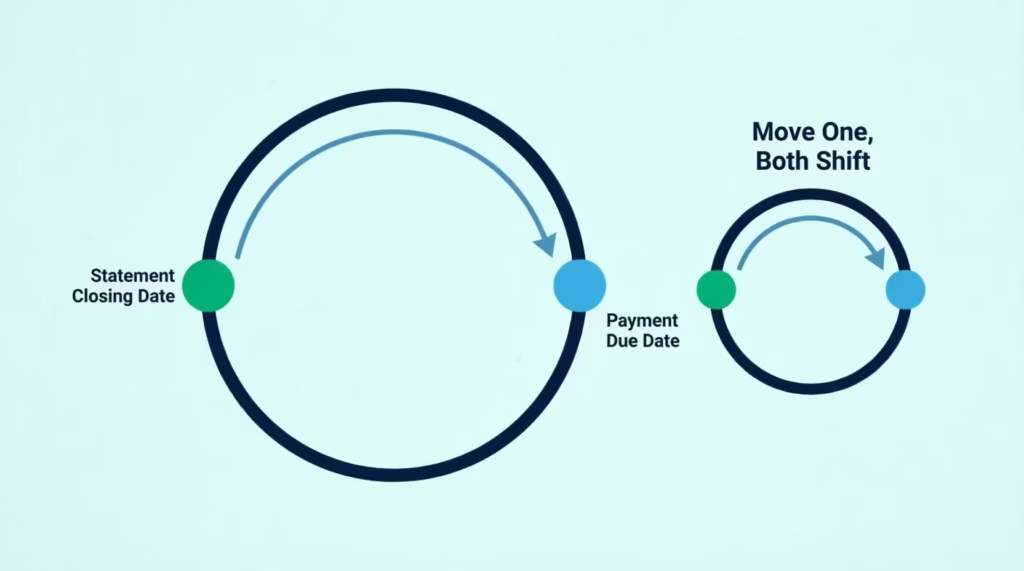
Here’s the first thing most cardholders get tangled up in. You go looking for a “billing cycle” setting on your Citi account, and you can’t find one. That’s because it doesn’t exist as a separate control. Citi gives you exactly one lever, and it’s called the payment due date. When you move the due date, the statement closing date shifts with it, and the whole cycle moves as a unit.
Think of it like moving a single anchor on a rope. The knot at the other end moves the same distance. The statement closing date and the due date are locked together in a fixed relationship. On a typical Citi card, the due date is about 23 days after your statement closes.
If you move your due date forward by a week, your statement closing date will shift forward by about a week too. Citi confirms this offset structure in its own guide to credit card due dates and closing dates.
So when the article says “change your billing cycle,” what you’re really doing is changing the due date. There is no second setting to worry about, and no separate billing cycle length dial. The cycle length stays the same at roughly 30 days. Only its position on the calendar moves.
Citi does allow this change on personal credit cards. Your account needs to be in normal standing, meaning you’re not currently past due or in collections. If those boxes are ticked, the online tool for a Citi billing cycle change online should work for you today.
Can Citi Cardholders Change Their Billing Cycle
Short answer: yes. You use the change payment due date feature inside your online account, and the cycle shifts with it. There’s no separate application, no fee, and no need to close and reopen the card.
A few conditions apply. Your account should be current, not delinquent. The setting is applied per card, so if you carry two Citi cards, you’ll need to change each one separately even though they share the same login. And the date you can choose from isn’t unlimited; Citi will give you a specific range, which we’ll explain soon.
How to Change Your Citi Credit Card Due Date Online
The reason people can’t find this setting is that Citi tucks it under Account Management, not under Settings or Profile. Once you know where to click, the whole thing takes about two minutes.
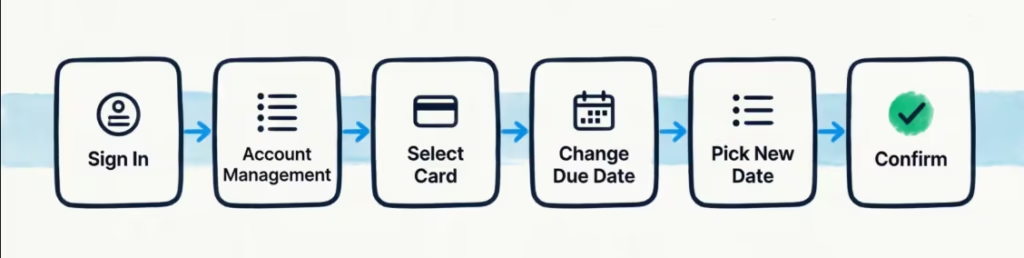
Follow these steps on desktop:
- Sign in to your account at citi.com. Use the same username and password you’d use for the mobile app.
- On the top navigation bar, click the Account Management tab. This is the menu that holds most of the “change how my account works” tools.
- Find the card you want to adjust. Citi shows all your cards on one screen, so you don’t need to switch profiles first. Just look for the correct card if you have more than one.
- Click Change Payment Due Date. The link sits inside the payments and services group of options. It’s separate from the Manage Payment Accounts area, which is only for your linked checking accounts.
- Pick your new date from the list Citi offers. You’ll typically see a range of dates rather than every day of the month. That’s normal, and it’s explained further below.
- Review the new due date on the confirmation screen, then click Submit or Confirm.
Right after you submit, Citi shows an on-screen confirmation with your new due date and often the date it will first apply. You should also receive a confirmation email within a few minutes. Save that email or take a screenshot. It’s your proof the request went through, and it’s useful if you ever need to call in about the change.
If you don’t see the Change Payment Due Date link, it might not be available for your account. Also, your account may not be in good standing to make changes. In that case, the phone route below is your backup.
Changing the Due Date in the Citi Mobile App
If you prefer your phone, the path is similar, but the labels are different.
Open the Citi Mobile app (grab it here on the Apple App Store or Google Play if you don’t have it). Then:
- Tap Services at the bottom of the screen.
- Choose Card & Bank Account Services.
- Tap Payment Due Date.
- Select your card if prompted, then pick a new date from the list shown.
- Review and confirm.
The app sometimes shows a slightly narrower list of dates than the desktop site. If the date you want isn’t on the app but you think it should be, log into the desktop site and check there before you give up. After you confirm, expect a confirmation screen inside the app and a follow-up email. If neither shows up, treat the change as unconfirmed and try again.
💡 Pro Tip: The Citi app describes the options as “beginning, middle, or end of a month” in its store listing, but the actual due-date picker gives you specific dates. Don’t be thrown off by the marketing wording you’ll see real calendar days once you’re inside the tool.
Changing the Due Date by Phone
Sometimes the online tool won’t cooperate. Maybe no acceptable dates appear, or the account is showing an issue that blocks the online change. That’s when a phone call is worth it.
Call the general Citi cards line at 1-800-950-5114. This is the number Citi publishes on its official Contact Us page, and it’s also printed on the back of your card and on your monthly statement. Spanish-language support is at 1-800-947-9100.
Before you dial, have these ready:
- Your card number, or the last four digits and your account details.
- Your ZIP code and the answer to your security question.
- The exact new date you want, and a backup date in case your first pick isn’t available.
- Your most recent statement, so you can quickly answer verification questions about balance or last payment.
Ask the agent to confirm the new due date, the first statement the change will apply to, and whether AutoPay and any reminder alerts will update automatically. Ask for a confirmation number and jot it down. Also request a follow-up email or secure message so you have written proof of the switch.
Why You Can Only Choose Certain Due Dates
This one confuses almost everyone. You open the picker expecting a full monthly calendar, and you see maybe six or eight dates, sometimes even fewer. Nothing is broken. This is how the tool is designed.
The dates you’re offered are tied to where your account currently sits in its current billing cycle. Citi must keep the new cycle length reasonable. So, you can’t choose a date that creates a super-short cycle, like three days, or an odd overlap with your statement. So the system filters the calendar down to only the dates that produce a clean transition.
Here’s what that looks like in practice. Say today is the 8th of the month, and your current due date is the 12th. Citi may only offer you dates roughly between the 13th and the 24th.
Dates before the 13th are too close to your current due date to be useful. Dates too far out would stretch this billing period past what the system allows. That’s the whole logic behind the restricted billing cycle length view.
If the date you want isn’t showing, don’t assume you’re locked out. Wait until you’re at a different point in the cycle and check again. The list refreshes based on today’s position, so what’s unavailable on the 8th may open up on the 20th.
Picking a Due Date to Match the Calendar Month or Your Other Cards
Lots of cardholders want their Citi due date to sit near month-end, or right after payday, or lined up with a Chase or Amex card so they only pay bills once. Here’s how to reverse-engineer the date.
The due date on a Citi card typically falls about 23 days after the statement closing date, per WalletHub’s breakdown of Citibank due dates. So if you want your statement to close on the 30th (aligning cleanly with your calendar month), aim for a due date around the 22nd or 23rd of the next month. If you want your Citi due date to match a Chase card that’s due on the 15th, you can pick the 15th directly if it’s offered.
Two small wrinkles to know. First, weekends and holidays can push a due date forward by a day or two, because the actual “posted by” date has to fall on a business day. Second, short months (February especially) can make the closing date shift by one day. So expect small drift, not perfect alignment every month.
Here’s a quick reference for common goals:
| Your goal | Target due date to pick | Roughly what your statement will close on |
|---|---|---|
| Pay right after 1st-of-month paycheck | 5th–8th | 13th–16th of previous month |
| Pay right after 15th paycheck | 20th–23rd | 27th–30th of previous month |
| Line up with calendar month-end | 22nd–24th | 30th or last day of the month |
| Match a Chase or Amex due date | Same date as the other card | 23 days earlier |
Pick the date that solves your actual cash-flow problem. Don’t over-optimize. Being one or two days off from a “perfect” alignment matters far less than never missing a payment because the timing feels natural.
What to Do If No New Dates Are Available
If the picker shows only your current date, or the list is empty, don’t panic. Try these in order:
- Wait and check again. Come back later in the same current billing cycle, maybe a week or two out. The available date list is dynamic and refreshes as your cycle progresses.
- Confirm you clicked the right link. The Change Payment Due Date link is separate from the AutoPay settings screen, which only lets you change the day AutoPay draws money, not the actual due date. If you’re editing AutoPay, you’re in the wrong place.
- Try the desktop site if you were on the app, or vice versa. Occasionally one interface offers a date the other doesn’t.
- Call Citi at 1-800-950-5114. An agent can sometimes push through a date the self-service tool won’t offer, especially if your reason is tied to income timing or hardship.
How Long the Change Takes to Take Effect
This is where late payments quietly happen. The moment you click confirm, you might assume the new date is live right away. It isn’t. According to Citi’s own guidance on changing your due date, the change may not apply immediately.
Plan for one to two full billing cycles before the new payment due date shows up on your statement. Sometimes the very next statement reflects it. Sometimes it takes the one after that. It depends on how close you were to your closing date when you made the change.
If Citi’s system had already generated the next statement, that bill goes out with the old date, and your new date only appears on the following cycle.
Here’s the rule that keeps you safe: pay by whatever date is printed on your most recent statement. Not the date you just picked. Not the date your calendar app auto-updated. The date on the paper (or PDF) statement in front of you is the only one that counts until you see the new one print.
You can also log into your account and check the Payment Information panel on your dashboard. It shows the currently active due date. When that number changes to your new one, you’re clear.
What to Do With Your Current Bill While the Change Is Processing
Michael, a project manager at a mid-size consulting firm, changed his Citi due date from the 8th to the 22nd because his direct deposit hits on the 15th. Right after he submitted, he assumed his current $1,240 bill would now be due on the 22nd. It wasn’t.
His statement had already been generated on the 1st with an 8th due date. He nearly missed the payment because he’d already mentally rescheduled it.
Don’t do what Michael almost did. During the transition window:
- Pay at least the minimum payment due by the date printed on your most recent statement. That’s the only date that governs whether you’re late.
- Don’t assume the new date applies to the bill already in your inbox.
- Read the due date on every statement during the transition, not just the first one after the change. It might take two statements for the shift to actually appear.
- If you use bank bill-pay or a calendar reminder set to the old date, leave it alone until the new date is confirmed on a printed statement. Then update your reminders.
How to Confirm the Change Actually Went Through
Three checkpoints will tell you the switch has landed:
- Look at the next statement. The due date field is right at the top. If it shows your new date, the change is live.
- Check the online summary. Your account dashboard shows the active due date under Payment Information. This is usually the fastest way to spot the switch.
- Search your email. Citi sends a confirmation notice, typically within a few hours of the request. If you never got one, the request may not have been processed, and it’s worth calling in.
If two full statement cycles pass and the date still hasn’t changed, contact Citi. Something didn’t stick, and you don’t want to keep guessing.
Does Changing Your Due Date Also Update AutoPay
Yes, in almost every case Citi shifts AutoPay to match the new due date automatically. You don’t need to cancel AutoPay and re-enroll. The system links AutoPay alignment to your active due date, so when the date changes, the AutoPay draw date changes with it on the next cycle.
That said, don’t just trust that it worked. Verify it. After you submit the due date change:
- Go back to Account Management and click into AutoPay (or “Enroll in AutoPay / Manage AutoPay”).
- Look for the “pay on due date” setting. It should still be selected. If it is, AutoPay will always align, no matter how many times you change the due date later.
- If your AutoPay is set to a specific calendar day instead of “on the due date,” fix it. Change it to “pay on due date,” so it moves with any future adjustments. Otherwise, you risk the draw happening on the old day, which may now be after the actual due date.
- Double-check that your linked bank account is still correct. Occasionally people update account details separately, and it’s an easy thing to overlook during a payment due date change.
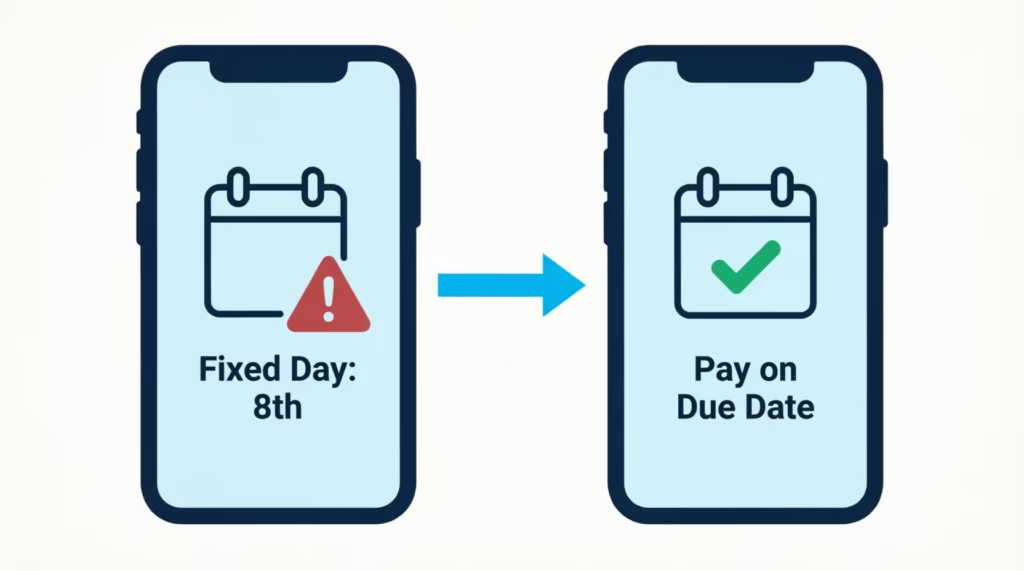
⚠️ Mistake to Avoid: If your AutoPay is set to a fixed day of the month (say “pay every 8th”) rather than “pay on due date,” changing your due date will not shift the draw. You could end up paying after the new due date and rack up a late fee. Always switch AutoPay to “pay on due date” before you change your billing cycle.
If AutoPay and your due date fall out of sync, the payment could post late even though the money left your bank. Late payments over 30 days can hit your credit report, so this is worth ten seconds of verification.
How Often You Can Change Your Citi Due Date
This is the question with the most murky answer, so it’s worth being straight about what’s confirmed and what isn’t.
Citi’s own article on changing credit card due dates notes that some issuers limit changes to one per 90 days. Citi sees this as an industry norm, not a strict company rule. They also don’t publish a single frequency limit for all cards and accounts. What that means for you: the exact number of days you have to wait between changes can vary by card product and by account history.
The practical takeaway: assume you get one change roughly every three months, and treat each change as if it’s your only one for a while. If you need a more specific answer for your account, two options work:
- Open the change payment due date tool. If the tool blocks you with a message like “you’ve recently changed your due date,” it will usually tell you when you can try again.
- Call the number on the back of your card and ask directly. An agent can see your account’s specific rules in real time.
Because a fix might not be possible next week, pick your target date carefully. Think about your paycheck schedule, bill dates, and any life changes, like moving, starting a new job, or quarterly bonuses, before finalizing it. A well-chosen date the first time saves you from waiting out a 90-day cool-down.
Will Changing Your Due Date Make Your Next Bill Bigger
Possibly, yes, and it’s worth budgeting for. This is the side effect nobody warns you about, and it can catch you off guard.
Here’s why it happens. When you push your due date later, you’re also pushing your statement generation date later (remember, they move together). That means your current billing cycle gets stretched. Instead of closing in, say, 12 days, it might close in 22 days. Any purchases you make in that extra window get added to the credit card statement that’s about to close, not the one after it.
A quick example: Say your statement normally closes on the 5th of each month with about $1,000 of purchases. You push your due date out by 10 days, which pushes your statement close from the 5th to the 15th. In those 10 extra days, you spend another $350 on groceries and gas.
That $350 now lands on the closing statement, making the total $1,350 instead of $1,000. Your minimum payment due for that cycle will still be small, but if you normally pay in full, the full amount is $350 bigger than usual.
This is a one-time transition effect. Once the new cycle is fully in place, your bills should look normal again. Just plan for it. If you’re pushing the date later, expect the next statement to run slightly higher and set aside a little extra so you can still pay in full and avoid interest.
📌 Did You Know: Moving your due date earlier in the month has the opposite effect. Your next statement covers a shorter-than-usual window, so the balance can actually be smaller than normal. Great for lowering your reported utilization in a month. Citi usually reports your balance to credit bureaus near your statement closing date.
Frequently Asked Questions (FAQs)
How do I change my Citi credit card billing cycle?
Log in to your Citi account, click Account Management, then select Change Payment Due Date for the card you want to adjust. Pick a new date from the list Citi offers, then confirm. Your billing cycle shifts automatically since it’s tied to your due date.
Is it possible to change my credit card billing cycle date?
Yes, Citi lets you change it through the Change Payment Due Date tool in Account Management. There’s no fee and no need to close your card, but the setting must be changed separately for each card you own.
What is the billing cycle for a Citibank credit card?
A Citi billing cycle runs about 30 days, with the due date falling roughly 23 days after the statement closing date. Moving your due date shifts the whole cycle, but the length itself stays the same.
Can I change my payment date to the end of the month for Citibank?
You can request a date near month-end, but Citi only offers a limited range of dates based on where you currently sit in your billing cycle. If the 22nd through 24th isn’t available yet, check again later in your cycle since the list refreshes.
What happens if I change my billing cycle?
Your statement closing date shifts along with your due date, and your current cycle may stretch or shrink temporarily. If you push the date later, extra purchases can land on your next statement, making that one bill larger than usual.
How often can I change my Citi due date?
Citi doesn’t publish one universal limit, but many issuers cap changes at once every 90 days as an industry norm. Try the online tool first since it will tell you if you need to wait before changing it again.
Does changing my payment date affect my credit score?
Changing your due date doesn’t directly hurt your score, but it can temporarily raise your statement balance if you push the date later. Since Citi reports your balance near your statement closing date, a bigger balance that month could raise your reported utilization.
Does changing my due date also update AutoPay?
Yes, Citi typically shifts AutoPay to match your new due date automatically on the next cycle. Still, check that your AutoPay is set to “pay on due date” rather than a fixed calendar day, or your payment could post late.
How long does it take for a new due date to apply?
Plan for one to two full billing cycles before the new date shows up on your statement. Keep paying the date printed on your most recent statement until you see the new one appear.
Wrapping Up
Changing your Citi due date shifts your entire billing cycle. Once you find the setting in Account Management, it only takes about two minutes to complete the change.
Keep in mind three key points:
- The date list is limited for a reason.
- The switch needs one or two statements to take effect.
- Pushing the date later can temporarily raise your next bill.
Choose your target date once. Then, make sure AutoPay is set to “pay on due date.” Keep paying the printed date until a new one appears.
If a friend or family member is juggling multiple cards and struggling to line up payments with payday, share this guide with them. It could save them a late fee and a lot of calendar stress.