You signed up for Experian to check your score before a car loan or apartment lease. Now the monthly charge keeps hitting your card, and every “cancel” button on the site quietly turns into a “downgrade” offer.
If you’re trying to figure out how to cancel an Experian membership without getting bounced through upsells or stuck on a chat loop, you’re not alone.
This guide walks you through every working method, warns you about the traps, and shows you how to lock in the refund if you’re eligible. Keep reading for the exact clicks, numbers, and proof steps you need.
Key Takeaways
This guide explains how to cancel an Experian membership through online, app, and phone methods, including retention offer traps, refund eligibility, and how to confirm cancellation is stuck.
Core Facts:
- Downgrading to free stops paid features but keeps the account open, while fully canceling stops the recurring charge entirely.
- Online cancellation is done through My Account, Subscriptions, and clicking Cancel Subscription, followed by declining retention offers and confirming.
- Subscriptions billed through the App Store or Google Play must be canceled directly through Apple or Google, not Experian support.
- The official Experian membership phone number is 1-866-617-1894, staffed weekdays 8 am to 8 pm CT and weekends 8 am to 6 pm CT.
- Full refunds apply if canceled within the 7-day free trial, charged due to a system error, or charged after cancellation with proof.
- Canceling a paid Experian membership does not affect your credit score, since the credit report and score exist independently of the subscription.
Best for:
- Readers who signed up for a free trial or paid plan and want to stop recurring charges without getting stuck in retention offers.
- Anyone who was charged after already canceling and needs a clear refund request process.
- Readers trying to determine whether their subscription was billed through Experian, Apple, or Google before contacting support.
Downgrading to Free vs. Fully Canceling Your Experian Membership
Before you touch any button, understand what Experian is really offering you. There are two very different actions, and picking the wrong one means you’ll still be paying next month.
Downgrading moves you from a paid plan (like CreditWorks Premium or IdentityWorks Premium) to Experian’s free tier. Your paid features stop, but your account stays open. You keep your free FICO Score 8, basic credit monitoring alerts, and access to your Experian credit report. This is what Experian pushes hardest, because you’re still a “user” they can market to.
Fully canceling ends the paid subscription and stops the recurring charge. In the US, most people don’t fully “delete” their Experian account, because the free membership is what powers tools like Experian Boost and your free credit report access. What you actually want in almost every case is to stop the paid plan, so no more money comes out. That is a cancellation, even if the account itself stays alive at the free level.
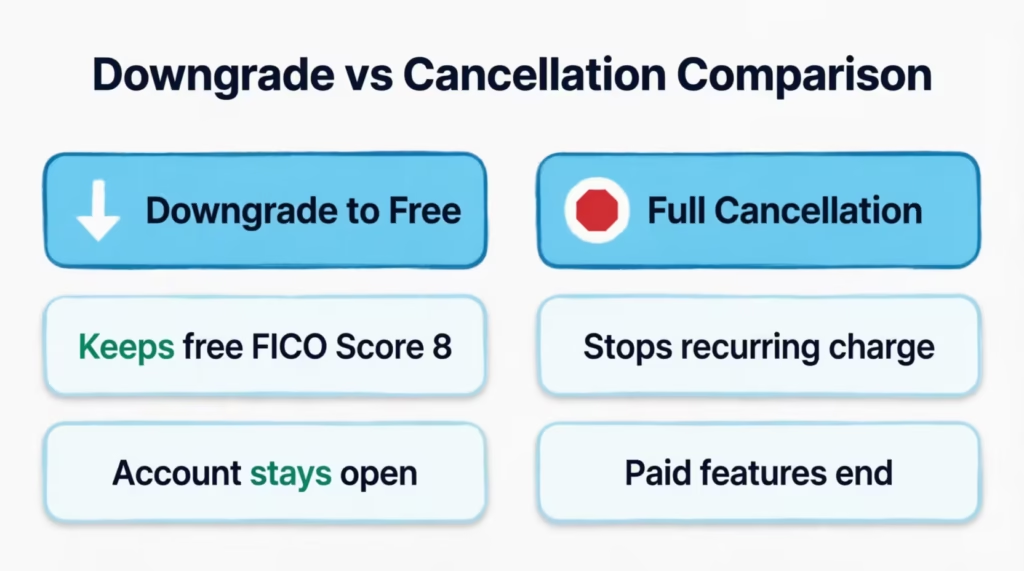
Why does the site keep showing you a downgrade button instead of a clean “cancel”? Two reasons. First, US law lets consumers hold a free credit-monitoring account, so Experian keeps that door open on purpose. Second, retention offers (a cheaper plan, one free month, a lower tier) are standard subscription tactics. You can decline every one of them and still end the paid billing.
Here’s the simple rule: if your only goal is to stop the charge, choose downgrade to free or cancel the paid subscription. Both stop the money. To remove your personal data, you’ll need to make a separate request. Contact Experian’s consumer services team by phone or in writing. This is different from stopping the bill.
💡 Pro Tip: Take a screenshot of every cancellation screen, including the final confirmation. If a charge appears next month, that screenshot is your fastest path to a refund.
How to Cancel Experian Membership Online
Canceling online is the quickest option for most. It applies to CreditWorks Premium, IdentityWorks Premium, and other plans signed up online. You don’t need to call anyone.
Follow these steps exactly:
- Open a desktop or mobile browser (not the app) and go to the Experian sign-in page. Log in with the email and password you used to sign up.
- Click your name or the profile icon in the top right corner. From the dropdown, select My Account.
- On the My Account page, look for the Subscriptions, Membership, or Billing section. The exact wording changes based on which plan you have.
- Find your active paid plan. Click Cancel Subscription or Cancel Membership next to it.
- Experian will show one or two retention screens. You may see a discount offer, a downgrade-to-free offer, or a “pause” option. If you want to stop paying, keep clicking Continue to Cancel or No Thanks.
- Reach the final confirmation page. Click Confirm Cancellation.
- Wait for the on-screen confirmation and note the reference number if one appears.
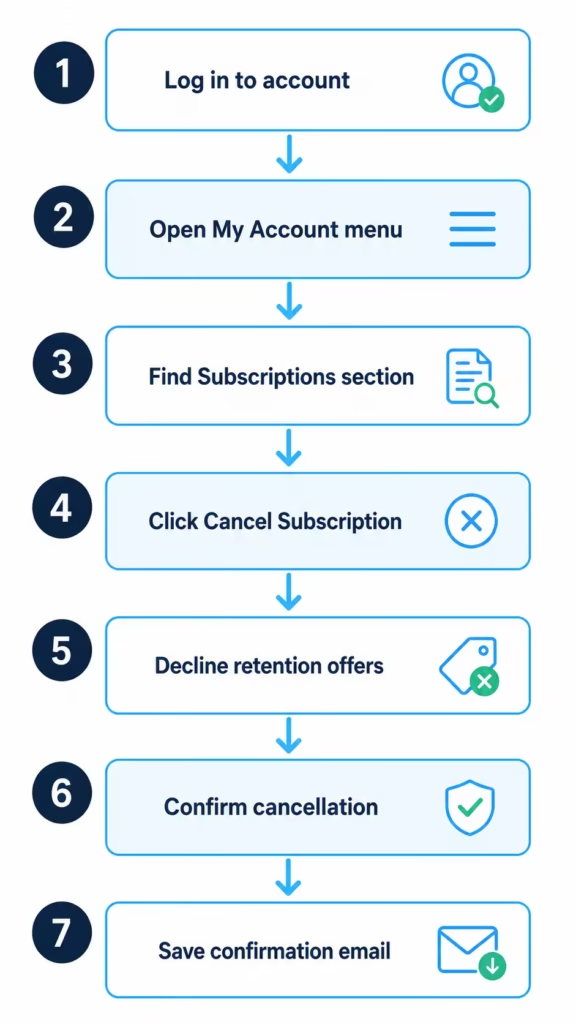
You should get a cancellation email within a few minutes. If it doesn’t arrive, check spam and then check your subscription status again by refreshing the My Account page. If it still shows “active,” the cancellation didn’t go through, and you’ll need to try again or switch to the phone method covered below.
One important note about timing. Canceling stops the auto-renewal, but you usually keep access until the end of your current billing cycle. If you signed up on the 15th and cancel on the 20th, you’ll have access through the next 15th, and no new charge will hit after that.
How to Cancel Experian Membership on the App (iPhone and Android)
The Experian mobile app has a big limitation: you can’t always cancel a paid plan from inside it. What you can do depends on how you originally signed up.
If you signed up through the Experian website or directly with Experian, the app won’t show a clear cancel button. You’ll need to open a mobile browser (Safari on iPhone, Chrome on Android), log in to Experian.com, and follow the online steps in the section above. Trying to cancel from inside the app itself will usually just link you back out to the website.
If you signed up through the App Store on your iPhone, Apple is the biller, not Experian. You must cancel through your Apple subscription settings:
- Open the Settings app on your iPhone.
- Tap your name at the top.
- Tap Subscriptions.
- Find Experian in the list.
- Tap it, then tap Cancel Subscription.
- Confirm on the pop-up.
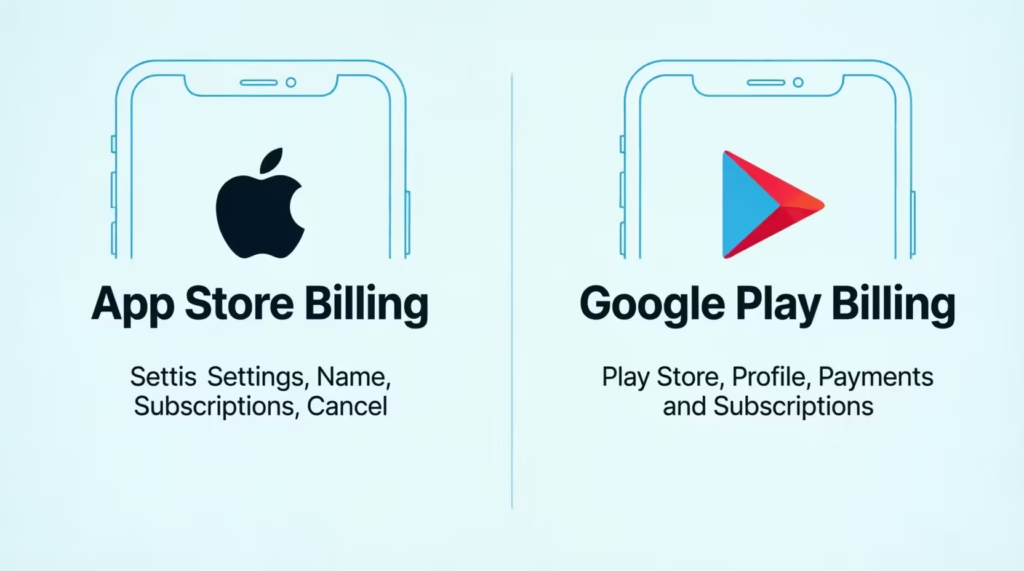
If you signed up through Google Play on Android, Google is the biller:
- Open the Google Play Store app.
- Tap your profile icon in the top right.
- Tap Payments & subscriptions, then Subscriptions.
- Tap Experian, then Cancel subscription.
- Follow the prompts to confirm.
This split matters. Experian’s customer service can’t cancel subscriptions billed through Apple or Google. They will tell you the same thing: you have to cancel it at the store. If you call Experian about an App Store charge, they can’t refund it or stop it. Only Apple can.
How to Cancel Your Experian Subscription Without Calling
Some people would rather stub their toe than sit through a phone menu. Good news: you have three no-call options.
Option 1: Online through My Account. This is the primary method and works for anyone who signed up on Experian’s website. The steps in the “Cancel Online” section above cover it fully.
Option 2: Live chat with Experian support. Experian offers a live chat available 24 hours a day, 7 days a week for membership questions. Access it through the Experian Contact Us page. Start the chat, tell the agent you want to cancel your paid membership, and provide your account email and the last four digits of the payment card on file. The agent will process it and send you a confirmation.
Option 3: Written cancellation request. If you want a paper trail, mail a signed letter to Experian’s consumer services address requesting cancellation. Include your full name, address, date of birth, and the email tied to your Experian account. This method is slow (allow 2 to 4 weeks), but it creates a legal record. Send it certified mail so you get a delivery receipt. Use this route if you’ve tried other methods and they haven’t worked.
For most readers, live chat is the sweet spot: no phone, faster than mail, and you get an agent who can actually stop the billing while you watch.
Canceling by Phone: Experian’s Contact Number and What to Expect
Sometimes online cancellation fails, the site loops, or you just want a human to confirm it. When that happens, the phone works.
The official Experian membership customer service number is 1-866-617-1894. This line is listed on the Experian Contact Us page and staffed Monday through Friday 8 am to 8 pm CT, and Saturday and Sunday 8 am to 6 pm CT. Call from the phone number tied to your account if you can, since it may speed up verification.
Before you dial, have this ready:
- Your Experian account email
- Your full name and date of birth
- The last four digits of the credit or debit card being charged
- Your ZIP code and mailing address on file
- If you have it, your most recent charge amount and date
The call flow usually goes like this. You’ll get an automated menu. Choose the option for “Membership” or “Billing” or “Cancel.” You’ll then verify your identity, which can include a three-digit CVV check, the last four of your card, or an SMS code to your phone.
Once you’re with an agent, say clearly: “I want to cancel my paid membership and stop all future charges.” Expect the agent to offer a retention discount, a free month, or a downgrade to the free tier. Politely decline each offer and repeat your request. Ask the agent for a cancellation reference number and confirm that a confirmation email will be sent to you within 24 hours. Write down the reference number, the agent’s name, and the date and time of the call.
Most cancellation calls take 8 to 15 minutes. If your call is going longer than 20 minutes with no progress, ask for a supervisor.
Beware of Unofficial “Experian Cancellation” Phone Numbers
Search Google for “Experian cancel phone number” and you’ll see paid ads and forum posts with numbers that look official but aren’t. Some belong to third-party credit-repair companies. Some are outright scams. They claim to “help” you cancel but ask for your Social Security number, card details, and login info.
Only trust numbers listed on Experian’s own domain (experian.com). If a number appears on a directory site, a Yelp listing, or a random blog, cross-check it against the official Experian help page before you dial.
⚠️ Mistake to Avoid: Never give your full Social Security number, full card number, or online password to anyone who calls you claiming to be from Experian. Experian will not call you out of the blue to cancel your membership.
Red flags that you’re talking to a scam line:
- The rep asks for your full 9-digit SSN when Experian normally uses the last 4
- They pressure you to buy “credit repair” or “identity restoration” instead of canceling
- They ask you to pay a fee to cancel (Experian never charges to cancel)
- They ask for remote access to your computer
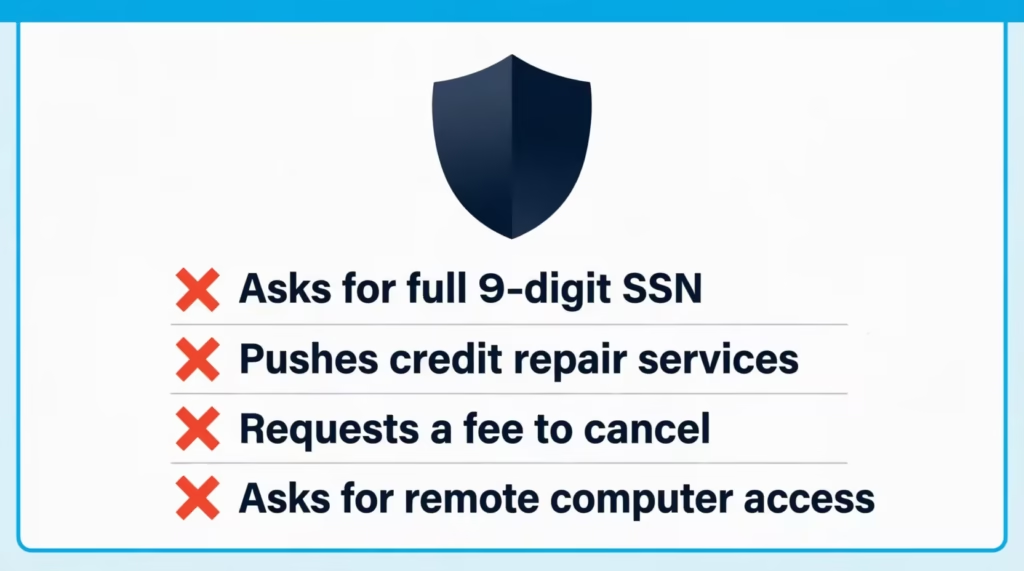
Hang up immediately if any of these happen and dial the number on the official contact page yourself.
How to Cancel a Free Trial Before You’re Charged
The free trial is where most people get burned. Experian’s IdentityWorks Premium trial runs for 7 days, and after that you’re billed automatically at $24.99 per month, as noted on the Experian Identity Theft Protection page. Miss the window and the charge is legally valid because you agreed to it at signup.
To cancel before the charge:
- Find your exact trial end date. Check the welcome email Experian sent when you signed up. It lists the trial period and the date the first charge will hit. If you can’t find the email, log in to My Account and look at the Subscriptions section for the renewal date.
- Cancel at least 48 hours before that date. Give yourself a buffer. If the trial ends on the 15th, cancel by the 13th. Cancellations sometimes take a few hours to process on Experian’s side, and you don’t want to cut it close on a weekend or holiday.
- Set a phone reminder for two days before the trial ends the moment you sign up. This is the single most effective thing you can do to avoid a surprise charge.
- Use the online cancellation flow covered earlier. Free trials are canceled the same way as paid plans, through My Account > Subscriptions > Cancel.
- Confirm you still have trial access after canceling. Experian usually allows you to access trial features until the original end date, even if you cancel. This means you won’t lose what you paid for right away.
📌 Did You Know: Experian’s terms state that if you cancel within the 7-day trial window, you owe nothing. But after that window, the fee is charged in full, and Experian does not prorate the month if you cancel mid-cycle.
If the charge already hit because you missed the window by a day or two, don’t panic. The refund section below covers exactly what to do.
How to Cancel and Request a Refund
Refund eligibility depends on when you cancel and what you were charged for. Experian’s official policy is straightforward once you know the rules.
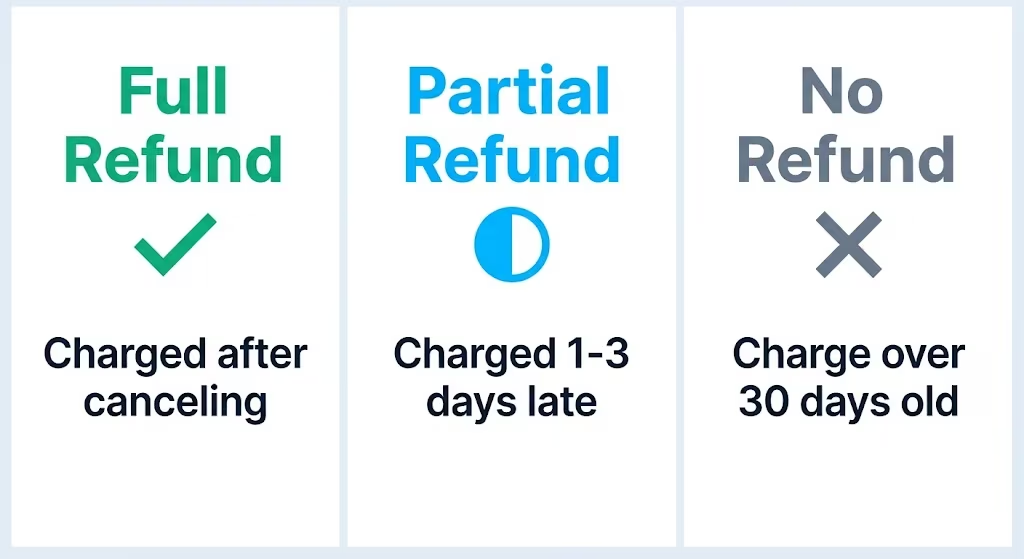
You are eligible for a full refund if:
- You cancel within the 7-day free trial window (no charge should have hit at all)
- You were charged due to a system error or duplicate billing
- You were charged after canceling (proof of cancellation is required)
You may be eligible for a partial or discretionary refund if:
- You were charged 1 to 3 days after the trial ended and you contact Experian promptly
- You didn’t use any paid features in the billing cycle you’re disputing
- You experienced a service outage or major feature failure
You are usually not eligible for a refund if:
- The charge is more than 30 days old
- You used premium features during the billing cycle
- You canceled, but the cancellation didn’t process, and you never followed up
To request a refund:
- Call Experian at 1-866-617-1894 or start a chat from the contact page. Chat is often faster because there’s a written record.
- State clearly: “I’d like to cancel and request a refund of my most recent charge on [date] for [amount].”
- Give your reason. Be honest and specific. “I canceled on [date] but was still charged” or “I didn’t realize the trial had ended” both work.
- Ask for a refund reference number and get a written confirmation by email.
- Refunds usually post to your card within 7 to 10 business days.
If Experian refuses and you believe the charge was unauthorized or unfair, you have a backup. Call your credit card issuer and file a chargeback dispute. You generally have 60 days from the statement date to dispute. Chargebacks work well for clear cases like “I canceled and was still billed” or “I never signed up for this.”
Will Canceling Experian Affect Your Credit Score?
Many people worry about this, but you’ll be relieved to know: canceling your paid Experian membership won’t impact your credit score at all.
Your credit report and credit score exist independently of any monitoring subscription. Experian is a credit bureau, meaning it collects and stores credit data on you whether or not you pay them a monthly fee. Canceling a monitoring plan doesn’t erase your credit history, doesn’t close any accounts, and doesn’t create an inquiry.
What you lose when you cancel the paid plan:
- Daily FICO Score updates and score simulations
- Real-time credit monitoring alerts
- Identity theft insurance and dark web scans
- Access to all three bureau reports through Experian’s dashboard
What stays the same:
- Your credit report itself (unchanged)
- Your FICO Score 8 and other scores (calculated the same way by lenders)
- Your credit history length, payment record, and account balances
- Your ability to dispute errors with Experian directly for free
If you want to keep an eye on your credit without paying, you have solid free options:
- AnnualCreditReport.com gives you free weekly online credit reports from Experian, Equifax, and TransUnion.
- Free Experian membership keeps giving you your FICO Score 8 and basic monitoring alerts at no charge.
- Your credit card issuer’s free credit tool. Most major issuers (Chase, Capital One, Discover, Amex) now provide free FICO or VantageScore updates in their apps.
You can use AnnualCreditReport.com and a free issuer tool. Together, they give you what most paid credit-monitoring services offer, all for free.
How to Confirm Your Cancellation Went Through (and What to Do If You’re Still Being Charged)
Canceling is only half the battle. You need proof it stuck. Run this checklist within 48 hours of your cancellation.
Your proof-of-cancellation checklist:
- You received a cancellation confirmation email from an @experian.com address
- The email includes a cancellation date and reference number
- Logging in to My Account shows the subscription as “Canceled,” “Inactive,” or gone from the list
- You saved a screenshot of the final cancellation screen and the confirmation email
- Your next expected billing date has passed with no new charge
If any of these are missing, treat the cancellation as incomplete and follow up.
If a new charge hits after you canceled:
- Gather your proof first. Pull up your cancellation confirmation email, reference number, and any screenshots.
- Contact Experian immediately through the help center or by calling 1-866-617-1894. Tell them exactly: “I canceled on [date], reference number [X], but was charged on [date] for [amount]. I want a full refund and confirmation the account is fully closed.”
- Escalate to a supervisor if the front-line agent refuses.
- Dispute the charge with your bank or card issuer if Experian doesn’t resolve it within 5 business days. File a billing-error dispute and provide the same proof you gave Experian.
- File a complaint with the Consumer Financial Protection Bureau at consumerfinance.gov/complaint if the charges keep coming. The CFPB routes complaints directly to Experian and requires a response, which usually gets stubborn cases resolved fast.
If your card keeps getting charged after all of this, ask your card issuer to block future charges from Experian. As a last resort, request a new card number, which will stop any recurring merchant from billing the old card.
Keep every email, reference number, and screenshot for at least 90 days after your last confirmed non-charge. That paper trail protects you if a surprise charge appears months later.
Frequently Asked Questions (FAQs)
How do I cancel my Experian membership online?
Log in at Experian.com, click your profile icon, and select My Account. Find your plan under Subscriptions or Billing, click Cancel Subscription, decline any retention offers, then click Confirm Cancellation.
Can I cancel Experian at any time?
Yes, you can cancel your paid Experian membership at any time through My Account, live chat, or phone. You’ll typically keep access to paid features until your current billing cycle ends.
Can I permanently delete my Experian account?
Canceling a paid plan only stops the charge; it doesn’t delete your account, since the free membership stays active. To remove your personal data, you need to contact Experian’s consumer services team by phone or in writing with a separate request.
How do I avoid Experian auto-renewal?
Cancel at least 48 hours before your trial or billing renewal date, since Experian doesn’t prorate mid-cycle charges. Set a reminder two days before your trial ends so you don’t miss the window.
Can I speak with a live person at Experian?
Yes, call 1-866-617-1894, available Monday through Friday 8 am to 8 pm CT and weekends 8 am to 6 pm CT. You can also reach a live agent through Experian’s 24/7 chat feature on the Contact Us page.
Can I get a refund on my Experian subscription?
You qualify for a full refund if you cancel within the 7-day trial, get charged by a system error, or get billed after already canceling. Refunds typically post to your card within 7 to 10 business days.
Why did I get charged $24.99 from Experian?
The $24.99 charge is the standard monthly rate for IdentityWorks Premium after its 7-day free trial ends. If you missed the cancellation window, that charge is considered valid unless you cancel promptly and request an exception.
How do I stop Experian from charging my card?
Cancel your paid subscription through My Account, chat, or phone before your next billing date, and always request a confirmation email with a reference number. If charges continue, ask your card issuer to block future charges from Experian or request a new card number.
Will canceling Experian affect my credit score?
No, canceling your paid membership has zero impact on your credit score. Your credit report and score are maintained independently by the bureau whether or not you pay for monitoring.
How do I confirm my Experian cancellation actually went through?
Check for a cancellation confirmation email from an @experian.com address with a reference number, and verify your My Account page shows the subscription as canceled or inactive. Also confirm your next expected billing date passes with no new charge.
Wrapping Up
Ending your Experian subscription comes down to three moves: choose the right method (online, app store, chat, or phone), decline the retention offers, and confirm the cancellation with a reference number and email.
The best way to cancel is online through My Account. Then, send a screenshot. This method is quick and gives you proof. If a charge still slips through, the refund path and chargeback right are on your side.
If this guide helped you, share it with a friend or family member who’s stuck in a subscription from their car loan or apartment search. It could save them a full month’s charge and hours of chat-window frustration.