I’ve been there. My bag is packed, my passport is on the counter, and one nagging question keeps popping up: do I need to notify Citi of international travel before I fly out? It’s a small task, but it feels risky to skip. Nobody wants to hand over a card at a hotel in Rome and watch it get declined.
The short answer: Citi does not force you to file a travel notice, but the bank still suggests you do it.
Below, we’ll walk you through the exact steps, the real risks, and what to do if your card ever stops working while you’re abroad.
Key Takeaways
This guide explains whether you need to notify Citi of international travel, covering Citi’s official policy, how filing a travel notice works, what happens if you skip it, and how it compares to other major card issuers.
Core Facts:
- Citi does not require a travel notice for international trips, but the bank recommends filing one to help its fraud system match charges to your travel plans.
- A travel notice can be filed through the Citi Mobile app, on Citi.com, or by calling 1-800-950-5114, and takes only a few minutes to complete.
- Filing requires three details: your travel dates, every country on your itinerary, and a contact phone number where Citi can reach you.
- Skipping a travel notice does not guarantee a decline, but it raises the chance of a security hold if a charge looks unusual to Citi’s fraud system.
- American Express, Chase, and Capital One no longer require or accept travel notices, relying instead on automated fraud detection to track cardholder travel.
- Each Citi card account needs its own separate travel notice, and authorized users are covered under the primary cardholder’s notice rather than filing their own.
Best for:
- Citi cardholders preparing for an international trip who want to reduce the chance of a declined card abroad.
- Travelers who carry cards from multiple issuers and want to know which ones actually require action before departure.
- Cardholders who have experienced a declined card overseas and want to know how to resolve it while traveling.
Does Citi Require You to Notify Them of International Travel?
No, Citi does not require a travel notice for international trips. But the bank still recommends that you set one up. Citi calls this a “good idea” because it helps their fraud team match your travel plans to any charges made from a new country. When the system sees a charge that fits your notice, it is less likely to freeze the card.
You can set up a travel notice at any time. It only takes a few minutes on the Citi Mobile app or on the Citi website. Citi confirms this on its own Travel Notification page, where cardholders can add, view, or cancel a trip.
This step is mostly for international travel. Domestic trips rarely trigger a fraud hold. The only time you may want to flag a domestic trip is if you plan to make a very large purchase far from your home ZIP code. Think of a wedding in another state or a car bought during a road trip. In those cases, a quick note to Citi can help.
Why Citi Still Recommends Travel Notices When Other Issuers Don’t
Fraud detection is not the same at every bank. Each issuer builds its own system, and each system reads spending patterns in a different way. Citi’s fraud tools work well, but the bank still likes an extra layer of confirmation from you. That’s why the travel notice option stays on the app and website.
Other big issuers have moved in the other direction. American Express, for example, tells cardholders on its travel notification FAQ page that its fraud detection tools “recognize when our Card Members are traveling, so you don’t need to notify us before you leave.”
Capital One says the same on its official travel notice guide, stating that the bank “doesn’t require travel notices.” Chase has also moved away from taking travel notices for most cardholders.
So what does this mean for you? If you hold cards from more than one bank, you don’t have to log in to every app. Citi is the one you’ll want to update. Chase, Amex, and Capital One will track your travel on their own. Filing a notice with Citi is a small step that fits neatly into your pre-trip checklist.
💡 Pro Tip: If you carry cards from four banks but only Citi accepts a travel notice, save yourself time. Skip the other apps and just add the trip to your Citi account.
What Happens If You Don’t Notify Citi Before Traveling Internationally
The main risk is a declined charge. Picture this: Sarah, a marketing manager from Chicago, lands in Lisbon after a nine-hour flight. She hands her Citi Double Cash card to the taxi driver, and the reader beeps red. The card is fine. Citi’s system just saw a charge from Portugal that didn’t match her normal spending, so it paused the card as a safety step.
This is called a security hold. It is a short block that stays on the card until Citi can check that the charge is really yours. Sometimes the hold clears fast, right after you get a text from Citi asking, “Was this you?” Other times you may need to call the bank to lift it. Either way, it can feel stressful in a busy airport.
Skipping a travel notice does not mean your card will be declined. Many cardholders travel every year without filing one, and their cards work fine. But the risk is real. A travel notice tells the system, “Yes, these charges from Paris, Rome, and Athens between May 5 and May 15 are mine.” That single note can prevent a lot of stress.
Domestic vs. International Travel Notice Differences
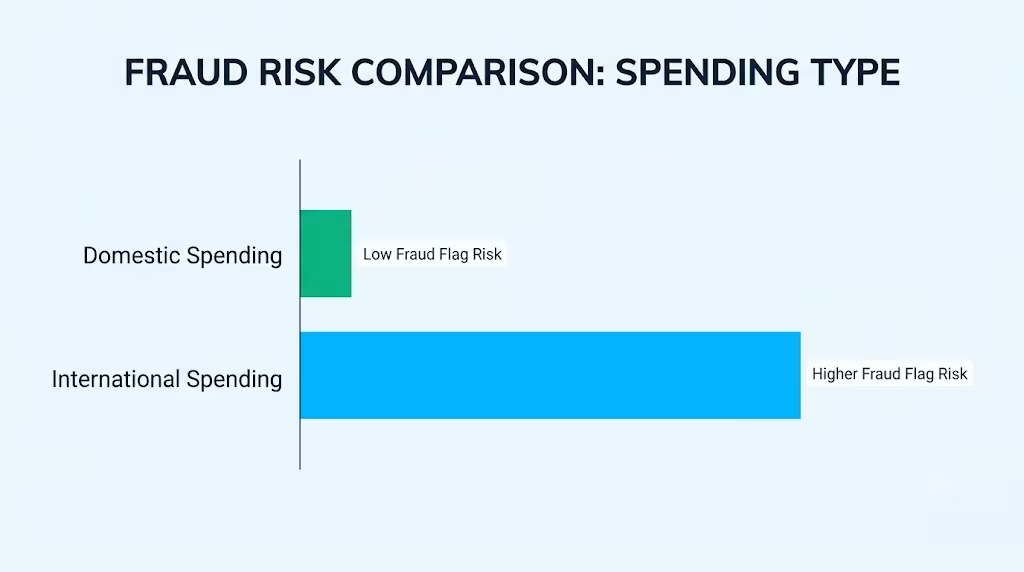
Domestic travel seldom sets off a fraud hold. Your U.S. spending pattern usually covers many states already. Online shopping, work trips, and family visits blur the map for you.
International travel is different. A charge from a foreign country can look odd to a fraud system, even if you fly abroad often. New currency, new merchant codes, and new IP addresses all raise the risk score. That’s why most banks watch international activity more closely than domestic activity.
How to Set Up a Citi Travel Notice
Citi gives you three simple ways to file a travel notice. You can use the mobile app, the website, or a quick phone call. Each method takes just a few minutes. Pick the one that fits your day.
Using the Citi Mobile App
The Citi Mobile app is the fastest way. Follow these steps:
- Open the Citi Mobile app and log in.
- Tap the card you plan to use abroad.
- Look for “Card Management” or “Services” in the card menu.
- Choose “Travel Notices” or “Add a Trip.”
- Enter your start date, end date, and each country you plan to visit.
- Confirm the phone number Citi should use to reach you.
- Review your details and tap Submit.
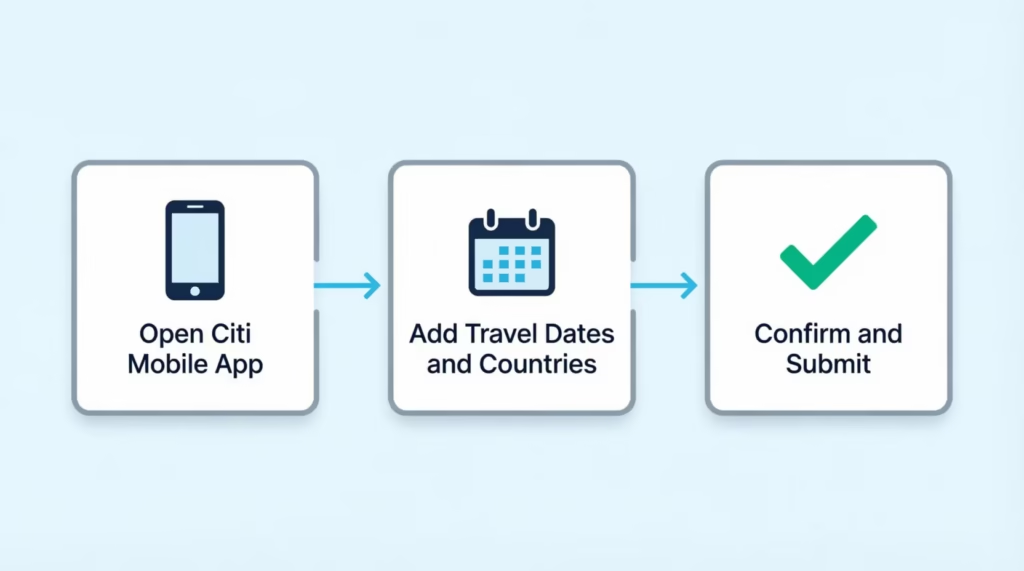
You should see a confirmation right away. If you don’t, log out and check again. Sometimes the app needs a moment to update.
Using Citi Online (Website)
If you prefer a bigger screen, go to Citi.com and log in. Then:
- Click the “Services” tab at the top of your account page.
- Look for “Travel Services” or “Travel Notice.”
- Select the card you’ll use on the trip.
- Add your travel dates and every country on your route.
- Check your contact number, then click Submit.
The website shows a green confirmation banner when the notice is set. Take a quick screenshot of this page for your records. It’s small, but nice to have.
Calling Citi Customer Service
Some people just want to talk to a person. If that’s you, flip your card over and call the number on the back.
For most Citi cards, that number is 1-800-950-5114. Have your card handy along with your trip dates and destinations. The agent can add the notice while you are on the line.
If you’re already outside the U.S., use the international collect-call number instead.
Citi lists this as 605-335-2222 on the back of most cards. You can dial it collect from any country. Save this number in your phone before you fly.
Information You’ll Need to Submit a Travel Notice
Have these three items ready before you start:
- Travel dates: Your start date and your return date. Add a small buffer on both ends in case flights shift.
- Destinations: Every country you plan to visit, not just the first stop. If your flight has a long layover, add that country too.
- Contact phone: A number where Citi can reach you fast. This can be your cell phone with roaming turned on, or a spouse’s number if you plan to use a local SIM.
That’s it. No account number, no PIN, and no travel receipts needed at this stage.
Special Situations: Authorized Users and Multiple Cards
Travel notices get a bit trickier when more than one person or more than one card is involved. Here’s what to know before you file.
Do Authorized Users Need a Separate Travel Notice?
No. Authorized users do not need to file their own notice. As the primary cardholder, you can add them to your trip. When you set the notice, Citi tags all cards linked to that account. So if your spouse is an authorized user on your Citi Strata card, their card is covered too.
But there’s a catch. The authorized user cannot file the notice on their own. They don’t have full access to the account. So make sure you set the notice before you both leave.
Do You Need a Notice for Each Citi Card You’re Bringing?
Yes. Each Citi card account needs its own notice. If you’re bringing your Citi Double Cash card and your Citi Strata card, file two separate notices, one for each account. Each card has its own fraud rules and its own history. A notice on one card does not carry over to the other.
The good news? Filing takes just a few minutes per card. You can do them back-to-back in the same app session.
What a Citi Travel Notice Does and Doesn’t Guarantee
A travel notice lowers the odds of a false decline, but it does not remove them. Think of it as a heads-up, not a shield. Citi’s fraud system stays active during your trip. If a charge looks strange, even in a country you flagged, the system may still pause the card.
Here’s an example: Michael, a finance director from Boston, sets a travel notice for his two-week trip to Japan. On day three, he tries to buy a $4,200 watch in Tokyo. His card gets declined, even with the notice in place. Why? The purchase was much larger than his usual spending, and Citi’s system flagged the amount, not the location.
This is why a backup card matters. A second card from a different bank can save the day if your Citi card gets held up. And remember, all Citi cards come with $0 Liability protection for unauthorized charges. So even if fraud does happen, you won’t be on the hook.
⚠️ Mistake to Avoid: Don’t rely on your Citi card alone abroad. Pack a backup card from a different issuer. If Citi puts a hold on one card, the second card keeps your trip moving.
What to Do If Your Citi Card Is Declined While You’re Already Traveling
Take a breath. A declined card is stressful, but the fix is often quick. Follow these steps.
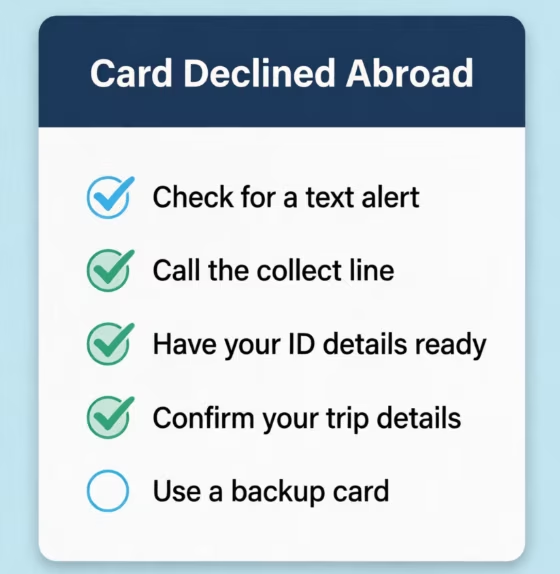
Step 1: Check for a text or app alert. Citi often sends a “Was this you?” message right after a suspicious charge. Reply “Yes” and try the card again. The hold may clear in seconds.
Step 2: Call Citi if the alert doesn’t come. Use the international collect-call line at 605-335-2222. Dial it collect from any country. You will not pay the call cost.
Step 3: Have your details ready. The agent will ask for your name, date of birth, and the last four digits of your card. They may also ask about a recent charge to confirm your identity. Keep your last hotel bill or restaurant receipt handy.
Step 4: Confirm the trip in real time. Tell the agent where you are and how long you’ll be there. They can add or extend a travel notice on the spot.
Step 5: Use your backup card in the meantime. While Citi lifts the hold, pay with a second card. This keeps the checkout line moving and lowers your stress.
Most holds clear within 15 minutes of a call. If it takes longer, ask the agent for a case number. That way, any follow-up call goes faster.
Other Ways to Protect Your Citi Card Before an International Trip
A travel notice is one step, but a few more habits can save your trip. Add these to your pre-flight checklist.
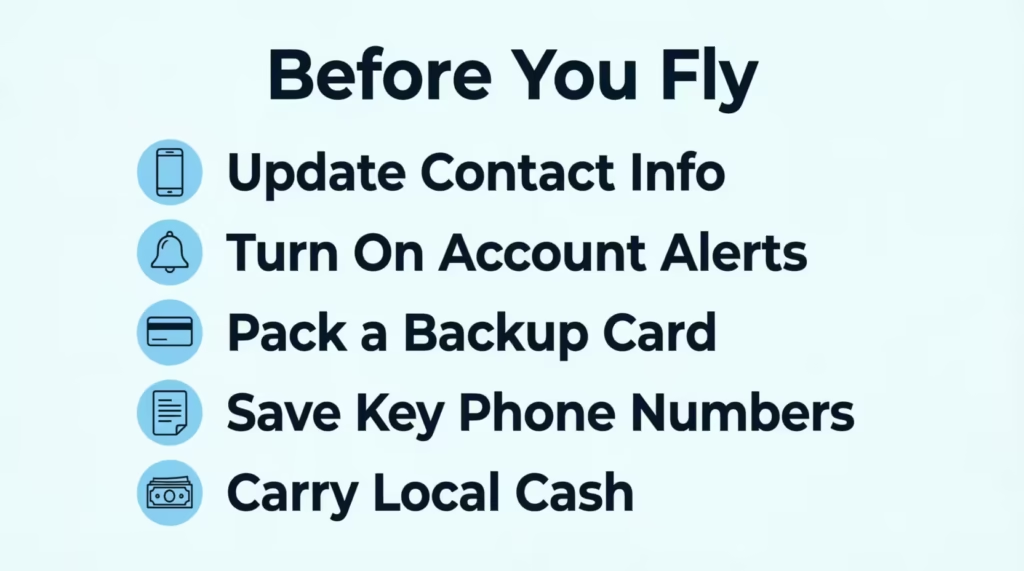
Update your contact info. Log in to your Citi account and check your phone number and email. If Citi can’t reach you, they may pause the card just to be safe. A working number is your first line of defense.
Turn on account alerts. In the Citi Mobile app, set alerts for large purchases, foreign charges, and any charge over a set amount. These push notifications let you catch fraud fast, often before you even leave the store.
Pack a backup card. Bring a card from a different bank. Chase, Amex, and Capital One all work well as backup options because they don’t need travel notices.
Save key phone numbers. Write down or screenshot the customer service number and the international collect-call line. Do this before you fly. If your phone dies, you’ll still have the info on paper.
Carry a small amount of local cash. Cash is a lifesaver for taxis, tips, and small shops. It also helps if every card in your wallet gets held up at once, which is rare but not impossible.
📌 Did You Know: A dead cell phone can cause more card trouble than fraud itself. If Citi can’t reach you to confirm a charge, the hold may stay in place for hours. A portable battery pack is one of the best travel tools you can pack.
Citi vs. Amex, Chase, and Capital One: Travel Notice Policy Comparison
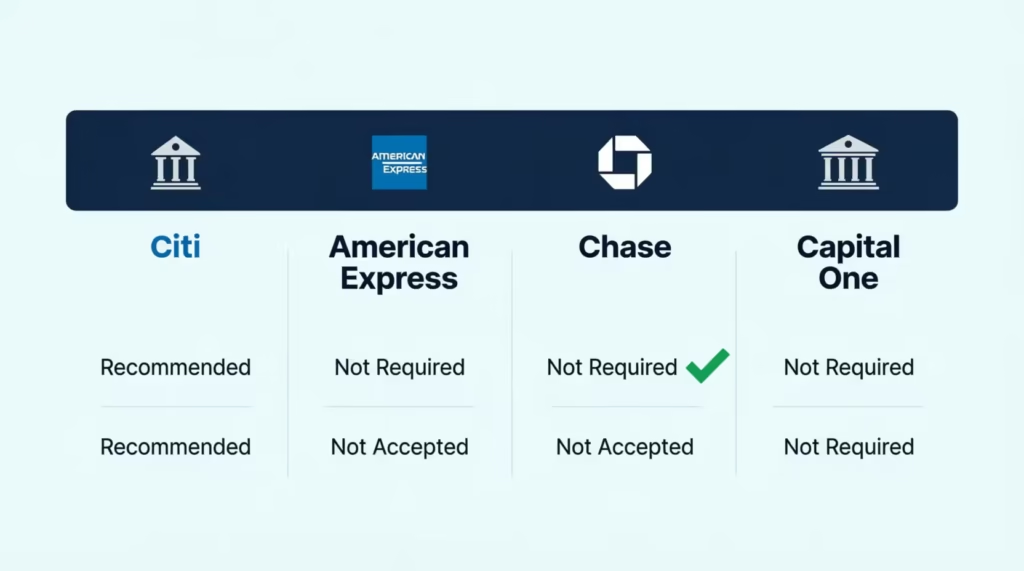
Not every bank handles travel the same way. Here’s how the four biggest issuers stack up in 2026.
| Card Issuer | Travel Notice Policy | What This Means for You |
|---|---|---|
| Citi | Recommends a travel notice for international trips | File a quick notice in the app or online |
| American Express | Does not require or offer travel notices | Just travel; Amex tracks your card use |
| Chase | No longer accepts travel notifications for most cards | Skip the notice; check that your info is current |
| Capital One | Does not require travel notices | No action needed; trust the fraud system |
The pattern is clear. Citi is the last major issuer that still uses the classic travel notice. The others rely on machine learning and real-time signals to track where you are. Both systems work. But if you carry a Citi card, take the extra two minutes to file. It’s a small step that keeps your trip smooth.
Frequently Asked Questions (FAQs)
How do I notify Citi of international travel?
File a travel notice through the Citi Mobile app, on Citi.com under “Travel Services,” or by calling 1-800-950-5114. You’ll need your travel dates, every country on your itinerary, and a working contact number.
Do you need to register travel with Citi?
No, Citi doesn’t require it, but the bank still recommends filing one for international trips. It helps Citi’s fraud team match your charges to your actual location and lowers the odds of a false decline.
How do I let my credit card company know I am traveling?
For Citi, add a travel notice through the app, website, or a phone call before you leave. Other issuers like Amex, Chase, and Capital One don’t require this step since their fraud systems track travel automatically.
Does Citibank want to know when you travel?
Yes, Citi is the last major issuer that still encourages travel notices for international trips. Amex, Chase, and Capital One have all moved away from this system in favor of automated fraud detection.
Can my Citi card be used internationally?
Yes, Citi cards work internationally without any activation step. Filing a travel notice is optional and simply helps prevent your card from being flagged as suspicious in a new country.
What happens if I don’t set a travel notice?
Your card will likely still work, but you risk a security hold if a charge looks unusual to Citi’s fraud system. This often shows up as a declined card at a hotel or restaurant until you confirm the charge is yours.
Why don’t credit cards need travel notifications anymore?
Most issuers, including Amex, Chase, and Capital One, now use real-time fraud detection that recognizes travel patterns automatically. Citi still offers notices as an extra layer, even though its own systems can also detect travel independently.
Do authorized users need their own Citi travel notice?
No, authorized users are covered under the primary cardholder’s notice. The primary cardholder must file it, since authorized users don’t have full account access to submit one themselves.
Is Citibank good for international travel?
Citi works well abroad, especially if you file a travel notice ahead of time and carry a backup card from another issuer. All Citi cards include $0 liability protection, so unauthorized charges won’t leave you responsible for the cost.
Wrapping Up
Filing a travel notice with Citi isn’t required, but it’s a smart move for any international trip. Based on how Citi’s fraud system reads foreign charges, a quick notice in the app or online lowers the odds of a false decline.
Set the notice, update your contact info, pack a backup card, and save the international collect-call number. Those four steps cover almost every issue that can pop up abroad.
If you know someone flying overseas soon, share this guide. It could save them from the panic of a declined card at a hotel front desk in a country far from home.