You went to pay. The card got declined. Now you are standing at the register, staring at the terminal, wondering what just happened and how to make it stop. If your Citi credit card is not working, the reason is almost always one of about ten specific problems, and most of them you can fix in under two minutes from your phone.
The fastest fix is to open the Citi Mobile App, check for a fraud alert or a card lock, and unlock or verify the card right there.
Below, you will get the exact steps for each cause, in plain language, with the button paths inside the app so you don’t have to guess.
Key Takeaways
This guide explains why a Citi credit card stops working, covering card locks, fraud holds, billing mismatches, virtual card rules, and contactless payment issues, with exact steps to fix each one using the Citi Mobile App.
Core Facts:
- A card lock toggled on in the Citi Mobile App under “Services” or “Manage Card” can be switched off instantly with no waiting period.
- Fraud holds can be released by replying “YES” to a Citi text or confirming an app or email alert, usually within a minute or two.
- Online declines are often caused by an Address Verification System mismatch between the billing name, address, ZIP code, CVV, and expiration date on file.
- New chip cards typically require one chip insert transaction before contactless tap-to-pay is enabled.
- Virtual card numbers lock to the first merchant that charges them and have their own separate CVV, expiration date, and spending limit.
- Citi’s general customer service line is 1-800-950-5114, while Costco Anywhere Visa cardholders use 1-855-378-6467.
Best for:
- Cardholders whose Citi card was suddenly declined and need to identify the specific cause before contacting support.
- People who received a fraud alert text or email and are unsure whether to confirm or call Citi directly.
- Anyone troubleshooting a new or replacement Citi card, a virtual card number, or contactless payment failures.
Common Reasons a Citi Credit Card Gets Declined
Before you assume something big is wrong, rule out the small stuff. Most Citi card declines happen for boring, fixable reasons. Work through this short list first, because the answer is often here.
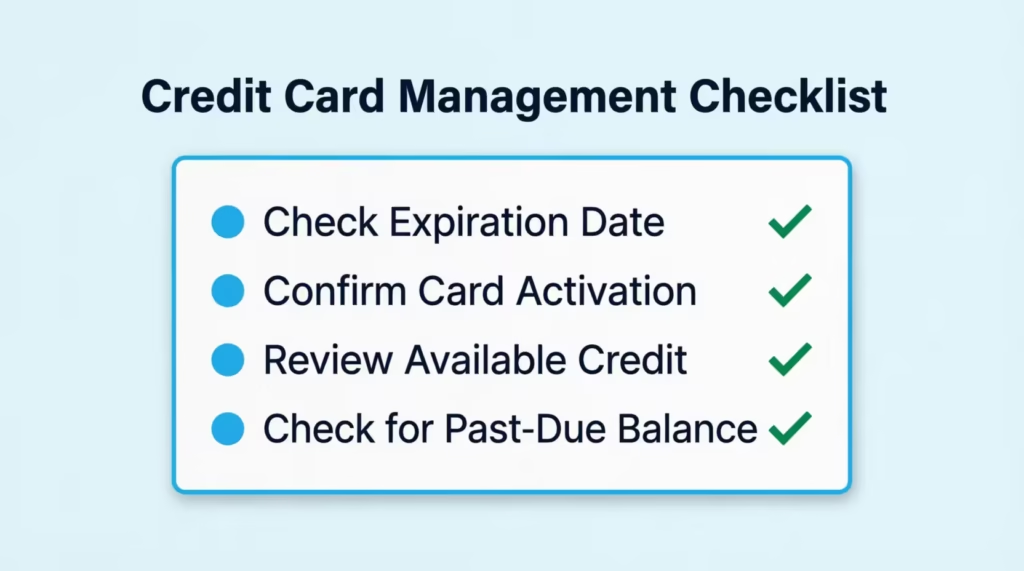
Start with these four checks:
- Look at the expiration date on the front of the card
- Confirm the card was activated after it arrived in the mail
- Open the Citi app and check your available credit
- Check for a past-due balance or minimum payment you missed
If none of those are the problem, the issue is likely a lock, a fraud hold, or a system glitch, which the next sections cover.
💡 Pro Tip: Before you try the same purchase again, wait 60 seconds. Some retry attempts push the transaction into a soft block, which makes the second decline harder to reverse than the first.
Card Expired or Not Yet Activated
Every Citi card has an expiration date printed on the front (month/year). If that date has passed, the card is dead, and no amount of troubleshooting will bring it back. Citi normally mails a replacement about 30 to 60 days before the old one expires, so check your mail and your Citi Mobile App inbox for a shipping notice.
If the card is new, it will not work until you activate it. Activation is fast. You can do it three ways:
- Open the Citi Mobile App, tap the new card, and follow the activation prompt
- Log in at citi.com and use the activation link on your account page
- Call the activation number on the sticker attached to the front of the card
One thing that trips people up: on a brand-new chip card, the very first purchase often has to be a chip insert, not a tap. This is a security rule built into the EMV chip, not a Citi rule. After that first insert, tap-to-pay usually works fine.
Reached Your Credit Limit or Have a Past-Due Balance
If your card gets declined and you know it is active, the next question is whether you have room to charge. Your available credit is your credit limit minus your current balance minus any pending charges. Once available credit hits zero, the card stops working, even for small purchases.
To check your available credit:
- Open the Citi Mobile App and log in
- Tap the card you are trying to use
- Look at the “Available Credit” figure right under the balance
If you are close to the limit or over it, a partial payment usually restores use within minutes. Citi processes app and online payments almost instantly for available credit purposes, even though the payment may still show as “pending” on your statement.
A past-due balance can also trigger a block. If you missed the minimum payment on your last statement, Citi’s system may decline new purchases until you pay at least the minimum due. Paying the minimum through the app usually clears the block the same day.
Your Citi Card Is Locked or Frozen
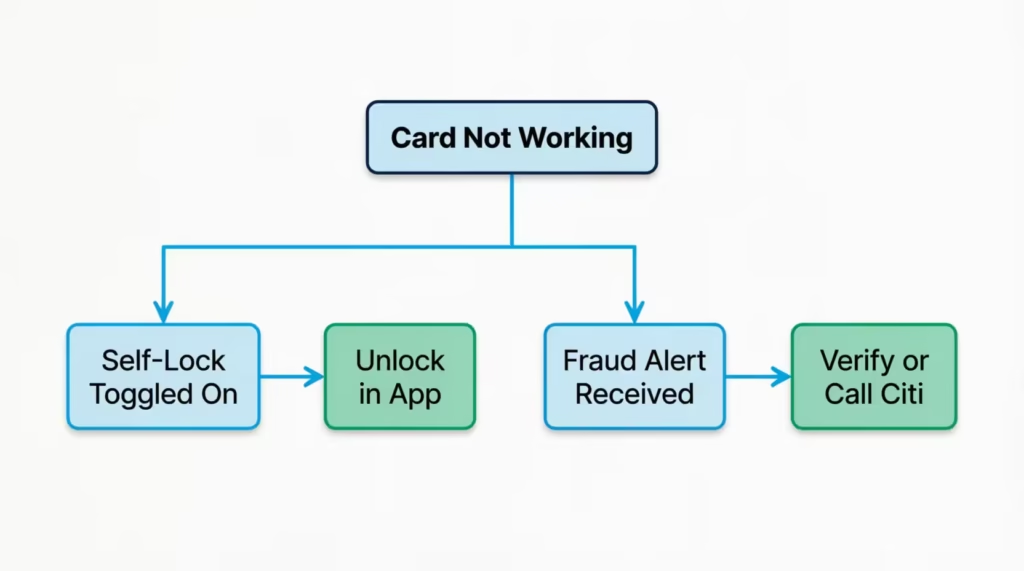
If your card is not expired, not maxed out, and not past due, the next likely reason is a lock. A lock means the card is fine, but you (or Citi) flipped a switch that stops all new purchases until it is flipped back.
There are two kinds of locks:
- A self-lock you turned on inside the Citi Mobile App (often by accident)
- A security freeze placed by Citi’s fraud system
Both are easy to check and easy to reverse.
To unlock your card yourself, follow this path in the Citi Mobile App:
- Log in to the app
- Tap the card you want to unlock
- Scroll to “Services” or “Manage Card”
- Look for “Lock Card” or “Card Controls”
- Toggle the lock off
Once you toggle it off, the card works instantly. There is no waiting period. This is Citi’s “Quick Lock” feature, and it was designed so you could freeze the card the second you misplace it and unfreeze it just as fast when you find it in your coat pocket.
If the toggle already shows “unlocked” but the card still won’t work, the block is probably coming from Citi’s side, not yours. That points to a fraud hold, which is the next section.
Your Card Was Declined Due to a Fraud Alert or Suspicious Activity Hold
Citi’s fraud system watches every transaction in real time. When something looks unusual for your account (a purchase in a new city, a very large charge, several fast charges in a row, or a merchant type you never use), it can place a temporary hold on the card and reach out to you to verify.
Signs a fraud hold caused your decline:
- You just got a text from a short code like 96269 asking about a transaction
- You have an email in your inbox with “Verify Your Purchase” or similar
- The Citi Mobile App shows a red alert or pending action on the card
- The decline happened during travel, on a large purchase, or at an unfamiliar merchant
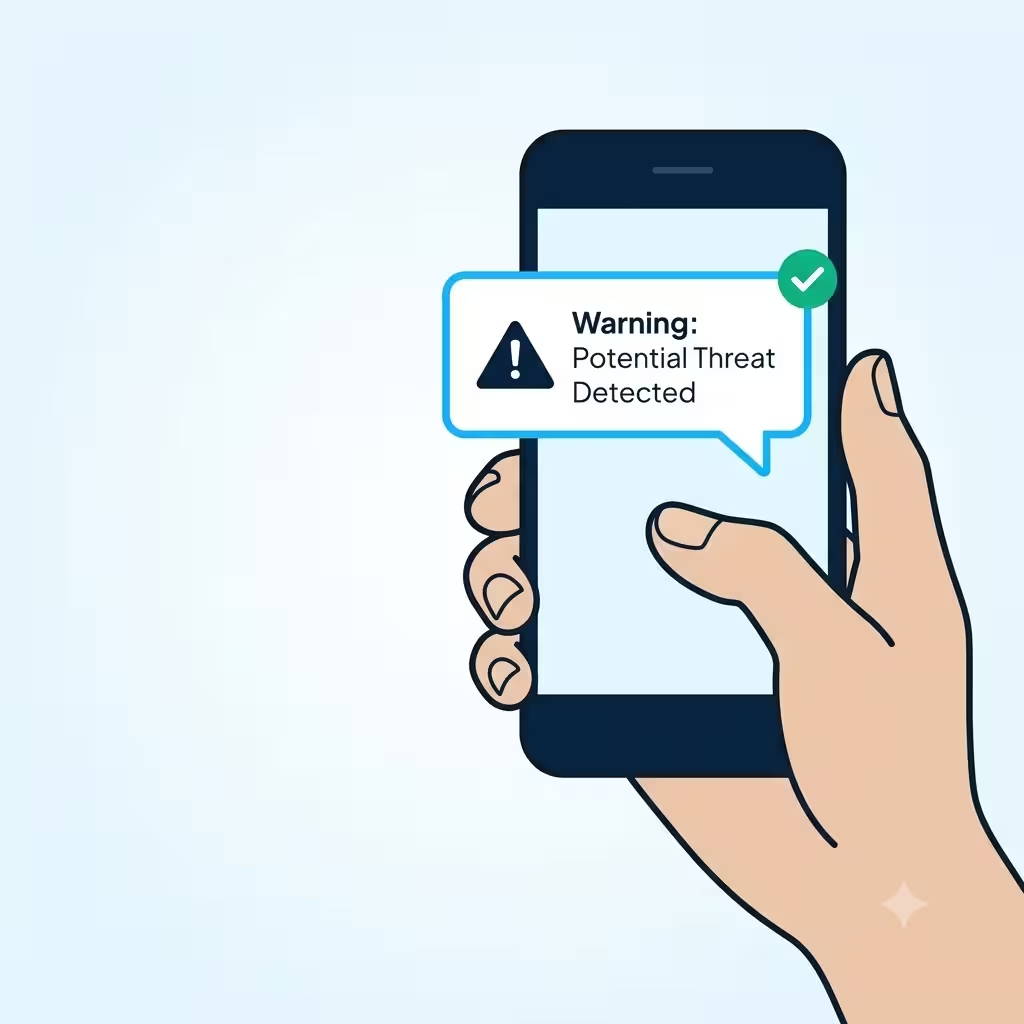
If it was you, the fix is quick. Reply “YES” to the Citi text, or tap the confirmation link in the email or app alert. The card usually unlocks within a minute or two.
If it wasn’t you, do not reply “YES.” Call Citi immediately at 1-800-950-5114, which is the general customer service line printed on Citi’s contact page. Tell them the transaction was not yours. They will cancel the card, block any pending charges, and mail a replacement, usually within 5 to 7 business days.
⚠️ Mistake to Avoid: Never confirm a suspicious charge just to make the card work again. If you confirm a fraudulent transaction as legitimate, it becomes much harder to dispute later, and you may become responsible for the amount.
A verified fraud hold usually releases the card within a few minutes of your reply. Some holds take up to an hour if the system needs a second review. If your card is still not working after an hour, call the number on the back of the card.
Card Declined Online Due to a Billing Address or CVV Mismatch
If your Citi card works fine at a physical store but keeps getting declined at online checkout, the issue is rarely the card itself. It is usually a mismatch between what you typed and what Citi has on file.
Online purchases go through a check called the Address Verification System, or AVS, which compares the billing address you entered with the one linked to the card. If any field is off, the transaction gets rejected.
Four fields need to match exactly:
- The name on the card
- The billing street address and ZIP code (must match what Citi has, not where you live now)
- The 3-digit CVV on the back of the card (4 digits on the front for American Express, but Citi consumer cards use 3 on the back)
- The expiration date, month and year
The most common cause is an old billing address. If you moved and forgot to update Citi, every online purchase will fail until you fix it. To update:
- Log in to Citi Online
- Go to “Profile” or “Account Settings”
- Update your billing address
- Save the change and wait about 15 minutes for the update to propagate
Also check the retailer’s saved payment info. Places like Amazon, Walmart, and DoorDash store your card details from your first purchase. If your address changed, their saved info is now wrong, even though your Citi account is correct. Delete the card from the retailer and add it again with the current address.
Citi Credit Card Not Showing Up Online
Sometimes the card is working fine, but it just is not visible in your Citi Online account or Citi Mobile App. You log in, and the card that should be there is missing from your list of accounts.
This is almost always a display issue, not an account issue. Try these fixes in order:
- Pull down to refresh the account list in the Citi Mobile App
- Log out and log back in, which forces a fresh sync
- Update the app to the latest version through the App Store or Google Play
- Clear your browser cache if you are using Citi Online in a web browser
- Try a different device (desktop if you were on mobile, or vice versa)
If the card is still missing after all five steps, treat it as a possible outage on Citi’s side rather than a problem with your account. The next section covers how to check.
One more thing to rule out: if you have multiple Citi logins (for example, a personal user ID and a joint one with a spouse), make sure you are logged into the one that owns the card. It sounds obvious, but this catches people all the time.
How to Check If Citi Is Down Right Now
If your Citi Mobile App won’t load, your online account keeps timing out, or your card is being declined at multiple merchants at once, the problem may not be you at all. Citi has occasional system outages, and during one, nothing you do on your end will help.
Three quick ways to confirm an outage:
- Check the Citi Mobile App’s login screen for a maintenance banner
- Visit Downdetector’s Citi page and look for a spike in user reports over the last hour
- Search “Citi down” on X (formerly Twitter). If it’s a real outage, hundreds of people will be posting about it
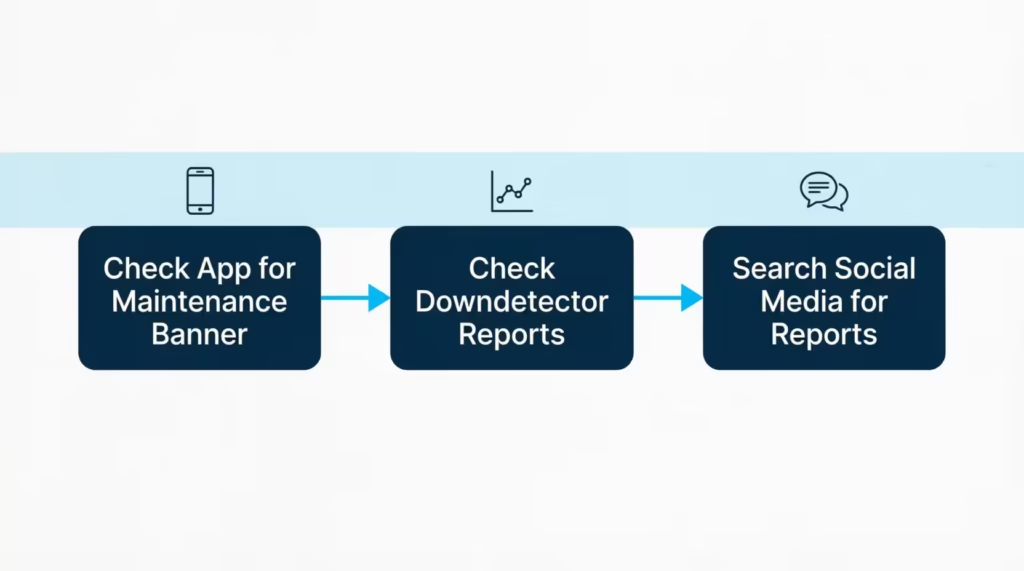
During an outage, the best action is often no action. Do not keep retrying the same transaction, because failed retries can sometimes create temporary blocks that stick around after the outage clears. Wait 30 to 60 minutes, then try again.
If you need to make a purchase right now, use a different card or a mobile wallet (Apple Pay, Google Pay, Samsung Pay) that has your Citi card saved. Mobile wallets sometimes route through different systems and can work even when the physical card doesn’t.
📌 Did You Know: Citi’s mobile wallet transactions and physical card transactions can process through slightly different authorization paths, so a card in Apple Pay can occasionally clear a purchase that just got declined at the same terminal on the physical card.
Citi Virtual Credit Card Not Working
Citi virtual account numbers work differently from your physical card. A virtual number is a separate 16-digit number linked to your account but locked to specific rules, most often a merchant lock (the number only works at the first merchant that uses it) and a spending limit set when the number was created.
If a virtual card number is being declined, ask these questions in order:
- Is this the same merchant you originally created it for? If not, the number won’t work. Virtual numbers lock to the first merchant that charges them.
- Is the purchase amount higher than the limit you set? Any charge over the limit gets declined automatically.
- Has the number expired? Virtual numbers have their own expiration date, separate from your physical card.
- Did you paste the correct CVV? Virtual numbers have their own 3-digit CVV, not the one from your physical card.
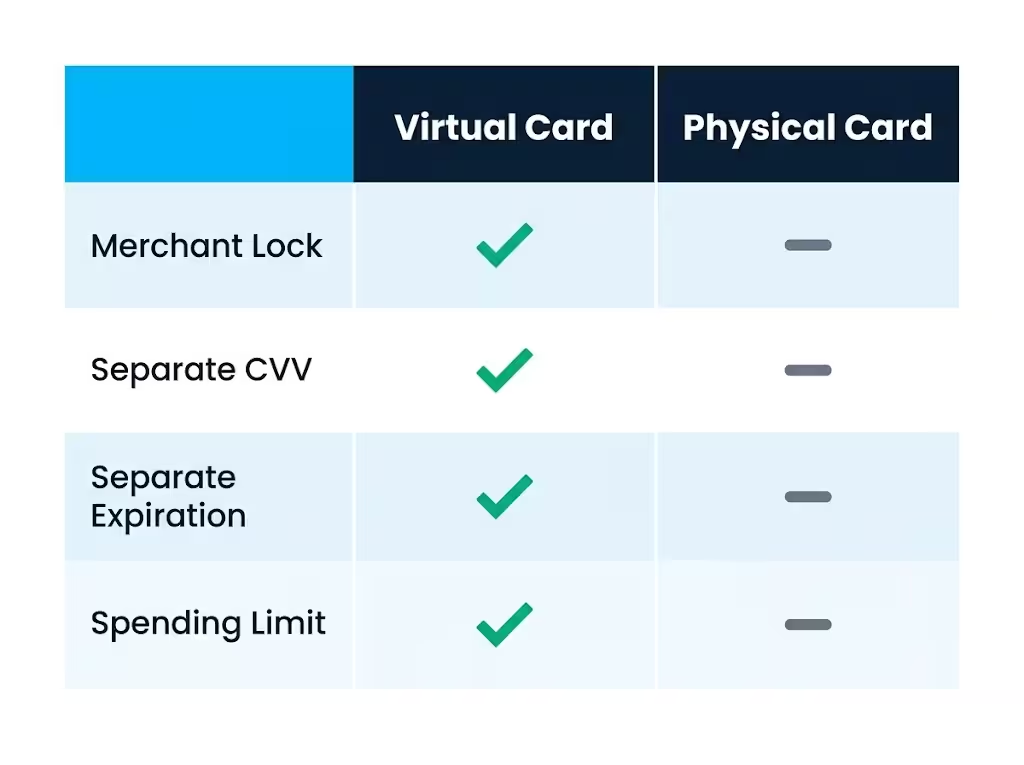
If all four check out and the number still won’t work, the fix is usually to generate a new one. Log in to Citi Online, go to the virtual card tool, generate a new number with a higher limit or the correct merchant, and use that for the transaction.
Citi has changed its virtual account number program several times in recent years, and the feature is not available on every Citi card. If you can’t find the option in your account, use your physical card number for online purchases. Trust strong merchant protections like Amazon, PayPal, or Apple Pay instead.
Citi Credit Card Tap (Contactless) Not Working
If you can insert or swipe the card but tap-to-pay just won’t register, the card is fine. The problem is either the terminal or a first-use rule.
Common reasons contactless payment fails:
- You are holding the card too far from the reader (the antenna range is only about 1 to 2 inches)
- The terminal accepts tap for debit cards but not credit cards from that network
- Your card is brand new and hasn’t been “activated” for contactless use yet
- The terminal’s contactless reader is broken (very common on older machines)
New Citi cards often require one chip insert transaction before tap-to-pay is enabled. This is a security feature that ties the chip to the account before letting the contactless antenna authorize charges. After one successful insert, tap should work everywhere.
The fastest workaround is also the easiest one: insert the chip instead. Every terminal that accepts tap also accepts chip insert, so you never have to leave the store empty-handed just because contactless is down. If tap fails twice in a row on the same terminal, insert the chip on the third try and move on.
If tap fails everywhere, on every terminal, the contactless antenna in your card may be damaged. Cards can crack, bend, or get demagnetized over time. Call the number on the back of your card and request a replacement. New cards typically arrive within 5 to 7 business days.
Why Is My Citi Card App Not Working
The Citi Mobile App has two separate failure modes, and it helps to know which one you are dealing with.
- Login problems mean the app opens but won’t let you in
- Transaction problems mean you are logged in but can’t complete actions like payments or card locks
For login problems, try these steps:
- Update the app through the App Store or Google Play
- Force-close the app and reopen it
- Reset your password on the login screen if you are unsure of it
- Try logging in through the mobile website at m.citi.com as a workaround
One warning: if you enter the wrong password too many times in a row, Citi will lock your online access for security reasons. Getting that reversed usually requires a phone call to customer service and identity verification. Reset the password before your third failed attempt, not after your fifth.
For app transaction issues like endless payment spins or card locks, switch to the mobile website or use Citi Online on your desktop. If the same action works on desktop, the issue is with the app, and updating or reinstalling usually fixes it. If it fails everywhere, it is likely an outage on Citi’s side.
New or Replacement Citi Card Still Not Working After Activation
You activated the new card. You expected everything to just work. It didn’t. This is one of the most frustrating problems because you did everything right, and the card still won’t cooperate.
Three things commonly go wrong after activation:
First, the chip PIN may not be set. Credit cards usually need a signature or no signature at all. However, some terminals, especially outside the U.S. or at self-checkout kiosks, may require a PIN for the first use. If you never set a PIN or don’t remember it, call the number on the back of the card and request a PIN reminder or reset.
Second, your saved payments still point to the old card. If your old card was compromised or reissued, the number and CVV changed. Every subscription, every autopay, and every “one-click” checkout saved with a merchant is still pointing at the old, dead number. You have to log into each service and update the payment info. Common ones to check:
- Netflix, Hulu, and other streaming services
- Amazon and other one-click retailers
- Utility bills on autopay
- Gym memberships
- Cloud storage (iCloud, Google One, Dropbox)
Third, activation sometimes takes 5 to 10 minutes to fully propagate. If you activated the card and tried to use it 30 seconds later, the merchant network may not have received the “active” flag yet. Wait 10 minutes, try again, and if it still fails, call Citi to confirm activation went through.
What to Do If Your Citi Card Still Isn’t Working
If you’ve worked through every section above and the card still won’t cooperate, it’s time to talk to a human. Citi offers two direct paths.
Call the number on the back of your card. This is the fastest option for anything urgent. For most Citi consumer cards, the general line is 1-800-950-5114, listed on Citi’s official contact page. For Costco Anywhere Visa cards, the number is different: 1-855-378-6467.
Use in-app chat. If you don’t want to wait on hold, log into the Citi Mobile App and tap the chat icon. Chat is best for non-urgent questions, and wait times are often shorter than the phone line.
Before you call or chat, have these ready:
- Your full account number or the last four digits of the card
- The most recent transaction that failed (merchant name, amount, date)
- Any text or email alerts you received from Citi in the last 24 hours
- A backup card in case the fix takes time to propagate
Citi’s fraud team will run identity verification before making any changes. They will ask for your date of birth, the last four digits of your Social Security number, and possibly a security question or a one-time code sent to your phone. Have that phone with you before you call, because losing signal mid-verification means starting the whole process over.
If the card can’t be revived due to physical damage, a compromised number, or a permanent security lock, Citi will issue a replacement. Standard shipping is 5 to 7 business days.
Expedited shipping (usually 1 to 2 business days) is often free if you ask, especially if the failure was Citi’s fault. In the meantime, add your Citi card to Apple Pay, Google Pay, or Samsung Pay before the physical card is deactivated. This way, you can continue to use it for tap purchases while the new card is in the mail.
Frequently Asked Questions
Why does my Citi credit card keep declining?
The most common causes are a card lock, a fraud hold, a maxed-out limit, or a past-due balance. Open the Citi Mobile App first to check for alerts or a lock before assuming something bigger is wrong.
How do I unblock my Citibank credit card?
Log in to the Citi Mobile App, tap the card, go to “Services” or “Manage Card,” then toggle “Lock Card” off. This Quick Lock feature reverses instantly with no waiting period.
What do I do if my card is declined but I have money?
Check for a fraud hold first, since Citi’s system flags unusual purchases like new locations or large charges. If you got a text or email asking to verify a transaction, confirming it (only if it was really you) usually restores use within minutes.
Is Citibank having technical issues today?
Check the Citi Mobile App login screen for a maintenance banner, visit Downdetector’s Citi page for a spike in reports, or search “Citi down” on X. During a real outage, hundreds of users typically post within the same hour.
How do you fix a declined credit card?
Start by checking the expiration date, confirming activation, and reviewing your available credit and payment status in the app. If those check out, look for a card lock or fraud alert, since those cause most unexpected declines.
Can I reactivate my Citi credit card?
Yes, if the card was self-locked or placed on a fraud hold, unlocking it in the Citi Mobile App or confirming the alert reactivates it immediately. If the card was closed due to permanent damage or a compromised number, Citi issues a replacement instead, usually within 5 to 7 business days.
What happens when my credit card is blocked?
New purchases get declined at checkout, though the card itself isn’t cancelled. Most blocks come from a self-lock, a fraud hold, or exceeding your credit limit, and clear within minutes once resolved.
Why is my Citi card declined online but works in stores?
Online purchases run through an Address Verification System that checks your billing name, address, ZIP code, CVV, and expiration date against Citi’s records. An outdated billing address on file, even after you’ve moved, is the most common cause.
Can a declined transaction still go through?
No, a declined transaction does not process, and the merchant does not receive payment. However, retrying it too quickly can sometimes trigger a temporary soft block, so waiting 60 seconds before trying again is safer.
Why won’t tap-to-pay work on my Citi card?
Brand-new Citi chip cards require one chip insert transaction before contactless payment activates. If tap still fails after that, hold the card within 1 to 2 inches of the reader or insert the chip instead.
Wrapping Up
A Citi card that suddenly stops working is almost always fixable in minutes once you know where to look. We went through common issues like self-locks, fraud holds, and address mismatches. We also faced virtual card quirks, tap failures, app problems, and edge cases after activation
For most readers, the most effective approach is to check the Citi Mobile App first (locks and alerts), then rule out billing details, then check for a Citi outage before calling support.
If this guide helped you, share it with a friend or family member who juggles multiple credit cards. They will thank you the next time their Citi credit card is not working at the worst possible moment.