We’ve all wondered if that shiny new banking app can quietly do double duty and help fix a shaky credit file. If you’re staring at a thin file or a low score, you probably want to know if the answer to Does Chime report to credit bureaus is yes, no, or something in between. The confusion is fair. Chime markets itself as fee-free and easy, but “easy” doesn’t always mean “credit-building.”
Yes, but only through the Chime Credit Builder Visa Card, not the standard checking account.
Below, we’ll walk through what gets reported, what doesn’t, how long results take, and how to switch reporting the right way.
Key Takeaways
This guide explains whether Chime reports to credit bureaus, including which Chime product reports, what data gets sent, the reporting timeline, and how to avoid credit score risks.
Core Facts:
- Chime reports to credit bureaus only through the Chime Credit Builder Visa card, not the standard checking or savings account.
- Credit Builder reports monthly to all three major credit bureaus: Equifax, Experian, and TransUnion.
- Chime reports payment history, account age, card balance and activity, and account status, but treats utilization differently than a traditional revolving card.
- Chime does not report Chime SpotMe overdrafts, debit card spending, direct deposits, or checking and savings account activity.
- A new Credit Builder tradeline typically appears on a credit report 30 to 60 days after account opening, with a noticeable score change usually appearing after 3 to 6 months of on-time activity.
- Credit Builder requires no hard credit inquiry to open, and the Safer Credit Building feature automatically pays the balance to help prevent missed payments.
Best for:
- People with a thin or damaged credit file who want to understand exactly which Chime product builds credit.
- Chime users who assumed regular checking account activity was already building their credit.
- Readers deciding whether to enroll in Credit Builder and wanting realistic timeline and risk expectations first.
Does Chime Report to Credit Bureaus?
Yes, Chime reports to credit bureaus, but only when you use the Chime Credit Builder Visa Secured Credit Card. The regular Chime checking account and savings account do not show up on your credit report at all. This is the single most important thing to understand.
So if you opened a Chime spending account and hoped it would quietly build your credit score in the background, that isn’t happening. The checking side of Chime is a bank account, not a credit product. Banks don’t send day-to-day debit card use to Experian, Equifax, or TransUnion.
The Credit Builder card is different. It’s a real credit card, backed by money you move into a secured account. Once you activate it and start using it, Chime sends your payment activity to all three major credit bureaus each month. That’s how the “chime credit builder report” actually reaches your file and starts shaping your score.
The short version: opening a Chime account does not build credit. Using the Credit Builder card the right way does.
Chime Checking Account vs. Chime Credit Builder: Why the Distinction Matters
People often use “Chime” as one word for everything the app does. That’s where most of the confusion starts. In reality, Chime has two very different products, and only one of them touches your credit report.
The Chime checking account is a standard mobile bank account. You get a debit card, direct deposit, and a spending balance. None of that reaches the credit bureaus. Debit spending isn’t borrowing. Bank deposits are your own money. There’s nothing for a bureau to score.
The Chime Credit Builder is a secured credit card. You move money from your Chime checking into a locked Credit Builder account. That balance backs the card. When you swipe the card, Chime treats it like a real credit line, tracks your payments, and reports them.
Here’s a quick side-by-side to make the split clear:
| Feature | Chime Checking Account | Chime Credit Builder |
|---|---|---|
| Product type | Bank account | Secured credit card |
| Credit check to open | No | No |
| Reports to bureaus | No | Yes, all three |
| Builds credit history | No | Yes |
| Requires a deposit | No | Yes, funds the card |
| Affects credit score | No | Yes, over time |
Once you see the two products side by side, the answer stops feeling fuzzy. If you want your Chime activity to help your score, the secured credit card is the piece doing the work.
How Chime Credit Builder Works
The Credit Builder card runs on a simple idea. You fund it with your own money, spend that money on the card, and Chime reports the activity as if it were a normal credit card. It’s a secured deposit account tied to a Visa card, and it acts like training wheels for credit.
To use it, you need a Chime checking account with a qualifying direct deposit. Once you qualify, you turn on Credit Builder in the app, move money from checking into the secured Credit Builder account, and get a Chime Credit Builder Secured Visa card. The amount you move over becomes your spending limit. Move $200, spend up to $200. Move $700, spend up to $700.
There’s no credit check to sign up. Chime doesn’t run a hard pull, so applying won’t ding your score. There’s also no interest charge and no annual fee, which removes the classic secured-card traps that cost beginners money.
When your statement closes, Chime can pull the balance straight from your Credit Builder funds through a feature called Safer Credit Building. That means no missed payments, ever, as long as you leave the money in place. Since payment history is the biggest slice of your FICO score, this setup is designed to build credit with very little risk of self-inflicted damage.
💡 Pro Tip: Turn on Safer Credit Building right after activation. It sweeps your balance to $0 automatically each cycle, so you never miss a payment, even during a busy month.
Which Credit Bureaus Chime Reports To
Chime Credit Builder reports to all three major credit bureaus: Equifax, Experian, and TransUnion. That matters because different lenders check different bureaus. A landlord might pull Experian. An auto lender might use Equifax. A credit card issuer might rely on TransUnion. If a product only reported to one bureau, your score would only grow in one place.
Because Chime feeds all three, your Credit Builder activity shows up on every major report. That gives you a fuller credit file and a more consistent score across lenders.
What Information Chime Actually Reports
Chime doesn’t send everything about your account to the bureaus. It sends the specific data points that shape a credit score. Knowing what’s in that report helps you understand what actually moves your number.
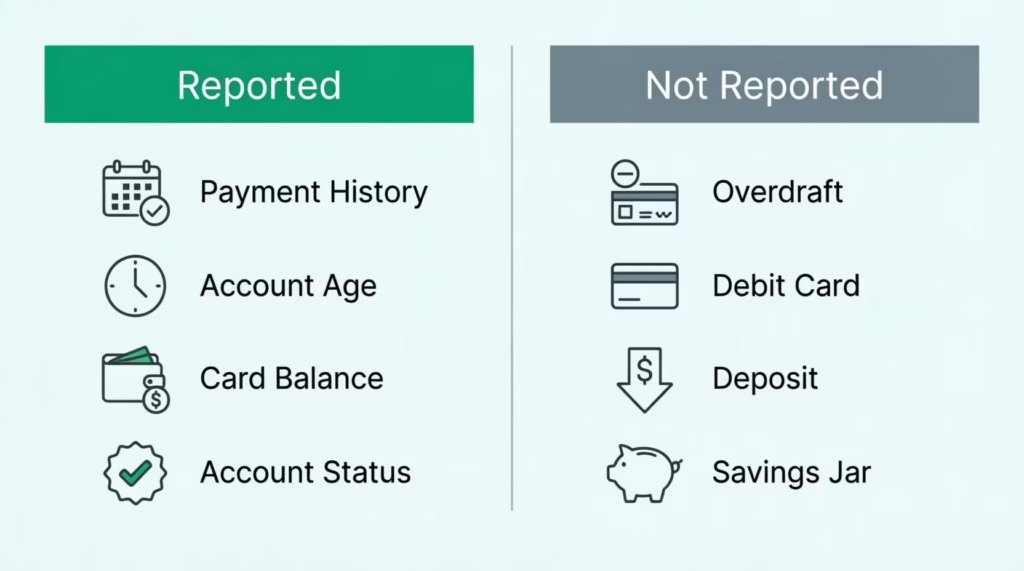
Chime reports:
- Payment history: whether each monthly balance was paid on time. This is the biggest single factor in most credit scores.
- Account age: how long your Credit Builder account has been open. Older accounts help your score grow.
- Card balance and activity: what you spent during the cycle and what was paid off.
- Account status: whether the account is open, in good standing, or closed.
One thing worth flagging is credit utilization. On a regular credit card, this ratio compares your balance to your credit limit, and it’s a major score factor. With Chime Credit Builder, utilization is treated differently by the bureaus because the card is backed by your own deposit.
Many credit scoring models don’t count the card the same way as a traditional revolving account, which is actually helpful for beginners. You won’t get punished for using a high share of your Credit Builder limit.
The report Chime sends is clean, simple, and focused on payment behavior. That’s exactly the kind of data a thin file needs to grow.
What Chime Does NOT Report to Credit Bureaus
This part answers a fear a lot of new users carry: “will my everyday Chime activity somehow show up and mess with my score?” The answer is no. A big chunk of what happens inside the Chime app never touches a credit bureau.
Chime does not report:
- Chime SpotMe: the fee-free overdraft feature. Using SpotMe doesn’t create a debt on your credit report and doesn’t lower your score.
- Debit card spending: swipes on your regular Chime debit card. Debit spending is your own money, not credit.
- Direct deposits: paychecks and transfers into your account. Deposits aren’t a credit event.
- Checking account balance: how much sits in your account. Bank balances are not part of any credit report.
- Savings account activity: interest, transfers, and balances in the Chime savings account.
- ATM withdrawals and transfers: routine banking moves.
So if you overdraw with SpotMe, run your checking to $0, or use the debit card ten times a day, none of that shows up on Experian, Equifax, or TransUnion. Only the Credit Builder card’s monthly activity gets sent. That’s a big relief for people who worry about small missteps in daily banking harming their score.
Reporting Timeline: When You’ll Actually See Results
New users almost always ask, “how fast will this work?” Fair question. Credit building is slow by design, but the timing is actually predictable once you know the credit reporting cycle.
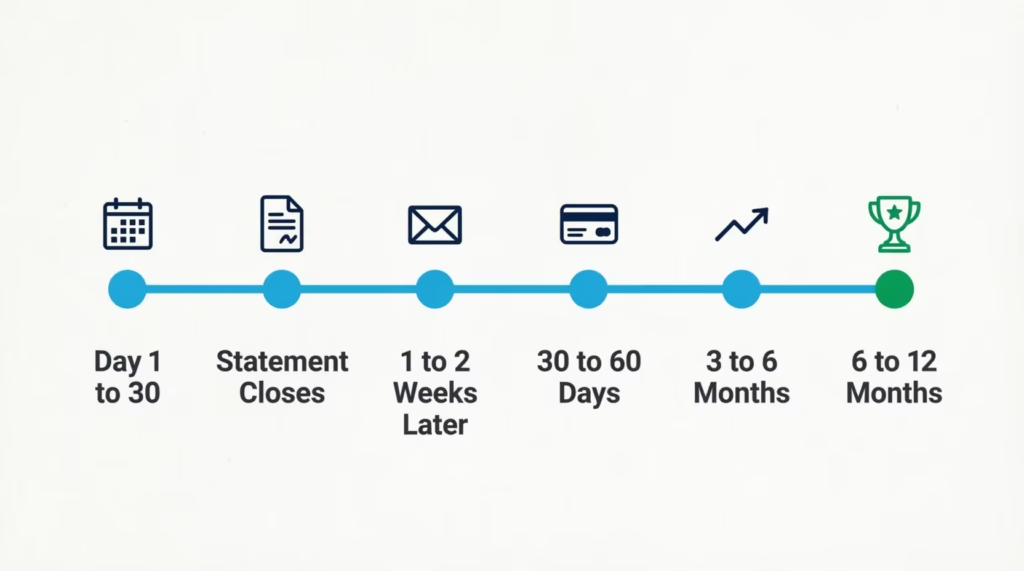
Here’s how the timing usually plays out:
- Days 1 to 30: You activate Credit Builder, move money in, and start using the card. Nothing shows up on your report yet.
- End of your first statement cycle: Chime closes out the month and prepares the data to send.
- 1 to 2 weeks after the statement closes: Your first month of activity reaches the bureaus.
- 30 to 60 days from account opening: A new tradeline appears on your credit report showing Chime Credit Builder.
- 3 to 6 months of on-time activity: You’ll usually see a real score change. Many users report a first score in the low-to-mid 600s if they had no credit before.
- 6 to 12 months: The account starts to add serious value. Payment history builds up, account age grows, and lenders see a steady pattern.
📌 Did You Know: A brand-new credit file usually can’t produce a FICO score until you’ve had at least one account open and reporting for six months. That’s why the six-month mark is such a big milestone with Credit Builder.
The statement cycle and its reporting lag are the main reasons results feel slow at first. Once the first tradeline lands, though, every month of clean payments adds weight.
Can Chime Credit Builder Hurt Your Credit Score?
This fear stops a lot of people from signing up, so it deserves a straight answer. Chime Credit Builder is one of the lower-risk ways to start a credit file, but “low risk” is not “zero risk.”
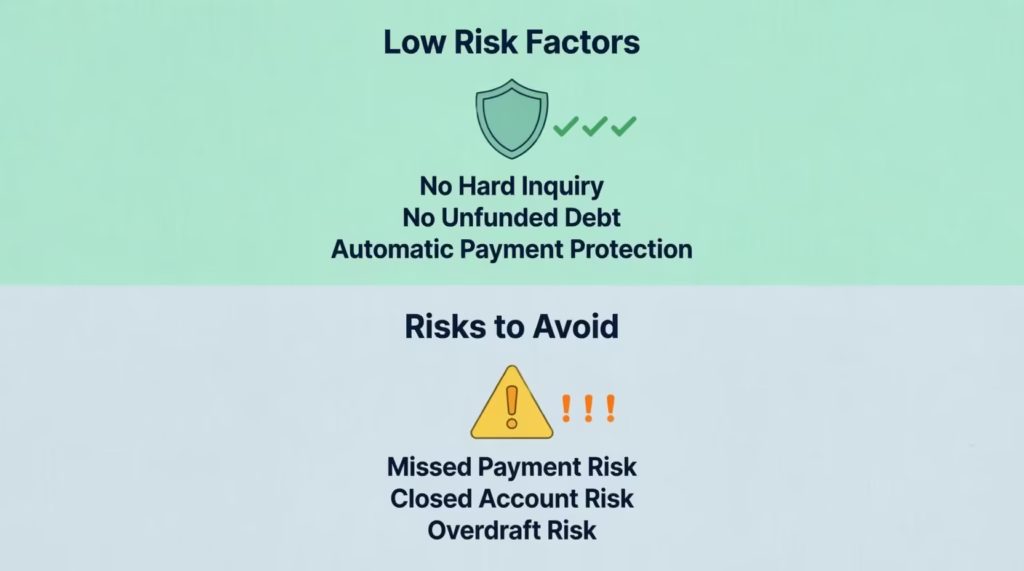
The good news:
- No hard inquiry. Signing up doesn’t trigger a credit check, so applying can’t drop your score.
- No unfunded debt. Because the card is secured by your own deposit, you can’t rack up a balance you can’t pay.
- Safer Credit Building on autopay. If you leave the feature on, the balance gets swept automatically, which prevents missed payments.
The risks are small but real:
- Missed payments if you turn autopay off. If you disable Safer Credit Building and forget to pay the statement balance, Chime can report a late payment. Late payments are one of the most damaging credit events.
- Closed account with a negative balance. Closing the account while owing money can end up on your report as a negative item.
- Overdrawing your Credit Builder account. This is rare, but any negative pattern can still be reported.
⚠️ Mistake to Avoid: Turning off Safer Credit Building because you want “more control.” For most beginners, this feature is the whole safety net. Leave it on unless you have a very specific reason to switch it off.
So does Chime affect credit score outcomes? Yes, mostly in a positive way if you use it as designed. It only hurts you if you actively misuse it.
Making Sure Your Chime Activity Is Actually Being Reported
Enrollment isn’t automatic. Just having a Chime account isn’t enough. You need to opt in and complete a short setup so the Credit Builder data flows to the bureaus.
Follow these steps:
- Open a Chime checking account and set up a qualifying direct deposit of at least $200 within the past 365 days. This is Chime’s requirement to unlock Credit Builder.
- Apply for Credit Builder in the Chime app. Go to the “Credit Builder” tab and tap through the setup. There’s no credit check.
- Move money into your Credit Builder secured account. Whatever amount you move becomes your spending limit.
- Activate the Chime Credit Builder Visa card when it arrives in the mail.
- Turn on Safer Credit Building in the settings. This is the autopay feature that protects your payment history.
- Use the card for small, regular purchases. Groceries, gas, or a streaming subscription are perfect. You don’t need to spend heavily to build credit.
- Check your credit report after 60 days using a free tool like AnnualCreditReport.com, the official source authorized by federal law. Confirm that “Chime Credit Builder” shows up as an active tradeline.
If the tradeline doesn’t appear after two full statement cycles, contact Chime support through the app. Sometimes the account status hasn’t fully switched over, or the direct deposit requirement wasn’t met.
How Chime Compares to Other Credit-Builder Options
Chime isn’t the only tool for a thin file. A quick, non-salesy comparison helps you see where it fits:
- Self Credit Builder Loan: You pay into a savings account each month, and your on-time payments get reported. It builds payment history and adds a small installment loan to your credit mix. Useful if you want a loan tradeline instead of a card.
- Current Build Card: Similar concept to Chime Credit Builder, also a secured card with no credit check. Choose based on which banking app you already trust.
- Traditional secured credit card: Cards from major banks work well but usually require a security deposit that’s locked separately. Chime’s setup is more flexible because your deposit is also your spending money.
For most beginners, Chime Credit Builder wins on ease and cost. It’s a fair default. If you want a mix of credit types, adding a Self loan on top can round out your file.
Layering Chime With Rent Reporting
One of the newer moves in the Chime ecosystem is rent reporting. After Chime acquired Pinch, some users can now get their rent payments reported to the credit bureaus as well. Rent is often the biggest monthly bill a young adult pays, and having it counted on your credit report can make a real difference.
Layering rent reporting on top of Credit Builder is powerful because it adds a second stream of positive payment history. You’d see the Credit Builder tradeline with on-time card payments. Also, rent reporting would show on-time housing payments.
Two positive tradelines grow a thin file much faster than one. Check the Chime app for current rent reporting availability, since the feature is being rolled out in stages.
Frequently Asked Questions (FAQs)
Does Chime actually build your credit?
Yes, but only through the Chime Credit Builder Visa card. The standard Chime checking and savings accounts never touch your credit report.
Does Chime show up on a credit report?
Yes, if you’re enrolled in Credit Builder. Chime reports payment history, account age, and balance activity to Equifax, Experian, and TransUnion each month.
Is Chime hard to get approved for?
No. Chime Credit Builder requires no credit check and no hard inquiry, so applying won’t affect your score even if you’re rejected.
How fast can Chime build your credit?
A new tradeline typically appears on your report 30 to 60 days after opening the account. Most users see a noticeable score change after 3 to 6 months of on-time activity.
Will Chime mess up my credit score?
It’s low risk if you leave Safer Credit Building turned on, since it auto-pays your balance and prevents missed payments. Turning that feature off and missing a payment is the main way it could hurt your score.
What is the downside of Chime Credit Builder?
The main risks are disabling Safer Credit Building and missing a payment, or closing the account while it has a negative balance. Both can appear as negative marks on your credit report.
Does Chime Credit Builder charge interest or fees?
No. There’s no annual fee and no interest charge, since the card can only spend money you’ve already deposited into the secured account.
Can I use Chime Credit Builder without a regular Chime checking account?
No. You need a Chime checking account with a qualifying direct deposit of at least $200 within the past 365 days before you can enroll in Credit Builder.
Wrapping Up
Chime does report to the credit bureaus, but only through the Credit Builder Visa card. Standard checking, SpotMe, debit spending, and deposits stay off your credit report entirely.
To get started, beginners should enable Credit Builder and turn on Safer Credit Building. They can use the card for small, everyday purchases. This approach works well because there’s no hard inquiry, no interest, and automatic payment protection. Give it three to six months to show up in your score.
If a friend or family member wants to build credit from scratch, this guide can save them months of effort. Share it with them!