I know that sinking feeling. You’re days away from signing on a car, an apartment, or a mortgage, and the lender just said the words nobody wants to hear: “Your TransUnion report is frozen. You need to lift it before we can move forward.” Now you’re staring at a login you haven’t touched in years, wondering if you even remember your PIN, and the clock is ticking.
This guide walks you through every step of how to unfreeze your credit on TransUnion the right way, so nothing stalls at the finish line.
You’ll get the fastest methods, backup plans for forgotten credentials, and a final check to make sure the freeze actually lifted before the lender pulls.
Key Takeaways
This guide explains how to unfreeze a TransUnion credit report using online, phone, app, or mail methods, including PIN requirements, processing times, and how to confirm the freeze actually lifted.
Core Facts:
- Unfreezing online or through the myTransUnion app requires only your account login and does not require your 6-digit PIN.
- Unfreezing by phone through TransUnion’s automated system requires your 6-digit PIN, and reps cannot override this requirement in most cases.
- Lifting or removing a TransUnion freeze is free, with no limit on how many times you can freeze or unfreeze your file.
- Online and phone unfreezes take effect immediately, with your report typically available to lenders within about one hour.
- Mail requests are processed within up to three business days of receipt, with total time to lender-ready status running seven to ten days once mail transit is added.
- Each credit bureau’s freeze is separate, so a tri-merge lender pull requires TransUnion, Equifax, and Experian to all be unfrozen at the same time.
Best for:
- Readers with an active lender deadline who need to confirm which unfreeze method is fastest for their situation.
- People who have forgotten their TransUnion password or PIN and need to know which credential applies to which method.
- Anyone applying for a mortgage or other loan that requires a tri-merge credit pull across all three bureaus.
What to Have Ready Before You Start
Before you touch a website or dial a phone number, gather your information. A missed detail here is the top reason people fail on the first try and lose an hour to a second attempt.
You need your Social Security number, your date of birth, your current address, and any address you’ve lived at in the last two years. TransUnion uses these to run identity verification. If you moved recently and forgot to update your file, the system may bounce you into a manual review that adds days.
Have a government-issued ID nearby. That means a driver’s license, state ID, passport, or military ID. You won’t need to upload it for the online path, but you will if you go by mail, and the phone rep may ask you to confirm details from it.
If you plan to use the phone method, dig up your 6-digit TransUnion PIN. This was mailed to you in the confirmation letter when you first placed the freeze, or it may sit inside your online account under “Freeze Details.” No PIN, no phone unfreeze. Full stop.
For the online path, you need your account login credentials for the TransUnion Service Center. If your credit freeze predates the account or you never made one, you can create the account in a few minutes and skip the PIN entirely.
Finally, expect to pay nothing.
Is It Free to Unfreeze TransUnion?
Yes. Lifting or removing a TransUnion credit freeze is free by federal law. The Economic Growth, Regulatory Relief, and Consumer Protection Act of 2018 made freezes and unfreezes free at all three bureaus. You can lift and re-freeze as many times as you want without paying a cent. If any site or service asks for a fee to unfreeze your credit, close the tab. It’s not the real TransUnion.
Do You Need a PIN or Just a Password?
This is the single biggest source of confusion, and it wastes more time than any other question. So here’s the direct answer.
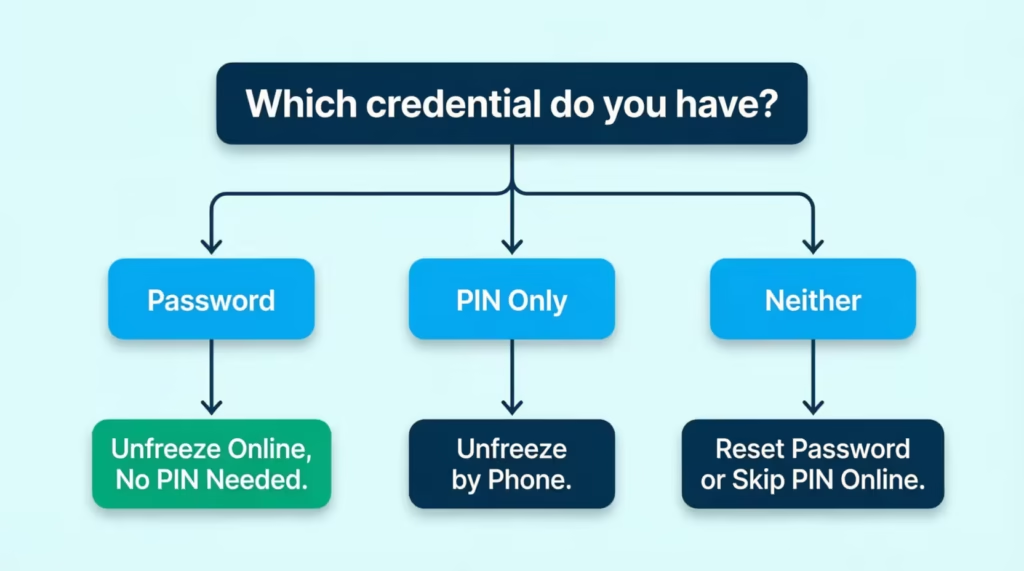
If you unfreeze online or in the mobile app, you do NOT need your PIN. You just need your account login (username and password). TransUnion switched to account-based freeze management years ago, and the online path is the fastest for anyone who can log in.
If you unfreeze by phone, you DO need the 6-digit PIN. Phone reps can’t unfreeze without it. If you don’t have your PIN, you’ll need to request a reset before you can use this path, which takes extra time.
If you unfreeze by mail, you don’t need the PIN either. You need identity and address verification documents (copies of your ID and a utility bill or similar), plus a signed letter with your details.
So the real decision comes down to what you have access to. Password? Go online. PIN but no password? Go by phone. Neither? Read the recovery steps below.
What to Do If You Forgot Your Password
Head to the TransUnion Service Center login page and click “Forgot Username or Password.” You’ll enter the email tied to the account. TransUnion sends a reset link, and after clicking through, you’ll answer identity questions built from your credit file.
These are usually about old addresses, past loans, or a monthly payment amount on a mortgage or auto loan. Answer carefully. Too many wrong answers can lock you out for 24 hours.
Once you’re in, reset the password to something you’ll actually remember this time, then move straight to the unfreeze steps in the next section.
What to Do If You Forgot Your PIN
If you’re locked out of the phone path because you can’t find your PIN, you have two workable options.
First, skip the PIN entirely and use the online method. Creating a new TransUnion Service Center account bypasses the PIN requirement completely. This is faster than a PIN reset for most people and is the fix TransUnion actually recommends.
Second, if you must use the phone, call TransUnion at 1-888-909-8872 and request a PIN replacement. The rep will run identity verification (SSN, DOB, address, and knowledge-based questions from your credit history).
Depending on how the verification goes, they may issue a new PIN over the phone or mail it to you, which can take up to a week. If your deadline is tight, the online workaround is nearly always faster.
How to Unfreeze TransUnion Online
The online route is the fastest way to lift a TransUnion freeze. Most people finish it in under five minutes. Here’s the full walk-through.
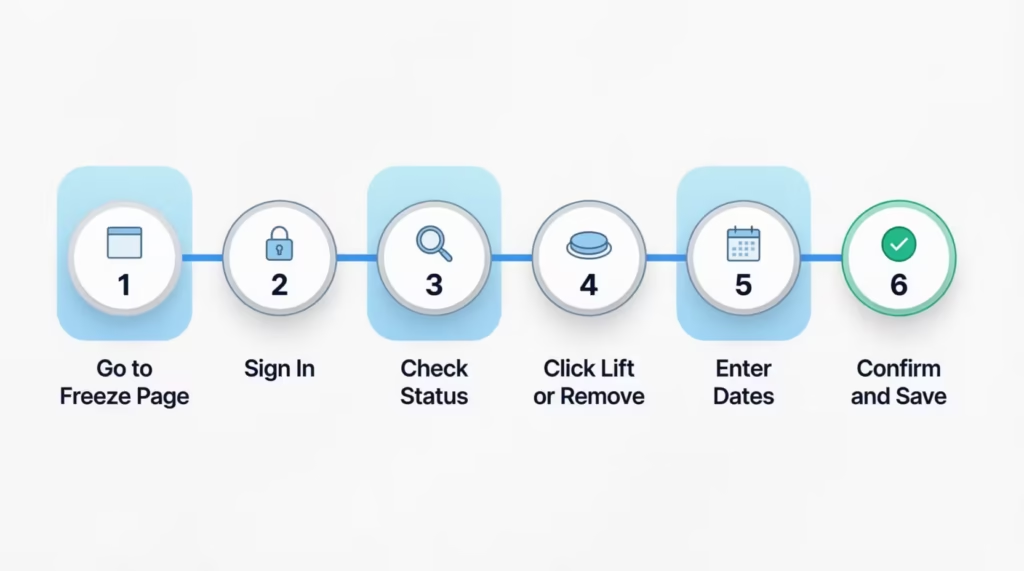
Step 1: Go to the TransUnion credit freeze page and click “Add Freeze, Temporary Lift or Remove Freeze.”
Step 2: Sign in to your Service Center account. If you don’t have one, click “Sign Up Now” and follow the account creation flow. You’ll verify identity using SSN, DOB, and knowledge-based questions. This is the step that lets you skip the PIN entirely.
Step 3: On the dashboard, find the freeze status box. It should read “Frozen” in red.
Step 4: Click “Temporarily Lift Freeze” or “Remove Freeze.” Pick temporary if you know your lender and a rough date window. Pick permanent removal if you’re going to be credit shopping for weeks or months.
Step 5: If you chose a temporary lift, enter the start date and end date. You can schedule up to 15 days in advance. If you chose permanent removal, confirm the action on the next screen.
Step 6: Read the confirmation screen carefully. The freeze status on your dashboard should update immediately to “Lifted” or “Removed.” Save or screenshot this confirmation.
The effect is instant. Your report is available to lenders within about an hour, though TransUnion’s system usually updates in minutes.
Unfreezing via the myTransUnion App
If you’d rather use your phone, the myTransUnion app on iOS or the Android version on Google Play does the exact same thing as the web version.
Log in with your Service Center credentials, tap “Credit Freeze” on the home screen, and pick “Temporarily Lift” or “Remove.” The steps mirror the desktop flow, and the lift takes effect just as fast. No PIN needed here either.
How to Unfreeze TransUnion by Phone
The phone method is a solid backup when the website is down or when you can’t complete online identity verification, but it does require the PIN.
Call the TransUnion Service Center at 1-888-909-8872. The automated system will greet you, and you’ll navigate to credit freeze options. In most cases, the freeze menu is reachable without waiting for a live rep.
You’ll be asked to enter or state your Social Security number, date of birth, and current address. The system may also ask a knowledge-based question or two to confirm identity. Have your credit history handy, since questions can reference a lender name or a monthly payment.
When prompted, enter your 6-digit PIN. Without it, the automated system can’t process the request, and a live rep also cannot override that requirement in most cases.
Choose between a temporary lift and a permanent removal. For a temporary lift, you’ll set a duration. The automated system supports common windows (a few days, a week, up to 30 days), and you can request custom dates with a live rep.
The unfreeze takes effect right away. Ask for a confirmation number before you hang up, and write it down. That number is your proof if anything goes sideways later.
⚠️ Mistake to Avoid: Do not read your PIN out loud in a public place or on speakerphone. TransUnion agents will only ask for the PIN through the secure automated menu or during verified live-agent handoff. Anyone else asking for your PIN is a scam.
How to Unfreeze TransUnion by Mail
Mail is the slowest option. Use it only when you have no online or phone access, or when you need to submit for a minor and prefer a paper trail. Plan for at least a week of processing after TransUnion receives the letter, and possibly longer if anything is missing.
Send your written request to:
TransUnion P.O. Box 160 Woodlyn, PA 19094
Your letter should include your full name, including your middle initial and any suffix. Add your current address. Also list every address you have used during the past two years. Include your Social Security number and date of birth. Finally, clearly state that you want to lift or remove your TransUnion credit freeze. Sign the letter. An unsigned letter will be rejected.
Include a copy of one government-issued ID for identity verification. A driver’s license, passport, state ID, or military ID all work. Do not send the original.
Include a copy of one address verification document dated within the last 90 days. A utility bill, bank statement, insurance statement, or pay stub with your name and address works. A W-2 or 1099 also works.
If you’re lifting temporarily, state the exact date range you want the freeze lifted. If you’re removing permanently, say so clearly. If you don’t specify, TransUnion may default to a partial lift you didn’t want.
Use certified mail with tracking so you know when the letter arrives. Once TransUnion receives it, processing takes up to three business days per federal law, though real-world timing can stretch when documents need extra review. Add mail transit time on both ends, and you’re looking at seven to ten days total. Miss that window against a lender deadline, and you’re back to the phone or online path.
Temporary Lift vs. Permanent Removal: Which to Choose
The right choice depends on how long you’ll be shopping for credit and how much security you want after.
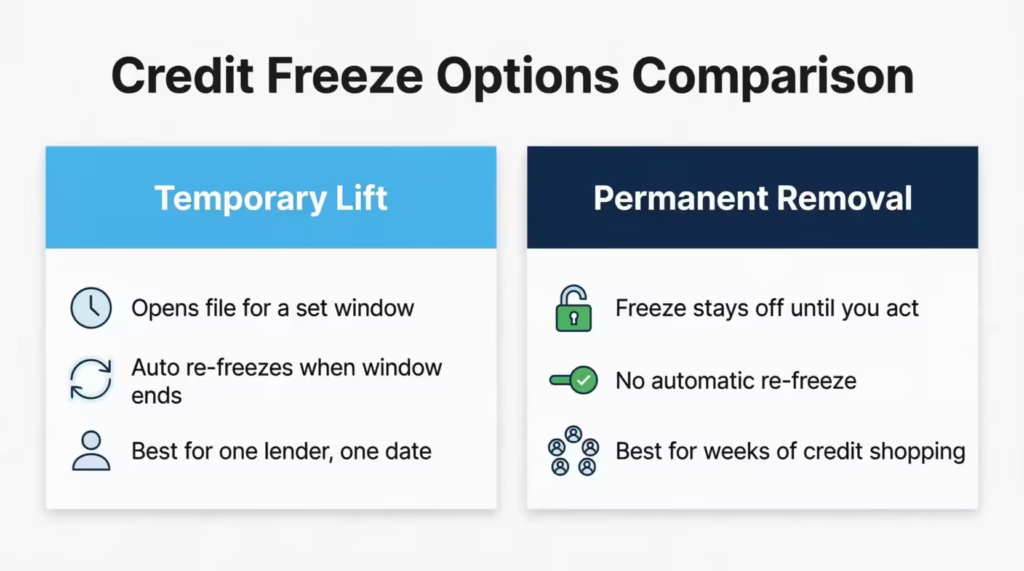
A temporary lift keeps the freeze in place but opens your file for a set window (a specific date range or a set number of days). When the window ends, the freeze automatically snaps back on. No action needed from you. This is the right choice when you have one specific lender, one known application, and a rough date. It’s also the right choice when you want security by default and just need a short opening.
A permanent removal takes the freeze off entirely and leaves your file open until you re-freeze it manually. Choose this when you’re credit shopping for weeks or months (mortgage pre-approvals, refinancing, multiple lender comparisons, new-hire background checks). Cycling temporary lifts every few days gets exhausting, and a missed window can kill a deal.
You can also schedule a temporary lift up to 15 days ahead of time through the online Service Center or app. This is useful when you know a closing date but don’t want your file open before then. Set the start date to match the lender’s expected pull day and the end date to give a few days of cushion.
TransUnion sends a freeze confirmation letter after each action. Keep it. It’s your paper trail if a lender later claims your file was still frozen.
💡 Pro Tip: For most one-time applications, pick a temporary lift with an end date three days after your lender’s expected pull. That gives cushion if the pull gets delayed, and the automatic re-freeze protects you without any extra work.
Unfreezing for One Specific Lender or Date Range
If you know the lender will pull on Thursday, set the temporary lift to start Wednesday and end the following Monday. That gives one buffer day on each side. You do not need to name the lender when lifting through TransUnion.
Unlike some older freeze systems, TransUnion’s lift is not tied to a specific creditor code. Any lender who pulls your file during the lift window will see your report.
Before setting the range, confirm with the lender when they plan to pull. Some pull the day of application, others wait until underwriting starts, which can be days later. A quick call or email to the loan officer saves you from a lift window that ends before the pull happens.
How Long Each Unfreeze Method Takes
Timing is where deadlines get missed. Federal law sets a maximum, but real-world times vary by method.
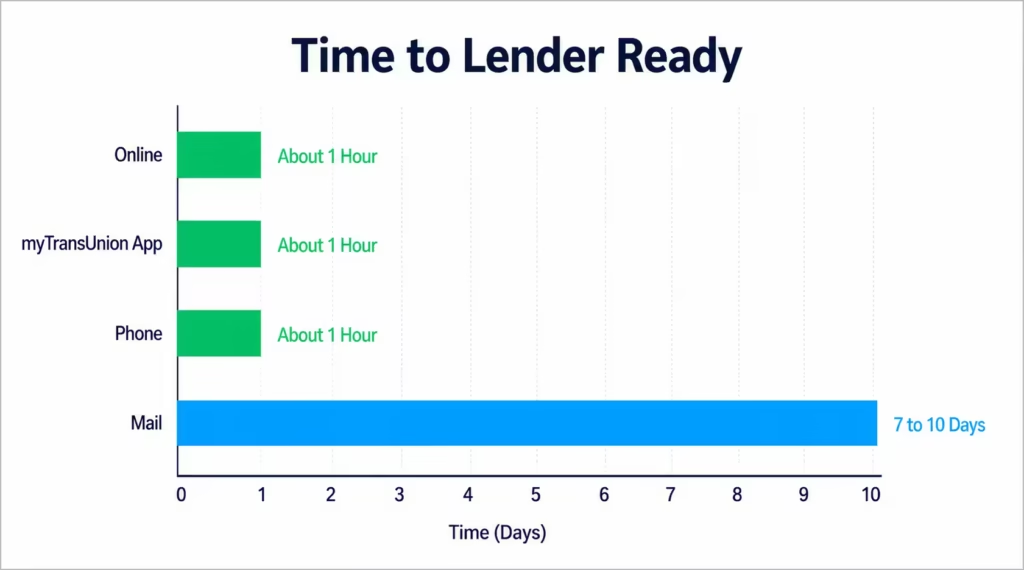
Online (Service Center or app): Immediate. Once you confirm the lift, your file is available in about one hour, and often within minutes. Wait a full hour before telling the lender you’re clear, just to be safe.
Phone (1-888-909-8872): Immediate. Same as online. The rep or automated system processes the lift on the call, and the file updates in the same window.
Mail: Up to three business days after TransUnion receives your letter. Add three to five days of mail transit each way, and total time is seven to ten days minimum. If documents are incomplete, add another cycle.
| Method | Processing Time | Total Time to Lender-Ready |
|---|---|---|
| Online | Instant | ~1 hour |
| myTransUnion App | Instant | ~1 hour |
| Phone | Instant | ~1 hour |
| Up to 3 business days | 7-10 days |
If your deadline is inside 48 hours, mail is not an option. Go online or phone.
How to Confirm Your Freeze Was Actually Lifted
This is the step almost every article skips, and it’s the one that saves closings.
First, check your TransUnion Service Center dashboard. The freeze status should read “Lifted” or “Removed” with a clear timestamp. If it still says “Frozen,” refresh once, then log out and back in. If it still shows frozen after ten minutes, the lift didn’t process. Repeat the steps or call.
Second, request your free credit report from AnnualCreditReport.com to confirm the file header shows the freeze is off. This is the same source lenders pull from, so if your report loads without a freeze warning, lenders will see the same thing.
Third, wait about an hour before telling the lender you’re clear. TransUnion’s internal databases usually update in minutes, but lender-side systems sometimes cache older statuses. An hour of cushion is the safest bet.
If the lender still gets a “frozen” response on their pull, call TransUnion right away with your confirmation number. In most cases, the freeze did lift, and the issue is a stale cache on the lender’s side. A rep can confirm the file is open and give the lender a reference to try again.
Do You Need to Unfreeze Equifax and Experian Too?
Very often, yes. This is the mistake that costs mortgage closings.
Each credit bureau’s freeze is separate. Unfreezing TransUnion has zero effect on your Equifax file or your Experian file. If a lender pulls a tri-merge report (the standard for mortgages and many auto loans), all three bureaus must be unfrozen at the same time. If even one is still frozen, the tri-merge fails, and the lender will ask you to lift the others before they retry.
Ask your lender directly: “Which bureau or bureaus do you pull from?” Auto lenders and credit card issuers sometimes use only one bureau, and it varies by state. Mortgages almost always pull all three. Apartment landlords often use a specialty screener that reads from one bureau, and they’ll tell you which.
If you need all three lifted, go to Equifax’s freeze center and Experian’s freeze center and follow their similar (but not identical) processes. Each takes just a few minutes online. Doing all three in one session saves a stalled application later.
Unfreezing a TransUnion Freeze for a Minor or Dependent
Parents and legal guardians can lift a freeze placed on a minor’s TransUnion file, but the process needs extra documentation. This scenario comes up when a teen opens a first bank account, applies for a student credit card, or a scholarship program requests a credit check.
The guardian uses their own TransUnion Service Center login, not the minor’s. If the freeze was placed with a PIN, that PIN is required regardless of method (this is one of the few cases where PIN comes into play even for account holders).
Have these documents ready. Include the minor’s Social Security number and date of birth. Also include the minor’s birth certificate or a court order showing guardianship. Finally, provide the guardian’s government-issued ID. For a mail request, include copies of all three plus proof of the guardian’s current address.
Because the extra verification is manual, expect a slower turnaround than a standard adult unfreeze. Even the phone route can take a day or two for a minor’s file, and mail can run two weeks. If your deadline is tight, call TransUnion first and confirm what documents they need for your specific case before submitting anything.
Frequently Asked Questions (FAQs)
How do I unfreeze my credit with TransUnion?
Log into your TransUnion Service Center account or app, find the freeze status box, and click “Temporarily Lift Freeze” or “Remove Freeze.” No PIN is needed for this online method, and it takes effect within about an hour.
How can I unfreeze my credit instantly?
Use the TransUnion Service Center website or myTransUnion app. Once you confirm the lift, your file is available to lenders in about an hour, often within minutes.
What is the phone number to call TransUnion to unfreeze my credit?
Call 1-888-909-8872 and navigate to the credit freeze menu. You’ll need your Social Security number, date of birth, address, and your 6-digit PIN to complete the request.
How much does it cost to unfreeze my credit report?
It’s completely free. The Economic Growth, Regulatory Relief, and Consumer Protection Act of 2018 made freezing and unfreezing free at all three bureaus, with no limit on how many times you do it.
How do I unfreeze my credit without a PIN?
Skip the phone method and use the online Service Center or app instead. Creating or logging into your account lets you lift the freeze with just your username and password, no PIN required.
Do I need to unfreeze all three credit bureaus?
Often yes. TransUnion, Equifax, and Experian freezes are separate, so if a lender pulls a tri-merge report, such as for a mortgage, all three must be unfrozen, or the pull will fail.
How long does it take to unfreeze TransUnion?
Online and phone methods work almost instantly, with your file ready in about an hour. Mailing a request takes longer, typically seven to ten days total once processing and mail transit are added.
How long should I wait after unfreezing before applying for a loan?
Wait about an hour before telling your lender you’re clear. TransUnion’s system usually updates within minutes, but lender-side systems can sometimes cache an outdated frozen status.
Can I unfreeze TransUnion online or does it have to be by phone?
You can do either. Online through the Service Center or app is fastest and skips the PIN requirement, while phone works too but requires your 6-digit PIN to process.
What’s the safest way to confirm my freeze actually lifted?
Check your TransUnion dashboard for a “Lifted” or “Removed” status with a timestamp, then pull a free report from AnnualCreditReport.com to double-check. If it still shows frozen after ten minutes, repeat the steps or call TransUnion.
Wrapping Up
Lifting a TransUnion freeze is easier than most people expect once you know the shortcut: the online path skips the PIN entirely, and it’s done in five minutes.
If you have a lender deadline, unfreeze your credit online or in the myTransUnion app. Next, check your dashboard to confirm the freeze has been lifted. Then pull a free credit report to verify the change. After that, tell your lender your credit file is ready.
Remember to check whether Equifax and Experian need lifting too, especially for mortgages. If this guide saved you from a stalled closing or a rejected application, share it with anyone else you know who’s about to apply for a loan. It could save them a very expensive delay.