
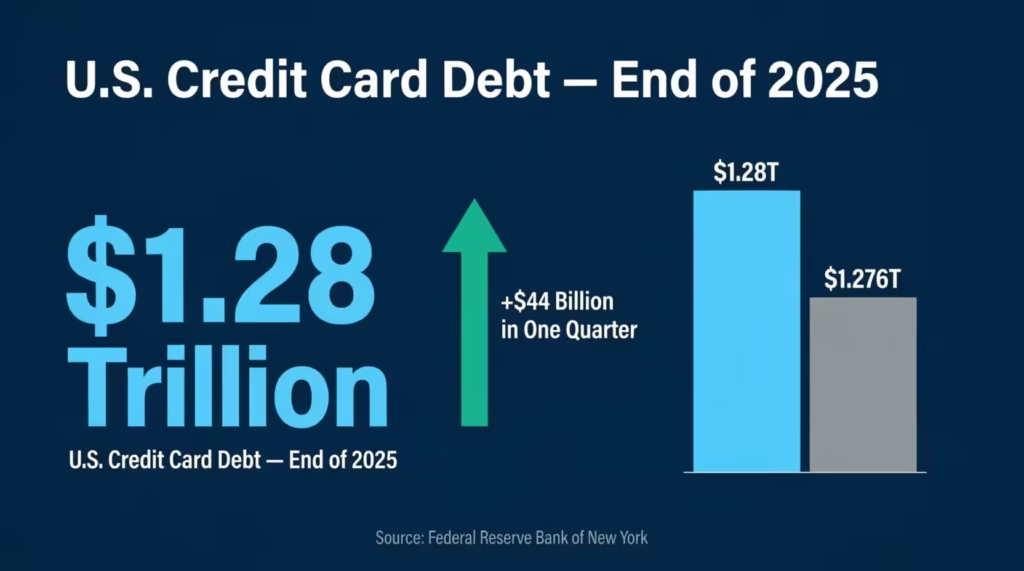
Juggling multiple cards without a credit card tracker template can feel like flying blind. The Federal Reserve Bank of New York reports that U.S. credit card balances hit $1.28 trillion at the end of 2025. That’s a lot of debt slipping through the cracks.
A simple tracking sheet puts every transaction, payment, and balance in one place so nothing gets missed.
Below, you’ll find free downloadable trackers in five formats, plus a step-by-step guide on filling them out, keeping your utilization low, and avoiding costly mistakes.
Download Your Free Credit Card Tracker Templates
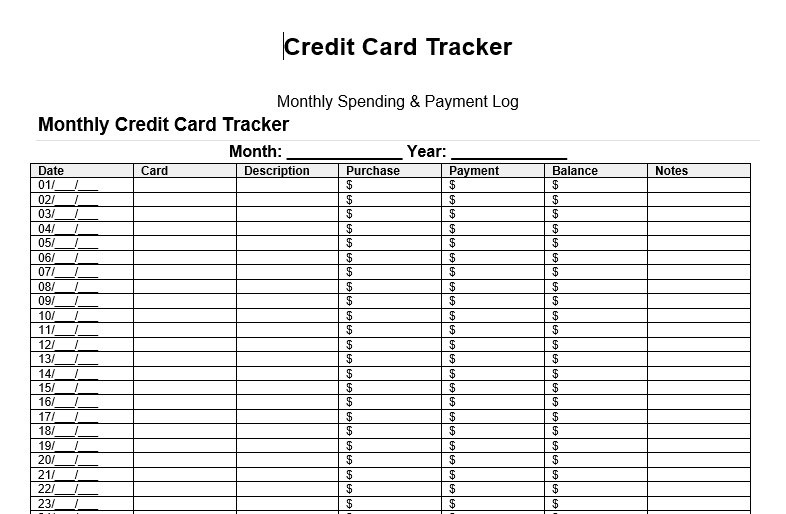
Five ready-to-use templates are available to start tracking right away. Each one covers the columns you need: date, card name, description, amount, payment, balance, and notes.
Pick the format and paper size that works best for you:
Disclaimer: The Templates & Printables on this site are provided for informational and personal tracking purposes only. This is not financial, legal, tax, or credit advice. While reasonable efforts are made to ensure accuracy, Credit Card Wind makes no warranties as to the completeness, reliability, or accuracy of the calculations generated by these Templates & Printables. Users are responsible for independently verifying all data and calculations. Terms, conditions, rates, regulations, and legal requirements vary by institution, jurisdiction, and individual circumstances.
Always refer to your official statements, account agreements, and applicable laws, and consult a qualified professional before making any financial, legal, or other important decisions. By using these Templates & Printables, you acknowledge that Credit Card Wind and its owner shall not be liable for any damages, losses, or financial consequences arising from the use or misuse of these Templates & Printables.
This universal disclaimer applies to all templates and printables provided by Credit Card Wind (https://creditcardwind.com), created by Robert Williams (Owner at Credit Card Wind).
© Credit Card Wind. All rights reserved.
These templates and printables may be downloaded and used for personal, non-commercial purposes only. Redistribution, resale, or modification for commercial use without permission is strictly prohibited.
What Is a Credit Card Tracker and Why Does It Matter?
A credit card tracker is a simple document or spreadsheet that records every transaction across all your cards. It logs purchases, payments, fees, refunds, and running balances in one place.
Think of it like a checkbook register, but built for plastic. Instead of tracking one account, the tracker covers every card in your wallet.
Why does this matter? Federal Reserve Bank of New York data shows that U.S. consumers now carry $1.28 trillion in credit card debt. That total climbed by $44 billion in a single quarter. Without a clear record of what goes in and out of each account, small charges pile up fast.
A tracking sheet turns vague spending into hard numbers. When the numbers are visible, smarter decisions follow.
Why Tracking Every Credit Card Transaction Saves You Money
Most people check their statements once a month, if at all. By then, forgotten subscriptions, duplicate charges, and impulse buys have already drained the budget.
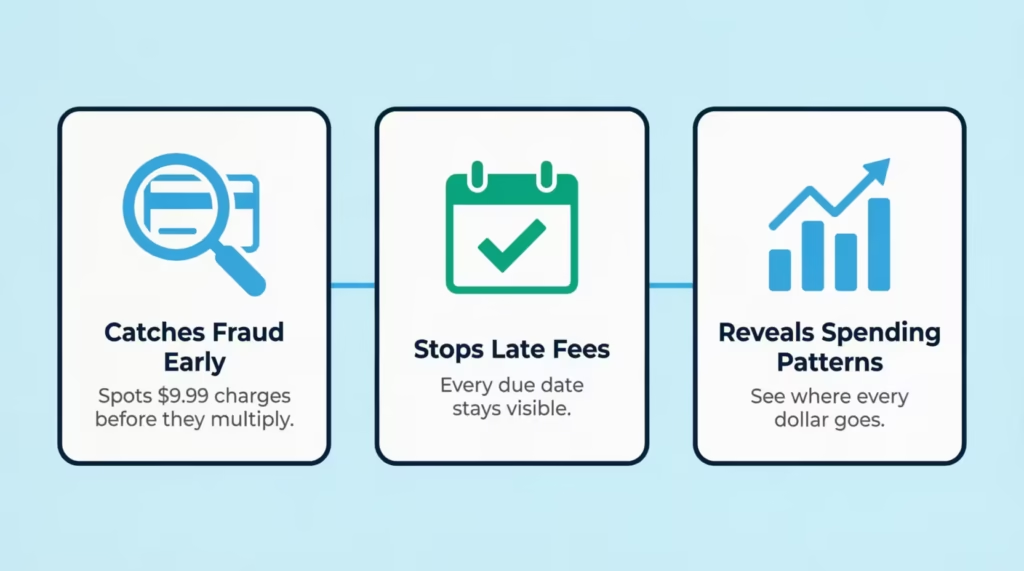
Recording each transaction as it happens changes the game in three ways:
1. Catches unauthorized charges early. Fraud doesn’t always show up as a big, obvious purchase. Sometimes it’s a $9.99 streaming trial or a $4 foreign transaction fee. A daily spending log makes those small charges impossible to miss.
2. Stops late fees before they start. The average credit card late fee sits around $30 to $41, based on the issuer. Miss two due dates across different cards, and that’s $60 to $82 gone. A payment tracker with due dates built in keeps every deadline in sight.
3. Reveals spending patterns you can’t see otherwise. Sarah, an account manager at a mid-size marketing firm, started logging her three credit cards in a spreadsheet. Within 30 days, she found $187 in recurring charges she’d forgotten about, including two music apps and an expired gym trial. That’s over $2,200 a year she would have kept losing.
Pro Tip: → Want to understand how your limit was set? The credit card limit calculator breaks it down.
How a Spending Log Protects Your Credit Score
Credit utilization is one of the biggest factors behind a credit score. It measures how much of the available credit limit is being used at any given time. Bankrate notes that this metric falls under “amounts owed,” which makes up 30% of a FICO score.
The general guideline? Keep utilization below 30%. Consumers with exceptional scores of 800 or higher tend to keep theirs around 7%.
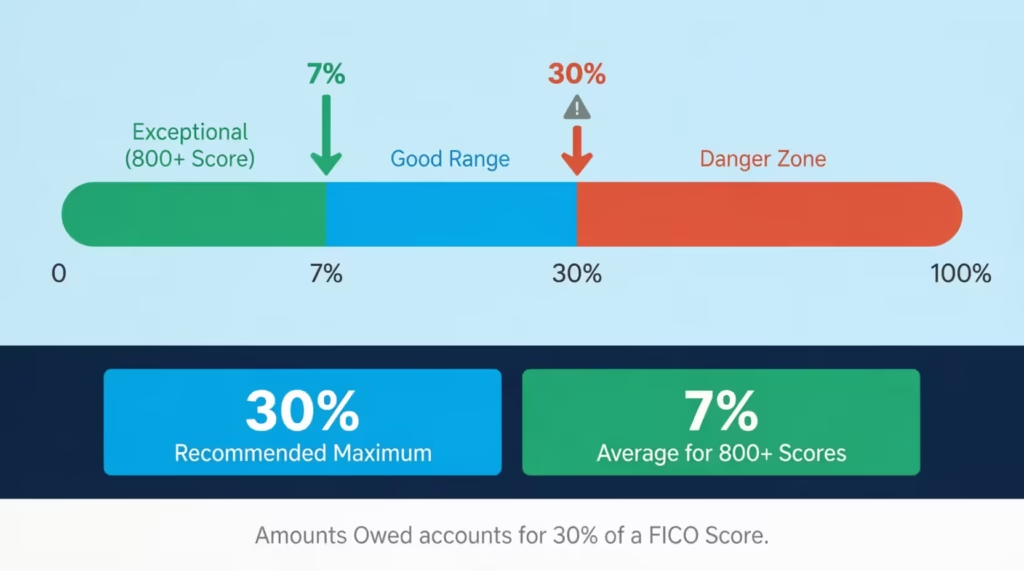
A balance tracker makes this easy to watch. The running balance shows how much you’ve used each card and all cards together after logging every acquisition and payment.
Quick example:
| Card | Credit Limit | Current Balance | Utilization |
|---|---|---|---|
| Card A | $10,000 | $2,500 | 25% ✅ |
| Card B | $5,000 | $2,800 | 56% ❌ |
| Card C | $8,000 | $400 | 5% ✅ |
| Overall | $23,000 | $5,700 | 24.8% ✅ |
Notice how Card B alone is way above the 30% mark, even though the overall ratio looks fine. Credit scoring models check both individual card utilization and total utilization. A tracking sheet reveals these hidden spikes that a statement alone won’t show until it’s too late.
⚠️ Mistake to Avoid: Don’t assume overall utilization is the only number that matters. A single card maxed out at 90% can still drag your score down, even if every other card sits at 0%.
What Each Column in the Tracking Sheet Means
Every template included above uses a set of core columns. Knowing what goes in each one removes guesswork and keeps the log consistent.
Date – The day the transaction happened, not the day it posted to the account. This keeps the timeline accurate.
Card – The name or last four digits of the credit card used. Essential when tracking three, four, or more accounts.
Description / Merchant – Where the money went. “Amazon” or “Shell Gas Station” works fine. Keep it short but clear enough to recognize later.
Purchase – The dollar amount of a buy. Enter this as a positive number.
Payment – The dollar amount paid toward the card balance. Some trackers use a negative number for payments, while the printable versions use a separate column.
Balance – The running total after each transaction. Subtract payments and add purchases to the previous balance.
Category – Groups like Groceries, Gas, Dining, Travel, Bills, Entertainment, and Online Shopping. Categories make it possible to see where the most money goes each month.
Status – Whether the charge is Pending or Paid. This helps during monthly reconciliation with the official statement.
Notes – Any extra detail worth remembering. Examples: “Business trip,” “Annual card fee,” or “Item returned.”
The Excel spreadsheet tracker has all these columns.
It also has auto-calculated fields for:
- utilization percentage
- statement closing dates
- payment due dates.
How to Use These Credit Card Tracker Templates Step by Step
Each format serves a different style of tracking. Below is a walkthrough for every version so you can hit the ground running.
Printable PDF (Non-Fillable)
This version is designed for pen-and-paper tracking. It prints cleanly on standard US Letter paper.
- Print the PDF on regular paper or card stock.
- Write the current month and year at the top.
- Fill in each row as transactions happen throughout the month.
- At the end of each row, calculate the running balance by hand.
- Total up purchases, payments, and the month-end balance at the bottom.
- Store completed sheets in a binder or folder for future reference.
This format works best for people who prefer physical planners and want a tangible record they can flip through.
Fillable PDF
The fillable version lets you type directly into the form fields on a computer, tablet, or phone.
- Open the PDF in Adobe Acrobat Reader, Preview, or any PDF reader that supports form fields.
- Click into the Month and Year fields and type the current period.
- Tab through each row and enter transaction details as they occur.
- Save the file after each update so nothing gets lost.
- Print a copy at month-end if a hard copy is needed.
📌 Did You Know: Most modern PDF readers on phones and tablets support fillable forms. This makes the fillable PDF a solid on-the-go option without needing a full spreadsheet app.
Word Template
The Word document has three parts:
- A Monthly Credit Card Tracker (31 rows for daily entries)
- A Detailed Transaction Log
- A Payment Planner
- Open the .docx file in Microsoft Word, Google Docs, or LibreOffice.
- Start with the Monthly Tracker at the top. Fill in each day’s transactions.
- Use the Transaction Log on the next page for more detailed records, including merchant name, category, and status.
- Customize the Payment Planner section to map out upcoming due dates and minimum payments.
- Save a new copy for each month (e.g., “CC-Tracker-April-2026.docx”) to build a clean archive.
The Word format offers the most editing freedom. Add rows, change fonts, insert your own logo, or rearrange sections to fit your style.
Excel Spreadsheet Tracker
The Excel file is the most feature-rich option. It comes with eight built-in sheets that work together.
- Start with the Settings sheet. Add or edit credit card names and spending categories. These feed the dropdown menus on other sheets.
- Move to the Credit Cards sheet. Enter each card’s name, bank, last four digits, credit limit, APR, statement closing day, and payment due day. Balances and utilization are calculated automatically.
- Log transactions in the Transactions sheet. Enter the date (YYYY-MM-DD format), select the card from the dropdown, type the merchant name, choose a category, and enter the amount. Use positive numbers for purchases and negative numbers for payments or refunds.
- Check the Dashboard.
Key metrics updated in real time include:- Total credit limit
- Total balance
- Overall utilization
- Next payment due
- Spending breakdown by category
- Review the Monthly Summary. This sheet auto-generates totals for purchases, payments, fees, and utilization for each card, grouped by month.
- Plan your payoff with the Payoff Planner. Choose a card, enter your monthly payment, and the sheet creates an amortization schedule. It shows how long it will take to pay off and the total interest you’ll pay.
- Print the Printable Log sheet for a clean black-and-white backup you can keep on paper.
Tip: → Keeping tabs on renewal dates across multiple cards? The credit card expiration date calculator keeps you ahead of it.
Google Sheets Version
The Google Sheets version works like the Excel tracker but lives in the cloud.
- Open the link (provided on this page) and click File > Make a Copy to save it to your own Google Drive.
- Follow the same steps as the Excel version: start with Settings, add your cards, then log transactions.
- Access the tracker from any device with a browser, including your phone.
- Share the sheet with a spouse or partner for joint tracking.
Google Sheets auto-saves every change. There’s no risk of forgetting to hit “Save.”
Printable vs. Digital: Which Tracking Format Fits Your Style?
Not everyone tracks finances the same way. Some people need the physical act of writing to stay engaged. Others want auto-calculations and cloud access. The table below breaks down when each format shines.
| Format | Best For | Pros | Cons |
|---|---|---|---|
| Printable PDF | Pen-and-paper budgeters, binder systems | Tactile, no tech needed, easy to start | No auto-calculations, manual totals |
| Fillable PDF | Quick digital entry without a spreadsheet app | Works on most devices, clean layout | Limited editing, no formulas |
| Word (.docx) | People who want full customization | Edit anything, add sections, flexible | No built-in formulas |
| Excel (.xlsx) | Data-driven trackers who want automation | Auto-calculations, dashboard, payoff planner | Requires Excel or compatible app |
| Google Sheets | Cloud access, joint tracking with a partner | Free, auto-saves, access anywhere | Needs internet connection |
The best format is the one that actually gets used. If a spreadsheet feels overwhelming, start with the printable version. Build the habit first, then upgrade to Excel or Google Sheets later.
Monthly Credit Card Review: A Quick Checklist
Tracking daily transactions is the foundation. But a monthly review ties everything together and catches anything that slipped through.
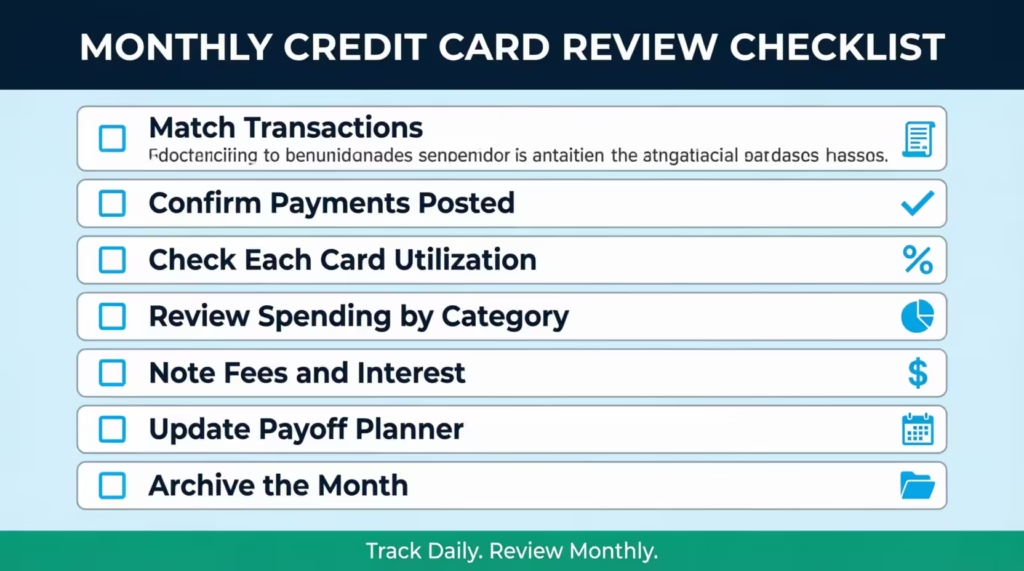
Run through this checklist on the last day of each billing cycle:
- Match the tracker to official statements. Compare every entry in the log against the statement from each card issuer. Flag any charge that doesn’t match.
- Confirm all payments posted. Verify that each payment shows as received, not just scheduled.
- Check utilization for each card. Pull the current balance and divide it by the credit limit. Anything over 30% needs a plan before the next statement closes.
- Review spending by category. Look at where the money went. Did dining jump 40% over last month? Did subscriptions creep up? Categories tell the story.
- Note any fees or interest charges. Late fees, annual fees, and interest charges should be logged and reviewed. A single overlooked annual fee of $95 to $550 can throw off a budget.
- Update the payment planner. Adjust smallest payments, extra payments, and target payoff dates based on the latest balances.
- Archive the month. Save or file the completed tracker. Label it clearly (e.g., “March 2026”). This builds a financial record that’s useful at tax time or when applying for a mortgage.
Experian data shows the average American carries 3.7 active credit cards. With that many accounts, a monthly review prevents any single card from falling off the radar.
5 Common Tracking Mistakes That Cost You Money
Even people who commit to logging transactions can lose money through small, repeated errors. These five mistakes show up most often.
1. Tracking purchases but ignoring fees and interest.
A transaction log that only captures store purchases misses a huge piece of the picture. Annual fees, foreign transaction fees, balance transfer fees, and monthly interest charges are all real costs. The CFPB’s 2025 Consumer Credit Card Market Report covers how fees and interest continue to represent a significant cost to cardholders. Log every charge, not just the ones at checkout.
2. Forgetting to track refunds and credits.
Michael, a freelance web developer, returned a $340 track to Best Buy and never logged the refund. Two months later, he thought his balance was $340 higher than it actually was and made an unnecessary extra payment, straining his cash flow. Refunds change the balance just like purchases do. Track them.
3. Waiting until the end of the month to update the log.
Memory fades fast. A purchase from October 3rd looks unfamiliar by October 28th. Daily or every-other-day logging is the habit that separates trackers who succeed from those who quit.
4. Using one tracker for personal and business expenses.
Mixing personal dinners with client lunches on the same sheet creates confusion at tax time. Keep separate logs, or use the Category and Notes columns to clearly tag business expenses.
5. Skipping the monthly reconciliation.
A tracker is only as good as its accuracy. Without comparing the log to official statements, errors, unauthorized charges, and missed payments go unnoticed. The monthly review checklist above takes 15 to 20 minutes and can save hundreds of dollars a year.
⚠️ Mistake to Avoid: Don’t track only the card with the highest balance. Low-balance cards often carry the highest utilization percentages because their limits are smaller. Track every card, every month.
Frequently Asked Questions
What is the best way to track credit card spending by hand?
Print a credit card tracking sheet with columns for date, card name, amount, and running balance. Fill in each purchase the same day it happens, so nothing gets missed.
Can a credit card tracker help improve a credit score?
Yes. Keeping track of balances and credit limits helps maintain utilization under 30%. This is important for FICO scores. Visible due dates also reduce late payments.
How often should a credit card log be updated?
Daily updates produce the best results. Logging transactions once a day takes about two minutes and prevents forgotten charges from piling up at month-end.
Is a spreadsheet better than a budgeting app for tracking credit cards?
Spreadsheets offer full control over columns, categories, and formulas without monthly subscription fees. Budgeting apps automate imports but may not support custom tracking fields. The better choice depends on personal preference.
What categories should a credit card spending tracker include?
Common categories include Groceries, Gas, Dining, Travel, Bills, Online Shopping, Entertainment, and Other. Start with these and add custom categories as spending patterns become clearer.
Do the free templates work on a phone or tablet?
The fillable PDF and Google Sheets versions both work on mobile devices. The Excel file requires a spreadsheet app like Microsoft Excel or Google Sheets on the phone. The printable PDF is designed for paper use only.
Should each credit card have its own separate tracker?
Not necessarily. A single tracker with a “Card” column handles many accounts on one sheet. The Excel and Google Sheets versions already include this setup with dropdown menus for each card.
What is credit utilization, and why does a tracker help manage it?
Credit utilization is the percentage of your credit limit currently in use. A tracker shows real-time balances for each card. This makes it easy to see when any card goes over the 30% limit before the statement closes.
How long should completed tracking sheets be saved?
Keep them for at least 12 months. Older logs help you see spending trends from year to year. They also help resolve billing disputes and support tax deductions for business expenses.
Bottom Line
Keeping tabs on every swipe, payment, and fee doesn’t have to be complicated. The right tracking sheet turns a scattered pile of receipts into a clear financial picture. It protects your credit score by keeping utilization visible. It catches unauthorized charges early. And it stops late fees from eating into your budget.
Five free formats are ready to download above. The printable PDF works for pen-and-paper fans. The Excel spreadsheet tracker handles auto-calculations, dashboards, and payoff planning. Pick the one that fits your routine and start logging today.
Based on the data covered in this article, the most effective approach for anyone juggling various cards is to track daily and review monthly. That two-step habit catches more problems than any single app or alert system.
If you know someone juggling three or four credit cards without a system, share this page. A simple tracking sheet could save them from missed payments, hidden fees, and a credit score drop they didn’t see coming.