
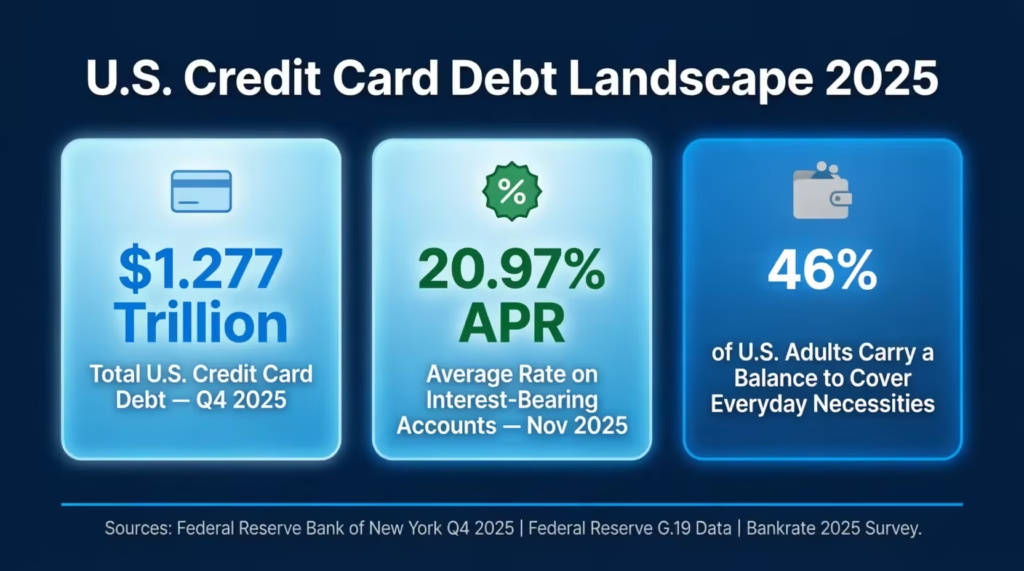
Carrying a credit card balance month after month can feel like trying to fill a bucket that has a hole in the bottom. The Federal Reserve Bank of New York reveals a staggering truth: Americans owe a jaw-dropping $1.277 trillion in credit card debt as of Q4 2025.
This figure is not just high; it shatters previous records, echoing financial worries across the nation.If you’ve been searching for a reliable credit card payoff tracker template, you’re not alone. This shows that many people also want a better plan.
A structured repayment plan, built around your actual balances, APRs, and monthly cash flow, is the clearest path from debt to debt-free.
Keep reading. This guide covers every format of the free downloadable templates. It provides a full walkthrough on how to use them correctly. You’ll also find proven repayment strategies that can help you cut months, or even years, off your payoff timeline.
Download Your Free Credit Card Payoff Tracker Templates
Five ready-to-use formats are available below. Each one includes all the sections you need to start tracking right away. Pick the format that fits your workflow best.
Disclaimer: The Templates & Printables on this site are provided for informational and personal tracking purposes only. This is not financial, legal, tax, or credit advice. While reasonable efforts are made to ensure accuracy, Credit Card Wind makes no warranties as to the completeness, reliability, or accuracy of the calculations generated by these Templates & Printables. Users are responsible for independently verifying all data and calculations. Terms, conditions, rates, regulations, and legal requirements vary by institution, jurisdiction, and individual circumstances.
Always refer to your official statements, account agreements, and applicable laws, and consult a qualified professional before making any financial, legal, or other important decisions. By using these Templates & Printables, you acknowledge that Credit Card Wind and its owner shall not be liable for any damages, losses, or financial consequences arising from the use or misuse of these Templates & Printables.
This universal disclaimer applies to all templates and printables provided by Credit Card Wind (https://creditcardwind.com), created by Robert Williams (Owner at Credit Card Wind).
© Credit Card Wind. All rights reserved.
These templates and printables may be downloaded and used for personal, non-commercial purposes only. Redistribution, resale, or modification for commercial use without permission is strictly prohibited.
💡 Pro Tip: If you have more than one credit card, the Excel template is the strongest choice. Its built-in formulas handle multiple cards at once and automatically calculate how paying one card off affects the rest of your debt.
What Is a Credit Card Payoff Tracker?
A credit card payoff tracker is a structured worksheet, available in digital or printable form. It allows you to record and watch key details of your credit card debt in one central place. It shows your balances, interest charges, minimum payments, and monthly activity. This way, you can see where your money goes and how quickly your debt decreases.
The idea is simple: when you can see your debt clearly, you can attack it more effectively.
Without a tracker, most people rely on guesswork. They have a general idea of what they owe. However, they can’t confidently say how long it will take to pay off a specific card. They also don’t know how much interest they’ll pay or which card costs them the most each month. A repayment log removes all of that uncertainty.
The Federal Reserve Bank of New York’s Q4 2025 data puts total U.S. credit card balances at $1.277 trillion — the highest figure since the New York Fed began tracking this data in 1999. At the same time, the average credit card APR on interest-bearing accounts reached 20.97% as of November 2025, according to Federal Reserve G.19 data. At those interest rates, a $5,000 balance paying only the minimum can take well over a decade to clear and cost thousands in interest alone.
That’s why a debt tracking spreadsheet or printable planner isn’t just a nice organizational tool. For anyone carrying a balance at 20%+ APR, it can directly translate into real dollars saved.
Tip: → Not sure which card to pay off first? Let the debt snowball calculator build your priority order for you.
Why Tracking Your Credit Card Debt Actually Works
It might seem like just logging numbers on a page couldn’t change much. But the data on this is clear, and the behavioral reason behind it makes sense.
Tracking forces clarity. Most people who carry credit card debt underestimate what they actually owe. A 2025 survey by Bankrate found that 46% of U.S. adults who carry a credit card balance do so because it’s their only way to cover everyday necessities.
Additionally, a quarter of these cardholders have no clear repayment plan at all. No plan means no progress.
Tracking also creates accountability. When you fill out your monthly payment log and see your closing balance go down, even if it’s just by $50, you feel like you’ve accomplished something. That small feedback loop matters more than most people realize. Fitness trackers help people exercise more because they show progress. This visible change motivates them to keep going.
Consider this real-world example. Marcus, a middle school teacher in Ohio, was carrying balances on three cards totaling $11,400. He’d been making minimum payments for almost two years and couldn’t figure out why his balances barely moved.
After filling in the Monthly Debt Repayment Log section of the printable tracker, he realized that $187 out of his $230 combined monthly payment was going toward interest, not principal. That single insight pushed him to redirect an extra $150 per month toward his highest-rate card. He paid it off in 14 months and saved over $800 in interest.
That kind of clarity is what a structured monthly payment log delivers.
How to Use the Printable Templates: Step-by-Step
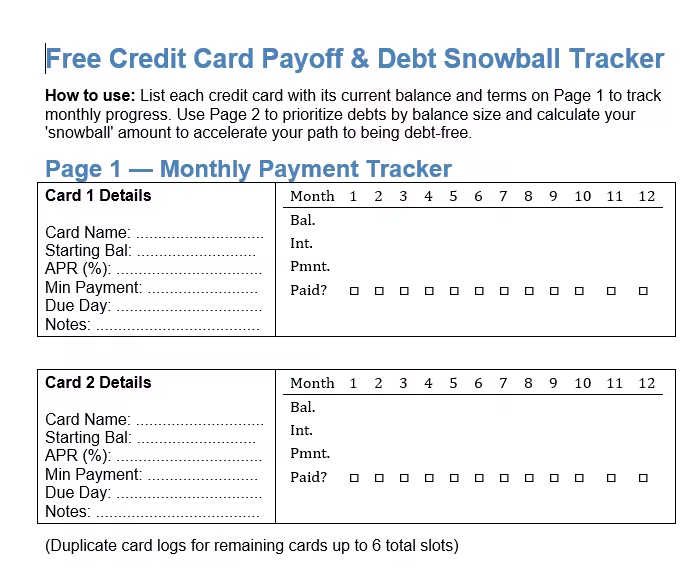
The PDF and Word versions of the tracker are split into two main worksheets. The first is the Credit Card Payoff Tracker, and the second is the Credit Card Debt Snowball Worksheet. Together, they give you a complete repayment system you can manage entirely on paper.
Section A: Enter Your Card Information
Start by filling in your card details at the top of the first page. Both the US Letter and A4 versions ask for:
- Card Name — Write the name of the card or the bank (e.g., Chase Freedom, Capital One, Discover).
- Starting Balance — The total amount you currently owe on this card.
- APR (%) — Your annual percentage rate. Find this on your monthly statement or your card issuer’s website.
- Minimum Payment — The smallest amount required each month.
- Due Date — When your payment is due.
- Goal Payoff Date — Set a target. Even a rough target creates direction.
If you’re working with various cards, print one sheet per card. Each tracker is designed for one card at a time.
Section B: Log Your Monthly Payments
Section B is the main tracking table. It runs for 12 months and includes these columns:
- Month — Fill in the month name or number.
- Starting Balance — Your opening balance for that month.
- Interest — The interest charged that month (balance x monthly interest rate).
- Payment — The actual amount you paid.
- Principal Paid — Payment minus interest. This is the part that actually reduces your debt.
- Ending Balance — Starting balance + interest – payment.
- Paid checkbox — Check it when the payment clears your account.
Fill this in at the end of each month. It takes about two minutes once you have your statement in hand. The goal is to see your Ending Balance drop steadily month over month.
⚠️ Mistake to Avoid: Don’t confuse the total payment amount with principal reduction. If you pay $80 on a card charging $65 in monthly interest, only $15 of that payment reduces your actual balance. Your tracker will show this clearly — and it can be a powerful motivator to pay more.
Section C and D: The Debt Snowball Priority List and Instructions
The second page of both printable templates is the Credit Card Debt Snowball Worksheet. This is where you plan your multi-card attack strategy.
Section C asks you to list your cards from smallest to largest balance. Include their minimum payments and the extra payment amount you’ll use. The US Letter version has space for 8 cards; the A4 version accommodates up to 10.
Section D explains the four-step snowball process that appears directly on the template.
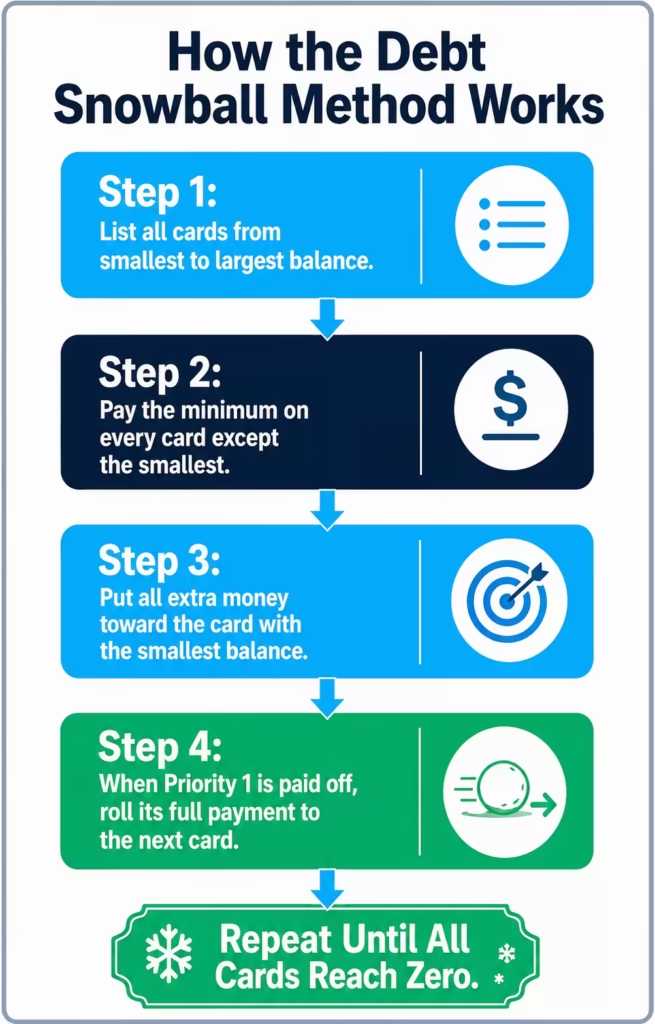
- List all cards from smallest to largest balance.
- Pay the least on every card except the smallest.
- Apply any extra payment to the card with the smallest balance (Priority 1).
- When Priority 1 is paid off, roll its entire payment amount forward to the next card.
Section E: Visual Progress Tracker
Both printable templates include a progress visual at the bottom of the snowball worksheet. The US Letter version uses a thermometer graphic. The A4 version uses a horizontal progress bar from 0% to 100% PAID.
Fill in the thermometer or bar as you knock out balances. This isn’t just decoration. Having a visible goal marker somewhere you see regularly keeps the effort feeling meaningful.
Tip: → Tracking more than one card? The multiple credit card payoff calculator maps out your combined payoff timeline.
How to Use the Excel Credit Card Payoff Tracker
The Excel template is a more advanced tool. It supports up to four credit cards at once, calculates everything automatically, and lets you run payment scenarios without any manual math. It has six tabs:
Tab 1: Instructions
Start here, especially if you’re new to spreadsheets. The Instructions tab guides you through the quick-start in eight steps. It explains what each tab does and lists all named ranges in the file. This way, you’ll know exactly where to enter your data. Yellow cells are editable inputs. Blue cells have formulas in them, so don’t overwrite them.
Tab 2: Cards
This is your main data entry tab. Enter the following for each card (up to four):
- Card name (e.g., Chase Freedom, Citi Double Cash)
- Starting balance and current balance
- APR (enter as a decimal — 19.99% becomes 0.1999)
- Minimum payment
- Extra payment amount
- Statement due day
- Notes (optional — useful for things like “0% promo ending” or “rewards card”)
Once you fill in this tab, every other tab in the workbook updates automatically. You don’t need to calculate anything manually.
Tab 3: Dashboard
The Dashboard pulls all your card data together into a single summary view. The key metrics it displays include:
- Starting Total — Your combined original balance across all cards.
- Current Total — What you owe right now.
- Total Paid Off — The difference between the two.
- Total Minimums — The sum of minimum payments across all active cards.
- Extra Payment — The amount you’ve designated above the minimums.
- Est. Months to Finish — How many months until you’re debt-free at your current payment pace.
- Est. Payoff Date — A specific calendar date that the system calculates using TODAY().
- Monthly Payment — Minimums plus your extra payment combined.
The Card Summary section below shows each card’s current balance, APR, minimum payment, and status in one table. It also includes priority order and months remaining.
You can also switch the payoff method between Snowball and Avalanche directly from the Dashboard. This one toggle changes how priority rankings are assigned across all cards.
Tab 4: Amortization
The Amortization tab generates a full month-by-month payment breakdown for each card. For every monthly row, it shows:
- Starting balance for the month
- Interest charged
- Payment applied
- Principal reduction
- Ending balance
- Cumulative interest paid so far
- Cumulative principal paid so far
This schedule runs for 12 months per card and refreshes automatically whenever you update the Cards tab. It’s especially useful for seeing how much of each payment goes toward interest versus reducing your actual balance.
Tab 5: SnowballPlan
The SnowballPlan tab shows your monthly balance for each card over six months. This is based on your chosen method (Snowball or Avalanche) and your current extra payment amount. It also includes a Payment Allocation section that shows exactly how much of each month’s total payment goes to which card.
Tab 6: WhatIf
The WhatIf tab is one of the most useful features in this template. It runs seven preset extra payment scenarios side by side:
| Extra Payment | Monthly Total | Est. Months | Interest Saved | Time Saved |
|---|---|---|---|---|
| $0 extra | Minimums only | Calculated | $0 | Baseline |
| $50 extra | Minimums + $50 | Calculated | Calculated | Calculated |
| $100 extra | Minimums + $100 | Calculated | Calculated | Calculated |
| $150 extra | Minimums + $150 | Calculated | Calculated | Calculated |
| $200 extra | Minimums + $200 | Calculated | Calculated | Calculated |
| $300 extra | Minimums + $300 | Calculated | Calculated | Calculated |
| $500 extra | Minimums + $500 | Calculated | Calculated | Calculated |
Below the preset scenarios, there’s a Custom Scenario box where you can type in any extra payment amount and see its exact impact on your payoff timeline and estimated interest savings.
The WhatIf tab answers a question most people carry in the back of their mind: “What would actually happen if I put an extra $100 per month toward my debt?” Now you can see the answer in seconds, with real numbers from your actual balances.
📌 Did You Know: Even a small extra payment makes a meaningful difference. Adding $100 per month to the minimum on a $6,500 balance at 20% APR can cut the payoff time by over three years and save more than $2,000 in interest.
Debt Snowball vs. Debt Avalanche: Which Method Fits Your Situation?
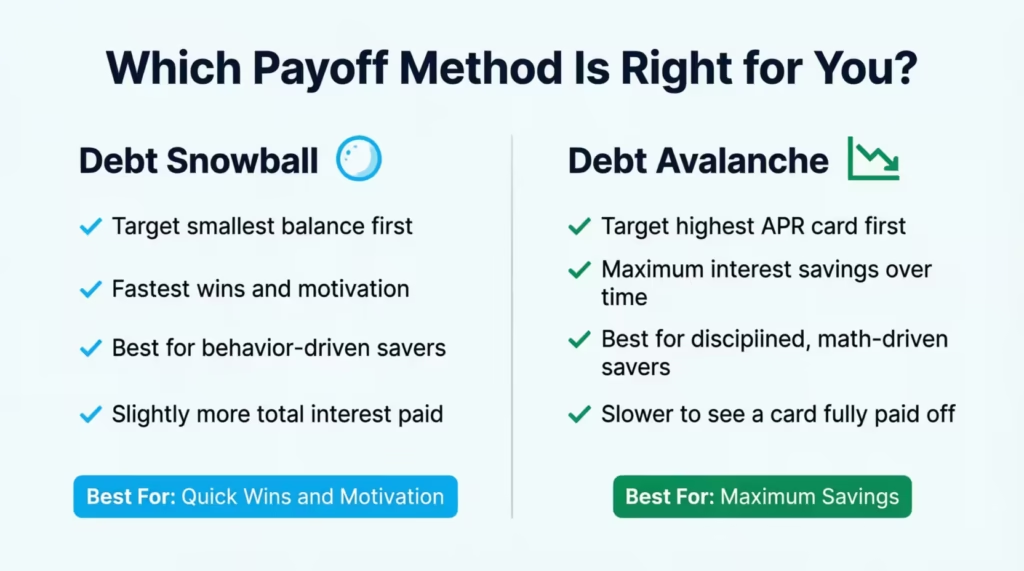
Both methods appear in these templates, and each one works. The right choice depends on what motivates you more: quick wins or maximum savings.
The Debt Snowball Method
With the snowball approach, you rank your cards from smallest balance to largest. You pay the minimum on everything, then throw every extra dollar at the smallest balance until it’s gone. When that card reaches zero, you roll its payment forward to the next smallest card.
The strength of the snowball method is psychological momentum. Paying off a card feels like a real victory, even if it’s not your highest-rate card. Research in behavioral economics shows that small wins help maintain long-term effort better than big rewards that are far away.
Section D of the template explains this clearly:
- Focus on the smallest balance first.
- Keep minimums on all other accounts.
- Roll payments forward when a card is paid off.
- Avoid adding new charges while following the plan.
The Debt Avalanche Method
With the avalanche approach, you rank cards from highest APR to lowest. You pay the least on all cards, then apply your extra payment to the card with the highest interest rate.
The avalanche method leads to larger savings in mathematical terms. By attacking the most expensive debt first, you reduce the total interest you pay over the life of your repayment. For someone with a card at 24.99% APR and another at 15.99%, the difference can run into hundreds of dollars.
The downside is patience. If your highest-rate card also has a large balance, it can take many months before you see any card cleared. Some people lose steam during that waiting period.
Which One Should You Choose?
The answer depends on your personality and your numbers.
Choose the snowball if you need early wins to stay motivated, or if your card balances are relatively close in size.
The avalanche method is good for you if you manage money well. It works best if one card has a much higher APR than others. You must also be able to stick to the plan. Don’t plan to pay it off early
Both options are built into the Excel template. On the Dashboard tab, switching the Method toggle from “Snowball” to “Avalanche” quickly updates the priority order for all cards. The printable templates use the snowball method by design. This method is more beginner-friendly.
Tip: → Feel like progress is too slow? See if a balance transfer calculator could shave months off your timeline.
How to Accelerate Your Payoff: Practical Strategies That Work
Filling in a repayment log is the foundation. These strategies help you push that payoff date forward even faster.
Automate your minimum payments.
Missing a payment adds late fees and can trigger a penalty APR, which can jump to 29.99% or higher on many cards. Set up autopay for at least the minimum on every card. This protects your credit score and keeps your tracker accurate.
Apply windfalls directly to debt.
A tax refund, a bonus, or even a cash gift becomes a lot more powerful when it goes toward a high-rate balance instead of discretionary spending. If you get a $1,200 tax refund and use it on a card with a 22% APR, you save about $264 in annual interest right away.
Make biweekly payments instead of monthly.
Paying half of your monthly bill every two weeks gives you 26 half-payments a year. That’s like making 13 full payments instead of just 12. That extra payment per year accelerates principal reduction without requiring a larger payment amount.
Track every payment the day you make it.
Don’t wait until the end of the month to update your repayment log. Logging payments immediately keeps your tracker accurate and reinforces the habit.
Use the WhatIf tab before committing extra income.
Before you decide how to use discretionary income, run the scenario through the WhatIf tab in the Excel template. Seeing the exact interest savings from an extra $75 or $150 makes the decision more concrete.
💡 Pro Tip: Round your payment up to the next $25 or $50 increment. If your minimum is $47, pay $75. The extra amount costs you little in the short run but can cut months from your payoff timeline on high-rate cards.
Common Mistakes People Make When Using a Debt Payoff Tracker
A tracker functions effectively when you use it in the right way. These are the most frequent errors that undercut the process.
Only entering the minimum payment.
Many people fill in the smallest payment amount as their “payment made” even when they pay more. Always log the actual payment you make. The difference between the minimum and your actual payment is what drives the tracker’s accuracy.
Skipping months.
If you miss updating your log for two or three months and try to backfill it later, errors compound quickly. The tracker is like a monthly appointment. Spend 10 minutes at the start or end of each month. This keeps things organized.
Adding new charges while tracking.
This is perhaps the most common problem. Jessica, a marketing coordinator in Phoenix, spent six months diligently filling in her debt tracker. But she was also adding $200 to $300 in new charges each month on the same card she was trying to pay off. Her balance barely moved. The tracker won’t fix your spending habits. That’s your responsibility. Try to avoid charging to any card you’re actively paying down. If you do need to, make sure to pay off new charges in full each month. Do this before logging your tracker payment.
Ignoring the interest column.
A lot of people skip over the interest line because it’s uncomfortable to see. Don’t. The interest column is the most powerful number in your tracker. It shows you exactly how much your debt is costing you every 30 days. That discomfort is the motivation.
Choosing a method and then switching constantly.
Switching between snowball and avalanche in the plan disrupts momentum. It also makes it hard to measure progress accurately. Pick one method, commit to it for at least 6 to 12 months, and check only after you’ve given it a real run.
⚠️ Mistake to Avoid: Don’t close a paid-off credit card immediately just because you finished paying it. Closing old accounts can raise your credit utilization ratio and hurt your credit score. Mark the card as “paid” in your tracker and keep the account open unless you have a strong reason to close it.
Understanding Your Amortization Schedule
The amortization schedule in the Excel template seems technical, but it has a simple message. It shows you each month how much of your payment cuts your debt and how much goes to interest.
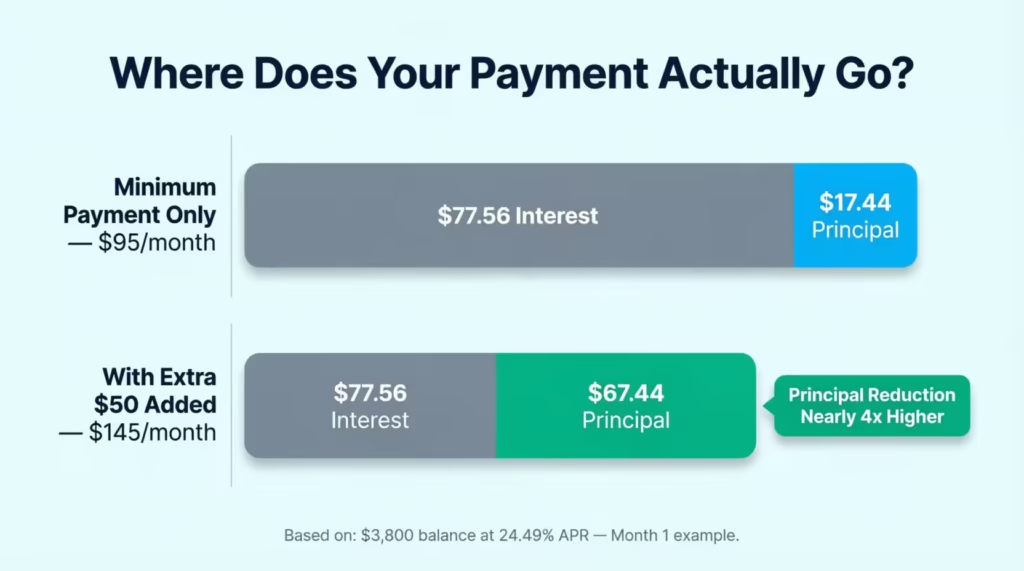
For a card with a $3,800 balance at 24.49% APR and a $95 minimum payment, Month 1 might look like this:
| Month | Starting Bal | Interest | Payment | Principal | Ending Bal |
|---|---|---|---|---|---|
| 1 | $3,800.00 | $77.56 | $95.00 | $17.44 | $3,782.56 |
Notice that of the $95 paid, only $17.44 actually reduces the balance. The other $77.56 goes to the lender as interest. Minimum payments take a long time to clear a balance. You’re hardly making a dent.
Now compare what happens when you add $50 in extra payment:
| Month | Starting Bal | Interest | Payment | Principal | Ending Bal |
|---|---|---|---|---|---|
| 1 | $3,800.00 | $77.56 | $145.00 | $67.44 | $3,732.56 |
With the extra $50, the principal reduction nearly quadruples. That compounding difference is what makes even modest extra payments so impactful over 12 to 24 months.
The Amortization tab calculates all this for each of your cards and resets automatically whenever you update your balance or payment amount in the Cards tab.
How to Pay Off Multiple Credit Cards at Once
Juggling more than one card is where most people feel stuck. The good news is that both the Excel template and the printable snowball worksheet are designed to handle situations with several cards.
The many credit card payoff spreadsheet in the Excel file tracks up to four cards simultaneously. Each card gets its own row in the Cards tab. It has a dedicated amortization section. Additionally, each card has its own column in the SnowballPlan month-by-month projection.
The priority column in the Cards tab automatically ranks your cards based on your chosen method. If you’re using the snowball, the card with the smallest current balance gets Priority 1. If you’re using the avalanche, the card with the highest APR gets Priority 1. This ranking updates automatically when you switch the method on the Dashboard.
For the printable templates, the debt snowball priority list in Section C lets you list up to 8 to 10 cards and organize them by repayment order. Once a card reaches zero, cross it off the list, note the expected payoff date in the “Paid Off” column, and roll its payment to the next card on the list.
Frequently Asked Questions
How often should I update my credit card payoff tracker?
Update it once a month, ideally right after your statement closes or when your payment processes. Monthly updates keep the data accurate without requiring constant attention.
Can I use the printable templates if I have more than two credit cards?
Yes. Print one Credit Card Payoff Tracker sheet per card and use the Debt Snowball Worksheet to manage all cards together. The A4 snowball table fits up to 10 cards.
What’s the difference between the debt snowball and debt avalanche methods?
The snowball targets your smallest balance first to build momentum. The avalanche targets your highest APR card first to cut total interest paid. Both methods work; the right one depends on whether quick wins or greatest savings matter more to you.
Do I need to know Excel formulas to use the Excel template?
No. All formulas are pre-built. You only type into the yellow input cells in the Cards tab and the Dashboard. The blue cells perform calculations without manual input.
What should I put in the “extra payment” field if I don’t have extra money right now?
Enter $0. The tracker will still calculate your timeline based on minimum payments alone. You can update the field any time extra funds become available. The WhatIf tab also shows what would happen if you added even $25 or $50 per month.
How do I calculate the interest charged for a given month in the printable template?
Multiply your current balance by your monthly interest rate. Your monthly rate equals your APR divided by 12. For example, a 20% APR gives a monthly rate of 1.667%. On a $2,000 balance, that’s $33.34 in interest for that month.
Can I track a balance transfer card using these templates?
Yes. Enter the transferred balance as your starting balance. If your card has a 0% promotional APR, enter 0% for the APR during the promo period. Set a reminder to update the APR field. Do this before the promotional period ends. This will help you avoid underestimating future interest charges.
Is it better to pay off one card completely before touching others?
That’s exactly what the debt snowball and avalanche methods recommend. Focusing extra payments on one card at a time works better than making small extra payments on all cards. This strategy lowers the principal faster on the chosen card and removes its minimum payment sooner.
What does “principal reduction” mean in the monthly payment log?
Principal reduction is the part of your payment that actually reduces your balance after interest is subtracted. If you pay $100 and $60 goes to interest, your principal reduction is $40. Growing this number each month is the goal of any payoff plan.
What should I do once a card is fully paid off?
Mark it as paid in your tracker and record the payoff date. Roll its monthly payment amount forward to your next priority card. Keep the account open unless you need to close it. Closing old accounts can lower your available credit and increase your utilization ratio.
Bottom Line
Carrying credit card debt at today’s interest rates is truly expensive. The longer a balance stays without a structured plan, the more it costs you. The most effective approach is to combine a clear repayment method with a tracking system. This system holds you accountable each month, ensuring you stay on track.
Whether you prefer the quick wins of the snowball method or the mathematical efficiency of the avalanche, the free templates on this page give you a practical starting point in whatever format works best for you.
The Excel version is the strongest option for anyone managing various cards. It handles calculations automatically and allows you to model different payment scenarios in real time. For those who prefer using pen and paper, the printable PDF or Word templates work effectively, provided you fill them out consistently.
If you found this guide useful, share it with someone who’s been struggling to get a handle on their credit card balances. The right tool at the right time can change everything. It can mean the difference between just making minimum payments and finally seeing a debt-free date on your calendar.